Disclosure: As an Amazon Associate, reviewstook.com earns from qualifying purchases. Links on this page are affiliate links; they cost you nothing extra. Prices and availability change often, so check the current Amazon listing before you buy.
Low-profile keyboards spent years as the polite option — slim boards for tidy desks and quiet offices, politely ignored by serious players. The fnatic streak80 lp was Fnatic’s argument that a low-profile board could be an esports instrument instead: a tenkeyless deck with shallow-travel switches, a rigid frame and a wired-first design aimed at tournament desks. This article explains what the Streak80 LP represents, what low-profile design genuinely gives and takes away, and — because the Fnatic board itself has no verified listing in the site’s product data — it assesses the two strongest purchasable low-profile alternatives, clearly framed as alternatives: Razer’s DeathStalker V2 Pro TKL and Logitech’s G915 TKL.
That framing matters, so it is stated plainly at the start rather than buried. The Streak80 LP is covered in prose throughout this article — its design philosophy, its trade-offs, and the questions a buyer should ask of it — but no purchase link in this piece leads to it, because no listing for it was returned when the article’s product data was checked. The two linked keyboards are excellent low-profile boards in their own right, and they are presented as what they are: the alternatives a Streak80 LP shopper should cross-examine, each embodying a different answer to the low-profile question. The Razer answers with optical switches and wireless freedom; the Logitech answers with mechanical low-profile switches and a multi-device wireless ecosystem.
Why does low profile deserve an esports argument at all? Because key travel is time. A standard mechanical switch travels roughly twice as far as a low-profile one before and after actuation, and while the differences per keystroke are measured in millimetres and milliseconds, a fast player presses keys thousands of times a session. Shallower travel also lowers the whole hand, which changes wrist angle — for many players, a flatter wrist is a more comfortable wrist across a long evening. The counter-argument is equally physical: less travel means less room for error, less tactile ceremony per press, and a typing feel that heavy-handed users describe as abrupt. Both arguments are true, and the sections below weigh them properly.
The tenkeyless half of the design deserves its own sentence of respect. Removing the number pad is not a cost-cutting amputation; it is a deliberate transfer of desk territory from the keyboard to the mouse. A narrower board lets the mouse hand sit closer to the body’s centreline, which straightens the right shoulder’s angle across a long session, and it lets the two hands work nearer together in the posture typists are taught and gamers usually abandon. The Streak80 LP’s layout and the two alternatives here all make that transfer, and for most gaming desks it is the single most ergonomic decision in the whole product — more consequential, hour by hour, than any switch.
Key takeaways
- The Streak80 LP is Fnatic’s low-profile tenkeyless esports board; it is discussed in prose here because no listing for it was verified, and the two linked boards are alternatives, not substitutes pretending to be it.
- Low-profile switches shorten key travel, which speeds actuation and lowers the hand — at the cost of a shallower, less forgiving typing feel.
- The Razer DeathStalker V2 Pro TKL pairs low-profile optical linear switches with HyperSpeed wireless, Bluetooth, Snap Tap and a listed battery life of up to 200 hours.
- The Logitech G915 TKL pairs low-profile mechanical switches — the linked listing is the Tactile version — with Lightspeed wireless, Bluetooth and Lightsync RGB in a slim aluminium-topped deck.
- Tenkeyless layouts trade the number pad for mouse room, which is the right trade for most gaming desks and the wrong one for spreadsheet-heavy work.
- Judge a low-profile board with your own typing, not a spec sheet: an hour of real prose will tell you more than any actuation figure.
In this guide
Quick picks for Fnatic Streak80 Lp
| Item | Best for | Page |
|---|---|---|
| Razer DeathStalker V2 Pro TKL | Best for tinkerers | Check price on Amazon |
| Logitech G915 TKL | Top pick | Check price on Amazon |
Read this table as the alternative shelf, honestly labelled. If your interest in the Streak80 LP is really an interest in what it stands for — a slim, fast, tenkeyless board built for competitive play — then these two are where that interest becomes purchasable today. The Razer is the closer spiritual match to the Fnatic board’s esports intent, with optical actuation and a feature, Snap Tap, aimed squarely at competitive movement. The Logitech is the more luxurious all-rounder, the board that treats the low-profile gaming deck as a premium desk object as much as a tournament tool.
Between them they also bracket the switch question that defines this category. Optical switches actuate with a light beam, which lets them be extremely fast and consistent; low-profile mechanical switches keep the familiar contact-based mechanism and its tactile options, in a shallower housing. Your fingers will have a preference, and the detailed reviews below are organised to help you discover it on paper before you discover it at a checkout.
How the selection was chosen
The first selection decision was an ethical one: the subject board would not be linked without a verified listing, and no alternative would be dressed up as the subject. That left the article’s real task — choosing alternatives that faithfully represent the Streak80 LP’s category, so a reader researching the Fnatic board leaves with both an understanding of it and a truthful map of what else the low-profile esports shelf holds.
Three criteria chose the pair. Each alternative had to be genuinely low-profile rather than a standard board in a slim case, genuinely tenkeyless or near it, and genuinely aimed at players rather than only at minimalists. Each also had to return a complete verified listing through the site’s product data, so every feature quoted — switch type, wireless system, battery claim, lighting system — comes from the maker’s own listing rather than from review folklore.
The Razer and Logitech boards also had to disagree with each other in instructive ways, and they do: optical versus mechanical actuation, a feature-led esports pitch versus an ecosystem-led premium pitch, white versus black presentations of the same slim idea. A shortlist whose members disagree teaches a reader what their own priorities are, which is the most useful thing a comparison can do.
Detailed reviews

Razer DeathStalker V2 Pro TKL
Best for tinkerers
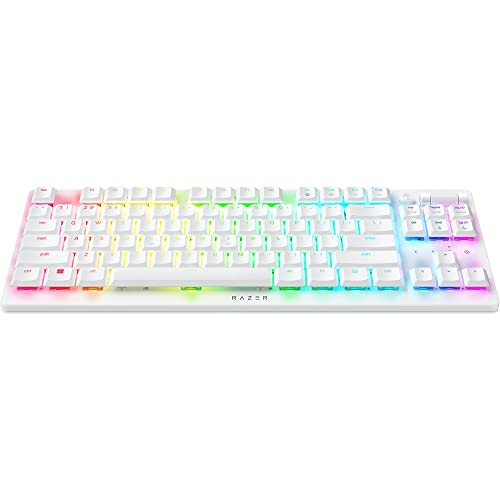
| Model | Razer DeathStalker V2 Pro TKL |
|---|---|
| Segment | Mechanical Keyboards |
| Switches | Low profile optical switches, Linear Red |
| Wireless | HyperSpeed wireless and Bluetooth |
| Lighting | Chroma RGB |
| Battery | Up to 200 hours (listing) |
| Feature | Snap Tap |
| Finish | White |
| Listing | Check price on Amazon |
The DeathStalker name has a history — Razer has used it for low-profile boards before — and the V2 Pro TKL is its modern esports form. The core decision is optical actuation: each key registers when a stem interrupts a light beam, so the switch has no metal contacts to debounce and no contact wear to drift. In its Linear Red form here, the press is smooth from top to bottom with no tactile bump, which suits gaming inputs that value speed and repeatability — strafing keys tapped in rhythm, ability keys double-tapped — over typing ceremony.
Snap Tap is the feature that reveals the board’s intended audience most clearly. It addresses a problem competitive FPS players know intimately: when two opposing movement keys are held at once, most keyboards leave the character standing still or favouring the first key, so counter-strafing — the rapid direction change used to stop accurately and shoot — depends on releasing the first key at exactly the right instant. Snap Tap prioritises the most recent directional input, making that counter-strafe crisper and more forgiving. It is a tournament-brain feature, the kind a board includes when its designers watch professional movement mechanics rather than typing tests.
The wireless story is unusually complete for a board this slim. HyperSpeed is Razer’s low-latency 2.4 GHz link for play, Bluetooth covers the second machine — the work laptop, the tablet — and the listed battery endurance of up to 200 hours reframes wireless from a daily chore into an occasional one. Real endurance depends on lighting brightness, as it does on every RGB board, but a ceiling that high means even heavy lighting habits leave a usable interval between charges. The white finish completes a board that looks like laboratory equipment: clean, bright, and entirely unwilling to blend into a dark desk.
As a Streak80 LP alternative, the Razer matches the Fnatic board’s intent — low profile, tenkeyless, esports-first — while exceeding its connectivity, since the Fnatic design is wired-first. A player whose attraction to the Streak80 LP was its philosophy rather than its badge will find the same philosophy here with wireless freedom added; a player who specifically wanted a wired board’s simplicity should note the difference rather than discover it.
Two practical notes complete the Razer picture. Its low-profile keycaps are sculpted for the shallow switches beneath them, which keeps the typing surface coherent — full-height caps on low-profile switches, a combination some boards attempt, would squander the height saving and wobble on the short stems. And its software layer carries the profiles, lighting and Snap Tap configuration; players who dislike companion software should know the board’s essentials work without it, while its tournament features are configured within it, which is the standard bargain of modern gaming keyboards and one Razer at least makes straightforward to accept or decline.
Strengths
- Optical low-profile switches with a smooth linear action built for rapid, repeated inputs.
- Snap Tap directly serves competitive counter-strafing, a feature few boards at any height offer.
- Dual wireless modes plus a very high listed battery ceiling make it a genuinely untethered deck.
- Tenkeyless footprint that returns desk space to the mouse where gaming desks need it.
Trade-offs
- Linear switches give typists no tactile confirmation, and heavy-handed typists may bottom out harshly on the shallow travel.
- The white finish shows keycap grime and desk dust sooner than dark boards do.
- Low-profile keycaps and switches are a smaller aftermarket than standard MX gear, limiting customisation.
Best for: competitive players who want the Streak80 LP’s low-profile esports idea with optical speed and full wireless freedom. / Not suited for: tactile-switch devotees, heavy-handed typists, or hobbyists who plan to rebuild the board with standard-profile custom parts.
Logitech G915 TKL
Top pick
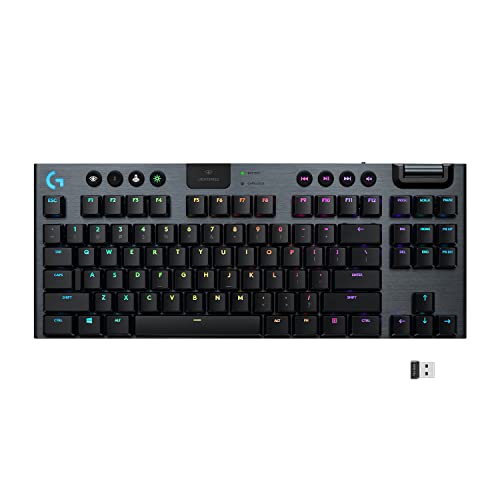
| Unit | Logitech G915 TKL |
|---|---|
| Class | Mechanical Keyboards |
| Switches | Low profile mechanical switch options; Tactile on this listing |
| Wireless | Lightspeed wireless and Bluetooth support |
| Lighting | Lightsync RGB |
| Layout | Tenkeyless |
| Finish | Black |
| Listing | Check price on Amazon |
The G915 TKL is the board that proved a low-profile deck could be a flagship. Its design leads with materials and thinness: an aluminium-alloy top case drawn down to a slim profile that still feels like a slab of equipment rather than a plastic tray, housing Logitech’s low-profile GL mechanical switches. The linked listing is the Tactile variant, which keeps a discernible bump in the press — a meaningful choice in this category, because it answers the most common low-profile complaint, that shallow keys feel vague, with mechanical feedback your fingers can actually read.
Lightspeed is Logitech’s name for its gaming-grade wireless, and on this board it is paired with Bluetooth so the deck can serve a gaming PC and a second device without a cable swap. Lightsync RGB ties the per-key lighting into Logitech’s wider ecosystem, synchronising effects with other Logitech gear and with supported games. None of that is decoration for the player who owns the ecosystem; a desk where the keyboard, mouse and headset share one lighting and software language is measurably simpler to live with than three competing control panels.
The tenkeyless layout keeps the board’s width honest for gaming while preserving dedicated media controls — a volume roller and media keys that full-size exiles usually lose in the tenkeyless conversion. That detail reveals the G915’s positioning: it is a low-profile board designed by people who expected it to be someone’s only keyboard, for work and play alike, rather than a tournament-only tool rolled out on weekends. Against the Streak80 LP’s esports purity, the Logitech offers the all-rounder’s answer — slightly less single-minded, considerably more livable.
The volume roller deserves its paragraph, because it is the control G915 owners consistently praise after the novelty of everything else fades. Adjusting volume with a rolling wheel — eyes on the screen, hand never hunting for a key combination — is the kind of interaction a keyboard performs dozens of times a week, and its quality quietly defines how premium a deck feels to live with. Logitech’s decision to protect that control while cutting the number pad shows a maker ranking features by daily use rather than by spec-sheet drama, and it is the strongest evidence for the G915’s all-rounder crown.
Strengths
- Low-profile mechanical switches with a tactile option that restores feedback shallow boards usually sacrifice.
- Premium slim aluminium construction that makes the deck feel like equipment, not an accessory.
- Lightspeed plus Bluetooth covers gaming and second-device duties in one board.
- Media controls survive the tenkeyless layout, serving the work-and-play desk properly.
Trade-offs
- Mechanical low-profile switches actuate less instantaneously in feel than the Razer’s optical design.
- Its premium positioning makes it the considered purchase of the pair rather than the impulse one.
- The GL switch ecosystem is Logitech’s own, so keycap and switch customisation follows Logitech’s path, not the wider hobby market’s.
Best for: players who want one premium low-profile board for both gaming and daily work, with tactile feedback and a mature wireless ecosystem. / Not suited for: players chasing the fastest possible actuation feel, or custom-keyboard hobbyists who want standard parts throughout.
Buying guide: what actually settles Fnatic Streak80 Lp
Low-profile switch speed and accuracy trade-off
The physics are simple and worth stating precisely. A key press registers partway through its travel; everything after that point is overtravel, cushion the finger feels but the computer ignores. Low-profile switches shrink both the distance to actuation and the overtravel after it. The gains are a key that registers sooner after your finger commits and a hand that sits lower and flatter. The losses hide in the same shrinkage: with less travel, the margin between an intended press and an accidental brush of a neighbouring key narrows, and the finger receives less mechanical information about what it just did.
Accuracy, in practice, is the art of matching that trade to your hands. Light, precise typists and players with disciplined finger placement gain speed and lose nothing — their accuracy was never being protected by travel. Heavy-handed users, and anyone who rests their fingers’ weight on the keys between inputs, will produce accidental actuations on shallow linear switches until their touch lightens, which some never enjoy doing. This is why the switch variant matters so much in this category: a tactile low-profile switch, like the G915 listing’s, returns a confirmation bump that partially repays the lost travel, while a linear optical switch, like the Razer’s, spends the whole budget on speed.
One adaptation technique shortens the learning curve considerably: for the first week, type at eighty percent of your normal speed and let accuracy lead. The fingers are recalibrating their sense of how far a key needs to move, and speed attempted before that calibration lands simply rehearses errors. Players who grant themselves the slow week usually emerge faster than their full-height baseline by the second; players who refuse it often conclude, wrongly and permanently, that shallow switches are imprecise, when in fact their own impatience was the imprecise component.
Judge with the right test. Gaming demos flatter low-profile boards, because game inputs are deliberate and rhythmic. Typing a long, tired paragraph at midnight is the sterner examination — it is where accidental presses, missed feedback and bottoming-out harshness all introduce themselves. If a low-profile board survives your worst typing, its speed in games is pure profit.
Build quality of the aluminium frame
A slim board has a structural problem a thick board never meets: less material to resist flex. When a thin deck twists under typing pressure, the whole typing feel goes vague, keys at the corners feel different from keys at the centre, and the board can rock almost imperceptibly on an uneven desk. An aluminium top case is the classic solution, and both alternatives here lean on rigid construction — the G915 most explicitly, with its alloy top drawn over the slim chassis.
Test frame quality with your hands when a board arrives: press firmly at opposite corners and feel for give, then type hard on the corner keys and listen for ping or rattle. A good slim frame answers with silence and solidity, which is also what makes a low-profile board satisfying on a desk — the keys may travel shallowly, but the platform beneath them should feel like it was machined rather than assembled. Weight plays a supporting role: a slim board still needs enough mass to stay planted when a cable tugs or a wrist brushes it mid-game.
Feet and angle belong to the frame conversation too. A low-profile board’s typing angle is shallower by design, and its flip-out feet — where fitted — exist to let the user choose between the flat esports posture and a slight typing tilt. Check that the feet lock positively and that the board’s rubber pads grip at both settings; a slim board that slides on a smooth desk undermines every other virtue it has, because a keyboard, like a mousepad, is a reference position your hands navigate from, and a moving reference is a tax on every input.
Tournament extras such as rapid response modes
Esports boards earn their label in the extras, and the category’s extras cluster around one theme: removing delay and ambiguity from movement inputs. The Razer’s Snap Tap, which prioritises the latest directional key for cleaner counter-strafing, is the clearest example in this article. Similar thinking produces features like adjustable actuation and rapid-repeat modes on other boards. The Streak80 LP’s own tournament pitch belongs to the same family of ideas — a wired-first connection for zero link negotiation, a layout with nothing a tournament player does not use, and firmware aimed at response rather than decoration.
Evaluate extras by your game’s mechanics, not by their novelty. Counter-strafing features matter enormously in tactical shooters where accuracy resets on stopping, and barely at all in games where movement and accuracy ignore each other. A player whose library is strategy, racing and role-playing titles can safely value typing feel and build over every tournament extra on the market — and should, because they will use the typing feel in every session and the extras in none.
There is also a discipline question hiding inside the extras: every reinterpretation feature asks the player to trust the board with part of a technique. Snap Tap’s prioritisation, for example, changes what holding two keys means, and a player who has spent years mastering manual counter-strafing may initially play worse with assistance that rewrites a reflex they own. Treat such features as a retraining programme with a two-week horizon, not as a switch to flip before a ranked match — and keep the discipline to disable, rather than endlessly adjust, any extra that has not earned its place by the end of that fortnight.
Typing comfort outside gaming
Most keyboards live double lives, and a board bought for ranked evenings will type essays, emails and code by day. Low-profile decks have a genuine daytime argument: the lowered hand position flattens the wrist angle, which many users find kinder across long writing sessions than a tall board without a wrist rest. The shallow travel also quiets the desk — less key travel means less bottoming-out noise, and slim boards in shared rooms and late-night flats are noticeably more considerate than full-height mechanical decks.
The daytime liabilities are the mirror of the gaming ones. Shallow keys punish sloppy typing technique, long-form writers may miss the deep, confirming travel of a traditional board, and tenkeyless layouts exile the number pad that spreadsheet work feeds on. If your work involves heavy numeric entry, budget for a separate numpad or choose a full-size board and accept its gaming width; no switch technology reconciles a missing column of keys with a job that needs it hourly.
Sound at work deserves a separate verdict, because it is social rather than mechanical. A low-profile board’s shallower bottoming-out produces a softer report than a full-height deck, which colleagues in a shared office and family members through a thin wall will register as consideration. Optical and linear variants are the quietest of all; tactile mechanicals keep a modest voice of their own. If your keyboard is heard by people who did not choose it, that softness is not a compromise at all — it is one of the category’s most practical virtues, and it costs the player nothing in performance to enjoy it.
Fnatic Streak80 Lp in real routines
Scenario: an esports player travelling with a compact board
The travelling competitor’s kit bag is an exercise in ruthless geometry, and a tenkeyless low-profile board is the easiest rectangle in it: thin enough to slide against a laptop, light enough to forget, and — in the Streak80 LP’s wired-first philosophy — free of chargers, dongles and pairing rituals at an unfamiliar desk. Tournament setups reward that simplicity; when your preparation time is measured in minutes, a board that works the instant it is plugged in is a competitive feature, not a convenience.
There is a preparation habit the travelling player should steal from musicians: set up the board at home exactly as the venue will demand — same cable route, same angle, same profile loaded — and play a full session in that configuration before packing. Keyboards fail travellers in small ways, a forgotten receiver, a profile that lived on the home PC’s software rather than the board, and every one of those failures is discoverable in a rehearsal and embarrassing at a venue. The slim board’s portability is only an advantage if the routine around it is equally portable.
The wireless alternatives travel differently rather than worse. The Razer’s Bluetooth lets it pair to a hotel-room laptop for evening practice without unpacking a receiver, and its battery ceiling means a weekend event never meets a charger. The travelling player choosing between the philosophies is really choosing which failure they refuse to risk: the wired board cannot run flat or lose a link, and the wireless board cannot snag a cable across a crowded tournament desk. Both refusals are rational; the itinerary decides.
Situation: a gamer whose wrists prefer shallow travel
Some players arrive at low-profile boards through their wrists rather than through reviews. A tall keyboard raises the hand and bends the wrist upward unless a rest compensates; across years of long sessions that angle becomes the thing a player notices first when they sit down. A slim deck lowers the whole geometry — the hand lies flatter, the fingers reach down less, and for many players the evening simply stops ending with that familiar awareness of their own joints.
This article makes no medical claims, and a player with genuine pain should talk to a professional rather than a keyboard guide. But as a comfort preference, shallow travel is legitimate and testable: borrow or buy with returns, write and play for a week, and let your wrists file their report. The low-profile category exists at its current quality level largely because enough wrists filed the same report.
The wrist-led buyer should also audit the rest of the geometry before crediting the keyboard alone. Chair height relative to the desk decides the wrist angle more than any product does, and a slim board dropped onto a desk that is simply too high will disappoint an owner who blames the switches. Set the chair so your forearms run level, then judge the board; low-profile decks reward a correct setup conspicuously, because their whole design assumes the hand arrives flat and stays that way.
Scene: a desk shared between work documents and ranked nights
The shared desk imposes a daily transformation: documents and a work laptop by day, a gaming PC and ranked queue by night, with the keyboard as the one citizen of both worlds. A tenkeyless low-profile board suits the transformation elegantly — slim enough to slide aside when paperwork spreads, presentable enough to sit in a video call’s background, and quick enough that the evening’s first game needs no equipment change at all.
Dual-wireless boards shine brightest here. The G915’s Lightspeed-plus-Bluetooth pairing is practically designed for the two-machine desk: one connection for play, one for work, a switch between them instead of a cable dragged across the day’s documents. The Razer offers the same dual-mode convenience with its own flavour. What the shared desk cannot forgive is a board that serves only one of its lives — a tournament deck too harsh to type reports on, or an office board too slow for the evening — and both alternatives in this article were chosen because they refuse that failure in both directions.
Setup and first-week how-to
Step 1 for Fnatic Streak80 Lp: save or photograph the configuration that finally works
Low-profile gaming boards carry more settings than their slim cases suggest — lighting profiles, actuation features, wireless pairings, macro layers. When you reach a configuration you love, photograph the software screens or export the profile before experimenting further. Settings drift is the quiet tax on feature-rich boards: a firmware update, a borrowed PC, a curious afternoon in the software, and the board you tuned is a stranger. A saved configuration turns that from a loss into a restore.
Step 2 for Fnatic Streak80 Lp: test the board on your worst typical day
Do not judge shallow travel with fresh hands on a quiet morning. The honest examination is a tired evening: a day of work in your fingers, ranked nerves in your shoulders, and a long message to type afterwards. Low-profile boards reveal their character under fatigue — accidental presses multiply, bottoming-out feels harsher, and any wrist benefit also shows itself most clearly. A board that passes your worst day will delight you on your best ones; the reverse is not true.
Step 3 for Fnatic Streak80 Lp: unbox slowly and keep every accessory until the setup survives a full week
Receivers, cables, keycap pullers and manuals all stay in the box, and the box stays in the room, until the board has survived a week of both your lives — work and play. This discipline matters most for the wireless alternatives: the receiver you nearly discarded as packaging is the low-latency half of the product you bought. It also protects the return option, which for a category as feel-dependent as low-profile is not pessimism but method.
Step 4 for Fnatic Streak80 Lp: schedule a two-week review to catch annoyances only repetition reveals
Some keyboard truths are statistical. A key you accidentally press once a day, a switch that feels fine for an hour and harsh across six, a lighting setting that distracts only in dark rooms — none of these appear in a first impression, and all of them decide whether a board is still on your desk in a year. Put a genuine review in the diary at two weeks: one long typing session, one long gaming session, and a decision made from notes rather than from mood.
Step 5 for Fnatic Streak80 Lp: connect or pair it exactly as its manual describes before changing any setting
First connections set the terms for everything after. Pair the wireless boards by their documented route, place the receiver where the manual suggests rather than where the desk happens to allow, and play a full session at defaults before touching actuation features or lighting. A board judged at defaults gives you a baseline; every improvement you then make is measurable against it, and every problem can be assigned to the change that introduced it rather than to the board as a whole.
Common mistakes with Fnatic Streak80 Lp
Expecting a thocky typing board from an esports tool
Custom-keyboard culture has taught buyers to listen for a deep, marbly sound signature, and low-profile esports boards will disappoint anyone shopping with their ears first. Shallow switches on slim cases produce a higher, quieter voice by physics, not by failure, and the Streak80 LP’s category was designed for response, not acoustics. Judge these boards by what your fingers report and what your games gain; if sound is your primary pleasure, the full-height custom world is your market and it will welcome you.
Buying low profile for heavy-handed typing
The player who types like the keys owe them money will have a specific, miserable fortnight on a shallow linear board: every press bottoms out with a clack, neighbouring keys join in uninvited, and the board gets blamed for a mismatch it announced in its name. Heavy-handed users who love the low-profile look should choose tactile variants, type with a consciously lighter hand for a trial week, or accept that their hands are full-height hands. There is no settings page that adds travel to a switch.
Forgetting it is wired-first in a wireless desk plan
The Streak80 LP’s design assumes a cable, and a buyer planning a clean, wireless desk around it will spend their first evening solving a problem the board never promised to avoid. Read connection philosophy as a headline feature, not a footnote: if your desk plan has no cable route from PC to keyboard tray, the wireless alternatives in this article are not compromises — they are the correct products for your plan, and the Fnatic board is the beautiful answer to a question your desk is not asking.
Head-to-head: separating the lineup
The Razer DeathStalker V2 Pro TKL and the Logitech G915 TKL are both slim, tenkeyless and wireless, and they diverge on the oldest question in keyboards: how should a press feel and register? Razer’s answer is optical and linear — a beam of light, a smooth stroke, a feature set bent toward competitive movement, capped by Snap Tap. Logitech’s answer is mechanical and, on this listing, tactile — a contact switch with a bump your finger can read, wrapped in an ecosystem of lighting and multi-device polish.
Against the prose-only subject, the comparison sharpens. The Streak80 LP’s wired-first, single-purpose esports design is the purist’s object: nothing aboard that a tournament desk does not need. The Razer keeps the esports intent and adds freedom from the cable plus a movement feature the purist board’s generation did not offer. The Logitech relaxes the intent into luxury, trading a measure of actuation extremity for materials, media controls and a second device’s worth of convenience. A reader who knows which of those three paragraphs sounds like their desk already knows their answer.
Battery and lighting divide the pair in daily life. The Razer’s listed endurance ceiling is the higher headline, favouring players who forget chargers exist; the Logitech’s Lightsync gives its lighting a wider family to synchronise with, favouring players already invested in that ecosystem. Neither advantage survives contact with the wrong owner — which is the recurring lesson of this entire category, and the reason feel tests outrank feature lists in every section of this article.
One more divider is easy to overlook until the first late-night session: keycap legends and backlight behaviour. On a low-profile board the legends sit closer to the light source and the caps are thinner, so a board’s lighting discipline — how evenly it illuminates, how gracefully it dims — is unusually visible in a dark room. Players who game at night should weigh that behaviour as a real feature rather than a garnish, because a keyboard you must squint at, or shield your eyes from, at 1 a.m. has failed a test no daytime review ever sets it. Both boards here handle their lighting with more discipline than most, which is part of what their premium positioning is buying.
Living with the choice: care and longevity
Slim boards collect a specific kind of grime: the shallow gaps between low-profile keycaps admit crumbs and dust to the deck plate, where a weekly shake over a bin and a pass with a soft brush keep the board honest. Compressed air, used gently and at an angle, clears what brushing misses. Because the caps sit lower, spills reach the switches faster than on a tall board — keep drinks at the far side of the desk, and treat any splash as an immediate power-off and dry-out, not a problem for the weekend.
Keycap shine is the honest wear pattern of this category. Low-profile caps are often thinner than their full-height counterparts, and the home-row keys will polish first where your fingers live. That shine is cosmetic — it changes neither actuation nor travel — but buyers who mind it should know it arrives sooner here than on thick aftermarket caps. Switch longevity, by contrast, favours the optical design: with no contacts to oxidise or wear, the Razer’s actuation character in year three should be the one it had in week one, while mechanical switches age gracefully but perceptibly.
Desk placement is a longevity habit too. A slim board stored standing on its edge in a drawer, or transported loose in a bag, risks the two injuries this category fears: a bent corner from a drop onto its thinnest dimension, and keycaps knocked askew by pressure against the bag’s contents. Carry it flat, in a sleeve or its box, and a low-profile deck will survive years of travel that would embarrass its fragile appearance — slim, in a well-built board, describes its height and not its constitution.
Wireless boards add a battery to the longevity ledger. Keep either board’s cell in its comfortable middle — neither stored flat for months nor held at full charge on a cable forever — and its capacity will outlast your interest in the board. And keep the wired option in perspective: the cable that low-profile wireless boards made optional is still the most reliable accessory in the category, and both alternatives here can run cabled when a tournament, a deadline or a flat battery asks them to.
Final recommendation
Start with the subject’s idea, because it is a good one: a low-profile tenkeyless board, built rigid, aimed at players, with travel cut down to what speed requires. The Fnatic Streak80 LP embodies that idea in its purest, wired-first form, and if a verified listing for it is available to you when you read this, judge it by the criteria in this article — switch feel under tired fingers, frame rigidity, and whether its wired philosophy matches your desk’s plan.
Between the purchasable alternatives, the Razer DeathStalker V2 Pro TKL is the recommendation for the player the Streak80 LP was designed for: competitive, movement-focused, and happy to trade tactile ceremony for optical speed and Snap Tap. The Logitech G915 TKL is the recommendation for the player whose keyboard must also be their daily instrument — tactile, premium, and fluent in two machines at once. Neither is the consolation prize for the other’s absence; they are the two honest destinations this category offers, and your typing hands, given one honest week, will tell you which one is yours.
And if the week tells you neither — if shallow travel simply reads as a mistake to your fingers no matter how well it is executed — believe it without resentment. Keyboards are the most touched objects in a setup, and a preference this physical is data, not failure. The full-height world loses nothing by your return to it, and you will shop it next time knowing exactly which of your requirements are real, which is worth the full price of the experiment entirely by itself, whatever board you finally end up keeping for the long term ahead of you.
Frequently asked questions
What counts most when choosing for fnatic streak80 lp?
Switch feel, because low-profile design concentrates the entire keyboard experience into a few millimetres of travel. Within that small distance, the difference between a linear optical press and a tactile mechanical one is the difference between a board you love and a board you tolerate. Frame rigidity comes second — a slim board must not flex — and connection philosophy third, since wired and wireless desks are different commitments.
How much should a beginner budget for fnatic streak80 lp?
Expect premium-deck money rather than entry-level money for anything in this article, and check the current listing before deciding, because prices in this category move with sales seasons. A beginner should also budget honestly for the experiment itself: low-profile feel divides people, so buying from a seller with a painless returns policy is worth more than a small discount from one without.
Which mistake do buyers of fnatic streak80 lp regret most?
Assuming low profile is a universal upgrade rather than a trade. The regretful buyers are rarely disappointed by quality — they are disappointed that shallow travel was not the unqualified improvement the marketing implied, usually because their typing style needed the travel they gave up. The second regret is layout surprise: discovering after purchase how often their work reached for a number pad that a tenkeyless board does not have.
How long does it take to get used to a new fnatic streak80 lp setup?
Most players need about a week for gaming inputs to feel natural and up to two weeks for typing accuracy to fully return, because the fingers must relearn how little distance a press requires. Accidental actuations cluster in the first days and fade as your touch lightens. If two honest weeks leave your error count high and your wrists no happier, the category has given you its answer and a full-height board is not a defeat.
When is the premium option in fnatic streak80 lp actually worth it?
When the board is your daily instrument in both lives — hours of typing and hours of play, every day — because premium money in this category buys frame rigidity, switch quality and wireless polish that are felt in every one of those hours. A player who games twice a week and types on a work-issued laptop gets less from the premium tier, and the honest advice is to let the cheaper end of the category serve them until their usage grows into the flagship tier.
What should I verify first if my fnatic streak80 lp purchase disappoints?
Verify your expectations against the category first: shallow travel and a quieter, higher voice are the design, not defects. Then verify the setup — receiver placement for the wireless boards, the correct connection mode, and a full session at default settings before features are blamed. Finally verify the fit between the board and your desk plan, particularly the wired-versus-wireless question, because most disappointment in this category is a philosophy mismatch wearing the disguise of a faulty product.
Related guides
The Streak80 LP’s desk companions in this series are the mice and surface from the same collaboration family: Fnatic Focus3 Max, Fnatic Lamzu Maya 8k and Fnatic Lamzu Thorn. Readers whose searches for this board began with its initials may also find the camera-battery guides that share them useful as a study in how different categories answer similar questions: Best Canon Lp E6 Battery Chargers and Lp E6 vs Lp E6n vs Lp E6nh.
One more angle: low-profile switch speed and accuracy trade-off, revisited
Revisit the speed question after your first month, when the novelty has worn off: the actuation advantage of shallow switches is real but small, and by week four the players who still love their low-profile boards love them for the hand position, not the milliseconds. That is the category’s open secret — it is sold on speed and kept for posture — and knowing it in advance lets you buy for the benefit you will actually still be collecting next year.
One more angle: build quality of the aluminium frame, revisited
A frame also ages acoustically. A slim board that is silent when new can develop a faint case ping as screws settle and feet compress, and a five-minute tightening of the case screws — gently, in a cross pattern — restores most boards to their factory voice. Add that check to a twice-yearly maintenance habit, alongside the brush-out, and a rigid board will still feel rigid when its keycaps have long since shined.
One more angle: tournament extras such as rapid response modes, revisited
Tournament extras deserve one caution from the competitive world itself: features that prioritise or reinterpret simultaneous inputs can be restricted by some tournament rules and league settings, because organisers distinguish between hardware assistance and player technique. If you compete officially, check your league’s current input rules before building your movement around any such feature — a technique you are forbidden to use in the match that matters is a liability wearing a feature’s clothes.
One more angle: typing comfort outside gaming, revisited
Finally, give the board’s daytime self a fair audition in the place it will actually work. Typing feel changes with desk height, chair height and the presence of a wrist rest, and a board that felt abrupt on a shop counter may feel perfect at your own desk’s geometry. Home trials beat showroom impressions for keyboards more than for almost any other product — arrange one wherever the returns policy allows, and let your own furniture vote.