Disclosure: As an Amazon Associate, reviewstook.com earns from qualifying purchases. Links on this page are affiliate links; they cost you nothing extra. Prices and availability change often, so check the current Amazon listing before you buy.
For a few years the gaming mouse market behaved as if the ergonomic shape had been solved and discarded: everything serious was symmetrical, ultralight, and shaped like a compromise. The fnatic lamzu thorn is the collaboration that pushed back. Lamzu’s Thorn is an ergonomic, right-handed shell — curved to fill a palm, with an inward-scooped side and a centre hump — and the Fnatic edition put an esports organisation’s name behind the argument that a mouse can be both light and shaped like a hand. This article assesses the Thorn through its current standard-edition form, the Lamzu Thorn V2, and sets it against the Pulsar X2H CrazyLight, a symmetrical mini that represents everything the Thorn is not.
Why does the shape debate matter enough to anchor an article? Because grip fatigue is the silent tax on aim. A symmetrical mouse asks the hand to hold itself in position around a neutral shell; an ergonomic mouse offers the hand a position and lets it rest there. Neither philosophy wins for every player — fingertip players often find ergonomic shells bossy, telling their fingers where to be — but for palm and relaxed-claw players, a well-drawn ergonomic curve can be the difference between a hand that finishes a session fresh and one that finishes it quietly aching.
The Thorn’s particular claim is that it delivers that ergonomic support without the historical penalty. Ergonomic gaming mice used to be heavy, because their makers loaded them with features and materials for office-style comfort. The Thorn V2’s listing tells a different story: 55 grams, wireless, 8K polling, optical switches and an optical scroll wheel, wrapped in a shell with an ergonomic outline, an inward side and a centre hump, described by its maker as suited to palm and claw grips. Light and shaped, in other words — the combination the market assumed was a trade-off until shapes like this one proved otherwise.
It is worth understanding why the market swung away from ergonomic shapes in the first place, because the reasons were real. Symmetrical shells are cheaper to design well, they serve both hands, and the ultralight era’s obsession with grams punished every curve that added material. Professional play reinforced the swing: the most visible players used symmetrical mice, so aspiring players copied them, and the copy became a consensus that ergonomic shapes were for offices. The Thorn’s emergence — and its adoption by a collaboration with a professional organisation — is best read as the market correcting an overcorrection. Shape preference was never a solved question; it was a fashion cycle, and underneath it the hands that needed support kept quietly needing it.
Key takeaways
- The Thorn is the ergonomic branch of the Fnatic and Lamzu collaboration family: right-handed, palm-filling, and built for palm and claw grips rather than fingertip steering.
- The linked Lamzu Thorn V2 is listed at 55 grams with 8K polling, optical switches, an optical scroll wheel, a centre hump and a 50K DPI NEXTI sensor — flagship internals in a shaped shell.
- Ergonomic does not mean heavy or slow any more; at 55 grams the Thorn V2 sits within reach of symmetrical ultralights while offering far more palm support.
- The Pulsar X2H CrazyLight is the counter-argument: a 37-gram symmetrical mini for claw and relaxed-claw players who want the shell to disappear.
- Left-handed players are excluded from the Thorn by design; the shape’s curves only exist for a right hand.
- Fit testing matters more with ergonomic mice than with symmetrical ones, because a curve that mismatches your hand is worse than no curve at all.
In this guide
Quick picks for Fnatic Lamzu Thorn
| Product | Best for | Page |
|---|---|---|
| Lamzu Thorn V2 | Best for tinkerers | Check price on Amazon |
| Pulsar X2H CrazyLight | Top pick | Check price on Amazon |
Two mice, two theories of the hand. The Thorn V2 says the shell should meet the hand more than halfway, filling the palm’s arch and guiding the fingers onto the buttons. The X2H CrazyLight says the shell should be a minimal platform the fingers command, small enough and light enough — 37 grams on its listing, with dot skates — that the hand forgets it is holding anything. Your grip style already knows which theory it believes; the rest of this article exists to test that belief against details like weight balance, dongle options and warm-room grip.
If you are arriving from a symmetrical mouse with a specific complaint — a palm that feels unsupported, a ring finger that wanders, a hand that tires before your session does — the Thorn V2 is the pick this article is organised around. If your complaint about ergonomic mice has always been that they feel like holding a potato, the Pulsar is here to show what the modern symmetrical alternative looks like at its most extreme.
How the lineup was chosen
The subject dictated the first slot: the Thorn, represented by the Thorn V2, the current standard edition returned by the site’s product data with a complete listing. Its recorded facts — weight, polling rate, switch and wheel type, shape descriptors, sensor — are quoted from that listing throughout, and where the article discusses the Fnatic collaboration edition, it discusses the shape and the partnership rather than inventing edition-specific hardware claims.
The second slot needed a foil, not a runner-up. A rival ergonomic mouse would have turned the comparison into a curve-versus-curve argument that only existing ergonomic converts could use. The Pulsar X2H CrazyLight was chosen because it is the strongest current expression of the opposing camp: symmetrical, mini-sized, dramatically light, and aimed at claw grips. A reader who finishes this article should know not just which mouse to buy, but which philosophy their hand subscribes to.
Both mice are wireless with high polling capability, both use optical switching, and both come from makers the enthusiast community scrutinises heavily. That parity is deliberate — it strips away the easy spec-sheet victories and leaves the decision where it belongs: on shape, balance and fit.
A word about what this article does not do: it does not crown a winner for hands it has never met. Mouse reviewing has a bad habit of universal verdicts, and ergonomic mice expose that habit worst of all, because their entire value is relational — a curve is good or bad only against a specific palm. What can be stated universally is narrower and more useful: the Thorn V2’s build, internals and weight are competitive with anything in its class, so a player whose hand matches its curves gives up nothing to own it; and the CrazyLight’s internals are equally serious, so a player whose hand matches its minimalism gives up nothing either. Fit is the only remaining variable, and it is yours to measure.
Detailed reviews
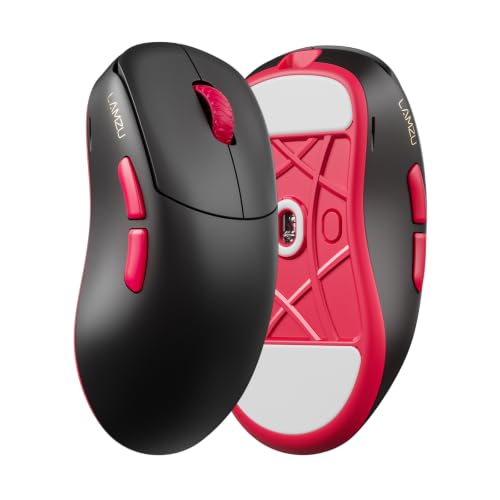
Lamzu Thorn V2
Best for tinkerers
| Model | Lamzu Thorn V2 |
|---|---|
| Class | Gaming Mice |
| Weight | 55g (listing) |
| Polling | 8K polling rate |
| Sensor | 50K DPI NEXTI sensor |
| Switches and wheel | Optical switches; optical scroll wheel |
| Shape | Ergonomic, inward side, centre hump; palm/claw grip |
| Connection | Wireless, USB-C charging |
| Listing | Check price on Amazon |
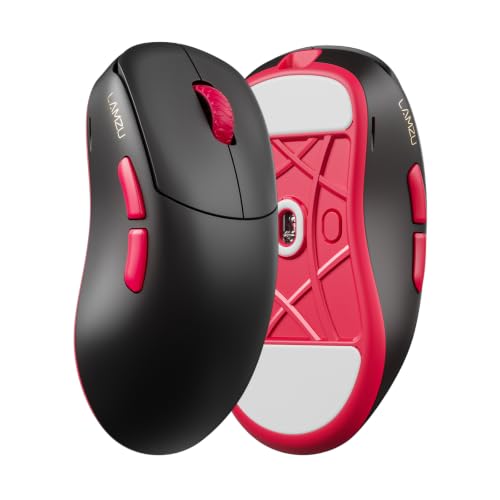
Begin with the silhouette, because on this mouse the silhouette is the specification. An ergonomic shell curves in plan view — the left side, where the thumb works, is sculpted differently from the right — and the Thorn adds two named features worth unpacking. The inward side describes how the mouse’s flanks tuck in, giving the thumb and ring finger defined ledges to hold rather than a smooth swell to squeeze. The centre hump places the shell’s peak where a palm or a claw’s finger base actually rests, so the hand’s weight lands on structure instead of hovering. Together they produce the Thorn’s signature sensation: the mouse feels located in the hand, as if it had a correct position and your hand had found it.
That located feeling is the ergonomic dividend, and it pays out in consistency. On a symmetrical shell, your grip re-forms slightly differently every time you pick the mouse up after typing; on a shaped shell, the curves shepherd your hand back to the same contact points, so your click angle, your scroll reach and your flick geometry repeat. Players who set their mouse down between rounds — which is to say, all players — benefit from that repeatability more than from any single performance figure.
The internals refuse to let the shape be dismissed as a comfort product. Optical switches handle the main clicks, removing the metal-contact wear that produces double-click faults over time, and the optical scroll wheel applies the same principle to the wheel — an encoder that reads light rather than scraping contacts, aimed squarely at the sloppy-step degradation that afflicts mechanical encoders. The NEXTI sensor’s 50K DPI ceiling is a headline number no human needs, but it signals a sensor running without artificial limits, and the tracking beneath that ceiling is the part your hand will judge. Eight-thousand-hertz polling completes the flagship picture for players with the monitor and CPU to use it.
At 55 grams, the Thorn V2 also dismantles the assumption that shaped means heavy. It is not the lightest mouse in this article — the Pulsar undercuts it dramatically — but it is light enough that flicks do not fight inertia, and its mass is distributed through a shell your palm supports, so the perceived effort is lower than the number suggests. Weight you can rest on a curve feels lighter than weight you must pinch between fingertips; that is ergonomics doing arithmetic that a scale cannot.
The Fnatic connection completes the picture. The collaboration edition of this shape exists because competitive players — the constituency least sentimental about comfort and most ruthless about performance — found the shape worth their name. The standard V2 linked here carries the same design language and the current internals; buyers specifically hunting the Fnatic edition should verify its availability through the collaboration’s own channels rather than assuming a standard listing is the same product.
Two ownership details deserve mention before the verdict. First, the USB-C charging port sounds like a footnote until you have lived with a drawer of incompatible cables; a mouse that charges from the same connector as your phone and your keyboard simplifies travel kits and desk drawers alike. Second, an ergonomic shell’s buttons sit at angles a symmetrical mouse does not have, so give your scroll-and-click timing a few sessions to recalibrate — the wheel’s reach in particular changes when the shell beneath it is curved, and early fumbles with weapon swaps are a geometry adjustment, not a quality verdict.
Strengths
- Ergonomic curves with an inward side and centre hump that give the hand repeatable, supported contact points.
- Flagship internals — optical switches, optical scroll wheel, 8K polling — that refuse the comfort-mouse stereotype.
- 55-gram weight that keeps a shaped shell flickable rather than ponderous.
- Palm and claw support that reduces the grip effort a symmetrical shell quietly demands all session.
Trade-offs
- Right-handed only; the shape offers left-handed players nothing at all.
- Fingertip players may find the guided curves intrusive, forever suggesting a grip they do not use.
- A shaped shell fits a narrower band of hand sizes well — too small or too large, and the hump lands in the wrong place.
Best for: right-handed palm and relaxed-claw players who want ergonomic support with esports-grade internals and weight. / Not suited for: left-handed players, committed fingertip grippers, or hands far outside the medium range the curves were drawn around.

Pulsar X2H CrazyLight
Top pick
| Unit | Pulsar X2H CrazyLight |
|---|---|
| Class | Gaming Mice |
| Weight | 37g with dot skates (listing) |
| Size and shape | Mini, symmetrical |
| Sensor | XS-1, 32K DPI |
| Switches | Optical switches |
| Polling | 8K dongle included |
| Finish | Jet Black |
| Listing | Check price on Amazon |
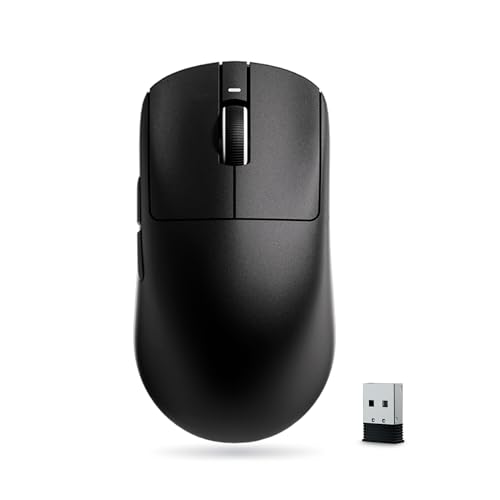
The X2H CrazyLight is a study in subtraction. Thirty-seven grams is a weight that makes most gaming mice feel like paperweights by comparison, and Pulsar reaches it in a mini symmetrical shell fitted with dot skates — small, low-contact feet that reduce the pad’s drag to a whisper. The X2H’s hump placement suits claw and relaxed-claw grips, giving the finger base something to brace against while the palm stays mostly clear of the shell. Where the Thorn guides the hand, the CrazyLight obeys it.
Its specification is not a diet version of a real mouse. The XS-1 sensor is Pulsar’s flagship, listed here at 32K DPI; the switches are optical; and the 8K capability arrives with its dongle included in the box rather than as an accessory to hunt down — a detail that matters, because high-polling wireless mice that treat the fast receiver as an optional extra have frustrated many buyers. Pulsar’s inclusion of it signals the mouse is meant to be run at full specification from day one.
The mini size is the honest limitation, and it cuts by hand rather than by preference. Medium hands can claw it happily; large hands will find their fingers extending well past the buttons and their control suffering for it, however seductive the weight looks on paper. Dot skates also change the pad relationship: they glide beautifully and wear faster than full feet, and on a control cloth they can feel almost too free until the player’s touch recalibrates. This is a specialist’s instrument, and it knows it.
There is a style of play this mouse flatters above all others: the wrist-anchored, small-radius game. Players who keep the forearm planted and steer within a few centimetres of pad — high-sensitivity claw players in arena shooters and real-time strategy alike — make hundreds of tiny movements an hour, and for them 37 grams is not a statistic but a reduction in the day’s total work. If your play instead involves sweeping arm movements across a large pad, the CrazyLight’s lightness buys you less, and its small shell may even feel lost in a big hand mid-sweep; match the mouse to the radius you actually play at.
Strengths
- Extraordinary 37-gram weight that makes the mouse nearly vanish under a claw grip.
- 8K dongle included, so the headline polling rate works out of the box.
- Flagship XS-1 sensor and optical switches — no internal compromises for the weight.
- Dot skates deliver an exceptionally free glide for players who supply their own braking.
Trade-offs
- Mini shell excludes large hands and offers palm players almost no support.
- Dot skates wear faster than full-size feet and feel loose on control surfaces until adapted to.
- No ergonomic guidance at all — the hand must hold its own position for the whole session.
Best for: small-to-medium handed claw players chasing the lightest possible symmetrical mouse with full flagship internals. / Not suited for: palm grippers, large hands, or players whose hands tire without shell support.
Buying guide: what really decides Fnatic Lamzu Thorn
Ergonomic shape and palm fill
Palm fill is the ergonomic quality that decides everything else, and it is a Goldilocks measurement. Too little fill and the shell behaves like a symmetrical mouse with extra steps — the palm hovers, unsupported, and the hand works as hard as it ever did. Too much and the mouse feels like a handful of dough, pushing the fingers up off their natural button positions and making small adjustments clumsy. The right fill meets the palm’s arch exactly when the fingers rest on the buttons at their natural length, so support arrives without instruction.
Test fill with your whole hand relaxed, not posed. Place the mouse under your palm, let the hand settle under its own weight, and notice three things: whether the hump contacts the palm’s centre rather than its edge, whether your index and middle fingers land on the buttons without reaching or curling hard, and whether the thumb rests on its ledge without pressing. If all three happen unforced, the curve was drawn for a hand like yours. If you must arrange your hand to make them happen, the mouse will spend every session reminding you of the arrangement.
Hand size turns fill from a preference into a fitment. As a working guide, small hands often find medium ergonomic humps arriving too early — the peak presses the finger base before the palm arrives — while large hands find the same hump finishing too soon, leaving the rear palm unsupported. Neither failure is subtle once you know to look for it, and both are reasons the Thorn’s medium-hand centre of gravity should be respected rather than argued with. Measure your hand’s length and compare it honestly against the shell’s intended range before ordering; a tape measure is the cheapest accessory in this entire article.
Weight balance front to back
Total weight gets the headlines, but balance decides how the weight behaves. A front-heavy mouse drags its nose through flicks and feels sluggish on lift-off; a rear-heavy mouse can feel twitchy, its front end wandering under light finger pressure. The balanced ideal for most players places the centre of mass near the sensor, roughly under the middle of the grip, so the mouse rotates around the point your hand is actually steering from.
Ergonomic shells complicate balance in a good way: because the palm supports the rear of the mouse, a slightly rearward balance that would feel unstable in a fingertip mouse feels planted in a palm grip — the hand itself becomes part of the structure. When you test a Thorn-class mouse, lift it slowly by your normal grip and feel where it wants to tip. In a relaxed claw or palm hold it should hang level with minimal finger correction; that level hang is balance and shape agreeing with each other.
Balance also explains a paradox in player reports: two mice of identical weight can be described as light and heavy by the same person on the same day. The mouse whose mass sits under the grip’s centre feels light because the hand never fights a lever; the mouse whose mass sits at an end feels heavy because every movement begins by correcting that end’s momentum. When you read weight figures in listings — 55 grams here, 37 there — remember they are only half the datum, and the half your hand cares about less.
4K and 8K dongle options explained
High polling rates over wireless need a receiver built for the traffic, which is why mice in this class pair their fastest rates with dedicated dongles. The step from 1000 Hz to 4000 Hz halves and halves again the report interval, and the step to 8000 Hz halves it once more — each step bringing smaller returns and larger costs in battery and CPU load. Many players find 4K the rational summit: most of the smoothness, a fraction of the power appetite, and less risk of judder on a mid-range processor.
The practical questions to ask of any mouse here are whether the fast dongle is in the box — the Pulsar includes its 8K dongle, which settles the matter — and where the dongle wants to live. Like any high-rate receiver it performs best close to the pad on an extension, not buried behind a tower case. Budget the desk space for it when you buy, and the polling feature you paid for will actually be the polling feature you get.
Battery arithmetic belongs in this section too, because dongle choice is where it bites. A mouse polling at 8000 Hz is transmitting eight times as often as at the standard rate, and while each transmission is small, the radio never rests; intervals between charges that measured in weeks at 1000 Hz can shrink to days at full rate. At 4000 Hz the same mouse typically lands in between, which is why so many experienced players treat 4K as their standing setting and reserve 8K for tournaments and testing. Decide your rate with your charging habits in the room, not just your monitor’s refresh rate.
Coating and grip in warm rooms
Warm rooms and long sessions test a mouse’s surface in ways a showroom never will. As hands warm and sweat lightly, a glossy or worn coating turns slick, and the player’s response — squeezing harder — converts a surface problem into a fatigue problem. Matte, slightly textured coatings earn their keep here: they give moisture somewhere to go and keep friction closer to constant between a cold first game and a heated fifth.
Ergonomic mice have a hidden advantage in this test, because their curves locate the hand mechanically rather than by friction alone; even if the surface grows slick, the ledges keep the grip assembled. If your hands run warm, add two habits regardless of mouse: wipe the shell with a dry cloth between games, and consider grip tape on the main contact points only after you have played a full warm session without it — tape is a targeted remedy, not a default.
Coating choice also interacts with colour in a way buyers rarely plan for. Dark matte shells like these two hide the polished shine that develops where fingers rest, while light shells display it honestly; neither is damaged by the shine, which is simply the coating’s high spots smoothing with use. If visible wear bothers you, dark finishes and a monthly wipe-down will keep a mouse looking close to new for years; if you read wear as character, buy whichever colour you enjoy and let the mouse keep its diary.
Fnatic Lamzu Thorn in real routines
Situation: a right-handed player whose symmetrical mouse feels hollow
The complaint is common and oddly hard to articulate: the mouse works, the sensor is fine, yet the hand feels as if it is holding a shape that was designed for no one. Underneath the vagueness is a real geometry — a symmetrical shell’s rear is a shallow dome, and a palm that wants to rest finds nothing to rest on, so the hand hovers and pinches all session. This player does not need a new sensor or a lower weight; they need the mouse to meet them.
There is a diagnostic this player can run before spending anything: rest your hand on your current mouse, then consciously relax every finger at once. On a hollow-feeling setup the mouse nearly escapes — nothing but your vigilance was holding the grip together. Repeat the thought experiment imagining a ledge under the thumb and a hump under the palm, and notice how much of the vigilance becomes unnecessary. That imagined difference, multiplied by every hour you play, is the entire ergonomic proposition stated in one gesture.
The Thorn is drawn for exactly this defector. Its centre hump gives the hovering palm a landing, its inward sides give the pinching fingers ledges instead of slopes, and within a week the player’s hand stops auditioning grips because the mouse keeps proposing the same good one. If this scenario describes you, the Thorn is not an experiment — it is the correction.
Situation: long aim-training sessions where shape comfort compounds
Aim training is repetition at industrial scale: the same flicks, drills and resets for an hour or more, with no match adrenaline to mask discomfort. Small ergonomic debts compound brutally under that regime. A grip that costs a little extra squeeze, a hump that presses a slightly wrong spot — in a match you would never notice; across four hundred repetitions they become the session’s defining sensation and, eventually, the reason training gets skipped.
A supported shape reverses the arithmetic. When the shell carries part of the hand’s positioning work, the muscles spend themselves on aiming rather than on holding, and the last drill of the hour resembles the first. Players who train seriously should choose their mouse by the sixtieth minute, not the sixth — and that standard is precisely the one ergonomic designs like the Thorn were built to pass.
There is a subtler training benefit as well: consistency of contact makes practice transferable. Drills build skill by repeating identical motions, and a shell that returns your hand to identical contact points removes a source of noise from every repetition. Coaches in physical sports obsess over repeatable stance for exactly this reason; the mouse is the gamer’s stance, and an ergonomic shell is a stance that partly holds itself.
Scene: a hybrid worker-gamer wanting one light mouse
The hybrid desk is where gaming mice go to be judged by two masters. By day the mouse must glide through spreadsheets and documents without its aggressive styling shouting in video calls; by night it must flick without compromise. A black ergonomic mouse like the Thorn V2 threads this needle well: its shape is genuinely comfortable for eight hours of cursor work — arguably more comfortable than a flat office mouse, since the curves support a resting hand — and its gaming internals simply wait, unobtrusive, until they are needed.
The weight tells in this scenario too. Office mice are often surprisingly heavy, and a 55-gram gaming mouse makes a day of window management feel effortless once the sensitivity is set sensibly for desktop work. The hybrid player’s only real homework is a DPI step they can toggle between work precision and game speed — a setting every mouse in this class provides — after which one mouse honestly serves both lives.
There is also a presentability dividend that should not be underestimated. A gaming setup that must pass as a work setup benefits from gear whose aggression is in its engineering rather than its appearance, and a matte black ergonomic mouse reads on a desk as professional equipment rather than as a toy. For the growing number of players whose desk is photographed, streamed from, or shared with a partner’s work calls, that discretion is a feature with daily value — and the Thorn delivers its performance without asking the room to admire it.
Setup and first-week how-to
Step 1 for Fnatic Lamzu Thorn: write the return deadline on the box the day it arrives
Ergonomic fit cannot be judged in an evening, so protect the experiment: note the last return date where you will see it daily. This is not pessimism — it is what frees you to test honestly instead of defending the purchase. A shaped mouse deserves a fair trial across warm sessions and tired ones, and the deadline simply guarantees the trial ends in a decision rather than a drift into keeping a shape your hand never chose.
Step 2 for Fnatic Lamzu Thorn: pair it exactly as its manual describes before changing any setting
Connect the mouse by its intended route — receiver first, cable for charging and configuration as directed — and play a full session at factory settings. With an ergonomic mouse this baseline matters doubly, because you are evaluating a shape and a sensor at once; changing DPI, polling and lift-off settings on day one tangles the two verdicts together. One session of defaults gives you the shape’s honest first impression, unedited.
Step 3 for Fnatic Lamzu Thorn: unbox slowly and keep every accessory until the setup survives a full week
Keep the dongle, the extension, the cable, the spare skates and the box itself together until the mouse has survived a week of real use. Accessories for mice in this class are not packaging filler — the receiver extension is part of the wireless system’s performance, and spare skates are part of its maintenance plan. The player who discards the extension on day one and complains about wireless stability on day three has thrown away a component and kept the symptom.
Step 4 for Fnatic Lamzu Thorn: clean your hands and pad before the session you judge it by
Ergonomic verdicts are easily poisoned by surface noise: a dusty pad makes any mouse feel draggy, and hands carrying moisturiser make any coating feel slick. Before the session you intend to judge the Thorn by, wipe the pad, wash and dry your hands, and clean the mouse’s skates with a fingertip. What remains after that hygiene is the mouse’s true character — glide, grip and curve — and it is the only character worth making a decision about.
Step 5 for Fnatic Lamzu Thorn: change one variable at a time
Across the first week you will want to adjust sensitivity, polling rate, grip and perhaps skate choice. Adjust them in sequence, a day apart, never together. Ergonomic adaptation already changes how your aim feels; stacking a sensitivity change on top of a shape change leaves you unable to say which one helped, and the usual result is a player reverting everything and concluding wrongly that the mouse failed. One variable at a time is slower and vastly more informative.
Common mistakes with Fnatic Lamzu Thorn
Ordering it for left-handed use
It happens more often than anyone admits: a left-handed player reads the praise, sees a mouse that is merely curved rather than obviously sculpted, and orders hopefully. The Thorn’s ergonomics are not a styling accent — the thumb ledge, the button heights and the hump’s placement all assume a right hand, and a left hand on this shell gets the worst of both worlds: no symmetry to fall back on and curves that actively oppose its fingers. Left-handed players should look to symmetrical designs like the Pulsar here, or to the Maya family covered in the companion guide, and spend their money where their hand is welcome.
Assuming ergonomic means heavy and slow
The stereotype had evidence once — shaped mice were office-weight objects with gaming badges — and it now survives mostly as a reason players deny themselves a shape that would suit them. The Thorn V2’s listing is the rebuttal in numbers: 55 grams, 8K polling, optical everything. Judge modern ergonomic mice by their listings and your hand’s report, not by a category memory formed around products from a different era of the market.
Skipping the grip test with sweaty palms
A mouse tested only with cool, dry hands has been tested in the laboratory, not in your life. The decisive Thorn session is the warm one: a heated room, a long match, palms doing what palms do. Play it before the return window closes. If the curves hold your grip together when friction falls — which is the ergonomic promise — the mouse has passed its real examination; if your hand slides despite the ledges, no dry-handed session should talk you out of what the warm one taught you.
Head-to-head: separating the shortlist
The Lamzu Thorn V2 and the Pulsar X2H CrazyLight agree on almost everything a spec sheet measures — wireless high-rate polling, optical switches, flagship-class sensors — and disagree on the one thing it cannot: what a hand is for. The Thorn treats the hand as a structure to be supported, and spends its design budget on curves, ledges and a hump. The CrazyLight treats the hand as the authority, and spends its budget removing everything — weight, size, skate drag — that might argue with it.
In numbers, the separation is 55 grams against 37, a full-size ergonomic shell against a symmetrical mini. In experience, it is larger than numbers suggest. The Thorn’s support makes it the better mouse at hour three of a session and for any player whose hand aches on symmetrical shells; the CrazyLight’s absence of mass makes it the faster mouse in the first flick of a duel and for players whose fingers do all the work. Neither advantage is imaginary, and neither is available from the other mouse at any setting.
The deciding question is therefore embarrassingly simple: when you finish a long session, what is tired — your aim or your hand? If your hand is tired, support is your missing specification and the Thorn answers it. If nothing is tired and you simply want the mouse to interfere less, the CrazyLight’s subtraction is your answer. Buy for the fatigue you actually have.
Sensor and switch parity deserves one more emphasis, because it is what makes this comparison honest. In an older generation, choosing the ergonomic mouse meant accepting a lesser sensor and mushier clicks — a real performance sacrifice dressed as comfort. Here, both mice carry current flagship-class tracking and optical switching, so the choice costs nothing measurable in inputs per second or click latency. When the spec sheet ties, the hand’s vote is the only vote left, and it should be allowed to cast it without a guilty conscience about performance.
Living with the choice: care and longevity
An ergonomic mouse’s curves collect what a symmetrical shell sheds: skin oil and dust settle into the thumb scoop and along the hump’s flanks, and a weekly wipe with a dry or barely damp cloth keeps the coating’s grip honest. Pay attention to the scroll wheel’s well and the seam lines, where grime builds invisibly until a click or a wheel step feels gritty. A soft brush handles those channels better than a cloth forced into them.
The optical scroll wheel on the Thorn V2 removes the most common wheel failure — encoder wear — but the wheel’s rubberised rim still ages with hand chemistry; keep solvents and hand sanitiser away from the shell, and let hands dry after washing before a session. On the Pulsar, the dot skates are the consumable to watch: their small contact area glides beautifully and thins faster, so keep the spares and treat a scratchy week as a skate problem before suspecting the pad.
Battery rhythm matters for both. High polling rates shorten the interval between charges, so adopt a standing habit — charge during a regular break, on the same day each week — rather than reacting to a low-battery warning mid-match. A wireless mouse that is always charged becomes, for practical purposes, as reliable as a wired one, and the habit costs nothing once it is a habit.
Travel is the last longevity test. A shaped mouse tossed loose into a backpack will have its curves and coating abraded by chargers, bottles and keys, and its buttons can be held down for hours by pressure — a slow way to age switches. A simple hard case, or even the original box for occasional trips, keeps a travel mouse in home condition. Players who commute between home and office desks with one mouse should treat the case as part of the purchase, not an accessory to postpone.
Final recommendation
The Thorn earns this article’s headline because it makes the strongest current case for a proposition the market nearly forgot: that a mouse shaped like a hand can also be a serious instrument. In its V2 form it pairs that shape with optical switches, an optical wheel, 8K polling and a 55-gram weight, and the Fnatic collaboration behind the shape tells you the design survived professional scrutiny. If you are a right-handed palm or claw player whose symmetrical mouse leaves your hand unsupported, this is the most coherent upgrade path available in its family.
Choose the Pulsar X2H CrazyLight instead if your grip is claw, your hand is small to medium, and your ideal mouse is the one you forget you are holding. It is not a lesser mouse — it is the opposite answer, executed just as thoroughly. The only wrong purchase here is the one made without asking your hand the question, so test with warm palms, tired hands and a return deadline on the box, and let the answer be final.
If it helps to compress the whole article into one test, use this: borrow or buy with returns, play your longest normal session on your two most-played games, and afterwards write down — actually write down — where your hand feels anything at all. A mouse that leaves no entry on that list, at either weight, is your mouse. The Thorn’s promise is that for the supported-shape player, the list stays empty for years.
Whichever you choose, keep the other philosophy in mind for your next purchase rather than treating this one as a conversion. Hands change with age, games change with taste, and the player who needs support at thirty-five may steer with fingertips at twenty-five. The Thorn and the CrazyLight will both be here, in newer versions, when your hand files its next report on what it needs.
Frequently asked questions
What matters most when choosing for fnatic lamzu thorn?
The match between the shell’s curves and your hand’s size and grip, because an ergonomic mouse amplifies both good and bad fits. On a symmetrical mouse a mediocre fit is a mild tax; on a shaped mouse the hump either lands where your palm wants it or presses where it does not, all session long. Hand measurement and an honest grip label come before every other consideration.
How much should a beginner budget for fnatic lamzu thorn?
Expect flagship-mouse territory rather than entry-level money, and confirm the current figure on the listing before committing, since prices move between visits. A beginner whose grip is still unsettled should be cautious in a different way: ergonomic mice reward a known grip, so a player still experimenting may extract more value from a cheaper symmetrical mouse first, then buy the Thorn’s support once their hand has decided how it plays.
Which mistake do buyers of fnatic lamzu thorn regret most?
Buying it for the wrong hand size — most often a small hand drowning in a shell whose hump lands too far back, or a large hand perched on curves drawn for a medium one. The second regret is skipping the warm-palm test and discovering in a heated match that the coating and their skin disagree. Both regrets are preventable inside the return window, which is why this article keeps returning to it.
How long does it take to get used to a new fnatic lamzu thorn setup?
Plan on one to two weeks. Players arriving from symmetrical mice typically need several days for the guided grip to stop feeling like an instruction, after which the same guidance becomes the reason their hand position stops drifting. Click timing on optical switches settles within days; the hump’s relationship with your palm is the slow learner, and it is the one worth waiting for.
When is the premium option in fnatic lamzu thorn actually worth it?
When your sessions are long, your hand has a named complaint about your current mouse, and your system can use the high polling rates you are paying for. Premium ergonomic money buys support plus internals together; if you need only one of the two, cheaper mice sell each separately, and the honest recommendation is to buy the half you need.
What should I verify first if my fnatic lamzu thorn purchase disappoints?
Verify fit before settings: in a relaxed hold, does the hump meet your palm’s centre, do your fingers reach the buttons without stretching, and does your thumb rest rather than press? If the geometry fails, no configuration will rescue it and an exchange is the right move. If the geometry passes, check receiver placement and polling load next — the two settings most often masquerading as a bad mouse.
Related guides
The Thorn’s closest relatives in this guide series are its own family: the surface both mice glide on in Fnatic Focus3 Max, the symmetrical sibling assessed in Fnatic Lamzu Maya 8k, and the keyboard that completes the collaboration desk in Fnatic Streak80 Lp. For desk setups beyond gaming, the same fitting discipline applies to the mice in Best Keyboard And Mouse Combos for Office; seasonal shoppers can watch Gaming Mouse Black Friday Deals, and players who solve warm-room grip with accessories rather than shape should read Best Mouse Hold Tapes.
One more angle: ergonomic shape and palm fill, revisited
Revisit palm fill after a month, not a day. A new ergonomic mouse often feels over-filled in week one simply because the hand has forgotten what support feels like, and under-filled in week three if the novelty was masking a size mismatch. The month verdict is the trustworthy one — by then your hand has stopped performing for the new purchase and has settled into whatever relationship the curves actually offer.
One more angle: weight balance front to back, revisited
Balance also changes with accessories more than owners expect. Grip tape on the rear, a heavier aftermarket skate set, even a charging cable left plugged in during play — each moves the centre of mass you calibrated your flicks around. When a familiar mouse suddenly feels off, audit what you have attached to it before auditing your own aim; the answer is embarrassingly often a strip of tape.
One more angle: 4K and 8K dongle options explained, revisited
One refinement for dongle placement: height helps. A receiver raised to desk level on its extension, roughly level with the mouse’s own plane, holds a cleaner link than one sitting in the shadow of a monitor stand or a metal speaker. If your high-rate connection flickers only in certain mouse positions, suspect shadows before hardware — radio, like light, travels in lines, and desks are full of obstacles.
One more angle: coating and grip in warm rooms, revisited
Finally, remember that grip is a system: coating, hand, room and pad all contribute, and the cheapest fix is often environmental. A small desk fan aimed across the play area does more for warm-room grip than any accessory, by keeping palms dry at the source. Players in hot climates who solve the room first frequently discover their mouse’s coating was adequate all along.