Disclosure: As an Amazon Associate, reviewstook.com earns from qualifying purchases. Links on this page are affiliate links; they cost you nothing extra. Prices and availability change often, so check the current Amazon listing before you buy.
Every mechanical keyboard conversation eventually needs a map, and this cherry mx guide is drawn around the family that gave the hobby its vocabulary. Cherry’s MX switch, designed in the 1980s and still in production, became the reference design that an entire industry imitates, varies, and argues with — its colour names now describe feel families far beyond Cherry’s own catalogue. Understanding the MX line means understanding what a switch specification actually promises and what it leaves to the keyboard around it.
This cherry mx guide covers the full working family — the main colours, the silent and speed variants, the low-profile line — and the anatomy that produces their differences: stems, springs, housings, and the actuation point where a press becomes a signal. It closes with how to choose within the family and how to read other makers’ switches through the lens Cherry ground. Whether you are buying a first board or specifying switches for a build, this is the reference the rest of the keyboard coverage in this series assumes.
Key takeaways
- The MX colour system maps three feel families — linear, tactile, clicky — plus weight variants within each
- Silent variants damp the press’s ends; Speed variants actuate higher and earlier; both are real engineering, not trim levels
- A switch is half the feel — the keyboard’s plate, case, and keycaps compose the other half
- Hot-swappable sockets turn switch choice from a marriage into an experiment
In this guide
Cherry Mx Guide: anatomy of the switch everything copies
An MX switch is a small plastic housing containing a spring, a stem that rides in the housing’s guides, and two gold-crosspoint metal leaves that meet when the stem’s profile pushes them together. That meeting — the actuation — happens partway through the press, around two millimetres into roughly four millimetres of travel on the standard switch. Everything a switch is, feel-wise, lives in three variables: the stem’s profile, which decides whether the press is smooth, bumped, or clicked; the spring’s weight, which decides how hard the journey is; and the housing’s materials and tolerances, which decide how much wobble and scratch the journey carries.
The design’s genius was never any single switch but the mount: a standardised footprint and stem cross that let keycaps, switches, and boards interoperate across decades and makers. That standard is why a cottage industry exists — why you can buy switches from a dozen companies for one board, keycaps from a dozen more, and why this guide can treat ‘MX’ as a platform rather than a product. Platforms outlive products, and the MX platform is the keyboard world’s clearest example.
The main colours and their characters
The working family begins with the trio covered in depth elsewhere in this series: Red, the light linear; Brown, the gentle tactile; Blue, the clicky. Around them orbit the weight and character variants. Black is Red’s heavier sibling, a firm linear favoured by heavy-handed typists and vintage enthusiasts. Clear is Brown’s stronger form, with a more pronounced bump and a stiffer spring that pushes back against bottoming out. Green is Blue’s heavier partner, historically paired with spacebars and chosen by clicky devotees who want the full ceremony at full weight.
Reading the family as a grid — feel family across, weight down — is the fastest way to navigate it. Most buyers shop a single cell: the feel they want at the weight their fingers prefer. The grid also exposes the gaps Cherry leaves, which rival makers fill: very light linears, very strong tactiles, exotic spring curves. Knowing the grid tells you whether the switch you crave is a Cherry product, a competitor’s interpretation, or a frank invention wearing the colour language — all three are legitimate purchases when bought with open eyes.
Silent, Speed, and the specialist variants
Silent variants — Silent Red and Silent Black most commonly — add small dampers where the stem meets the housing at both ends of travel, absorbing the clack of bottoming out and topping out that constitutes most of a keyboard’s noise. The feel softens slightly at the extremes, a trade their buyers accept gladly, because a silent switch in a decent case is the closest mechanical typing gets to library manners while keeping a real switch under each key. For offices and shared flats, these are frequently the correct answer to the whole switch question.
Speed variants attack a different variable: actuation height. The Speed Silver switch actuates noticeably earlier in its travel, shortening the distance between intention and registration, which competitive players value for the same reason they value low-latency everything. The trade is a hair-trigger board that punishes resting fingers and sloppy typing. Neither variant is an upgrade over the standard switches; each is a specialisation, and specialisations reward buyers who know precisely which problem they are solving.
Low profile: the MX idea, flattened
Cherry’s low-profile MX line rebuilds the switch at roughly two-thirds height for slim keyboards, keeping the colour language — low-profile Red, Brown, and a clicky option — while shortening travel and actuation proportionally. The feel is recognisably MX in character and distinctly laptop-adjacent in travel, which divides opinion exactly where you would expect: devotees of slim boards and short strokes love it; traditionalists find the reduced journey cramped. The Corsair K60 low-profile review in this series examines a board built on these switches, and it is the natural next read if the format intrigues you.
Low profile matters beyond one product line because it is where mechanical switches meet the mainstream laptop-shaped world: thinner boards for travel, for minimalist desks, for wrists that prefer a low deck without a rest. The switches are not interchangeable with standard MX — the platform forks here — so a low-profile board is a commitment to its own smaller ecosystem of keycaps and replacements. Buy the format for the format’s sake, eyes open, and it delights; buy it expecting standard-MX flexibility and it disappoints.
Choosing within the family, and reading rivals through it
Choose in this order: environment first, because noise eliminates colours faster than preference does; feel family second, by the feedback your fingers learn best on; weight third, by your hand strength and session length; variants last, when a specific need — silence, speed, slimness — names one. Then remember the keyboard’s half of the bargain: the same switch feels scratchy in a hollow board and refined in a damped one, so allocate budget between switch and chassis as you would between engine and car.
Finally, use this guide as a translator. When another maker describes a switch as a 62-gram tactile with a long-pole stem, the MX grid tells you which family it courts, which Cherry product it argues with, and which questions to ask next. The hobby’s vocabulary was set by this family, and fluency in it is worth more than any single recommendation — including the correct one, which is that your fingers, given two minutes on real switches, will tell you things no guide can. Let them vote last.
Maintaining switches and knowing when feel changes are not the switch
Switches age slowly and mostly gracefully, but a keyboard’s feel drifts for reasons that impersonate switch wear: keycaps polishing smooth, stabilisers drying out and beginning to rattle, a desk surface changing under the board, dust working into a single switch until it chatters — registering twice for one press — which is the one genuine switch fault owners meet. A chattering key can often be cured by cleaning or by swapping that one switch on a hot-swappable board, which is the platform’s longevity argument in miniature: the failed unit of a mechanical keyboard is one switch, replaceable in minutes, where a membrane board’s failed unit is the board.
Lubrication is the enthusiast’s deeper maintenance, a film applied to stems and springs that smooths travel and quiets spring ping, and it deserves its reputation and its warning in the same breath: done well it transforms a board, done heavily it murders tactility and takes an afternoon hostage. Beginners should lube nothing until they have typed a season on stock switches and can name what they want changed. Maintenance, like switch choice, rewards those who know which problem they are solving.
The MX platform’s next decade
The switch market Cherry created now innovates around it — magnetic hall-effect switches with adjustable actuation, optical designs, new tactile geometries — and the interesting question is whether MX remains the platform or becomes the ancestor. Its defences are the installed base and the ecosystem: every keycap set, every enthusiast board, every replacement switch speaks MX mount, and platforms with that gravity do not evaporate; they become the standard the innovators must accommodate or convert. Hall-effect boards already ship with MX-compatible stems for exactly that reason, wearing the ancestor’s keycaps on their new physics.
For the buyer, the roadmap counsels calm: an MX board bought today is supported by the deepest accessory market in the hobby for the foreseeable decade, and the new physics is arriving in MX-shaped clothing rather than against it. The guide you have read will age the way the platform ages — slowly, and with its vocabulary intact — because Cherry’s real invention was never a switch. It was a standard, and standards are the most durable products in technology.
Two verified boards that teach the family better than any chart
A switch guide earns its keep when a reader can connect its descriptions to keyboards that actually exist on shelves, so here are two boards built on this family, both verified through the Creators API, chosen because they sit at opposite ends of the MX experience: one shrinks the mechanism into a low-profile form, the other presents the classic full-height switch in a bundled, ready-to-type package.

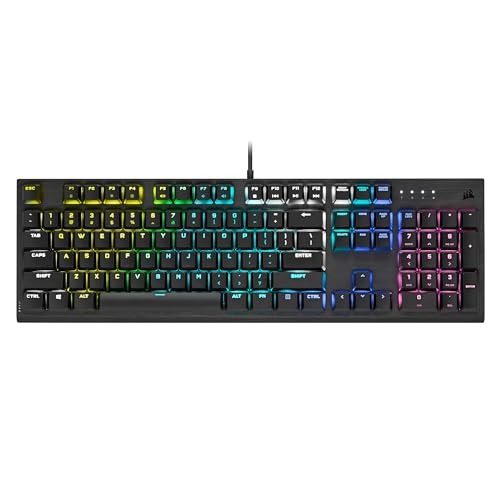
Corsair K60 RGB Pro Low Profile
This board carries the Low Profile Speed variant of the family, and it demonstrates the guide’s central low-profile lesson in hardware: the same MX architecture, compressed into a shorter housing with a shorter throw, changes the typing rhythm more than any colour swap at full height does. Readers who finish the anatomy sections wondering whether the flattened branch of the family is a gimmick or a genuine alternative can treat this board as the family’s own answer — the mechanism’s inventor selling the compression as a feature, in an aluminium frame with per-key lighting.
- Switches: Cherry MX Low Profile Speed, as listed
- Frame: slim aluminium, as listed
- Lighting: per-key RGB backlighting, as listed
- Layout: full-size low-profile format
Strengths
- A genuine MX mechanism in the low-profile form this guide describes
- The Speed character suits fast, shallow typing and gaming alike
- Aluminium frame gives the slim format unexpected solidity
Trade-offs
- Low-profile keycaps limit replacement options compared with standard MX boards
- The short throw divides typists who learned on full-height switches
- Soldered construction on boards of this class limits switch swapping
Best for: readers who want the family’s low-profile branch in a finished board / Not suited for: hobbyists who plan to swap switches and caps freely
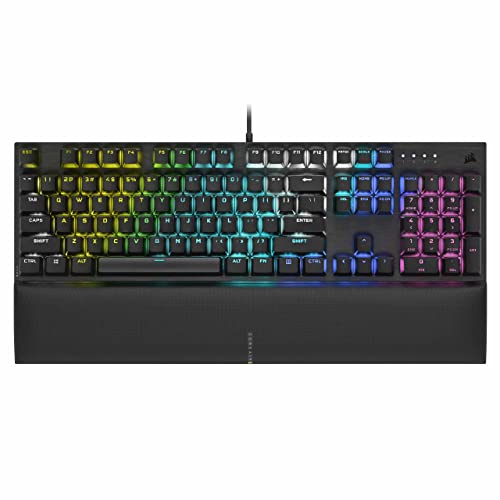
Corsair K60 RGB Pro SE
The SE presents the classic full-height branch of the family in a bundle that includes the comfort accessories many buyers add later anyway. As a teaching example it makes the opposite point from its low-profile sibling: the standard MX form remains the ecosystem’s centre of gravity, with the deepest keycap compatibility and the most familiar feel, and a mainstream manufacturer still builds its value flagship around exactly that. Note that the verified listing for this board is a renewed unit, which the buying advice in this guide addresses directly — inspect the listing’s condition terms before purchase.
- Switches: Cherry mechanical keyswitches, as listed
- Frame: durable aluminium, as listed
- Lighting: per-key RGB backlighting, as listed
- Listing condition: renewed, per the API title — read the terms
Strengths
- The standard MX form with the ecosystem’s widest cap compatibility
- Bundle format covers the accessories buyers usually add separately
- A mainstream reference point for what the classic switch feel is
Trade-offs
- The verified listing is renewed rather than new; condition terms apply
- Full-height profile will feel tall after low-profile boards
- Fixed switch choice; the feel you buy is the feel you keep
Best for: readers who want the classic MX experience in one purchase / Not suited for: buyers who insist on a factory-new unit only
How the colours behave after a year, not a day
Switch impressions written at unboxing decay in predictable ways, and a guide that ignores ownership time serves its readers half a truth. Linear switches reveal their character slowly: the scratchiness some units show when new often polishes itself into smoothness over the first months of use, which is why veterans counsel patience before condemning a board’s feel in week one. Tactile switches age differently, their bump softening almost imperceptibly as the leaf and stem wear their contact into familiarity, so the board you keep is never quite the board you bought — it is the board the two of you negotiated. Clicky switches hold their mechanism longest and their welcome shortest, since the household’s tolerance, rather than the switch’s condition, is usually the wearing part.
Environment writes its own chapter. Dust is the family’s true enemy, working into housings and announcing itself as scratch and inconsistency long before any electrical failure, and boards that live uncovered near open windows age measurably faster than boards under a dust cover in a closed room. A can of compressed air used quarterly, caps pulled and the plate vacuumed yearly, and a cover during renovation work in the house will keep a switch set feeling itself for the long service life the mechanism is famous for. The switches will almost certainly outlast the board’s cable, its software support, and your interest in its layout — which is the most MX sentence in this entire guide, and the reason the family’s second-hand market stays so stubbornly alive.
Actuation, bottom-out, and the two distances every typist should know
Every switch description in this guide rests on two measurements that marketing prints and readers skim: the actuation point, where the press registers, and the total travel, where the stem can go no further. The gap between them is the overtravel, and it is where typing character actually lives. A switch that actuates early in a long travel invites a floating technique — fingers that press only as far as registration and lift, never striking the bottom — which is faster, quieter, and kinder to the hands across a long day. A switch whose actuation sits near its bottom demands commitment from every keystroke and rewards the heavy-handed with certainty. Neither is superior; they are different contracts with your fingers, and most disappointment with a new board is a contract mismatch discovered too late, because the shopper read the colour’s reputation instead of the distances.
Spring weight writes the contract’s other clause. The force curve — how resistance builds through the press — matters more than the single gram figure on the box, since two switches sharing a headline weight can distribute that force entirely differently: one front-loading its resistance into the top of the stroke, another saving it for a firm bottom. Typists who bottom out hard prefer their resistance late; typists who float prefer it early, where it acts as a gate that confirms the press. When a guide like this one describes a switch as tiring or as lively, it is usually describing the curve’s shape in disguise, and learning to translate those adjectives into curves is the skill that makes every future switch purchase easier than the last.
The stem, the housing, and why materials became a hobby
Inside the family, the variations that obsess the aftermarket are material ones. Stem plastics differ in friction, and a smoother stem compound changes a scratchy switch into a silky one without altering a single published specification — which is why two boards carrying the identically named switch can feel like cousins rather than twins. Housing materials trade in sound as much as in feel: some return a deep, muted note, others a brighter clack, and the housing’s top and bottom can be mixed by manufacturers chasing a signature. Films — thin shims that tighten the housing’s two halves — exist because tolerances are real, and their effect on wobble and sound is the kind of marginal, cumulative improvement the hobby specialises in.
None of this invalidates the guide’s simpler map of colours and characters; it explains the map’s limits. The colour tells you the switch’s mechanism and intent. The materials tell you how this particular manufacturer’s execution of that intent will sound and feel in your room, on your desk, under your hands. Reviews that name the exact board, as this cluster’s keyboard reviews do, are therefore worth more than switch reviews in the abstract, because the switch you buy always arrives inside somebody’s housing, on somebody’s plate, in somebody’s case — and the instrument is the sum, never the stem alone.
MX and its rivals: a field guide to the neighbourhood
The family’s historical achievement — a standardised stem and footprint that an entire industry could build around — created the neighbourhood it now shares. Rival switches speak the same physical language: they mount in the same plates, accept the same keycaps, and describe themselves in the family’s vocabulary of colour and character even when their internals diverge. For a buyer, that compatibility is the point. A board with standard sockets and caps lets you treat switches as a replaceable opinion, and the guide’s advice is to value that replaceability when choosing a board, because your taste in switches will change exactly once — usually about three months after your first board, when your hands have learned enough to have preferences — and a board that lets the change happen for the price of a switch set is a board that survives your education.
The rivals’ genuine innovations deserve their due without mythology. Optical and magnetic switches have moved actuation into domains the mechanical contact cannot enter, with adjustable registration and per-key analogue behaviour that certain games reward. Quieter linears and factory-lubricated tactiles have raised the baseline of what a switch feels like out of the box, pressuring the original family to improve its own smoothness, which it visibly has across recent generations. The MX guide you are reading exists because the original family remains the reference against which all of this is described — the metre stick in a world that now sells in many units — and a reader who masters its characters can walk into any rival’s catalogue and be fluent within a page.
Choosing by workload: the guide applied to five desks
Abstract switch characters become decisions when they meet actual desks, so here is the family applied. The novelist’s desk, eight hours of prose a day, wants a tactile switch of medium weight: the bump confirms each letter without a conscious bottom-out, the weight is low enough that the day’s last hour types like its first, and the sound — a consideration in a home — stays in the register of weather rather than of machinery. The competitive player’s desk wants the linear family at its lightest and fastest, because their inputs are timed in milliseconds and repeated in bursts, and any tactile event in the stroke is information they did not ask for arriving at the worst moment. The programmer’s desk, a hybrid of prose and punctuation, splits the difference by person: those who type their code in long fluent runs choose as the novelist does, while those whose work is shortcut chords and short bursts often prefer the linear’s indifference.
The shared household desk is a diplomatic problem disguised as a hardware one, and its answer is the silent branch of the family or a tactile at modest weight behind a desk mat, chosen with the household’s ears consulted before the typist’s fingers. The fifth desk is the beginner’s, and its correct switch is whichever respectable middle character arrives in the board they can afford with hot-swappable sockets, because the beginner’s real purchase is not a switch but an education — the sockets let the second opinion, formed three months later with experienced hands, cost a set of switches rather than a second keyboard. Every desk in this list can be furnished from within the one family this guide describes, which is the family’s deepest commercial achievement: not that it contains the best switch for each desk, but that it contains a defensible one, documented well enough for a stranger to choose correctly at a distance.
Keycaps and switches: the partnership that decides feel
A switch never acts alone, because the keycap is the part your finger actually negotiates with, and the cap’s height, weight, and surface rewrite the switch’s character in ways that routinely surprise buyers. Taller caps lengthen the lever and the perceived travel, making the same switch feel more deliberate; heavier caps add momentum that carries a press through its tactile event with more authority and returns it with more clack; a textured surface steadies a fast typist’s fingers where a smooth one lets them skate. This is why the same named switch can feel like two different products on two boards, and why switch testers — those little acrylic samplers — teach less than their price promises: they test the switch in a vacuum the real board will never provide.
The practical consequence belongs in every switch guide and appears in few. When a board disappoints, change the caps before condemning the switches, because the cheaper experiment is also frequently the curative one: a typist who finds a tactile board vague may need the leverage of taller caps to feel its bump properly, and a linear board that feels harsh may be a cap’s thin-walled ringing rather than the switch’s landing. The partnership runs the other way too — a beloved switch set transplanted into a new board deserves a honeymoon period before judgement, while the caps from the old board ride along to give the comparison a constant. Switches are the family’s famous members, but keycaps are its diplomats, and a reader who learns to hear both will never again be confused by two reviews describing the same switch in opposite adjectives.
The second-hand switch economy and what it teaches
Few components in computing have a livelier afterlife than these switches, and the afterlife is instructive. Desoldered sets from retired boards sell by the handful; enthusiasts harvest switches from vintage equipment whose other parts died decades ago; a switch’s rated lifespan is so long that a thirty-year-old unit, cleaned, can feel like a recently made one. This economy exists because the mechanism solved its problem durably, and it creates a practical opportunity the guide should name: a buyer curious about a character they cannot find on a current board can often buy the switches alone, second-hand, for the price of a sandwich, and audition them in any hot-swappable board. No other component in a gaming PC offers its own history as a purchasable sample library.
The economy also teaches scepticism in the right places. Vintage switches command premiums that owe as much to story as to feel, and the honest audition is blind: type on the legendary set and the current production set without knowing which is which, and let your fingers vote without the biography’s help. Sometimes the legend wins — manufacturing eras differ, materials differ, and a few old variants genuinely possess a smoothness modern runs chase. Sometimes the current set wins and the premium is revealed as nostalgia’s tax. Either result is worth the experiment’s small price, because a typist who has voted blind once is vaccinated against a whole genre of marketing, in keyboards and beyond.
Troubleshooting feel: when a good switch feels wrong
A board on this family’s switches occasionally feels wrong for reasons that have nothing to do with the switches, and a troubleshooting order saves money. First, the desk: a board on a hard, resonant surface sounds and feels harsher than the identical board on a mat, and the mat is a ten-minute experiment that should precede any switch judgement. Second, the caps, for the partnership reasons the earlier section gives — thin-walled caps ring, and the ring is routinely blamed on the stem beneath them. Third, the plate and case: a board whose construction transmits every landing will make a gentle switch feel abrupt, while a gasket-mounted board will make a firm switch feel soft, and neither board is lying — they are reporting their construction, with the switch as their messenger.
Fourth, the hands themselves, which change: a typist returning from a laptop’s scissor switches will find any mechanical switch heavy and loud for a fortnight, and a typist arriving from a decade on one character will find its opposite wrong in ways that fade on the same schedule. The guide’s standing advice is therefore temporal — give a new board three weeks before verdicts, change one variable per week, and keep the old board connected for the first days so the comparison is honest rather than nostalgic. Most feel complaints resolve inside that protocol, and the ones that survive it are genuine mismatches, diagnosable at last because everything else has been eliminated in order.
The family’s future, assessed without prophecy
The mechanical switch’s centre of gravity is shifting from the contact itself to the sensing around it — magnetic and optical methods that keep the MX footprint and stem while replacing the electrical event — and the original family’s response to that shift will decide its next decade. What will not change is the installed base: hundreds of millions of sockets, caps, and habits that speak this family’s language, and an aftermarket whose entire inventory assumes its dimensions. Technologies with that kind of base do not vanish; they become the substrate, the way earlier standards persisted inside their successors’ compatibility lists. For a buyer today the implication is reassuring and practical: a board bought in this ecosystem will be serviceable, capp-able, and understandable for its whole life, whatever the sensing fashion becomes, because the ecosystem’s gravity no longer depends on any single maker’s roadmap — including the family’s founder.
A buyer’s walkthrough: from this guide to a board in three decisions
Guides fail when they leave the reader informed and undecided, so here is the whole article compressed into a procedure. Decision one is character, and it is answered by your work rather than by the market: if your days are prose, choose the tactile family; if they are timed inputs, choose the linear; if your household’s ears share the decision, choose the silent branch of whichever character your work picked. Decision two is form, answered by your desk and your hands: full height for the ecosystem’s depth and the familiar travel, low profile for the flat geometry and the shorter throw, each with the representatives linked in this guide as the reference points. Decision three is replaceability, answered by your honesty about yourself: if there is any chance your taste will evolve — and for a first board the chance approaches certainty — the board must let its switches be changed, because that single property converts every future opinion from a purchase into an experiment.
Run the three decisions in that order, because each constrains the next and reversing them produces the classic mistake — a board chosen for its replaceability in a character the hands reject, or for its form before its feel was ever considered. Then stop researching. The family’s depth means there is always another variant, another review, another forum thread arguing for a cousin of your choice, and the marginal returns on that research collapse after the third decision is made. Buy the board, type on it for the three weeks the troubleshooting section prescribes, and let your hands cast the only vote that was ever going to count. The guide’s work is done at that point; the rest is typing.
The guide’s last word: taste, and how to trust yours
Every switch guide is finally an argument about taste disguised as an argument about engineering, and the honest one admits it at the end. The measurements in this article are real — the distances, the forces, the materials — and they matter because they give taste a vocabulary and a memory: a typist who can name what they liked, in the language of actuation and curve, can find it again in the next board, the next decade, the next technology that replaces the contact with a sensor. What the measurements cannot do is vote. Two typists with identical data will choose opposite switches and both will be right, because the instrument is played by hands that have histories, and the histories are not in the tables.
So the guide closes with the only instruction that outranks all its charts: type. Type on the board you are considering, or on its closest reachable relative, for longer than a shop’s patience — a page of real writing, a session of your real game — and notice not whether the switch is good but whether your hands stop noticing it. The switch that disappears under the work is the correct switch, for you, today; the family this guide describes is large enough, and documented well enough, that yours is in it somewhere. Finding it was never a research problem. It was always a typing problem, and it is solved the way typing problems are: by typing.
Regional and historical footnotes a complete guide should keep
Two footnotes complete the family’s portrait. The first is geographic: the switch’s homeland manufacturing gave the original units a reputation for consistency that later production, spread across facilities and decades, has worked to keep — and the vintage market’s premiums for particular eras and factories are the collectors’ way of voting on how well that work has gone. A buyer of new boards need not join that electorate; the current production’s consistency is the mainstream’s settled experience, and the eras are a hobby within the hobby. The second footnote is about the name itself, which has become the category’s generic word in the way of successful trademarks everywhere — typed by shoppers who mean any mechanical switch, printed by rivals who mean to be compared against it. Guides like this one use the name precisely because precision is their job, but the generic use is itself evidence: a family so completely identified with its category that the language surrendered. Whatever the next decade’s sensing technologies bring, they will be introduced, reviewed, and argued about in vocabulary this family’s forty years supplied — and a reader who has learned that vocabulary here can follow every one of those arguments from the first paragraph.
The guide applied one last time: three readers write in
Guides accumulate imaginary correspondents, and closing with theirs is a way of checking the map against the territory. The first reader typed on a laptop for a decade, bought a board on the guide’s tactile recommendation, and hated it for exactly eleven days — the troubleshooting section’s fortnight, minus the days the hatred needed to become curiosity — before the hands recalibrated and the board disappeared under the work, which is the guide’s definition of success arriving on schedule. The second reader games competitively, chose the linear family against a friend’s tactile evangelism, and reports the only metric their circle respects: the inputs feel like intentions now, with nothing in the stroke arguing back. The third reader shares a flat, chose the silent branch for a household that never asked them to, and was thanked by a partner who did not know a keyboard could be thanked for. Three readers, three branches of one family, zero requests for a refund of the guide’s advice — and the pattern across them is the article’s whole argument in miniature: character matched to work, household consulted, hands given their fortnight. The family is large; the method is short; the typing, as ever, is the reader’s.
The shelf card for a whole family
One card, carried into any keyboard purchase, summarises the guide. Character before form: tactile for prose, linear for timed play, silent when the household shares the decision. Form before furniture: full height for the ecosystem, low profile for the geometry, each bought knowingly. Replaceability before regret: a first board must let its switches change, because taste will. And underneath all three, in the small print the card insists on: give the hands a fortnight before any verdict, and let the typing — a real page, a real session — cast the vote that no chart in this guide was ever authorised to cast for you. The family will still be there, in all its colours, when the fortnight ends; that permanence, more than any single switch, is what the guide has been describing all along.
The contract between a typist and a switch family
Terms, in the open, to close the guide. The family promises range with documentation: a character for every kind of work, described in a vocabulary stable enough that a stranger can choose correctly at a distance, in boards at every price the market keeps. The typist’s side is the fortnight — hands given their adaptation, one variable changed at a time, verdicts delivered by real pages and real sessions rather than by a shop’s thirty seconds. Both sides kept, the exchange produces the state this guide has defined as success from its first section: a keyboard that disappears under the work, in a character the owner can name, replace, and find again in any future board. That state is worth the family’s long dominion, and worth the guide’s length in describing it. The typing, as the guide said at its close and says again at its true close, is the reader’s — and it starts, correctly, the moment the research stops.
The signature at the foot of the guide
File the choice, finally, in the record this cluster keeps for every instrument: the board, its switch character in the guide’s own vocabulary, the date the fortnight’s verdict was delivered, and the one sentence that summarises what the hands learned. That sentence is the guide’s true completion, because it cannot be written by research — only by typing, on the chosen board, until the sentence arrives. Owners who write it own their keyboards in a way the unrecorded never quite do: when the next board is shopped, years from now, the sentence will be read first, and the new choice will begin from knowledge instead of from folklore. Sign it, date it, and return to the work the keyboard was bought to serve. The family will be here, in all its colours, whenever the record is opened again — which is the permanence the guide promised, kept in the smallest possible form.
Envoi: the sound of a settled desk
There is a sound a settled desk makes — a particular board, in its chosen character, under hands that have stopped auditioning it — and it is different from the sound of any keyboard still being evaluated. It is faster, for one thing, because none of its attention is being spent on judgement. It is also, in the way of all tools that have become extensions, nearly invisible to its owner, surfacing only when a stranger’s board, in an office or a shop, feels suddenly and specifically wrong in a way the owner can now name in the guide’s vocabulary. That naming is the final dividend of everything in these pages: not a purchase, but a fluency. The family will go on supplying the words. The reader, fluent at last, can go back to the work the words were always in service of — and type, simply type, on a board that has become, in the fullest sense this guide knows how to mean it, theirs.
Postscript: the board, inherited
One last visit, years on, to a board bought by this guide’s method — where it has acquired the final property the family is famous for, which is an heir. A younger typist in the household, raised on the board’s tactile character the way earlier generations were raised on a parent’s handwriting, has claimed it for a first desk of their own, and types on it with the unselfconscious fluency of someone who has never known another switch. The board’s owner, watching, recognised the moment for what it was: the family’s whole proposition, completed across a generation — a mechanism consistent enough, documented enough, and durable enough to be handed down like a language. The new typist will form their own opinions, change the caps, perhaps one day change the switches, in sockets or in a successor board. The vocabulary they will use to describe all of it is the one this guide taught. That is what standards are for, and it is a fitting last word for the family that became one.
Questions readers ask about this topic
What do the Cherry MX colours mean?
They name the stem inside the switch, which decides the press’s character. Red is linear and light, Brown is tactile with a small bump and no click, Blue is tactile with a deliberate click, and further colours vary the weight — Black is a heavier linear, Green a heavier clicky, Clear a stronger tactile. Around those sit specialist lines: Silent variants with dampers, Speed variants with earlier actuation, and a low-profile family for slim boards.
Are Cherry switches still the best choice?
They are the reference choice: consistent, widely available, and the standard every rival is measured against. Whether they are the best choice for a given buyer depends on taste — several rival makers now offer smoother linears, stronger tactiles, and novel designs that many enthusiasts prefer. Cherry’s advantages are predictability and the ecosystem built around its standard. If a board is hot-swappable, the question matters less, because the switches can be changed in minutes.
What is the difference between MX and MX Low Profile switches?
Height, travel, and ecosystem. Low-profile switches are built slimmer for thin keyboards, with proportionally shorter travel and actuation, keeping the same colour families. They are not interchangeable with standard MX switches or their keycaps. Choose low profile when the board’s slimness itself is the point — travel, minimal desks, low wrist angles — and standard MX when you want the full depth of the switch and keycap market.
Do Silent switches feel worse than standard ones?
Slightly different, not worse. The dampers soften the very ends of the press, which some typists describe as a gentler landing and others as a hint of mush. In exchange, they remove most of the noise a mechanical board makes, which in an office or shared home is worth more than the last degree of crispness. If your environment has no noise constraint, standard switches keep the classic feel; if it does, Silent is the correct specialisation.
How long do Cherry MX switches last?
They are rated for tens of millions of presses per switch — far beyond the realistic life of the keyboard around them, the cable, or the owner’s interest in the layout. Switch failure is rarely how a mechanical keyboard dies; spills, worn keycaps, and fashion kill more boards than actuations do. This longevity is part of the platform’s appeal: a board bought today can be re-switched, re-capped, and kept in service across several computers.
Can I change the switches in my keyboard?
If the board is hot-swappable, yes — switches pull out and press in with a simple tool, no soldering, and you can mix colours across the board if you like. If it is soldered, changing switches is a desoldering project for the equipped and patient. Check which kind of board you own before ordering switches; the product description states it plainly, and it is the single most consequential line in a keyboard’s specification after the layout.
Are Cherry switches still worth choosing over the clones they inspired?
They remain the reference for consistency, availability, and documented behaviour, and boards built on them carry the least surprise. The clones and rivals have earned their places on character, price, and features the original family was slow to offer, so the honest answer is that Cherry is the safest choice rather than the only good one, and this guide’s framework exists to let you judge the rivals on evidence.
How long do MX switches actually last in a home office?
Far longer than the boards around them, in most cases. The mechanisms are rated for tens of millions of presses, and a decade of daily typing rarely approaches that on all but a handful of keys. What ends a board’s service is usually a cable, a controller, a spilled drink, or an owner’s wandering interest — the switches are typically still willing when everything else has retired.
Can I change how a switch feels without replacing it?
Within limits. Lubrication softens scratch and quiets springs, films tighten loose housings on boards that allow opening them, and spring swaps change the weight curve outright. What you cannot change is the fundamental character — a linear switch will not grow a tactile bump from any lubricant — so modifications refine the family member you chose rather than converting it into another.
Related guides
Brown versus Red versus Blue compared
Corsair K60 low profile review
Corsair K100 versus K95 Platinum XT


