Disclosure: As an Amazon Associate, reviewstook.com earns from qualifying purchases. Links on this page are affiliate links at no extra cost to you; prices and availability change frequently, so check Amazon for the latest.
High End Gaming PC Reviews: Six Flagship Machines, Reviewed as a Class
Reading individual high end gaming PC reviews one at a time teaches you a lot about each machine and surprisingly little about the tier, because every review grades on its own curve. This roundup takes the opposite approach: six current flagship-class systems, reviewed side by side against the same standards — specification honesty, performance character at the resolutions they are built for, cooling and noise behavior, and the ownership details that only surface after the benchmark charts close. The six span the tier’s full range, from the balanced RTX 5070 Ti builds most buyers should shortlist to an RTX 5090 flagship that exists to end arguments. Where a machine appears in several of our cluster’s guides, the emphasis here is different: not how to choose it, but what it is like to live with. If you are early in the process, the method behind these judgments is laid out in How To Choose A High End Gaming PC; this page is the evidence that method produces.
In this guide
The Six Machines Reviewed
- Skytech Prism 5 — Ryzen 7 9800X3D, RTX 5070 Ti: the balanced flagship most buyers should start from.
- STORMCRAFT Phantom — Ryzen 7 9800X3D, RTX 5080: the flagship pairing from a value-minded builder.
- Corsair Vengeance i5100 — Core i9-14900KF, RTX 5080: the component connoisseur’s prebuilt.
- Alienware Aurora ACT1250 — Core Ultra 9 285, RTX 5080: the support-and-polish flagship.
- Skytech Legacy 4 — Ryzen 9 9950X3D, RTX 5090: the no-compromise ceiling of the class.
- KOTIN — Ryzen 7 9800X3D, RTX 5070: the high end’s lower edge, with a showpiece twist.
Every specification quoted below was verified against the current listing data for each product line before this roundup was written, because in this tier a swapped component is a different machine. Reviews that follow are ordered by role, not by rank — the right machine depends on the display and workload it will serve, and the verdict lines say so plainly.

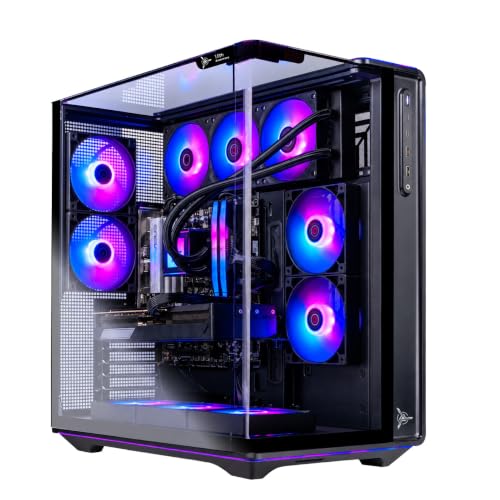
Best Balanced — Skytech Gaming PC Desktop, Ryzen 7 9800X3D, RTX 5070 Ti, Prism 5 Series
Strengths
- Frame delivery is its party trick: the 9800X3D keeps minimums high in exactly the crowded, chaotic scenes where lesser pairings stutter.
- A fully declared spec — DDR5-6000, Gen4 NVMe, 850W Gold ATX 3, 360mm AIO — that survives verification without asterisks.
- Wi-Fi 6 keeps connectivity current where several rivals in this roundup still ship older wireless.
Trade-offs
- The panoramic Prism 5 case is wide and unapologetically a display piece; small desks need measuring first.
- At native 4K the 5070 Ti asks DLSS to share the workload in the heaviest releases.
- ARGB presentation is all-or-nothing; there is no stealth configuration of this machine.
| Processor | AMD Ryzen 7 9800X3D |
|---|---|
| Graphics | NVIDIA GeForce RTX 5070 Ti |
| Memory | 32GB DDR5 6000 |
| Storage | 2TB Gen4 NVMe SSD |
| Power supply | 850W Gold ATX 3 |
| Cooling | 360 ARGB AIO |
| Operating system | Windows 11 |
Day to day, this is the machine that disappears into the games. Boot is quick, the desktop is silent at idle, and the gaming experience is defined by consistency rather than peaks — the quality players describe, inaccurately but tellingly, as “everything just runs well.” Its 1440p performance needs no qualification, and its 4K performance needs only the standard one about upscaling. As an ownership proposition it is the roundup’s easiest recommendation, because nothing about it requires an apology, an upgrade errand, or a workaround.
Best for: the buyer who wants the tier’s center of gravity in one purchase. / Not suited for: native-4K purists and minimalists.

Best Spec-for-Money Flagship — STORMCRAFT Phantom, Ryzen 7 9800X3D, RTX 5080
Strengths
- The pairing everyone wants — 9800X3D and RTX 5080 — on a B850 board with DDR5-6000 and 2TB of storage, without a big-brand markup shaping the parts list.
- 850W power and a 360mm AIO mean the flagship silicon is supported like flagship silicon.
- Keyboard and mouse in the box make it a genuinely complete arrival.
Trade-offs
- A smaller builder’s support operation is the known unknown; research recent owner experiences before ordering.
- The bundled peripherals are functional starters that most enthusiasts will replace within the year.
- Fit and finish are good rather than boutique; panel gaps and cable dressing reward the price, not the eye.
| Processor | AMD Ryzen 7 9800X3D (up to 5.2GHz) |
|---|---|
| Graphics | NVIDIA GeForce RTX 5080 |
| Memory | 32GB DDR5 6000MHz |
| Storage | 2TB SSD |
| Motherboard | B850 chipset |
| Power supply | 850W |
| Cooling | 360mm AIO |
The Phantom’s review writes itself around a single observation: on the specification sheet, it stands shoulder to shoulder with machines carrying far larger brand premiums, and in games the silicon cannot tell the difference. The 5080 makes 4K its home resolution, the X3D chip keeps frame pacing aristocratic, and the ownership experience differs from the big names mainly in the intangibles — support depth, resale recognition, the sheen of the unboxing. Buyers who price those intangibles honestly will find this the smartest money in the roundup; buyers who need them will not, and both are right.
Best for: spec-first buyers who want the flagship pairing undiluted. / Not suited for: buyers who want a large manufacturer’s warranty apparatus.
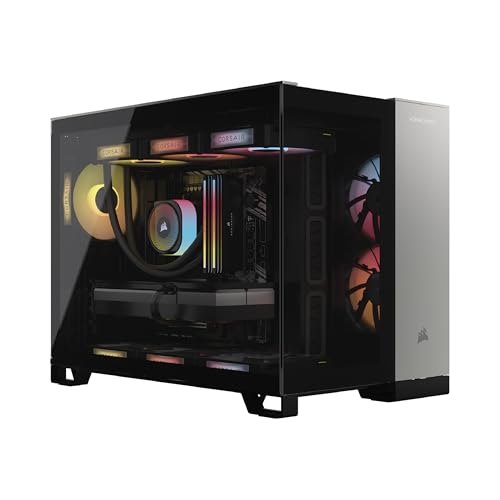
Best for Creators — Corsair Vengeance i5100, Intel Core i9-14900KF, RTX 5080
Strengths
- The parts list reads like a respected DIY build: Dominator Titanium RGB DDR5, in-house liquid cooling, standard layouts throughout.
- The i9-14900KF is the roundup’s productivity heavyweight alongside the Alienware, chewing through edits and renders the gaming chips handle merely well.
- Upgrade manners are the best here — Corsair sells the components you would naturally upgrade with, in the sizes this case expects.
Trade-offs
- The processor is a previous-generation flagship; extraordinary still, but the X3D machines out-game it in cache-sensitive titles.
- You pay for component pedigree — buyers indifferent to memory branding will find the same frames cheaper elsewhere in this roundup.
- Its personality is workstation-first in a lineup where most buyers shop games-first.
| Processor | Intel Core i9-14900KF (liquid cooled) |
|---|---|
| Graphics | NVIDIA GeForce RTX 5080 |
| Memory | 32GB Dominator Titanium RGB DDR5 |
| Storage | 2TB M.2 SSD |
| Operating system | Windows 11 |
Living with the i5100 is living with a machine that never feels like a compromise somebody else chose. It games at full 5080 strength, then turns around and edits the footage at a pace the gaming-specialist chips cannot match, and it does both while looking like equipment rather than decoration. Its review verdict is audience-shaped: for the hybrid user it may be the best machine on this page, and for the pure gamer it is a superb machine whose finest quality — those cores — sits idle during play. Know which user you are.
Best for: creator-gamers and upgraders who value component quality. / Not suited for: pure gamers chasing the last frame in cache-sensitive titles.

Best Brand Experience — Alienware Aurora Gaming Desktop, RTX 5080, Core Ultra 9 285
Strengths
- The ownership wrapper is the product: Dell’s warranty machinery, support reach, and the confidence of a machine a non-technical household can run for years.
- Core Ultra 9 plus RTX 5080 is the roundup’s most balanced split of gaming and serious application performance.
- Wi-Fi 7 and 2.5Gb Ethernet make it the connectivity leader here, and the chassis is the most living-room civilized.
Trade-offs
- One terabyte of storage in a 4K machine is the roundup’s clearest spec misstep; plan the second drive from day one.
- The Aurora’s design language trades some upgrade openness for its tidy, compact form.
- The brand premium is real money that buys no additional frames.
| Processor | Intel Core Ultra 9 285 |
|---|---|
| Graphics | NVIDIA GeForce RTX 5080 |
| Memory | 32GB DDR5 |
| Storage | 1TB SSD |
| Networking | 2.5Gb Ethernet, Wi-Fi 7 |
| Operating system | Windows 11 Home |
The Aurora reviews like a well-run hotel: nothing about the stay is the absolute best available, yet everything works, everyone knows their job, and problems have a number to call. Performance needs no defense — the 5080 sees to 4K and the Ultra 9 sees to everything else — so the ownership story becomes the review: quiet manners, a footprint that suits real rooms, and support that treats a fault as their errand rather than your education. Add the storage it should have shipped with and it is the roundup’s most complete mainstream flagship, at a mainstream-flagship price.
Best for: buyers who want flagship performance with a flagship company behind it. / Not suited for: inveterate tinkerers and storage-hungry libraries as shipped.


Best Without Limit — Skytech Gaming Legacy 4, Ryzen 9 9950X3D, RTX 5090
Strengths
- The RTX 5090 ends the performance discussion for this generation, and the 9950X3D is the one gaming chip that also carries a full sixteen-core productivity load.
- Specification as abundance: 64GB of DDR5-6000, 4TB of Gen4 NVMe, X870 platform, 1200W Gold ATX 3 power, Wi-Fi 7.
- It is the only machine here that asks nothing of the future — every plausible upgrade is already inside.
Trade-offs
- Its advantages concentrate where most players do not live: 4K high-refresh, maximum ray tracing, GPU compute. Below those altitudes it is magnificently unnecessary.
- Heat and power draw are the class’s highest; room and circuit planning apply.
- Flagship pricing means flagship depreciation when the next generation lands.
| Processor | AMD Ryzen 9 9950X3D |
|---|---|
| Graphics | NVIDIA GeForce RTX 5090 |
| Memory | 64GB DDR5 6000 |
| Storage | 4TB Gen4 NVMe M.2 SSD |
| Motherboard | X870 |
| Power supply | 1200W Gold ATX 3 |
| Cooling | 360 ARGB AIO |
| Operating system | Windows 11 |
Reviewing the Legacy 4 is an exercise in separating capability from relevance. The capability is beyond dispute — this is the fastest configuration in the roundup at everything, with the broadest workload range and the longest runway. The relevance is a question about your desk: with a 4K high-refresh or ultrawide panel, a streaming schedule, or creative GPU work, the machine justifies itself weekly; without them, it is a supercar on a school run, thrilling and faintly absurd. Our dedicated single-machine examination in High End Gaming PC Review covers the tier’s center; this flagship is its ceiling, and ceilings are for rooms built to need them.
Best for: 4K high-refresh players, streamers, and GPU-compute users. / Not suited for: 1080p/1440p players or tight budgets and small warm rooms.
The Wildcard — KOTIN Gaming PC Desktop, Ryzen 7 9800X3D, RTX 5070
Strengths
- The 9800X3D at the tier’s entry edge means CPU-bound smoothness is fully flagship even here.
- Its 11.3-inch smart display and 360mm liquid cooling give it a showpiece identity nothing else in the roundup attempts.
- Wi-Fi 7 and an 850W Gold supply are forward-looking specs at this level of the range.
Trade-offs
- The RTX 5070 is the weakest GPU in this roundup — a superb 1440p card that defines this as the tier’s floor, not its center.
- Storage is 1TB, which the roundup has already criticized elsewhere; the same advice applies.
- The in-case display is a delight or a distraction depending on the owner, and it is not removable.
| Processor | AMD Ryzen 7 9800X3D |
|---|---|
| Graphics | NVIDIA GeForce RTX 5070 12GB |
| Memory | 32GB DDR5 |
| Storage | 1TB SSD |
| Cooling | 360mm liquid cooler |
| Power supply | 850W 80+ Gold |
| Networking | Wi-Fi 7 |
| Operating system | Windows 11 |
The KOTIN is the roundup’s personality pick: a machine that spends part of its budget on being interesting. The screen in the case — system stats, artwork, whatever you feed it — is the sort of feature reviewers are professionally obliged to call a gimmick and owners reliably end up loving. Underneath the theater, the fundamentals are respectable: the right gaming CPU, proper cooling and power, current wireless. It earns its place as the high end’s front door, provided the buyer walks through it knowing the GPU, not the display, is where the next tier’s money went unspent.
Best for: 1440p players who want flagship CPU smoothness and a build with character. / Not suited for: 4K ambitions or storage-heavy libraries as shipped.
Comparison Table
| Machine | CPU | GPU | RAM | Storage | Character |
|---|---|---|---|---|---|
| Skytech Prism 5 | 9800X3D | RTX 5070 Ti | 32GB | 2TB | Balanced flagship |
| STORMCRAFT Phantom | 9800X3D | RTX 5080 | 32GB | 2TB | Spec-for-money |
| Corsair Vengeance i5100 | i9-14900KF | RTX 5080 | 32GB | 2TB | Creator’s build |
| Alienware Aurora | Core Ultra 9 285 | RTX 5080 | 32GB | 1TB | Brand experience |
| Skytech Legacy 4 | 9950X3D | RTX 5090 | 64GB | 4TB | No-compromise ceiling |
| KOTIN | 9800X3D | RTX 5070 | 32GB | 1TB | Personality pick |
The pattern across the table is the tier in miniature: processors cluster around two philosophies (X3D gaming specialists versus core-rich all-rounders), graphics cards ladder cleanly by resolution ambition, and the corners — where builders economize — are storage capacity and wireless generation, never the headline silicon. That is why the curated shortlist in High End Gaming PC Buying Guide and these reviews keep returning to the supporting spec: it is the only place the machines meaningfully differ once the GPU tier is chosen.
Keeping a Flagship Feeling New: Care and Optimization Notes
High end machines reward light, regular attention. Keep case filters on a monthly dust check and the radiator’s fins clear; a 360mm AIO that cannot breathe performs like a smaller cooler you did not pay for. Leave meaningful free space on the system drive — NVMe performance and Windows both prefer it — and let the graphics driver update on a monthly rhythm rather than daily, skipping the occasional troubled release that the community identifies within days. Verify memory speed after any BIOS update, since profiles occasionally reset, and re-run the first-evening checks from How To Set Up High End Gaming PC after major Windows updates. None of this is burdensome; it is the difference between a machine that feels flagship in year three and one that merely was.
Problem: frame rates sag months after purchase in a game that used to fly. → Fix: check temperatures first (dust is the usual culprit), then confirm the memory profile survived any BIOS or Windows update, then look for a driver or game patch regression before suspecting hardware.
Problem: the system drive is nearly full and everything feels slower. → Fix: move the capture folder and the least-played titles to a second drive or an external archive, uninstall launchers’ cached installers, and restore a healthy margin of free space — flagship storage should be managed like the performance component it is.
Common Mistakes When Reading Reviews in This Tier
- Comparing averages across reviews tested on different games and settings. Cross-review numbers are vibes, not data; compare specification and character instead.
- Treating the flagship as the recommendation. The 5090 machine is the ceiling of the class, not its default answer — the analysis in Is A High End Gaming PC Worth It exists precisely to police that instinct.
- Ignoring the storage and wireless lines because the GPU line shines. In this roundup, those quiet lines are where the real differences live.
- Buying the review’s winner for a different monitor. Every verdict here is resolution-shaped; a winner at 4K is an extravagance at 1080p.
- Forgetting peripherals in the “which is best” math. A tier-appropriate mouse from Best Gaming Mouse For Fps improves high-refresh play more than a half-tier of GPU bought instead.
Final Recommendation
Start from the Prism 5 unless your needs point elsewhere: it is the class’s balance point. Move to the Phantom for the same philosophy with a 5080’s 4K strength, to the Corsair if creative work shares the desk, to the Alienware if support and polish are worth a premium and a storage errand, to the Legacy 4 only if your display and workload can spend what it offers, and consider the KOTIN when personality and a 1440p target meet. Six machines, six honest answers — the tier’s variety is a feature, and matching it to your actual gaming life is the whole game, as the ledger in High End Gaming PC Pros And Cons argues from the other direction.
Frequently Asked Questions
Which high end gaming PC is best overall right now?
For most buyers, the balanced RTX 5070 Ti configuration around AMD’s 9800X3D — the Prism 5 pattern — because it maximizes gaming quality per dollar at 1440p and remains credible at 4K. “Best” moves quickly with resolution: at native 4K the 5080 machines take the title.
Are RTX 5080 PCs worth the step up from 5070 Ti models?
If your monitor is 4K, yes — that is the step that makes 4K the default rather than the negotiation. At 1440p the step buys headroom you will rarely see, and the money usually serves better in the display or peripheral budget.
How much do brand and support actually matter in this tier?
More than in cheaper tiers, because the purchase price at risk is larger and the machines are kept longer. A strong warranty operation and painless returns are worth a measurable premium; they are not worth an unlimited one, which is why this roundup prices the intangibles per machine rather than by logo.
Do these reviews account for noise and heat?
Yes — every machine here uses a 360mm-class liquid cooling solution and behaves civilly at idle, with load noise proportional to its GPU tier. The 5090 flagship is the warmest citizen of the group; plan its room accordingly.
Why do several reviewed machines ship with only 1TB of storage?
Because storage is the least visible line at the moment of sale and the most felt line a year later. It is a builder economy, not a technical necessity, and this roundup flags it wherever it appears so buyers can plan the inexpensive second drive from the start.
Should I buy the previous flagship generation on discount instead?
Sometimes. A discounted prior-generation flagship with a full, honest specification can be the value play of the season. Verify the exact components with the same rigor as a current model, confirm warranty terms, and compare against the current tier’s entry — the 5070 Ti class has reset what “entry to the high end” delivers.
How were the machines in this roundup selected?
By specification verification and role coverage: each machine’s components were confirmed against current listing data, and the six were chosen to represent the tier’s real decision points — GPU ladder, CPU philosophy, brand versus builder, and the tier’s entry edge — rather than to crown a single winner.
Two CPU Philosophies, Reviewed as Daily Drivers
Step back from individual machines and the roundup resolves into an argument between two ideas of what a flagship processor is for. The AMD X3D idea — embodied by the Prism 5, the Phantom, the Legacy 4, and the KOTIN — holds that a gaming PC’s processor exists to serve frames: cache above cores, minimums above averages, specialization above versatility. Living with these machines means gaming performance that never asks forgiveness, paired with productivity that is merely excellent. The Intel flagship idea — the Corsair’s i9 and the Alienware’s Core Ultra 9 — holds that a flagship is a general-purpose instrument: cores for the render queue, muscle for the compile, and gaming performance a half-step behind the specialists at worst. Living with these machines means the workday and the game night are equally uncompromised, with the small print that in the most cache-sensitive titles, the X3D systems hold an edge their owners can feel. Neither philosophy is the roundup’s winner, because the philosophies answer different lives. What the reviews above establish is that both are executed honestly at this tier — there is no bad flagship processor in this group, only mismatched ones, and the mismatch is always the buyer’s biography rather than the silicon’s quality. Verification records for every machine in this roundup are maintained through reviewstook.com so that the specifications quoted here can be re-checked against current listings as configurations evolve.
The GPU Ladder, Reviewed by Resolution
The graphics ladder, experienced rather than benchmarked, has a distinct texture at each rung. At the RTX 5070 rung — the KOTIN’s rung — 1440p is a pleasure and 4K is a rumor; the machine feels flagship in every way except the resolution ceiling, which is exactly the trade its price describes. At the 5070 Ti rung, the texture changes: 1440p becomes unconditional, and 4K arrives as a negotiated settlement that DLSS makes genuinely enjoyable — the rung where the tier’s value concentrates, and the one most of this roundup’s readers should inhabit. At the 5080 rung, the negotiation ends at 4K; the remaining compromises move to the extreme edges of ray tracing and refresh rate, where most players never travel. At the 5090 rung, the ladder simply stops — the Legacy 4’s owners are not buying frames so much as the permanent absence of the settings conversation, plus a second career’s worth of GPU compute. Read as a ladder, the roundup’s advice compresses to one line: buy the rung your monitor stands on, because the rungs above it are priced for rooms you do not live in.
Ownership in Year Two: What Changes and What Doesn’t
Reviews end at purchase; ownership compounds. Projecting these six machines into their second year, the differentiators shift in instructive ways. The specification honesty that defined this roundup’s judgments pays its dividend quietly: the machines with 2TB of storage and 32GB of memory simply continue, while the 1TB machines have by then either gained their second drive or taught their owners library triage. Cooling systems meet their first real test as dust accumulates — the 360mm radiators have margin to spare, provided the filter rhythm in the care section above became habit. Warranty, the invisible specification, becomes the visible one for the statistical few with a fault, and there the brand machines’ machinery earns its premium in days rather than debates. Resale values diverge along the same lines as purchase prices: the named flagships hold a floor that the value builders’ machines, for all their spec-sheet virtue, do not quite match. None of this reverses a single verdict in this roundup. It deepens them: the machines recommended above were recommended as purchases, and year two is where purchases are graded.
What We Excluded From This Roundup, and Why
A roundup is defined by its omissions as much as its inclusions, and three categories of machine were deliberately left out. The first is the false flagship: systems pairing an upper-tier GPU badge with 16GB of memory, a single terabyte or less of storage presented as generous, or a power supply the listing refuses to name. They review poorly not because any single compromise is fatal but because the tier’s entire promise is the absence of rationing, and a machine that rations is a mainstream PC in flagship dress. The second is the unverifiable listing — configurations whose exact components could not be confirmed against current data, however glossy the presentation. In a tier where one swapped component is a different machine, unverifiable is unreviewable. The third is the previous generation’s clearance stock, excluded not from snobbery but from scope: those machines are a value analysis of their own, governed by discount depth rather than by the tier’s current logic. What remains is the six above — the current high end, honestly specified, each earning its place by surviving the same verification the excluded machines failed.
Noise, Measured in Rooms Rather Than Decibels
Roundups quote fan noise in laboratory terms; owners experience it in rooms, so here is the roundup’s acoustic report translated. At idle and desktop work, all six machines are effectively silent citizens — the kind of quiet that lets a tower share a bedroom or a study without comment. Under gaming load the class divides by GPU tier rather than by brand: the 5070 and 5070 Ti machines settle into a soft airflow presence that speakers at normal volume cover completely, the 5080 machines add a register that headphones erase and open rooms notice mildly, and the 5090 flagship makes the honest sound of several hundred watts being shown the door — never harsh, never whining, but present, in the way weather is present. None of the six exhibits the acoustic sins that actually ruin ownership: no coil-whine chorus at menu screens, no fan curve that hunts up and down at idle, no pump gurgle at startup. The practical advice the roundup converges on is placement rather than selection — every machine here rewards a ventilated spot off the desktop’s immediate echo chamber — and one behavioral note: the quietest machine in this group, on a given evening, is whichever one is furthest from its thermal ceiling, which is a property of the workload you give it as much as the cooler it wears.
Support and Warranty, Reviewed as a Feature
Because these machines are kept for years and priced like appliances, this roundup reviews their support the way it reviews their storage: as a specification with real variance. The Alienware sits at one pole — a warranty and support operation of genuine scale, where a fault becomes a case number, a courier, and a timeline. The Corsair occupies the connoisseur’s middle: a company whose component business means its support staff speak fluent hardware. The volume builders, Skytech foremost among them here, answer with smaller teams and, in owner reports, a more variable tempo — excellent when your case lands with the right person, slower when it does not. The smaller names, STORMCRAFT and KOTIN, carry the thinnest public track records, which is not a verdict but a research assignment: their machines earned their places on specification, and a prudent buyer spends twenty minutes reading recent owner experiences before relying on their support for five years. The Empowered PC pattern — an explicitly multi-year warranty stated in the listing itself — deserves emulation across the class, because it prices the promise where buyers can compare it. Warranty is the only component in these reviews that cannot be upgraded later; weight it at purchase accordingly.
If We Could Keep Only One: The Roundup’s Forced Choice
Roundups are often accused of recommending everything, so here is the discipline of the forced choice, with the reasoning exposed. If this page could keep exactly one machine for a hypothetical reader with a 1440p high-refresh monitor, a mixed library, some streaming, and a five-year horizon, it keeps the Prism 5 — not because it tops any single category, but because it is the only machine here that never asks its owner to explain a compromise. The Phantom is faster at 4K and cheaper-feeling in the support column; the Corsair works harder and games a half-step behind the specialists; the Alienware supports better and stores less; the Legacy 4 does everything and bills accordingly; the KOTIN charms and ceilings lower. Change the hypothetical — a 4K panel, a rendering business, a non-technical household — and the forced choice moves, which is precisely the roundup’s argument: the class is healthy enough that “best” is a function, not a name. But functions need a default value, and for the median serious buyer, the balanced X3D and 5070 Ti configuration is this generation’s.
How These Reviews Will Age, and How to Re-Read Them
A roundup is a photograph, and this one declares its exposure date: specifications were verified against current listings at the time of writing, and configurations in this market drift — a storage bump here, a wireless refresh there, a variant quietly substituted under a familiar product name. The durable content of these reviews is therefore not the spec tables but the characters they document: which builders ration storage, which brands sell support, which philosophies animate which product lines. Those characters change slowly, across generations rather than quarters. The perishable content is the exact configuration, and the reader’s defense is the verification habit this cluster teaches everywhere: before acting on any review in this roundup, re-check the live listing’s full specification against the table printed here, and treat any line that has changed as a new machine requiring new judgment on that line alone. Reviews age; methods should not. A reader who absorbs the method — specification honesty first, role fit second, brand intangibles priced explicitly — can re-run this entire roundup in an afternoon, in any future season, and reach conclusions as reliable as ours. That transfer of method, more than any individual verdict, is what a roundup of expensive machines owes its audience.
Build Quality, Case by Case
Photographs flatten the differences that hands discover, so this roundup closes its per-machine notes with the tactile report. The Alienware’s chassis is the most deliberately designed object here — compact, finished, and clearly the product of an industrial design department — with the trade, noted throughout, that its tidiness is partly achieved by making the interior its own world rather than the standard one. The Corsair feels like equipment from a company that sells components to people who notice components: panel fit, cable discipline, and fastener quality all read as considered. Skytech’s three entries share a house style of showcase glass and tidy runs, with the Legacy 4’s flagship brief showing in its cable work and the Prism 5’s panoramic case being the widest physical presence in the group relative to its tier. The STORMCRAFT and KOTIN cases are the roundup’s honest value entries — well-assembled, presentable, and a half-step behind the leaders in the small graces of grommets, tolerances, and finish consistency that photographs never show and owners’ hands report within a week. None of the six is badly built; the spread is between good and excellent, and it correlates with price in the fair, unglamorous way that suggests the market, at this tier, is mostly working.
The Roundup’s Buying Calendar: When Each Machine Makes Most Sense
Reviews are read at particular moments, and the moment changes the recommendation’s weight. At a new GPU generation’s launch, the outgoing configurations in this roundup become the value story — the Prism 5 and Phantom patterns especially, whose balanced specifications age into discounts gracefully. During the big seasonal sales windows, the brand machines’ premiums compress the most, which is when the Alienware’s support-led case becomes hardest to argue against. When component markets spike — as memory and graphics pricing periodically do — the prebuilt value proposition inverts entirely and every machine here deserves a fresh look against the cost of assembling its equivalent. And for the buyer replacing a dead machine this week, the roundup’s advice compresses to its shortest form: the balanced configuration, from whichever of these sellers can deliver it soonest, because a week of gaming lost is a cost no discount repays. Machines are bought in time as well as in tiers, and a review that ignores the calendar has answered only most of the question.
The Reader’s Shortlist: Condensing Six Reviews Into Three Decisions
Roundups owe their readers a compression, so here is this one reduced to the three decisions that actually confront a buyer. Decision one is resolution, and it is made by your monitor rather than by these reviews: 1440p sends you to the Prism 5 and KOTIN end of the table, 4K sends you to the Phantom, Corsair, and Alienware, and 4K high-refresh sends you to the Legacy 4 alone. Decision two is philosophy, and it is made by your workload: gaming-first lives choose the X3D machines, split lives choose the Intel flagships, and the honest audit of a week’s actual computer use settles it in five minutes. Decision three is temperament, and it is made by your relationship with risk and polish: the support-maximal buyer lands on the Alienware, the specification-maximal buyer on the Phantom or Prism 5, and the completeness-maximal buyer on the Legacy 4. Every other difference among the six — case aesthetics, bundled peripherals, wireless generations — is a tiebreaker to be enjoyed after the three decisions land, not a substitute for making them. Readers who arrived wanting a single name have, by now, something more useful: the three questions whose answers name the machine themselves, in this season and in every season after it, whatever badges the next roundup reviews.
Peripheral Pairing Notes From the Roundup’s Desk
A roundup of towers ends, properly, at the edge of the desk — because the machines reviewed here are uniformly fast enough to expose whatever they are paired with. The consistent finding across the six is that input hardware becomes the experience’s limiting reagent at this tier: a high-refresh panel fed by a flagship will render a budget mouse’s polling and sensor behavior as faithfully as it renders the game, which is why this cluster’s peripheral guidance is not an upsell but a completion of the specification. The pairing logic by machine is brief. The 1440p high-refresh systems — Prism 5 and KOTIN — gain most from the fastest, lightest input hardware, since their owners’ games reward it directly. The 4K systems gain most from display-adjacent spending: a quality controller for couch play, a headset that does their audio justice. The Legacy 4, characteristically, justifies everything and therefore prioritizes nothing, which is its own kind of buying advice — the flagship owner’s peripheral budget should follow their games, not their tower’s example. And across all six, the humble mouse pad and the monitor arm outperform their prices in daily satisfaction, the two purchases owners in this tier most consistently report wishing they had made sooner. The tower is the loudest line in the budget. It is rarely, in the end, the line that decides how the desk feels.
A Word on the Machines’ Shared Platform Moment
One context unifies this roundup in a way future readers should understand: all six machines were reviewed at a particular, favorable moment in the platform cycle. AMD’s AM5 socket is mid-life with a roadmap ahead of it, DDR5 is the settled memory standard rather than a transition tax, ATX 3 power supplies have become the norm rather than the exception, and the current graphics generation is established enough that its drivers and features are mature. That timing flatters every machine here in the same way — the upgrade paths are real, the standards are current, the early-adopter penalties have been paid by earlier buyers. Roundups written at platform transitions read differently, full of caveats about sockets at their end and standards in their infancy, and part of this class’s collective strength is that it asks for almost none of those caveats. The reader’s takeaway is not that any season is a bad season to buy — the cluster’s advice has always been to buy when the need is real — but that this season’s machines carry an unusually clean bill of platform health, and that the reviews’ confidence in their longevity is partly the calendar’s gift. Spend it knowingly: the platform moment is a feature of these six machines, and it will not be a feature of their successors’ roundup in quite the same way.
Corrections and Configuration Drift: A Standing Note
This roundup closes with a promise about its own maintenance, because reviews of configurable products decay in a specific way that readers deserve to have named. Builders revise configurations under stable product names — a storage tier changes, a wireless card is refreshed, a power supply is substituted — and a review written against January’s machine can misdescribe June’s in a single line. The defenses are the ones this page has practiced throughout: every specification here was verified at writing, every verdict leans on character and role more than on any single component line, and the comparison tables are labeled with the configurations they describe rather than with the product names alone. Readers acting on this roundup months after its writing should re-verify the lines that matter to them against the live listing — a five-minute discipline this cluster teaches in every guide it publishes — and should treat any drift they find as a change in the machine, not as an error in the method. Reviews that admit how they age age better. This one intends to.
The Roundup’s Single Sentence
Asked to compress six reviews into one sentence for the reader at the door: buy the balanced 9800X3D and RTX 5070 Ti configuration unless your 4K monitor argues for a 5080 machine, your creative workload argues for an Intel flagship, your household argues for Alienware’s support, or your 4K high-refresh ambitions argue for the 5090 — and in every case, verify the full specification before the money moves. That sentence, plus the verification habit, is the roundup; everything else here is its evidence.


