Disclosure: As an Amazon Associate, reviewstook.com earns from qualifying purchases. Links on this page are affiliate links at no extra cost to you; prices and availability change frequently, so check Amazon for the latest.
How to Choose a High End Gaming PC Without Getting Burned by the Spec Sheet
Learning how to choose a high end gaming PC is mostly learning how to read past the marketing. Every listing in this tier leads with the two components you already know are fast — a flagship graphics card and a big-name processor — and then goes quiet about the components that decide whether the machine stays fast: the power supply, the cooler, the memory configuration, the storage generation. The result is a market where the most expensive mistake is not buying the wrong GPU but buying the right GPU trapped inside the wrong computer. This guide turns the decision into a sequence of checks you can perform on any listing, in order, so that by the end you know exactly what a given high end gaming PC will do for the games you play, on the monitor you own, for the years you intend to keep it.
Work through the steps in order. Each one eliminates a category of bad purchases, and the earlier steps matter more than the later ones: a machine that fails step one cannot be rescued by anything further down the list.
In this guide
Key Takeaways
- Decide your target resolution and refresh rate before looking at a single product page; the monitor defines the machine, never the reverse.
- Evaluate in a fixed order: GPU tier, then CPU, then memory and storage, then power and cooling, then warranty and case.
- Treat any spec the listing refuses to state — PSU wattage, memory speed, SSD generation — as a spec that would not flatter the machine.
- Prefer two sticks of DDR5-6000 and at least 2TB of NVMe storage; both are expensive to fix later relative to choosing them now.
- Shortlist three machines maximum, then let warranty, noise, and the day’s pricing decide between near-equals.
Step 1: What Resolution and Refresh Rate Are You Actually Feeding?
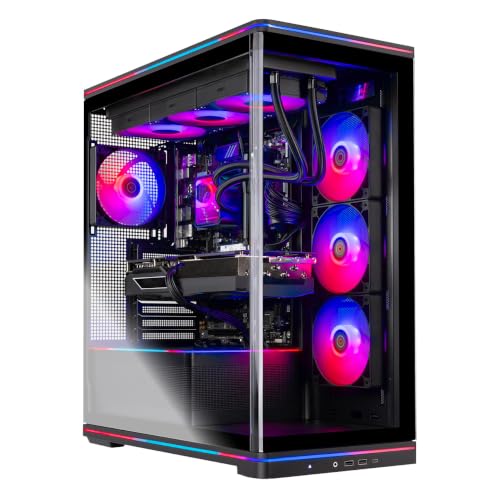
Write down your monitor’s resolution and refresh rate, or the one you are buying alongside the PC. This single fact sorts the entire market. At 1080p, even competitive high-refresh play tops out quickly, and the upper GPU tiers in this guide are wasted money. At 1440p, an RTX 5070-class card is the center of gravity: a configuration like the Skytech Gaming PC Desktop with Ryzen 7 9800X3D and RTX 5070 (Blaze 5 Series, 32GB DDR5, 2TB SSD) is honestly specified for exactly that job, and its 9800X3D processor keeps frame pacing tight in the esports titles where 240Hz panels earn their keep. At 4K, begin at the RTX 5080 and do not apologize for it. At 4K high-refresh or on ultrawide panels, the RTX 5090 tier stops being indulgence and starts being the correct tool.
Be honest about the games, too. A library of competitive shooters and older titles asks far less of a GPU than a library of flagship single-player releases with ray tracing. The same machine can be overkill for one player and merely adequate for another, which is why “how powerful is it?” is always the wrong first question and “powerful enough for what?” is the right one. Readers who want the product-first view can cross-reference this method against the curated picks in High End Gaming PC Buying Guide.
Step 2: How Do You Rank the Graphics Card Tiers?
Within the current generation, think of the tiers as resolution assignments. The RTX 5070 owns 1440p. The RTX 5070 Ti stretches from strong 1440p into upscaling-assisted 4K. The RTX 5080 owns native-leaning 4K at high settings. The RTX 5090 owns 4K at high refresh, maximum ray tracing, and any workload — rendering, AI, VR — that eats GPU memory and compute for breakfast. Two cautions apply. First, memory capacity travels with tier, and high-resolution texture loads increasingly punish cards that skimp on it. Second, laptop-style naming tricks do not apply here, but variant confusion does: always confirm the exact card on the listing, because builders sell multiple GPU options under a single product page and the default selection is rarely the flagship.
A useful reference point for the top of the stack is the Empowered PC Panorama XL with RTX 5090 and Ryzen 9 9950X3D — 64GB of DDR5, a 2TB Gen4 SSD, 360mm liquid cooling, Wi-Fi 7, and a three-year warranty. You may never buy at that altitude, but studying its spec sheet teaches your eye what “nothing rationed” looks like, which makes rationing elsewhere easier to spot.
Step 3: Which Processor Should You Pair With It?
The processor’s gaming job is to never be the reason a frame is late. AMD’s X3D line — the Ryzen 7 9800X3D above all — is purpose-built for that job, using stacked cache to keep minimum frame rates high. It is the default recommendation for a gaming-first machine, and its presence across most of this guide’s example systems is no coincidence. Step up to the Ryzen 9 9950X3D if the same machine must also render, compile, or edit seriously; it keeps the gaming cache and adds a full sixteen cores. Intel’s flagship Core Ultra and Core i9 parts make their case on mixed workloads and specific platform preferences. What to avoid at this tier is a mismatch in either direction: a flagship GPU chained to a mid-range CPU will stutter in exactly the CPU-heavy scenes benchmarks love to hide, while a flagship CPU behind a mid-range GPU is money spent watching the graphics card work alone.
Step 4: How Much Memory and Storage Is Enough?
Thirty-two gigabytes of DDR5, in two sticks, at DDR5-6000 speeds on AMD platforms. That sentence resolves the memory question for nearly every buyer in this tier. Sixteen gigabytes — still found in some glossy high end listings — is the single most common false economy in the segment; it saves the builder a little and costs you stutter in memory-hungry titles plus every background app you run. Sixty-four gigabytes is for the creator-gamer hybrids and the flagship tier, where it appears in machines like the Panorama XL above.
Storage follows the same logic. Two terabytes of NVMe is the floor for a machine bought to hold a modern library; one terabyte is a plan to delete games monthly. Check the generation if the listing states it — Gen4 drives are the current mainstream, and the difference matters less than capacity — and check whether a second M.2 slot exists for later expansion. A well-chosen example of the balanced spec is the Thermaltake Reactor 9880S, which pairs the 9800X3D and RTX 5080 with 32GB of DDR5-6400 RGB memory and 2TB of NVMe storage: every line of the sheet pulls its weight, which is precisely the pattern you are screening for.
Step 5: Why Do the Power Supply and Cooler Deserve Veto Power?
Because they are the two components whose failure modes are silence and heat rather than an obvious spec gap. An undersized or low-quality power supply behind a flagship GPU risks shutdowns under transient load spikes and constrains every future upgrade; look for 850W or more, an 80+ Gold rating, and ATX 3.x compliance on 5080-class machines, and four-figure wattage on 5090 builds. Cooling is the other silent thief: a flagship processor under a long gaming-and-streaming session will reduce its own clocks to survive inadequate cooling, and you will experience that as a machine that benchmarks brilliantly for ten minutes and disappoints for three hours. A 360mm liquid cooler is the going standard in this tier for good reason.
The screening rule is simple: if a listing will not tell you the PSU wattage or the cooler type, assume the answer is the cheapest one that fits, and price the machine accordingly — or walk away. Builders who fit good hardware say so, loudly, in the title itself. Contrast the listings in this guide: the serious ones volunteer “850W GOLD ATX 3 PSU, 360 ARGB AIO” before you even click.
Step 6: Prebuilt, Boutique, or Big Brand — Which Seller Fits You?
The same components arrive wrapped in three different promises. Big brands such as Alienware and MSI sell support infrastructure: deep warranty operations, easy returns, and machines like the MSI Aegis ZS with Ryzen 9 9900X and RTX 5080, which adds liquid cooling, Wi-Fi 7, bundled peripherals, and a DIY-friendly layout to the brand reassurance. Volume builders such as Skytech and iBUYPOWER sell parts-per-dollar; the iBUYPOWER Element with Ryzen 9 7900X and RTX 5070 shows the pattern — a strong last-generation flagship CPU paired with a current GPU, 32GB of DDR5, and a keyboard and mouse in the box, aimed squarely at buyers who comparison-shop the spec sheet. Boutiques sell fit, finish, and warranty length. None of these is the “smart” choice in the abstract. The smart choice is the one whose promise matches what you actually value, bought with open eyes about what it does not promise.
Two practical checks apply to every seller. First, confirm the warranty term and whether it covers the whole system or reverts to per-component terms. Second, confirm the return window, and plan to stress-test within it — the method in How To Set Up High End Gaming PC doubles as an acceptance test for a new machine.
Step 7: How Do You Compare Two Finalists That Look Identical?
Line up the full sheets and hunt the differences builders hope you will not weigh: memory speed and stick count, SSD capacity and generation, PSU wattage and rating, cooler size, Wi-Fi generation, motherboard chipset, and the number of free slots and bays. Then weigh the intangibles with real money values: an extra year of warranty, a quieter cooler, a case that fits your space. If the sheets truly tie, the tie-breakers in order are warranty, noise, upgrade room, and only then the day’s price gap. Readers weighing the decision emotionally as much as technically will find the honest ledger in High End Gaming PC Pros And Cons useful at exactly this point.
Troubleshooting Your Shortlist: Problems Buyers Hit Before Checkout
Problem: two listings show the same product name but different prices. → Fix: open both configuration selectors. Builders sell multiple variants under one page, and the difference is almost always a different GPU, half the storage, or a lesser CPU hiding behind the same headline photo.
Problem: the title says “RTX 5080” but the spec table is vague everywhere else. → Fix: scroll to the full specification section and the Q&A; if PSU, memory speed, and SSD capacity remain unstated, treat the machine as unrated and compare it against fully specified rivals like those in High End Gaming PC Reviews instead.
Problem: a cheaper machine matches your finalist except for 16GB of RAM. → Fix: price a matching 32GB DDR5 kit and the half hour to install it, then compare honest totals. Sometimes the “cheaper” machine is a genuine route in; sometimes the gap closes entirely and the properly specified machine wins outright.
Problem: you cannot tell whether you need the 5080 or the 5090. → Fix: name your three most-played games and your monitor. If none of the three is a ray-traced flagship title and the panel is 1440p or 4K/60, the 5080 tier is your ceiling of usefulness; the 5090 earns its premium at 4K high-refresh, ultrawide, VR, and in creative GPU workloads — the full argument is laid out in Is A High End Gaming PC Worth It.
Common Mistakes When Choosing
- Starting from a product instead of a monitor. Every wrong high end purchase begins as a great deal on the wrong tier.
- Comparing only CPU and GPU columns. The supporting spec is where value hides and where corners are cut.
- Trusting the default variant on a multi-configuration listing. Verify the exact configuration in the cart, not the headline.
- Paying for 64GB of RAM “for gaming.” Games do not need it yet; creators might. Buy it for a reason or not at all.
- Ignoring noise until the machine is on your desk. Cooling quality is an everyday quality-of-life spec, not a benchmark footnote.
Final Recommendation
Choose in the order this guide is written: display first, GPU tier second, X3D-class processor third, 32GB and 2TB as non-negotiable floors, and power and cooling as veto-wielding checks. Apply that sequence and the market’s noise falls away — you will find that only a handful of machines survive all seven steps, and choosing among survivors is easy. For the curated result of running exactly this process, see our buying guide for the cluster; for first-person impressions of what living with these machines is like, High End Gaming PC Review is the natural next read. Complete the setup with peripherals that do not bottleneck the experience — many readers start with Best Gaming Mouse For Fps once the tower decision is made.
Frequently Asked Questions
How do I choose a high end gaming PC if I have never bought one before?
Follow the sequence: fix your monitor target, pick the GPU tier that serves it, require an X3D-class or flagship Intel processor, set 32GB of DDR5 and 2TB of NVMe as floors, and reject any listing that hides its power supply or cooler. That checklist, applied literally, prevents nearly every common bad purchase in this tier.
What is the most important spec in a high end gaming PC?
The graphics card, because it sets the resolution and settings ceiling. The processor is second, governing frame pacing and minimum frame rates. Everything after that is about sustaining the first two — which is why under-specified power, cooling, memory, or storage can quietly undo an expensive GPU.
Should I wait for the next GPU generation instead of buying now?
Only if a launch is genuinely imminent and your current machine still serves you. High end hardware holds its capability for years, and the enjoyment gap between playing now on a 5080-class system and waiting a season for a successor is real. Buy the tier your monitor needs when you need it.
Is it better to choose a big brand or a smaller builder?
It is better to choose the promise you value: brands sell support depth and painless warranty handling; smaller builders sell more hardware per dollar. Both ship excellent and mediocre machines, so judge the individual configuration — full spec, warranty term, return window — rather than the logo.
How can I tell if a listing is hiding a weak component?
Look for absence. A listing that trumpets its GPU and CPU but never states PSU wattage, memory speed, or SSD capacity is telling you those parts would not help the sale. Fully specified listings — wattage, ratings, cooler size, chipset — are the segment’s honesty signal.
Does the motherboard chipset matter in a prebuilt?
Moderately. Current chipsets such as AMD’s B850 and X870 bring current connectivity, memory support, and upgrade paths; the X870 tier adds I/O and power-delivery headroom that matters most on flagship CPUs. It rarely justifies a decision alone, but it breaks ties between otherwise equal machines.
What should I check first when the PC arrives?
That the configuration inside matches the configuration you ordered: GPU model, memory capacity and speed, SSD size, all visible in Windows within minutes. Then run the full first-evening routine — updates, drivers, refresh rate, memory profile, and an hour of your heaviest game — while the return window is at its widest.
Step 8: Will It Fit Your Desk, Your Room, and Your Life?
Specifications end at the case door; ownership happens in a room. Full towers carrying 360mm radiators are wide, tall, and heavy, and panoramic glass designs are wider still. Measure the intended home — including the clearance the intakes and exhausts need — before the machine chooses a home for you, usually the floor, where dust lives. Consider the room’s thermal reality: a flagship under evening load is a small space heater with opinions, and a small, sun-facing room will register that. Consider the household: a machine that shares a wall with a nursery or a home office used for calls carries an acoustic budget alongside its performance budget. None of these factors appears on a listing page, and all of them appear in owner reviews within a month. The listings gathered through reviewstook.com research for this cluster include compact and console-sized alternatives for exactly this reason — a smaller machine that fits your life will be used and loved more than a flagship that wages war on it.
Step 9: How Do You Read Reviews and Benchmarks Without Being Misled?
Benchmarks are measurements of someone else’s test scene, and the gap between that scene and your library is where disappointment breeds. Three reading disciplines protect you. First, privilege minimum and 1%-low frame rates over averages wherever both are published; they describe the stutter you will actually feel. Second, match the test to your reality — a review conducted at 4K with a flagship CPU tells a 1440p buyer on a different platform almost nothing transferable. Third, distrust any single source’s outlier result, in either direction, until a second source reproduces it; driver versions and test scenes move numbers by margins larger than the gaps between rival machines. Reviews earn their keep on the unbenchmarkable qualities instead: noise character, build care, support behavior, the honesty of the delivered configuration. That is the layer this site’s own roundups, including High End Gaming PC Review, are written to document.
A Worked Example: Scoring Two Listings Against the Seven Steps
Theory sharpens when it touches real listings, so run the sequence against two contrasting shapes from the current market. The first is a fully declared flagship pattern: X3D processor named in the title, GPU tier stated precisely, DDR5-6000 speed printed, 2TB storage capacity printed, 850W Gold ATX 3 supply and 360mm cooler both volunteered. That listing passes steps one through five on its title alone, and your remaining work is seller diligence and price. The second pattern leads with an even shinier GPU claim, then goes vague: memory listed without speed or stick count, storage without capacity in the headline spec block, power supply and cooler absent entirely, wireless generation unstated. That listing has failed the transparency test at step five regardless of what its GPU does in a benchmark, because every silence is a place a cost was cut. The lesson generalizes beyond these two shapes: in the high end market, the quality of a listing’s information is itself a product specification, and it correlates with the quality of the machine more reliably than any single component choice. Choose the seller who shows their work.
How Should the Budget Divide Across the Machine?
When a configuration lets you trade components against each other — a faster GPU against more storage, a flagship CPU against a longer warranty — a rough allocation logic helps. The graphics card should command the largest single share, because it sets the ceiling everything else serves. The processor takes the next share, with the X3D premium justified whenever gaming dominates the machine’s life. Memory and storage together should be bought to the floor this guide sets — 32GB and 2TB — and not beyond it with money the GPU tier needed; capacity is the cheapest thing to add later and the most expensive thing to over-buy now. Power and cooling should be treated as fixed costs of admission at the tier you chose, never as the trading chip. What remains — case, lighting, bundled extras, the showpiece features — is where personal taste legitimately rules, precisely because it is the only money in the machine that buys no performance at all. Buyers who allocate in that order rarely regret a configuration; buyers who allocate in reverse order own beautiful cases around compromised computers.
One Last Check: The Configuration in the Cart
The final step happens at checkout, and it catches more bad purchases than any other. Multi-variant listings default to whichever configuration the seller prefers to move, and that default is not always the one the headline describes. Before paying, read the cart’s configuration line the way you would read a contract: exact GPU model, exact CPU model, memory capacity, storage capacity. Screenshot it. When the machine arrives, verify the delivered hardware against that screenshot inside the return window — the setup routine elsewhere in this cluster is written to double as that verification. Five minutes of pedantry at each end of the transaction is the cheapest insurance in the entire high end market, and it converts the seven steps above from advice into a result.
The Monitor-First Method, Applied to Three Real Buyers
Abstract steps become obvious when they meet actual people, so consider three buyers who all arrived asking for “a high end gaming PC” and needed three different machines. The first plays competitive shooters on a 1440p 240Hz panel and streams twice a week. Her binding constraint is frame pacing at high refresh, which points at the strongest gaming processor available and a GPU one tier above her resolution’s minimum — the 5070 Ti class — with the encoder handling her stream. A 5090 would add nothing her panel can show her; the correct splurge in her budget is the chair, the mouse, and the second monitor for chat. The second buyer plays single-player releases on a 4K television from a couch, games with a controller, and edits family video monthly. His binding constraint is raw 4K throughput, which starts at the 5080, and his processor choice can relax toward the all-rounders because couch gaming at 60–120Hz does not stress frame pacing the way a 240Hz desk setup does. The third buyer is a flight-simulation devotee building around a VR headset and three screens. His constraint is minimum frame rate under the heaviest sustained load consumer software produces, and his honest answer is the flagship step — the one buyer in three for whom the ceiling tier is not indulgence but specification. Same shop window, same label on the door, three correct answers. The method in this guide exists because the question “which high end PC is best” has no content until the buyer’s display and library give it some.
Red Flags: Listing Language That Should Slow You Down
Certain phrases recur wherever a specification is being managed rather than disclosed. “Up to” attached to a processor speed is innocent — boost clocks are genuinely conditional — but “up to” attached to memory or storage quantities means the base configuration has less, and the headline is advertising a variant. Graphics described by family rather than model (“RTX 50-series graphics”) conceal the single most important spec in the machine. Power supplies described by color of their rating badge without wattage, coolers described as “advanced thermal solution,” and storage described as “lightning-fast SSD” without capacity or interface are all the same sentence wearing different clothes: the number would not help the sale. None of this proves a machine is bad; builders with clumsy copy exist. But at high end prices you are not obliged to decode anyone’s marketing, and the fully specified rival is one click away. Treat fluency as a feature. The sellers in this market who print “850W GOLD ATX 3 PSU, 360 ARGB AIO, DDR5 6000” in their titles are telling you something about their whole operation, and what they are telling you is good.
When the Right Choice Is to Wait, Downgrade, or Buy Used
A complete choosing method includes the exits. Wait when a graphics generation is weeks from launch and your current machine still plays your library — not because the new cards will be magic, but because the launch reprices everything beneath it within a month. Downgrade when the honest audit of your library shows one or two undemanding titles doing ninety percent of your play; a machine sized to your actual habits plus a funded monitor upgrade is a better purchase than a flagship sized to your aspirations. Consider the used and refurbished market when you are comfortable verifying hardware yourself: previous-generation flagships change hands at steep discounts as upgraders chase the new ceiling, and a verified, honestly specified used flagship is often the best value in the entire segment. What all three exits share is that they are decisions, made with the same seven steps, rather than defaults drifted into. The worst high end purchase is never the one a step behind the curve — it is the one bought without the audit, at the wrong tier, for a monitor that cannot use it.
Choosing for a Household, Not Just a Player
Many high end machines are shared infrastructure, and the choosing method bends accordingly. A household machine accumulates users: a partner’s photo library, a teenager’s game installs, a work-from-home profile with its own storage appetite and its own opinions about fan noise during calls. That reality argues for the storage ceiling over the floor — the 2TB minimum becomes a starting point rather than a target — and for the quieter cooling configurations even at a small performance premium, because a machine three people live with is judged by its worst roommate quality, not its best benchmark. It argues, too, for the brand-support end of the seller spectrum more often than a solo buyer needs: when the machine is the household’s computer, a warranty that returns it to service quickly is worth more than the frames a value builder adds. Run the seven steps with the household in the room and the shortlist often reorders itself — the support-led machines climb, the showpiece glass towers with their dust discipline slip, and the configuration that survives is the one that serves everyone who will ever sit at it. That is not a compromise of the method; it is the method, applied to the actual user base.
The Ten-Minute Version: A Checklist You Can Screenshot
- Monitor written down: resolution and refresh rate, current or firmly planned.
- GPU tier matched to that monitor: 5070 class for 1440p, 5070 Ti for 1440p high-refresh or assisted 4K, 5080 for 4K, 5090 for 4K high-refresh, ultrawide, VR, or GPU work.
- Processor is a gaming flagship or honest all-rounder: X3D for gaming-first, flagship Intel or 9950X3D for split workloads.
- Memory: 32GB DDR5 minimum, two sticks, speed stated (DDR5-6000 on AMD).
- Storage: 2TB NVMe minimum, second slot confirmed if your library is large.
- Power supply: wattage, rating, and ATX 3.x compliance all printed; 850W class for 5080 builds, four figures for 5090 builds.
- Cooling: named and sized — 360mm liquid on flagship processors is the going standard.
- Seller: warranty term and return window read, not assumed.
- Cart configuration read line by line before payment; screenshot saved.
- Arrival verification scheduled inside the return window.
Ten lines, and between them they prevent essentially every horror story the high end segment produces. Print them, pin them, and let any listing that fails one make its case to you personally — a few will deserve to pass anyway, and you will know exactly which rule you are bending and why, which is all that informed buying ever is.
Choosing Between AMD and NVIDIA Graphics at the High End
Most of this guide’s worked examples wear NVIDIA badges, because the current high end prebuilt market is stocked overwhelmingly with GeForce configurations — but a complete choosing method addresses the alternative honestly. AMD’s flagship Radeon tier competes on rasterized performance per dollar and, in several current configurations, on memory capacity at a given step of the ladder, which matters for high-resolution texture loads. NVIDIA’s counter-case rests on its upscaling and frame-generation ecosystem, its ray-tracing performance, and the breadth of its software features for streamers and creators, including the encoder that broadcasters standardize on. The choosing rule is workload-shaped, as always: a pure rasterized-gaming buyer at 1440p or 4K, indifferent to streaming features, should price the Radeon configurations seriously and let the full specification — memory, storage, power, cooling, the whole seven steps — arbitrate. A streamer, a ray-tracing enthusiast, or a buyer whose creative tools lean on NVIDIA’s stack has the decision made by the workload. What neither camp licenses is buying by logo: the market’s current Radeon flagships and GeForce flagships are both legitimate high end hardware, and the machine around the card will decide your ownership experience more than the card’s badge does.
How to Choose When Two People Share the Decision
Flagship purchases are often negotiated — with a partner, a parent, or the household budget itself — and the method bends usefully under negotiation. Translate specifications into the currency the other party values: years of service rather than frame rates, the second workload rather than the cache size, the warranty rather than the wattage. The cost-per-year framing is the negotiator’s best instrument, because it converts a frightening sticker into a modest annual figure honestly, provided the ownership horizon is real. Agree the monitor first, since it is the decision both parties can see, and let it arbitrate the tier dispute that usually follows. And settle the return-window plan together before ordering: a shared agreement about what would send the machine back converts a potential argument in week one into a checklist item. Machines bought by committee fail socially more often than technically; the seven steps, run jointly, are as much a peace treaty as a buying method.
Choosing a High End Gaming PC as a Gift or for a Younger Player
A meaningful share of flagship machines are bought for someone else, and the choosing criteria shift in three places. First, support weight rises: the recipient may not troubleshoot, so the brand end of the seller spectrum and the longest warranty earn premiums they do not command for a self-sufficient buyer. Second, physical fit matters more: a younger player’s room and desk argue for the tidier chassis and the quieter cooling, and against the panoramic glass towers that dominate this guide’s aesthetics. Third, the configuration should be bought complete — peripherals included, storage generous, nothing left as a follow-up errand — because a gift that requires three further purchases is a project wearing a ribbon. Run the same seven steps, weight those three factors, and resist the temptation to buy your own taste at flagship prices for someone else’s desk. The best gifted machine is the one that disappears into the recipient’s life, and disappearance is a specification too.
What “Future-Proof” Should and Should Not Mean in Your Decision
No phrase in the segment deserves more suspicion, or more careful rescue, than future-proof. Taken literally it is a lie: no machine is proof against the future, and the graphics card in any flagship bought today will be a mid-range card by the standards of a few years from now. Taken sensibly, it names a real property with three testable components. Platform longevity: is the processor socket one with a multi-generation roadmap, so a future CPU can drop into this board? Capacity headroom: are there spare memory slots, a second storage bay or slot, and power supply margin for the next graphics card’s appetite? Standardization: does the machine use ordinary, replaceable parts in ordinary sizes, so the future’s components physically fit its past? Score a candidate on those three and “future-proof” stops being a slogan and becomes a checklist — one on which the upgrade-friendly builds in this cluster’s guides score well and the sealed design pieces score honestly lower. Buy the property, never the phrase, and your machine’s relationship with the future will be as good as the present allows anyone’s to be.
The Decision Journal: A Five-Line Habit That Prevents Regret
Before the order goes in, write five lines somewhere you will keep: the monitor the machine serves, the three games or workloads that sized it, the tier step you chose and the one you rejected, the warranty and return terms, and the date by which you will verify the delivered configuration. The habit sounds bureaucratic and works like a charm, because nearly every post-purchase regret in this tier is a memory dispute — the buyer remembers wanting a different machine than the one they chose, for reasons that felt obvious at the time. The journal settles the dispute with the only witness who was there. It also disciplines the choosing itself: a decision you cannot summarize in five honest lines is a decision you have not finished making, and the unfinished decisions are the expensive ones. Keep the journal with the receipt and the box, through the return window and beyond; in year three, when the upgrade question arrives, those five lines are where its answer starts.
Choosing for Longevity Versus Choosing for Today
One tension runs under every step of this method and deserves to be surfaced before you order: the machine that is optimal today and the machine that is optimal across five years are cousins, not twins. Choosing for today weights the current library, the current panel, and the current prices, and it happily accepts a platform with less headroom if the saving funds the monitor. Choosing for longevity weights the socket’s roadmap, the spare slots, the power margin, and the warranty term, and it accepts paying for capacity — memory slots unfilled, wattage unused — that this year’s games will never touch. Neither weighting is a mistake; confusing them is. The buyer who pays longevity prices and replaces the machine in two years has donated the difference to the second-hand market. The buyer who saves for today and keeps the machine for six has purchased a mid-life of small frustrations at a discount. Decide which buyer you are — by your actual replacement history, not your intentions — and let that single fact set the weight of every close call in the seven steps: platform versus price, warranty versus wattage, headroom versus headline. The method does not change. Its answers do, and they should, because they were always answers about your life wearing the disguise of a specification sheet.
The Last Word Before You Click: A Sanity Pass
Run one final pass over your chosen machine with the coldest eyes you can borrow. Read the full specification once more, top to bottom, as if a rival had written it and you were being paid to find the flaw. Ask what you would say about this machine if a friend showed it to you after buying it — the distance of that hypothetical catches what enthusiasm conceals. Confirm the total cost of the complete purchase, ecosystem included, one final time, and confirm that the figure still feels like the decision you intended rather than the sum of small surrenders. Then stop researching. The high end market is engineered to keep buyers in a permanent state of almost — a better deal next week, a new launch next quarter, a rival configuration with one shinier line — and the cost of almost is measured in months of gaming on the old machine while the perfect one stays theoretical. A choice made by the seven steps, verified in the cart, and journaled in five lines is a finished choice. Click, verify on arrival, and go play: that is what the entire method was for.
A Brief Note on Refurbished and Open-Box Flagships
Between the new market and the used market sits a third channel worth a paragraph in any complete choosing method: manufacturer-refurbished and open-box flagships, sold with a warranty by the brand or a major retailer rather than by a stranger. The value proposition is the used market’s discount with a meaningful share of the new market’s protections — a defined warranty term, a return window, and a configuration verified by the seller rather than asserted by an individual. The choosing method applies unchanged, with two additions. First, verify the exact specification with extra rigor, because refurbished stock is where variant confusion breeds: the same model name may cover several original configurations, and the refurbished unit in front of you is one specific one of them. Second, price the warranty term explicitly against the new machine’s, since a shorter term is a real component of the discount and occasionally the whole of it. For the buyer whose audit says flagship but whose budget says otherwise, this channel is often the honest reconciliation — the tier’s experience at a defensible price, with the paperwork to prove what was bought. It deserves its paragraph because, for a certain careful buyer, it is not the compromise option. It is the correct one.


