Disclosure: As an Amazon Associate, reviewstook.com earns from qualifying purchases. Links on this page are affiliate links at no extra cost to you; prices and availability change frequently, so check Amazon for the latest.
How to Choose a Budget Gaming PC: A Step-by-Step Method That Prevents Expensive Mistakes
Learning how to choose a budget gaming pc is mostly learning how to ignore the wrong numbers. Listings at this end of the market are engineered to be skimmed: a big processor name in the title, a glowing case in the photo, and the details that actually decide your gaming experience — graphics hardware, memory configuration, power supply — buried or absent. This guide gives you a repeatable method: six steps, in order, that turn any candidate list into a clear decision. We will apply each step to real, verified machines from our current pick sheet so you can watch the method work, and by the end you will be able to run it on any listing anywhere, including ones that did not exist when this guide was written.
Every machine referenced here was verified against Amazon’s catalog data through the Creators API on 2026-11-20, so the configurations we discuss are the configurations actually sold. Prices at this tier change too often to print; check the latest price on Amazon for any machine that survives your process.
Where to Buy
Run the steps below against listings you can inspect in full — Amazon product pages show the complete configuration, and the machines this guide uses as worked examples are the ZYNEEX Prebuilt Gaming Desktop (RTX 3050), the YAWYORE Gaming PC (Ryzen 5 5600GT), the CyberPowerPC Gamer Master (RX 6500 XT), the Volt X3 V1.2 Gaming PC (GTX 1070), the OKAMUS Pre-Built PC, and the CyberPowerPC Gamer Master (RTX 5060 Ti). reviewstook.com verifies every configuration it links against catalog data before recommending it, and you should hold any seller to the same standard: if a listing will not tell you exactly what is inside, it has failed step one of the method below.
In this guide
Step One: Write Down Your Actual Game List
Open your library — Steam, Epic, wherever — and write down the ten games you actually played in the last three months, plus the two you are waiting to buy. This list, not a hypothetical future library, is your requirements document. Now sort it into three piles. Pile one: esports and lightweight titles — competitive shooters, MOBAs, sports games, Minecraft-class sandboxes — built to run on almost anything. Pile two: older AAA and well-optimized mid-weight games, the back catalog. Pile three: current AAA releases, the demanding minority in most real libraries.
The pile sizes choose your graphics tier in step two, and they do it more honestly than any budget figure. Most players who do this exercise discover pile one is eighty percent of their hours, which is excellent news for their wallet. Players whose pile three dominates should accept now that graphics spending is non-negotiable and plan the rest of the machine around it. If you are buying for a child or a household, do the exercise for the actual players — a PC chosen for a Fortnite-and-Roblox reality should not be specced for a library nobody in the house owns. Note your monitor too: if you play at 1080p, budget hardware is in its element; a 1440p monitor raises the graphics requirement a full tier.
Step Two: Choose Your Graphics Tier
Graphics hardware is where gaming performance lives, so choose the tier before looking at a single product. Tier A — integrated graphics: the GPU built into the CPU. Modern AMD integrated graphics, as in the Ryzen 5 5600GT inside the YAWYORE, handle pile one easily and pile two respectably at 1080p. Intel integrated graphics of the class in the OKAMUS are a step behind — fine for pile one at modest settings. Tier B — entry discrete: a separate graphics card like the RX 6500 XT 4GB or RX 560 4GB. Everything in pile two becomes comfortable, pile three becomes playable at reduced settings, and 4GB of video memory is the ceiling you will occasionally touch. Tier C — mid-range discrete: RTX 3050 6GB, GTX 1070 8GB, and upward. Pile three at good settings, upscaling features on the newer cards, and the tier where a budget PC stops apologizing.
Match the tier to step one: pile-one-dominant players can live happily in Tier A on the right platform; mixed libraries belong in Tier B minimum; pile-three players should target Tier C and trim elsewhere. Write your tier down. Every listing you consider from here is either in your tier or it is a distraction — including the tempting ones a tier up on a flash discount, which deserve a look only after the method has run.
Step Three: Screen the CPU, RAM, and Storage Floors
With the graphics tier fixed, screen the supporting specs against three floors. CPU floor: a modern six-core processor — Ryzen 5 5500 or 5600-class, or a recent Core i5 — feeds any graphics card in these tiers without bottlenecking. Older six-cores like the Ryzen 5 2600 in the Volt X3 are acceptable when the graphics card is the value story, but know you are buying an older platform. RAM floor: 16GB is the target; 8GB is acceptable only with a planned upgrade, and on integrated-graphics machines, insist on memory running at a decent rated speed, because the GPU borrows it. Storage floor: an SSD is mandatory — every machine on our sheet qualifies — and 500GB is the practical minimum, with 1TB preferred for anyone whose pile two or three includes modern large installs.
Apply the floors ruthlessly. A listing that fails one floor is not “almost right”; it is a machine plus a shopping trip. Price the fix honestly — a second RAM stick is cheap and easy; a too-small SSD is annoying forever; a weak CPU in a prebuilt is effectively permanent. The machines that pass all three floors with room to spare, like the ZYNEEX and the YAWYORE, are rarer at this budget than listings suggest, which is exactly why the screening step exists.
Step Four: Check the Power Supply and the Upgrade Story
Now ask the question listings least want asked: what can this machine become? Find the power supply wattage and rating. Around 400W with no rating, as in the OKAMUS, means the machine is essentially sealed — it will live and age as what it is. A 550W 80PLUS unit, as in the YAWYORE, means a future mid-range graphics card is a fifteen-minute install away, transforming the machine’s ceiling. Between those poles, judge accordingly, and treat a listing that hides the PSU entirely as a 400W-class machine until proven otherwise.
Also glance at the physical platform: a standard tower with accessible internals upgrades easily; compact or proprietary designs may restrict card length and cooling. The upgrade story matters because budget PCs are rarely final purchases — they are first purchases, and the difference between a platform and a dead end is the difference between spending a little more later and starting over. Our Budget Gaming PC Buying Guide explores this trade in more depth, and Budget Gaming PC Pros And Cons weighs it against the category’s other compromises.
Step Five: Run the Method on Real Machines
Watch the six machines from our verified pick sheet pass through the steps — this is the method doing its job, producing different answers for different players rather than one winner for everyone.

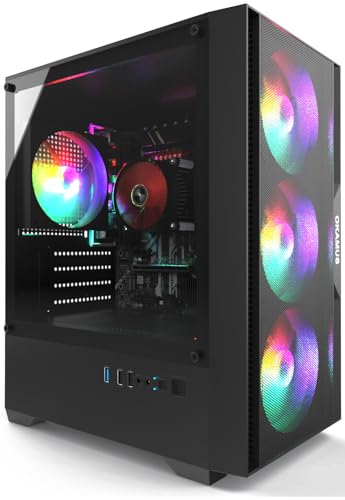
OKAMUS Pre-Built PC — For the Pile-One Player on the Tightest Budget
Step one profile: esports, older games, homework, media. Step two: Tier A integrated, Intel class. Step three: passes CPU adequacy for its tier, fails the RAM target at 8GB and the storage preference at 256GB — both survivable for its profile, both real. Step four: the 400W PSU closes the upgrade story. Verdict: the OKAMUS Pre-Built PC is the right answer only for the player whose step one is genuinely lightweight and whose budget is genuinely firm. Check on Amazon
| CPU | Intel Core i5, up to 3.6GHz |
|---|---|
| Graphics | Integrated graphics only (no discrete GPU) |
| RAM | 8GB |
| Storage | 256GB M.2 SSD |
| PSU | 400W |
| Wireless | WiFi 6 + Bluetooth 5.3 |
| OS | Windows 11 Home |

YAWYORE Gaming PC — Tier A Graphics, Tier-One Platform
The YAWYORE Gaming PC (Ryzen 5 5600GT) is what step four was invented to find: integrated graphics strong enough for piles one and two, paired with 16GB of RAM, 1TB of storage, and a 550W 80PLUS power supply that keeps the discrete-card upgrade wide open. For a buyer who wants to play now and grow later, the method ranks it above several machines with nominally stronger graphics today. Check on Amazon
| CPU | AMD Ryzen 5 5600GT (integrated graphics) |
|---|---|
| RAM | 16GB DDR4 3200MHz |
| Storage | 1TB M.2 NVMe PCIe SSD |
| PSU | 550W 80PLUS |
| Wireless | WiFi + Bluetooth |
| OS | See listing |

CyberPowerPC Gamer Master RX 6500 XT — Tier B From a Major Brand
The CyberPowerPC Gamer Master (RX 6500 XT) passes step two with a real discrete card and step three partially — 8GB of RAM flags a planned upgrade, 500GB of PCIe 4.0 storage passes the floor. What the method cannot capture in specs, it captures in step six below: a major prebuilt brand’s warranty and support have real value to first-time buyers, and this is the cheapest seat at that table on our sheet. Check on Amazon
| CPU | AMD Ryzen 5 5500 |
|---|---|
| Graphics | Radeon RX 6500 XT 4GB |
| RAM | 8GB DDR4 |
| Storage | 500GB PCIe 4.0 SSD |
| Wireless | WiFi ready |
| OS | Windows 11 Home |

ZYNEEX Prebuilt — The Machine With No Failed Steps
Run the ZYNEEX Prebuilt Gaming Desktop (RTX 3050) through the method and nothing flags: Tier C graphics with DLSS, six-core CPU, 16GB of RAM, 1TB of NVMe storage. It is the answer the method gives a mixed-library player with a mid-budget, and the reason it anchors our recommendations is precisely this absence of asterisks. Check on Amazon
| CPU | AMD Ryzen 5 5500 |
|---|---|
| Graphics | GeForce RTX 3050 6GB |
| RAM | 16GB DDR4 3200MHz |
| Storage | 1TB NVMe SSD |
| Cooling | ARGB air cooling |
| Wireless | Wi-Fi |
| OS | Windows (see listing) |

Volt X3 V1.2 — When the Graphics Card Is the Whole Argument
The Volt X3 V1.2 Gaming PC (GTX 1070) fails step three’s platform-youth preference — Ryzen 5 2600 is an older generation — and passes everything else with a twist: its GTX 1070’s 8GB of video memory exceeds the newer entry cards. The method’s verdict: a deliberate trade, right for the player who values today’s texture-heavy games over tomorrow’s upgrade paths. Check on Amazon
| CPU | AMD Ryzen 5 2600, up to 3.9GHz |
|---|---|
| Graphics | NVIDIA GTX 1070 8GB |
| RAM | 16GB DDR4 |
| Storage | 512GB NVMe SSD |
| Wireless | WiFi + Bluetooth |
| OS | Windows 11 Pro 64-bit |

CyberPowerPC RTX 5060 Ti — The Method’s Ceiling
The CyberPowerPC Gamer Master (RTX 5060 Ti) is included so step two’s tiers have a visible top: current-generation graphics, DDR5 platform, Ryzen 7. If your step-one list is pile-three heavy and your budget reaches, the method blesses it; if not, it exists to show you what you are not missing for your actual games. Check on Amazon
| CPU | AMD Ryzen 7 8700F |
|---|---|
| Graphics | GeForce RTX 5060 Ti 8GB |
| RAM | 16GB DDR5 |
| Storage | 1TB PCIe 4.0 SSD |
| Wireless | WiFi ready |
| OS | Windows 11 Home |
Step Six: Verify the Listing and the Seller
The final step protects all the others. Before buying any budget gaming PC: read the full specification block, not the title; confirm the exact graphics hardware in writing (the phrase “gaming graphics” without a model name is a refusal to answer); screenshot the configuration at checkout; and confirm the return window covers a machine that arrives configured differently than listed — a real phenomenon at this tier, where model names get reused across configurations. Prefer sellers and brands with a track record you can check, and treat a first-time buyer benefit — whole-system warranty, real support — as worth money in the comparison, because the alternative is becoming your own support department. Our verified shortlist process is described in Budget Gaming PC Reviews, where the current field is assessed as a group.
Red Flags That End the Evaluation
Some listings fail the method on sight. A title trumpeting a high-end CPU paired with no named graphics card means integrated graphics wearing a costume. “Up to” language on every spec means the base configuration is the weakest version. Storage described without the letters SSD, memory described without capacity, and power supplies not described at all are each a step failed by omission. Stock photos of glowing towers that could illustrate any machine, attached to a spec sheet that matches none, close the case. Walk away from all of these regardless of price — a bad budget PC is not cheap at any number, because its replacement is the real price. Round out the desk only after the tower passes: a fitting mouse from Best Budget Gaming Mice and the settings in Best Windows Mouse Settings For Gaming complete a budget setup for less than a single mis-specced component costs to fix.
How to Set Up Your Chosen PC in the First Hour
Choosing well buys the hardware; the first hour decides how much of it you actually get. The complete walkthrough is How To Set Up Budget Gaming PC; the essentials: run Windows Update to completion, install the current graphics driver from AMD or NVIDIA rather than trusting the shipped one, enable the XMP or EXPO memory profile in the BIOS so RAM runs at rated speed (integrated-graphics machines gain the most), set your monitor to its full refresh rate in Windows display settings, and select the High Performance power plan. Then launch your most-played game and set it up honestly: 1080p, the settings preset one notch below your instinct, upscaling on Quality where offered.
Problem: the new PC feels no faster than the old one in games. -> Fix: verify the game is running on the correct GPU in Windows graphics settings and that the memory profile is enabled; these two defaults account for most “my upgrade did nothing” reports. Problem: storage is already half full. -> Fix: that is modern game sizes, not a fault — move the library’s cold titles to an external drive rather than deleting and re-downloading them later.
Common Mistakes When Choosing
Choosing by CPU name. The processor is the third-most-important gaming spec in a budget PC, behind graphics and memory configuration — yet it headlines most listings. Let it.
Skipping step one. Every wrong budget PC purchase begins with speccing for imagined games instead of played ones. Ten minutes with your real library saves real money.
Treating 8GB of RAM as equal everywhere. On a discrete-card machine it is a mild limitation; on an integrated-graphics machine in single-channel it taxes every frame. Configuration details are the spec.
Ignoring the second-year story. A budget PC is a platform decision. The YAWYORE Gaming PC (Ryzen 5 5600GT) versus OKAMUS Pre-Built PC comparison is this mistake in miniature: similar today for light games, entirely different machines in year two.
Buying the discount instead of the machine. A large percentage off a bad configuration is a bad configuration with better marketing. Run the steps on the discounted machine exactly as on any other — see Is A Budget Gaming PC Worth It for how value actually works at this tier.
Final Recommendation
Choose in order: games, graphics tier, floors, upgrade story, verification. Applied to today’s verified field, that method sends mixed-library buyers to the ZYNEEX, platform-minded buyers to the YAWYORE, brand-and-warranty buyers to the CyberPowerPC RX 6500 XT, and the firmest budgets to the OKAMUS with eyes open. The method matters more than any single answer, because prices and models will change — and now you can evaluate whatever replaces them.
Worked Example: Choosing for Three Different Players
Methods earn trust by being watched, so here is the six-step method run end-to-end for three buyers whose answers differ — the point being that the method, not a ranking table, produces each answer.
Player one: the competitive teenager. Step one’s list is Valorant, Fortnite, Roblox, and Minecraft — pile one, entirely. Step two therefore lands on Tier A integrated graphics without apology. Step three’s floors still apply: 16GB of RAM preferred for a machine that will also carry schoolwork and a browser’s worth of tabs, and storage enough for the rotation. Step four becomes the deciding step: between the OKAMUS (sealed, 400W) and the YAWYORE (550W, room to grow), the method asks whether a graphics card is a plausible future gift or savings goal — in most households, yes — and lands on the YAWYORE. Step five’s verification is a parent’s five minutes with the spec block. Answer: the platform machine, with the card as a future milestone the teenager can aim at — a feature of the purchase, not a flaw in it.
Player two: the returning adult gamer. Their list mixes a decade of back catalog with two current releases they genuinely play weekly. Step two therefore refuses Tier A: pile three is real, and the method sends them to Tier C. Step three eliminates the 8GB configurations. Step four is satisfied by any standard tower. The shortlist collapses to the ZYNEEX — with the Volt X3 as the value alternative if their current-release appetite is lighter than stated and their back catalog is texture-heavy. Step six’s brand question barely matters here; the configuration is the argument. Answer: the ZYNEEX, bought once, with no upgrade narrative required.
Player three: the firmest budget. Their constraint is not a preference; the money is what it is, and the games are esports plus older titles on a shared family PC. The method’s job here is dignity: it confirms Tier A is correct for the library (not a compromise — a match), applies step three to prefer the most balanced floor configuration the money reaches, and uses step four to state plainly that the machine is a finished purchase rather than a platform. If the money reaches only the OKAMUS, the method blesses it for this library and redirects remaining attention to the desk — a decent mouse from the budget tier and correct settings will improve this player’s week more than any internal upgrade could. Answer: the floor machine, bought with open eyes, which the method counts as a success rather than a surrender.
The Specification Traps, Catalogued
Because step-by-step methods fail at predictable places, here is the trap catalogue our verification process encounters most — each trap stated with its tell and its counter.
The processor costume. Tell: a flagship-sounding CPU name, no graphics model anywhere. Counter: no named card means integrated graphics; class the machine as Tier A and price it against Tier A rivals, however the listing is priced.
The memory mirage. Tell: a generous RAM capacity with no stick count or speed. Counter: on integrated-graphics machines especially, assume single-channel at a default speed until the listing proves otherwise — the performance difference is large enough to change the machine’s tier in practice.
The storage shell game. Tell: capacity trumpeted, technology unnamed, or “SSD” applied to a small cache drive paired with a large spinner. Counter: the letters NVMe or SATA SSD, attached to the full capacity, or it does not count.
The phantom power supply. Tell: no wattage, no rating, no brand — in a listing that specifies the case lighting in detail. Counter: treat as minimum-viable, which means treating the machine as sealed against graphics upgrades.
The recycled model name. Tell: one marketing name, multiple contradictory spec sheets across sellers or across time. Counter: buy by exact model code and screenshot the configuration at checkout; if the code itself is unstable, walk away.
The benchmark screenshot. Tell: listing images showing frame rates or scores with no settings, resolution, or game version attached. Counter: numbers without conditions are decoration; the verified spec sheet predicts your experience better than any screenshot.
Choosing When the Buyer Is Not the Player
A large share of budget gaming PCs are bought by one person for another — parents for teenagers, partners for partners — and the method adapts in two ways worth stating. First, step one must be run on the player’s library, not the buyer’s assumptions about it: the gap between the games adults imagine teenagers play and the games teenagers actually play is where mismatched PCs are born, and it is closed by a two-minute conversation, not by spending more. Second, the support and warranty consideration in step six legitimately weighs heavier when the buyer will be the de facto support department for a machine across town or across the hall: a major brand’s whole-system warranty is, in that situation, partly a purchase of the buyer’s own evenings back. Neither adaptation changes the method’s order — games, graphics, floors, platform, verification — because the player’s experience still decides whether the gift succeeds. But they change the weights, and a method you can re-weight honestly is worth more than a ranking you cannot.
Gift buyers should also plan the unboxing as part of the choice: a machine that arrives needing the setup hour described in our setup guide will be judged, unfairly but inevitably, in its first ten minutes. If you are giving a budget PC, give the setup too — or give it a week early and set it up together, which several families report becoming the best part of the gift.
How the Method Handles Edge Cases
The VR-curious buyer. Virtual reality imposes a hard graphics floor that integrated systems do not meet and entry cards meet only at their upper edge. If VR is a genuine near-term goal rather than a someday interest, the method’s step two answers differently than for flat-screen gaming: target the strongest discrete card the budget can reach — the RTX 3050 class as a floor, the stretch tier preferred — and treat every other spec as secondary until that floor is funded. Someday-VR buyers, by contrast, should buy for today’s library on an upgradeable platform and let the someday decision fund itself later.
The creator who games. Video editing, streaming, and 3D work re-weight step three: memory capacity rises in importance (16GB becomes a floor rather than a target), CPU cores earn their premium, and NVIDIA’s encoding and acceleration features give the RTX machines an edge their gaming benchmarks alone would not justify. The ZYNEEX’s positioning — its listing names gaming, streaming, and editing together — reflects exactly this buyer, and the method endorses it for them more strongly than for a pure gamer at the same price.
The small-space buyer. Dorm rooms, shared flats, and desks that are also dining tables add a physical screen the standard method omits: measure the space, then filter towers by footprint and by where their vents need clearance. The performance method is unchanged, but its shortlist is drawn from machines that physically fit the life they are joining — a tower exiled to a carpeted corner for reasons of size will underperform its spec sheet through thermals alone.
The Linux or tinkerer buyer. If the machine will run alternative operating systems or serve as a learning platform, add a compatibility pass to step six: AMD graphics historically offer the smoother open-driver experience, standard motherboards beat proprietary ones for support, and the platform machines in this guide are all conventional enough to serve. The method’s structure survives the addition intact — one more screen, applied last, like all the others.
The One-Page Version of the Method
Everything above compresses into a checklist short enough to keep open on your phone while you shop. One: list your ten most-played games and sort them by demand. Two: pick your graphics tier from that list — integrated for light libraries, entry discrete for mixed, mid-range discrete for current-release players — and refuse to look outside it until the method finishes. Three: screen for a modern six-core CPU, 16GB of RAM (or 8GB with a priced upgrade plan), and at least 500GB of SSD. Four: find the power supply’s wattage and rating; decide, in writing to yourself, whether this machine is a platform or a finished purchase. Five: run the shortlist through those four screens and notice that it has usually collapsed to one or two machines — that collapse is the method working, not a lack of choice. Six: verify the winner’s full spec block, screenshot it at checkout, and confirm the return window. Then buy it, set it up properly in its first hour, and go play — the method’s final step is knowing when choosing is done.
Teaching the Method to the Person You Are Buying With
Budget PCs are often chosen by committee — partners, parents and teenagers, roommates splitting a machine — and committees fail in a predictable way: each member optimizes a different invisible criterion, and the loudest spec wins. The method in this guide doubles as a peace treaty, because its order forces the argument to happen in the right sequence. Start the committee at step one, with the actual game list on a screen everyone can see; disagreements about graphics tiers usually dissolve when the library is literally in front of the room. Assign step three’s floors as non-negotiables agreed in advance, so later arguments cannot smuggle them away. Let step four — platform or finished purchase — be the explicit debate, since it is the real philosophical divide in most households: money now for capability, or money later for growth. And reserve step six, verification, as the closer: whoever feels least technical can own it, because reading a spec block against a checklist is the most learnable step and the one that protects everyone. Households that choose this way report the same side effect our worked examples showed: the final machine is rarely the one anyone walked in wanting, and it is usually the one everyone is still happy with in year two — which is the only review that matters.
When the Method Says “Not Yet”
A selection method that cannot recommend waiting is a sales funnel, so here are the three situations where this one does. First, when step one reveals a library in transition — a player leaving esports for current releases, a household about to gain a new gamer — the honest move is to buy for the library that is arriving, and if that library’s tier is not yet affordable, to wait and fund it rather than buy twice. Second, when step four exposes that the money reaches only sealed machines but the player’s history says they outgrow things, the method prefers patience: the platform machine bought a season later beats the sealed machine bought today and replaced next year, on every ledger that matters. Third, when step six cannot be completed — when the only available listings refuse verification, or a needed configuration is out of stock everywhere trustworthy — waiting is not indecision but the method’s own conclusion, because an unverifiable purchase fails the process that makes budget buying safe. In all three cases the waiting is purposeful: a named target configuration, a known price band, and a trigger for buying. That is not delay; that is the method, applied to time itself.
How to Choose When Two Machines Tie
The method occasionally ends in a genuine tie — two machines, both verified, both passing every screen, close in price. Ties are not failures; they are invitations to use the tiebreakers the main method deliberately holds in reserve. First tiebreaker: support and warranty, weighted by the buyer’s self-reliance — the less the buyer wants to be the technician, the more the brand-backed machine wins ties. Second: noise and thermals, weighted by the room — shared and small spaces break ties toward the quieter, cooler configuration. Third: the bundled and the incidental — WiFi generation, front-panel ports, an included peripheral set — small things that are free to prefer when the large things are equal. Fourth, and most underrated: the seller’s listing quality itself. A seller whose listing is complete, precise, and internally consistent has shown you how they do business; in a tie between machines, buy from the listing you could verify without effort, because that transparency predicts the support experience better than any promise. And when even the tiebreakers tie, choose the machine whose weakness you understand best — a known limitation you have priced is always safer than an unknown one you have not, which is perhaps the method’s deepest principle stated one last time.
A Note on Choosing for the Long Game: Resale, Hand-Me-Downs, and Parts
Step four asked what the machine can become while you own it; this closing consideration asks what it becomes afterward, because budget machines have unusually useful afterlives and a wise chooser prices them in. Standard-tower machines hand down intact — to a sibling, a parent, a spare room — with their upgrade options traveling with them, which is one more reason the platform screen in step four matters: it selects not just your machine’s future but its next owner’s options too. Discrete graphics cards, memory, and SSDs all have second lives in later builds or modest resale value, while integrated sealed machines retire whole. None of this should overturn a decision the six steps made — the afterlife is a tiebreaker-class consideration, not a criterion — but for two households in three it will eventually be real value received, and a method that ignores real value on principle is not rigorous, just tidy. Choose the machine your library needs, on the platform your habits justify, verified the way step six demands — and let the afterlife be the pleasant surprise it so often is.
The Method, Stress-Tested Against a Foggy Listing
End with the method doing its least glamorous and most valuable work: rejecting something. Imagine the listing every budget shopper meets — a glowing tower, a title built from a flagship CPU badge and the words “gaming PC,” a price sitting between the OKAMUS and the ZYNEEX, and a spec block that names no graphics card, gives memory as a bare capacity, describes storage as “high-speed,” and omits the power supply entirely. Step one is unaffected — your library is yours. Step two asks for the graphics tier and the listing refuses to answer, which the method scores as Tier A integrated until proven otherwise. Step three asks for memory configuration and storage technology and receives adjectives. Step four asks for the power supply and receives silence, scored as sealed. By step five the machine has collapsed to its floor classification: an unverifiable integrated-graphics tower priced like a discrete-card machine — the single most common bad purchase in this market, caught in four questions. Step six is never reached. The point of the stress test is that the method’s power is mostly negative: it does not need to find the perfect machine, because eliminating the foggy ones leaves a field small enough that almost any verified survivor serves its buyer well. Choose among the honest; the method has already done the hard part.
Choosing Under Uncertainty: When You Cannot Know the Library
One situation defeats step one honestly: the buyer who genuinely does not know the future library — a first PC for a young player whose tastes are unformed, a household machine whose heaviest user has not yet revealed themselves. The method handles uncertainty the way good decisions always do: by buying flexibility where it is cheap and refusing to buy it where it is expensive. Concretely, uncertainty argues for the platform machines over both alternatives — against the sealed floor, because an unformed library might grow teeth; against the full discrete purchase, because it might not, and the card can be bought later at later prices with better information. It argues for memory and storage at the comfortable tier immediately, since those serve every possible library including the non-gaming ones. And it argues for treating the first year as the real step one: watch what actually gets played, keep the notes the setup guide recommends, and let the upgrade decision — the only decision uncertainty truly postpones — be made by evidence. Choosing under uncertainty is not a failure of the method; it is the method’s most adult application, and the platform tier exists in this market precisely to serve it.
Choosing the Chooser: A Word for the Household’s Designated Expert
Many budget PCs are chosen by the household’s designated technical person on behalf of everyone else, and that role carries a specific temptation this method exists to restrain: choosing the machine you would want, specced for the games you find interesting, at the tier your own standards demand. The method’s steps are the restraint — the player’s library in step one, the player’s habits in step four, the household’s support reality in step six — and following them on someone else’s behalf is an act of respect disguised as a checklist. Add one courtesy the steps omit: after the machine is chosen and set up, hand over a one-page note — what was bought, why, what its planned upgrade is, and what to do when something seems wrong — because the chooser’s knowledge should not be the machine’s single point of failure. The designated expert who does all this has given something better than a PC: a purchase the whole household understands. That, in the end, is what choosing well means when the chooser and the player are different people — and it is the note this guide chooses to end on.
The Method’s Promise, and Its Limits
Close with candor about what a method can and cannot do. It cannot make a budget larger, a library lighter, or a foggy market honest. It cannot guarantee that the chosen machine never disappoints — hardware ages, tastes migrate, and a game will eventually arrive that reopens every settled question. What it can do, and what this guide has tried to build step by step, is convert the budget PC purchase from the market’s favorite ambush into a sequence of questions whose answers you control: your games, your tier, your floors, your platform philosophy, your verification. A buyer who has answered those five things honestly has not merely chosen a computer; they have chosen the terms on which the computer will be judged, and that is why method-chosen machines so rarely become regret stories even when they age exactly as predicted. The market will keep its fog machines and its headline traps. You now own the counter-procedure. Run it once more on your final candidate — slowly, out loud if it helps — and then buy with the confidence the process has earned you.
Frequently Asked Questions
What is the most important spec in a budget gaming PC?
The graphics hardware, by a wide margin. It decides which games are playable and at what settings. CPU, RAM, and storage matter as floors to clear; the graphics tier is the decision itself.
How do I know if a listing has a real graphics card?
A real card is named — a model like RTX 3050 or RX 6500 XT appears in the specifications. Listings that say only “gaming graphics,” “HD graphics,” or trumpet the CPU are describing integrated graphics. If the card is not named, it is not there.
Is 8GB of RAM a dealbreaker?
Not for esports-focused play, provided you accept a planned upgrade and the price reflects it. It is a dealbreaker at prices where 16GB machines compete, and a genuine handicap on integrated-graphics systems where memory configuration affects rendering directly.
Should I choose a newer platform or a stronger older graphics card?
It depends on your horizon. The Volt X3’s GTX 1070 plays today’s texture-heavy games well; a newer platform like the YAWYORE’s grows better tomorrow. Players replacing PCs every few years should weight today; players who upgrade in place should weight the platform.
How can I verify a budget PC’s specs before buying?
Read the full specification block, cross-check the model number against the manufacturer’s configuration, screenshot the listed specs at checkout, and buy where returns are straightforward. Every machine in this guide was verified against catalog data before inclusion — demand the same standard from any listing.
What power supply wattage should I look for?
For the machine as shipped, whatever it includes will run it. For upgrades, 500W or more with an 80PLUS rating is the practical threshold for adding a mid-range graphics card later. An unnamed or 400W unit means treating the PC as a closed system.
When is a budget gaming PC the wrong choice entirely?
When your game list is dominated by current AAA titles at high settings, when you need portability (that is a laptop conversation), or when pure gaming value is the only goal — a console wins that specific contest. The PC’s case rests on versatility, upgradability, and the games themselves costing less over time, as Budget Gaming PC Vs Entry Level Gaming PC lays out.


