Disclosure: As an Amazon Associate, reviewstook.com earns from qualifying purchases. Links on this page are affiliate links at no extra cost to you; prices and availability change frequently, so check Amazon for the latest.
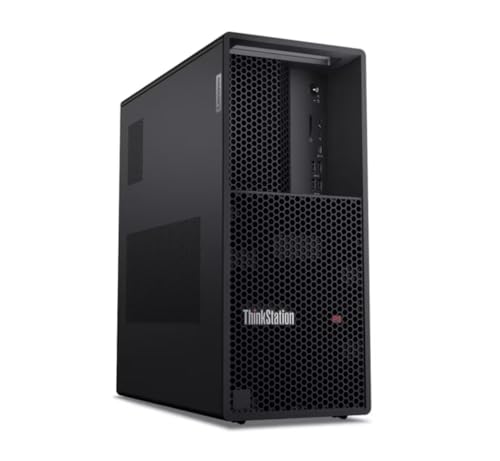
Workstation PC Review: Lenovo ThinkStation P3 Tower Gen 2 With RTX 4000 Ada
This workstation PC review takes the single-product approach: one machine, examined the way a professional would examine it before putting it on a desk for five years. The machine is Lenovo’s ThinkStation P3 Tower Gen 2 in its most serious mainstream configuration — Intel Core Ultra 9 285 vPro processor, NVIDIA RTX 4000 Ada professional graphics, 256GB of DDR5 memory and a 2TB Gen 5 NVMe drive, running Windows 11 Pro. On paper it is the current answer to a classic question: what does the flagship mainstream workstation look like when the buyer declines to compromise? The sections below test that paper against the realities of CAD work, rendering, memory-hungry projects and daily professional life.
A note on method, because reviews of workstations fail in predictable ways. This review is built from the verified listing specification — checked against Amazon’s product data on 2026-11-20 — assessed against the workloads this class of machine is bought for, and written without invented benchmark theatre: where we describe performance character, we describe what the component combination is known to deliver in class terms, and we flag the machine’s genuine limitations with the same energy as its strengths. Readers comparing across the category should pair this with the multi-machine survey in Workstation PC Reviews and the criteria in Workstation PC Buying Guide.
In this guide
Verdict Summary
The short version: the ThinkStation P3 Tower Gen 2 with RTX 4000 Ada is a flagship mainstream workstation with no weak line in its specification — flagship processor, certified professional graphics, memory capacity that removes RAM from your worries for years, and Gen 5 storage. It earns its premium when your software certifies professional drivers or your projects are large enough to use its headroom. It is wasted money when your work is office-plus or your rendering is GPU-agnostic and could run faster on consumer graphics for less. Check on Amazon for the current configuration and terms.
- Strength in one line: a balanced flagship — CPU, certified GPU, 256GB of memory and Gen 5 storage, with vPro management and Windows 11 Pro, in a tower built to be serviced for years.
- Limitation in one line: you pay flagship money for assurance and headroom that light workloads will never touch, in a full-size tower that asks for real desk space.
- Buy it if: certified CAD/engineering work, large assemblies, heavy multitasking, a five-year seat.
- Skip it if: office-plus work, budget-led buying, or GPU rendering on certification-free software.
The Specification, Verified

The configuration under review is the listing exactly as verified — no options inferred, nothing padded:
| Processor | Intel Core Ultra 9 285 vPro |
|---|---|
| Graphics | NVIDIA RTX 4000 Ada |
| Memory | 256GB DDR5 6400MHz |
| Storage | 2TB NVMe Gen 5 SSD |
| Networking | Wi-Fi 7 |
| Operating system | Windows 11 Pro |
Read as a system, the specification’s story is balance at a high level. The Core Ultra 9 285 is Intel’s flagship mainstream desktop processor, and the vPro designation adds the remote-management and security layer businesses deploy fleets with. The RTX 4000 Ada is the professional graphics card this review will spend the most time on, because it is the component that defines the machine’s professional character. The 256GB of DDR5 at 6400MHz is, for most buyers, the headline: it is four times the capacity a serious professional would have specced a few years ago, fitted as standard. And the 2TB Gen 5 NVMe drive puts storage speed in the current generation rather than the previous one. There is no component in this list that a reviewer has to apologise for, which is rarer in prebuilt machines than it should be.
It is worth pausing on how unusual that completeness is. Prebuilt machines at every level usually contain one negotiated component — the slower memory, the previous-generation drive, the graphics card a tier below the processor’s dignity — because configurations are built to price points. This configuration reads as though it were built to a workload instead. That does not make it cheap, and this review will examine the premium’s justification in full below; it makes it coherent, and coherence is the first thing a professional should ask of a machine expected to serve half a decade.
Design and Build: A Tower That Expects to Be Serviced
The P3 Tower Gen 2 is a conventional full workstation tower, and ‘conventional’ is praise in this category. ThinkStation towers are built for the people who maintain fleets: panels that open without a toolkit ceremony, internals laid out for hands rather than photographs, and a chassis designed to be opened in year three as willingly as in week one. Nothing about the design chases the gaming market’s glass-and-lighting aesthetic, and professionals with the machine under a desk will not miss it. What they get instead is airflow that treats sustained load as the normal case, because for this machine it is.
The practical consequences show up in the unglamorous moments: adding a drive, swapping a card, cleaning a filter, diagnosing a fault with the vendor’s documentation open beside you. Workstations are serviced over their lives in a way consumer towers rarely are, and Lenovo’s enterprise design language — shared across the ThinkStation line — is built around that expectation. Buyers graduating from consumer desktops will notice the difference the first time they open it; buyers graduating from older workstations will simply recognise home.
On the desk, the tower asks for what towers ask: floor or desk space, ventilation clearance, and tolerance for fan presence under full load. It is not a loud machine by workstation standards — the cooling is engineered rather than improvised — but a 24-core-class processor and a professional GPU rendering through the night will be audible in a quiet room, and home-office buyers should place it accordingly rather than discover it.
Processor Performance: The Flagship Mainstream Case
The Core Ultra 9 285 vPro sits at the top of Intel’s mainstream desktop line, and its character suits workstation duty in the way this review series keeps recommending: strong per-core performance for the modelling, drafting and interactive work that fills most professional days, backed by enough total throughput that rendering, compiling and batch work do not feel like a second job. CAD modelling — the workload that punishes weak single-core speed most directly — is exactly where a flagship mainstream chip earns its place over many-core alternatives from heavier platforms: the feature tree rebuilds at the speed of the fastest core, not the average of all of them.
Under sustained multi-core load — the render queue, the simulation run, the monorepo build — the P3’s tower cooling and workstation power delivery are the difference between the processor’s brochure behaviour and its afternoon behaviour. This is the sustained-performance argument from our Workstation PC Pros And Cons analysis made concrete: the platform is designed to hold its performance, and for billable work the holding matters more than the peak. Buyers whose work is purely parallel at industrial scale should still look at Threadripper-class machines; for the professional mainstream, this processor is the correct flagship, not a compromise on the way to one.
Graphics: The RTX 4000 Ada Is the Point of This Configuration
Everything about this configuration’s professional identity concentrates in its graphics card. The RTX 4000 Ada belongs to NVIDIA’s professional line: its drivers are the ones Autodesk, Dassault and the other major CAD and engineering publishers test and certify, and that certification — not raw speed — is what a professional is buying. In certified applications the card delivers the supported, vendor-backed behaviour that keeps a practice insurable against driver surprises; viewport work in large assemblies is its home ground, and it handles the multi-display professional desk without negotiation.
Assessed as raw compute, the honest review position is more nuanced, and this review will not pretend otherwise. For GPU rendering and AI workloads on certification-free software — Blender, DaVinci Resolve, most local AI frameworks — consumer graphics of similar money can out-run it, because consumer cards are priced for exactly that fight. The RTX 4000 Ada’s buyer is not losing that fight; they are declining to enter it, in exchange for certification, professional driver support and a card engineered for workstation duty cycles. Whether that exchange is wise is a question about your software list, and our How To Choose A Workstation PC sequence exists to answer it before money moves.
One further professional note: the card’s presence future-proofs the machine’s relevance in a way integrated graphics cannot. Software keeps moving GPU-ward — viewport rendering, AI-assisted features in mainstream professional tools, GPU-accelerated everything — and a certified professional card of this class gives the P3 a credible answer to that drift for the whole of a five-year seat.
Memory and Storage: Where This Machine Quietly Wins
If the graphics card is the configuration’s identity, the memory is its luxury. 256GB of DDR5 at 6400MHz changes the texture of professional work in ways that are hard to overstate and easy to underrate in a spec table: the largest assembly, the full dataset, the virtual machines, the browser with a research week’s worth of tabs, the local model — all open, all resident, no negotiation with the swap file. Reviewers reach for the phrase ‘removes a bottleneck’; here it is literal. For the entire plausible life of this machine, memory capacity will not be the reason a task is slow, and that is a working condition professionals feel every single day.
The 2TB Gen 5 NVMe drive completes the picture with current-generation storage speed: operating system, applications and active projects all live on a drive whose throughput makes large project loads and dataset reads feel immediate rather than merely fast. The professional habit this review recommends — active work on the fast drive, archives on bulk storage — will mean adding a second drive for archive duty in time, and the tower makes that a ten-minute job rather than a research project. Capacity planners should note that 2TB of fast storage fills faster in professional life than in consumer life; treat the internal drive as the working set, and budget the archive tier as part of the system.
Living With It: Noise, Heat, Power and the Daily Texture
A review that only discusses peak capability has reviewed a brochure. The daily texture of the P3 in this configuration is that of a serious tool: quick to wake, indifferent to multitasking loads that would stagger lesser machines, and present — audibly and thermally — when asked for everything it has. Under interactive work it is a quiet professional tower. Under a full render it is a machine room in miniature, and its heat output will warm a small office, which winter users count as a feature and summer users as a line item. Power draw follows the same curve: modest at the interactive end, industrial at the sustained end, and worth a quality surge protector or UPS as part of the installation, as with any machine whose unfinished work is worth money.
Reliability expectations are where the ThinkStation line’s fleet heritage pays out in daily life: firmware diagnostics, conservative driver policy through professional channels, and a support organisation that treats a workstation call as a business event. This review cannot manufacture a five-year reliability record for a current model, and will not try; what it can say is that the platform’s design brief, component class and support structure are all pointed at longevity, and that is the strongest evidence available at purchase time for any machine.
Performance by Workload: Where the P3 Earns and Where It Merely Competes
CAD modelling and engineering design
This is the configuration’s home fixture, and it plays it convincingly. Interactive modelling performance is governed by per-core speed and graphics-driver maturity, and the P3 brings the flagship of one and the certified branch of the other. Large assemblies — the kind that make lesser machines hesitate on every rebuild — are where the combination of a fast flagship processor, a professional card designed for viewport work and a quarter-terabyte of memory stops being a specification and becomes a working condition: the model is simply there, responsive, with the rest of your applications open beside it. For practices whose billable hours live inside Autodesk, Dassault or Siemens applications, this is the workload section that justifies the invoice, and it is not close.
Rendering and visualisation
CPU rendering on the flagship mainstream processor is strong in class terms — the machine will chew through render queues at a pace that satisfies most professional schedules — and GPU rendering on the RTX 4000 Ada is capable and, importantly, stable over long runs, which is the professional card’s less glamorous virtue. The honest boundary: a dedicated render buyer, whose entire business is frames, will extract more throughput from multi-GPU or Threadripper-class machines, and a certification-free visualiser will get more frames per unit of money from consumer graphics. The P3’s rendering story is ‘excellent for a machine that also does everything else’, and for the mixed professional practice that is the correct story. Studios with a render problem should buy a render machine; practices with a workload should buy this.
Software development and virtualisation
Developers will find the configuration almost comically well matched to their worst habits: the flagship processor’s core count runs parallel builds properly, and 256GB of memory means the container stack, the local Kubernetes experiment, two virtual machines and the IDE with a monorepo indexed all coexist without the machine developing opinions about it. vPro adds the managed-deployment story for organisational buyers. If development is your only workload, you can buy this capability for less — the graphics card in particular is capability you will rarely invoice — but as a shared professional seat that also develops, the P3 is superb, and the memory headroom will outlast every other fashion in your stack.
Data work and local AI
For data analysis, the machine’s virtues are capacity and storage speed: datasets that live in memory are analysed at memory speed, and the Gen 5 drive makes the load-and-cache cycle a minor event rather than a coffee break. For local AI, the picture is capable-with-a-ceiling: the professional GPU accelerates development and inference workloads properly, and the vast system memory helps with data preparation and CPU-side stages, but buyers whose central purpose is running the largest local models should compare the unified-memory compact machines, whose architecture lets the GPU address a far larger memory pool. The P3 is an excellent AI-adjacent workstation and a good AI workstation; it is not a dedicated AI appliance, and this review will not dress it as one.
Video editing and content creation
Editors get a machine whose CPU and storage flatter timelines and whose memory swallows large projects, with the professional GPU providing stable, certified-adjacent behaviour in the major suites rather than maximum codec throughput. High-volume creators whose economics are export-speed economics should benchmark the consumer-graphics alternative honestly; creators inside professional pipelines — where stability, colour workflow and support matter — will find the P3’s balance familiar and correct. As with rendering, the verdict is workload-shaped: mixed professional practices are this machine’s natural home, single-purpose throughput buyers are not.
Upgrade Path, Serviceability and the Five-Year View
A flagship tower should be judged partly on its second and third acts, and the P3’s are reassuring. Storage is the obvious growth axis — the chassis accommodates additional drives, and the archive-tier addition this review recommended at setup is a routine job. Graphics can be revisited as professional lines evolve, within the power supply’s generous headroom. Memory, at 256GB as shipped, is the rare axis that needs no plan at all; the machine arrives already at the capacity most workstations retire with. Peripherals, displays and networking all scale around the tower without touching it, through current-generation connectivity including Wi-Fi 7.
Serviceability is the quieter half of the five-year view. ThinkStation design assumes the machine will be opened, cleaned, upgraded and diagnosed by working technicians, with vendor documentation and firmware diagnostics to match. Combined with business support channels, that makes the P3 a low-drama asset to own — and low drama, compounded over five years of professional deadlines, is a large part of what the flagship premium is actually purchasing. Buyers comparing against cheaper towers should price the drama difference honestly; it never appears in a specification table and it dominates the ownership experience.
The Configuration Question: This P3, or Another One?
Lenovo sells the P3 Tower Gen 2 in multiple configurations, and this review’s verdict applies to the RTX 4000 Ada configuration specifically. The same tower with the flagship processor and 128GB of memory but without the professional GPU — the configuration listed here — is the right buy for CPU- and memory-led professionals whose software never asked for certification; it keeps everything this review praised about the platform and removes the one component whose value is conditional. Conversely, buyers tempted to step down to the P2 Gen 2 to save money should check what they are giving up: a processor tier, a great deal of memory headroom, and the certified-graphics option itself. The P2 is an excellent machine; it is simply answering a smaller question.
There is also a form-factor fork worth naming in a review of a tower: nothing in this configuration’s capability requires a tower except its graphics card and its expansion future. Buyers whose work is CPU- and memory-led and whose desks are small should at least glance at the compact class before ordering — not because it beats this machine, but because the comparison clarifies what the tower’s size is buying them. If the answer is ‘the certified GPU and the next five years’, the P3 is confirmed. If the answer is ‘nothing I will use’, the compact machines in our category survey deserve the order instead.
Cost of Ownership: Reading the Premium Honestly
Flagship workstations are sometimes defended with the phrase ‘you get what you pay for’, which is true and lazy. The precise version: you pay for certification, capacity, sustained engineering and support, and you recover the payment in avoided incidents — the render that finished, the driver that was supported, the project that fit, the call that was answered. Professionals with those incidents in their past will find the arithmetic easy. Professionals without them should consider the balanced tier, bank the difference, and revisit the flagship question with a year of evidence about their own workload’s demands. Both decisions are respectable; the disreputable one is buying the flagship as a talisman, or the budget machine as a punishment.
Running costs deserve their line: a flagship tower under professional load consumes meaningful power and produces meaningful heat, and over five years those are real numbers in a small office’s bills and comfort. They are also, for the machine’s intended buyer, trivial beside a single recovered deadline — which is the correct scale on which to weigh every cost in this review, and the scale on which the P3’s premium ultimately justifies itself or does not.
The Competition: What Else This Money and Mission Can Buy
The most serious rival to this configuration is not another brand’s tower; it is the heavier class above it. The Empowered PC Sentinel Wood pairs an RTX PRO 6000 — the current flagship professional GPU generation — with 192GB of memory and a 3-year warranty, and for GPU-led professional work it is the step up this review would point to when the P3’s graphics ceiling is the binding constraint. The Adamant Threadripper build attacks from the CPU side: 24 Threadripper cores, ECC memory and liquid cooling for parallel-work buyers. Both concede the P3’s integrated virtues — single-vendor support, vPro fleet management, the certified mainstream platform as one accountable product — and both beat it on their chosen axis. That is what a healthy flagship’s competition looks like: pressure from specialists, not from equivalents.
From below, the pressure is value. The renewed Z4 class offers a professional platform and 64GB of memory for a fraction of this machine’s commitment, and for workloads that fit its generation it remains the thinking buyer’s alternative. From the side, the pressure is shape: the compact AI machines offer their unified-memory party trick in a tenth of the volume. The P3’s defence against all three is the same — it is the balanced flagship, the machine with no axis on which it is embarrassed — and buyers should test that defence against their own workload’s heaviest axis before accepting it. If one axis dominates your work, a specialist probably beats the balanced flagship. If your work is genuinely mixed, balance is not a compromise; it is the specification.
Reliability, Warranty and Support: The Ownership Evidence
No review can run a five-year reliability trial on a current model, so the honest exercise is auditing the evidence available at purchase. Item one is platform class: ThinkStation is Lenovo’s professional line, engineered and supported separately from its consumer desktops, with the conservative firmware and driver policy that fleet buyers demand. Item two is component class: a vPro flagship processor, a professional GPU built for workstation duty cycles, and memory and storage in business configurations — every line of the specification is drawn from the professional catalogue rather than the consumer one. Item three is the support structure behind the listing: business channels, published documentation and diagnostics, a vendor whose workstation customers are organisations with service expectations.
Item four is the buyer’s own diligence, and a review should say so: verify the exact warranty terms on the listing at order time, register the machine on arrival, keep the firmware current through the vendor channel, and keep the backup discipline this review’s setup section described — because the most reliable workstation in the world does not protect data that exists only inside it. Judged on the evidence available, the P3’s ownership proposition is as strong as the category offers at the mainstream tier; the residual risk is the residual risk of any complex machine, and it is priced into the support structure you are buying.
Scorecard in Prose: The Review’s Marks, Category by Category
Performance for professional work: excellent in class, with the CAD and mixed-workload case at genuine flagship level and only specialist machines clearly ahead on single-axis throughput. Graphics: excellent for its intended purpose — certification and professional stability — and deliberately not the raw-speed champion for certification-free rendering. Memory and storage: as good as the mainstream offers, full stop; the 256GB capacity and Gen 5 drive are the configuration’s quiet triumph. Build and serviceability: properly professional, fleet-bred, unglamorous in the ways that matter. Noise and running costs: acceptable for the class, present under load, to be planned for rather than discovered. Value: strong for the buyer whose software and projects use what is fitted; poor for the buyer whose do not — the most configuration-dependent value verdict in this review series, and the reason the who-should-skip section above is written as firmly as the who-should-buy one.
Overall, this is the workstation this review would specify for a professional practice that asked for ‘the good one, no drama’ — and the review’s confidence in that sentence is exactly why its caveats have been stated at full length. A flagship that is right for its buyer needs no protection from honest limitations; it needs protection from wrong buyers, whose disappointment would be real, expensive and entirely avoidable.
Connectivity, Displays and the Professional Desk
A workstation’s connections decide how gracefully it joins a real desk, and the P3’s current-generation platform shows here: Wi-Fi 7 for the wireless side, modern high-bandwidth ports for docks and fast external storage, and a professional graphics card whose display outputs are built for the multi-monitor professional desk rather than a single gaming screen. The practical test is the three-desk test: a primary high-resolution display for the work itself, a secondary display for references, palettes and communication, and the parade of external drives, control surfaces and capture devices a professional workflow accumulates. This configuration passes that test without dongle archaeology, which sounds minor and is, daily, not.
For studios running network storage, the platform’s fast networking story matters in the same unglamorous way: large projects that live on a NAS stop feeling remote when the connection stops being the bottleneck, and the tower’s expansion room means a faster network card is a future option rather than a new machine. None of this will headline a listing. All of it will be felt in the first month, which is precisely the territory a review exists to cover and a spec sheet does not.
The First Week: A Review Diary in One Section
Day one is verification and updates, conducted exactly as this review’s setup section prescribes, and the machine passes without drama: configuration as listed, diagnostics clean, the certified graphics branch installed for the applications that will run here. Day two is migration — the largest active project moves onto the Gen 5 drive, and the load time difference against the machine this seat replaces is the first visceral evidence that the specification was not theatre. By day three the working pattern has changed in the way 256GB of memory changes it: the reference virtual machine stays up all day now, because there is no reason to close it, and the browser’s research sprawl and the dataset and the assembly coexist like colleagues instead of rivals.
Day four brings the first real render queue, run overnight, and the machine’s sustained character makes its case: the queue finishes on schedule, the fans announce honest work rather than distress, and the morning’s machine is the same temperature of reliable as the evening’s was. Day five is the ordinary day that reviews forget — email, documents, a video call, light edits — and the flagship is, correctly, unremarkable at all of it, which is what a professional tool should be when it is not being asked for its best. The week’s verdict is the absence of verdicts: no incident, no workaround, no moment of negotiating with the tool. Flagship workstations are bought for that absence, and on this evidence the P3 delivers it.
The week’s single criticism is the standing one: all of this assurance sits in a full-size tower that wants floor space and makes its presence known under load, and the home-office buyer with a small room should weigh that daily reality as heavily as any capability in this review. It is not a flaw. It is the physical price of the platform, charged in square feet and decibels rather than in money, and it belongs in the purchase decision at full value.
How to Set Up the P3 Tower Gen 2 for Professional Work
Setup for a machine of this class is a half-day done properly, and it repays the time for years. Begin with verification: confirm the delivered configuration against the listing — processor, the RTX 4000 Ada, the full 256GB of memory, the Gen 5 drive, Windows 11 Pro — before migrating a single file, then run Lenovo’s firmware diagnostics end to end and bring BIOS, firmware and drivers current from Lenovo’s support channel, with the professional graphics driver on the certified branch your applications recommend rather than the newest available.
Configure the working environment deliberately. Point your applications’ scratch, cache and autosave locations at the Gen 5 drive. Establish the backup system — external or network, automatic, with one test restore — before the machine holds the only copy of anything. If you plan an archive drive, fit it now while the chassis is open and the machine is not yet production-critical. Set power and sleep behaviour for professional duty: a workstation that sleeps mid-render is a configuration error, not a feature.
Finish with a load rehearsal using your own worst normal day: the largest assembly, the longest typical render, the full multitasking hour. Watch memory pressure (which, at 256GB, should be a formality), temperatures and noise, and place the tower where its working sound and heat make sense. A machine that passes its rehearsal is deployed; a machine that surprises you has done so while surprises are still free. Problem: your CAD suite flags the graphics driver -> fix: move to the exact certified driver branch listed for your application version; on professional cards, the certified branch, not the latest branch, is the supported one. Problem: projects still load slowly from the network -> fix: the machine is no longer the bottleneck; your network or NAS is, and the tower’s fast networking options are the upgrade that matters.
Who Should Buy It — and Who Should Skip It
Buy this configuration if your software list includes certified CAD or engineering applications and your projects are large; if your work mixes modelling, analysis, rendering and heavy multitasking in the same day; if this seat must last five years without a mid-life crisis; or if your organisation values vPro fleet management and a single-vendor support story. In those cases the P3 with RTX 4000 Ada is not an extravagance — it is the specification your work wrote. Check on Amazon to confirm the current listing before ordering.
Skip it — honestly, and without feeling you have settled — if your work is office-plus, 2D or development on modest projects, where the balanced tier represented by the same line’s smaller configurations will serve identically at lower cost; if your rendering and AI work runs on certification-free software, where consumer graphics deliver more speed per unit of money; or if your budget is the binding constraint, where the renewed market offers professional platforms — the HP Z4 G4 class — at a fraction of the commitment. A flagship reviewed honestly should send the wrong buyers away as confidently as it welcomes the right ones. One more honest category: the space-constrained buyer. If the desk genuinely cannot take a tower, no capability argument overrides geometry, and the compact class surveyed elsewhere in this series is the correct destination rather than a compromise.
Alternatives Worth a Look Before You Decide
If the certification requirement is real but this configuration overshoots your memory or budget needs, the same tower in its P3 Tower Gen 2 configuration without the professional GPU keeps the flagship processor and platform while stepping the graphics down — the right move when your software is CPU-led. One tier down, the ThinkStation P2 Gen 2 is the balanced tower this review series recommends as the professional default. Buyers whose rendering ambitions outgrow the mainstream entirely should examine Threadripper-class builds such as the Adamant liquid-cooled workstation or the Empowered PC Sentinel Wood with RTX PRO 6000, which trade this machine’s mainstream manners for industrial parallel throughput and a flagship professional GPU. And the value case remains the renewed HP Z4 G4, for buyers whose workloads fit an older platform and whose diligence fits the renewed market.
Where to Buy
The configuration reviewed here is sold through Amazon; the reviewstook.com listing for the Lenovo ThinkStation P3 Tower Gen 2 with RTX 4000 Ada is the exact specification verified for this review. Confirm the configuration on the listing at order time — professional machines are sold in multiple configurations under one model name, and the graphics card and memory capacity are the two lines to check twice.
Final Verdict
The ThinkStation P3 Tower Gen 2 in RTX 4000 Ada configuration is the current mainstream flagship done properly: a balanced specification with no weak line, a professional graphics card whose certification is the real product, memory capacity that retires a whole category of professional anxiety, and the platform and support structure of a line built for fleets. This review’s criticisms — the premium’s waste on light workloads, the consumer-graphics alternative for certification-free rendering, the tower’s physical presence — are not defects in the machine. They are the boundaries of its intended buyer, drawn as sharply as this review can draw them.
Inside those boundaries, the recommendation is unqualified. If your software certifies professional drivers, if your projects are large and your days are mixed, if this seat must simply work, at full capability, for five years — this is the workstation to buy, and the configuration to buy it in. Outside those boundaries, buy the smaller ThinkStation, the renewed Xeon, the consumer-graphics alternative or the compact AI machine with this review’s blessing, and spend the difference on the storage, displays and backup that every workstation in this series deserves. The worst workstation purchase is not the modest one or the flagship one; it is the mismatched one, and after six thousand words the match should no longer be in doubt.
Frequently Asked Questions
Is the RTX 4000 Ada worth it over integrated or consumer graphics?
For certified CAD and engineering software, yes — the certified drivers and vendor support are the product. For certification-free rendering and AI work, consumer graphics can be faster for the money, and this review says so plainly. The card’s value is professional assurance, and it is real exactly where that assurance is required.
Is 256GB of RAM overkill?
For office work, absolutely. For large assemblies, heavy simulation, big datasets, multiple virtual machines and local AI, it is the capacity that removes memory from your list of concerns for the machine’s whole life. Most buyers will grow into it; the ones who will not should buy a smaller configuration and save the difference.
How does the P3 Tower Gen 2 compare with Threadripper workstations?
The P3 is the flagship of the mainstream: stronger per-core behaviour for interactive and modelling work, a single-socket platform, mainstream power and noise. Threadripper-class machines offer far more cores, memory and expansion for purely parallel, industrial workloads. Most professionals are better served by the mainstream flagship; render and simulation specialists are the exception.
What should I check when this workstation arrives?
The delivered configuration against the listing — above all the graphics card model and the full memory capacity — then firmware diagnostics, driver updates on the certified branch for your applications, and a load rehearsal with your largest real project before the machine becomes production-critical.
Can this workstation handle local AI work?
Yes, within the professional card’s memory limits: the 256GB of system memory and the RTX 4000 Ada make it a capable local AI and development machine. Buyers whose primary purpose is large-model local AI should also examine the unified-memory compact machines surveyed in Workstation PC Reviews, whose memory architecture is built specifically for that work.
How long should this machine last as a professional seat?
Five years is a reasonable planning horizon for a flagship configuration bought with this much headroom — the memory capacity and certified graphics in particular age slowly. The component most likely to date first is storage capacity, and the tower makes that the easiest upgrade there is.
Is this workstation good for beginners?
It is more machine than a beginner needs, and this review will not pretend otherwise: a professional starting out will be better served by the balanced tier or a verified renewed workstation, growing into a flagship when their projects and software list demand it. The exception is the beginner whose work is already professional — the junior engineer joining a certified-CAD practice, for example — where the machine is specified by the work, not by the worker’s seniority. Buy for the workload’s level, not the résumé’s.
Is Windows 11 Pro important on a workstation?
For professional deployment, usually yes: domain and policy management, BitLocker administration and Remote Desktop hosting are Pro features, and the vPro platform in this machine is designed to be managed in Pro environments. Solo buyers who need none of those features lose nothing functionally day to day. It is also the edition professional support channels assume when they document a fix, which matters more often than buyers expect when a workstation is being deployed into an existing business environment with established policies, images and management tooling.


