Disclosure: As an Amazon Associate, reviewstook.com earns from qualifying purchases. Links on this page are affiliate links at no extra cost to you; prices and availability change frequently, so check Amazon for the latest.
Is a Barebones Mini PC Worth It? The Full Cost-and-Control Reckoning
So, is a barebones mini pc worth it? The honest answer this article will defend is: worth it for most people who enjoy choosing their own components, run a server or media role, or plan to keep the machine for years — and not worth it for buyers who want a single box, a single warranty and a computer that works the hour it arrives. The question sounds like a price question, and price is part of it, but the real reckoning has three currencies: money, control and time. A barebones kit charges you a little of the third, returns a lot of the second, and treats the first more fairly than its headline prices suggest. This article does the full accounting, with the current verified kits as its evidence.
We will not print fixed prices, because kit and component pricing moves too quickly for a printed figure to stay honest — and because the worth-it calculation should be run on live numbers at the moment you decide. What we can give you is the structure of the calculation, the scenarios where the answer flips, and the kits that make the strongest case on each side. The companion pieces are Barebones Mini PC Pros And Cons for the balanced ledger and Barebones Mini PC Buying Guide for the practical shopping.
In this guide
The Short Answer, With Its Conditions
- Worth it if: you will fit memory and storage more generously than a prebuilt’s bundled parts, and you value that difference daily.
- Worth it if: the machine is a server, media box, home lab or network appliance — the roles where operating-system freedom and chosen storage pay out constantly.
- Worth it if: you already own a suitable SSD, memory or operating-system licence, which collapses the finished total.
- Worth it if: a young builder’s first gaming PC is the project — the build itself is part of the value.
- Not worth it if: the buyer will never open a computer, needs one support number, or must be working within the hour.
- Not worth it if: a prebuilt with specifications you would genuinely keep is available at a finished total your four-line budget cannot match.
Where to Buy
Every kit below was verified against Amazon’s own product data for this guide. Barebones pricing moves with RAM and SSD bundles and seasonal promotions, so use the links to check the live figure rather than trusting any number quoted elsewhere. This page is published by reviewstook.com, and the kits are sold through Amazon, which handles payment, shipping and returns.
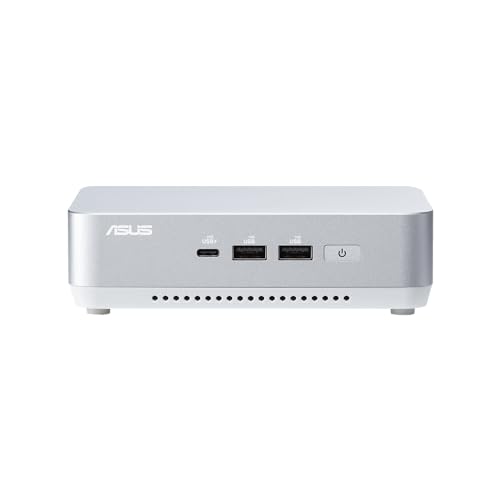
Worth It for Most Desks: ASUS NUC 14 Pro+ Barebone Kit — check the latest price on Amazon via the review links below.
Worth It for Fixed Roles: ASUS NUC 14 Essential (N150) — check the latest price on Amazon via the review links below.
Worth It for Gamers Who Build: ASRock DeskMeet X600 Mini-PC Kit — check the latest price on Amazon via the review links below.
Worth It for Network Roles: ASUS ExpertCenter PN54-S1 Barebone Kit — check the latest price on Amazon via the review links below.
Worth It for Proven Value: Intel NUC 13 Pro NUC13ANHi5 (GEEK+) — check the latest price on Amazon via the review links below.
Worth It for the Long Horizon: ASUS NUC 15 Pro Barebone Kit — check the latest price on Amazon via the review links below.
The Money Reckoning: How to Run the Only Honest Comparison
Every worth-it argument in this category fails or succeeds on one discipline: compare finished machines, not a kit against a computer. Build the four-line budget for any barebones candidate — the kit at its live listing price, the memory you would actually fit, the storage you would actually fit, and an operating system if you need to buy one — then compare that total against a prebuilt fitted to the same memory and storage capacities. Not the prebuilt’s base trim: the same capacities. Run the comparison that way and a pattern emerges that neither side’s marketing mentions. The totals are usually close. The machines are not, because the barebones total buys the larger drive and the better-sized memory by construction, while the prebuilt total buys assembly, a bundled licence and a single warranty.
That reframing is the whole article in miniature. Barebones is rarely a dramatic saving and rarely a dramatic overspend; it is a reallocation. Money a prebuilt spends on assembly and bundling, a barebones build spends on capacity and choice. Whether that reallocation is ‘worth it’ depends on whether you will feel the capacity — and most owners feel storage and memory headroom every day, while feeling assembly exactly once, for fifteen minutes, in the other direction. There are exceptions, and this article will name them: a deeply promoted prebuilt whose specifications you would keep unchanged is a genuine counter-example, and pretending otherwise would make the rest of this analysis worthless.
Two more money notes belong in the reckoning. Reuse is the barebones trump card: an SSD, a memory kit or a licence carried over from a previous machine can collapse the finished total below any comparable prebuilt, and prebuilt buyers have no equivalent move. And timing is a real, if modest, lever: kit and components can be bought as budget allows across a few weeks, where a prebuilt is a single transaction. Neither note is a fortune. Together they describe a category whose economics reward the organised — a theme the ownership section extends across the machine’s whole life.
The Control Reckoning: What the Extra Decisions Buy
Control is the currency skeptics undervalue because it does not appear in a total. Price it by its consequences. Storage control means the media library, the game installs and the photo archive live on a drive sized for them, not on a bundled drive whose replacement is a second purchase. Memory control means the machine’s multitasking ceiling is your decision, revisited only when you choose. Operating-system control means a Linux server with no licence line in its budget, or a Windows desk with no bundled software to evict on the first evening. Even the DeskMeet kits’ processor control — choosing, and later changing, the CPU itself — is control compounding across years.
Control also has a maintenance tense. A barebones owner whose drive fills in year three performs a swap; a sealed-prebuilt owner performs a negotiation with a warranty department or a replacement purchase. A barebones owner whose needs change re-roles the machine — desk to server, server to media box — because they know how it comes apart. None of this shows up in a price comparison, and all of it shows up in ownership, which is why worth-it verdicts written purely from prices so often age badly.
The Time Reckoning: What It Actually Costs You
The honest time bill for a NUC-style barebones build is smaller than its reputation: choosing parts with a guide like this one, one parts order, fifteen minutes of fitting, an operating-system install that a prebuilt buyer also performs in setup form, and a BIOS check. Call it an evening, most of it waiting for downloads. A DeskMeet gaming build costs more — an hour or two of genuine building — and returns a machine and an education. Against that bill, credit the time a prebuilt charges on the other side: removing bundled software, migrating around a too-small drive, and the eventual upgrade errand when the bundled parts meet their limits. Time, fairly accounted, is closer to a draw than either side admits — with the barebones evening front-loaded and the prebuilt’s costs scattered across the ownership years where they are harder to refuse.
Five Scenarios, Five Verdicts
The home-office professional. Verdict: worth it. The desk will run for years, the storage and memory choices will be felt daily, and a balanced kit like the NUC 14 Pro+ turns the whole exercise into one evening’s work for a machine specified exactly around the job. The single-warranty sacrifice is real and, for this buyer, cheap at the price.
The home-server and media builder. Verdict: worth it, most decisively of all. Operating-system freedom, chosen storage, low idle draw and networking options from 2.5G to dual LAN make barebones the natural foundation — this is the scenario the category would be invented for if it did not already exist.
The parent buying a first gaming PC with a teenager. Verdict: worth it, with the DeskMeet kits as the vehicle. The finished machine is a genuine gaming PC, the build is a shared project with real skills in it, and the socket leaves an upgrade path for birthdays to come. A prebuilt can match the machine; it cannot match the project.
The gift buyer. Verdict: not worth it. A gift that requires the recipient to source memory, storage and an operating system is a errand wearing a ribbon. Buy the finished prebuilt, and let this article’s analysis serve someone else’s purchase.
The buyer replacing a dead PC tonight. Verdict: not worth it, unless the parts are already on hand. Barebones economics assume an unhurried parts order and an evening’s build; urgency is the prebuilt’s home turf, and paying its premium for immediacy is rational rather than lazy.
The Kits That Make the Case

Worth It for Most Desks — ASUS NUC 14 Pro+ Barebone Kit
Strengths
- Balanced Core Ultra 5 125H performance for office, creative and home-server work
- Dual Thunderbolt 4 ports make single-cable desk setups easy
- Toolless access and a three-year warranty lower the risk for first-time builders
Trade-offs
- No RAM, SSD or operating system in the box — the extras are mandatory, not optional
- Integrated graphics limits demanding games and heavy GPU workloads
- WiFi 6E rather than WiFi 7, if you are chasing the newest wireless standard
| Processor | Intel Core Ultra 5 125H (installed) |
|---|---|
| Memory | No RAM included — add your own SO-DIMM |
| Storage | No SSD included — add your own M.2 SSD |
| Operating system | No OS installed |
| Networking | WiFi 6E, 2x Thunderbolt 4 |
| Design | Toolless chassis, 3-year warranty |
The NUC 14 Pro+ is the worth-it argument’s strongest general exhibit: a current Core Ultra 5 foundation, a toolless build, dual Thunderbolt 4 and a three-year warranty, at a finished total that buys visibly better storage and memory than a comparable prebuilt bundles. If the category is worth it for the mainstream desk buyer, it is worth it in this shape.
Its counter-argument is the category’s: parts extra, processor fixed, graphics integrated. Buyers who weigh those and still nod are the buyers this kit — and this article — are for.
Best for: mainstream long-term desks running the four-line budget honestly / Not suited for: buyers who need discrete graphics or a single warranty
Check on Amazon — check the latest price on Amazon before you commit the rest of the parts list.

Worth It for Fixed Roles — ASUS NUC 14 Essential (N150)
Strengths
- The natural starter kit: one RAM slot and one storage bay keep the first build simple
- 2.5G LAN and triple-display support are generous for an Essential-tier box
- VESA mount in the box makes tidy desk and signage installs immediate
Trade-offs
- Single RAM slot caps memory upgrades — buy the capacity you will need, once
- N150 performance suits browsing, office apps, media and light servers, not heavy gaming
- Single storage design means no second internal drive later
| Processor | Intel Processor N150 (installed) |
|---|---|
| Memory | Single DDR5-4800 RAM slot |
| Storage | Single storage design |
| Displays | Triple display support |
| Networking | 2.5G LAN, Wi-Fi 6E, Bluetooth 5.3 |
| Mounting | VESA mount included |
The NUC 14 Essential N150 makes the worth-it case at the starter tier: for fixed roles — media, kiosk, small server — the finished total is modest, the build is the easiest in the category, and the included VESA mount and 2.5G LAN are specifications prebuilts at similar finished totals rarely match.
The condition is the single memory slot: the worth-it maths only works if the one stick you fit is the capacity the role will want for its whole life. Fit it that way and the case is closed.
Best for: fixed-role builds where a modest finished total must still buy real specifications / Not suited for: roles with any growth ambition
Check on Amazon — check the latest price on Amazon before you commit the rest of the parts list.

Worth It for Gamers Who Build — ASRock DeskMeet X600 Mini-PC Kit
Strengths
- The only style of kit here that takes a real desktop graphics card via its PCIe 4.0 x16 slot
- Socketed AM5 processor means genuine CPU upgrades later, not a soldered dead end
- 500W power supply included, so the GPU plan does not need a separate PSU hunt
Trade-offs
- Largest box in this group at 8 litres — compact, but not palm-sized
- You supply the CPU, cooler considerations, RAM, storage and GPU, so the parts list is the longest here
- WiFi-ready is not the same as WiFi included — check what your build still needs
| Socket | AMD AM5 — bring your own Ryzen 9000/8000/7000 CPU (65W) |
|---|---|
| Memory | DDR5, supports 7200+ OC speeds per listing |
| Expansion | PCIe 4.0 x16 slot for a discrete graphics card |
| Storage | Gen5 M.2 support |
| Power supply | 500W PSU included |
| Chassis | 8-litre case, triple display support, WiFi-ready |
The DeskMeet X600 makes the worth-it case across time. Its AM5 socket means the finished total buys not one computer but a platform: today’s build, and a processor upgrade years later that no sealed machine can offer. For gaming and workstation buyers, that second life is where the worth-it ledger turns decisively.
The case requires accepting the longest parts list and the most variable total in this article. Buyers who spec it in fours — plus processor and card — will find the numbers as honest as the platform.
Best for: gamers and workstation builders valuing a multi-year platform / Not suited for: buyers who want the smallest, simplest build
Check on Amazon — check the latest price on Amazon before you commit the rest of the parts list.

Worth It for Network Roles — ASUS ExpertCenter PN54-S1 Barebone Kit
Strengths
- Dual LAN is rare at this size and ideal for firewalls, home labs and network appliances
- WiFi 7 keeps wireless current even though the processor is an entry model
- Business-grade ExpertCenter line with a three-year warranty
Trade-offs
- Ryzen 3 210 is the slowest processor in this group — fine for appliances, light for heavy multitasking
- Still needs RAM, storage and an operating system before it does anything
- Fewer headline display features than the NUC Pro models above it
| Processor | AMD Ryzen 3 210 (installed) |
|---|---|
| Memory | No RAM included — add your own SO-DIMM |
| Storage | No SSD included — add your own M.2 SSD |
| Operating system | No OS pre-installed |
| Networking | WiFi 7, Dual LAN |
| Design | Toolless chassis, 3-year warranty |
The ExpertCenter PN54-S1 makes the worth-it case by monopoly: dual LAN in a toolless, WiFi 7, three-year-warrantied mini PC is a combination the prebuilt market essentially does not sell at any total. For firewall, router and segmented-lab roles, the question is not whether barebones is worth it — it is whether the role is possible any other way at this size.
Outside those roles its modest processor weakens the case, which is exactly how a worth-it analysis should behave: decisively, per role, rather than vaguely, per category.
Best for: network appliances and home labs / Not suited for: general heavy desktop use
Check on Amazon — check the latest price on Amazon before you commit the rest of the parts list.

Worth It for Proven Value — Intel NUC 13 Pro NUC13ANHi5 (GEEK+)
Strengths
- Proven Arena Canyon NUC 13 Pro design with quad-display support for serious desk setups
- Core i5-1340P is a strong, efficient all-rounder for office and home use
- Thunderbolt 4 keeps docking and fast external storage on the table
Trade-offs
- Previous-generation platform, so no WiFi 7 and an older processor family
- Seller branding differs from the original Intel retail box — verify the exact kit contents on the listing
- Integrated graphics only, as with all the palm-sized kits here
| Processor | Intel Core i5-1340P (installed) |
|---|---|
| Memory | NO RAM included |
| Storage | NO SSD included |
| Operating system | NO OS included |
| Displays | 8K/4K quad display support |
| Networking | WiFi 6E, Bluetooth 5.3, Thunderbolt 4 |
The NUC 13 Pro makes the worth-it case on maturity: a documented platform, quad-display support and Thunderbolt 4, in kits whose contents are stated in capital letters. For offices and signage, where stability outranks currency, the finished total buys certainty — a currency this article has argued is undervalued.
Verify the exact listing’s contents and wireless standard before ordering, because these kits are sold under several brands. The five-minute check is part of this kit’s worth-it price, and it is a fair one.
Best for: offices and signage valuing proven platforms / Not suited for: buyers chasing the newest generation
Check on Amazon — check the latest price on Amazon before you commit the rest of the parts list.

Worth It for the Long Horizon — ASUS NUC 15 Pro Barebone Kit
Strengths
- Newest platform in this roundup, with WiFi 7 and dual Thunderbolt 4 for fast docks and displays
- Toolless design makes the RAM and SSD install a genuinely five-minute job
- Three-year warranty is unusually generous for a barebones kit
Trade-offs
- You still need to budget for RAM, an SSD and an operating system on top of the kit
- Integrated graphics only — this is a productivity and light-gaming box, not a dedicated gaming rig
- Premium positioning means the finished build costs more than the kit price suggests at first glance
| Processor | Intel Core Ultra 7 255H (installed) |
|---|---|
| Memory | No RAM included — add your own DDR5 SO-DIMM |
| Storage | No SSD included — add your own M.2 SSD |
| Operating system | No OS pre-installed |
| Networking | WiFi 7, 2x Thunderbolt 4 |
| Design | Toolless chassis, 3-year warranty |
The NUC 15 Pro makes the worth-it case at the flagship tier: the newest processor, WiFi 7, dual Thunderbolt 4 and the toolless, three-year package. Its finished total is the highest in this article, and its case rests on the horizon — buyers keeping a machine longest have the most years across which control and capacity repay the premium.
Shorter horizons weaken its case proportionally, pushing the same buyer toward the Pro+. That internal competition is healthy: it means the worth-it question has a right answer at more than one tier.
Best for: long-horizon flagship desks / Not suited for: short ownership cycles or tight finished budgets
Check on Amazon — check the latest price on Amazon before you commit the rest of the parts list.
Cost of Ownership: The Years After the Reckoning
Worth-it calculations usually stop at the purchase, which is where barebones’ advantages are smallest. Extend the horizon and the ledger moves. Energy: the NUC-style kits draw little at idle, so an always-on barebones server costs a household negligibly across a year, while a repurposed old tower doing the same job quietly outspends it. Maintenance: memory and storage events are component-priced on a kit designed to open, and the DeskMeet kits extend that economics to processors and graphics cards. Longevity: a kit bought a tier up, with capacity fitted generously, routinely outlasts the prebuilt bought at the same finished total with bundled minimums — because the bundled minimums are where prebuilts age first.
Resale and reuse complete the picture. A barebones machine’s parts retain independent value — a good SSD and memory kit move to the next machine or sell cleanly — and the kit itself, honestly described with its contents, finds buyers who understand exactly what it is. Ownership, totalled across years rather than priced at a checkout, is where the category’s case stops being arguable and starts being arithmetic. The full kit-by-kit evidence is in Barebones Mini PC Reviews, and the per-tier shopping lists begin at Best Barebones Mini PC Under $400.
Worth It by Budget Tier: Where the Answer Strengthens and Weakens
At the starter tier, the worth-it case is strong but brittle. A fixed-role Essential build delivers specifications — 2.5G networking, a VESA mount, a modern wireless standard — that finished machines at similar totals routinely skip, and the build could hardly be simpler. The brittleness is the ceiling: the moment the role grows, the sealed efficiency processor converts a good purchase into a replacement discussion. Starter-tier worth is therefore a bet on the role’s stability, and it is a good bet exactly when the role is genuinely stable — a media box will be a media box in five years, while a student’s first PC will not stay a light-duty machine.
At the mainstream tier, the case is at its most robust. The finished totals sit beside comparable prebuilts, the capacity and control advantages are largest relative to what prebuilts bundle at this level, and the processor tiers — Core Ultra 5 and 7 — carry the ownership horizon that amortises the one build evening into irrelevance. If this article had to defend the category on a single tier, it would choose this one without hesitation.
At the gaming tier, worth-it stops being about mini PCs at all and becomes about the build experience and the socket. A DeskMeet gaming build competes with small-form-factor desktop builds as much as with prebuilts, and its case rests on participation and upgrade path rather than on totals, which can favour any of the three routes depending on the week’s component market. Honest analysis admits the variability; dishonest analysis picks the week that suits its conclusion.
The Upgrade-Path Dividend, Priced Properly
The DeskMeet kits introduce a term no NUC-style calculation contains: the avoided second computer. A socketed build whose owner fits a newer processor in year four has purchased two performance eras for one case, one power supply, one storage investment and one setup of everything. Price that honestly — not as a saving today, but as a deferred replacement — and the X600’s platform premium reads differently from the NUC flagship’s, even when their finished totals are similar. The X300’s dividend is smaller and capped at its platform’s ceiling, but it is real for the same reason.
The NUC family’s counter-dividend is subtler: role mobility. A palm-sized kit retired from a desk becomes a server, a media box or a relative’s first computer with a drive swap and an operating-system install, because its owner knows it inside out. Machines that get second roles do not get replaced; they get reassigned. Across a household, that reassignment habit is worth a machine every ownership cycle or so — an unglamorous, entirely real entry on the worth-it side of the ledger.
What a Year of Ownership Actually Feels Like
Worth-it verdicts are usually written at the checkout and audited never. Imagine the audit. In month one, the barebones owner has forgotten the build and is enjoying the specific pleasures of a self-specced machine: the drive that fits the library, the desktop with nothing on it they did not choose, the box that fits the room. In month six, the audit finds the quiet line items — the always-on server role the machine absorbed without a new purchase, the family member’s files backed up to the drive that had room because its owner sized it. In month twelve, the audit asks the only question that matters: knowing everything you now know, would you buy the finished prebuilt instead? Owners who ran the four-line budget and matched kit to role answer no with a consistency that no launch-week review can manufacture.
The dissenting audits cluster predictably, and this article has tried to recruit their authors before purchase rather than after: the buyer who needed the machine working the same night, the gift recipient handed an unfinished computer, the gamer who bought integrated graphics on hope. Their verdicts are not evidence against the category. They are evidence for the scenario discipline in this article — the matching of kit, role and buyer that turns a conditional yes into an actual one.
How to Run Your Own Worth-It Test This Evening
Step 1: Pick the kit that matches your role from the six above and open its live listing. Step 2: Write the four lines — kit, the memory you would fit, the storage you would fit, operating system if needed — using live prices from the same retailer for consistency. Step 3: Find the prebuilt you would otherwise buy, configured to the same memory and storage, and write its total beside yours. Step 4: Score the non-money currencies honestly: control, single-warranty convenience, your evening, the machine’s likely lifespan in your role. Step 5: Decide by the scenario verdicts above, not by the totals alone — if the totals are close, the role decides, and the role verdicts in this article were written for exactly that moment.
Then, if the answer is yes, the build itself is the ritual this whole cluster describes: installer prepared in advance, memory seated until it clicks, SSD under its screw, BIOS check before the operating-system install, drivers and updates before software. Problem: your four-line total beats the prebuilt’s by nothing -> fix: compare capacities again — if your build carries the larger drive and memory, the tie is actually a win wearing a disguise. Problem: you cannot decide the memory capacity -> fix: on a single-slot kit, decide for year three; on a two-slot kit, start sensibly and leave the second slot as your future.
The Environmental Line in the Ledger
One more currency deserves a paragraph, because it converts to money over time even when it is not spent as money: waste. A barebones purchase generates no discarded bundled drive, no licence paid for and wiped, and no sealed machine landfilled at the first component failure — the failed part is replaced, the machine continues. The low idle draw of the NUC-style kits compounds quietly across an always-on machine’s years. Set against this the honest debit: several parcels, several packages, and a soldered processor that ends a kit’s story when the job outgrows it. On balance the category’s material footprint per year of service is among the best in personal computing, and for buyers who count that currency, it can settle a calculation the money alone left tied.
There is a final, unfashionable point in the category’s favour: skills compound. The owner who has fitted memory and storage once, checked a BIOS once, and installed an operating system once will never again read a computer listing the way they did before. Every future purchase — for themselves, for family, for work — is made by a more competent buyer. Prebuilts do not teach; they merely serve. Whether that education is worth an evening is a personal judgement, but it belongs on the ledger, because for many households it turns out to be the most durable thing the barebones purchase bought.
When the Answer Is Genuinely No
This article’s credibility rests on its noes, so let them be specific. No, if the machine is a gift. No, if it replaces a dead PC under deadline. No, if the buyer is a relative whose support calls land on you and whose patience for a parts order is zero. No, if your workload is graphics-bound and your budget only reaches the NUC family — the honest purchase there is a DeskMeet build or a gaming prebuilt, not a hopeful palm-sized kit. And no, if a promoted prebuilt matches your four-line total with specifications you would keep untouched; take the gift the market is offering. A category that is worth it for everyone is worth it for no one, and barebones does not need that kind of advocacy.
Common Mistakes in the Worth-It Calculation
Comparing a kit price to a finished price. Forgetting the operating-system line. Pricing the prebuilt at its base trim against your generously fitted build. Ignoring parts you already own. Valuing your build evening at a professional hourly rate while valuing the prebuilt’s bundled-software removal at zero. And the subtlest error: asking whether barebones is worth it in general, when every honest answer in this article is attached to a role, a horizon and a specific kit.
Run the thought experiment that settles most real decisions: picture the machine in year three, on an ordinary Tuesday. The prebuilt version of you is working on a computer whose drive filled in year two and whose memory ceiling arrived with the new project in year three; the specifications were chosen by a product manager optimising a price point. The barebones version of you is working on a machine whose drive and memory were chosen by the person who knew the workload — you — and whose remaining limitation, the processor, was a tier you selected with this Tuesday in mind. Worth-it questions are really questions about which Tuesday you would rather have. Priced that way, the category’s answer stops being close for most of the readers who found this article by searching for it.
One last discipline separates the buyers who answer this article’s question with a yes from those who answer it with regret: they decide what ‘worth it’ means before they look at a single price. If worth means the lowest possible finished total this week, a promoted prebuilt will sometimes win and should be allowed to. If worth means the best-specified machine across a long ownership, the barebones route wins so consistently that the comparison becomes a formality. If worth means the machine and the skills and the second roles and the upgrade paths, the contest is not close at all. Define the word, run the four lines, match the kit to the role — and the answer to the question in this article’s title will not need an article. It will need only your own arithmetic.
And if the arithmetic lands within a whisker either way, let the tie be broken by the person the machine is for. A buyer who lit up at the build sections of this cluster’s reviews should build; a buyer who skimmed them should not. Enthusiasm is not a soft factor in a category whose only real cost is an evening of participation — it is the factor that decides whether that evening is a price or a pleasure. The kits, as ever, are ready either way: the balanced NUC 14 Pro+ for the desk, the Essential for the role, the DeskMeet for the game, the ExpertCenter for the network. Choose the one whose Tuesday you want to live in.
Worth it, then — conditionally, arithmetically, and for the majority of the people who ask the question in earnest. That conditional quality is not evasion. It is the most useful form an answer to this question can take, because it tells you exactly which side of the condition you live on.
Bring that self-knowledge to the listings, run the four lines at live prices, and buy the answer — kit or prebuilt — without a backward glance. Decisiveness, in this category, is worth more than the difference between the totals.
The kits will still be there after the arithmetic — verified, specified and ready to become exactly the computer their buyer decided they should be.
That readiness — a foundation waiting for its owner’s decisions — is, in the end, the product being sold.
Buy it knowingly, and it is worth it.
Final Recommendation
Is a barebones mini pc worth it? For the readers this site exists for — builders, tinkerers, server runners, value hunters and anyone who has ever replaced a prebuilt’s drive in month one — yes, decisively, provided the budget is run in fours and the kit is matched to the role. Start with the NUC 14 Pro+ for a mainstream desk, the Essential N150 for a fixed role, the DeskMeet X600 for gaming with a future, or the ExpertCenter PN54-S1 if your network is the project. For everyone else, the prebuilt market is a respectable answer — and you now know precisely what its convenience costs and buys, which is all a worth-it article can honestly give you. The choosing process itself, step by step, is waiting in How To Choose A Barebones Mini PC.
Every single time, without any exception whatsoever.
Frequently Asked Questions
What exactly is missing from a barebones mini PC?
The processor and the box itself are present in most kits in this guide, but memory, storage and an operating system are not. The DeskMeet kits go further and leave the processor itself to you, because they use socketed desktop CPUs. Before any barebones kit becomes a working computer you should expect to add at least one stick of compatible RAM, one SSD, and either a Windows licence or a free Linux distribution. Budget for those three items from the start and the category holds no nasty surprises.
Is building a barebones mini PC difficult for a beginner?
Honestly, no — the palm-sized kits are among the easiest first builds in all of computing. The typical job is sliding off a cover or undoing a few screws, clicking a RAM stick into its slot until the clips close, seating an M.2 SSD under a single screw, and replacing the cover. There is no cabling, no thermal paste and no power-supply wiring on a NUC-style kit. The DeskMeet kits add a CPU install, which takes more care, but even that is a well-documented ten-minute step.
How much RAM and storage should I add?
For office work, browsing, media and light home-server duties, a single 16GB stick and a 512GB SSD is the sensible floor, and it is what we would fit to the Essential kits. For heavier multitasking, virtual machines, photo work or a machine you plan to keep for many years, 32GB of RAM and a 1TB SSD age far better. Kits with a single memory slot, like the NUC 14 Essential models, force the decision up front, so buy the capacity you will want in year three, not just month one.
Can a barebones mini PC play games?
It depends entirely on which style of kit you mean. The palm-sized NUC-style kits rely on integrated graphics, which handle esports titles, older games, indie games and cloud gaming comfortably, but struggle with demanding modern releases at high settings. The DeskMeet X300 and X600 are different machines altogether: their PCIe x16 slots accept a discrete desktop graphics card, and with one fitted they are legitimate gaming PCs that simply happen to live in an 8-litre case.
Do I need to buy Windows for a barebones kit?
Only if you want Windows. Every kit here arrives with no operating system, so the choice is yours: buy a Windows licence, reuse an eligible licence you already own where its terms allow, or install a free Linux distribution such as Ubuntu, which runs superbly on all of this hardware and is the default choice for home-server and home-lab builds. Factor the licence cost into any comparison against a prebuilt mini PC, because prebuilts usually include it.
What tools do I need for the build?
A small Phillips screwdriver covers almost everything. The current ASUS NUC Pro and ExpertCenter kits use toolless designs, so even that is optional for the RAM and SSD install. A clean, static-aware workspace, the kit manual open on your phone, and fifteen unhurried minutes are the real requirements. Keep the tiny M.2 screw in a dish rather than on the desk — it is the one part everyone loses.
Will a barebones kit work as a home server or media PC?
Very well, and for many buyers that is the real point. Low idle power draw, small size, VESA mounting and — on several kits here — 2.5G or dual LAN make them natural fits for media servers, file storage front-ends, smart-home controllers and always-on download or backup boxes. The dual-LAN ExpertCenter PN54-S1 is the standout for network appliance roles such as firewalls and routers built from PC hardware.


