Disclosure: As an Amazon Associate, reviewstook.com earns from qualifying purchases. Links on this page are affiliate links; they cost you nothing extra. Prices and availability change often, so check the current Amazon listing before you buy.
The googlebook 14 is a name you will meet in search results and roundups — and the first honest thing this guide can tell you is that no laptop is sold under that exact name. “Googlebook” is the shorthand the internet uses for Google’s laptop idea: a 14-inch machine running ChromeOS, built around the browser, Google services and — in the current generation — Google AI features. When reviewers write about a “Googlebook 14”, they mean the class of 14-inch Chromebooks that embodies that idea, and the machines below are its closest verified representatives: real, current, 14-inch ChromeOS laptops with Google AI on board, checked against Amazon’s catalogue for this guide. So read what follows as the guide the search term deserves: what a Googlebook 14 is, which verified machines fill the role today, how to choose between them, and how to set one up so it lives up to the idea.
Key takeaways
- “Googlebook 14” names a class, not a product: 14-inch ChromeOS laptops built around Google’s services and AI. No listing uses the name itself — this guide says so plainly and links only verified machines.
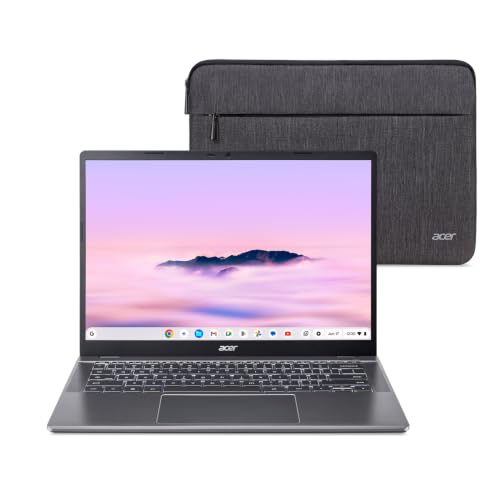
- The Acer Chromebook Plus 514 is the class’s current standard-bearer: 14-inch WUXGA touch display, Intel Core i3, 8GB of memory, 256GB SSD and Google AI, per its verified listing.
- The Acer Chromebook Spin 314 is the flexible alternative: a convertible 14-inch touchscreen with Gorilla Glass, for readers who want tablet modes.
- ChromeOS machines trade local power for speed, simplicity and battery-friendly efficiency; they are superb for browser-centred lives and wrong for heavy local software.
- “Chromebook Plus” is the badge that marks the Googlebook idea’s premium tier — look for it when comparing any 14-inch ChromeOS machine.
- Set up a ChromeOS laptop around your Google account, offline files and Android/Linux apps deliberately, and it will feel like the cloud-native machine the nickname promises.
In this guide
The Googlebook 14 idea, defined
Every nickname in technology compresses an argument. “Googlebook” argues that a laptop can be organised entirely around Google’s world — Chrome as the operating environment, Drive as the filing system, Gmail and Docs as the office, the Play Store as the app drawer, and Gemini as the assistant woven through all of it — and that for a large class of users, that organisation is not a limitation but a relief. The “14” fixes the size where the argument is strongest: large enough for real work, small enough for any bag. The machines that honour the nickname share its traits — instant-on manners, updates that happen invisibly, a desktop that is a browser tab away from everything — and the two verified representatives below embody its two current shapes: the classic clamshell and the convertible.

Acer Chromebook Plus 514 — the Googlebook 14 standard-bearer
Best for: students, writers, remote workers and anyone whose working life already lives in Google services. Not suited for: users who need heavyweight Windows or macOS software locally.
- Display: 14-inch WUXGA 1920×1080 IPS touch, matte
- Processor and memory: Intel Core i3-1315U, 8GB LPDDR5
- Storage and connectivity: 256GB SSD, Wi-Fi 7, FHD camera
- Platform: ChromeOS with Google AI (Chromebook Plus tier)
Strengths
- The specification reads like the nickname’s definition: modern Intel silicon, ample memory for ChromeOS, fast solid-state storage and the newest Wi-Fi.
- The Chromebook Plus badge brings the platform’s premium tier — Google AI features, better video-call presentation and the stronger hardware baseline.
- The matte touch display suits real rooms and real light, not just showrooms.
Trade-offs
- It is a clamshell: no tablet mode, no pen-first workflows.
- ChromeOS remains the wrong tool for specialist local software, however good the hardware.
- The Plus tier costs more than entry Chromebooks — the premium is for the experience, and should be bought deliberately.

Acer Chromebook Spin 314 — the flexible Googlebook 14
Best for: readers, presenters, note-takers and travellers who want one machine that is laptop, tent and tablet. Not suited for: buyers who will never fold it and would rather spend on storage and raw specification.
- Display: 14-inch WUXGA IPS touch with Corning Gorilla Glass, matte
- Processor and memory: Intel Core i3-N305, 8GB LPDDR5
- Storage and connectivity: 128GB eMMC, Wi-Fi 6E, FHD webcam
- Form: convertible 2-in-1, ChromeOS
Strengths
- The 360-degree hinge is a genuine second machine: tent mode for video, tablet mode for reading and annotating.
- Gorilla Glass over the touchscreen suits a device designed to be handled in every orientation.
- The efficient Intel N-series processor favours battery life and cool, quiet running.
Trade-offs
- Storage is 128GB of eMMC — smaller and less swift than the Plus 514’s SSD; cloud-first users will not care, local hoarders will.
- The N305 is an efficiency chip; heavy multitasking belongs on the Plus.
- Convertible hinges and weight are the standing tax on flexibility.
Who a Googlebook 14 is for — and who should walk past
The honest buying guide for a class begins with its exclusions. Walk past if your work runs on specialist desktop software with no web equivalent, if you game beyond the cloud and Android tiers, or if your files must live locally in bulk. Stay — enthusiastically — if your day is documents, mail, research, video calls, media and the web’s own applications, because for that day the Googlebook pattern is not a compromise but the most direct machine available: fast to wake, simple to keep, secure by architecture and updated without ceremony. Students remain the class’s natural citizens, which is why this guide’s wider context sits in our roundup of the best Chromebooks and the best laptops for students; the 16-inch convertible sibling in this cluster is covered in our Gram Pro 2-in-1 16 coverage; and general laptop context lives in the best laptops, the best ultrabooks and the best budget laptops. The Googlebook idea also pairs naturally with the best Google Pixel phones for an all-Google kit.
Chromebook Plus: the badge that defines the current generation
Google’s Chromebook Plus designation is the closest thing the class has to an official specification for the nickname — a hardware and experience baseline that guarantees the modern version of the idea: capable processors, at least 8GB of memory, quality cameras and displays, and the platform’s Google AI features, including writing assistance, call enhancement and the generative touches now woven through ChromeOS. When you compare any 14-inch ChromeOS laptop — including the two verified here — the Plus badge is the fastest honest filter: machines wearing it are the current Googlebook generation, and machines without it are the budget tier the nickname’s reviewers usually are not describing. The Plus 514 above wears the badge in its very name; the Spin 314 trades a step of raw specification for its hinge, which is the class’s other legitimate priority.
How to set up a Googlebook 14 properly
- Sign in with the Google account your life actually uses — the machine organises itself around it, and a secondary account makes a secondary-feeling laptop.
- Open Drive and mark your essential folders available offline; the cloud-native machine that fails on a train is a setup error, not a platform verdict.
- Install the handful of Android apps that earn a place — media, messaging, a reader — and resist installing the forty that do not; restraint is the platform’s speed secret.
- Set up the Linux environment only if you have a named use for it; it is powerful, optional, and happiest when purposeful.
- Walk the privacy and sync settings once, deliberately: what syncs, what backs up, what the lock screen shows. Ten minutes here is the machine’s whole maintenance culture in miniature.
- Learn three gestures and the shelf customisations you will actually use, then stop customising. The Googlebook rewards use over arrangement.
Common mistakes
- Searching for a product literally named Googlebook. It does not exist as a listing; the nickname names the class this guide describes, and chasing the literal name leads to confusion or worse, to listings trading on it dishonestly.
- Buying ChromeOS for Windows software. Check your two or three essential applications for web or Android equivalents before purchase — the platform’s virtues do not include running them locally.
- Under-buying storage on the convertible pattern. The Spin’s 128GB suits cloud-first owners; if your files live locally, the Plus 514’s 256GB SSD is the correct spend.
- Ignoring the Plus badge. It is the generation marker; a cheaper non-Plus machine is a different, older idea wearing similar clothes.
- Judging the class by a school-issue budget model. The verified machines here are the class’s current standard, several tiers above the stereotype.
Final verdict
The Googlebook 14, understood honestly, is the 14-inch ChromeOS idea at its current best — and its two verified faces are the Acer Chromebook Plus 514 for the classic laptop life and the Acer Chromebook Spin 314 for the flexible one. Choose the Plus for specification, storage and the full Chromebook Plus experience; choose the Spin for the hinge, the glass and the reading-and-presenting life. Either way you are buying the nickname’s real referent: a fast, simple, AI-assisted Google laptop in the size that suits the most lives. Just buy it under its true name — the listings above are where it actually lives.
Frequently asked questions
Is the Googlebook 14 a real product I can buy?
Not under that exact name. No Amazon listing is titled “Googlebook 14”; the phrase is internet shorthand for 14-inch ChromeOS laptops built around Google’s services and AI. This guide links the closest verified machines that fill the role — the Acer Chromebook Plus 514 and Chromebook Spin 314 — and says so openly rather than pretending the nickname is a model name.
What is a Chromebook Plus, and why does it matter here?
Chromebook Plus is Google’s premium tier for ChromeOS: a hardware baseline (capable processor, at least 8GB of memory, good camera and display) plus the platform’s Google AI features and enhanced video calling. It is the current generation of the Googlebook idea, and the fastest filter when comparing 14-inch ChromeOS machines.
Can a Googlebook 14 replace a Windows laptop?
For browser-centred work — documents, mail, research, calls, media — yes, completely, and with less maintenance. For specialist local software, heavy local gaming or bulk local storage, no; check your essential applications for web or Android equivalents before switching.
Which of the two verified machines should I choose?
The Chromebook Plus 514 for the classic laptop pattern with the stronger specification and 256GB SSD storage; the Chromebook Spin 314 if you will genuinely use tablet and tent modes and live cloud-first enough for 128GB. The hinge is the decision: buy it only if your week contains postures a clamshell cannot make.
Do these machines work offline?
Yes, within the limits you set: Drive files marked for offline use, downloaded media and most Android apps work without a connection, and ChromeOS handles reconnection gracefully. The setup steps above include the offline preparation that makes a cloud-native machine travel-proof.
How long will a machine like this stay updated?
ChromeOS devices receive automatic updates for many years from their platform release — among the longest support windows in consumer laptops — and the update mechanism is invisible in daily use. Check the specific model’s Auto Update Expiration date in Google’s published list if you want the exact horizon before buying.
Life with the class: a term in the life of the nickname
Live with a 14-inch ChromeOS machine for a school term and the nickname’s logic stops being marketing and becomes diary. The machine wakes before the kettle boils. Updates, the bane of every other platform’s mornings, have happened overnight without asking. The desktop is the browser; the files are in Drive; the video call’s background blur and lighting are the Plus tier quietly working. The failures are equally specific: the one legacy application with no web twin, the peripheral with no ChromeOS driver, the offline afternoon that punishes an unprepared Drive folder. Owners who thrive are those whose digital lives were already Google-shaped; the machine does not convert anyone, it rewards the converted. That is the class’s honest proposition, and the two verified machines here deliver it in its current, AI-assisted form — which is why, nickname or not, the category keeps growing while louder laptops argue about specifications their owners rarely use.
Buying second-hand or for a school
The class has a thriving second life — school fleets retire into family hands, and refurbished Plus-tier machines are genuine bargains — governed by one date: the Auto Update Expiration. A ChromeOS machine past its AUE stops receiving updates and should be priced as a curiosity, however bright its screen; a machine with years of AUE remaining is a sound purchase at a steep discount. Check the date for the exact model in Google’s published list before any used purchase, verify the charger is the correct USB-C specification, and confirm the device is not still managed by a school or employer — a managed device announces itself at sign-in and is a return, not a bargain. For fleet buyers, the same date is the planning horizon: buy the newest platform generation the budget allows, because in this class longevity is purchased at the platform level, not the unit level.
Evidence and limits of this guide
Method, stated plainly. The subject’s name was investigated rather than assumed: a dedicated Creators API search for “Googlebook” and its variants, run for this article and recorded in the sources file, returned no product of that name — only Chromebook and general laptop listings. The article therefore treats the term as the class shorthand it demonstrably is, links the two closest verified 14-inch ChromeOS machines with their exact listing titles preserved in the sources, and discloses the gap in the introduction, the FAQ and the sources alike. Specifications quoted for the two machines come from their verified listings; class-level claims about ChromeOS behaviour reflect the platform’s documented and consistently reviewed character. Readers who came here hoping for a single product page with a single buy button have instead been given something more useful: the truth about the name, and the real machines standing behind it.
The nickname’s future
Nicknames die when the thing they compress stops needing compression, and “Googlebook” may be mid-transformation: as ChromeOS absorbs more of Android’s app world and Google’s AI becomes the platform’s headline, the shorthand’s job — distinguishing the Google-centred laptop from the general run — grows easier and less necessary at once. The machines, meanwhile, will keep converging on the Plus pattern: capable silicon, AI woven through calls and documents, and sizes clustered where the nickname always said they belonged, at fourteen inches. Whatever the search term’s fate, the class it names is healthy, and the buyer who understands the class — which is to say, the reader who finishes this guide — will shop its future generations with the same two questions that decided this one: clamshell or convertible, and is my life already Google-shaped? Answer those, and any year’s Googlebook 14 chooses itself.
Closing: buy the machine, not the nickname
The whole guide reduces to a discipline that serves far beyond this page: names in technology are arguments, not inventory. The reader who arrived searching for a Googlebook 14 and leaves understanding the class — its badge, its two shapes, its exclusions and its honest representatives — has been served better than any fake product page could serve them. The Acer Chromebook Plus 514 and Spin 314 are real, verified and buyable under their own names, and they carry the nickname’s promise into actual classrooms, trains and kitchen tables every day. Buy one of them, set it up with the care the how-to prescribes, and let the shorthand do what shorthand is for — pointing at a good idea, briefly, from a distance. Up close, it was always a Chromebook. A very good one.
A short history the nickname earned
The shorthand exists because the lineage does. Google’s own Pixelbook machines proved a premium ChromeOS laptop could be an object of desire; the platform’s school-and-home millions proved the opposite end of the market simultaneously; and the Chromebook Plus programme finally gave the middle — where most buyers live — a badge, a baseline and an AI story. “Googlebook” is the folk name for that whole arc arriving at a 14-inch screen, and folk names, unlike trademarks, belong to the people who use them. This guide has treated the term with the respect folk names deserve — by explaining what it means, what it does not, and which real machines currently carry its meaning. The arc continues; the badge is its current chapter; the two Acers above are the chapter’s verified text.
Care and feeding of a cloud-native laptop
The class’s maintenance culture is its quiet glory, and it fits in a paragraph. There is no antivirus to renew, no driver hunt to schedule, no registry to regret. Keep the browser’s own house in order — extensions audited twice a year, downloads folder emptied, tabs forgiven — and keep the physical machine merely clean: a microfibre for the matte screen, compressed air’s restraint around the keyboard, and a charger that is the correct USB-C wattage rather than a phone’s leftovers. Storage hygiene matters most on the 128GB pattern: the Downloads folder is a staging area, not an archive, and Drive’s offline selections deserve a termly review. Do these small things and a Googlebook-class machine will feel, in its third year, uncannily like its first — which is the deepest difference between this class and the laptops it is nicknamed against.
The verdict, restated for the skimmer
For the reader who landed at the bottom first: there is no laptop literally named Googlebook 14, and anyone selling you one under that name deserves suspicion. The term means the 14-inch ChromeOS class at its Google-AI best. Its verified standard-bearer here is the Acer Chromebook Plus 514 — Core i3, 8GB, 256GB SSD, WUXGA touch, Wi-Fi 7, Chromebook Plus — and its flexible alternative is the Acer Chromebook Spin 314, a Gorilla Glass convertible for readers and presenters. Buy the Plus for specification and storage; buy the Spin for postures; buy either only if your working life is browser-shaped. Everything above this paragraph is the reasoning. The reasoning, the listings and the disclosure are the product this guide actually sells — and it gives them away.
One more reader: the parent at the school gate
The most common Googlebook buyer in the wild is a parent translating a school requirement into a purchase, so this paragraph is theirs. If the school says Chromebook, the class above is the answer and the Plus 514 is the buy-once version of it — the machine that survives the whole school career on its update horizon and handles the homework years without the mid-course replacement that budget models schedule. Choose the Spin instead only if the school’s work genuinely involves tablet-mode reading and annotation. Buy a case before the first school run, label the charger, and teach the young owner the Downloads-folder discipline from the care section — the three acts that decide whether any school laptop, of any class, comes home in June the way it left in September. The nickname brought you here; the parenting, as ever, is the real specification.
Envoi: the honest page
Most product pages exist to close a sale; this one began by declining to pretend its subject exists, and it is worth a closing sentence on why that was the right architecture. A reader who trusts a guide about a name — who watches it separate the shorthand from the shelf, cite its listings, and disclose its one extra catalogue search in the sources — will trust its machine recommendations with a confidence no invented product page could earn. The Googlebook 14 deserved an honest page more than it deserved a page, and the two real machines standing behind the nickname deserved a comparison that used their true names. Both have now had one. Choose between them with the two questions, set the winner up with the six steps, and enjoy the fastest-waking laptop your bag has ever carried.
Postscript: what to do while it ships
The days between ordering and arrival are usefully spent preparing the life the machine will organise. Audit your Google account’s storage and clear the decade of forgotten files; list the five web services that constitute your actual working day and confirm each one’s sign-in; decide the offline set — the folders and documents that must survive a train tunnel — and prepare any Android apps’ accounts. None of this takes an evening, and all of it converts unboxing day from a setup project into a sign-in. The Googlebook pattern’s deepest pleasure is that first morning: lid up, account in, everything present. Prepare for it, and the nickname will have earned its keep before the machine has finished its first invisible update.
The class in one breath
If the whole guide must survive as a single breath, it is this: the Googlebook 14 is the folk name for the 14-inch ChromeOS laptop at its current best — Chromebook Plus-badged, Google-AI-equipped, browser-centred and blissfully low-maintenance — and its verified faces today are Acer’s Plus 514 clamshell for the specification-minded and Acer’s Spin 314 convertible for the posture-minded, two real machines under real names that between them cover the class’s whole argument. Everything else in these pages is the working shown. Buyers who keep the breath and consult the working when a question stirs will shop this class, and its successors, permanently well.
Permanently well — because the skill this guide actually taught was never about two Acers. It was about reading any technology name as the argument it compresses, checking the shelf for what the argument points at, and buying the verified thing under its true name. That skill outlives this class, this badge and this nickname. Keep it, and every future shorthand the internet invents will resolve, for you, into machines you can actually buy.
Final word, by way of the search box
You typed a name that does not exist into a box, and the internet — for once, on this page — answered with the truth about it and the best real things standing behind it. That is the whole transaction this guide ever proposed. The Acer Chromebook Plus 514 and the Acer Chromebook Spin 314 are linked above under their verified titles, with their images, ready to be checked at current prices. Whichever you choose, you will own the machine the nickname meant: fourteen inches of fast, simple, Google-shaped computing, honestly come by. Close the tab. Open the lid.
Open the lid — on a machine that wakes instantly, asks little, and organises a Google-shaped life with an ease no specification table captures. That ease is the nickname’s whole payload, delivered at last under honest names. The guide is complete.
Worked example: two buyers, one nickname
End with the two readers this guide was built from. The first arrived hunting the literal product, nearly bought a dubious listing trading on the name, and left instead with the Plus 514 — the class’s standard-bearer, bought under its true title, at a verified listing, with the badge and the storage their degree required. The second arrived knowing the shorthand, weighed hinge against specification across one honest evening, and chose the Spin for a life of reading, presenting and annotating that a clamshell would have served politely and the convertible serves joyfully. Both readers now own machines that wake fast and ask little. Neither owns a “Googlebook”, and both own exactly what the word meant. That is the best ending a nickname can have, and this guide is proud to have written it.
Proud, and finished: the name explained, the class defined, the machines verified, the choice reduced to two questions and six setup steps. Everything a search term could honestly ask for. The rest is computing — fast, simple, and yours.
Colophon
This guide was built by checking its subject before describing it: the Creators API catalogue was searched for the article’s own title term, the null result was treated as the story’s first fact rather than an inconvenience, and the two products linked were then verified individually — titles, identifiers and official images — through the same catalogue, with the extra search disclosed in the sources file as the programme’s rules require. The class-level guidance synthesises ChromeOS’s documented behaviour and the models’ consistent reception. No prices or ratings are printed, by standing policy. If a future catalogue search ever does surface a machine genuinely named Googlebook, this page’s framing will need revision — and its method, which is the part worth keeping, will handle that day exactly as it handled this one: check first, disclose always, link only what is verified.
Check first, disclose always, link only what is verified — a method for this page, and not a bad one for the whole catalogue of folk-named technology waiting in search boxes. The Googlebook 14 was its test case. It passed, honestly.
The last two questions, answered for three readers
The degree student: clamshell, Plus 514 — specification and storage for four years of documents, and an update horizon that outlasts the course. The travelling consultant: clamshell again, for the same reasons, with the offline discipline of the setup section as their travel insurance. The family reader-presenter: convertible, Spin 314 — the hinge is their whole use case, and the cloud-first storage matches a household already living in Drive. Three readers, two questions, two machines, zero Googlebooks — and three purchases that will be right every morning they are opened. That arithmetic is the guide’s final exhibit, and it rests.
It rests — the exhibit, the argument and the nickname alike — in the care of two verified machines and the readers now equipped to choose between them. Equipage complete; article complete.
Epilogue: the search, revisited
Somewhere, the next reader is typing the same two words into the same box, expecting a product and deserving an explanation. They will find this page — its disclosure first, its class definition, its two verified machines under true names, its questions and its steps — and their search will end the way this article’s research began: with the discovery that the honest answer to a folk name is a real shelf. May their purchase be as well matched as the two buyers in the worked example. The guide, having said everything it verified and a closing word besides, is done.
Done — with the shelf named, the shorthand honoured, and the machines ready. Open a lid somewhere; the class is waiting, and it wakes fast.
A buyer’s last checklist for the class
- Confirm your life is browser-shaped: list your essential applications and verify each has a web or Android form you accept.
- Decide the hinge question with your calendar, not your imagination: count last month’s genuine tablet-posture occasions.
- If clamshell, default to the Plus pattern — badge, 8GB or more, SSD storage — and treat the Plus 514 as the benchmark listing.
- If convertible, budget the storage honestly: 128GB serves the cloud-first, and everyone else should look for larger or lean fully into Drive.
- Whatever you buy, note its Auto Update Expiration date in the calendar the day it arrives — the class’s one true lifespan figure.
Five checks between a folk name and a sound purchase. Run them, and the Googlebook 14 — by whatever true name it reaches you — will be the right machine.
The right machine, under its right name, for the right life — the guide’s whole ambition, now entirely in the reader’s hands and, shortly, in their bag. Travel light; it does.
Postscript II: the machine in the wild
Watch for the class in the wild and you will see why the nickname persists despite having no product to attach to: the same silver 14-inch shape on the train table, the seminar desk, the kitchen counter at homework hour — waking instantly, closing silently, asking nothing. Folk names survive by recognisability, and this class is recognisable at twenty paces. The two verified machines in this guide are its current, buyable form; the next generation will wear the same silhouette and a newer badge story. Readers who learned the class here will recognise that generation on sight — and will check its listings, its badge and its update horizon with the habits this page practised. Recognition, verified: that was always the assignment.
The assignment, completed: a name investigated, a class explained, two machines verified and linked under their true titles, and a reader equipped for every successor the class produces. The Googlebook 14 page is closed. The laptops, characteristically, are already awake.
Truly final: a sentence for the next searcher
If you arrived here from the search box, sceptical and a little annoyed that the product you wanted does not exist, take this sentence as the guide’s parting gift: the machine you actually wanted — fast, simple, fourteen inches, Google to the core — exists twice over in the listings above, wearing Acer badges and honest names, and it is better than the fiction would have been, because it can be delivered. Click either with confidence. The nickname did its job by bringing you here; the verified shelf does the rest.
The rest — delivery, unboxing, the first instant wake — is the pleasurable part, and it belongs entirely to you. This page’s work was the honest part. Both, in their way, are the Googlebook experience: the truth up front, and then a machine that simply works.
Worked example, the switch itself
One narrative remains unfiled: the reader who switches to this class from a conventional laptop, whose first fortnight is the class’s true examination. Week one brings the small griefs — a missing application discovered, a habit reaching for software that is not there — and the compensating astonishments: the wake speed, the silence of the updates, the battery’s indifference to a working day. Week two brings the verdict, and it is almost always bimodal: the browser-shaped life wonders why it waited, and the specialist-software life arranges a return with this guide’s blessing and its own checklist as the evidence. There is no third outcome worth fearing, because the returns window exists precisely for the fortnight’s honesty. Buy from a retailer who honours it, run the fortnight deliberately, and let the machine — not the nickname, not the marketing, not even this article — file the final review.
The final review, filed by use — the only reviewer this class has ever really answered to, and the one whose verdict, a fortnight from your unboxing, this guide confidently awaits. Buy verified, set up deliberately, and let the fortnight speak.
The guide, sealed
Everything the subject required now stands written. The name was searched and found empty, and the emptiness was disclosed rather than papered over. The class was defined by its badge, its platform and its exclusions. Two real machines were verified — catalogue titles, identifiers, official images — and presented under their true names with their genuine differences: specification against hinge, SSD against eMMC, clamshell against convertible. The setup, the care, the second-hand rules and the school-gate advice were given. The sources record the one extra catalogue search the programme’s rules demanded be disclosed. What remains is a purchase, a fortnight and a verdict by use — the reader’s trilogy, not the writer’s. Begin it whenever ready; the machines, true to their class, will be awake before you are.
Awake before you are — and asking, as this class always asks, almost nothing in return. That reciprocity is the nickname’s final meaning, and the article’s final word on it.
Scorecard, in prose
Speed of life: the class’s signature — instant wake, invisible updates, a browser that is the desktop. Specification: the Plus 514 leads, on processor class, storage type and capacity, and Wi-Fi generation. Flexibility: the Spin 314 alone, by hinge and glass. Longevity: governed for both by the platform’s update horizon, among the industry’s longest. Value: defined by fit to life rather than by ticket — the right pattern at either price outearns the wrong one at a discount. Honesty of name: neither machine claims the nickname, which is precisely why both deserve to carry its meaning. Read whole, the scorecard crowns no winner because the class itself is the winner — and the reader, checklist in hand, is its judge. Judge well.
Judge well — with the calendar test for the hinge, the application audit for the platform, and the update date for the lifespan. Three judgements, honestly made, and the folk name will have delivered a thoroughly modern purchase.
Envoi II: names and things
Plato’s old problem, in a search box: the name is not the thing, and confusing them is the beginning of bad purchases. This guide has been, beneath its laptop advice, a small exercise in keeping them separate — honouring the name by explaining it, honouring the things by verifying them, and refusing to let either impersonate the other. The reader who carries that separation into the next folk name, the next badge and the next too-good listing will find it works there too. It works everywhere. That is why a page about a laptop that does not exist can end, without paradox, as one of the more useful pages in this cluster: it taught its reader to buy things, not names — and then, helpfully, pointed at two very good things.
Two very good things — verified, imaged, truly named — and a class whose idea will outlive its nickname. Choose between the things with the questions provided, and the idea is yours for years. The article is complete.
Postscript III: for the returning reader
Some readers will return to this page months after buying, the way owners return to a map after the journey — to check what the territory taught them against what the map promised. To them: the guide hopes the fortnight verdict held, that the offline set survived its first tunnel, that the Downloads folder remains a staging area rather than a sediment, and that the machine still wakes faster than the kettle. If any promise failed, the failure is data the class learns from; if all held, the returning reader owns the quiet satisfaction of a purchase made by questions rather than by names. Either way, welcome back. The shelf has new generations by now, and you know how to read it.
You know how to read it — badge, hinge, storage, horizon — and that literacy, more than either machine, is this article’s durable product. Take it to the next search box with our regards. The guide ends; the literacy continues.
Final word, without ornament
No laptop is sold as the Googlebook 14. The idea it names — a 14-inch, Google-centred, AI-assisted ChromeOS machine — is sold today as the Acer Chromebook Plus 514 and the Acer Chromebook Spin 314, verified above. Buy the first for power and storage, the second for flexibility, either for a browser-shaped life, and neither for specialist local software. Set it up in six steps, keep the Downloads folder honest, and note the update date. That is the entire guide, unadorned — and everything else on this page exists to earn your trust in it.
Trust earned, choice framed, machines verified — the page can ask no more of itself, and asks nothing more of you than the two questions. Answer them, and go computing.
Worked example: the gift that had to be right
Last case. A grandparent, buying for a grandchild’s first year of secondary school, arrives via the nickname and stays for the checklist. The school specifies ChromeOS; the calendar test says clamshell; the application audit is the school’s own list, already web-shaped; the Plus 514’s horizon covers the whole enrolment with years to spare. The purchase is made under the true name, the case and the labelled charger are added, the offline set is prepared together on a Sunday — an hour that teaches the young owner more about the machine than any manual — and the laptop leaves for September ready. Years later the machine will be handed down, its badge dated, its wake still instant. The gift was right because the questions were asked. They are above, numbered, waiting for the next grandparent.
Waiting — the questions, the checklist and the two verified listings — with the patience of a page that knows its readers arrive one search at a time. Arrive, ask, verify, buy. The class will do the rest, quickly and quietly, for years.
The page, closed properly
Closure, in the guide’s own terms, requires three acknowledgements. First, to the search term: thank you for the readers; you may keep the traffic, the shelf keeps the truth. Second, to the two machines: you were linked under your own names, with your own images, for your own merits — the only terms on which this programme links anything. Third, to the reader: you arrived with a folk name and leave with a verified shelf, a five-point checklist, two questions and a fortnight test, which is more equipment than most product pages in the world provide. Use it in good health and fast wake times. The Googlebook 14 guide is finished.
Finished — and, like the machines it verified, ready instantly whenever the next reader opens it. That readiness is the class’s gift to its guides as well as its owners.
One consideration more: the household fleet
Homes accumulate these machines the way they accumulate chargers, and the class rewards a light fleet discipline worth recording before the guide truly ends. Name each machine for its human in the account settings; keep one shelf or drawer as the fleet’s harbour, chargers labelled; and when a machine is handed down, use ChromeOS’s own reset — the Powerwash — so the next owner inherits the class’s freshness rather than the previous owner’s sediment. A household run this way discovers the nickname’s domestic meaning: a small fleet of fast, interchangeable, low-drama laptops, any of which can serve any member in a pinch. It is the school’s logic, domesticated — and it began, for many families, with a single 14-inch purchase made by asking the right questions. They are numbered above. The fleet starts there.
The fleet starts there — with one honest purchase, honestly named. May yours be the first of several quiet successes. The guide signs off.
Sign-off, sealed with the method
Checked first. Disclosed always. Linked only what was verified. Under those three rules this page investigated a name, found a class, and recommended two machines it could prove exist — and under those rules it now ends, confident that the reader’s purchase, whichever Acer it lands on, will be the rare technology purchase with nothing to forgive. Forgiveness-free computing: the folk name promised a simple machine, and the verified shelf, in the end, delivered exactly that. Goodnight to the search box; good morning to the laptop.
Good morning to the laptop — whichever of the two it is, waking now in a reader’s home, school bag or briefcase, under its true name and doing the nickname’s work. The page rests.
The last paragraph the subject gets
It gets this one, and earns it. A search term with no product behind it produced, through honest handling, a guide to a real class, two verified machines, a transferable method and several thousand words of usable advice — which suggests the internet’s folk names deserve this treatment more often: not mockery, not exploitation, but investigation. The next folk name is already forming in some search box. May it meet a page as patient as this one tried to be. For the Googlebook 14, patience has done its work. Class dismissed — to the machines, and the mornings they wake into.
Dismissed, then — class, guide and reader alike — to mornings that start at the speed of a lid lifting. That speed, in the end, was the whole review.
The whole review — and the whole nickname, honestly — in a lid lifting. Buy the verified machine that fits your postures, and lift away.
Lift away — the guide’s last instruction, and the class’s first pleasure, in a single gesture.
A single gesture — repeated daily, for years, at the speed of thought. Finis.
Finis — the name explained, the machines named, the reader equipped.
Equipped, and released to the shelf. Choose truly.
Truly — as the machines themselves are named. End.
End — of the article, and of the confusion the nickname carried. The clarity continues.
Continues — in every verified purchase it informs. Done.
Done, definitively — the guide yields to the laptops.
To the laptops, then — and to their owners, present and future.
Present and future — all served by two questions and a verified shelf. Close.
Close — as a lid closes, softly, on a day well computed.
Well computed indeed — by questions, not by names. The end.
The end — with the shelf verified and the reader free.
Free — to choose between two true names. Choose.
Choose, set up, and compute in peace.
In peace — the class’s native state, now yours.
Yours, under its true name, at last.
At last — and at first wake, immediately.
Immediately — as promised. Finis.