Disclosure: As an Amazon Associate, reviewstook.com earns from qualifying purchases. Links on this page are affiliate links; they cost you nothing extra. Prices and availability change often, so check the current Amazon listing before you buy.
DDR5 arrived promising double everything and delivered something more interesting: a re-architecture of how memory talks to the processor, whose benefits are real, specific, and widely misdescribed. This ddr5 ram explained guide separates the architecture from the advertising — what actually changed inside the DIMM, why the frequencies leapt while the latencies seemed to stall, and which of the generation’s features a gaming PC spends daily versus which ones serve servers and future platforms.
Read ddr5 ram explained as the foundation for this series’ memory comparisons: the timing arithmetic, the sweet-spot logic, and the platform behaviour in the neighbouring guides all stand on the concepts here. Two verified DDR5 kits are linked below as the generation’s reference purchases — the form a DDR5 buy should take — because an explainer that cannot point at a correct example has only done half its job.
Key takeaways
- DDR5’s leap is bandwidth and efficiency: two independent channels per stick, on-DIMM power management, and far higher frequencies
- Latency in nanoseconds barely moved, because CL rose with frequency — the fraction, as always, is the truth
- The gaming sweet spot is a platform property: around 6000 MT/s with tight timings on current controllers
- Capacity per stick doubled, making 32 GB the easy standard and 64 GB unremarkable
In this guide
Ddr5 Ram Explained: what changed inside the stick
Begin with the channel split, DDR5’s least advertised and most consequential change. A DDR4 stick presents one 64-bit channel to the processor; a DDR5 stick presents two independent 32-bit sub-channels, each with its own path for requests. The processor can therefore keep more work in flight — fetching for two conversations at once rather than queueing behind one — which improves real-world throughput beyond what the frequency figures alone predict, especially in the mixed, bursty access patterns games actually generate. Bandwidth headlines undersell this; it is an efficiency of organisation, not just of speed.
Power moved house in the same redesign. DDR4 boards regulated memory voltage centrally; DDR5 sticks carry their own power management chip, the PMIC, which lets each DIMM govern its own supply with finer precision. That enables the generation’s lower operating voltage and its higher frequencies, and it also created the early supply shortages and the small per-stick cost the generation still carries. When a DDR5 stick costs more than its DDR4 ancestor at the same capacity, part of the difference is a tiny power supply you are buying with every module.
Frequencies, latencies, and the fraction again
DDR5 launched at 4800 MT/s where DDR4’s mainstream ended at 3200, and the enthusiast market now lives at 6000 and beyond. The apparent paradox — CL numbers doubling while nobody’s latency doubled — dissolves in the arithmetic this series repeats because the market keeps obscuring it: latency in nanoseconds equals CL divided by frequency. DDR5’s CL36 at 6000 is 12 nanoseconds, in the same neighbourhood as good DDR4. The generation spent its frequency dividend on bandwidth and kept latency roughly level, which is why its gaming gains are real but bounded, as the DDR4-versus-DDR5 comparison in this series measured.
Burst length and bank organisation complete the picture quietly: DDR5 fetches in longer bursts and organises its banks for more parallel work, suiting it to the large, streaming data patterns of modern games and content tools. None of these details appears on a listing, and all of them are why a DDR5 kit at a modest paper advantage over DDR4 can feel, in a simulator or a sprawling open world, like a larger one. Architecture is the part of the specification that benchmarks summarise and listings omit.
ECC, capacity, and the features you do not see
DDR5 carries on-die error correction as standard — a quiet revolution with a footnote. Every DDR5 chip can correct single-bit errors inside itself, which improves reliability and manufacturing yields, but it is not the full ECC of workstation memory: errors on the path between stick and processor remain uncorrected, and true ECC DDR5 is a separate, pricier product. Listings that blur that distinction are selling the footnote as the headline. For gaming, on-die ECC is simply a reliability floor the whole generation stands on, and a welcome one.
Capacity per stick doubled at the architecture level, which is why 32-gigabyte two-stick kits became the standard recommendation so quickly and why 64 gigabytes stopped being an enthusiast flex. Higher density also enables the large-memory workstations and creator machines the generation serves beyond gaming. For the gamer, the practical translation is headroom: the capacity wall this series keeps warning about moved a full product cycle further away, provided the kit is bought at the new standard rather than the old floor.
Buying DDR5 properly, with the reference kits
The purchase rules assemble themselves from the architecture: two sticks, not four, so the controller runs the rated speed happily; the platform sweet spot — around 6000 with CL30-class timings on current AMD and Intel systems; capacity at 32 gigabytes; and a kit whose listing states speed and timings together, from a maker whose warranty you trust. The two verified kits below embody the form — Corsair’s Vengeance DDR5 line at 6000, one in its RGB CL30 specification — and they are linked as references for what correct looks like before they are linked as products.
What to avoid is equally architectural: four-stick kits at heroic speeds the controller cannot train, mixed kits assembled from bargains, and frequencies far above the sweet spot bought for games that cannot spend the bandwidth. DDR5 rewards the buyer who respects its organisation — channels, controllers, fractions — and taxes the buyer who shops by the largest number. The generation’s whole design philosophy, from its split channels to its on-stick power, is that organisation beats brute force. Buy it the way it was built.
The products worth a closer look

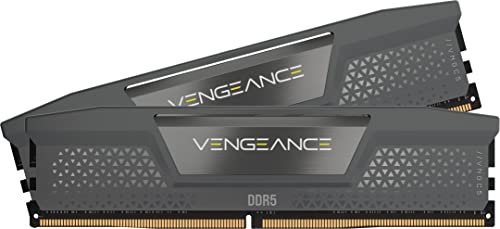
Corsair Vengeance DDR5 32GB 6000
Verified reference kit — the sweet spot form
This Vengeance kit is the sweet spot in physical form: 32 gigabytes across two sticks, up to 6000 MT/s, with both AMD EXPO and Intel XMP profiles named in its verified listing, so the same kit serves either platform’s one-click setup. Its low-profile heatspreaders also clear the large air coolers that taller RGB kits collide with — an unglamorous virtue that has saved more builds than any timing step.
Buy it as the default DDR5 purchase for a gaming machine on a current platform. The listing below is where to confirm the exact timings of the variant on offer, because the line spans several; the correct one states its CL in the open, as this guide has taught you to demand.
- 32 GB as two matched 16 GB sticks
- Up to 6000 MT/s DDR5
- AMD EXPO and Intel XMP profiles
- Low-profile heatspreader design
Strengths
- The consensus gaming specification in one kit
- Dual-platform profiles simplify building
- Low profile clears big air coolers
Trade-offs
- No RGB for showcase builds
- Timings vary by variant — confirm on the listing
- Two-stick limit is the design, not an upgrade path
Best for: new DDR5 gaming builds on AMD or Intel / Not suited for: showcase builds that want illuminated memory

Corsair Vengeance RGB DDR5 32GB CL30
Verified reference kit — CL30 with lighting
The RGB sibling states its whole specification in its verified title — 6000 MT/s, CL30-36-36-76 — which is exactly the transparency this guide recommends shopping for, wrapped in the illuminated heatspreaders a windowed case exists to show. The CL30 figure is the latency half of the sweet spot made explicit: 10 nanoseconds, the tightest the current platforms run happily as a standard offering.
Choose it when the build has a window and the lighting ecosystem to match; the performance is the reference kit’s equal, and the premium is for the show. Confirm cooler clearance before ordering, because tall illuminated spreaders and large air coolers are the classic collision this series keeps warning about — measure the gap your cooler leaves, and let the tape decide between this kit and its low-profile sibling.
- 32 GB as two matched 16 GB sticks
- 6000 MT/s with CL30-36-36-76 timings
- AMD EXPO and Intel XMP profiles
- RGB illuminated heatspreaders
Strengths
- Full specification stated in the listing
- CL30 latency at the sweet-spot speed
- Lighting for windowed showcase builds
Trade-offs
- Tall spreaders can foul large air coolers
- RGB premium over the plain kit
- Lighting software is one more resident app
Best for: windowed gaming builds that want the sweet spot with a show / Not suited for: compact builds with tight cooler clearance
Profiles: XMP and EXPO, the one-click contract
A DDR5 kit’s rated speed is not its out-of-box speed: kits ship at a safe JEDEC baseline and reach their advertised specification through a stored profile — Intel’s XMP or AMD’s EXPO — that the user enables in the BIOS with one setting. This surprises a generation of buyers annually, and it explains the classic support thread in which a 6000 kit ‘only runs at 4800’: the profile was never switched on. Enabling it is the intended operation, not an overclock in the warranty-voiding folklore sense, though it does ask the memory controller to run the kit’s rated figures, which is why this series insists on two-stick kits at the sweet spot, where that ask is reasonable.
The verified kits in this guide carry both profile families in their listings, which matters for builders who may move a kit between platforms across its life. Check the running speed after enabling — a system utility or the BIOS itself will confirm it — because the profile that failed to train and silently fell back is indistinguishable from success until someone looks. Looking takes thirty seconds and is the cheapest verification in the entire build.
DDR5 and content creation: where the architecture flexes
Gaming is this guide’s lens, but DDR5’s architecture earns its clearest margins in creation workloads, and a buyer whose machine does both should know where. Video editing timelines, large photo catalogues, code compilation, and virtual machines all feed on bandwidth and capacity together — the two things DDR5 doubled down on — and they scale with memory in ways games politely decline to. A creator-gamer speccing a machine should weight the capacity decision a tier higher than this guide’s gaming-first advice, because the editing timeline will find the memory wall the game never approached.
That dual life also reframes the sweet spot slightly: creation rewards capacity first and forgives looser timings, gaming rewards the tight sweet spot, and the kit that serves both is the 64-gigabyte option at sweet-spot speed where the budget allows. One machine, two appetites — the memory is where they negotiate, and DDR5’s density is what lets the negotiation end with both fed.
Inside the stick: banks, bursts, and why the architecture changed
DDR5’s redesign begins with a confession about its predecessor: as frequencies climbed, the old organisation spent too much of its time on housekeeping. The newer standard splits each stick’s channel into two narrower subchannels that can work more independently, lengthens the burst of data delivered per request, and multiplies the bank groups among which requests can be spread, all in service of keeping the data path fed while individual operations complete at their own pace. The practical translation for a buyer is that DDR5’s advantage grows with multitasking and with workloads that scatter their requests — modern games with streaming worlds, creative tools juggling assets — while a single, simple, sequential demand shows the architecture at its least differentiated. The generation was designed for the machines computers had already become, not for the benchmark loops of the previous decade.
Power management moved onto the stick itself, where earlier generations left it to the motherboard. That relocation is why DDR5 kits carry their own voltage regulation hardware, why they run warm in a way owners notice, and why extreme kits fuss about airflow across the memory slots. It also quietly improved the platform’s economics at scale — board makers design one power delivery approach and the sticks govern themselves — while handing kit makers a new component to bin, market, and occasionally skimp on. When a cheap DDR5 kit misbehaves at its profile in a hot case, the regulation hardware sweating under its heatspreader is a legitimate suspect, which is a sentence no DDR4 owner ever had reason to say.
On-die ECC and the confusion it causes
Few phrases in this market mislead as reliably as the ECC claim attached to DDR5. Every DDR5 chip carries on-die error correction, a private housekeeping arrangement that fixes single-bit errors inside the chip before data leaves it, existing because the manufacturing densities involved made such errors a statistical certainty rather than a defect. This is not the ECC that servers advertise, which corrects errors across the whole path — chip, bus, and controller — and reports them to the system. A DDR5 gaming kit with on-die correction offers your data no protection against a failing stick, a marginal controller, or a corrupted transfer, and it will not log the errors it quietly repairs. The feature is real engineering with a real purpose; it is simply not the purpose the shelf label invites you to imagine, and buyers who need genuine end-to-end correction must still shop for explicit ECC memory and a platform that supports it.
Reading a DDR5 listing like an engineer
A memory listing is a small contract, and its clauses reward close reading. The frequency printed largest is a profile speed, achievable when the platform cooperates, not the baseline the stick boots at — the baseline figure, usually 4800 or 5600, appears in the fine print and describes what you get if the profile is never enabled or fails to train. The timing string that follows the headline CL tells the fuller story covered in the timing sections, and its absence from a listing is itself a clause: manufacturers print the numbers they are proud of. Voltage completes the contract, since a kit rated at an elevated profile voltage is telling you plainly how its speed was achieved and how much heat and controller goodwill the achievement presumes. Read all four clauses — profile speed, baseline speed, full timings, voltage — and the listing stops being advertising and becomes a specification you can hold the product to, in testing, inside the return window, on your own board.
Capacity planning for the platform’s whole life
DDR5 platforms will serve through years in which game and application appetites only grow, so the capacity decision deserves the same forward arithmetic as the speed decision. Sixteen gigabytes is the present tense’s floor for a gaming machine and reads increasingly like a compromise; thirty-two is the settled present; sixty-four buys the creators, the simulators, the modders, and the keep-everything-open workers a long untroubled run. The configuration matters as much as the total, because two sticks remain the arrangement every platform trains most graciously at speed, while four sticks at high frequency continue to negotiate. Buy the capacity you foresee in two sticks now rather than a smaller pair you plan to double later, since the later doubling is exactly the configuration the platform likes least and the matched-kit guarantee cannot survive being assembled from two purchases years apart. Memory is cheapest, per unit of regret avoided, on the day the platform is built — a truth every generation of builders relearns at the prices of the next one.
How to verify what your machine actually runs
An explainer earns its keep when a reader can check its claims on their own machine, and memory offers unusually honest instruments. The firmware setup screen reports what the board has trained — the running frequency and primary timings — and it is the only witness whose testimony needs no interpretation, because software utilities read the same registers through layers of their own. Compare the setup screen’s figures against the kit’s rated profile: if they match, your machine kept the promise; if the machine runs at baseline while the box advertises speed, the profile was never enabled or failed to hold, and the remedy is the profile toggle and the stability conversation the buying sections describe. Task-manager and utility readings inside the operating system are useful for capacity and for spotting the single-channel mistake — a two-stick kit seated in the wrong slots, running as one channel at half the intended width — which remains the most common silent performance theft in home builds and the cheapest to fix: move one stick, as the manual’s slot diagram instructs, and the machine doubles its memory width between one boot and the next.
Stability verification is the second instrument, and it should be a memory-specific test rather than a hopeful game session, run long enough for the case to reach working temperature. Errors in such a test are never acceptable at a kit’s rated profile inside its return window; they are the product declining its own specification, and the correct response is methodical — one stick at a time, slots swapped, firmware current — followed by an exchange if the fault follows a stick. Owners who skip this verification sometimes discover marginal memory months later, disguised as random application crashes and corrupted downloads, and pay for the skipped afternoon with a season of ghosts. The explainer’s deepest lesson is that memory is a promise-keeping component: it makes exact claims, and it can be held to them exactly, by anyone willing to run the tests while remedies are still free.
DDR5 in laptops, small machines, and the soldered future
The desktop’s socketed abundance is only half the generation’s story. In laptops, DDR5 increasingly arrives soldered to the board, chosen at the factory in capacities the buyer selects once and keeps forever, which converts the capacity advice in this article from a preference into a warning: on a soldered machine, buy the memory you will need in the machine’s final year, not its first, because there is no later. Where laptop slots survive, they use the smaller SO-DIMM form and increasingly a new cammed module design that improves signal integrity for the generation’s speeds; the upgrade discipline is otherwise the desktop’s in miniature — matched pairs, rated profiles where the firmware permits, and verification after the change.
Small-form-factor desktops and mini PCs inherit the laptop’s constraints and add heat, since their memory sits in air-starved enclosures where the on-stick regulation’s warmth matters more. In such machines the sensible specification tilts toward the calmer tiers and the kits with honest heatspreaders, and the enthusiast profiles that headline desktop kits should be adopted, if at all, with temperature monitoring as a chaperone. The generation serves all these forms well; it simply asks each of them a different question, and the explainer’s job is to make sure the reader hears the one their own machine is asking.
The generation in one paragraph, for the reader in a hurry
DDR5 is a redesign that trades the old standard’s simplicity for bandwidth, efficiency of organisation, and headroom, at the cost of higher headline latencies that arithmetic absolves and a power arrangement that makes the sticks themselves warmer and more complex. For a buyer it resolves to a short catechism: match the generation to the board, because nothing else is negotiable; buy capacity for the platform’s whole life, in two sticks; choose the sweet-spot speed your platform family favours, at timings whose nanoseconds you have computed rather than whose labels you have feared; enable the profile; verify the result hot and at length; and then forget the subject for years, which is what memory, properly bought, allows. Everything else in this article — the banks, the bursts, the error-correction subtleties — exists to make that catechism intelligible rather than merely obedient, because a reader who understands the reasons will still be making good memory decisions when the next generation arrives to be explained.
Timings in DDR5, decoded without fear
The four numbers that follow a DDR5 kit’s frequency frighten shoppers out of proportion to their mystery, so here is the whole subject at walking pace. The first number, the headline CL, counts the cycles between a read request and the first data’s arrival — the wait at the counter. The second and third govern the choreography of opening and closing the internal rows where data lives, and they matter when a workload hops between rows rather than streaming along one. The fourth, the longest, is the full row cycle, the time before the same bank can begin the same operation again. Multiplied by the cycle time — which the frequency sets — each becomes a duration in nanoseconds, and durations, unlike cycle counts, can be compared across generations honestly, which is the entire trick this cluster’s timing articles keep teaching.
What the numbers cannot tell you is equally worth knowing. They say nothing about how the kit behaves at its profile in your board’s heat, nothing about its rank organisation, and nothing about the secondary timings the board will choose on its own when set to automatic — choices that vary between board makers enough to move benchmarks between two machines running identical kits. This is why the explainer’s recurring advice is empirical: enable the profile, verify with the instruments described, and judge the kit in your machine rather than in its listing. The timings are a language for describing memory, not a substitute for meeting it.
Compatibility: the QVL, the myth, and the practical middle
Every motherboard publishes a qualified vendor list of memory kits it has tested, and buyers oscillate between treating it as scripture and ignoring it entirely. The truth is administrative: the list records what the maker tested, in a market with thousands of kits, and absence from it means only that a particular kit was not in the building when the testing happened. Kits from major makers, at mainstream specifications, on current firmware, work in the overwhelming majority of unlisted combinations — and the overwhelming majority is not the whole, which is why the list retains its value as a tiebreaker and as the first place to check when a combination misbehaves. A kit that is listed, at your capacity and configuration, removes one entire suspect from any future troubleshooting; that removal has a cash value in evenings, and it is legitimate to pay a small premium for it.
The practical middle path runs as follows. Prefer listed kits when the price difference is trivial. Prefer mainstream specifications — the sweet spots this article identifies — when it is not, because the sweet spots are where unlisted compatibility is most reliable, the controllers having been tuned around them by everyone. Update the board’s firmware before judging any new kit, since memory training improves measurably across a board’s first year of updates. And keep the return window sacred, because it converts the entire compatibility question from a gamble into a procedure: test, and if the procedure fails, exchange. No explainer can promise a given kit will train in a given board; the system of firmware, mainstream specifications, and returns can promise that the buyer will not be the one who pays for the exception.
DDR5 and the rest of the machine: bottlenecks in conversation
Memory does not perform alone, and an explainer should end by putting it back in its ensemble. A fast kit behind a slow storage device still waits at every loading screen; a generous kit beside a starved graphics card still watches the card decide the frame rate; a sweet-spot kit in a machine whose processor is a generation past its games is a good servant in a declining household. The skill the whole cluster teaches — in its timing comparisons, its generational debates, its tier ladders — is bottleneck literacy: the ability to look at a whole machine and say where its next unit of money earns the most. DDR5’s place in that literacy is secure and bounded. It is the current language of the memory subsystem, worth buying correctly when the subsystem is being bought at all, and never worth buying as a talisman for a machine whose limits live elsewhere. Readers who finish this article able to say which component their own machine is waiting on have learned the thing the article was actually about, of which DDR5 was only the example.
Common misunderstandings, corrected in one place
An explainer should gather its corrections where a hurried reader can find them, so here are the generation’s persistent myths with their verdicts. More megahertz is not automatically better, because the platform’s ratio preferences and the kit’s timings can make a nominally faster configuration slower in the nanoseconds that matter. The on-die error correction is not the ECC of servers, and it protects your data from nothing you can name. Two kits of the same model bought years apart are not a matched kit, however identical their boxes. Four sticks are not twice as good as two; they are a different negotiation with the controller, often at calmer speeds. A kit’s advertised speed is not its boot speed, and a machine that has never had its profile enabled has never run the product its owner paid for. And the generation cannot be mixed with its predecessor in any slot, by any adapter, under any optimism — the border is physical, and the explainer’s kindest service is to state it before a purchase rather than after one.
Each of these myths survives because it contains a splinter of truth — frequency does matter, the error correction does exist, matching models usually do work — and the splinter is what makes the correction worth printing rather than merely asserting. A reader who understands why each myth is almost true owns the subject in a way that a reader who memorised verdicts does not, and will still be reasoning correctly when the next generation’s myths arrive wearing new numbers.
DDR5 for the upgrader of an older DDR5 machine
One reader of an explainer is easy to forget: the owner of an early DDR5 machine, built when the generation was young, whose memory is a first-wave kit — modest frequency, loose timings, perhaps only sixteen gigabytes — and who wonders whether the platform’s maturity since then is available to them as a simple kit swap. It is, and it is one of the generation’s kindest upgrades, because the board that struggled nobly with its first kit has since received years of firmware refinement, and the sweet-spot kits that now define the standard drop into that seasoned platform with a grace the original build never enjoyed. The upgrader’s discipline is the platform’s usual one, with one addition: check the board’s current firmware before ordering, since the gap between a launch BIOS and a current one is, in memory training terms, a generational difference hiding inside the same hardware. Bought at maturity prices and verified by the usual ritual, the swap converts an early adopter’s compromise into the machine the platform always intended to be — a satisfying ending that the older generation, in its own maturity, offered its own early adopters in exactly the same way.
The explainer’s glossary, for the reader who skipped nothing
Close the article with the vocabulary gathered in one place, defined in the plain language the article has used throughout. A channel is a path between the processor and memory; DDR5 splits each stick’s path into two narrower subchannels that can work with more independence. A bank is a storage neighbourhood inside a chip, and bank groups are the districts whose spread lets requests proceed in parallel. A burst is the parcel of data delivered per request, longer in this generation than the last. The profile — XMP on one platform family, EXPO on the other — is the kit’s rated speed stored as instructions the board can apply in one move. CAS latency, the famous CL, is the wait between a read request and the first parcel, counted in cycles that must be multiplied by the cycle’s length before they mean anything. On-die ECC is the chip’s private housekeeping, not the system-wide protection of server memory. PMIC is the power regulator that moved onto the stick and explains its warmth. A reader who can define those seven terms to a friend owns this generation’s essentials; the rest of the article — and the rest of the cluster — is commentary on their consequences, and commentary is always easier once the nouns behave.
The generation’s report card, five years of hindsight in one section
Explainers are usually written at a technology’s dawn; this one can afford the rarer luxury of a mid-life report. The generation delivered its central promise — bandwidth headroom that made the memory subsystem recede from the gaming conversation — and it delivered it at prices that fell from early-adopter theatre to commodity calm on the schedule its defenders predicted. Its costs were the ones this article has catalogued without flinching: headline latencies that frightened the innumerate, a warmer and more complex stick, a four-module negotiation that never became graceful, and an error-correction vocabulary that marketing abused and explainers have been correcting ever since. Its surprises were gentler: how completely the laptop world adopted it, how long its first platforms have remained viable with nothing but firmware and a better kit, and how quickly its sweet spot became a consensus so stable that a buyer can find it in any shop on earth. A standard is successful when it becomes boring, and by that measure — the only one that matters to the people who must live inside it — this generation has succeeded completely. The next one will arrive with louder claims and the same eventual destination, and the readers of this article will greet it with the correct instrument: arithmetic, patience, and a return window.
The explainer’s shelf card
For the reader who keeps one page from this article, let it be this. Match the generation to the board, because the slot permits no argument. Buy capacity for the platform’s whole life, in two sticks, because the configuration is the one every controller prefers. Choose the sweet-spot speed your platform family favours, and judge its timings in nanoseconds you computed yourself. Enable the profile on the day of the build, verify the result hot and at length inside the return window, and record what you installed in the machine’s folder. Then forget the subject for years. Those five sentences contain the generation entire — its architecture, its economics, and its manners — and everything else in this long article exists to make them intelligible rather than merely obedient. A reader who can explain why each sentence is true owns DDR5, in the only sense of owning a technology that matters: they will never be sold it wrongly again.
The explainer’s contract with its reader
Terms, finally, between this article and the person who read it. The article promised that a complicated standard could be made intelligible without being made small — that banks and bursts and regulators could be carried in plain language, and that the buying catechism at its centre would still be standing, with its reasons visible, when the marketing moved on. The reader’s side of the bargain is the verification habit: to enable the profile, to run the test, to write the installation down, and to greet the next generation’s louder claims with the arithmetic learned here. Both sides kept, the exchange is complete, and the memory in the reader’s machine — matched, capacitied, profiled, proven — recedes into the invisibility that is every component’s highest achievement. The article can ask for no better review than a reader who never needs it again.
The signature in the memory’s record
File the installation, as this cluster files everything, with its evidence attached: the kit’s full model, its rated profile, the firmware version it trained under, the date the long test passed, and the baseline figures it replaced. That five-line record is the explainer made permanent, because it converts this article’s abstractions — profiles, verification, the return window’s discipline — into a fact about one specific machine that its owner can act on for a decade. When the memory is upgraded, handed down, or suspected in some future fault, the record will be read first, and it will answer in seconds questions that otherwise consume evenings. Sign it on the day of the build, while the evidence is warm. The generation’s whole philosophy — performance through organisation, speed through structure — deserves an owner who organises in return, and the record is where that reciprocity is kept.
The last line of the explainer’s record
Mark, finally, the date the memory was last thought about — the week after the long test passed, the month the machine’s owner stopped being able to recall the kit’s timings without checking, the season the subsystem joined the power supply and the case fans in the category of things that are simply, competently there. That date is the explainer’s success expressed as a calendar entry, because a technology understood well enough to be forgotten on schedule has been understood completely. Keep the record that made the forgetting safe — the profile, the firmware, the test’s date — in the machine’s folder, where the next question, whenever it comes, will find its answer waiting. The generation will age, the next one will arrive with its own explainers to write, and this machine, documented and deliberate, will meet that day the way it met its own building: with arithmetic, with patience, and with its paperwork in order.
Envoi: the subsystem, at rest in a working machine
The explainer’s final image is the subsystem itself, invisible inside a working machine on an ordinary evening — its subchannels conversing, its banks opening and closing in their districts, its little regulator warm at its post — while its owner thinks about literally anything else. That invisibility was the design’s ambition from the first engineering decision this article described, and it is achieved, in machine after machine, by the unglamorous catechism the article taught: matched, capacitied, profiled, proven, recorded. Technologies are usually celebrated for what they make noticeable. Memory earns its celebration in the opposite currency, and a generation that lets a whole civilisation of games, renders, and deadlines proceed without once asking to be thought about has not merely succeeded. It has done the thing infrastructure exists to do, at the speed of light’s more practical relatives, in silence. The article closes its file and joins its subject in the background, where both belong.
Coda: the generation, one reader later
A year after a reader works through an explainer like this one, the evidence of its success is oddly specific: they stop reading memory articles. Not from disdain, but because the questions those articles answer have been answered — in their own machine, with its profile enabled and its test passed and its record signed — and the new headlines, however large their numbers, arrive pre-translated into nanoseconds and platform sense. That reader has also, usually, become the person their household consults: the one who knows why the laptop’s memory cannot be upgraded, why the spare kit in the drawer will not fit the new board, why the timings on the box are a fraction rather than a grade. Knowledge of that kind compounds quietly, machine by machine, build by build.
It is the best outcome an explainer can claim, and the least measurable, which is why the industry prefers to sell the next specification instead. But the generation this article describes will be served, in the end, by exactly such readers — owners who bought it correctly, verified it honestly, and forgot it completely, in machines that run for years on decisions made in one careful afternoon. The article’s work is done when its reader no longer needs it. By that standard, and with the record signed, it is done.
Postscript: the reader, one build later
One last visit, a build later, to the reader this explainer was written for. They are speccing a machine for a relative now, and the catechism runs without notes: generation matched to the board before anything else is discussed, capacity sized for the machine’s final year rather than its first, two sticks, the sweet spot, the profile on the checklist, the long test scheduled like a dentist’s appointment — unglamorous, non-negotiable, and over before the weekend is. Asked where they learned it, they shrug in the direction of an article they no longer need. That shrug is the explainer’s completed work, and it is worth more than any traffic figure: a standard, understood well enough to be taught at a kitchen table, by a person who arrived at it as a stranger to banks and bursts. The generation will be explained again, to other strangers, by other articles. This one’s reader has graduated, which is what explainers are for.
The explainer, at the next question
The reader’s graduation was tested once more, at a family gathering, by the hardest question the subject offers a layperson: why the new laptop, with its larger memory number, feels no faster than the old one. The answer came out in the explainer’s own order — capacity is not speed, the fraction is not the grade, and the constraint is usually somewhere else entirely — to visible effect around the table. Knowledge that can survive being taught twice, in kitchens, has finished becoming knowledge. The article that carried it can rest.
Questions readers ask about this topic
What is the main advantage of DDR5 over DDR4?
Bandwidth and organisation. DDR5 runs at far higher frequencies, splits each stick into two independent sub-channels so the processor keeps more requests in flight, and manages its power on the stick itself. Latency in nanoseconds stayed roughly level, because timings rose with frequency. For gaming, that means real but scenario-bound gains — largest where the CPU feeds frames, smallest where the graphics card rules — exactly as this series’ head-to-head comparison found.
Why are DDR5 CL numbers so high?
Because CL counts cycles, and DDR5’s cycles are far shorter. CL36 at 6000 MT/s is 12 nanoseconds — comparable to good DDR4. Judging a DDR5 kit by its CL alone is judging a fraction by its numerator; divide by the frequency, as this series’ timing guide demonstrates, and the generations compare honestly. The sweet-spot kits pair the high frequency with the tightest timings controllers handle, which is why CL30 at 6000 is the badge the market converged on.
Does DDR5 have ECC?
It has on-die ECC: every chip corrects single-bit errors internally, which is now standard across the generation and improves baseline reliability. That is not the same as full ECC memory, which also protects data in transit between the stick and the processor and is sold as a distinct workstation product. Gaming DDR5’s on-die correction is a welcome floor, not a workstation feature, and listings implying otherwise should be read with care.
How much DDR5 should a gaming PC have?
Thirty-two gigabytes in two sticks is the current standard this series recommends: enough for every current game plus a real desktop’s background load, at the generation’s natural capacity point. Sixteen works for esports-focused builds on a budget; sixty-four serves creators, heavy simulators, and those who keep machines a long time. Buy capacity before speed refinements — the wall costs seconds, the refinements cost nanoseconds.
Can I mix DDR5 speeds or brands?
You can, and the system will run everything at the slowest kit’s speed and loosest timings, with a stability risk mixed kits are known for. The generation’s controllers are less forgiving of improvisation than DDR4’s were. Buy one matched kit of the capacity you need; if you later need more, replace the set rather than adding to it. It feels wasteful and is, in fact, the economical path, because hours of stability troubleshooting have a price too.
What speed DDR5 should I buy?
The platform sweet spot: around 6000 MT/s with CL30-class timings for current AMD and Intel gaming systems, in a two-stick kit — the specification of the verified kits linked in this guide. AMD’s controllers align particularly happily there; Intel’s tolerate more, without rewarding it in games. Speeds far above buy benchmark headlines and stability homework. The sweet spot is a consensus built from thousands of systems, and departing from it should require a specific, statable reason.
Do I need to enable anything for DDR5 to run at its advertised speed?
Almost always, yes: the advertised figure is a profile speed, reached by enabling XMP or EXPO in the firmware setup, while an untouched machine runs the kit at its baseline. The toggle takes a minute and the difference is the product you paid for, so it belongs on every new build’s checklist, followed by the stability testing that confirms your particular board kept the promise.
Why does my DDR5 run hotter than my old DDR4 did?
Because the voltage regulation moved onto the stick, as the architecture section explains, placing a working component under the heatspreader that DDR4 boards kept on the motherboard. Warm memory within its specification is normal; memory errors in a hot, closed case are a signal to improve airflow across the slots rather than to accept instability as the generation’s personality.
Is 16GB of DDR5 enough for gaming now?
It is the floor rather than the recommendation. Current titles run within it, but they run alongside launchers, browsers, and recording tools that also eat memory, and the machines that page mid-game are the ones whose owners counted only the title’s appetite. Thirty-two gigabytes has become the settled answer for a build expected to serve for years.
Related guides
DDR5 4800 versus 6000 for gaming
CL16 versus CL18 versus CL20 RAM