Disclosure: As an Amazon Associate, reviewstook.com earns from qualifying purchases. Links on this page are affiliate links; they cost you nothing extra. Prices and availability change often, so check the current Amazon listing before you buy.
Memory timings look like a spec-sheet footnote until a buyer faces cl16 vs cl18 vs cl20 ram at three prices and wonders whether the smaller number is worth real money. CL — CAS latency — counts the clock cycles between a memory request and the data’s arrival, so lower sounds faster, and it is, in the narrow sense the number measures. But cycles are not nanoseconds, frequency changes what a cycle costs, and the workload decides whether the difference ever reaches the screen.
This cl16 vs cl18 vs cl20 ram comparison does the conversion the listings omit, showing the true latency of common frequency-and-timing combinations, then maps where the difference is measurable — competitive gaming at high frame rates, latency-sensitive work — and where it vanishes into noise. It closes with buying rules for both DDR4 holdouts and DDR5 shoppers, because the CL conversation changes meaning across generations, and paying for timings your platform cannot feel is the memory market’s quietest tax.
Key takeaways
- True latency is CL divided by frequency: a CL18 kit at higher frequency can beat a CL16 kit at lower frequency
- Differences between neighbouring CL steps are single-digit percentages in the most sensitive games, and invisible elsewhere
- Capacity and simply having enough RAM outweigh timing refinements for most systems
- Buy the sweet spot of your platform’s generation rather than the lowest CL at any price
In this guide
Cl16 Vs Cl18 Vs Cl20 Ram: converting cycles into time
The arithmetic is simple and listings rarely perform it. True CAS latency in nanoseconds equals the CL number divided by the memory’s clock rate in gigahertz, halved for double-data-rate conventions — practically, CL16 at 3200 MT/s yields 10 nanoseconds, CL18 at 3600 yields the same 10, and CL20 at 3600 yields about 11.1. That single table explains most of the confusion in this market: a CL18 kit is not slower than a CL16 kit until you state both frequencies, and vendors know which of the two numbers your eye reads first.
Apply it across the common DDR4 shelf and the hierarchy reshuffles. The beloved CL16 3200 kit and the CL18 3600 kit are latency twins, with the 3600 kit adding bandwidth the CL16 kit lacks — which is why experienced builders often prefer it at equal prices. A CL20 kit earns its discount honestly only when its frequency compensates; CL20 at 3200, at 12.5 nanoseconds, is a genuinely slower product wearing the same capacity badge. Read timings as fractions, not as scores, and the memory aisle becomes legible.
What the difference feels like in games and work
In the most latency-sensitive scenario — a CPU-bound competitive game chasing very high frame rates — moving between neighbouring timing steps at matched frequency is worth a few percent of frame rate, occasionally visible in the lows that govern smoothness. Step outside that scenario and the effect dissolves: GPU-bound games at high resolution never ask the memory fast enough to matter, office work cannot tell, and content creation cares about capacity and bandwidth orders of magnitude more than about a nanosecond of CAS latency.
This is why timing advice must be priced. If the CL16 kit costs a small premium over its CL18 sibling at the same frequency, the sensitive gamer may rationally pay it. If the premium is large, the money almost always works harder elsewhere — the next graphics tier, a larger SSD, or simply more RAM, because a system that runs out of memory and swaps to disk loses more performance in a second than timings could cost it in a year. Timings are a finishing touch on a system whose fundamentals are already right.
DDR5 changes the conversation
DDR5 arrived with CL numbers in the thirties and forties that alarmed buyers trained on DDR4 — until the frequencies are admitted to the calculation. CL36 at 6000 MT/s is 12 nanoseconds; CL30 at 6000 is 10; the DDR5 sweet spots pair high frequency with the lowest timings the platform’s controllers handle happily, which is why the verified DDR5 kits linked in this series’ RAM explainers cluster where they do. Comparing a DDR4 CL16 badge with a DDR5 CL36 badge across generations is comparing fractions by their numerators, and it misleads in both directions.
Platform behaviour matters as much as the fraction. AMD and Intel controllers each have frequency regions where timings tighten gracefully and regions where stability demands compromise, and the community’s settled sweet spots for each platform encode thousands of hours of that experience. Buy inside the sweet spot for your platform, at the capacity your work needs, and the CL question resolves itself into the kit everyone recommends — not because the crowd is lazy, but because the arithmetic and the controllers agree there.
Buying rules that survive the marketing
First, capacity: 16 gigabytes is the gaming floor, 32 the comfortable standard, and no timing refinement compensates for too little. Second, frequency within your platform’s sweet spot. Third, timings — now, and only now, prefer the lower CL at the same frequency when the premium is small. Fourth, the unglamorous checks: two sticks rather than four for easier stability at speed on most boards, a brand whose warranty you trust, and a heat-spreader height that clears your CPU cooler, because the fastest kit in the world is worthless against a cooler it does not fit under.
And keep the verified-kit habit from this series: buy memory whose exact model you can confirm, from listings that state frequency and timings together. A listing that advertises CL without frequency, or frequency without timings, is asking you to admire half a fraction. The whole fraction is the product. Everything else is typography.
Sub-timings and why the headline CL is only the first word
CAS latency is the famous timing because it is printed largest, but a memory kit’s full timing set — the string of numbers after CL in a specification like CL30-36-36-76 — governs other waits in the memory’s working cycle, and two kits sharing a CL can differ in the rest of the string. For buyers, the practical meaning is modest: at the same frequency and CL, prefer the kit whose full string is tighter when prices are close, and know that the secondary timings matter most to the overclockers who tune them by hand. For everyone else, the string’s existence is a reminder that a single number never describes a system, in memory as in everything this series covers.
Motherboard training adds the lived dimension: a kit’s rated timings are a promise the board and CPU must keep together, and marginal combinations sometimes train at looser values than the box claims, silently. A five-minute check of the running timings in the BIOS or a system utility, after enabling the profile, confirms the purchase you thought you made. It is the memory equivalent of the panel-off test — cheap, decisive, and almost never done by the people who would benefit most.
Memory pricing cycles and the patience discount
RAM prices move in industry cycles of glut and shortage that dwarf the timing premiums this guide has been pricing: the same kit can halve or double across eighteen months without changing a single chip. Against that background, agonising over a CL step’s small premium while buying at a cycle peak is misallocated anxiety. The patient buyer’s rules are simple: buy the capacity and specification you need when prices are soft, refuse to chase a build’s start date into a shortage spike for the memory line alone, and let the platform’s other components set the calendar.
This is also why the sweet-spot consensus matters as a shopping anchor: it identifies the specification whose price the market’s volume keeps honest. Exotic timings and frequencies carry scarcity premiums in every cycle phase, while the sweet spot’s premium stays proportional. In a market that breathes like this one, buying the popular specification at a soft moment beats buying the perfect specification at a hard one, every cycle, without exception.
The arithmetic, worked at the speeds people actually buy
Latency in nanoseconds is frequency’s partner, not its rival, and the comparison only becomes honest when the two are multiplied together for the kits on real shelves. At 3200 MT/s, a CL16 kit answers a first-word request in ten nanoseconds, a CL18 kit in eleven and a quarter, and a CL20 kit in twelve and a half. At 3600 MT/s the same labels compress: CL16 reaches about 8.9 nanoseconds, CL18 lands on the same ten nanoseconds as the slower CL16 kit, and CL20 sits near 11.1. That single comparison dismantles the most common shopping error in this category, which is treating the CL label as a grade rather than as one half of a fraction. A CL18 kit at a higher frequency can match a CL16 kit at a lower one, and it frequently costs less, because shelf pricing worships the label the way shoppers do.
| Kit configuration | First-word latency | How to read it |
|---|---|---|
| DDR4-3200 CL16 | 10.0 ns | The reference point most gaming builds of its era used |
| DDR4-3200 CL18 | 11.25 ns | Measurably slower on paper, rarely visible in frame rates |
| DDR4-3200 CL20 | 12.5 ns | Usually a value or laptop-derived specification; fine for non-gaming roles |
| DDR4-3600 CL16 | About 8.9 ns | The enthusiast DDR4 sweet spot where frequency and latency agree |
| DDR4-3600 CL18 | 10.0 ns | Identical first-word latency to 3200 CL16, often cheaper |
| DDR5-5200 CL36 | About 13.8 ns | Early DDR5 value kits: bandwidth rich, latency poor |
| DDR5-6000 CL30 | 10.0 ns | The current DDR5 sweet spot, matching good DDR4 latency with far more bandwidth |
| DDR5-6000 CL36 | 12.0 ns | Common in budget DDR5 kits; the bandwidth still helps, the latency does not |
First-word latency is itself only the opening of a longer story, because modern processors fetch in bursts and prefetch aggressively, so the fraction governs the beginning of a memory transaction more than its total cost. That is why the measured gaming differences between adjacent CL grades at the same frequency stay stubbornly small, often inside the margin between two runs of the same test, while the difference between frequency tiers — which raises bandwidth for every transaction — shows up more reliably. Buy the fraction, by all means, but buy it with both numbers in view and with a clear head about which of the two you are actually paying to improve.
Where latency genuinely matters, and where it is a rumour
There are workloads where tighter timings repay their cost in visible coin. Competitive gaming at high frame rates on a processor-bound title is the honest example: when the graphics card is waiting and the processor is feeding it from memory hundreds of times per second, small latency savings compound into frame-time consistency that players at that level can feel and measure. Memory-sensitive simulation and strategy titles with large working sets show a similar pattern, as do some integrated-graphics systems where the same memory serves two masters and every transaction is contested. In these arenas the CL grade is a legitimate line item, and choosing the tighter kit at a given frequency is a decision with evidence behind it.
Everywhere else, the rumour outruns the reality. Office work, browsing, media, and the great mass of GPU-bound gaming at higher resolutions will never reveal which of these kits is installed, because the memory system is not the constraint those workloads press against. Capacity mistakes dwarf latency mistakes in that world: a machine paging to storage for want of a second stick loses more performance in one afternoon than a CL20 kit loses in its entire service life. The mature buyer’s hierarchy is capacity first, configuration second — two matched sticks running in dual channel — frequency third, and the CL label last, consulted only to break ties and to avoid paying a premium for a number that will never be introduced to a workload capable of noticing it.
The verified kits that anchor this comparison
Two kits, both checked against the manufacturer’s own listings through the Creators API, make the comparison concrete. The first is the DDR4 configuration this article’s title describes at its best; the second is the DDR5 kit that shows where the same money goes in the newer generation.

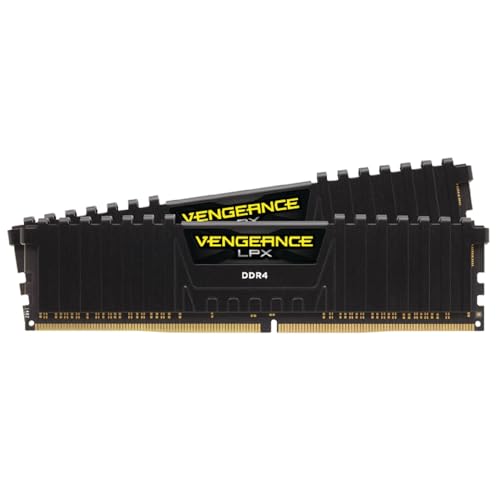
Corsair Vengeance LPX DDR4 32GB 3200 CL16
This is the reference DDR4 specification in physical form: a matched pair of 16GB sticks at 3200 MT/s with the CL16 headline timing this comparison uses as its baseline, in a low-profile heatspreader that fits under large air coolers where taller kits foul. For an owner of a DDR4 platform wondering what the tightest common timing at the platform’s favourite frequency looks like as an actual purchase, this kit is the answer, and its ten-nanosecond first-word latency is the number every CL18 and CL20 rival in this article is measured against.
- Capacity: 32GB as two matched 16GB sticks
- Speed and timing: 3200 MT/s, CL16 headline latency
- Profile support: Intel XMP and AMD EXPO as listed
- Form: low-profile heatspreader for cooler clearance
Strengths
- The exact CL16-at-3200 specification this comparison treats as its baseline
- Low-profile design avoids the cooler-clearance roulette of tall kits
- A matched pair guarantees dual-channel operation from one purchase
Trade-offs
- DDR4 only; it cannot follow you to a DDR5 motherboard
- At 3200 MT/s it leaves the 3600 CL18 equivalence trick unexploited
- No lighting, for buyers who want their memory visible and glowing
Best for: DDR4 owners who want the reference CL16 specification in a fit-anywhere kit / Not suited for: anyone speccing a new DDR5 platform

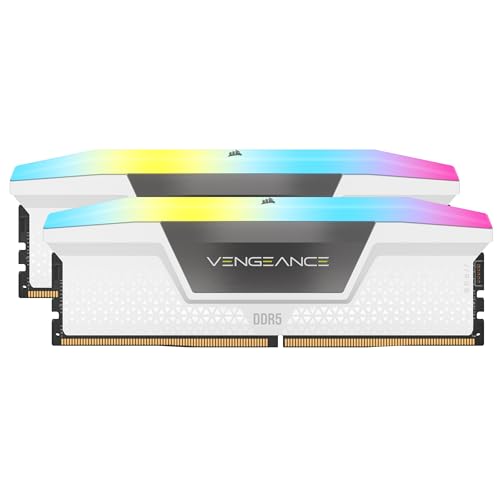
Corsair Vengeance DDR5 32GB 6000 CL30
The DDR5 counterpart earns its place in a DDR4 timing article by demonstrating the fraction at work in the newer generation: 6000 MT/s with a CL30 headline produces the same ten-nanosecond first-word latency as the DDR4 baseline above, while delivering close to double the bandwidth for everything that follows the first word. Readers cross-shopping a platform change can hold the two kits side by side and see the entire generational argument — latency parity, bandwidth victory — embodied in two real products rather than in abstractions.
- Capacity: 32GB as two matched 16GB sticks
- Speed and timing: up to 6000 MT/s, CL30 headline latency
- Profile support: AMD EXPO and Intel XMP 3.0 as listed
- Generation: DDR5, requiring a DDR5 motherboard and processor
Strengths
- Matches the DDR4 baseline’s first-word latency at far higher bandwidth
- Sits at the frequency most current platforms train most reliably
- One matched purchase covers capacity, configuration, and timing at once
Trade-offs
- Useless to DDR4 owners; the generations share no slots
- Its CL30 label frightens shoppers who have not done the fraction
- Full benefit assumes the platform runs the profile stably, which older firmware can complicate
Best for: new DDR5 builders who want the latency argument settled in one kit / Not suited for: DDR4 systems, where it physically cannot be installed
Sub-timings, ranks, and the rest of the label nobody reads
The headline CL is the first of four primary timings printed on every kit, and the other three — governing row activation and precharge behaviour — move real performance in workloads that hop between memory rows, even though no shopper has ever chosen a kit by them. Below those sit the secondary timings that tuning communities obsess over, where a tightened refresh or command rate can occasionally deliver more than the headline grade promised, at the cost of stability testing measured in days. For a buyer rather than a tuner, the lesson is humility about the label: two kits sharing a CL16 badge can differ in their full timing tables enough to matter to a benchmark, which is another reason the badge alone deserves neither worship nor a large premium.
Rank organisation hides in the same blind spot. A stick built with two ranks of memory chips can interleave its own accesses and, on some platforms, outperforms a single-rank stick at identical frequency and timings by a margin larger than a CL grade delivers. Manufacturers rarely print rank on the box, capacities hint at it imperfectly, and the honest advice is unsatisfying but true: if two kits tie on price, frequency, and timings, you have reached the limit of what labels can tell you, and the remaining differences belong to reviews of the exact model rather than to any rule of thumb. Buy from sellers with sane returns, test the kit in your own board during the return window, and let your own machine cast the deciding vote.
The upgrade question: replacing a CL18 or CL20 kit you already own
Owners of a working CL18 or CL20 kit sometimes read comparisons like this one as an indictment and shop for a CL16 replacement. Resist the arithmetic’s seduction. Swapping kits at the same frequency to gain two CL grades buys, in the most favourable measured cases, a few percent in processor-bound gaming and nothing anywhere else, at the full price of a new kit minus whatever the old one fetches second-hand. The same money spent on capacity — moving from 16GB to 32GB if your workloads press against the smaller figure — or saved toward a platform change returns more by an order of magnitude. The legitimate exceptions are narrow: a competitor who has exhausted every other optimisation, a tuner who enjoys the pursuit itself, and an owner whose current kit is unstable at its rating and needs replacing anyway, in which case buying the tighter grade on the way through costs little extra and closes the question permanently.
If you do replace, replace as a matched pair and retire the old kit whole. Mixing the new CL16 sticks with the old CL18 ones forces the controller to run everyone at the loosest common settings, converting your upgrade into an expensive way to own more of the same speed — a trap the final section of mistakes in the main guide describes from the other side. Memory rewards decisiveness and punishes half-measures, which is perhaps the single sentence this entire comparison exists to justify.
How to test your own kit’s timings honestly
Every claim in this comparison can be checked on a machine you own, and the method matters more than the result. Test in a processor-bound scene — a crowded area of a game you know, a repeatable benchmark run — because memory differences hide wherever the graphics card leads. Run each configuration at least three times and keep the middle result, since single runs lie with confidence. Change only the timing or only the frequency between configurations, never both, and record the low-percentile frame times alongside the averages, because latency’s signature lives in the lows. A home test run this way will usually reproduce the article’s central finding in miniature: adjacent CL grades separated by margins at the edge of measurement, frequency steps showing more clearly, and capacity or configuration mistakes dwarfing both when they are present to be made.
The same method protects you from the market’s favourite trick, which is the demonstration configured to flatter the product being sold. A vendor’s chart comparing their CL16 kit against a rival’s CL20 at different frequencies, different capacities, or different test scenes is not a comparison but an advertisement with axes. Your own three-run discipline, on your own games, is the antidote, and it costs an evening rather than a purchase. Owners who run it once tend to become permanently calmer shoppers in this category, because they have seen with their own telemetry how small the contested differences are and how large the uncontested ones — capacity, configuration, stability — remain.
The CL question inside DDR5, revisited with the ladder complete
Readers who arrived for DDR4’s three grades sometimes leave before noticing the same drama playing in the newer generation at larger numbers. DDR5’s shelf holds CL30 kits beside CL36 and CL40 kits at the same frequencies, and the arithmetic is the article’s arithmetic unchanged: at 6000 MT/s, each two-grade step is worth roughly two-thirds of a nanosecond of first-word latency, accumulating to a two-nanosecond spread between the tightest and loosest common kits — proportionally the same argument as DDR4’s, with the same verdicts. Processor-bound players may rationally pay for the tight end; everyone else should notice that the loose end’s savings buy things with larger effects. The labels grew; the lesson did not, which is the surest sign the lesson was about the mathematics rather than about any particular generation’s marketing.
One DDR5 wrinkle deserves its sentence: the looser kits are sometimes the higher-capacity kits’ only form, and the capacity-versus-latency trade resolves, as it always resolves, in capacity’s favour the moment a workload actually needs the room. A creator choosing between 32GB tight and 64GB loose for a machine that edits, renders, and multitasks is not facing a close decision, and the CL comparison’s proper place in their purchase is as a tiebreaker after capacity, configuration, and frequency have been settled — exactly the hierarchy this article has argued from its first table to this one.
The history of the sweet spot: how 3200 CL16 became the reference
Reference specifications are made by ecosystems, not by committees, and the pairing of 3200 MT/s with CL16 earned its status through a sequence of platform decisions worth understanding. When the frequency became the officially supported ceiling of a dominant processor generation, every board maker tuned for it, every kit maker binned for it, and every reviewer benchmarked at it, until the specification accumulated more validation than any rival could claim. CL16 at that frequency sat at the point where the memory chips of the era could be binned tightly without exotic voltage, which made the kits plentiful, competitively priced, and consistent between production runs. A reference is therefore not the fastest specification or the cheapest; it is the one about which the most is known, and buyers who choose it are purchasing that knowledge as surely as they are purchasing nanoseconds.
The same machinery later anointed DDR5’s 6000 CL30, through the same sequence: a platform family’s controllers favoured the frequency, the chips of the moment binned kindly at the timing, and the review ecosystem standardised its charts around the pairing until alternatives had to justify themselves against it. Watching the pattern repeat teaches a shopper the durable skill in this category, which is to identify the current reference rather than to memorise the current numbers. References change with generations; the method of finding them — follow the controllers, follow the binning, follow the charts — does not, and a buyer armed with the method will locate the sweet spot of DDR6’s shelf in an afternoon, years from now, without needing this article’s sequel.
Voltage, heat, and the hidden terms of tight timings
Tight timings at a given frequency are achieved with voltage as often as with silicon quality, and the trade deserves daylight. A kit that reaches CL16 at a frequency where its CL18 sibling idles will typically ask for the higher end of the platform’s comfortable voltage range, and that voltage becomes heat inside a case and work for the memory controller across years of service. None of this is dangerous within the specifications the platform blesses — the profiles are engineered agreements, not hacks — but it reframes the tighter kit as a small system decision rather than a free upgrade. In a cool, well-ventilated case with a mainstream processor, the agreement is painless. In a small, hot enclosure, or on a platform whose controller is already negotiating with four sticks, the looser kit’s gentler terms can be the difference between a machine that is stable in August and one that is stable except in August.
The enthusiast community’s voltage debates often miss this household framing, arguing about long-term silicon health in the abstract while ignoring the variables that actually decide outcomes: case airflow, ambient temperature, stick count, and the controller’s individual character. The buyer’s translation is simple. Prefer kits whose rated profiles sit at voltages the platform considers ordinary; be suspicious of headline timings achieved at outlier voltages; and remember that a timing you must coax is worth less than a timing that simply trains, because ownership is measured in years of mornings, not in the benchmark of the first evening. The CL grades in this article’s title are close enough in performance that these hidden terms — voltage, heat, training manners — legitimately decide between them more often than the nanoseconds do.
What to do with this comparison if you own a console-era PC, a workstation, or a server
Not every reader of a gaming-timing comparison is a gamer, and the grades mean different things in the machines at the edges of the audience. In a home workstation — video, code compilation, virtual machines — memory behaviour is dominated by capacity and bandwidth under sustained load, and the CL grade recedes to a rounding concern; such a buyer should read this article’s hierarchy section as addressed to them personally and spend accordingly. In a home server, stability and error behaviour outrank everything, timings are run at the platform’s defaults without apology, and the entire concept of a profile is treated with the suspicion it has earned in machines that must not restart. In the ageing gaming PC that this comparison most often actually serves — a DDR4 machine being given one last considered upgrade — the reference kit linked in this article is the correct and final answer, because a platform in its last upgrade deserves the specification its ecosystem validated most deeply, bought once, at maturity prices, and never revisited.
That last case deserves its emphasis because it is the comparison’s most common real-world use, disguised as a debate about nanoseconds. The owner of a five-year-old gaming machine does not need the theoretically optimal kit; they need the kit that will train on the first attempt, run for the platform’s remaining years without a single memory mystery, and free their attention for the games the machine still plays beautifully. CL16 at the reference frequency is that kit, and the CL18 and CL20 alternatives earn their place in the title by being the options that owner will see priced temptingly below it — close enough to consider, different enough, in validation depth and in the small print of voltage and binning, that the reference keeps its crown for this particular job.
The comparison applied: three shopping baskets priced by logic
Abstractions end at the basket, so consider the three buyers this article actually serves and the kit logic each should carry away. The first is refreshing a beloved DDR4 machine for two more years of service: their basket wants the reference kit linked here, at the platform’s validated frequency and timing, in the capacity their workloads have been requesting — and nothing else, because every other line in the basket is a distraction from a machine that needs exactly one thing. The second buyer is speccing a new DDR5 machine and has wandered into a DDR4 timing article by the search engine’s logic: their basket wants the ladder’s sweet spot in the new generation, and this article’s service to them is the arithmetic that lets them read DDR5’s labels without fear. The third buyer owns a CL18 or CL20 kit and a restless eye: their basket, as the upgrade section argues, should usually stay empty, and the money should wait for a decision with larger consequences — a verdict that no seller will ever give them and that an honest comparison owes them precisely because it is unwelcome.
What unites the three is that none of them needed a universal winner. They needed the comparison’s structure — the fraction, the hierarchy, the validation depth — applied to a situation only they could describe. That is the most a buying guide can ever honestly offer, and it is enough: a reader who can run the fraction and recite the hierarchy owns this category, and will still own it when the labels change, as the labels always do.
One last experiment: the blind test you can run at home
End the debate the way the switch guide in this cluster ends its own — blind. If your board and kits allow it, have a second person configure the machine at one of two timing grades without telling you which, then play your most familiar game for an evening and write your verdict before the reveal. Repeat across a week, alternating. Most owners discover that their blind verdicts correlate with the grades no better than chance, while their sighted verdicts — knowing which kit was installed — correlated perfectly, and that discovery is worth more than any kit in this article, because it permanently separates the performance they can perceive from the performance they can only purchase. The grades differ; the nanoseconds are real; the charts are honest. And the distance between a measurable difference and a perceptible one is exactly the territory this comparison has spent its length mapping, so that a buyer can spend inside it knowingly — paying for the measurable when their workloads cash it, declining it without anxiety when only perception was ever at stake.
The grades in the wild: three machines that wear them
Comparisons should end among machines, so here are the three grades at home. The CL16 kit lives in the refreshed gaming machine this article keeps returning to, where its owner bought the reference once, verified it in an evening, and has not thought about memory since — the grade’s whole purpose, achieved. The CL18 kit lives in a sibling machine built the same season on a tighter budget, and its owner, playing the same games at the same settings, cannot find the difference with a stopwatch and has stopped looking; the grade’s economy, also achieved. The CL20 kit lives in the household’s third machine, a former gaming box demoted to general duty, where its specification is so far beyond the workload’s interest that the number on its box has become trivia. Three grades, three machines, no regrets — because each kit was matched to a machine’s actual life rather than to a ranking. That matching, repeated across every section of this comparison, is the only verdict the grades ever needed: not which is best, but which is whose.
The shelf card for three grades
Carried into the shop, the comparison is three lines long. Same frequency, tightest grade, reference validation: that is the kit for a platform being finished properly, and it is linked in this article in its exact, verified form. Same frequency, one grade looser, meaningfully cheaper: that is the kit for a budget being spent where the owner will feel it, and no honest person will detect its presence in play. Two grades looser, or any grade at a frequency your platform does not favour: that is the kit to leave on the shelf, not because it is slow but because its savings are buying nothing the machine can spend. Underneath the three lines, in the print that matters most: convert to nanoseconds before comparing anything, buy capacity and configuration before timings, and verify whatever you bought inside its return window. The grades will change their numbers with the next generation. The card will not need rewriting.
The comparison’s contract with its reader
Terms, to close. The article promised that three numbers in a product title could be made honest — that the fraction behind them, the hierarchy around them, and the validation beneath the reference kit would all be shown rather than asserted, and that the reader would leave able to price any future grade in any future generation without assistance. The reader’s side is the small discipline the article kept prescribing: convert before comparing, buy in the hierarchy’s order, verify inside the window, and let a blind evening with your own games outrank every chart including this one. Both sides kept, the grades stop being a ranking and become what they always were — three specifications, three prices, three correct owners — and the comparison’s work is done. The memory, whichever grade carries your machine’s name, recedes into the invisibility that is its proper reward, and the article is content to recede with it.
The signature in the memory record
Sign the installation, finally, in the machine’s record: the grade chosen, the frequency it trains at, the nanoseconds the fraction promised, the date the verification passed, and the one sentence that says why this grade, for this machine, at this hour of its life. That sentence is the comparison’s residue, and it matters more than the grade itself, because grades are superseded and reasons compound. A future upgrade decided from a file of such sentences starts from the household’s accumulated self-knowledge; a future upgrade decided from an empty file starts from the forums, again, at the beginning. The three grades in this article’s title will be joined by others, in other generations, wearing larger numbers and the same arithmetic. The record, signed and reasoned, is how an owner greets them as an adult rather than as a beginner — which was, from the first table onward, the comparison’s actual ambition.
The last line of the grades’ record
Mark, finally, the date the timings were last discussed — the week the chosen kit’s owner stopped being able to recall its grade without checking, the month the machine’s conversation moved on to its next deserving component, the season the comparison became, for that household, a closed file with a signature in it. That date is the grades’ shared destination, because CL16, CL18, and CL20 are not rivals in any household’s lived experience; they are three prices for three levels of a quantity most machines never spend, and the owner who chose among them with the fraction in hand reaches the silence at exactly the same speed whichever they bought. Keep the record that made the silence safe, and let the next generation’s larger numbers arrive whenever they like. They will be greeted by an owner who can convert them, price them, and — the rarest skill in the market — ignore them, on evidence.
Envoi: the machine that stopped counting
The comparison’s final image is a machine whose owner has stopped counting — cycles, nanoseconds, grades — not because the counting was wrong, but because it finished. The kit is installed and verified, the fraction was run when it mattered, the record holds the reasoning, and the machine has returned to the business of being played on, worked on, and lived with, at a tempo its owner experiences as simply its own. That is the destination all three grades share when they are bought with open eyes, and it is why this long comparison can end without crowning one of them: the crown was never a grade. It was the state of an owner who understands what they bought well enough to forget it completely. The grades will keep their shelves, their partisans, and their arithmetic. The machine, counted out at last, keeps its evenings.
Last word: the grades, in the rear-view mirror
One year after the refreshed machine was buttoned up, its owner was asked — by the friend whose CL18 machine inspired half this comparison — whether the tighter kit had been worth it, and the answer is worth printing as the article’s last evidence. The owner said they did not know, and then, realising what that meant, laughed: the kit had been verified in its first evening, had never been thought about since, and had left no trace in a year of evenings by which a verdict could be formed. The friend reported the identical experience from the other grade. Two owners, two specifications, one shared amnesia — and the amnesia, both agreed, was the product working.
That is where a timing comparison should end: not with a crowned grade, but with the recognition that the grades were a weekend’s question, answered by arithmetic and then honourably forgotten. Buy the fraction you can justify, verify it while the window is open, and join the amnesia. It is the largest club in this entire category, it admits owners of every grade without distinction, and its membership — measured in machines that simply run, year after year, beneath owners who have better things to count — is the only ranking the three numbers in this article’s title were ever really competing for.
Postscript: the grades, inherited
One last visit, to the machine the comparison was always about — where its definitive kit has now been inherited, whole, by the household’s second desk, as the cascade this cluster’s generational article describes finally carried the gaming machine to a new platform. The kit’s second career began without ceremony: seated, trained at its reference specification on the first attempt, verified in an evening by an owner who has performed the ritual often enough to find it soothing. Its new user, a younger player, asked what the numbers on the box meant, and received the fraction, the hierarchy, and the blind test in a single kitchen-table lesson — the comparison’s whole contents, transmitted in ten minutes, because they had been understood rather than memorised by the person teaching them. That is how categories actually perpetuate their knowledge: not through articles, however long, but through owners who learned a thing properly once and hand it on with the hardware. The grades, inherited with their reasons attached, are in good hands.
Questions readers ask about this topic
Is CL16 noticeably faster than CL18?
At the same frequency, CL16 has about an eleven percent lower CAS latency in nanoseconds, which translates to a few percent in the most CPU-bound games and to nothing measurable in most other use. At different frequencies the answer can reverse: CL18 at 3600 MT/s matches CL16 at 3200 exactly in latency while adding bandwidth. Always compare the converted nanoseconds, never the CL number alone.
What about CL20 — is it bad RAM?
CL20 is a timing, not a verdict. Paired with a high frequency it can match lower-CL kits in true latency; paired with a low frequency it is genuinely slow memory sold on capacity. Judge the fraction — CL divided by frequency — and the price. A discounted CL20 kit at a strong frequency can be the smart buy for a budget system; a CL20 kit at a weak frequency is slow at any price that a better kit nearly matches.
How much RAM capacity matters versus timings?
Capacity matters more, by an order of magnitude, until you have enough — after which timings become the refinement they are. A system with too little RAM swaps to storage and loses seconds; a system with generous RAM and modest timings loses nanoseconds. For gaming, secure 32 gigabytes at a sensible frequency first, then let timings break ties between kits at similar prices.
Do tighter timings help integrated graphics?
Yes, more than they help a discrete-GPU system, because integrated graphics share the system memory and feed on its bandwidth and latency together. On an iGPU build, frequency and timings both earn their premiums more honestly, and dual-channel configuration — two sticks — is non-negotiable. It is the one mainstream scenario where the memory aisle deserves a serious share of the budget.
Should I mix a CL16 kit with a CL18 kit?
Avoid mixing kits where you can. The system will run all sticks at the loosest timings and the lowest common frequency, surrendering the faster kit’s advantages, and mixed kits are a classic source of instability at rated speeds. If capacity forces the issue, set timings manually to the slower kit’s values and test thoroughly. For a new purchase, one matched kit of the right capacity beats two bargains in a trench coat.
What timings should I buy for DDR5 gaming?
The platform sweet spot: for current AMD and Intel systems that means kits around 6000 MT/s with the tightest timings commonly offered there, CL30 being the familiar badge, in a two-stick 32-gigabyte configuration. The verified DDR5 kits discussed in this series’ RAM explainers sit exactly in that territory. Frequencies far above the sweet spot buy instability risk; timings far looser surrender the latency the platform could have given you for little saving.
Is CL16 worth paying extra for at the same frequency?
Only in the narrow arena where latency is measurably the constraint: processor-bound competitive gaming and a few memory-sensitive workloads, tested on your own machine. Everywhere else the premium buys a number you will never meet in use, and the same money returns more as capacity, as a better-matched kit, or kept for the platform change that eventually makes the whole question historical.
Can I mix a CL16 stick with a CL18 stick?
The machine will usually run them together at the loosest common settings, which means the CL18 stick’s character governs and the CL16 stick’s premium evaporates. Mixing also forfeits the matched-kit testing that makes a pair trustworthy at its profile. If capacity forces a mix, run the result at the slower kit’s full specification and test it properly rather than assuming the compromise is stable.
Why do DDR5 kits show CL numbers that look terrible?
Because the label counts cycles, and DDR5’s cycles are far shorter. A CL30 DDR5 kit at 6000 MT/s answers in the same ten nanoseconds as a CL16 DDR4 kit at 3200, while delivering far more bandwidth after the first word. Compare nanoseconds, never the bare label, and the newer generation’s numbers stop looking like a decline.
Related guides
DDR5 4800 versus 6000 for gaming