Disclosure: As an Amazon Associate, reviewstook.com earns from qualifying purchases. Links on this page are affiliate links; they cost you nothing extra. Prices and availability change often, so check the current Amazon listing before you buy.
The question can you game with a trackball mouse sounds like a joke until someone asks it seriously — usually a player whose wrist aches after long sessions, whose desk has no room for mouse sweeps, or who simply prefers the ball. The honest answer is yes, with qualifications that depend entirely on the genre. A trackball trades the arm’s large, fast movements for the thumb or fingers’ small, precise ones, and games differ enormously in how much they value each side of that trade.
This explainer examines can you game with a trackball mouse genre by genre, explains the two trackball families and why they suit different games, and gives a realistic adaptation timeline for a player switching from a conventional mouse. It also covers the ergonomic case that motivates most switchers, because for the player whose alternative is not gaming at all, the question answers itself — and the verified trackball linked below is the model most switchers start with.
Key takeaways
- Yes for strategy, RPG, simulation, and casual play; competitive shooters are the hard case, not an impossible one
- Thumb balls suit mouse-like play; finger balls suit precision and large sweeping control
- Expect two to four weeks before a trackball feels natural, longer for shooter muscle memory
- The ergonomic payoff — a stationary hand and no desk space — is the real reason most gamers switch
In this guide
Can You Game With A Trackball Mouse: the short answer by genre
Start with the genres where the trackball is not a compromise at all. Strategy and management games are pointer games: you click regions, drag selections, and scroll maps, all of which a trackball does fluently, with the bonus that long sessions leave the hand parked rather than roaming. Role-playing games, point-and-click adventures, simulation titles, and turn-based games of every flavour play identically well. Players raised on conventional mice often find, to their surprise, that nothing about these games misses the mouse at all.
The gradient steepens through action genres. Third-person action and MMOs, with their forgiving targeting and ability-driven combat, remain comfortable. First-person shooters are the summit: they reward rapid 180-degree turns and micro-corrections in the same motion, and they are where the trackball’s physics — a ball you spin and brake with a thumb — fights the genre’s demands hardest. It can be done, and dedicated players do it, but the adaptation is measured in weeks and the ceiling, for most humans, sits below an equivalent mouse. Honesty about that ceiling is what makes the rest of this guide trustworthy.
Thumb ball versus finger ball for games
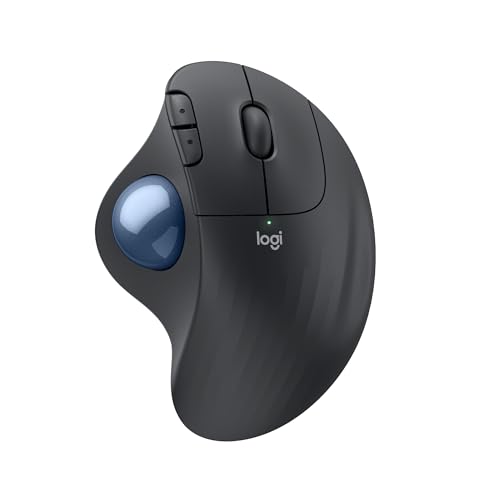
Thumb-operated trackballs keep the hand in a familiar mouse posture, with the ball under the thumb and conventional buttons under the fingers. They are the natural first step for gamers: clicking, scrolling, and right-clicking transfer instantly, and only the pointing itself must be relearned. Their limitation is precision — the thumb is a strong, coarse digit — and fatigue in marathon sessions, since one digit does all the travelling. The Logitech Ergo M575 family, linked below, defines this category and is where most gaming experiments begin.
Finger-operated models place a large ball under the index and middle fingers, with the thumb handling buttons. The larger ball and finer digits give them the precision crown, and their ambidextrous or sculpted shapes suit long strategy sessions beautifully. For shooters they offer the better flick-and-brake control of the two families, at the cost of a stranger hand posture that takes longer to learn. Players choosing for games should try both postures in a shop if one exists nearby; hands have strong opinions that specifications cannot overrule.
The shooter problem, examined fairly
A mouse turns the character by moving the whole device across the desk, recruiting the arm’s large muscles for speed and the wrist for correction, with friction providing a natural brake. A trackball turns by spinning a ball that keeps its momentum, so the player must learn to brake the spin with touch — a skill with no mouse equivalent, and the source of the overshoot that makes new trackball players feel seasick in shooters. Acceleration settings become crucial: a well-tuned curve lets a slow roll aim precisely and a hard spin whip the view around, approximating the mouse’s two-speed nature in one digit.
Given weeks, the brain rewires. Trackball shooter players exist at respectable ranks, and their gameplay looks different rather than worse — more pre-aiming, more positioning, fewer heroic flicks. What the trackball rarely survives is the dual demand of competitive shooters at high level, where opponents’ mice set a speed benchmark the thumb cannot match. The fair verdict: casual and mid-level shooter play, yes, after adaptation; aspiring to competitive ranks, the mouse remains the rational tool, and no article should pretend otherwise to sell you a ball.
Ergonomics: the reason the question gets asked
Most people asking about trackball gaming are not chasing novelty; they are managing a wrist, an elbow, or a shoulder that has begun invoicing them for mouse years. A trackball’s hand does not travel, the forearm stays still, and the desk needs no cleared acreage for sweeps — which also makes trackballs the only real pointing option for gaming in a recliner, on a train tray, or in a crowded shared workspace. For a player whose choice is trackball or not playing, the genre qualifications above become footnotes.
Comfort has its own learning curve. A thumb ball moves the workload to one digit, which can develop its own complaints if sensitivity is set so low that the thumb travels constantly; raise sensitivity, use acceleration, and let small motions do the work. Finger balls distribute effort better for long sessions. Either way, alternate posture, take the breaks you would take anyway, and treat persistent pain as a medical question rather than a peripheral one — this guide can recommend a mouse, not diagnose a wrist.
Settings and habits that close the gap
Disable any ‘enhance pointer precision’ style operating-system acceleration you do not control, then set acceleration deliberately inside the trackball software or the game, where its curve is predictable. Raise base sensitivity until a single thumb stroke crosses the screen, because strokes you must repeat are fatigue and delay combined. In games, bind a precision modifier — a button that temporarily lowers sensitivity while held — if the title allows it; sniping with a trackball becomes dramatically more civilised with a sniper key doing the job a wrist used to do.
Keep the ball and its bearings clean. A trackball’s smoothness is mechanical: skin oil and dust accumulate on the ball and the tiny support bearings, and a gritty ball makes fine aim impossible in a way players misdiagnose as their own clumsiness. Pop the ball out weekly, wipe it and the socket, and the device returns to gliding. It is the only gaming peripheral whose maintenance ritual takes twenty seconds and whose neglect so completely ruins its one job.

The products worth a closer look
Logitech Ergo M575S trackball
The starter trackball for gamers, verified
The M575S is the thumb ball most switching gamers land on: a sculpted, mouse-like shell, a smooth ball with adjustable sensitivity, and dual connectivity — Bluetooth or the included Logi Bolt receiver — so it can live on a gaming PC and a work laptop in the same day. Its API-verified listing confirms the current S revision of Logitech’s long-running design, a lineage that matters because the shape has been refined across millions of hands.
For gaming, treat it as the experiment’s control instrument: affordable enough to test the concept, good enough that a failed experiment is the concept’s fault and not the device’s. If the month of adaptation converts you, the finger-ball category awaits; if it does not, you own an excellent travel and media mouse, which is the softest landing any peripheral experiment offers.
- Thumb-operated ball with adjustable pointer speed
- Bluetooth and Logi Bolt USB receiver connectivity
- Sculpted ergonomic shell for right hand
- Works on any surface, including none at all
Strengths
- Familiar mouse-like posture eases the switch
- Dual connectivity suits PC-plus-laptop lives
- No desk space or mouse pad required
Trade-offs
- Thumb precision ceiling for competitive shooters
- Right-hand-only shape
- Ball and bearings need weekly cleaning
Best for: gamers testing trackball play and anyone short on desk space / Not suited for: left-handed players or esports-rank ambitions
Trackballs in specific games: a field report format
The genre verdicts in this guide sharpen with titles. City builders and grand strategy are trackball home turf, where a session is four hours of map work and the stationary hand is pure profit. CRPGs and MMOs follow closely, their ability-driven combat indifferent to pointing speed. Among shooters, the slower tactical titles — where positioning and pre-aiming dominate — accommodate the ball best, while arena shooters built on constant high-speed turning resist it most; battle royales sit between, their long looting phases trackball-friendly and their final circles less so. Racing and flight belong to other devices entirely, and always did.
Simulation deserves a special note, because it is where trackball gamers speak with most enthusiasm: a flight or farming simulator’s cockpit clicking, camera management, and menu work suit the ball’s stationary precision, and the desk space saved fits a HOTAS or wheel beside it. If your library leans simulation and strategy, the adaptation this guide describes is not a compromise you endure for your wrist’s sake — it is a control scheme you may end up preferring on the merits.
The two-device desk: the switcher’s real destination
Most gamers who adopt a trackball do not, in the end, replace the mouse; they demote it. The mature setup keeps both connected — the ball as the default for desktop, strategy, and long sessions, the mouse woken for the shooter nights — and modern operating systems accept two pointing devices without argument. This hybrid is the honest destination the switcher’s journey usually reaches, and it reframes the purchase: the trackball is not auditioning to be your only pointer, it is applying to take the hours that hurt from the device that causes them.
Configure each device for its role rather than mirroring settings between them, and keep the mouse’s pad territory clear even in ball-dominant weeks, because habits revert under excitement. The two-device desk also solves the guest problem and the shared-computer problem, and it explains the trackball market’s quiet durability: it does not need to defeat the mouse to earn its place, only to relieve it.
The learning curve, week by week, without the folklore
Every trackball gaming story begins with a lie the teller does not know they are telling: that the first day predicts the first month. The first day is genuinely awful for almost everyone, because years of arm-aiming muscle memory are suddenly unemployed and the thumb or fingers driving the ball have the fine control of a toddler with a crayon. What matters is the shape of the curve after that, and it is more encouraging and more specific than the folklore admits.
| Stage | What it feels like | What is actually improving |
|---|---|---|
| Days one to three | Overshooting everything; menus feel like ice | Your brain is mapping ball rotation to cursor distance, the fundamental calibration |
| End of week one | Desktop use normal; games still humbling | Small corrective movements become unconscious; the ball stops feeling foreign |
| Weeks two to three | Slow-paced games genuinely enjoyable | Flick accuracy arrives in coarse form; tracking smooth targets becomes reliable |
| Month two | Your personal ceiling comes into view | The remaining gap concentrates in fast 180-degree turns and micro-corrections under pressure |
| Beyond | Preference, not progress, is the question | Skill plateaus near your other peripherals for most genres; exceptions stay genre-specific |
Two training habits shorten that curve measurably. First, use the trackball for everything, not just gaming, because the thousand daily desktop movements are the real practice and the game sessions are merely the exam. Second, train in aim-trainer scenarios that isolate tracking before flicking, since the trackball’s natural strength is smooth continuous motion and confidence built there carries the rest. Players who only suffer through competitive matches for practice improve slowest and quit most, which then becomes the anecdote they tell about trackballs.
Genre by genre: where the ball wins, draws, and loses
Strategy, management, and anything with a pause button
These genres are the trackball’s home turf and it is not close. The ball’s ability to cross a large monitor with a flick and then make pixel-fine adjustments without lifting anything suits map navigation and menu work beautifully, and the stationary hand survives marathon sessions that would fatigue a mouse arm. If your library leans here, the question in this article’s title answers itself in the affirmative within a week.
Role-playing games, MMOs, and action adventures
Camera control in third-person games is continuous and forgiving, which plays to the ball’s tracking strength, while ability bars and inventories are desktop-like tasks the ball handles natively. The adjustment period is real but short, and many players report preferring the ball for long sessions in these worlds because the hand rests while the camera glides.
Shooters: the honest middle and the honest limit
Casual and cooperative shooters are entirely playable and enjoyable on a trackball once the curve is climbed, and aim assistance in many modern titles narrows the gap further. Competitive ranked play at higher levels is where the limit lives: the fastest direction reversals and the finest micro-corrections under time pressure remain easier on a good mouse, and pretending otherwise would be a disservice. The deciding question is which shooters, at what stakes, dominate your actual week.
Settings and hardware choices that make gaming work
- Sensitivity is a ball-size conversation. Larger balls carry momentum that smooths tracking and makes fine stops harder; smaller balls are nimble and twitchy. Match in-game sensitivity so a comfortable full flick turns you most of the way, not all of it, leaving the fingers authority over the final aim.
- Acceleration divides the community for a reason. Pointer acceleration lets one device be both a crossing tool and a precision tool, which suits the ball’s physics; many competitive players disable it for muscle-memory purity on mice and then wrongly import the rule. Experiment honestly for a week each way before adopting either dogma.
- Button placement decides your strafe-and-aim life. Gaming asks for simultaneous movement, aiming, and firing, so a trackball whose buttons fall naturally under the non-ball fingers matters more than its sensor specification. Models that force the aiming fingers to also click compromise exactly the coordination games test.
- Keep the ball and its bearings clean. A trackball’s sensor reads a moving surface whose condition you control. Skin oil and dust on the ball or its support bearings introduce exactly the inconsistency players blame on the concept, and a weekly wipe is the cheapest accuracy upgrade in this entire article.
- Polling and connection still matter. For fast games, a wired connection or a quality wireless link with a high report rate keeps the input chain honest. The ball is not the only component in the latency story, and it should not carry the blame for a sleepy dongle across the room.
Notice that most of these are tuning, not shopping. The trackball you already own for work is probably one settings session and one cleaning away from its gaming verdict, and reaching that verdict before buying a gaming-specific model is the order of operations this guide recommends.
Ergonomics: the reason many players arrive here at all
A large share of trackball gamers did not come for performance; they came because a wrist, shoulder, or elbow filed a complaint about the mouse. The trackball’s stationary design moves the work to fingers that were underemployed, and for many players that redistribution is the difference between gaming and not gaming. That context reframes the performance question entirely: the relevant comparison for an injured player is not trackball versus an ideal mouse, but trackball versus the mouse their body now permits, used for the session length their body permits.
Honesty requires the counterweight: trackballs load the thumb or the index and middle fingers heavily, and trading a wrist problem for a thumb problem is a documented path, especially with thumb-ball designs used at high sensitivity for long sessions. Alternating devices across the week, keeping sensitivity high enough that the ball travels little, and taking the ordinary breaks every peripheral deserves are the habits that keep the ergonomic bargain honest.
Desk geometry completes the picture. A trackball needs no roaming space, which makes it the gaming pointer of small desks, tray tables, and couch setups where a mouse simply has no habitat. For the player whose battlefield is a laptop on a train tray, the question in the title was never really a question.
The sensor and ball: specifications that matter and those that merely print
Trackball specifications are usually copied from mouse datasheets, where they mean something different, because a trackball’s sensor does not read a desk; it reads a patterned ball whose surface condition you control. Resolution figures still matter, setting how much ball rotation becomes cursor travel, but the lived determinants of tracking quality are the ball’s own finish, the condition of the tiny bearings it rides on, and the sensor’s ability to read the ball at the slow speeds where precision lives. A modest sensor under a clean, well-seated ball outperforms a flagship sensor under a greasy one every day of the week.
| Specification or feature | What it means for a trackball specifically | Gaming relevance |
|---|---|---|
| Ball diameter | Larger balls carry momentum for smooth tracking; smaller balls answer faster and stop sooner | High: choose by genre, tracking games favour large, twitch games favour small |
| Bearing type | Static bearings are silent and wear slowly; dynamic bearings roll freer and can chatter | Moderate: affects the fine-control feel at the smallest movements |
| Sensor resolution range | Sets the span of sensitivities available without software scaling | Moderate: wide ranges forgive experimentation |
| Report rate | How often the device reports movement to the computer | High for fast games, as with any pointer; wired and good wireless both suffice |
| Button switches and placement | Whether aiming fingers must also click, and how the clicks feel | High: simultaneous aim-and-fire is the gaming test |
| Scroll mechanism | Ring, wheel, or ball-twist, depending on design | Genre-dependent: inventory and zoom habits decide |
The maintenance corollary deserves repeating in specification language: the ball is a consumable optical surface. Skin oil changes its friction and its reflectivity together, which is why a trackball can feel subtly worse across a fortnight and then feel new again after a thirty-second wipe of the ball and its bearing points. Owners who schedule that wipe, weekly for daily players, are practising the cheapest performance discipline in pointer gaming.
Building the hybrid desk: trackball and mouse in one setup
The pragmatic ending many players reach is not a conversion but a coalition: the trackball owns the desktop, the long sessions, and the genres that flatter it, while a mouse remains plugged in for the titles and ranks where its strengths are decisive. This arrangement costs one USB port and a little desk honesty, and it dissolves the question in this article’s title into a scheduling decision. The friction to manage is sensitivity consistency: set both devices so a familiar movement produces a familiar result, or accept a few minutes of recalibration in the hands each time you swap, which most players stop noticing within a month.
Keyboards with per-game profiles and simple device-switching habits make the coalition smoother, but the essential trick is social rather than technical: decide in advance which device owns which game, so the choice is made by the library and not renegotiated by frustration after a bad match. A device blamed mid-match for a loss it did not cause gets retired unfairly, and the coalition’s peace treaty is precisely that its borders are drawn in calm moments.
- Give the trackball the long sessions by default. Comfort compounds across hours, and the genres of endurance are where its ergonomic case is strongest.
- Give the mouse the ranked shooter by default. Not because the ball cannot play it, but because removing the equipment question from competitive losses is worth more than the answer.
- Keep both sensitivities in a note. Games reset settings; notes do not. The coalition survives patches when its terms are written down.
There is a quiet benefit beyond gaming: a two-pointer desk is a desk insured against either device’s failure, battery, or cleaning day, and the redundancy that began as diplomacy ends as simple robustness.
The competitive record and the community’s honest verdict
Trackballs have a genuine competitive history that folklore forgets: early arcade cabinets standardised on them for titles built around spinning control, and a persistent minority of high-level players in various modern genres use them by preference rather than by necessity. Their testimony converges on the same points this guide has made from principle: tracking and endurance are real strengths, instantaneous reversal is the real cost, and the player’s investment in the learning curve is repaid in genres that reward the strengths. The community’s honest verdict is not that the ball is secretly superior, but that the hierarchy of pointers is genre-shaped, and a flat hierarchy was always a mouse-owner’s story.
That verdict reframes the purchase question for newcomers. You are not buying a verdict on the concept; you are renting a month of learning curve to discover your own genre-shaped answer, ideally with a return window or a borrowed unit. The players who thrive on trackballs are disproportionately those who ran that experiment honestly, with full-time use and aim training, rather than those who dabbled for two embarrassed evenings and filed the concept under gimmick. The experiment’s design matters as much as the device.
The desk, the chair, and the ball: ergonomics as a system
A trackball’s ergonomic promise depends on the furniture around it more than its own shape suggests. Because the device does not travel, its position is fixed, and a fixed position that is wrong, too high, too far, rotated against the wrist’s neutral line, will be wrong for every minute of every session, where a mouse’s wandering at least varies the insult. The correct setup places the ball where the hand falls naturally with the elbow at the side and the forearm level, close enough that the shoulder never reaches, and angled so the wrist stays straight while the fingers work. Five minutes with a tape measure and a honest posture check are the ergonomic intervention; the device merely occupies the position they choose.
Chair height and desk height enter the same equation, because the trackball’s fixedness transmits their errors undiluted. Owners who adopt a trackball for pain and feel no relief should audit the furniture before indicting the device, since a desk two centimetres too high defeats any pointer ever made. The system view also explains the accessory market’s quiet successes: wrist rests that set the hand’s angle, angled bases that rotate the device toward the forearm’s natural line, and stands that bring a couch setup’s ball to the hand rather than the reverse. Each is furniture thinking applied at desktop scale.
The breaks discipline completes the system, and it is the section of ergonomics advice everyone agrees with and nobody schedules. A timer that interrupts long sessions briefly, a habit of switching the ball between hands during low-stakes desktop work where the design allows, and an honest response to new pain in the ball’s working fingers rather than a heroic silence: these are what keep the ergonomic bargain this article described from quietly expiring. The trackball redistributes work; it does not abolish it, and the owner’s habits are the redistribution’s manager.
Children, newcomers, and the trackball as a teaching device
An unexpected constituency deserves its paragraph: the trackball is a superb first pointer for the very young and the very new, because it separates the two skills a mouse fuses, moving the pointer and holding the device still. A child or a grandparent can rest a hand on a stationary ball and learn pointing as a single idea, without the mouse’s simultaneous demand to grip, slide, and not rotate. Households that keep a trackball on the shared computer often discover it becomes the teaching device by accident, and the discovery is worth making on purpose.
The same separation serves players returning after injury or with limited mobility, for whom the mouse’s grip-and-slide is the barrier and the ball’s rest-and-roll is the accommodation. Gaming’s accessibility conversation rightly concentrates on controllers and software, but the pointer choice is part of it, and the trackball’s long history in assistive setups is one of the strongest answers to this article’s title: for some players, the trackball is not an alternative way to game but the way gaming remains possible at all.
That perspective disciplines the performance debate one final time. A device category that serves the ranked competitor adequately, the strategy player superbly, the injured player essentially, and the newcomer pedagogically is not a curiosity to be judged by its hardest exam alone. It is a mature tool with a genre-shaped and person-shaped map of strengths, and the map, by now, should be legible enough for any reader to locate their own position on it.
Your first month: a training plan that respects the curve
- Week one: total immersion on the desktop. Use the ball for everything outside games, configure sensitivity so a comfortable flick crosses the screen, and clean the ball twice. No verdicts are permitted this week.
- Week two: slow games and aim training. Strategy and adventure titles for real play; fifteen minutes of tracking drills before shooter sessions, treated as warm-up rather than examination.
- Week three: your main genre, honestly. Play what you actually play, at your actual stakes-minus-one: casual matches before ranked, cooperative before competitive. Note where the ball costs you, specifically, in the diary sense this guide keeps recommending.
- Week four: the settings pass. Revisit sensitivity and acceleration with a month’s hands, test the alternative philosophy for three days, and settle. Most early settings were chosen by a beginner who no longer exists.
- Day thirty: the verdict, in writing. Which genres the ball owns, which it rents, which it should never visit again, recorded while the month is fresh. That page is worth more than any review, including this one, because it is the only one written by your hands.
The plan’s design borrows from how musicians adopt instruments: immersion before judgement, drills before performance, settings after technique, and a verdict with a date on it. Players who run it discover, with remarkable consistency, that the answer to this article’s question is not yes or no but a list, their list, and that the list surprises them.
Trackball terms, translated for gamers
| Term | Plain meaning | Gaming relevance |
|---|---|---|
| Thumb ball / finger ball | Which digits drive the ball: thumb on the side, or fingers on top | The founding choice of the category, with the control and comfort trades this guide detailed |
| Ball diameter | The size of the ball itself | Momentum and smoothness against speed and stopping; genre decides |
| Bearings | The tiny supports the ball rides and spins on | Their condition is the fine-control feel; cleaning them is maintenance, not fussiness |
| Stiction | The small static friction to overcome when starting a movement | The enemy of micro-corrections; the quality that separates good trackballs from frustrating ones |
| Acceleration | Pointer speed rising with ball speed, beyond one-to-one | The trackball’s native ally; test both philosophies before adopting a dogma |
| Report rate | How often per second the device reports its movement | Fast games want it high, as with any pointer; check the wireless link as well as the sensor |
| Scroll ring | A rotating bezel around the ball on some designs, used for scrolling | Elegant for strategy maps and inventories; a genre-dependent virtue |
| Ambidextrous design | A shape either hand can drive | The injury rotation and left-handed player’s essential feature |
That is the category’s whole vocabulary, and it fits on an index card because the category is honest: a ball, its bearings, its buttons, and the hand that learns them. Everything else in this guide has been about what those few parts mean across genres, bodies, and months, which is where the real comparison was always hiding.
The software layer: remapping, per-game profiles, and the ball’s second education
A trackball’s gaming education continues in software long after the hand has learned the hardware. Button remapping decides whether the device fits a game’s demands or fights them: the ball’s buttons are few, and assigning them, a dedicated aim-down-sights hold, a push-to-talk, a melee, by the game’s actual frequency table rather than by the defaults, converts scarcity into intention. Per-game profiles in the maker’s software, or in the games’ own settings, let the same device present different sensitivities and button maps to a strategy title and a shooter, which is the coalition idea from earlier in this guide implemented inside a single pointer.
The learning curve benefits from the software’s patience features too. Pointer precision enhancements in the operating system, acceleration curves in dedicated tools, and in-game sensitivity staging all let a new owner begin with training wheels that a mouse would never need, and remove them on the month’s schedule this guide laid out. There is no honour lost in the wheels; they are how every complex motor skill is taught, and the players who skip them out of pride are disproportionately the ones whose two-evening experiment becomes a permanent verdict.
Streaming, content, and the trackball on camera
A small but real constituency games on camera, and for them the trackball has properties no specification sheet lists. It is quiet in the hand’s neighbourhood of the microphone, it does not wander out of frame or off the desk’s edge at dramatic moments, and it reads on camera as a deliberate, characterful choice that audiences ask about, which for a streamer is a feature in itself. The stationary hand also fatigues less visibly across a long broadcast, and the broadcaster’s posture, a performance variable, survives the marathon sessions that mouse play degrades.
None of this outranks the performance analysis for a competitive player, but it completes the map of who the device serves, which by now includes the strategist, the endurance player, the injured player, the newcomer, the couch player, and the broadcaster. A pointer with that many constituencies is not a niche experiment; it is a mature alternative whose examination this article set, and whose grades, genre by genre and person by person, are recorded in the sections above for any reader to mark against their own life.
The trackball in specific titles: a field guide by example
City builders and colony simulations
These are the ball’s showcase titles: maps that reward the long flick and the patient hover, interfaces dense with small buttons that a stationary hand serves without fatigue, and sessions measured in evenings. Players routinely report these games as the moment the trackball stopped being an experiment, because the genre’s demands read like the device’s design brief written by accident.
Turn-based tactics and card battlers
Deliberate games forgive everything and reward precision at leisure, and the ball’s ability to rest exactly where it was left, while the player thinks, is a small ergonomic poem: the pointer waits where the thought left it, with no grip maintained and no drift to correct. These titles are the recommended first games for any new owner’s training month.
First-person adventures and immersive sims
Exploration-paced shooters, where looking is the primary verb and combat is deliberate, suit the ball’s smooth tracking beautifully, and their generous pacing forgives the reversal cost that ranked play punishes. A player whose shooter life lives here can ignore this guide’s competitive cautions almost entirely.
Rhythm and precision-arcade titles
The honest exception list: titles built on instantaneous, repeated direction changes at the edge of human reaction are the mouse’s home ground, and the ball’s momentum becomes the opponent. Even here, casual play is enjoyable; it is the leaderboard that files the objection.
Buying the first trackball for gaming: a decision in five questions
- Which hand, and which ball position? Finger-ball for control and gaming headroom, thumb-ball for the gentlest transition from a mouse. Answer from your genres, not from photographs.
- How large is your comfortable ball? Larger for tracking smoothness in strategy and adventure titles, smaller for nimbleness. Your hand size votes here too.
- Where do the buttons fall? In the shop or the return window, mime a strafe-and-fire: if the clicking finger must leave the ball, the layout will tax every fight.
- What does the connection promise? Wired certainty or a wireless link with a gaming-grade report rate; the dongle’s placement in your desk’s geography is part of the answer.
- What is the experiment’s exit? A return window, a resale market, or a desktop career waiting if gaming disappoints. The ball that can retire to the desk is a risk-free experiment; buy the experiment, not the verdict.
Five questions, none of them about the sensor’s headline number, because the sensor was never the decision. The hand, the genres, the buttons, the link, and the exit: that is the whole purchase, and it can be made well in an evening.
The verdict in one page, for the reader who scrolled
Yes, you can game with a trackball mouse, and the longer answer this article has built is a map rather than a verdict. Strategy, simulation, role-playing, and adventure titles are not merely playable but genuinely well served, often better served than by a mouse across long sessions. Casual and cooperative shooters are enjoyable after a learning curve measured in weeks. Competitive ranked shooters at high level remain the mouse’s home ground, and the honest player keeps one plugged in for those nights without treating the arrangement as a defeat. Ergonomics redraw the whole map for players whose wrists have filed complaints, because for them the comparison was never against an ideal mouse but against the sessions their body permits.
The experiment costs a month of honest use, ideally with a return window or a borrowed unit, full-time immersion, and a written verdict at the end. Run it and you will know something no review can tell you, which is where your own genres, hands, and desk fall on the map. That is the only answer to this article’s title that was ever going to fit you, and it is a better answer than yes.
The community’s borrowed wisdom: what veteran ball gamers tell beginners
Ask veteran trackball gamers what they wish they had known and their answers converge with a consistency that suggests truth. They wish they had committed fully for the first month instead of dabbling. They wish they had cleaned the ball before blaming the sensor. They wish they had chosen the ball size for their genres rather than their desk’s appearance. They wish someone had told them that the desktop hours were the training, and that the first game they should have played was the slowest one they owned. And almost all of them wish they had run the experiment years earlier, because the years they spent assuming the answer were the only real cost the question ever charged them.
That convergence is worth trusting precisely because it is unglamorous. Communities accumulate folklore in every direction, but advice that survives across genres, bodies, and decades of hardware tends to be the advice that was true. This guide has tried to earn a place in that lineage by being specific about where the ball wins and where it loses; the veterans’ list earns its place by being specific about the learner rather than the device. Between the two, a beginner has everything needed: the map, and the walking instructions.
A note for laptop and couch gamers, the ball’s secret stronghold
One habitat deserves its own closing mention because it converts more sceptics than any other: the laptop away from a desk. On a train tray, a sofa arm, a bed, or a flight’s fold-down table, the mouse’s requirement for a roaming surface becomes a genuine impossibility, while the trackball’s requirements, a few square inches and a resting hand, are met by all of them. Gamers who travel with laptops routinely discover that the question in this article’s title has a different answer at thirty thousand feet, where the ball is not the alternative pointing device but the only one fully employed. If your gaming life includes those seats, the experiment this guide prescribed should include one journey, because the journey may cast the deciding vote that the desk never could.
The same logic governs the living-room PC, where the keyboard sits on a lap and the mouse’s habitat is an upholstery lottery. A trackball integrated into that life simply works, every evening, without a tray, a pad, or a negotiation with the sofa. Whole categories of gaming setups are quietly trackball territory for this reason alone, and their owners’ bemusement at the wider debate is one of the community’s running jokes: the question was answered by their furniture years ago.
Questions readers ask about this topic
Can you really play FPS games with a trackball?
Yes, after a genuine adaptation period of several weeks, and with tuned acceleration and sensitivity. Casual and mid-level play becomes comfortable; the honest ceiling is competitive high-rank play, where the mouse’s arm-speed advantage is structural. Players who switch for comfort reasons routinely accept that trade and enjoy shooters for years on a ball. Players chasing ranks should keep the mouse for shooters and consider the trackball for everything else.
Which is better for gaming, a thumb ball or a finger ball?
Thumb balls are easier to adopt because the hand posture and buttons mirror a mouse, and they suit mixed gaming well. Finger balls offer finer precision and better flick-and-brake control once learned, and distribute effort across digits for long sessions. Most gamers start with a thumb ball for its familiarity; strategy specialists and precision seekers often graduate to a finger ball. If a shop lets you handle both, your hand will vote immediately.
How long does it take to get used to a trackball for games?
Basic pointing feels normal within days. Strategy and RPG play feels fully natural in about a week. Shooter muscle memory — spinning, braking, tracking — takes two to four weeks of regular play, and your aim will feel worse before it feels better, which is the normal shape of relearning. Judge the experiment at a month, not at a weekend, and keep the old mouse connected during the transition for the games that frustrate you.
Does a trackball help with wrist pain from gaming?
It changes the workload fundamentally: the hand and forearm stay still, no desk sweeping, no repeated wrist deviation across a pad. Many players find that removes the specific strain their mouse caused. It can move strain to the thumb if sensitivity is set too low, so tune for small motions. Persistent or worsening pain deserves a professional’s assessment; a peripheral change is a reasonable experiment, not a treatment.
What sensitivity should I use for trackball gaming?
Set it so one comfortable thumb stroke crosses the whole screen or turns your character most of a full rotation, then enable a controlled acceleration curve so slow movements stay precise. Add a hold-to-lower-sensitivity precision key for aiming if your games allow it. Avoid the trap of mouse-like low sensitivity — on a trackball it forces repeated strokes, which costs speed and tires the digit doing the work.
Can I use a trackball on a console or a couch setup?
Where the console or game supports mouse input, a wireless trackball is arguably the best couch pointing device ever made, because it needs no surface at all — it works on a leg, an armrest, or a cushion. That surfacelessness is also why trackballs persist in industrial and medical settings. For couch strategy and RPG play, the combination of a wireless trackball and a lap desk is genuinely excellent.
Can I stay competitive in ranked shooters on a trackball?
You can stay effective, and at most ranks the deciding factors remain positioning, game sense, and communication rather than the last increment of aim hardware. The honest ceiling appears at higher competitive levels, where opponents’ mouse micro-corrections and instant reversals set a standard the ball matches with difficulty. Many players settle this pragmatically: trackball for the library and for casual or cooperative shooter nights, mouse for the ranked sessions they take seriously. That hybrid is not hypocrisy; it is using each tool at the point where its strengths are the ones being tested.
Thumb ball or finger ball for gaming?
Finger-ball designs generally suit gaming better for most players, because the index and middle fingers offer finer control than the thumb and leave the thumb free for buttons, while the larger ball’s momentum flatters smooth tracking. Thumb balls win on familiarity for mouse converts, since the hand shape and click fingers feel like home, and on compactness. If your priority is shooters, start with a finger ball; if your priority is a painless transition from a mouse for mixed desktop and light gaming, a thumb ball is the gentler on-ramp, and neither choice is permanent.
Related guides
Cooler Master MM711 mouse review
the gaming PC build buying guide