Disclosure: As an Amazon Associate, reviewstook.com earns from qualifying purchases. Links to Amazon on this page are affiliate links; they cost you nothing extra.
Under $200 you get basic Android tablets that handle video, reading and light games.
Each tablet below is available on Amazon.com — check price on Amazon for the current price. This guide is built from product listings, not our own testing, so configurations change often, so confirm the exact screen, RAM, storage and compatibility on the product page. Some budget Android listings add extended or virtual RAM to the headline number, so compare the real RAM in the specs.
By the Reviewstook Editorial Team. Last updated: October 31, 2026.
In this guide
Quick Picks
| Product | Type | Best for |
|---|---|---|
| Samsung Galaxy Tab A11 (International Version) | 8.7-inch Android tablet | 64GB + 4GB, Wi-Fi |
| Samsung Galaxy Tab A11 (2026) | 8.7-inch Android tablet | 64GB, 4GB RAM, 90Hz |
| Lenovo Tab One (8.7-inch) | 8.7-inch lightweight tablet | Up to 12.5 hours of YouTube streaming |
| Lenovo Idea Tab (11-inch, 2.5K) | 11-inch college tablet | 2.5K IPS 90Hz touchscreen |
| TECLAST 13-inch Android Tablet (120Hz, 4G LTE) | Large gaming-style tablet | 120Hz, 4G LTE, large screen |
| TECLAST Android 16 Tablet 10-inch | Budget 10-inch tablet | Octa-core, IPS, dual camera |
Our Picks
Top pickBest for budget Samsung buyers
1. Samsung Galaxy Tab A11 (International Version)
A Samsung Galaxy Tab A11 Wi-Fi model (international version) with an 8.7-inch display and 64GB plus 4GB, per the listing. Check price on Amazon for the current price.
Good for: budget Samsung buyers. Strengths: Samsung brand at a low price. Weaknesses: international version, so check warranty and software. Skip it if you want a US-warranty model.

Best for everyday browsing, reading and video from a known brand
2. Samsung Galaxy Tab A11 (2026)
A Samsung Galaxy Tab A11 (2026) with an 8.7-inch 90Hz display, 64GB of storage and 4GB of RAM, Wi-Fi, per the listing. Check price on Amazon for the current price.
Good for: everyday browsing, reading and video from a known brand. Strengths: Samsung brand and 90Hz display. Weaknesses: small 8.7-inch screen. Skip it if you want a big screen.

Best for reading and video on the go
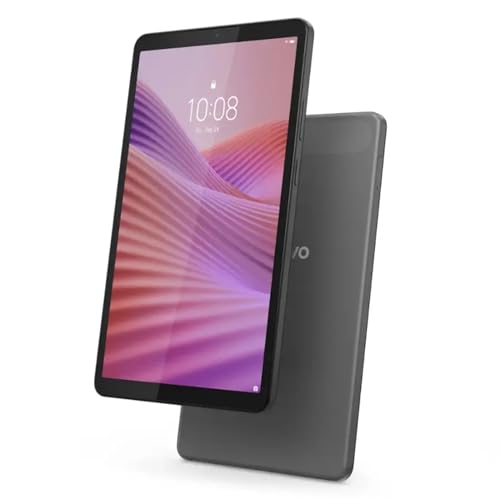
3. Lenovo Tab One (8.7-inch)
A lightweight Lenovo Tab One with an 8.7-inch HD display, 4GB of memory and up to 12.5 hours of YouTube streaming, per the listing. Check price on Amazon for the current price.
Good for: reading and video on the go. Strengths: light weight and long streaming claim. Weaknesses: HD display. Skip it if you want a sharp screen.


Best for students and media use on a bigger screen
4. Lenovo Idea Tab (11-inch, 2.5K)
A Lenovo Idea Tab college tablet with an 11-inch 2.5K IPS 90Hz touchscreen and a MediaTek Dimensity 6300, per the listing. Check price on Amazon for the current price.
Good for: students and media use on a bigger screen. Strengths: 2.5K 90Hz display. Weaknesses: 4GB RAM class performance. Skip it if you want a flagship tablet.

Best for a big screen for video and light games
5. TECLAST 13-inch Android Tablet (120Hz, 4G LTE)
A TECLAST 13-inch Android 16 tablet with a 120Hz display, 4G LTE and a large screen, per the listing. Check price on Amazon for the current price.
Good for: a big screen for video and light games. Strengths: large 120Hz screen. Weaknesses: budget chip. Skip it if you want a premium brand.

Best for the lowest price from a known tablet brand
6. TECLAST Android 16 Tablet 10-inch
A TECLAST Android 16 tablet with a 10-inch IPS screen, octa-core CPU and 5GHz Wi-Fi, per the listing. Check price on Amazon for the current price.
Good for: the lowest price from a known tablet brand. Strengths: low price and IPS screen. Weaknesses: basic performance. Skip it if you want a flagship tablet.

What You Get From a Tablet Under $200
Tablets under $200 are good at reading, video, web browsing, video calls and casual games, and they are not good at heavy multitasking or demanding apps. The six tablets in this guide make different trade-offs between screen size, sharpness, brand and software. This section explains the decisions. As with all our guides, it is built from product listings and manufacturer information, not our own testing, so confirm specifications on each product page.
Screen size: small, medium or large
Three of the six have 8.7-inch screens (the two Samsung Galaxy Tab A11 models and the Lenovo Tab One). Small tablets are easy to hold with one hand, good for reading and carrying. The TECLAST 10-inch and the Lenovo Idea Tab at 11 inches are better for video and shared viewing, and the TECLAST 13-inch is the largest, aimed at big-screen video. Bigger screens are less portable and less comfortable to hold for reading.
Resolution and refresh rate
The Lenovo Tab One lists an HD display, which looks softer than the others. The Lenovo Idea Tab lists a 2.5K IPS 90 Hz touchscreen, which is much sharper and smoother. The Samsung Galaxy Tab A11 (2026) lists a 90 Hz display, and the TECLAST 13-inch lists 120 Hz. A higher refresh rate makes scrolling smoother. For reading, resolution and brightness matter more.
Memory, storage and performance
Budget tablets usually have 3 to 4 GB of RAM and 32 to 128 GB of storage. The Samsung A11 listings show 64 GB of storage and 4 GB of RAM, and the Lenovo Tab One lists 4 GB of memory. That is adequate for browsing and video but can feel slow with many apps open. The Lenovo Idea Tab uses a MediaTek Dimensity 6300, a budget processor. Check whether the tablet has a microSD slot to expand storage.
Software and updates
Samsung and Lenovo typically offer clearer update policies than lesser-known brands. The TECLAST listings mention Android 16, which is current, but check the brand’s update history. Software updates matter for security, so favor tablets with a stated update policy if you will keep the tablet for years.
Wi-Fi and cellular
Most budget tablets are Wi-Fi only. The TECLAST 13-inch lists 4G LTE, which lets you use a SIM card for mobile data. The TECLAST 10-inch lists 5 GHz Wi-Fi, which is faster and less crowded than 2.4 GHz.
International versions and warranties
The first Samsung listing is an international version, which may have a different warranty, software and accessories than a US model. Check the seller and the warranty before buying.
The Six Tablets in Depth
Samsung Galaxy Tab A11 (International Version)
A Samsung Galaxy Tab A11 Wi-Fi model (international version) with an 8.7-inch display and 64 GB plus 4 GB, per the listing. Samsung’s brand and software support are the draw. The caution is the international version: check the warranty and software, because a US model may be better if you want local support.
Choose it if you want a Samsung tablet at a low price and accept the international version. Think twice if you want a US warranty.
Samsung Galaxy Tab A11 (2026)
A Galaxy Tab A11 (2026) with an 8.7-inch 90 Hz display, 64 GB of storage and 4 GB of RAM, Wi-Fi, per the listing. It suits everyday browsing, reading and video from a known brand. The screen is small, which is a plus for portability and a minus for video.
Choose it if you want a small, smooth tablet from a known brand. Think twice if you want a big screen.
Lenovo Tab One (8.7-inch)
A lightweight Lenovo Tab One with an 8.7-inch HD display, 4 GB of memory and up to 12.5 hours of YouTube streaming, per the listing. The weight and battery claim suit reading and video on the go. The HD display is not as sharp as the others, which matters for text.
Choose it if you want a light tablet for reading and video. Think twice if you want a sharp screen.
Lenovo Idea Tab (11-inch, 2.5K)
A Lenovo Idea Tab college tablet with an 11-inch 2.5K IPS 90 Hz touchscreen and a MediaTek Dimensity 6300, per the listing. The display is the standout, with a high resolution and a smooth refresh rate on a bigger screen. Performance is that of a budget chip. It suits students and media use.
Choose it if you want a larger, sharper screen for study and media. Think twice if you want flagship performance.
TECLAST 13-inch Android Tablet (120 Hz, 4G LTE)
A TECLAST 13-inch Android 16 tablet with a 120 Hz display, 4G LTE and a large screen, per the listing. It offers the biggest screen here and cellular capability. The processor is a budget chip, and the brand is less established, so check support and update policy.
Choose it if you want a big screen for video and light games. Think twice if you want a premium brand.
TECLAST Android 16 Tablet 10-inch
A TECLAST Android 16 tablet with a 10-inch IPS screen, an octa-core CPU and 5 GHz Wi-Fi, per the listing. It is the cheapest here, and the specifications are modest. It suits light use and as a secondary device, with the usual caution about performance and support at this price.
Choose it if you want the lowest price with a 10-inch screen. Think twice if you want a flagship tablet.
Which Tablet for Which Person
| You | Best match | Why |
|---|---|---|
| Want a Samsung at a low price | Samsung Galaxy Tab A11 (2026) | 90 Hz screen and known brand |
| Don’t mind an international version | Samsung Galaxy Tab A11 (International) | Samsung brand at the lowest Samsung price |
| Reading on the go | Lenovo Tab One | Lightweight, long streaming claim |
| Students and media | Lenovo Idea Tab 11-inch | 2.5K 90 Hz display |
| Big screen for video | TECLAST 13-inch | 120 Hz and 4G LTE |
| Lowest price | TECLAST 10-inch | Budget tier |
Making a Cheap Tablet Feel Better
- Install updates first, then remove apps you do not need.
- Add a microSD card if the tablet has a slot; see microSD cards for tablets.
- Use a case with a stand and a screen protector; see stands and holders and screen protectors.
- Turn off animations in developer options if it feels slow.
- Use lightweight apps and the browser for streaming.
- Add a keyboard if you type; see our tablet keyboard buying guide.
Best Picks by Category
These labels summarize listing data and are not hands-on test results.
- Highest listed rating (limited feedback): TECLAST Android 16 Tablet 10-inch. This is not an independent product-quality award.
- Most reviewed: Lenovo Tab One (8.7-inch).
- Best value: TECLAST 13-inch Android Tablet (120Hz, 4G LTE) — the lowest-priced pick in this guide.
- Lowest price: TECLAST Android 16 Tablet 10-inch — the budget option in this guide.
- Premium option: Lenovo Idea Tab (11-inch, 2.5K) — the premium option in this guide.
Price, Rating and Review Comparison
Prices change often, so check price on Amazon to confirm the current price.
| Product | Price | Rating | Ratings | Price tier |
|---|---|---|---|---|
| TECLAST Android 16 Tablet 10-inch | Check price on Amazon | — | — | Budget |
| Samsung Galaxy Tab A11 (International Version) | Check price on Amazon | — | — | Mid-range |
| Samsung Galaxy Tab A11 (2026) | Check price on Amazon | — | — | Mid-range |
| Lenovo Tab One (8.7-inch) | Check price on Amazon | — | — | Mid-range |
| TECLAST 13-inch Android Tablet (120Hz, 4G LTE) | Check price on Amazon | — | — | Mid-range |
| Lenovo Idea Tab (11-inch, 2.5K) | Check price on Amazon | — | — | Mid-range |
How Much Feedback Backs Each Rating
A high average from a handful of ratings is weaker evidence than a slightly lower average from thousands. Here is how the sample size looks for each pick.
- Samsung Galaxy Tab A11 (International Version): a moderate sample of feedback backs this pick.
- Samsung Galaxy Tab A11 (2026): a moderate sample of feedback backs this pick.
- Lenovo Tab One (8.7-inch): a moderate sample of feedback backs this pick.
- Lenovo Idea Tab (11-inch, 2.5K): a moderate sample of feedback backs this pick.
- TECLAST 13-inch Android Tablet (120Hz, 4G LTE): a moderate sample of feedback backs this pick.
- TECLAST Android 16 Tablet 10-inch: a small sample of feedback, so treat its listing cautiously.
Common Mistakes When Buying a Budget Tablet
- Ignoring the screen. An HD panel is noticeably softer.
- Buying too little storage. Check microSD support.
- Not checking updates. Security matters.
- Buying an international version without checking the warranty.
- Expecting a laptop replacement. Budget tablets are for light use.
Where to Go Next
Read our tablet buying guide. Browse tablets under $100, kids tablets, Samsung and Lenovo tablets, e-ink tablets, rugged tablets and keyboard cases.
How to Choose
Brand
Samsung and Lenovo get better support.
Screen
Look for 2.5K or FHD if you can.
RAM
4GB is typical for this price.
How We Chose These Products
We start from products sold on Amazon with a full product name and clear specifications, and we skip results that show only a brand name or a vague title. We then read the listing and any manufacturer information for each one and note the features that matter for tablets and tablet accessories: screen, performance, storage and accessories. We do not run our own lab tests, and this guide contains no hands-on measurements. Use it to build a shortlist, then check current prices, dimensions and return terms on the Amazon page before you buy.
Buying Guide: What to Check Before You Choose
What changes with price
Cheaper tablets use slower processors and less storage. They are fine for reading and video, but check the screen and software update support.
Keyboards for tablets
Check the connection (Bluetooth or a pogo-pin dock), the layout, the key travel and whether a trackpad is included. A case that doubles as a stand helps with typing. Confirm the size and model fit.
Kids’ tablets
Look for a durable case, parental controls, a long warranty and age-appropriate content. Check storage and whether apps are included.
Quick Reference: Which Pick Suits Whom
- Samsung Galaxy Tab A11 (International Version): suits budget Samsung buyers
- Samsung Galaxy Tab A11 (2026): suits everyday browsing, reading and video from a known brand
- Lenovo Tab One (8.7-inch): suits reading and video on the go
- Lenovo Idea Tab (11-inch, 2.5K): suits students and media use on a bigger screen
- TECLAST 13-inch Android Tablet (120Hz, 4G LTE): suits a big screen for video and light games
- TECLAST Android 16 Tablet 10-inch: suits the lowest price from a known tablet brand
Common Mistakes to Avoid
- Buying a keyboard without checking tablet model compatibility.
- Ignoring storage needs.
- Overlooking software update support.
- Skipping the case.
- Forgetting the return window.
Setup and Care
- Update the software.
- Pair accessories with Bluetooth in settings.
- Set up parental controls if needed.
- Protect the screen.
Quick Checklist for a Budget Tablet
A lower-cost tablet can be a good fit for reading, video and light browsing, if you know what you need from it. Walk through this list before you decide.
- What will you do most: stream video, read, browse, play games or help a child learn?
- How much storage do you need, and does the model take a memory card?
- Does the listing name the screen size and resolution?
- Which software does it run, and for how long does the maker say it will provide updates?
- Does it include the charger in the box?
- Are parental controls available if a child will use it?
Which Tablet Size Suits Which Situation
| Use | Screen size idea |
|---|---|
| Reading in bed or on the bus | A compact tablet that is easy to hold in one hand |
| Video and family viewing | A larger screen that is comfortable to prop up |
| Kitchen or counter use | A mid-size model with a stand or case |
| Travel | A lighter model that fits a small bag |
Think about whether you need extras such as a case, a screen cover or a stylus, because these are often sold separately. Check what the listing says about cameras and speakers if video calls matter to you.
When the tablet arrives, install the available software updates, set a screen lock, and sign in only to accounts you trust. Follow the maker’s guidance for battery care, and keep it out of hot cars. A tablet in this range suits simple tasks well, but heavy multitasking may feel slow. If a child will share it, create a separate profile and set limits on apps and screen time through the controls the maker provides. Keep your storage tidy by removing unused apps and clearing old downloads every month.
Reading the Picks Side by Side
The picks in this guide were chosen to cover different buyers rather than to repeat one formula at several prices, so the most useful reading is comparative: what each model gives up, as well as what it offers. The paragraphs below draw only on the strengths, weaknesses and best-for notes already recorded in the reviews above, and they are meant to be read with your own routine in mind rather than as a league table.
The contrast between Samsung Galaxy Tab A11 (International Version) and Samsung Galaxy Tab A11 (2026) is the contrast between two kinds of owner. Choose the Samsung Galaxy Tab A11 (International Version) if budget Samsung buyers describes you; its strengths, Samsung brand at a low price, are pointed exactly at that life, and its weakness, international version, so check warranty and software, is the sort you will rarely meet. Choose the Samsung Galaxy Tab A11 (2026) if everyday browsing, reading and video from a known brand is closer to your truth, accepting small 8.7-inch screen in exchange for Samsung brand and 90Hz display. Readers who cannot decide are usually describing a third situation, and for them the remaining picks in this guide, rather than a coin toss between these two, usually hold the answer.
Samsung Galaxy Tab A11 (2026) and Lenovo Tab One (8.7-inch) also divide on what they ask of you after purchase. The Samsung Galaxy Tab A11 (2026) gives Samsung brand and 90Hz display but expects you to live with small 8.7-inch screen; the Lenovo Tab One (8.7-inch) offers light weight and long streaming claim while asking you to accept HD display. In practice this means the Samsung Galaxy Tab A11 (2026) suits everyday browsing, reading and video from a known brand, and the Lenovo Tab One (8.7-inch) suits reading and video on the go, and the overlap between those audiences is smaller than the shared category suggests. If your use sits genuinely in the overlap, prefer the one whose weakness you mind least, because strengths become invisible with familiarity and weaknesses never do.
Set Lenovo Tab One (8.7-inch) beside Lenovo Idea Tab (11-inch, 2.5K) and the guide’s logic sharpens. The Lenovo Tab One (8.7-inch) is aimed at reading and video on the go, and the listing credits it with light weight and long streaming claim; the honest cost of that focus is HD display. The Lenovo Idea Tab (11-inch, 2.5K) answers a slightly different brief, suiting students and media use on a bigger screen, with 2.5K 90Hz display as its calling card and 4GB RAM class performance as the compromise to accept. Neither is the better tablet under $200 in the abstract: the first rewards buyers whose week looks like its brief, and the second rewards buyers whose week looks like its own. Choosing between them is really choosing which ordinary day you want to optimise for.
Matching the Choice to Real Life
Abstract criteria become concrete when they are tested against real routines. The three situations below are drawn from the readers this guide was written for, and each one changes which of the budget tablets above is the right answer, sometimes in ways the specification table would never predict.
The parent buying a tablet for a child, without buying a kids’ tablet
Many parents skip the dedicated kids’ models and put a standard budget tablet in a serious case, gaining a bigger, better screen and a device that can graduate to general family use. The picks in this guide suit that plan, with two practical additions: set up a supervised child profile before handing it over, and choose the model whose screen size matches the child’s hands and bag. The money saved versus a premium tablet buys the case, a spare charger and peace of mind.
The traveller wanting a disposable-ish media tablet
A tablet under this budget is the one you will actually take on holiday: loaded with downloaded films for the flight, maps and books for the trip, and cheap enough that a loss would sting rather than ruin. Battery life across a travel day and a screen that copes with bright airports matter most here, and expandable storage earns its place because hotel Wi-Fi cannot be trusted with your entertainment. The larger picks suit films; the compact ones suit readers who travel light.
The smart-home and kitchen tablet
An under-$200 tablet makes an excellent fixed household device: recipes and timers in the kitchen, a video-call station for family, a controller for lights and music, a photo frame between jobs. For this life, the tablet lives plugged in or near its charger, so raw battery capacity matters less than a screen that stays readable and speakers that carry over a kettle. Buy the pick whose size fits the counter or shelf it will live on, and give it a stand from day one.
A Deeper Look at the Criteria
Specifications are the beginning of the decision rather than the decision itself, and budget tablets reward buyers who read past the first line of the listing.
The screen is the tablet
A tablet is a screen with a computer attached, so panel size, sharpness and brightness decide satisfaction more than any other specification. Match the size to the dominant use: reading and carrying favour the compact picks, film and split-screen work favour the larger ones. Brightness and glare behaviour matter in the rooms you actually use, which for most people means a bright kitchen and a dim sofa, and the picks in this guide divide fairly clearly along those lines.
Software support as part of the price
Two tablets with identical hardware can be very different purchases once their update horizons differ. A model supported for years stays safe, keeps its apps compatible and holds its usefulness; a model abandoned early becomes a media-only device sooner than its hardware deserves. Treat the support story as a line item in the price, and be wary of any listing that is eloquent about everything except how long the maker stands behind the software.
Storage and the card slot question
Internal storage fills with the operating system, apps that grow yearly and the downloads you swore were temporary. Decide at purchase whether your use is streaming, which forgives small storage, or downloading, which does not, and check whether the model accepts a memory card before assuming you can expand later. The cheapest configuration of a good tablet is only a bargain if its storage survives your second year of ownership.
Battery and charging in daily rhythm
Tablets are used in bursts across a day and charged in the gaps, so real battery behaviour under mixed use matters more than a headline figure, and charging speed matters more than most buyers expect: a tablet that recovers meaningfully during a half-hour kitchen stop fits life better than one needing an overnight tether. If the tablet will travel, check what charger it uses and whether it is the same one your phone already carries.
Troubleshooting Common Problems
Troubleshooting is a skill of elimination: change one thing, test, and only then move on. These are the faults readers of this guide meet most often with budget tablets.
The tablet has slowed down over time
Slowness on an ageing tablet is usually storage pressure and accumulated apps rather than a dying processor. Check how full the storage is and keep a comfortable margin free, remove or disable apps you no longer use, and restart the tablet properly rather than letting it sleep for months. A factory reset, after a confirmed backup, restores most budget and midrange tablets to something close to their first-month manners, and is worth doing before concluding the hardware is finished.
Wi-Fi keeps dropping or will not connect
Separate the tablet from the network as suspects: test another device on the same Wi-Fi, and the tablet on a different network if you can. Forget and rejoin the connection to clear a corrupted profile, restart the router if every device complains, and check whether the drops follow a particular room, which points to range rather than faults. A case with metal elements occasionally deserves suspicion on smaller tablets where antennas live near the edges.
Apps crash or refuse to install
Compatibility creeps: as apps update, the oldest systems are quietly left behind, and a tablet that cannot install its banking or school app is telling you about its software horizon. Keep the system updated to the latest version offered, keep some storage free because updates need working room, and clear a misbehaving app’s cache before reinstalling it. When a must-have app genuinely no longer supports the tablet, that, rather than speed, is the honest signal to plan a replacement.
The battery drains overnight or charges slowly
Overnight drain usually has a name in the battery settings: an app syncing, a download completing, a radio hunting for a weak signal in a drawer. Check the usage list before blaming the cell. Slow charging is most often the charger or cable rather than the tablet, so test with the original or a known-good set. A battery that swells, lifts the screen or makes the tablet rock on a table is a stop-using-it fault and a safety matter, not a quirk.
Living With It Long-Term
A tablet under $200 lives in hands, bags and kitchens, so its care is mostly about the screen and the charge. A case that covers the corners is worth more than its price the first time the tablet meets a hard floor, and a screen protector earns its keep on any tablet that travels or serves children. Wipe the screen with a soft cloth; tablets collect fingerprints as a condition of employment, and a weekly clean keeps touches accurate and the picture honest.
Charge with a little kindness: the original or a reputable charger, no charging under pillows or in direct sun, and no anxiety about perfect percentages for a device used daily. If the tablet will serve a fixed role plugged in for long periods, as a kitchen or counter display, occasional unplugged use keeps the battery exercised. Store a spare tablet at partial charge in a cool place, and check it every few months rather than discovering a deeply drained cell a year later.
Keep the digital housekeeping as regular as the physical: know which account the tablet belongs to, keep a backup of photos and documents that exist only on it, and record its model and serial with your household documents. Tablets are borrowed, lent and carried off by family members more than any other computer, and the owners who fare best are the ones whose setup assumes that friendly chaos from the start.
Set the tablet up for its real job in the first week, while motivation is high: the home screen arranged for its main user, the unnecessary preinstalled apps removed or disabled, the parental controls or profiles configured if it will be shared. A tablet left in its factory arrangement slowly becomes nobody’s tool, full of other people’s priorities. An hour of setup is the difference between a device that gets picked up daily and one that gets charged monthly.
If the tablet is a gift, include the unglamorous essentials in the parcel: a case that fits, a charger that can live where the tablet will, and five minutes of your time to help with the first setup and account sign-in. Gifts of technology fail quietly when the recipient cannot get past the first evening’s configuration, and the fix costs almost nothing compared with the tablet itself. It also gives you the chance to set the privacy and safety options properly from the start.
Plan the tablet’s second role before its first one ends. A tablet outgrown for study or work often becomes an excellent kitchen screen, video-call station, photo frame or child’s device, and choosing a respected model from this guide makes that second life longer and safer thanks to better support. Thinking one role ahead turns the purchase from a consumable into a small piece of household infrastructure.
From Shortlist to Setup: A Step-by-Step Walkthrough
Advice becomes useful when it is turned into an order of operations. This walkthrough takes the criteria, comparisons and warnings in this guide and arranges them into the sequence experienced buyers actually follow when choosing a tablet under $200, from the first questions to the first week of ownership. Work through it with your own routine in mind, and let each step eliminate options rather than merely rank them.
Step one: write the tablet’s job description
Name the tablet’s main job in one sentence: films and reading, a child’s first device, a kitchen screen, a study companion, a travel media player. That sentence decides the screen size, the storage and how much software support matters more honestly than any comparison table. Tablets bought without a job become household ornaments; tablets bought for a named job get used daily, because every later decision, from case to home screen, can be checked against the sentence.
Step two: choose size by the room and the bag
Picture where the tablet will live and how it will travel: the sofa, the kitchen counter, a school bag, a coat pocket, a car headrest. The compact picks in this guide win on carrying and one-handed reading; the larger ones win on film, split-screen and shared viewing. If the tablet must do both, weight the use that happens weekly over the use that happens on holiday, because weekly comfort compounds and holiday convenience is soon forgotten.
Step three: settle storage and support together
Before ordering, answer two questions with numbers: how much will be downloaded rather than streamed, and how many years should this tablet stay safe and compatible. The answers pick the storage configuration, decide whether a memory card slot matters, and filter the models by their update horizons. These are the two specifications that cannot be repaired by an accessory later, which is why they belong in the purchase step rather than the ownership stage.
Step four: set it up for its owner in the first hour
Create the right accounts, remove or disable what will not be used, arrange the home screen for the main job, fit the case, and set up the backup for photos and documents. If the tablet is for a child or an older relative, do this setup with them or before gifting, including the safety and privacy options. A tablet configured in its first hour becomes a tool; one left in factory trim slowly becomes a drawer with a battery.
The Final Decision Checklist
Before you order, run your chosen tablet under $200 against this short list. It collects the checks scattered through this guide into one pass, and it is deliberately unglamorous: every item on it is something a real buyer, somewhere, discovered the week after delivery instead. If your pick passes all five, order with confidence. If it fails one, that failure, rather than the headline specification, is what your ownership will actually feel like.
- The tablet’s main job written in one sentence before shopping
- Size chosen by the rooms and bags it will actually live in
- Downloads estimated, and storage or card slot settled accordingly
- Update horizon checked against the years you intend to keep it
- Case and setup time planned as part of the purchase, not after it
Keep the completed checklist with your purchase records. If the tablet under $200 ever disappoints, the list tells you whether the disappointment was a wrong choice or a wrong expectation, and that distinction is what makes the next purchase better than this one.
A tablet’s place in a household is rarely the one it was bought for, and the models in this guide that age happiest are the ones bought with enough screen, storage and support to be reassigned: the study tablet becomes the kitchen tablet, the travel tablet becomes the video-call station by the comfortable chair. When you choose, spend a moment on that second life. It argues for the respected model over the anonymous bargain every time, because reassignment is where cheap tablets fail and where a good tablet under $200 quietly pays for itself a second time.
Set expectations at the family level, too, if the tablet will be shared: whose account it belongs to, where it charges, what it is for. Tablets drift between people more than any other device, and a small amount of structure at the start prevents the slow confusion of merged photos, mystery apps and a battery that is always someone else’s fault. The structure takes five minutes to agree and makes the tablet feel like household infrastructure rather than a contested possession, which is what the best of these devices become.
Frequently Asked Questions
What is the best tablet under $200?
The Lenovo Idea Tab for its screen, the Galaxy Tab A11 for brand.
Can I play games?
Light games, yes.
Do budget tablets get updates?
Samsung and Lenovo update more than no-name brands.
Can a tablet replace a laptop?
For browsing, video and light work, yes. For heavy multitasking, a laptop is more capable.
How much storage do I need?
64 GB is fine for light use; more if you download video or apps.
Do tablet keyboards work with any tablet?
Only if the size and connection match. Check compatibility.
What is the catch with tablets at this price?
The compromises are predictable: screens that are fine rather than lovely, cameras you will use only for video calls and document scans, speakers that favour clarity over volume, and software support that ends sooner than premium models. None of that prevents the jobs in this guide being done well. The real catch to avoid is a no-name specification that misleads, which is why this guide sticks to identifiable brands and models whose listings can be checked.
How much storage do I need in a budget tablet?
Work backwards from downloads. Streaming-only users can live with the base storage of any pick here. Anyone downloading films for travel, keeping a music library, or installing several large games should either choose a larger internal option or confirm the model accepts a memory card and budget for one. Remember that the operating system and preinstalled apps take a share of the headline figure, so treat a nearly full tablet as a performance problem, not just an inconvenience.
Will a cheap tablet get security updates?
Budget tablets receive fewer and shorter updates than premium ones, and some very cheap models receive very little beyond what they ship with. Practical hygiene covers much of the risk: install apps only from the official store, keep the browser updated, and avoid using an old, unsupported tablet for banking and primary email in its later years. If the tablet is for a child or for media, the exposure is smaller; if it is for your main accounts, weigh a longer-supported pick in this guide more heavily.
Can a tablet in this guide handle video calls well?
Yes: front cameras and microphones on the picks here are built for exactly that, and for family calls and casual meetings they are entirely adequate. The practical improvements are environmental rather than technical: prop the tablet at eye level instead of holding it, face a window or lamp rather than sitting with one behind you, and use headphones in a noisy room. A tablet on a stand at the right height outperforms a far more expensive device held at arm’s length below your chin.
Should I buy last year’s model to save money?
Often a sound move in this category, with one check attached: count the remaining support, not just the discount. A previous model with years of updates ahead is a bargain; the same model near the end of its support is a shorter-lived device than its price suggests. If the saving buys the case, the memory card or the larger storage you actually need, the arithmetic improves further. Just never let the discount talk you out of the support check.
Bottom Line
For a sharp screen, the Lenovo Idea Tab. For a known brand, the Galaxy Tab A11. For the lowest price, the TECLAST 10-inch.
Related Reading
- 7 Best Bluetooth Keyboards for Tablets: Arteck, OMOTON
- 5 Best Portable Foldable Keyboards for Tablets and Travel
- 6 Best Keyboard and Mouse Combos for Tablets
- 6 Best Keyboards for Android Tablets
- Samsung Galaxy Tab A11 vs Lenovo Tab One: Which?
- Lenovo Idea Tab 11 vs TECLAST 13-inch: Which Tablet?
- TECLAST 10-inch vs Galaxy Tab A11 (2026): Cheap or Samsung?
- Is the Samsung Galaxy Tab A11 (2026) Worth It?
- Is the Lenovo Idea Tab (11-inch, 2.5K) Worth It?
More Tablet Guides
- Best Samsung and Lenovo Android Tablets
- Best Tablets Under $100
- Best Kids Tablets
- Best E Ink Tablets for Note Taking
- Best Rugged Tablets
- Best Keyboard Cases for Tablets
- Best Tablet Stands and Holders
- Best microSD Cards for Tablets
- Best Tablet Screen Protectors
- Tablet Buying Guide
- All ‘+hubLabel.toLowerCase()+’ guides