Disclosure: As an Amazon Associate, reviewstook.com earns from qualifying purchases. Links to Amazon on this page are affiliate links; they cost you nothing extra. Listing details such as price and availability change often, so check the current Amazon listing before you buy.
The first generation of robot vacuums wandered at random and hoped to cover the floor by luck. A mapping robot works differently: it builds a plan of your home, remembers where the rooms are and drives in organised lines, so a run is predictable and finishes sooner. The best robot vacuums with mapping also hand you control through an app, where you can name rooms, send the robot to one spot and draw lines it must not cross.
This guide is for anyone moving up from a basic robot, or comparing options from Roomba and from brands that are not Roomba. We look at five current models from iRobot, Shark, Roborock, Ecovacs and Dreame, explain the difference between lidar and camera navigation, and show how virtual walls, schedules and voice assistants fit into daily use. The aim is to help you choose smart features you will actually use.
Quick Comparison
| Product | Best for | Main point | Link |
|---|---|---|---|
| iRobot Roomba j7+ j755020 | Roomba users who want smart maps | Camera navigation and Imprint mapping | Check on Amazon |
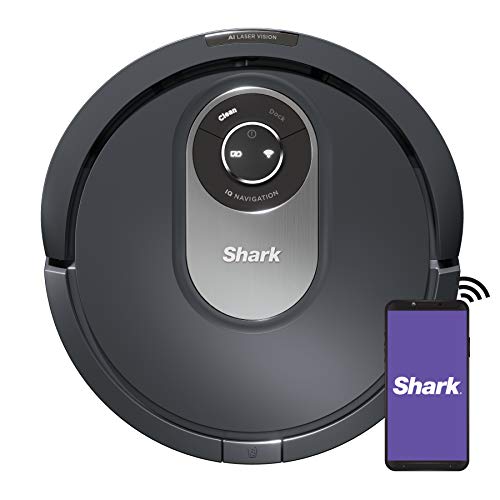
| Shark AI Robot Vacuum RV2001 | Neat grid cleaning without a dock | Home mapping and room selection |  Check on Amazon |
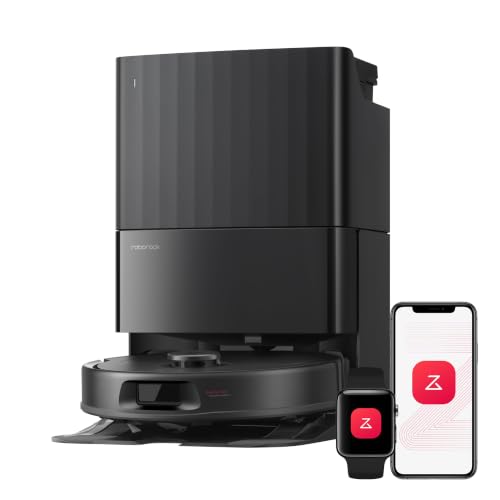
| Roborock Q5 Pro | First step into lidar mapping | Map-based zones in a compact package | Check on Amazon |
| Ecovacs Deebot N30 Omni | Voice control and station convenience | Lidar map with an all-in-one dock |  Check on Amazon |
| Dreame X40 Ultra | Detailed multi-room control | Rich app with many per-room settings | Check on Amazon |
In this guide
How These Options Were Chosen
This selection is drawn from manufacturer listings and published specifications. We have not used these products ourselves, so we describe features as the makers present them. We looked for robots that build a lasting map, let you divide it into rooms, support no-go zones and work with the common voice assistants, across a range of docks and navigation methods so you can see the real differences.
We also grouped the list by how much hardware surrounds the map. Two entries are plain robots with strong software, two are full stations that add washing, and one sits in between. That grouping lets you decide whether you are shopping for the brain, the dock or both, which is the question most buyers skip.
Keep in mind that map quality depends on your home as much as on the model. A tidy, well-lit space with open doors gives any of these robots an easier job than a cluttered one, and a good first run is worth the few minutes it takes.
The Best Robot Vacuums With Mapping for Smart Homes
iRobot Roomba j7+ j755020
If you want a Roomba that remembers your home, the j7+ is the point to focus on. It uses a front camera and the Imprint Smart Mapping system to learn rooms, and it lets you tell the robot to clean one room, avoid another or leave a gap around a pet bowl.
It works with the usual voice assistants and has a Clean Base that empties the bin. The app also offers scheduling and cleaning suggestions based on how you use it.
A camera map can need a little light to work well, and it is less detailed than a laser-based map in dark rooms. Skip it if you want a mop or the sharpest possible floor plan.
Shark AI Robot Vacuum RV2001
The Shark RV2001 is a good example of mapping without a bulky dock. It scans the home, builds a map and cleans in tidy rows, which Shark calls matrix cleaning, instead of ricocheting off furniture.
The SharkClean app lets you pick a room, set a schedule and use voice assistants. It is an easy alternative to a Roomba for people who want maps but not a station.
Because it has no emptying dock, the app shows you what to clean, but the bin is still yours to empty. Skip it if you want hands-free emptying, or if you want advanced multi-floor map storage.
Roborock Q5 Pro
The Q5 Pro is a compact way into laser-based mapping. Its navigation measures the room as it moves, then saves the result in the Roborock app, where you can split rooms, set no-go zones and choose a cleaning order.
It is an appealing choice for a flat or a small house with several rooms, where you want to send the robot only to the kitchen or only to the bedroom. Check the listing to confirm map and mop features for the exact version you buy.
Because it lacks a station, some tasks stay manual. Skip it if you want self-emptying or self-washing.
Ecovacs Deebot N30 Omni
The Deebot N30 Omni takes mapping and adds an Omni station, so the same map governs vacuuming and mopping. You can set zones by room, define walls and use voice control through major assistants.
It appeals to a household that likes to talk to its devices: asking it to clean one room by name beats opening an app. The Ecovacs Home app also lets you adjust power per room.
The trade-off is bulk and upkeep, as with any station. Skip it if you do not need mopping, or if your internet connection is unreliable, since much of the convenience depends on the app.
Dreame X40 Ultra
Dreame’s X40 Ultra is aimed at people who like fine control. The app lets you set suction, water level and cleaning order for each room, and its mapping supports no-go zones and no-mop zones.
It suits a large, multi-room home where each space needs different treatment, such as a rug-filled study next to a tile kitchen. Its station empties, washes and dries.
It is a lot of machine and a lot of settings. Skip it if you want a simple press-and-go experience or you have a small space.
Best for Roomba Fans Who Want a Smarter Map
The Roomba j7+ keeps the familiar iRobot ecosystem and adds room-aware cleaning. It is the gentlest step up from an older Roomba.
Best for Voice Assistants
The Ecovacs Deebot N30 Omni and the Roomba j7+ both work with common voice assistants, so you can ask for a specific room to be cleaned.
Best Without a Dock
The Shark RV2001 and Roborock Q5 Pro both give you mapping without the footprint of a station, which makes sense for smaller homes.
Best for Many Rooms
The Dreame X40 Ultra stands out where you need to control each room separately.
How to Choose a Robot Vacuum With Mapping
Begin with the navigation system. Camera-based robots recognise objects and rooms but may need light. Laser-based robots measure distance and can work in the dark. Neither is perfect, and the right one depends on your home.
Virtual walls and no-go zones
Virtual walls are lines you draw in the app that the robot will not cross. Use them to protect pet bowls, cables and fragile areas. Some models also offer no-mop zones for carpet. If you do not use an app, magnetic strips or boundary markers are an alternative on older models.
Multi-room maps and floors
Check how many maps the robot stores if you have two levels. Some save several floors, while others keep just one. If you have five or more rooms, look for room splitting and merging in the app.
Smart assistants and programming
Voice commands and schedules make a robot feel part of the home. Check that your assistant of choice is supported. A programmable schedule lets you run the robot while you are out.
Paths, tracking and accuracy
Mapped robots plan efficient paths rather than random ones, and the app shows live tracking so you can see where the robot is. Accurate maps need a clear first run, so tidy the floor and open internal doors.
Lidar versus camera in daily use
A lidar robot spins a small laser tower on top and measures the distance to walls and furniture, so it keeps working at night and behind closed curtains. The tower adds height, though, and can stop the robot fitting under a low sofa. A camera robot sits lower and can identify objects such as cords, but it relies on enough light and raises privacy questions that some owners prefer to avoid. Neither system is better in every home, so match it to your furniture and habits.
Cloud accounts and app support
Every smart robot needs an account and a maker that keeps updating the app. Look at how long a brand has supported its older models, and read the app terms. A strong app is the thing you will use every day, much more than any spec on a box.
Setting up your first map
The first run decides how good the map will be. Open interior doors, switch on the lights if the robot uses a camera, and clear loose items from the floor. After the run, check the layout in the app and split or merge rooms until the names match how you think about your home. Then add your no-go zones, one at a time, and run a short test to confirm the robot respects them.
What happens when you rearrange furniture
Maps are not set in stone. Most robots update their picture of the home as they work, but a major change, such as a new sofa or a moved wall of boxes, may need a fresh map. Read the app notes on re-mapping and save an edited copy of the map before you begin again, if the model supports it.
How much do the smart features add?
Be honest about your habits. If you will only press one button, a simpler robot may suit you. If you love scheduled runs by room, voice commands and live tracking, mapping is where the extra value sits.
A frequent mistake is paying for features you will not use, like multi-floor maps in a one-level flat.
Installation, Safety and Legal Notes
Follow the maker’s setup steps for the dock and the app. Keep the dock on a flat surface away from stairs, and let the first mapping run happen under supervision. Use approved chargers and batteries only. If a dock needs a new outlet, call a licensed electrician.
Camera and lidar robots store maps and possibly images through a cloud service, so read the privacy policy and adjust settings. Local rules may apply to recording devices in shared or rented spaces.
Care and Troubleshooting
| Problem | Likely cause | What to do |
|---|---|---|
| Map looks wrong | Closed doors or moved furniture on the first run | Open doors and remap |
| Robot ignores a no-go zone | Map out of date | Redraw the zone and save |
| Lost connection | Wi-Fi range or band | Move the router closer or check the maker’s network guidance |
Wipe the sensors and cameras gently with a dry cloth on the maker’s schedule. Dust on a sensor is a common cause of odd behaviour.
Privacy, Cameras and Where Your Map Data Lives
A robot that builds a map of your home is gathering information about its layout, your room names and, on some models, images from a camera. That is worth thinking about before you connect it. Camera-based robots like the Roomba j7+ use images to recognize objects, and makers typically say how that data is processed and stored. Lidar robots measure distances with a laser and generally do not capture pictures of your living space, though their apps still store room layouts.
Read the privacy policy of the companion app, and look at which permissions it asks for on your phone. Check whether you can delete your map and account, whether data is stored in the cloud or on the device, and whether any camera feed is optional. If you are uneasy, look for a model with a physical camera cover or a lidar system, and keep the robot out of bedrooms and bathrooms by using no-go zones. Use a strong, unique password for the account.
Network and Router Requirements
Mapping robots depend on a steady home network for their app features. Many connect only on a 2.4 GHz Wi-Fi band, which can be a snag if your router combines bands under one name. During setup, you may need to move your phone to the 2.4 GHz network or temporarily split the bands. Place the router so the signal reaches the dock and the rooms the robot will visit, since a weak signal causes dropped commands and map syncing problems.
- Check the supported Wi-Fi bands in the listing before buying.
- Keep the robot and dock within a decent signal range of the router.
- Update the robot’s firmware when the app offers it.
- Know that guest networks and some office-style networks block device discovery.
Once a map is saved, most robots can clean without internet, but remote start, voice commands and map editing usually require a connection. Plan for that if your connection is unreliable.
Managing Your Map Over Time
A map is not a one-off task. After the first run, spend a few minutes naming rooms, splitting or merging areas and drawing no-go lines. Use clear names, such as Kitchen or Hallway, so voice commands work as expected. If the robot divides an open-plan space oddly, adjust the borders so it cleans in logical sections, and save the layout once you are satisfied.
Keep-out zones deserve special attention. Draw them tightly around pet bowls, cable clusters and delicate objects, and revisit them when you move furniture. If a robot begins to get lost, a quick reset of a single room is often easier than rebuilding the entire map. Some apps let you keep multiple saved maps or back them up, which is useful for homes with more than one floor.
Tricky Layouts and Surfaces
Mapping works best in tidy, evenly lit rooms, but real homes are rarely that kind. Very dark floors can confuse the cliff sensors on some models, which treat a dark patch as a drop and stop. Glass doors and mirrors can create odd readings for laser systems, and clutter on the floor can make a camera robot stop and report an obstacle. Open-plan areas with no walls may need virtual boundaries so the robot knows where to stop.
Stairs are the biggest safety question. Robots detect drops with cliff sensors, but sensors can fail on glossy or very dark surfaces, so keep a gate or a barrier at the top of any stairway you consider risky. If you have several floors, carry the robot manually and load the right map for each level before starting.
What Changes When You Upgrade From an Older Robot
Moving from a random-bump robot to a mapped one changes how you think about cleaning. Instead of running a blind cycle, you target rooms, schedule by zone and receive reports on what was covered. Expect a learning curve: the first run is slow while the robot explores, and you will probably adjust zones a few times. The reward is a more predictable routine and fewer missed spots.
Plan for a few housekeeping changes too. Clear the floor before the first mapping run, open interior doors, and switch on lights in rooms that are normally dim. Name the rooms right away, since schedules and voice commands depend on those labels. Keep the dock in a spot with good Wi-Fi and enough room to approach. If you share the home with others, agree on a schedule so the robot is not started while someone is working or sleeping, and show everyone how to pause it from the app.
It is also worth deciding up front what the robot should not do. Mark delicate rugs, pet feeding areas and cable-heavy desks as keep-out zones, and check the map after the first week. Small tweaks early make daily use far smoother.
What Mapping Really Changes in Daily Life
Mapping is often sold as a clever picture in an app, but its practical value is narrower and more useful than that. A robot that knows your rooms can clean one room without doing the whole home, can be kept out of a nursery, a pet’s corner or a tangle of cables, and can return to a room it missed without starting again. A robot without a lasting map can still clean well, but it treats every run as a fresh exploration. For a small, open flat that difference may barely matter. For a home with several doors, mixed floors and rooms used at different times of day, it is the difference between a machine you schedule and forget and a machine you supervise.
The five picks here reach that result in different ways. The Roomba j7+ uses a front camera with its Imprint Smart Mapping, the Shark AI Robot Vacuum RV2001 builds a map and cleans in orderly rows without a dock, the Roborock Q5 Pro uses laser-based navigation in a compact, station-free body, the Ecovacs Deebot N30 Omni pairs its map with an Omni station that also handles mopping, and the Dreame X40 Ultra offers the finest per-room control in its app alongside a station that empties, washes and dries. Those are genuinely different products wearing a similar label, so the sections below compare them by how you will live with the map, not by how impressive the map looks on a product page.
The first mapping run sets everything up
Whichever model you choose, treat the first run as a survey, not a clean. Open the doors of every room you want on the map, lift cables, chairs and loose clutter, turn the lights on for camera-based models, and let the robot finish without rescuing it unless it is truly stuck. Then spend a few minutes in the app naming rooms, splitting open-plan spaces where you actually live differently, and marking the zones you already know are trouble. That half hour is repaid every time you later send the robot to a single named room by voice or with a tap. Skipping it, by contrast, leaves you with a rough map you never quite trust, and an untrusted map gets ignored until the robot is effectively running unmapped.
Comparing the Five Mapping Picks by How You Will Use Them
If you value a familiar app ecosystem and obstacle awareness around everyday objects, the j7+ is the natural centre of this list, with the compromise that a camera-based map can want some light and may look less crisp than a laser-drawn one. If you want a map and tidy row-by-row cleaning without giving floor space to a station, the Shark RV2001 and the Roborock Q5 Pro are the two to compare closely. Between them, the choice is mostly about which app and navigation style you prefer, and about accepting that both leave bin emptying in your hands. Neither is a lesser product for lacking a dock; both are deliberately simpler ownership propositions.
If you want the map to govern mopping as well as vacuuming, the Deebot N30 Omni and the Dreame X40 Ultra are the relevant pair. The N30 Omni suits a household that likes voice control and per-room power adjustment inside a single station setup. The X40 Ultra suits a larger home where rooms genuinely need different treatment, because its app lets you set suction, water level and cleaning order room by room. That depth is a benefit only if you will use it. Settings you configure once and never revisit add nothing, and several owners of advanced robots end up running a single whole-home routine. Be honest about that before paying for the deepest menu on the list.
Multi-floor homes and homes that change
A map is a snapshot of a home that will not stay still. Furniture moves, doors that were open close, a new rug appears, and a robot that handled the old layout confidently can look hesitant in the new one. The healthy habit is to update rather than fight the map: re-run or edit it after a real rearrangement, check that room divisions still match how you use the space, and clear new obstacles instead of adding ever more no-go zones around temporary clutter. Homes with more than one level need extra realism. A single robot can only be on one floor at a time, it cannot climb stairs, and moving it between floors means carrying it and, depending on the model, working with a separate map for that level. If two floors need daily attention, many households do better with a simpler second machine than with one advanced robot they carry up and down.
Voice Control, Schedules and Household Sharing
Voice control is most useful for named-room cleaning: asking for the kitchen after dinner, or the hallway after a muddy walk, without opening an app. For that to work smoothly, room names in the robot app need to match what people naturally say, so keep names short and obvious. Schedules work best when they follow the household’s real rhythm rather than an ideal one. Run the robot when rooms are empty and floors are clear, not at a tidy-sounding hour when everyone is stepping over it. A robot scheduled into a busy room gets paused, moved and rescued, and quickly becomes a nuisance instead of a help.
Sharing control deserves a moment of thought too. Several people in a home may want the app, and that is normally fine, but agree who edits the map and the no-go zones, because conflicting edits are a quiet source of strange behaviour. Guests, cleaners and pet sitters do not need control at all; a physical start for a whole-home clean is enough for them. If children will use voice control, expect the robot to be sent on entertaining missions, and set the zones you care about so an enthusiastic request cannot send it somewhere it should not go.
Privacy and connectivity, stated plainly
Mapping robots use sensors, and camera-based models use a camera, so it is reasonable to ask where the resulting information lives and what the app account holds. The practical steps are ordinary digital hygiene: use a strong, unique password on the maker’s account, keep the app and firmware updated, put the robot on your main home network rather than an open one, and read the maker’s privacy information for your model if the detail matters to you. If your internet connection is unreliable, weigh that before choosing a station model whose convenience leans heavily on the app, a point the original notes raise for the Deebot N30 Omni. A robot that cannot reach its services may still clean, but scheduling, map editing and voice features are exactly the things you paid for.
Keeping a Map Accurate Over Months
Small habits keep a good map good. Keep the dock in one place, because moving the dock is one of the fastest ways to confuse a robot’s sense of home. Keep sensors and, on camera models, the lens clean with a dry soft cloth, since a smeared sensor produces hesitant navigation that looks like a software fault. Watch the first run after any change — a moved sofa, a new rug, a different Christmas layout — and fix the map while the change is fresh. If the robot repeatedly struggles in one spot, look for a physical cause before resetting anything: dark flooring, strong sunlight across a doorway, a low threshold or a curtain touching the floor can all read as problems to a navigating machine.
When a map does go wrong, resist the urge to delete everything at the first odd run. Check the dock position, the sensors and the room lighting, run the robot again in a tidy space, and only rebuild the map if the errors persist. Rebuilding is not a disaster; in a home that has changed a lot it is often the cleanest fix, and the second build is faster because you already know how you want the rooms divided. What matters is ending with a map you trust, because trust is what turns a mapping robot from a gadget you demonstrate into an appliance you rely on.
Who Should Skip Mapping Altogether
It is worth saying plainly that some homes gain little here. A compact flat with one open living space, a household that runs the robot only when someone is home anyway, or a buyer who dislikes apps and accounts will get most of the benefit from a simpler robot at a lower tier of complexity. Mapping earns its place when you can name the specific things you will do with it: clean named rooms, protect specific zones, schedule different rooms at different times, or control cleaning by voice. If you can name two or three of those, one of the five picks above is a sound purchase, matched by dock preference and by how much per-room control you will genuinely use. If you cannot name any, save the complexity and put the effort into a regular routine instead.
How Navigation Methods Feel Different in a Real Home
Navigation methods are usually described as technology, but owners experience them as behaviour. A camera-based robot such as the Roomba j7+ reads the room much as a person glances around it, recognising objects and working out where it is from what it can see, which is why light and clear sightlines help it and why it can be good at avoiding specific obstacles on the floor. A laser-based robot such as the Roborock Q5 Pro measures distances as it turns, building a plan of walls and furniture that stays consistent in the dark and tends to produce the crisp, straight-edged map people picture when they think of mapping. The Shark RV2001 shows a third character, working in orderly rows from the map it builds, so its cleaning looks methodical even without a station behind it. None of these behaviours is simply better. They fail differently — a camera in a dark, cluttered room, a laser confused by mirrors or glass, any robot defeated by a floor-length curtain — and the home you have decides which set of failures you will meet least often.
Path behaviour matters as much as the finished map. A robot that cleans in tidy rows covers a room evenly and is easy to predict, which helps when you are working in the next room and want to know where it has been. A robot that works more opportunistically may reach odd corners a strict pattern skips, but it can also revisit the same area while a far corner waits. Watch the first few runs in your own rooms, especially around table legs, kitchen islands and the forest of chair legs under a dining table, because those obstacles reveal more about navigation quality than an empty-room test ever will. If a robot handles your dining chairs calmly, it will handle most of the house.
Obstacle avoidance is the other behaviour worth separating from mapping itself. A map tells a robot where the rooms are; avoidance tells it what is on the floor today — a shoe, a cable, a pet toy, a sleeping cat. Models differ in how much of that temporary world they recognise, and no system recognises everything, so the floor still needs a basic tidy before a run. The practical benefit of good avoidance is not perfection but fewer rescues, and fewer rescues is what turns a scheduled clean into a clean that actually happens while the house is empty.
Rooms That Test a Map, and How to Help
Open-plan spaces test room division, because the robot sees one large area while you live in it as three. Divide the map where your life divides — where the kitchen ends and the sitting area begins — even if there is no wall, so you can send the robot to the cooking zone after a meal without cleaning the whole space. Long hallways test dock-finding and patience, and they are where a robot’s route home becomes visible; keep them clear and the whole system feels calmer. Bedrooms with furniture pushed to the walls are easy territory, while a study full of chair legs, boxes and cables is the hardest room in most homes and the one most worth a no-go zone or a pre-run tidy.
Bathrooms and utility rooms are often best kept off the regular map altogether. They are small, frequently damp, full of obstacles at floor level and usually quicker to clean by hand than to prepare for a robot. Excluding them is not a failure of the mapping idea; it is the mapping idea working as intended, letting you spend the robot’s time where square metres and daily dirt actually are. Similarly, a room used for storage, a workshop or a child’s room in a particularly toy-heavy phase can be an occasional, supervised clean rather than part of the daily routine.
Children’s rooms and pet areas sit in between, and they reward specific zones more than whole-room decisions. A robot can clean the open floor of a child’s room daily while a no-go zone protects a construction of blocks or a railway layout that took all weekend to build. It can clean around a pet’s feeding area while keeping away from the bowls themselves. Those small, precise uses are where a good map quietly earns its money, and they are only available if you set the zones when you first build the map rather than meaning to do it later.
App Habits That Separate Happy Owners From Frustrated Ones
The app is the steering wheel of a mapping robot, and a few habits make it feel effortless. Keep room names short, spoken and consistent, so voice commands work the first time and every member of the household uses the same words. Review the cleaning history occasionally, not to admire it but to spot the room that is always skipped, the run that always ends early, or the spot where the robot always struggles; the history is a diagnostic tool disguised as a record. Keep notifications on for a finished or failed run at first, then trim them once the routine is proven, because an app that interrupts constantly trains its owner to ignore it, including the one time it matters.
Firmware and app updates deserve a calmer attitude than they usually get. Updates can change behaviour slightly, improve obstacle handling or alter the app’s layout, so apply them at a moment when you can watch the next run rather than the night before guests arrive. If a robot behaves oddly immediately after an update, check the map and settings before assuming a fault, since an update occasionally resets a preference. And keep the maker’s account in good order with a proper password, because the account holds your map and your routines, and losing access to it is a self-inflicted problem that support cannot always undo quickly.
Finally, remember that the map is a means, not the product. The product is a home that is cleaned room by room, on a rhythm that fits the people in it, with the robot kept out of the places it should not go. Whether that is delivered by the camera-guided j7+, the dock-free Shark RV2001 or Roborock Q5 Pro, or the station-based Deebot N30 Omni or Dreame X40 Ultra, depends on your floors, your appetite for settings and your need for mopping — and a buyer who decides on those grounds rarely regrets the choice.
What to Do in the First Weekend With a Mapping Robot
A short, deliberate plan for the first weekend turns a mapping robot from a novelty into an appliance. On the first day, build the map properly: doors open, floors tidied, lights on for a camera-based model, and no rescuing unless the machine is genuinely stuck. When it finishes, sit down with the app and do the unglamorous work of naming rooms in the words your household speaks, splitting open-plan areas where life actually divides, and marking the zones you already know about — bowls, cables, a delicate rug, a floor-level tangle behind the television.
On the second day, run one room at a time and watch. You will learn where the robot hesitates, which threshold it dislikes, and which piece of furniture has a gap almost tall enough to trap it. Fix those things physically where you can, with a cable tidied, a chair moved an inch, a mat secured, and use no-go zones only for what cannot be fixed. Set one schedule, tied to a moment when the house is reliably empty and the floors are reliably clear, and resist adding more until that one has run uneventfully for a week.
By the end of the weekend you should also know where the dock truly belongs, because a dock placed for the map rather than for the furniture is a dock that gets moved, and a moved dock confuses everything built on top of it. Decide its home, give it its clearance, and leave it there. That single weekend of attention is the whole secret behind the owners who describe these machines as effortless, whether they chose the j7+, the Shark RV2001, the Q5 Pro, the N30 Omni or the X40 Ultra.
One Last Check Before You Choose a Mapping Robot
Before you settle on a model, stand in your hallway and list what you want the map to do for you in plain sentences: clean the kitchen after dinner without doing the whole home, keep out of the room where the cables live, clean the bedrooms on a weekday morning while the living room waits. If your list has several sentences on it, mapping is a working feature in your home and the only remaining questions are dock or no dock, and how much per-room control you will use. If your list is empty, that is useful information too. Either way, deciding from your own sentences rather than from a feature chart is how buyers in this category end up with a robot that still feels right a year later.
Frequently Asked Questions
Is mapping worth it on a small flat?
It can be, because zones and schedules save time. If your home is a single room, a basic robot may do.
Are there good robots that are not Roomba?
Yes. Shark, Roborock, Ecovacs and Dreame all sell mapped models with strong apps.
Do these work with Alexa?
Many do, but check the listing for the exact assistant support in your model.
What is lidar?
It is a laser sensor that measures distance to build a map, even in low light.
Can I stop the robot from entering a room?
Yes, through no-go zones or virtual walls in the app.
Does it need Wi-Fi?
Most mapping features rely on the app, so a stable home network is important.
Will the robot remember my map after a power cut?
Most store maps in the robot or the cloud account, but behaviour varies, so check the app notes for your model.
Do I need a smart speaker to use the voice features?
Yes, a compatible speaker or phone assistant is needed, and setup steps are in the maker’s manual.
Do robot vacuums with cameras send pictures to the cloud?
It depends on the maker and model. Some process images on the device, while others may use cloud services for certain features. Read the privacy policy, check the app settings for camera options, and look for a physical cover or a lidar model if this concerns you.
Why will my robot not connect to my home Wi-Fi?
Many robots support only a 2.4 GHz band, and setup can fail if your phone is on 5 GHz or if the router combines both bands. Move closer to the router, split the bands temporarily, and check the password and supported networks in the manual.
Can more than one person control the same robot vacuum?
Many apps allow a household to share access, either by inviting other users or by logging into the same account. Check the app for a sharing feature and consider the privacy implications of who can see the map and schedule.
Can mapping robots handle black carpets or dark floors?
Some cannot, because cliff sensors may read a dark surface as a drop. Makers sometimes note this limit in the manual. Test a small area first, use no-go zones if the robot stops, and check the listing for details on dark flooring.
Bottom Line
A mapped robot saves time and effort, and the right one depends on how you like to control your home. The Roomba j7+ is the easy upgrade for Roomba users, the Shark RV2001 and Roborock Q5 Pro keep things compact, the Ecovacs Deebot N30 Omni brings voice control and a station, and the Dreame X40 Ultra gives deep room-by-room control.
Related Guides
- Best Robot Vacuums for Pet Hair on Floors and Rugs
- Best Roomba Robot Vacuums Compared by Model and Feature
- Best Robot Vacuums for Hardwood, Tile and Hard Floors