Disclosure: As an Amazon Associate, reviewstook.com earns from qualifying purchases. Links to Amazon on this page are affiliate links; they cost you nothing extra. Listing details such as price and availability change often, so check the current Amazon listing before you buy.
Robot vacuums that also mop promise to take over two of the most repetitive chores in a home: collecting dust and wiping the floor. The idea is appealing for kitchens, hallways and living rooms with tile, vinyl or sealed wood, yet the category is crowded and the differences between docks, mop pads and carpet handling are hard to spot from a product title alone. This guide compares the best robot vacuums and mops for hard floors, so you can see what sets them apart.
It is written for people who want a robot to do more than push dust around, owners of an older vacuum-only robot, and anyone who dislikes carrying a mop bucket. You will find a comparison table, six model profiles, short notes on carpet, pet homes and docks, a buying checklist, safety and care advice, and answers to common questions. The details come from maker listings, so verify your exact version before ordering.
Quick Comparison
| Product | Best for | Main point | Link |
|---|---|---|---|
| Roborock S8 Pro Ultra | Large hard-floor homes | Multi-function dock with mop washing | Check on Amazon |
| Dreame L10s Ultra | Mixed floors, low upkeep | Dock that empties and washes the mop |  Check on Amazon |
| eufy X10 Pro Omni | Kitchens and entryways | Dual spinning mops with an all-in-one station |  Check on Amazon |
| Narwal Freo X Ultra | Sticky floors, family homes | Self-cleaning dock with a mop focus | Check on Amazon |
| Ecovacs Deebot X2 Omni | Corners and tight layouts | D-shaped body with an all-in-one station | Check on Amazon |
| iRobot Roomba Combo j9+ | Existing Roomba users | Self-emptying dock with an auto-fill mop tank |  Check on Amazon |
In this guide
How These Options Were Chosen
We chose robots from recognized makers that sell a combined vacuum and mop with a dock, and we tried to show different approaches to mopping: vibrating plates, spinning pads and rolling designs. Descriptions are based on manufacturer listings and published specifications. We have not run these robots in our own homes, so the comments reflect what the makers state.
These products are updated often, and sellers sometimes list older or regional versions under similar names. We therefore leave out suction, tank size and battery figures. Please read the listing closely to confirm the dock type and included accessories.
The Best Robot Vacuums and Mops to Consider
Roborock S8 Pro Ultra Robot Vacuum and Mop
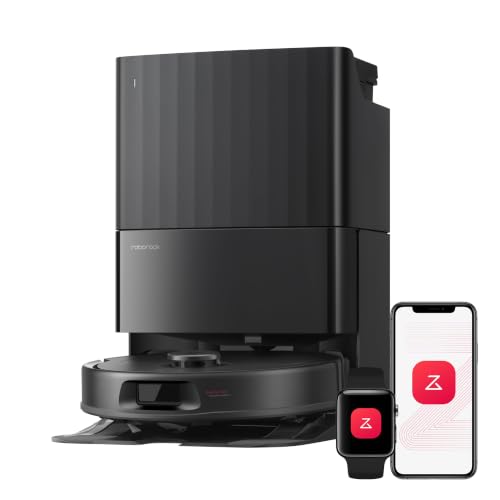
The S8 Pro Ultra pairs a vacuum and mop robot with a large dock that empties the dust bin, washes the mop and refills the water tank. Roborock describes the mop as a vibrating plate that lifts when the robot detects carpet, which suits homes that mix hard floors and rugs.
It fits large homes and people who want to touch the machine as little as possible. Setup involves placing a sizeable dock near a power outlet and a spot where the robot can drive in easily.
The trade-offs are footprint and complexity. The dock takes space, and the tanks and water trays need occasional cleaning. Read the listing to see which dock accessories and water connections are included.
Dreame L10s Ultra Robot Vacuum and Mop
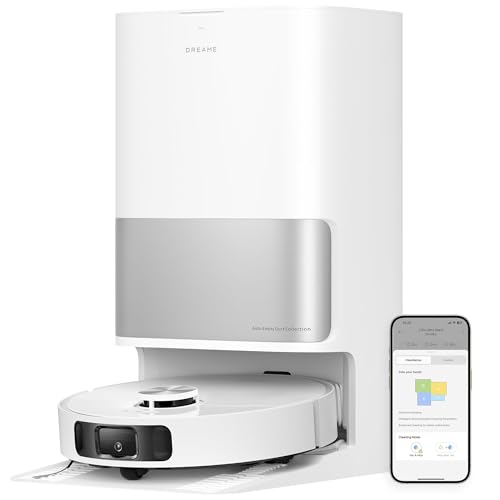
The L10s Ultra combines a robot with a station that empties the dust bin, washes the mop and dries it. It uses rotating mop pads rather than a flat plate, and it can map a home and be controlled from a phone.
It is a sound candidate for homes with a mix of tile, wood and carpet, and for owners who want the dock to handle most of the maintenance. Pet owners may like the automatic emptying when fur fills the bin.
As with other docks, expect a large base and regular cleaning of the water parts. Carpet handling and mop lifting differ between models, so check what the listing says about rugs and thick pile.
eufy X10 Pro Omni Robot Vacuum and Mop
The eufy X10 Pro Omni uses a pair of spinning mop pads and a station that handles emptying and pad washing. The dual pads are designed to scrub the floor as the robot moves instead of simply dragging a cloth.
It makes sense for kitchens, entryways and dining areas where footprints and drips accumulate. The station reduces the number of times you have to handle dirty pads.
Like all mopping robots, it is a light-to-moderate cleaner, not a scrubber for dried-on spills. Keep an eye on the pad state and the water tanks, and read the listing for the exact dock functions.
Narwal Freo X Ultra Robot Vacuum and Mop
Narwal has built its reputation on mopping. The Freo X Ultra comes with a self-cleaning base that washes the mop, and the brand highlights a design focused on keeping the mop clean while it works.
It fits households where floors get sticky or muddy, such as homes with children, dogs and busy kitchens. If mopping quality is a higher priority than the sheer number of features, it is a model to compare closely.
The base is large and the product is among the more expensive categories of robot, so consider whether you have the room and the use for it. Read about carpet behavior and tank handling on the listing.
Ecovacs Deebot X2 Omni Robot Vacuum and Mop
The Deebot X2 Omni stands out for its shape. Instead of a round body it has a squared-off front intended to reach corners and edges more closely than a circle can. It works with an all-in-one station that handles the dirty work of emptying and mop care.
It is a good match for homes with a lot of furniture corners, narrow kitchens and tight layouts where round robots leave a ring of dust. It also provides app-based mapping and scheduling.
The design brings its own considerations, such as how it turns in small spaces and how it handles obstacles. Check the listing for a description of its features and the exact station.
iRobot Roomba Combo j9+ Self-Emptying and Auto-Fill Robot Vacuum and Mop
The Combo j9+ brings iRobot’s mature app and parts supply into the mopping category. Its dock empties the bin and helps refill the mop tank, and its design uses a mop that is intended to lift away when it is not in use.
It suits people who already know the Roomba app or who want a familiar brand. Compared with the washing docks above, it focuses on emptying and refilling rather than washing the pad, so you remain involved with the mopping pad.
That means a little more manual care than the most automated rivals. Read the listing for details on what the dock does and does not do.
Robot Vacuums That Also Mop on Tile
Tile and sealed vinyl are the easiest surfaces for a mopping robot, since water does not soak in. Look for a machine that can adjust water flow and one that returns to wash the pad rather than spreading dirt. Grout lines can hold dirt, so a periodic manual scrub may still be wise.
Carpet, Rugs and Mixed Floors
Most mopping robots lift the mop or use a map to keep damp pads away from carpet, but the method differs. Check how the listing describes carpet detection, and use no-go zones for delicate rugs. If you have a lot of thick carpet, a vacuum-only robot might be a better match.
Homes With Pets and Kids
Hair and sticky spills are the main enemies. A self-emptying dock reduces bin chores, and a washing station helps with muddy paw prints. Keep floors clear of toys, cables and accidents, which can confuse any robot.
Mop Styles Explained
The word mop covers several different mechanisms, and knowing which one a robot uses helps set expectations. Spinning pads rotate against the floor and rely on pressure and motion to loosen dirt. A vibrating plate moves a flat cloth back and forth in small strokes. Rolling designs pull a damp roller across the floor and clean it as they go.
None of these is a perfect replacement for scrubbing by hand, but each can keep a floor in good condition if you run it often. Spinning pads tend to be praised for edge reach and pressure, while a rolling roller is often presented as better at keeping the cleaning surface fresh. Rather than trusting the label, read how the maker describes pad lifting, water control and what happens when the robot meets a rug.
Dock Features Worth Paying Attention To
The dock is where these machines differ most. Some only empty the dust bin. Others add mop washing, drying, and automatic refilling of the clean water tank. The more the dock does, the less you handle dirty water, but the larger it gets and the more parts there are to rinse. Plan floor space, a nearby outlet and a spot where the robot can drive straight in.
How to Choose a Robot Vacuum and Mop
Begin with your floors. If most of the home is hard floor, a combo robot makes sense. If most is carpet, choose a strong vacuum robot and use a mop only on small areas.
Then look at the dock. A basic dock charges the robot; a self-emptying dock handles the bin; an all-in-one station also washes pads and refills water. More features mean less work for you but more size and more water parts to clean.
Consider the mopping method. Spinning pads, vibrating plates and rolling mops each have strengths. Read how each maker describes pad pressure, water control and carpet lifting rather than relying on marketing names.
Think about your layout. Narrow furniture gaps, thresholds and cables limit any robot. Measure the clearance under your sofa and check how high the robot stands.
Check software and maintenance. Apps handle maps, schedules and no-go zones, and replacement pads, filters and brushes will be needed. Look at how easy they are to buy for the exact model.
Finally, avoid common mistakes. Do not expect a robot to scrub dried spills. Do not use unapproved cleaning solutions in the tank. Do not place the dock where the robot cannot reach it.
Safety, Water and Electrical Notes
Follow the maker’s instructions for your model. Use only the cleaning solutions the manual permits, keep the dock on a hard, level surface away from water spills, and do not use the robot on floors the flooring maker advises against wetting. Place the dock near a suitable outlet and keep the cord out of walkways.
If you plan a dock with a plumbing connection, ask a licensed plumber and a qualified electrician for any fixed work, and check your local rules. Dispose of batteries through a recycling program.
Care and Troubleshooting
Empty and rinse water tanks, wash or replace mop pads, and wipe sensors and charging contacts with a dry cloth. Check brushes for hair and clean the dock tray on the maker’s schedule.
| Symptom | Check |
|---|---|
| Streaky floors | Dirty pad, empty tank or too much solution |
| Musty smell | Dock tray or pad not cleaned and dried |
| Robot misses rooms | Closed doors, map settings or low battery |
| Will not dock | Blocked dock area or dirty contacts |
Preparing Your Floors Before the First Run
A mopping robot does its best work on floors that have been set up for it. Pick up cords, socks, pet toys and loose rugs with fringes, since each can snag a pad or send the robot off course. Check thresholds and door tracks, because many machines climb only a modest lip, and a high one can strand a robot or stop it reaching a room. Rugs with thin edges can curl under a wheel, so tape them down or add them to a no-go zone in the app.
Decide where the dock will live before you unbox anything. It needs a wall outlet, clear space on both sides and a straight approach, and it is best placed away from foot traffic so no one kicks the tray. Hard floors under the dock should be sealed, since a slow drip from a tray can mark unfinished wood. A small waterproof mat under the station is cheap insurance.
Building a Vacuum-Then-Mop Routine
Most owners get better results by treating the two jobs separately, even though one machine does both. Vacuum first so the pad meets less loose grit, then let the mop follow. Many apps let you assign different cleaning modes to each room, so the kitchen might get a mop pass every other day while the hallway is only vacuumed. Running a damp pad over a floor full of crumbs spreads them around, so a dry pass before a wet one is worth the extra time.
Frequency depends on your household. A home with pets and children may want a vacuum run daily and a mop run a few times a week, while a quiet apartment might need far less. Scheduling for when no one is home avoids a robot working around people, and gives floors time to dry before anyone walks across them. If you cook a lot, a quick spot clean after dinner can be more useful than a full cycle.
- Set water flow low on sealed wood and laminate, higher on tile.
- Use a no-mop zone on rugs and carpeted rooms.
- Keep a short pause between a heavy spill and the robot run, and wipe wet puddles by hand first.
Running Costs Beyond the Purchase Price
The sticker price is only part of owning a combined vacuum and mop. Mop pads wear out, dust bags or bins need replacing on some docks, filters lose effectiveness, and side brushes tangle with hair. Some docks use their own cleaning solution or tablets, while others accept only water, and the maker’s recommended products can add up over a year. Before you buy, look at how easy it is to find spare pads, brushes and bags for the exact model, and whether third-party versions exist.
Electricity use is modest, but a dock that heats water or dries pads with warm air draws more than one that simply empties a bin. Water use is small. The bigger hidden cost is time spent rinsing trays and tanks, so a design that is simple to open and wash will save effort in the long run. When you compare models, add up the parts you will have to replace each year, not only the robot itself.
Noise, Drying and Odors
Docks that empty the dust bin make a loud, short burst of suction, and washing stations add pumps and running water. If your living space is open plan, consider the hours when the dock runs and whether your robot can be set to empty only after a cleaning finishes. Quiet modes reduce fan speed but also reduce suction, so use them when you are home and switch to a stronger setting when you are out.
Smells almost always come from dirty water left to sit. Dirty-water tanks and wash trays grow musty if they are not emptied and rinsed regularly, and pads left damp in a closed dock are the most common culprit. Choose a model that dries pads with warm air if you can, or take pads out to air-dry. Emptying the dirty tank after every few runs, wiping the tray and leaving the lid open when the unit is idle will keep the dock fresh.
Matching the Machine to Your Home
The six robots here cover different priorities, so match the dock and mop style to your biggest annoyance. If you hate emptying bins, any self-emptying dock helps. If you hate handling dirty pads, choose a model whose station washes and dries them, such as the Dreame L10s Ultra. If you already use the Roomba app and accept a little more hands-on care, the Combo j9+ is a familiar route. Small homes with few hard floors may not need a full washing station at all, and a simpler model will leave more room in a hallway.
Think about your tolerance for upkeep honestly. A larger dock means more filters, trays and tanks to rinse, and the robot only saves time if you actually do that maintenance. Pick the level of automation you will keep up with, not the one with the longest feature list.
What Living With a Robot Vacuum and Mop Actually Involves
The six flagship machines in this guide — the Roborock S8 Pro Ultra, the Dreame L10s Ultra, the eufy X10 Pro Omni, the Narwal Freo X Ultra, the Ecovacs Deebot X2 Omni and the iRobot Roomba Combo j9+ — promise the most automated floor care money buys: vacuuming, mopping, self-emptying, mop washing and drying, all from a dock that anchors the system. The promise is real, but it is a partnership rather than an abdication. The robot handles the daily surface clean across the whole floor; you handle a short list of supporting jobs — keeping the floor reasonably clear, emptying or refilling the dock on its schedule, and giving brushes and filters a few minutes of attention now and then. Households that understand that split love these machines. Households expecting a silent servant who needs nothing tend to be disappointed by any robot, however advanced.
The daily experience is the point. Floors that used to be cleaned weekly now get attention daily, so grit never builds up underfoot, kitchen crumbs never survive the night, and the visible standard of the home rises without a corresponding rise in effort. The mop function changes the character of hard floors in the same way: not a deep scrub, but a constant light washing that keeps the film of everyday life from accumulating. That frequency-over-intensity model is what you are buying across all six models, and it is why owners consistently describe the change as the house simply feeling cleaner, all the time.
The dock is the appliance; the robot is its agent
It helps to think of the dock as the real appliance. It charges the robot, empties its bin, washes and dries its mop pads, and on the Roomba Combo j9+, refills its water. Where the dock lives therefore matters: it needs a permanent spot with clearance in front, an outlet, and enough social acceptability that a sizeable piece of furniture-grade equipment can sit there full-time — a hallway alcove, a utility room, or the side of a kitchen run are the usual answers. Docks also ask for consumables and care on their own schedule: bags where the design uses them, clean and dirty water tanks to cycle on the mop models, and an occasional wipe-down of the washing bay so yesterday’s dirty water does not become a permanent smell.
Build the dock’s routine into the household’s rhythm — tanks with the laundry cycle, bag checks monthly — and the system runs itself for weeks at a time. Neglect the dock and the robot’s performance quietly degrades: mops wash in stale water, bins stop emptying fully, and the automation you paid for leaks away at the edges.
How the Six Flagships Differ in Daily Use
All six vacuum and mop, navigate intelligently and maintain themselves at a dock, so the differences that matter are matters of emphasis. The Roborock S8 Pro Ultra is the specification-led all-rounder, strong on both carpet vacuuming and hard-floor mopping with a dock that does everything, and it suits buyers who want one machine to lean toward the top of every category at once. The Dreame L10s Ultra chases the same brief with particular polish in its mopping and dock automation, a favourite in open-plan homes where hard floors dominate and the mop works as hard as the vacuum.
The eufy X10 Pro Omni brings the flagship formula with a friendly, value-conscious streak, often the shortlist answer when the budget has a ceiling but the feature list is non-negotiable. The Narwal Freo X Ultra is the mop specialist of the group, designed from the mop outward, and it shows in homes with large areas of tile, stone or wood where washing quality is the headline need. The Ecovacs Deebot X2 Omni takes a distinctive compact, square-fronted shape that reaches into corners and along edges in a way round robots approximate, suiting homes with many rooms, nooks and furniture legs. The Roomba Combo j9+ carries iRobot’s name for navigation maturity and object recognition, with a dock that also refills the mop water, and suits households that value obstacle avoidance around pet messes, cables and the general archaeology of family floors.
Carpets, thresholds and the edges of the map
Every robot here divides its loyalty between carpet and hard floor, and the handover moments reveal the engineering. Mop pads that lift, retract or return to the dock when carpet is detected keep rugs dry while hard floors get washed, and the smoothness of that transition decides how set-and-forget the machine truly is in a mixed home. Thresholds and room dividers test climbing ability; most modern flagships handle ordinary transitions, but a tall saddle strip can still draw a border the robot respects, so walk your own floors with the robot’s clearances in mind before blaming its map. Dark carpets, high-contrast patterns and strong sunlight through glass doors can all confuse sensors on any brand, and the fixes are mundane: adjust lighting for scheduled runs, keep cliff sensors clean, and let the app set no-go zones where the physical world and the robot’s worldview disagree.
Getting the Best From Your Robot, Week After Week
Preparation is the cheapest performance upgrade. A five-minute floor reset before scheduled runs — shoes to the rack, cables lifted, small toys gathered, chairs tucked — converts directly into coverage and into a robot that finishes jobs instead of reporting obstacles. Run the vacuum cycle before the mop cycle where the app allows sequencing, keep the dock’s tanks and the robot’s sensors on the simple care rhythm described above, and review the cleaning map occasionally: rooms get rearranged, and a map that no longer matches the furniture quietly wastes battery on ghost obstacles.
Choose among these six by the floor you have most of and the chore you hate most. Hard-floor households that crave washed floors should lean toward the Narwal or Dreame. Mixed homes wanting maximum all-round automation lean Roborock or Ecovacs. Value seekers start with the eufy. Homes full of pets, children and floor clutter start with the Roomba Combo j9+ and its obstacle manners. Whichever flagship earns the dock space, the pattern of ownership is the same, and it is a genuinely new one in home cleaning: a floor that is cleaned a little, automatically, almost every day, and a household that mostly notices by how rarely it thinks about floors at all.
Setting Up a Flagship Robot System in a Real Home
The first week with any of these six machines sets the pattern for the years after, and it rewards a little ceremony. Choose the dock’s home with the seriousness of placing furniture: a permanent spot, hard floor beneath, clearance in front for the robot’s approach, an outlet within reach of the dock’s own lead, and a location you will not resent seeing daily. Run the mapping clean with doors open to every room the robot should serve, lights on, and the floor in its best reasonable state, because the map drawn in week one becomes the robot’s mental furniture for months. Walk the result in the app, name the rooms, set the keep-out zones around the known traps — the rug fringe, the cable nest behind the desk, the pet bowls — and schedule the first regular cleans at hours when the house is calm.
Then watch the first few runs, not from anxiety but from calibration. Every home has two or three spots where the physical world disagrees with a robot’s worldview: a threshold that is just at the climbing limit, a dark rug patch that reads as a drop, a glass door that floods a sensor with afternoon sun. Each has a mundane fix — a schedule shift, a zone adjustment, a small rearrangement — and finding them in week one converts them from recurring annoyances into solved footnotes. This calibration week is the real setup cost of the flagship category, and it is worth stating plainly, because the marketing version of these machines omits it and the honest version is still very good: one week of light attention, then months of floors that clean themselves.
Households, pets and the social contract of a robot
A robot changes a household’s habits in small, mostly welcome ways. Floors stay clearer because everyone knows the robot is coming; shoes migrate to racks, cables get tidied once and stay tidied, and children develop strong opinions about the machine’s name and character. Pets divide into the indifferent, the fascinated and the briefly offended, and nearly all settle into indifference within a fortnight, especially when runs happen at predictable times. Schedule around the household’s own rhythms — not during the baby’s nap if the nursery door stands open, not during the call-heavy work hour in a small flat — and the robot becomes infrastructure, noticed mainly on the rare day it does not run.
Guests are the other social test, and the flagships pass it by being finished before anyone arrives. A pre-guest run is a button press rather than an afternoon, which quietly changes how often people entertain. The dock’s placement matters here too: a dock in a utility space keeps the machinery of cleanliness invisible, while a dock in an open-plan living area makes a design statement that the sleeker models in this list carry off better than others. Choose the dock’s home for your own eyes first, because you will see it ten thousand times for every once a guest does.
The Long View: Costs, Care and Replacement Cycles
Flagship robots are consumable-supported machines, and the honest budget includes their rhythm: dock bags where fitted, mop pads and brushes on their replacement cycles, filters, and eventually a battery across a long life. None of it is surprising, all of it is predictable, and the total remains modest beside the hours returned — but it should be entered into knowingly, because a flagship starved of its consumables declines into an ordinary robot with an extraordinary dock. Buy the first set of spares with the machine, calendar the checks monthly, and the system’s performance stays at the level the reviews in this guide describe.
Care itself is light but specific. Wipe the sensors and charging contacts, clear the brush ends and the caster, rinse what the maker calls rinseable and dry it properly, and keep the dock’s washing bay and tanks fresh. Every few months, review the map against the furniture as it now is. Every year or so, expect a deeper refresh of the wear parts. Owners who keep that rhythm routinely get many years from these machines; the technology’s frontier moves fast, but a well-kept flagship from this list does not become a bad robot because a newer one exists — it becomes the upstairs robot, or the gift to a parent, and keeps cleaning. That cascade is the final argument for buying the flagship properly the first time: in this category, quality has somewhere useful to go when it is eventually, years later, replaced.
Reading the Flagship Choice as a Single Question
Strip away the model names and the six machines in this guide ask one question in six accents: how much of your floor care do you want to hand over, and to what style of machine? Hand over everything, with mopping treated as a first-class citizen, and the Narwal and Dreame are speaking to you. Hand over everything with an all-rounder’s balance and a dock that does every job, and the Roborock and Ecovacs answer. Hand over everything with value kept firmly in view, and the eufy makes its case. Hand over everything to the most practised navigation in the business, in a home where obstacles are a way of life, and the Roomba Combo j9+ steps forward.
Notice what the question is not. It is not which robot has the longest feature list, because at this level every list is long. It is not which dock is largest, though dock placement deserves its moment of thought. It is a question about your floors’ proportions, your household’s clutter, your tolerance for consumable routines, and your honest appetite for the one calibration week that sets the system free. Answer those four things and the flagship chooses itself — and once chosen and calibrated, it disappears into the life of the house, leaving behind only the evidence: floors that are cleaned daily, by a machine you mostly remember when visitors ask how the house stays this clean.
When the Flagship Earns Its Price, and When It Does Not
The flagship premium buys automation depth, and automation depth has a value that varies honestly by household. It earns its price where the floors are extensive, the days are full, the shedding is constant and the alternative is a cleaner, a rota or a lower standard. In those homes the dock’s quiet industry returns hours every week, and the machines in this guide repay their cost in the currency their owners actually lack, which is time. The premium earns less where the home is small, the floors are few, or a member of the household genuinely enjoys the ritual of cleaning and would experience the robot as a small, expensive redundancy parked in the corner.
There is also a middle truth worth stating in a flagship guide: the previous generation’s flagship, bought well, often serves a household better than the current mid-range, because the dock ecosystem and the navigation maturity are where the daily satisfaction lives. Whichever route you take into this list of six, take it for the automation you will use weekly, not the feature you will demonstrate once. The robots that become beloved are the ones whose best trick is invisible — a floor that is simply always ready — and all six here, matched to the right home, perform that trick for years.
One Dock, Many Years: A Closing Perspective
It is worth ending where the system begins each morning: at the dock, in its chosen corner, with the robot asleep on its contacts and the day’s first clean already scheduled. Everything in this guide — the six flagships, their mops and maps and self-emptying rituals — exists to protect that small daily miracle of a floor cleaned before anyone thought to ask. Protect it in return with the light care rhythm, the honest consumables budget and the occasional map review, and the arrangement holds for years. The households that get the most from these machines are not the ones with the largest homes or the newest models; they are the ones that set the system up once, properly, and then let it be boring. In floor care, boring is the highest achievement there is, and it is available, from this list, at every level of commitment.
A Note on Homes That Are Still Deciding
If you are reading this guide from the far side of the purchase — floors unroboted, dock corner empty — the most useful preparation is observational. For one week, notice when your floors are cleaned, by whom, and what gets in the way: the clutter that would stop a robot, the hour that would suit a schedule, the corner where a dock would have to live. That week’s evidence converts the flagship question from a technology debate into a household fact. Homes that run the observation honestly usually find the decision has made itself by Sunday: either the floors are crying out for daily automated care and the clutter is already robot-shaped, or the current arrangement genuinely serves and the flagship can wait. Both answers are respectable. The six machines in this guide will still be here, improving, when the second answer changes — as, in most busy households, it eventually does.
Bring that week’s notes to the six reviews in this guide and the differences between the flagships stop being abstract. The home with the obstacle-strewn family floor hears the Roomba’s case immediately; the open-plan, hard-floored home hears the Narwal and the Dreame; the many-roomed house hears the Ecovacs; the all-round, dock-does-everything brief hears the Roborock; the value brief hears the eufy. Observation first, specification second — it is the order this guide was written in, and the order in which confident purchases are made.
Related guides
- Best Self-Emptying Robot Vacuums With Auto Dock Bins
- Best Ecovacs Deebot Robot Vacuums for Every Home Size
- Best Robot Vacuums That Clean Corners and Edges Well
Frequently Asked Questions
Do robot vacuums that mop work on carpet?
They vacuum carpet, and many lift or avoid carpet when mopping. Check the listing for how each model handles it.
Can I use any cleaning solution in the tank?
Use only what the manual permits, since the wrong product can damage parts or leave residue.
Is a robot mop as good as a manual mop?
It is good for routine upkeep, but dried-on spills may still need hand cleaning.
Do I need a dock with mop washing?
Not strictly, but it reduces how often you handle dirty pads.
How often should I replace mop pads?
Follow the maker’s advice and replace them when they look worn or stay dirty after washing.
Will it work on wood floors?
Only if the floor is sealed and the flooring maker allows damp cleaning. When in doubt, use vacuum-only mode.
Why does my robot mop leave streaks or damp patches?
Streaks usually come from dirty pads, too much water or a floor with a layer of residue. Wash or replace pads, lower the water setting, and wipe the floor by hand once with a suitable cleaner. Check the dirty water tank is not overfull.
How do I stop my robot dock from smelling?
Empty and rinse the dirty-water tank and wash tray often, take pads out to air-dry if the dock does not dry them, and replace worn filters. Odors come from stale water and damp pads, so regular cleaning solves most cases.
Can a robot vacuum and mop climb over door thresholds?
Many can climb small lips, but the limit varies by model, so check the listing for the maximum height. Taller thresholds may need a ramp or a no-go zone. Thick rugs and cables can also block a robot, so clear paths before cleaning.
How often should I run a robot mop?
It depends on foot traffic. Busy kitchens and homes with pets or children may benefit from a few mop runs a week, while quieter spaces need far less. Vacuum before mopping for the best results, and adjust frequency based on how dirty floors get.
Bottom Line
The Roborock S8 Pro Ultra and Dreame L10s Ultra suit large hard-floor homes, the eufy X10 Pro Omni and Narwal Freo X Ultra focus on mopping, the Deebot X2 Omni helps with corners, and the Roomba Combo j9+ is the familiar option. Match the dock and mop style to your floors and patience for upkeep, then confirm the details on the listing.
Related Guides
- Best Mop Vacuums: Wet-Dry Cleaners That Vacuum and Mop
- Best Robot Vacuums for Carpet, High-Pile Rugs and Thresholds
- Best Miele Vacuums: Canister and Upright Models Compared