Disclosure: As an Amazon Associate, reviewstook.com earns from qualifying purchases. Links to Amazon on this page are affiliate links; they cost you nothing extra. Listing details such as price and availability change often, so check the current Amazon listing before you buy.
A robot vacuum saves effort only if you do not have to carry its tiny dustbin to the trash after every run. That is the whole point of the best self emptying robot vacuums: when a cleaning cycle ends, the robot parks on its dock and a suction port pulls the contents of its bin into a larger bag or box. Some docks also wash and dry mop pads, which turns a once-a-week chore into something you check on rarely.
This guide is for people who want to run a robot every day or every other day without babysitting it. We compare five docked models from iRobot, Shark, Roborock, Ecovacs and Dreame, explain how the different dock designs work, and point out the small costs that come with them, such as replacement bags and filters.
Quick Comparison
| Product | Best for | Main point | Link |
|---|---|---|---|
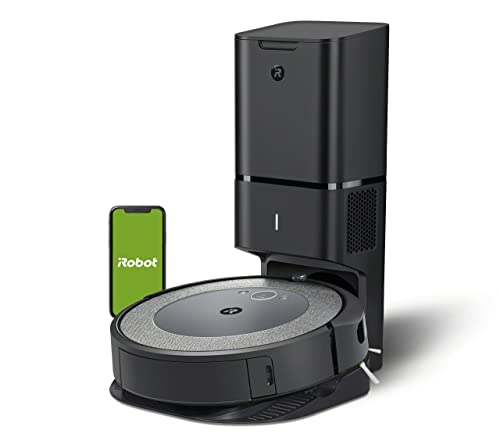
| iRobot Roomba i3+ EVO 3550 | Simple, low-fuss homes | Bagged dock that stays out of the way |  Check on Amazon |
| Shark AI Ultra Voice Control RV2502AE | Families with mixed flooring | Bagless dock with a large capacity bin | Check on Amazon |
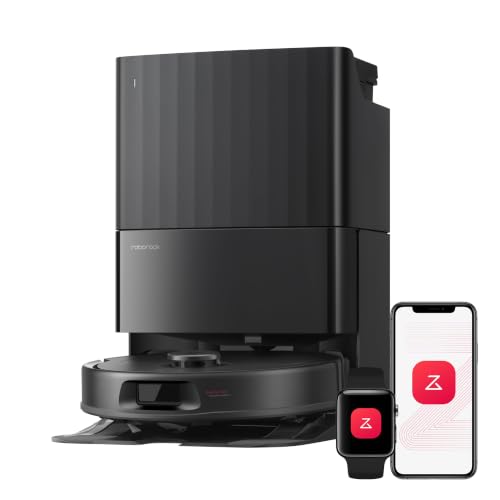
| Roborock Q Revo | Vacuum and mop in one routine | Dock empties, washes and dries | Check on Amazon |
| Ecovacs Deebot N30 Omni | Hard floors with some rugs | All-in-one station, app based |  Check on Amazon |
| Dreame L10s Ultra | Larger layouts with mapping | Lidar map plus a self-cleaning dock |  Check on Amazon |
In this guide
How These Options Were Chosen
We picked these models from manufacturer listings, published specifications and the way each brand describes its dock. We have not used these products ourselves, so you will not find claims about real-world run time or noise here. We looked for docks that empty the robot on their own, brands with an established app and spare parts supply, and a spread of designs, from a plain bag base to a full station.
The Best Self-Emptying Robot Vacuums for Everyday Homes
iRobot Roomba i3+ EVO 3550
The Roomba i3+ EVO pairs a compact round robot with the Clean Base, a bagged dock that sits against a wall and empties the robot after cleaning. Because dirt is sealed inside a disposable bag, you handle it only when the bag is full, and you can simply toss it.
The robot uses dual rubber brushes rather than bristles, which the maker says helps on different surfaces, and it is controlled through the iRobot app and compatible voice assistants. It suits a one-bedroom flat or a modest house where the goal is steady daily upkeep rather than a mopping system.
The trade-off is ongoing cost: you will keep buying compatible bags, and the dock is not a mop station. Skip it if you want one machine to wash hard floors as well, or if you want the most detailed room mapping features on the market.
Shark AI Ultra Voice Control RV2502AE
Shark takes a different route with its tall XL base. Instead of a paper bag, this dock collects debris in a bagless bin that the maker says holds many weeks of dirt, so you empty it into the trash only occasionally and you do not buy bags at all.
The robot maps your home, lets you target individual rooms, and responds to voice commands. It also has a brushroll designed to shed hair as it spins, which is useful when long hair is the main nuisance in your house.
On the downside, the dock is tall and needs clear space above and beside it. The bin must still be emptied and the filters rinsed or replaced as the manual describes. It is a sensible choice for a family home with several room types, but not for someone who wants mopping included.
Roborock Q Revo
The Q Revo moves past the plain bin dock. Its station empties the dustbin, supplies clean water for the mops, takes back the dirty water and dries the pads, so a single schedule covers both vacuuming and mopping.
It uses lidar navigation and a two-pad mop system, and the robot can lift or adjust the mops when it detects carpet, according to the maker. That makes it a good fit for a home that is mostly hard floor with a few rugs.
Expect a larger footprint than the Roomba or Shark docks, and plan for water tanks that need regular filling and emptying. If you have no hard floors at all, you are paying for features you will never use.
Ecovacs Deebot N30 Omni
The Deebot N30 Omni is Ecovacs’ answer to the all-in-one station: it empties dust automatically, cleans the mop and dries it with warm air, all from one base. The Ecovacs Home app handles scheduling, room selection and no-go areas.
It is a natural pick for an apartment or a house with tile, vinyl or sealed wood, where a mop that cleans itself saves real effort. Compared with the Roborock above, think of it as a similar idea in a different brand ecosystem, so choose by which app and support network you prefer.
Like all stations of this type, it needs routine upkeep: clean the mop tray, rinse the tanks and swap the dust bag. Skip it if you mostly have thick carpet, since the mop hardware adds bulk you will not use.
Dreame L10s Ultra
The Dreame L10s Ultra combines a lidar-guided robot with a dock that empties the bin, washes the mops and dries them. Its mapping lets you split rooms, set keep-out zones and run a specific area on demand.
Because it builds a detailed map, it works well in a larger or oddly shaped layout, such as a house with an open kitchen and hallway. It is also a good learning model for someone moving up from a basic robot who now wants station-style convenience.
The trade-offs are the same as other washing stations: it takes more room, the dock needs cleaning, and the mop pads wear and need replacing. Check that your doorway thresholds are low enough for the robot to climb, as the listing explains.
Best for Small Apartments
The Roomba i3+ EVO is the easiest dock to tuck away. Its base is shaped to sit flush against a wall, and the bag means no water tanks or trays to manage. If space matters more than extras, this is the one.
Best for Busy Families
The Shark AI Ultra RV2502AE suits a household that drops crumbs, hair and grit around the clock. The bagless dock means no running out of bags in the middle of a busy month, and room targeting helps when the kitchen needs attention more than the bedrooms.
Best for Hard Floors With Mopping
Roborock Q Revo and Ecovacs Deebot N30 Omni both handle vacuuming and washing in one routine. If your floors are tile, vinyl or sealed wood, either one gives you the full hands-off cycle in a single machine.
Best for Larger Layouts
The Dreame L10s Ultra and its map-driven approach make sense where there are many rooms to schedule separately. You can send it to the living room after breakfast and the hallway after school without touching a button on the robot.
How to Choose a Self-Emptying Robot Vacuum
Begin with the dock type, because it decides your long-term effort. A bagged dock is the cleanest: you remove a sealed bag and replace it. A bagless dock saves the cost of bags but means you handle loose dust when you empty the bin. A full station adds water tanks, which you must refill and drain.
Next, look at how often you must act. Makers state how many cleaning cycles the dock can hold before it is full, but this depends on how dirty your floors are, so treat any figure as a rough guide. Homes with pets or long hair fill a bag faster than a quiet flat does.
Think about the floor type. If you mostly have hard floors, a mop-washing station is a real labour saver. If you have large areas of thick carpet, a plain bin dock avoids the extra hardware and often costs less to run.
Check the footprint of the dock as well as the robot. Many docks need clear space on both sides and in front so the robot can enter without bumping. Put the dock near a power outlet and, for water-based stations, near a spot where you can fill and drain tanks easily.
Consider app support and replacement parts. Bags, filters, brushes and mop pads wear out, so confirm that parts for your chosen model are easy to find before you commit. A robot with a good app and a clear parts line will stay useful for years.
Finally, avoid the common mistakes: buying a station when you only need a bin dock, forgetting to measure the shelf or alcove where the dock will sit, and ignoring door thresholds that a small robot cannot climb.
One last point on running costs: bags, filters, side brushes and mop pads are the regular purchases with any docked robot. Before you buy, look up how easy these parts are to find and how often the maker suggests replacing them, so the real cost of ownership is no surprise. A dock with low running costs but hard-to-find parts becomes a nuisance over several years of daily use.
Installation, Safety and Legal Notes
Follow the maker’s setup instructions for placing the dock, connecting the app and charging the battery. Keep cables, socks and loose items off the floor before a run, and keep the dock away from stairs and heat sources. If you want a dock built into cabinetry or need new wiring or an outlet, hire a licensed electrician.
Use only the batteries, chargers and bags the maker lists for your model, and never open the battery pack. Robots with cameras or microphones send data to the app, so read the privacy settings and choose what you are comfortable with. Local rules about camera use in rented homes or shared buildings vary, so check yours if that applies.
Care and Troubleshooting
| Symptom | Likely cause | What to try |
|---|---|---|
| Dock does not empty the bin | Full bag or blocked port | Replace the bag and clear the suction port |
| Robot cannot find its dock | Clutter or low light around the base | Clear the area and wipe the charging contacts |
| Mop pads smell | Dirty tray or tank | Rinse the tank and clean the tray as the manual says |
| Weak pickup | Tangled brush or full filter | Cut away hair and rinse or replace the filter |
Set a monthly reminder to check the brushes, filters and sensors. Regular small checks prevent most of the problems that people blame on the dock itself.
Navigation Systems and How They Affect Cleaning
The navigation system is the part of a robot vacuum that most shapes daily results, and it is often described in vague marketing terms. In practice there are three broad approaches, and each comes with trade-offs worth knowing.
- Gyroscope and bump-based navigation moves in fairly orderly rows but relies on contact and sensors to detect walls and furniture. It is usually found on simpler models and can miss spots in cluttered rooms.
- Camera-based navigation uses a ceiling or forward-facing camera to build a map. It can work well in lit rooms but may struggle in very dim spaces, and some people dislike having a camera in the home.
- Laser-based navigation, often called LiDAR, uses a spinning sensor to scan the room and works the same in the dark. It tends to produce reliable maps, though the turret adds height, which can matter under low furniture.
A saved map allows features such as room selection, no-go zones and scheduled cleaning of specific areas. If your home has a mix of hard floors and rugs, or a space you want kept clear, map-based control makes the robot much more useful. If your home is a single open room, a simpler system may be all you need.
Dealing With Obstacles, Cords and Pets
Robot vacuums are good at floors and poor at surprises. Cords, socks, pet toys and loose cables are the most common causes of stalls, tangles and rescue missions. Models differ in how they detect small objects. Some add front-facing sensors or cameras to recognize and avoid them, while others simply drive over whatever is in the way.
Before you rely on a robot, spend ten minutes clearing the floor in the rooms it will visit. Lift charging cables and tuck them away, move loose rugs with fringe, and pick up small items. Pet owners should also think about accidents. A robot that rolls through pet waste will spread it, so many owners schedule runs for times when someone is home or when pets are fed and let out.
Hair management is a separate concern. Long hair and fur wrap around the main brush, and some designs use rubber or tangle-resistant rollers to reduce that. Even so, expect to cut hair off the brush on a regular schedule.
Floors, Rugs and Transitions
Most robots handle hardwood, tile and low-pile carpet without issue. High-pile rugs and thick shag are harder, since the robot may bog down or get snagged on the fringe. Thresholds are another limit. Each model lists the height it can climb, and even a small lip can stop a robot that is otherwise capable.
If you have both hard floors and carpets, check whether the robot detects floor type and raises suction on carpet. Mopping models add another step: they should lift the mop pad when crossing carpet, or you should mark carpets as no-mop zones in the app. Without that, a wet pad can leave damp patches on rugs.
Dark flooring and black rugs deserve a mention. Some models use cliff sensors that read black surfaces as drop-offs and refuse to cross them. If that sounds like your home, look for notes on this in the listing or reviews before buying.
Noise, Schedules and Living With a Robot
Robot vacuums are not quiet, and self-emptying docks add a short, loud burst when the bin empties. Most people handle this with scheduling. Running the robot while you are at work avoids the noise, while a quiet or low-power mode can suit evenings or smaller spaces.
App control is the other part of daily life. Basic features such as start, pause and scheduling are enough for many households. More advanced options include room-by-room cleaning, cleaning history, and voice assistant integration. Check which assistants a model supports if voice control matters to you. App quality varies, and a clunky app can turn a good robot into an annoyance.
Think, too, about privacy. A robot that maps your home and connects to the internet stores data about your layout. Review the maker’s privacy information, use a strong password for the account, and consider whether you need cloud features at all.
Total Cost of Ownership
The sticker price is only part of the story. Self-emptying robots use dust bags, filters, side brushes, main brushes and, on mopping models, pads and cleaning solution. Replacement parts are not expensive individually, but they add up over years. Before buying, look up the cost and availability of bags and brushes for the exact model, and check whether third-party parts are compatible.
Warranty and support matter more than usual, because a robot has motors, sensors and batteries that can wear. The battery is the most common long-term replacement. Look for a model with a replaceable battery and a clear warranty period. A slightly higher purchase price is easier to justify when parts and support are easy to find.
What Self-Emptying Actually Changes — and What It Does Not
A self-emptying dock changes the rhythm of owning a robot, not the physics of cleaning. The robot still has a small onboard bin, it still collects hair on its brushes, and it still needs its sensors wiped and its wheels checked. What disappears is the most frequent interruption: taking that small bin to the trash after every run or two. In its place you get a slower cycle of attention to a larger dock — a bag or a larger container depending on the model, a dock area to keep clean, and in the washing models, tanks and pads to rinse and dry. The five picks here, the Roomba i3+ EVO 3550, the Shark AI Ultra Voice Control RV2502AE, the Roborock Q Revo, the Ecovacs Deebot N30 Omni and the Dreame L10s Ultra, all make that trade, but they make it at different levels of extra service, and that level is the real decision.
A plain emptying dock is the simplest version of the idea and, for a carpet-led home, often the smartest. A washing station adds mop care on top, which is valuable exactly in proportion to how much hard floor you mop. Buying the fullest station for a home that is mostly rug is like buying a large car for a weekly passenger: the capacity is real, it is just rarely used, and you maintain it all the same. Start by deciding whether mopping belongs in your robot at all, then decide how much dock you need, rather than letting the dock decide for you.
Bagged and bagless docks in everyday terms
Where the picks differ on emptying style, think about the moment of disposal. A sealed bag tends to keep the collected dust contained when you lift it out, at the cost of buying bags on an ongoing basis and throwing a bag away each cycle. A bagless dock container avoids that purchase but asks you to empty and occasionally rinse a container, which can puff dust back into the air if you do it carelessly indoors. Neither approach is morally or practically superior in the abstract. Pet-heavy homes that empty often may prefer the sealed route for tidiness, while buyers who dislike consumables may accept a careful outdoor empty of a container. Check the exact arrangement on the listing for the model you choose, keep the correct spares on hand, and never assume a bag or container from another model will fit.
Comparing the Five Picks by Household
The Roomba i3+ EVO is the straightforward self-emptying choice for someone who wants a familiar app and a base without committing to a mopping station, and it suits small apartments and uncomplicated layouts well. The Shark AI Ultra RV2502AE appeals to busy families who like voice control and a dock designed to hold a longer stretch of debris, reducing how often the base itself demands attention. The Roborock Q Revo moves into washing-station territory, pairing self-emptying with mop washing, which fits hard floors that need regular mopping alongside vacuuming. The Ecovacs Deebot N30 Omni offers a similar station idea with its own app and mapping approach, well matched to larger layouts with many rooms. The Dreame L10s Ultra is the choice for a buyer who wants an advanced station and detailed control, and who will actually use the settings on offer.
Notice what that comparison does not do: it does not rank the five by a single score, because the right order reverses depending on your floors. In a carpeted family home the simplest dock may be first and the fullest washing station last. In a large home of tile and wood with area rugs, the order flips. Use the original notes on each model — who it suits, what to skip it for — together with your own floor plan, and be suspicious of any ranking, including this one, that ignores the rooms you live in.
Noise, timing and living beside a dock
Self-emptying is briefly loud. The transfer of debris into a dock uses a short, powerful burst of suction, and it is noticeably louder than the robot’s normal cleaning hum. That is normal for the category, but it should shape your schedule: avoid emptying cycles in the middle of the night beside a bedroom, and be thoughtful in a flat with thin walls or a sleeping baby. Place the dock where that brief noise does the least harm, on a hard floor away from soft furnishings that make housekeeping around it harder, and with enough clearance for the robot to dock straight. A dock squeezed into a corner it can barely reach will produce missed docks that look like navigation faults.
Setting Up the Dock for Reliable Emptying
Most emptying problems are placement problems. Give the dock a level, hard surface, a wall behind it, clear space in front and to the sides as the maker directs, and a route the robot uses regularly rather than a room you keep closed. Keep the area free of the very clutter the robot is meant to manage, wipe the charging and emptying contacts and ports as the manual describes, and check that bags or containers are seated properly after you change them. A bag that is not seated, or a container lid not fully closed, can turn a normal emptying cycle into a poor one without any part being broken. If emptying seems weak, inspect those simple seals and paths before assuming a motor problem.
Water-carrying stations add a few more habits. Rinse tanks rather than leaving dirty water standing, let washed pads dry fully, and wipe the dock tray where damp dust collects, because hair plus moisture is where odours begin. Use only cleaning products the maker approves for the machine, if any, and keep the dock somewhere a small leak would be noticed quickly. None of this is difficult, but it is regular, and a buyer who knows they will not do it should honestly choose a plain emptying dock instead.
The True Running Costs, Without the Sales Pitch
Beyond the purchase, budget attention and money for bags or dock filters where fitted, robot filters, brushes and side brushes, and mop pads on the washing models. How fast those wear depends on your home: pet hair loads brushes and filters faster, gritty entryways wear pads and rollers, and large homes put more hours on everything. The sensible approach is to note what your chosen model consumes, keep one spare set at home, and replace parts when pickup or mopping visibly declines. Filtration is worth understanding simply: a maintained filter and a properly sealed emptying path help the dust you collected stay collected at the moment you handle the dock, which is a practical housekeeping benefit in a dusty or hairy home, not a promise about anyone’s health.
When a self-emptying robot is the wrong purchase
Skip the whole category if your home is tiny and a dock would dominate a room, if you vacuum so rarely that a robot’s routine brings you nothing, or if your floors are mostly stairs, deep rugs and cluttered rooms that a robot cannot reach. In those cases a good upright or stick will do more per pound spent. Also think twice if everyone in the home is out all day and a pet is alone with the machine; scheduled cleaning around animals works best when the setup has been tested under supervision first. For the many homes in between — regular hair and dust, reachable floors, a wish to stop thinking about the bin — one of these five, matched to your floors and your appetite for dock upkeep, is a genuinely easier way to live.
Battery and Charging, Kept Simple and Safe
Use the dock and charging equipment supplied with your model, keep contacts clean and dry, and do not use a dock or cord that has been damaged without having it checked. Keep the dock away from standing water and from heat sources, and if the robot will sit unused for a long period, follow the maker’s storage guidance. Let the robot finish its return and emptying cycle before you move the dock, and resist unplugging the base to save a socket, because a base that is off is a robot that will not be ready for its next scheduled run. Those small consistencies are most of what reliable, hands-off cleaning is actually made of.
How the Emptying Cycle Works, and Why It Sometimes Disappoints
Understanding the emptying cycle explains most of the frustrations owners report. The robot returns to the dock, aligns itself, and a powerful burst of suction in the base pulls debris from the small onboard bin through a port into the bag or container. Anything that blocks that path weakens the whole event: a bin that was already overfull and compacted, hair felted over the port, a bag or container not seated squarely, or a seal that is not closing because grit is sitting on it. The robot itself may report a successful dock while the emptying was only partial, which is why an owner who occasionally looks inside the onboard bin knows more about their machine than an owner who trusts the app completely.
Hair is the usual culprit, and pet homes should expect to help the system. Long hair can bridge across a bin rather than flowing out of it, and a matted plug of hair and dust can survive several emptying cycles while fresh debris piles up behind it. A quick manual clear of the onboard bin every so often — far less often than emptying a non-docking robot, but not never — keeps the automatic system honest. Treat the dock as doing the frequent, light work and yourself as doing an occasional inspection, and the partnership works well.
The dock’s own airflow needs the same respect. Keep the area around the base free of stored items so air can move, wipe the ports and contacts as the maker directs, and listen to the emptying burst: a change in its sound is often the earliest warning that a bag is full, a path is blocked or a seal is not seating. Catching that change early is the difference between a two-minute fix and a robot that has quietly stopped emptying while continuing to clean, filling its small bin and leaving debris behind on every run.
Placing a Self-Emptying Robot in Different Kinds of Homes
In a flat, the dock is a significant object, so its home needs choosing rather than drifting into a corner. A hallway alcove or the side of a media unit usually beats a bedroom, because the emptying burst is brief and loud, and because a dock in the main living route gets used by the whole home’s traffic of dirt. Keep the required clearance genuinely clear rather than treating it as storage that the robot will somehow work around, and remember that a dock you have to move for guests is a dock whose robot will be confused afterwards.
In a family house, the calculation shifts toward capacity and routine. A dock that holds a longer stretch of debris, as the Shark AI Ultra in this list is positioned to do, suits a home producing a daily load of crumbs, hair and tracked-in grit, because the base itself then needs attention on a slower rhythm than the cleaning. Place it on the floor where most dirt arrives, which is usually the ground floor near the entrance and kitchen, and let upstairs be cleaned by carrying the robot up for a session or by accepting a less frequent routine there. No single robot covers two floors at once, and planning around that fact beats pretending otherwise.
In a home with mostly hard floors and area rugs, the washing stations — the Roborock Q Revo, the Ecovacs Deebot N30 Omni and the Dreame L10s Ultra in their different ways — come into their own, because the dock then maintains the mop as well as the bin and the robot can work a mixed routine without you rinsing pads by hand. In a home that is mostly carpet, that same station is largely idle machinery, and a plain emptying dock such as the one paired with the Roomba i3+ EVO is the proportionate choice. Let the floors, counted honestly room by room, make this decision.
Routines That Make Self-Emptying Feel Effortless
The owners who praise these machines most tend to run them more often and worry about them less, and that is not a coincidence. A daily run in the rooms that get dirty keeps loads small, which means the onboard bin never compacts, the emptying cycle works as designed, brushes collect hair gradually rather than in a mat, and the dock’s bag or container fills slowly and predictably. An infrequent, heroic clean does the opposite at every stage. If your household rhythm allows it, frequent and light is the operating mode the whole category was designed around.
Pair the robot’s routine with two human routines and the system is complete. The first is a brief floor-ready pass at a natural moment — shoes to the rack, toys to a box, cables up — so the scheduled clean starts on a floor it can actually clean. The second is a monthly dock session: check the bag or container, wipe ports and sensors, rinse what the washing models ask you to rinse, look at the brushes and wheels, and confirm the robot docks and empties while you watch. That half hour a month is the true running cost of hands-free cleaning, and it is a bargain compared with vacuuming the whole home yourself.
Keep spares in the house for whatever your model consumes, because a robot waiting a week for a bag, a filter or a pad is a robot whose routine has collapsed, and routines are much easier to keep than to rebuild. Note the exact model name when ordering, since docks and their supplies are model-specific across all five brands in this list, and a nearly-right bag or pad is usually a wrong one. With those habits in place, a self-emptying robot delivers the thing it promised on the box: floors that stay clean in the background of a busy home, and a bin you think about rarely enough that you have to be reminded it exists.
Self-Emptying Robots and the Rest of Your Cleaning Cupboard
Buying a self-emptying robot does not empty the cleaning cupboard, and planning what stays will save you from expecting the robot to do jobs it was never built for. Keep a cordless stick or a handheld for stairs, upholstery, the car and the sudden spill of something you do not want dragged across a room by a robot’s brushes. Keep a crevice tool’s worth of reach somewhere, whether that is the stick’s own tool or a simple hand brush and pan for the edges a round robot leaves. Keep whatever you use for glass, for the bathroom and for a proper scrub of a neglected floor, because a mopping station maintains hard floors; it does not rescue them.
What the robot does retire is the weekly whole-home vacuum session in most households, and that is the honest size of the prize. Floors stay at a maintained standard, the deep clean becomes shorter and less frequent, and the machines that remain in the cupboard are used for the specific jobs they are good at rather than as substitutes for daily upkeep. Households that understand that division tend to be satisfied with a mid-range self-emptying model. Households that sell or give away everything else on the day the robot arrives tend to be the ones writing disappointed accounts of a machine that could not clean a sofa.
There is also a storage dividend worth claiming. A docked robot lives in the open, in its working position, so it needs no cupboard space of its own, and the stick or handheld that remains can be the smaller, simpler model rather than a full-size upright with all its tools. In a small home that swap — a large upright out, a dock in a hallway and a compact stick in a cupboard — can be worth as much as the cleaning itself.
Decide the division of labour before you buy, choose the self-emptying model that fits the robot’s share of it — plain dock for carpet-led homes, washing station for hard-floor homes — and the purchase will slot into the household instead of reorganising it around a promise no robot can keep.
One Last Check Before You Choose a Self-Emptying Robot
Before you settle on a model, picture the dock in your home at its least glamorous moment: a month from now, on a busy evening, with the bag or container due for attention, the brushes carrying hair, and a clean scheduled for the morning. If that picture still looks like a good bargain compared with vacuuming the whole home yourself, the category fits you and the remaining choice is only about floors and station size. If it looks like a new set of chores you are already resenting in imagination, choose the plainer dock, or reconsider whether a robot belongs in your home at all.
Picture also the best moment: coming home to floors that are already clean, in a house with animals or children, with nothing to empty and nothing to plug in. For most owners that moment, repeated daily, is the entire case for these machines, and it is a strong one. Match the dock to your floors, keep the spares in the house, do the monthly dock session, and that best moment becomes the ordinary state of your home rather than an occasional achievement.
Frequently Asked Questions
How often does a self-emptying dock need attention?
It depends on your floors, but the dock typically holds several cleaning cycles. Look at the bag or bin every couple of weeks at first, then settle into a rhythm that matches your home.
Do I have to buy bags forever?
Only for bagged docks like the Roomba. The Shark uses a bagless bin, and the washing stations use dust bags or bins depending on the design, so check the listing for your model.
Are self-emptying robots louder?
The emptying burst is short but noticeably loud. Schedule runs for times when you are out of the house or not on a call.
Can I use any bag with my dock?
Use bags made for your model. A poor fit can cause leaks or weak emptying, and some makers say that third-party parts may affect support.
Is a washing station worth it over a plain bin dock?
It is worth it when most of your floors are hard and you want mopping done without effort. If you have mostly carpet, a plain dock is simpler.
Where should I put the dock?
Choose a flat spot against a wall with clear space beside and in front, near an outlet and away from stairs, as the manual advises.
Can a robot vacuum replace my regular vacuum?
Not entirely. A robot keeps floors tidy between deep cleans, but it struggles with stairs, corners, upholstery and thick rugs. Most owners keep a regular vacuum or handheld for those jobs. Think of a robot as maintenance cleaning that reduces how often you need to do the heavy version.
Will a robot vacuum work in the dark?
It depends on the navigation. Laser-based systems work fine without light, while camera-based ones may struggle in dim rooms. If you plan to run the robot at night or in a basement with little light, check what sensors the model uses and read the listing’s notes on low-light performance.
Do robot vacuums scratch hardwood floors?
Normally not. Soft rubber wheels and bristles are designed to be gentle on finished wood. Debris stuck in a wheel or brush can scratch, so clear the floor of grit and check the wheels periodically. Follow the maker’s care guidance for your specific floor finish.
How long does a robot vacuum battery last?
Run time varies by model, floor type and suction setting, and most lithium-ion batteries lose capacity gradually over a few years of regular use. A robot with a dock can recharge and resume cleaning on larger homes. Check whether the battery is replaceable and what the warranty covers.
Bottom Line
For a straightforward, tidy setup, the Roomba i3+ EVO and its bag base are hard to fault. For a bagless approach, the Shark RV2502AE avoids ongoing bag purchases. If you also want mopping handled, the Roborock Q Revo, Ecovacs Deebot N30 Omni and Dreame L10s Ultra bring wash-and-dry stations. Match the dock to your floors and your tolerance for upkeep, and the robot will genuinely fade into the background.
Related Guides
- Best Roomba Robot Vacuums Compared by Model and Feature
- Best Shark Vacuums for Every Type of Home and Floor
- Best Robot Vacuums With Mapping and Smart App Control