Where to buy
Check the latest price, availability and delivery on Amazon. Orders are placed on Amazon. We may earn a commission from qualifying purchases.
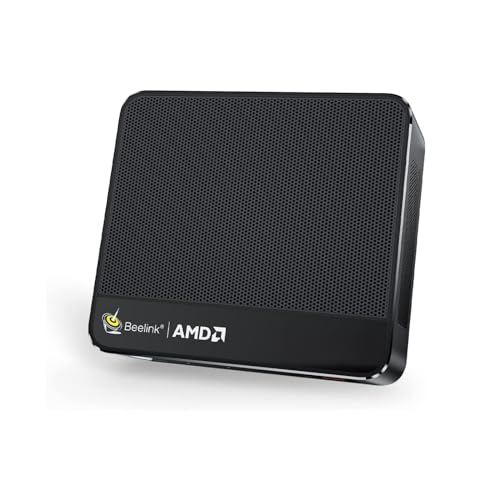
- Best overall for a small space: Beelink SER5 MAX Mini PC, Ryzen 7 7735HS, Radeon 680M, 24GB RAM, 500GB SSD — Check on Amazon
- ACEMAGIC Mini Gaming PC, Ryzen 7 7735HS, Radeon 680M, 24GB RAM, 512GB SSD — Check on Amazon
- GMKtec NucBox M6 Mini PC, Ryzen 5 6600H, Radeon 660M, 16GB DDR5, 512GB SSD — Check on Amazon
- abytespark Gaming PC, GTX 1660 Super 6GB, 16GB RAM, 1TB NVMe SSD — Check on Amazon
See 2 more Amazon options
- STGAubron Gaming PC, Ryzen 5 5500, RX 580 8GB, 16GB DDR4, 512GB SSD — Check on Amazon
- STGAubron Gaming PC, Core i7, RX 580 8GB, 16GB RAM, 512GB SSD — Check on Amazon
Read the full guide ↓
Disclosure: As an Amazon Associate, reviewstook.com earns from qualifying purchases. Links to Amazon on this page are affiliate links; they cost you nothing extra. Listing details such as price and availability change often, so check the current Amazon listing before you buy.
“For small spaces” sounds like one requirement. Under $500, it is actually two completely different purchases wearing the same label. Half of this guide is mini PCs of well under a litre — boxes smaller than a paperback novel that can hang on the back of a monitor and take up no desk at all. The other half is ordinary gaming towers: dozens of times the minis’ volume, machines that live on the floor or swallow a desk corner whole. Both halves are honest answers to this search, because at this budget the strongest graphics you can buy still come in a tower, and the smallest computers you can buy still game on integrated graphics. What separates a good small-space purchase from a bad one is not which half you pick — it is whether you measured your room before you picked it. A mini PC bought for a shelf it does not fit, and a tower bought for a desk corner that turns out to be a heat trap, are the same mistake in two sizes.
So this guide grades installations, not product photos. Every pick is judged on the space it actually consumes once it is plugged in: the box itself, the power brick that has to live somewhere, the cables that bend out of the back and set the real depth, and the hot air that has to go somewhere in a small room. The budget’s honest limits apply here too. There is no new tower with a current-generation graphics card under $500 — the volume RTX 3050 towers sit above this budget — so the towers here run previous-generation cards, and the minis run AMD’s strongest integrated graphics. Nothing here does ray tracing worth switching on, nothing here is a 1440p machine, and one tower often sits above this budget and is included only for when its live price fits it — check price on Amazon.
In this guide
Quick Picks
Short on time, or comparing several options at once? Each row below names a small-space situation and the machine that suits it, with a link to the listing.
| Your space | Pick | Why it stands out | Link |
|---|---|---|---|
| Zero desk footprint | Beelink SER5 MAX Mini PC, Radeon 680M | About 0.6 litres with a VESA mount in the box — it hangs behind the monitor | Check on Amazon |
| Living-room TV corner | ACEMAGIC Mini Gaming PC, Radeon 680M | Flat, square mini that sits like a console and drives up to three displays | Check on Amazon |
| Tightest total budget | GMKtec NucBox M6 Mini PC, Radeon 660M | About 0.8 litres, a budget-tier mini — check price on Amazon; leaves money for the monitor | Check on Amazon |
| Strongest graphics, floor space available | abytespark Gaming PC, GTX 1660 Super | The best graphics card under $500 — in a full tower that needs a real home | Check on Amazon |
| A tower that can grow in place | STGAubron Gaming PC, Ryzen 5 5500, RX 580 | Upgradeable AM4 platform, keyboard and mouse included — buy only on a price dip | Check on Amazon |
| Cheapest discrete graphics | STGAubron Gaming PC, Core i7, RX 580 | A budget-tier tower — check price on Amazon — if you verify the unspecified CPU before you commit | Check on Amazon |
How These Picks Were Chosen
The budget was applied as a ceiling, not a target: every machine below is a real Amazon listing in this under-$500 tier in the United States, and because prices in this segment move constantly, this guide does not print a fixed price for any pick — check price on Amazon for the current listing. One pick often sits above this budget; it is included with an explicit rule, buy it only when its live price fits the under-$500 budget, because the machine itself is exactly what a small-room buyer should want when the price behaves. Anything calling itself a gaming PC that turned out to be a current-generation GPU tower above this budget was excluded, however good it might be.
On top of that sat the small-spaces filter, and it changed the ranking. We graded each machine first by form-factor class — sub-litre mini PC or tower — because class, not brand, decides where a computer can live. Where a maker’s manual or specification page publishes dimensions, we print them; where none are documented, we say so and grade by class rather than inventing a number, and you will find no tower in this guide with a made-up litre figure attached to it. Mounting is treated the same way: a VESA claim appears only where the maker’s documentation puts a bracket in the box. We then graded the parts of the footprint that listings never photograph — the external power brick every mini PC carries, the cable bend behind the box that sets its true installed depth, and the heat each machine pushes into a small room’s air. A pick that wins on the spec sheet and loses on all three of those is not a small-space pick, whatever its volume.
We did not use these machines ourselves. We read the maker listings, manuals and specification pages, and compared graphics hardware alongside the installation grading, because at entry level the GPU decides what you can play and the installation decides whether you can stand living with it. Listings that withhold something that matters — an unspecified processor generation, an unnamed power supply — are flagged in their reviews and turned into checks you can run before or just after delivery, rather than gaps we pretend are not there.
The Footprint Is Bigger Than the Box
Every computer in this guide occupies more space than its case dimensions suggest, and small rooms are where the difference stops being trivia. Four hidden costs decide whether a pick truly fits, and they recur through the reviews below.
The brick needs an address. All three mini PCs run from external power bricks. The brick is a second object — it sits on the floor, on the shelf or behind the monitor alongside the machine, it wants ventilation like any power supply, and in a small room it is often the thing that ends up kicked or buried under cables. The towers invert this: their power supplies are internal, so a tower’s footprint, while far larger, is at least a single object with a single cable to the wall. When you measure for a mini, measure for two things, not one.
The cable drop sets the real depth. Display, power and network cables leave the back of a mini PC and need room to bend before they drop. A box that is two inches deep installs at four or five inches deep once its cables are connected, and a shelf measured to the box alone will push those cables hard against the wall. Towers have the same physics at larger scale: the case depth on a listing is not the depth the installation needs.
Hot air is a placement rule, not a footnote. A gaming PC turns most of the electricity it draws into heat in your room. The mini PCs draw a fraction of a tower’s power and are gentle roommates; the towers — particularly the two built around the RX 580, a card that draws real power — will warm a small, closed room noticeably over a long session. The rule that follows is absolute in this guide: no pick belongs in a sealed cabinet, a closed TV unit or a tight cubby with the door shut. Every one of these machines needs open air on its intake and exhaust sides, and the smaller the room, the more that rule matters.
Noise travels in small rooms. In a big room a fan is background; in a small one it is a presence, and in a bedroom it is the sound you fall asleep next to. We claim no decibel figures for any pick — none are documented for this set — and grade noise by design instead: the minis’ small fans work at low power draws, one of them carries a documented secondary-fan trade-off we flag in its review, and the towers move more air through bigger cases with four RGB fans each.
The 6 Best Entry Level Gaming PCs for Small Spaces Under $500
Beelink SER5 MAX Mini PC — Ryzen 7 7735HS, Radeon 680M, 24GB RAM, 500GB SSD
Who it suits: Small-space buyers who want the desk back — a dorm desk, a shared bedroom, a studio corner where the computer should effectively disappear.
Start with the measurements, because they are the review. Beelink’s own documentation puts this box at 4.96 × 4.44 × 1.65 inches — about 0.6 litres — and under two pounds, and a VESA mount is included in the box. Bolt it to the back of a monitor and its installed footprint is genuinely zero — no desk surface, no shelf space; the machine simply stops being furniture. If it sits on a surface instead, it takes up less room than a paperback book. Around that vanishing act sits the strongest mini PC specification in the guide: a Ryzen 7 7735HS with Radeon 680M integrated graphics — roughly the class of an older entry level discrete card — 24GB of RAM, more than any tower here, and a fast PCIe 4.0 NVMe SSD. At 1080p that means esports titles at high frame rates, indie and older games running beautifully, and demanding titles at reduced settings with upscaling helping. Check price on Amazon: it sits at the premium end of this budget tier, priced like a tower alternative, which is what it is.
Installing it well is mostly about air. The case breathes through mesh sides feeding its cooling, so the monitor mount is a feature, not a trick — the bracket holds the box in open air behind the panel, which is exactly where it wants to be. What it must not be is sandwiched: not wedged between a monitor and a wall with its sides pressed shut, not laid in a drawer, not resting on carpet or bedding. The power brick is the second object to place — behind the monitor or on the floor with air around it, not buried in a cable pile. The permanence trade is the one this machine shares with every mini here, and it should be understood before buying: the 24GB of RAM is soldered, generous today and fixed forever, and the integrated graphics share that memory and cannot be upgraded at any price. The SSD can be swapped for a larger one. When the 680M stops being enough, the whole machine is replaced — but a machine that costs you no space is also the easiest machine in this guide to replace.
- About 0.6 litres and under two pounds, with a VESA mount in the box — the zero-footprint pick.
- Radeon 680M integrated graphics: the strongest iGPU class in this guide, drawing a fraction of a tower’s power.
- 24GB of RAM and a PCIe 4.0 SSD — everyday specifications better than the towers here.
- Premium tier within this budget — check price on Amazon.
Honest limitation: The 24GB of memory is soldered and the graphics are part of the processor — only the SSD can ever change, so the gaming ceiling is set at purchase.
Choose it if your space problem is real and your library is esports, indie and back catalogue. Skip it if you expect to chase new AAA releases or to upgrade your way there later — that future belongs to the towers below.

ACEMAGIC Mini Gaming PC — Ryzen 7 7735HS, Radeon 680M, 24GB RAM, 512GB SSD
Who it suits: Buyers whose small space is a living room — a TV stand or media shelf where the PC should sit like a console and behave like one.
The documented dimensions tell its story: a flat, square box of 5.04 × 5.04 × 1.61 inches, about 0.67 litres, at 2.65 pounds. Where the Beelink above is built to hide behind a monitor, this one is built to be seen sitting flat — on a TV stand, on a media shelf, beside a console — with a footprint barely larger than the disc cases it might sit next to. One honest distinction matters here: no VESA mount is documented for this machine in the maker’s materials we read, so we grade it as a shelf machine and promise no bracket. If mounting behind a screen is your plan, the pick above is the documented route; if a flat square on a shelf is your plan, this is the neatest object in the guide for it. The machine inside matches the Beelink game for game — the same Ryzen 7 7735HS and Radeon 680M core, the same 24GB of RAM — so the gaming story is identical: esports at high frame rates at 1080p, older titles at settings that respect them, demanding titles reduced with upscaling.
Around that core sit the touches of a machine meant to live in a room rather than on a desk: Windows 11 Pro, a 2.5Gbps wired network port — run one cable and online play and downloads stop depending on Wi-Fi through walls — and support for three 4K displays, which turns it into a serious homework, work and streaming station on non-gaming days. Plan the cable drop before it arrives: up to three display cables plus power and network all leave this little box, and a media shelf measured to the box alone will be tight once they bend. Check price on Amazon before you buy — mini PC pricing moves often, so judge the live listing rather than any headline figure. Its one real quirk is the listing family: ACEMAGIC sells several configurations under similar pages with different processors and memory sizes, and this review is about the 7735HS with 24GB specifically. Confirm that exact configuration before ordering — the cheaper variants wear the same product photos.
- Flat 5.04-inch square, about 0.67 litres — sits on a TV stand like a console.
- Same 7735HS and Radeon 680M core as the guide’s top mini — the gaming story is identical.
- Windows 11 Pro, 2.5Gbps LAN and triple 4K display support.
- Check price on Amazon — judge it by the live listing price.
Honest limitation: Integrated graphics with shared memory and no documented VESA mount — it is a shelf machine, and the listing’s configuration maze must be checked before buying.
Choose it if the PC lives in the living room and plug-and-play simplicity matters most. Skip it if you need a documented monitor mount, or upgradeability — the pick above answers the first, the towers the second.

GMKtec NucBox M6 Mini PC — Ryzen 5 6600H, Radeon 660M, 16GB DDR5, 512GB SSD
Who it suits: The truly budget-first small-space buyer — anyone whose $500 has to cover the PC, a monitor and the first games, in a room with no space to waste.
GMKtec’s own manual gives this box at 12.8 × 12.7 × 4.8 cm — about 0.8 litres, roughly five by five by two inches — and around 528 grams, the lightest machine in this guide. Pick it up and it feels less like a computer than like a paperweight with ports. Its ports are grown-up for the size and price: USB4, dual 2.5G network ports, Wi-Fi 6E and Windows 11 Pro. Check price on Amazon — it is the budget-tier pick here, and in a small-space purchase that restraint compounds: what it leaves in your pocket buys the monitor, which is itself a space decision. What the remaining money buys in gaming terms is a smaller but honest machine — a Ryzen 5 6600H with Radeon 660M graphics, a clear step below the 680M minis above, which at 1080p still runs esports and indie titles well and older AAA at low-to-medium settings with upscaling switched on. For a library of League, Valorant, Minecraft, Stardew and a decade of classics, that is the correct amount of computer in the correct amount of space.
Two placement notes are specific to this pick. First, noise: GMKtec’s design uses a secondary fan that improves cooling at the cost of noise under heavy loads, which makes this the most audible mini in the guide when it works hard. On a desk across a room that is nothing; on a nightstand shelf beside a bed, it is a consideration — give it the far side of the desk rather than the shelf by your pillow. Second, uniqueness: alone among the minis here, its 16GB of RAM sits in standard DDR5 SO-DIMM slots rather than being soldered, and there are two SSD slots, so memory and storage can grow later without the footprint growing at all — the only pick whose second year fits in exactly the space its first year did. Its ordering warning matters as much as its dimensions: this model family also appears in barebones form without RAM or storage, so confirm the complete 16GB/512GB configuration is what you are buying. No VESA mount is documented for it in the materials we read, so plan on a shelf or desk placement and check the live listing’s contents line if a bracket matters to you.
- About 0.8 litres and roughly 528 g — the lightest, cheapest complete start in the guide.
- Budget-tier mini — check price on Amazon; leaves real money for a monitor.
- Socketed DDR5 RAM and dual SSD slots: the only mini here that can grow in place.
- Dual 2.5G LAN, Wi-Fi 6E and a full-feature USB4 port: connections the price does not predict.
Honest limitation: The Radeon 660M is a clear step below the 680M machines, its secondary fan is audible under load, and the barebones variants of this family must not be ordered by mistake.
Choose it if one $500 has to cover the entire setup and your library is esports, indie and classics. Skip it if the PC alone can take the full budget — the 680M minis game harder in barely more space.

abytespark Gaming PC — GTX 1660 Super 6GB, 16GB RAM, 1TB NVMe SSD
Who it suits: Small-space buyers whose constraint is budget, not floor area — a room with a proper desk corner or floor spot, where the strongest graphics under $500 matter more than size.
Honesty first: this is a tower, and no dimensions for it are documented in the listing materials we read, so we claim none. Grade it by class: a traditional tower case is dozens of times the volume of the mini PCs above, it will not fit a media shelf or a bookshelf, and it needs a home — a floor corner beside the desk or a deep desk surface — chosen before it arrives, not improvised after. Buyers with that corner free get the best gaming hardware in this guide in exchange: a GTX 1660 Super 6GB, a mid-range card in its day and still the strongest graphics here by a clear margin, with 16GB of RAM, a full 1TB NVMe SSD (double most rivals, and modern games routinely pass 100GB), Wi-Fi, four RGB fans and Windows 11 Home. Check price on Amazon for the current listing. Esports run the way they are meant to run, and the last decade’s AAA catalogue plays at 1080p medium with room to spare.
A tower does win one installation argument outright: its power supply is internal, so there is no brick to house — one box, one mains cable, and the footprint, while large, is a single honest object. Against that, four fans moving air through a tower will warm a small room over a long session, and the RGB lighting is a presence in a bedroom whether you want it or not; put the case where its exhaust is not blowing at the bed or the desk chair, and never in a closed cabinet. Two further honest notes from the main guide carry over at full size. The listing’s headline says “Core i7” without a generation, and the listing’s own processor field documents a Core i7-7700 — a quad-core chip from 2017 on a dead-end platform with no meaningful CPU upgrade path; the graphics card carries the gaming, and this tower’s future is a card swap at most. And small-brand listings can drift in configuration under the same page, so on delivery day, check the processor, graphics card, RAM and storage in system settings against what you ordered and run a game inside the return window. In a small room that check matters double: a tower is the hardest pick here to send back.
- GTX 1660 Super 6GB — the strongest graphics hardware in this guide, with 1TB of storage.
- Internal power supply: no brick to place — one box, one mains cable.
- Check price on Amazon — the guide’s best performance, in the mid-to-upper part of this budget tier.
Honest limitation: It is a full tower with no documented dimensions, built around a 2017 Core i7-7700 on a dead-end platform — measure your corner by class, not by a number this guide cannot give you.
Choose it if you have a floor corner or deep desk and want the best first-PC gaming performance under $500. Skip it if space is the actual problem — that is what the three minis above exist for.
STGAubron Gaming PC — Ryzen 5 5500, Radeon RX 580 8GB, 16GB DDR4, 512GB SSD
Who it suits: Small-room buyers planning to stay a while — anyone who wants one tower footprint that stays fixed while the machine inside it improves for years.
Like the pick above, this is a tower with no documented dimensions in its listing, graded by class: it needs the same floor corner or deep desk, and it will not pretend to be anything smaller. What justifies the space, uniquely in this guide, is what happens inside it over time. The Ryzen 5 5500 is a six-core Zen 3 processor on AMD’s AM4 socket, so this case’s future is real: a faster AM4 processor drops in later, more DDR4 RAM is cheap, a second SSD fits, and when the starting graphics card — an RX 580 8GB, a 2017 design whose 8GB of memory still serves 1080p textures well — eventually feels old, a newer card takes its slot. Every one of those upgrades happens inside the same footprint. For a small room, that is a genuine virtue: the furniture arrangement you make this year survives every improvement, and no replacement machine ever demands a bigger corner. STGAubron also includes an RGB keyboard and mouse in the box, which in a tight setup is two fewer peripheral boxes to buy, store and cable.
The catches are the ones the main guide prints in large type, and they stay large here. Pricing for this listing moves above and below this guide’s budget over the year — this machine spends a good part of the year above the budget it is listed under, so the rule is the review: check price on Amazon and buy it only when its live price fits the under-$500 budget, and walk away without regret when it sits higher, because above this budget the market offers better. The RX 580 itself draws real power — in a small, closed room you will feel this tower’s heat over a long session, so place it in open air with its exhaust pointed away from where you sit and sleep — and AMD has moved the RX 500 series to a legacy driver cadence, so new-game optimizations arrive slowly or not at all. The listing also does not publish its power supply’s wattage, which is the number that will govern how ambitious a future graphics card swap can be; check the label inside the case before planning one. None of that disqualifies it: it disqualifies buying it at the wrong price, in the wrong spot.
- Ryzen 5 5500 on AM4 — the only tower here whose upgrades never change its footprint.
- RX 580 8GB — its memory headroom still flatters texture-heavy older games at 1080p.
- RGB keyboard and mouse included — fewer boxes and cables in a tight setup.
- Internal power supply; check price on Amazon and buy only when it fits this budget.
Honest limitation: Its live price often sits above this guide’s budget and only sometimes fits it; the RX 580 is a 2017 card on legacy driver support that warms a small room, and the PSU wattage is unpublished.
Choose it if you can wait for a dip and want a small room’s one permanent tower. Skip it if you need a PC this week at today’s price, or your space problem rules towers out entirely.

STGAubron Gaming PC — Core i7, Radeon RX 580 8GB, 16GB RAM, 512GB SSD
Who it suits: Patient bargain hunters with a tower-sized space and a firm total budget — buyers willing to verify carefully in exchange for discrete graphics at a mini-PC price.
The third tower in the guide is the same recipe one shelf down in price: an RX 580 8GB graphics card, 16GB of RAM, a 512GB SSD, Wi-Fi 6, RGB fans and Windows 11 Home, — check price on Amazon for the current listing. No dimensions are documented for it either, so the space story is the family story — a tower-class case needing a floor corner or deep desk, an internal power supply with no brick to place, and four fans’ worth of warm air to route into open room rather than a cabinet. The gaming experience the RX 580 delivers is the same one the Ryzen tower above offers — esports at strong frame rates, older AAA at 1080p medium — because in games the graphics card does the heavy lifting and both machines carry the same one. For a buyer whose $500 must also stretch to a monitor, the saving versus the guide’s other towers is the difference between a setup that fits the room and one that is still missing its screen.
What you trade for the lower price is certainty, and in a small space the trade deserves a specific warning: a tower is the most annoying object in this guide to return. The listing says “Core i7” and a clock speed and does not say which generation — a span covering everything from genuinely capable chips to processors older than some of the games you will install — and coverage of this listing family has noted the omission along with mixed reliability reports. So treat the purchase as a verification exercise with a deadline. Before ordering, put the exact processor model to the seller through the listing’s question feature. On delivery, check the processor in system settings, confirm the RX 580 and the 16GB of RAM are what the box claims, and stress-test the machine with your most demanding game inside the return window — while the packaging is still in the room, because repacking a tower without it is a project. The listing likewise does not publish a PSU wattage, so no graphics upgrade should be planned until that label has been read. Buyers who run those checks usually end up with the bargain this listing promises; buyers who want a machine they never have to think about should take the abytespark above.
- RX 580 8GB discrete graphics — check price on Amazon; a budget-tier tower route to a real GPU.
- 16GB of RAM and a 512GB SSD — the baseline this guide asks of every tower.
- Wi-Fi 6 and Windows 11 Home included; internal PSU means no brick to house.
Honest limitation: The listing does not specify the Core i7 generation or the PSU wattage, and reports on this listing family are mixed — verification on delivery is part of the deal, and a tower is the hardest pick here to return.
Choose it if the total is immovable, the monitor must come out of the same money, and delivery-day verification does not put you off. Skip it if an unspecified processor makes you uneasy — that instinct is reasonable, and the picks above remove it.
Comparison Table
| Product | Installed size | Graphics | Best use | Link |
|---|---|---|---|---|
| Beelink SER5 MAX Mini PC | ~0.6 L, VESA mount in the box | Radeon 680M (integrated) | Zero-footprint gaming behind a monitor | Check on Amazon |
| ACEMAGIC Mini Gaming PC | ~0.67 L flat square, shelf placement | Radeon 680M (integrated) | Living-room TV stand, console-style | Check on Amazon |
| GMKtec NucBox M6 Mini PC | ~0.8 L, lightest here | Radeon 660M (integrated) | Whole setup on one $500 budget | Check on Amazon |
| abytespark Gaming PC | Tower class, no documented dimensions | GTX 1660 Super 6GB (discrete) | Strongest gaming, floor corner available | Check on Amazon |
| STGAubron Gaming PC, Ryzen 5 5500 | Tower class, no documented dimensions | RX 580 8GB (discrete) | One footprint that upgrades for years | Check on Amazon |
| STGAubron Gaming PC, Core i7 | Tower class, no documented dimensions | RX 580 8GB (discrete) | Cheapest discrete route, with verification | Check on Amazon |
How to Choose: Measure Before You Buy
Small-space PC buying fails in one direction only: the machine is chosen first and the room is consulted afterwards. Run these five steps in order, with a tape measure, before any listing gets your money.
- Step 1 — Measure the spot, not the room. Find the exact surface or corner the PC will occupy and measure its width, depth and height. Behind a monitor, measure the clearance between the panel’s back and the wall. On a shelf, measure between the uprights, not across the whole unit. For a tower, measure the floor corner or desk depth honestly — and if no surface in the room takes a tower case, that is your answer: your shortlist is the three minis, and no graphics card changes it.
- Step 2 — Reserve ventilation clearance. Whatever spot you measured, subtract breathing room. Every pick here pulls air in and pushes heat out, and a box fitted exactly into its space is a box being slowly cooked. Keep intakes and exhausts in open air, refuse sealed cabinets and closed TV units outright, and remember the towers — the RX 580 pair especially — heat the whole room, not just their corner.
- Step 3 — Give the power brick an address. If you chose a mini, it arrives with a second object: the external brick. Decide now where it lives — on the floor beside the desk leg, on the shelf behind the box, in open air behind the monitor — and confirm that spot exists and is not a cable tangle it will cook inside. If you chose a tower, skip this step with our blessing: the internal power supply is the tower’s one genuine space virtue.
- Step 4 — Walk the cable drop. Trace, physically, where each cable will run: display cable from the box to the screen, mains cable to the socket, network cable if you are wiring in — and in a small room, wired is worth it, since the minis’ Wi-Fi has walls and furniture to fight. Add the cable bend at the back of the machine to its depth before you declare it fits; a box that fits its shelf but whose cables are crushed against the wall does not fit its shelf.
- Step 5 — Then order, and verify on arrival. Only now does the listing get your money. When the machine lands, check the delivered configuration in system settings — processor, graphics, RAM, storage — against what you ordered, inside the return window and while the packaging is still in the room. This step is load-bearing for three picks here: the ACEMAGIC’s configuration family, the GMKtec’s barebones siblings, and the second STGAubron’s unspecified Core i7. Ten minutes with the settings screen turns every small-brand gamble in this guide into a known quantity.
Three further rules ride on top of the five steps. Start with your games list: if it is esports, indie and older titles, every machine here serves you and the choice is purely about space; if it is full of this year’s AAA releases, entry level is the wrong tier and no amount of measuring fixes that. Budget the whole setup: a monitor, and a keyboard and mouse if your pick does not include them — the GMKtec leaves you the money, and the STGAubron Ryzen tower includes the peripherals. Respect the price rules: where this guide says a pick is a buy only when its live price fits this budget, that is the review, not a footnote — check price on Amazon, set a price alert and be willing to wait a few weeks.
Common Buying Mistakes
- Measuring the box and forgetting the installation. The brick, the cable bend and the ventilation clearance are part of the footprint; a PC that fits its shelf on paper and cooks or crushes its cables in practice does not fit.
- Putting any of these machines in a sealed cabinet or closed TV unit. It is the single fastest way to turn a good small-space pick into a loud, hot, short-lived one. Open air is not optional.
- Assuming a mini PC can be VESA-mounted because it is small. In this guide, exactly one pick documents a mount in the box — the Beelink. For the others, mounting is unconfirmed until the live listing’s contents line says otherwise.
- Buying a tower for a room with no tower-sized space, because the graphics card was tempting. The card is genuinely better; the corner it needs is genuinely absent. Both facts survive the purchase.
- Buying a listing at a live price above this budget when it regularly returns to within it. For the STGAubron Ryzen tower, check price on Amazon first — the difference between a good buy and a bad one is purely timing.
- Ordering the wrong variant of a lookalike listing. The ACEMAGIC’s cheaper configurations and the GMKtec family’s barebones versions wear the same photos as the machines reviewed here. Confirm the exact configuration before ordering; in a small room, the wrong box is the same shelf holding a weaker machine.
- Skipping the delivery check, then throwing the packaging away. Small-brand listings occasionally ship a different variant than the headline, towers are miserable to repack without their box, and the return window only protects buyers who look inside it.
- Pairing an entry level PC with a 1440p or 4K monitor. Every machine here is a 1080p gaming machine; a higher-resolution screen makes games run slower, not prettier. The minis’ multi-display support is for desktop screens, not for gaming resolution.
Final Recommendation
- Most small spaces: Beelink SER5 MAX — mounted behind the monitor, it is the only pick that takes no space at all.
- Living rooms: ACEMAGIC mini — a flat square that sits like a console and drives the TV plus spare screens.
- Firm budgets covering the whole setup: GMKtec NucBox M6, the cheapest box here and the one that leaves monitor money behind.
- Rooms with a real desk corner or floor spot: the abytespark for performance now, or the STGAubron Ryzen tower — when its live price fits this budget — for a footprint that upgrades in place for years.
Our top two for a small space at this budget are the Beelink SER5 MAX, because a gaming PC that hangs behind your monitor and draws a fraction of a tower’s power is the complete answer to the question this search asks, and the ACEMAGIC, because a living room wants a flat, quiet box on the TV stand rather than a glowing tower beside it. Between the minis and the towers sits the honest shape of entry level in a small room: integrated graphics in under a litre that you will one day replace whole, or a previous-generation discrete card in a tower that needs a corner you may not have. If your ambitions point at upgrades and your room points at a free floor corner, the STGAubron Ryzen tower, when its live price fits this budget, is the one permanent installation here; if the whole setup must come out of this budget, the GMKtec leaves you the money to finish it. Buyers working out the same problem at other budgets should also see Best Entry Level Gaming PC Under $500, and Best Entry Level Gaming PC For Small Spaces Under $700 for the next tier up. Measure the spot, place the brick, walk the cables, check the configuration when it arrives, and check the live price before you order — in a small room, that homework is the whole difference between a PC that fits your life and one that merely fits your shelf.
Frequently Asked Questions
How small is a “small space” gaming PC under $500, really?
Smaller than most buyers expect — at the mini end. The three mini PCs in this guide run from about 0.6 to about 0.8 litres: smaller than a paperback novel, light enough to hold in one hand, and in one case mountable behind a monitor so the desk footprint is zero. The honest caveat is that the other half of this guide is ordinary towers, included because they hold the only discrete graphics cards under $500.
Can I mount one of these PCs behind my monitor?
One, on documented evidence: the Beelink SER5 MAX includes a VESA mount in the box, and mounting it behind the panel is the single best small-space installation in this guide. For the ACEMAGIC and the GMKtec, no mount is documented in the maker materials we read — treat mounting as unconfirmed, check the contents line on the live listing before you plan around it, and default to a shelf or desk placement. The towers, obviously, do not mount anywhere.
Where does the power brick go?
Somewhere with air around it, decided in advance: on the floor beside a desk leg, on the shelf behind the machine, or behind the monitor alongside a mounted mini. What it should not do is live buried in a cable pile, under bedding or carpet, or inside a closed cabinet. If the brick problem genuinely has no answer in your room, that is a real argument for a tower, whose power supply is internal.
Can I put a gaming PC in a TV cabinet or enclosed shelf?
Not with the door closed — not any pick in this guide. Every one of them turns electricity into heat and needs open air at its intakes and exhausts; a sealed cabinet recirculates hot air until the machine runs loud, throttles, or worse. An open-backed shelf or a TV stand with the machine in free air is fine for the minis. The towers, particularly the two RX 580 machines, also warm the room itself over long sessions, so give them the most open placement you have.
Is a mini PC powerful enough, or do I need the tower?
Powerful enough for the library most entry level buyers actually play: esports and competitive titles at high frame rates at 1080p, indie games and the last decade’s catalogue properly, and recent AAA releases at low-to-medium settings with upscaling. The tower’s discrete card buys you headroom — higher settings, more stability, more of the recent catalogue — and an upgrade path. It does not buy a different category: nothing here does ray tracing or 1440p, from either shape. Choose by your room first and your library second; choosing by library alone is how towers end up in rooms with nowhere to put them.
What else do I need to buy besides the PC?
A monitor — 1080p is the right match for every machine here — and a keyboard and mouse if your pick does not include them (the STGAubron Ryzen tower does; the minis and the other towers do not). In a small space, also think about where the monitor itself goes: a mini mounted behind it makes the pair a single object, the neatest complete setup this budget can build.
Why do some listings just say “Core i7” without a generation?
Because the ambiguity sells. “Core i7” covers everything from current chips to processors from 2017, and a listing that omits the generation may be fitting either. The fix is simple: ask the seller for the exact model before ordering, or verify in system settings the day the machine arrives and use the return window if the answer is not what you paid for. On the abytespark in this guide, the listing’s own processor field documents the chip as a 2017 Core i7-7700, and the review grades it as exactly that.


