A binding machine turns loose pages into a finished report or manual. Comb machines punch rectangular holes and use plastic combs. Coil machines punch round holes and thread a spiral through them. Punch capacity, binding size and what comes in the box decide which fits your office.
The six machines below range from a manual comb binder to an electric punch model and a coil binder with an electric coil inserter. Capacities and contents come from each product’s listing page and are the makers’ own figures. We have not used these machines ourselves.
As an Amazon Associate we earn from qualifying purchases. Links below are affiliate links, and they do not change the product information we give.
What to Look For
| Feature | Why it matters |
|---|---|
| Comb or coil | Comb opens and closes; coil turns flat and wraps around |
| Punch capacity | Sets how many sheets you punch per pull |
| Binding size | The thickest document the machine can bind |
| Starter supplies | Combs or coils in the box save a separate order |
| Paper size | Letter, A4 and A5 hole counts differ |
In this guide
Specs at a Glance
| Machine | Style and punch | Binding size | Notes |
|---|---|---|---|
| Makeasy comb | Manual comb; 10 to 12 sheets | Up to 400 sheets with a 2 in comb | 100 combs of 3/8 in; 8.2 lb |
| Fellowes Pulsar+ | Manual comb; 20 sheets | Up to 300 sheets with a 1-1/2 in comb | 10-pack starter kit; 15.4 lb |
| Amazon Basics comb | Manual comb; 12 sheets | Up to 350 pages | A5 15 holes; Letter 19; A4 21; combs not included |
| Makeasy coil | Manual punch, electric coil inserter; 15 sheets | 4:1 pitch coils | 5/16 in coils and pliers included |
| Fellowes Quasar 500 | Electric comb; 20 sheets | Up to 500 sheets with a 2 in comb | Starter kit; 25.8 lb |
| Coilbind S25A | Coil with electric inserter; 20 sheets | 8 mm coils fit up to 52 sheets | 100 coils and crimper; 20.1 lb |
The 6 Best Binding Machines for Offices

Top pickBest for a light office that binds reports
1. Makeasy 12-Sheet Comb Binding Machine
A metal manual comb binder that the maker says punches 10 to 12 sheets of 20 pound paper at a time and binds up to 400 sheets with a 2 inch comb, which is not included. The box has 3/8 inch black PVC combs for about 50 to 60 sheets. It measures 16.93 by 12.2 by 7.09 inches and weighs 8.2 pounds.
Suits: a light office that binds reports. Strengths: a metal body and combs in the box. Weaknesses: a lower punch capacity. Skip it if you punch thick stacks.


Best for an office that binds handouts in batches
2. Fellowes Pulsar+ Comb Binding Machine
A manual comb binder with a 20-sheet punch capacity that binds up to 300 sheets with a standard 1-1/2 inch comb and includes a 10-pack starter kit. The listing gives 5.13 by 15.38 by 18.13 inches and 15.4 pounds, and describes a continuous punch-and-bind design.
Suits: an office that binds handouts in batches. Strengths: a 20-sheet punch and a starter kit. Weaknesses: a tall, heavy body. Skip it if you have a small shelf.


Best for an office with mixed paper sizes
3. Amazon Basics Comb Binding Machine
A manual comb binder made of steel and plastic that punches up to 12 sheets at a time and binds up to 350 pages. It punches A5 with 15 holes, Letter with 19 and A4 with 21, with an adjustable margin and a fixed paper slider. Plastic comb spines are not included.
Suits: an office with mixed paper sizes. Strengths: adjustable margins and three sizes. Weaknesses: combs sold separately. Skip it if you want supplies in the box.

Best for a team that wants pages that fold flat
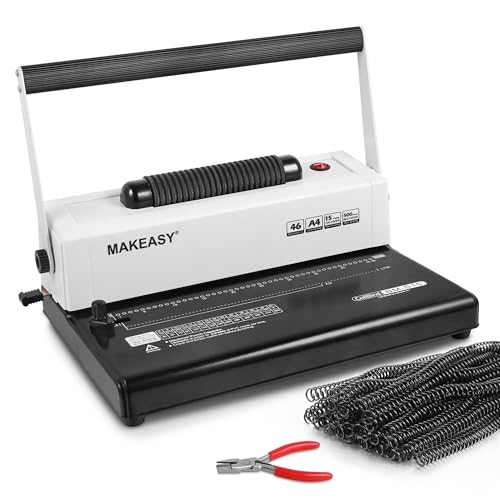
4. Makeasy Coil Spiral Binding Machine
A 4:1 pitch coil binder with a manual punch for 15 sheets and an electric coil inserter. It punches Letter with 44 holes, A4 with 46 and A5 with 33. The box has one box of 5/16 inch coils and crimping pliers.
Suits: a team that wants pages that fold flat. Strengths: an electric inserter and coils included. Weaknesses: the maker advises fewer sheets for thicker paper. Skip it if you prefer reusable combs.
View Makeasy Coil Spiral Binding Machine 15-Sheet Punch on Amazon
Best for a busy office with thick documents
5. Fellowes Quasar 500 Electric Comb Binder
An electric comb binder that punches up to 20 sheets with a button push and binds up to 500 sheets with a 2 inch comb. It comes with a starter kit, a metallic gray alloy steel body, 25.8 pounds and a two-year warranty.
Suits: a busy office with thick documents. Strengths: electric punch and a 500-sheet binding size. Weaknesses: the heaviest machine here. Skip it if you bind a few pages now and then.
View Fellowes Quasar 500 Electric Comb Binding Machine on Amazon

Best for an office that binds presentations and manuals
6. Coilbind S25A Spiral Coil Binding Machine
A coil binder with a 20-sheet capacity and an electric coil inserter. The box has 100 8 mm plastic coils, which the maker says fit up to 52 sheets, and a coil crimper. Margins are adjustable and the listing gives 20.1 pounds.
Suits: an office that binds presentations and manuals. Strengths: a 20-sheet punch and a full coil kit. Weaknesses: a heavier body. Skip it if you want a comb style.

Care and Setup
- Punch fewer sheets than the maximum on thick paper.
- Empty the chip tray often.
- Match the comb or coil size to the stack height.
- Keep spare supplies on hand.
Mistakes to Avoid
- Overloading the punch.
- Buying a machine without checking whether combs are included.
- Choosing the wrong hole count for your paper size.
- Using a coil size too small for the stack.
Comb, Coil and Wire Bindings: Which Finish Suits Which Document
The binding style shapes how a document looks and how people use it. Plastic comb binding uses a spine with round fingers that go through rectangular holes. Combs can be opened and closed, so pages can be added or removed later, which suits drafts, training materials and documents that change. A comb lies fairly flat but does not rotate fully.
Coil, or spiral, binding threads a continuous plastic coil through round holes. Pages turn easily and the document folds back on itself, which suits manuals, workbooks and notebooks that are used on a desk or held in one hand. Coil bindings are harder to open and modify once finished, since the coil is crimped at the ends.
Wire binding, which some machines offer, uses a double loop of metal that gives a neat, formal look, but requires a different machine and setup. This guide covers comb and coil machines, so if you need wire, check the specific listing.
Think about how the document will be used. Reports for clients may benefit from the tidy look of comb binding with clear covers, while field manuals benefit from coil’s flexibility. Consider durability: coil tends to hold up under heavy handling, while combs can pop open if overloaded. Decide before you buy supplies, because combs and coils are not interchangeable.
Punch Capacity, Duty Cycle and Matching the Machine to Your Volume
Punch capacity is the number of sheets the machine can handle in one pull, and it directly affects speed. A machine that punches ten sheets at a time needs many pulls to prepare a thick document, while a twenty-sheet capacity halves the work. Listed capacities usually refer to standard paper weight, so thicker stock reduces the number of sheets you should punch at once.
Consider your volume. A small office that binds a few reports a month does fine with a manual machine. A team that binds many documents each week will appreciate electric punching, which reduces effort and repetitive strain. Check whether the maker provides guidance on how long the machine can run before cooling down. Electric models may have limits on continuous use.
Binding capacity is separate from punch capacity. It describes the thickest document the machine can bind with its largest comb or coil. If you often bind thick manuals, check this number and the maximum size of the supplies you can buy. A machine with a modest binding size may force you to split documents into volumes.
Watch for build quality. Metal bodies and solid punching mechanisms tend to hold up longer under frequent use, but check the listed weight and materials. A light plastic body may suit occasional use but flex under heavy loads. Ask whether replacement parts, such as punch dies or handles, are available, since these are the parts that wear.
Paper Sizes, Hole Patterns and Margin Adjustments
Hole patterns differ by paper size and binding style. A comb machine for Letter paper punches a certain number of holes along the edge, and the pattern for A4 or A5 differs. If your office uses more than one size, check that the machine supports all of them and how it switches between them. Some machines have a lever or a slider to position the paper, and some require you to disable punch pins.
Margin adjustment controls how far from the edge the holes are punched. A deeper margin leaves more room for the binding and keeps text clear, while a shallower one saves space. Adjustable margins are helpful when you use different comb sizes, because bigger combs need more room.
Check the paper guides. A fixed slider that aligns the sheets makes punching consistent. Misaligned sheets lead to uneven holes, and the binding can look crooked or tear. Learn to jog the stack before punching so the edges line up.
Consider the covers. Clear front covers and solid backs are common, and they should be punched together with the pages. Heavier cover stock may reduce the number of sheets you can punch at once. For coil binding, remember that hole pitch must match the coil. Mixing pitches leads to poor fit, so confirm the pitch of the machine and supplies before ordering.
Supplies, Starter Kits and the Real Cost of Binding
The machine is only part of the cost. Combs, coils, covers and backs are consumables, and you will buy them again and again. Check whether a starter kit is included and what it contains. A starter kit may only include a few sizes, so you may need to order more soon after.
Buy supplies in sizes that match your typical documents. Using a comb that is too large leaves pages loose and may let them fall out, while one that is too small will not close. Many suppliers provide a chart that matches sheet counts to comb or coil diameters. Keep a few sizes on hand so you can adapt to different stack heights.
Think about storage. Combs can warp if stored in heat or in awkward positions, so keep them flat in a cool, dry place. Coils should be kept away from sunlight and crushing. Label boxes by size so you do not need to guess.
Consider waste. A misfed sheet or a wrongly sized comb leads to extra consumables. Practice with scrap paper to learn the machine. Some offices keep a small stock of covers in different colors for quick turnaround. When comparing machines, include the price of compatible supplies and how easy they are to find, rather than only the price of the machine.
Safety, Noise and Workspace Setup
Punching paper takes force, and binding involves pinching parts. Keep fingers clear of punch dies and closing mechanisms. Never reach into the punch area while the machine is in use, and follow the manual for clearing jams. Unplug electric models before clearing blockages or cleaning.
Set the machine on a sturdy table at a height that lets you pull the handle with your arm below shoulder height. A wobbly table makes punching harder and can lead to injury. Allow room on both sides for paper and finished documents. If the machine is heavy, place it where you will not need to move it often, and lift with proper technique.
Empty the chip tray regularly. Paper bits build up and can jam the dies or spill. Dispose of chips in a bin, and do not let them accumulate near electric parts. Keep the machine away from liquids, and cover it when it is not in use to keep dust out.
Noise and vibration vary. Manual punching creates sharp bursts of sound, while electric models hum or buzz. If the machine is in an open office, consider placing it in a copy room. Keep a clear space around the electric cord to avoid tripping, and avoid overloading outlets. If you notice smoke, burning smells or unusual noises, stop and contact the maker.
Binding Machine FAQ
Comb or coil?
Comb binders let you open and add pages. Coil binders let pages fold flat and turn around.
Are supplies included?
Most listed here include a starter kit. The Amazon Basics machine does not include combs.
Can I bind documents that are thicker than the stated capacity?
Not with a single comb or coil. Splitting a large document into volumes is safer than forcing the machine.
Why are my punched holes uneven?
Sheets may be misaligned or the stack may be too thick. Jog the pages, use the paper guide and punch fewer sheets at once.
Can I reuse a binding comb?
Often yes, if it is not bent or cracked. Open it, remove the pages and reuse it for a similar size document.
What happens if I use the wrong coil size?
A coil that is too small will not hold pages and one that is too large may slip off. Match the coil to the stack height.
Are electric punches worth it?
They reduce effort and speed up large jobs, which helps with frequent binding. For occasional use, manual machines are usually enough.
Can I punch plastic or card covers?
Many machines can, but thick covers reduce punch capacity. Check the manual and punch fewer sheets at a time.
How often should I clean the machine?
Empty the chip tray when it fills and wipe the machine occasionally. Keep paper dust away from the punching area.
Binding Versus Stapling, Clips and Report Covers
Before buying a machine, check whether you actually need one. A staple or a binder clip is the quickest way to hold a short document, and a slide-on report cover handles a dozen pages without any equipment. A binding machine earns its place when documents are longer, when they need to lie flat or open fully, or when the finished piece will be handed to clients, students or committees who expect a tidy result.
Think about how the document will be used. A training manual that people flip through all day benefits from a binding that opens flat and survives repeated handling. A one-time proposal needs a clean look more than long-term strength. A document that will be revised often may suit a comb binding, because combs can be opened and pages added or removed. Coil bindings are more permanent but also more durable, and the pages turn all the way around the spine.
- Under about ten pages: a staple, clip or simple cover is often enough.
- Regular reports of moderate length: comb binding is quick and flexible.
- Manuals and workbooks: coil binding handles heavy use and folds flat.
- Documents that change: comb binding allows page edits.
If you bind only a few documents a year, a copy shop may cost less than owning a machine. If you bind weekly, the convenience and the control over timing quickly make a machine worthwhile.
Covers, Spines and Presentation Details
The cover is the first thing a reader sees, so choose it deliberately. A clear front sheet shows the first page or a printed title, and a solid back sheet gives the document a firm finish. Many offices use a clear plastic front cover with a colored back cover, since the combination looks professional and protects the pages.
Cover weight matters too. Thin sheets curl or tear after a few uses, while stiffer covers keep the document flat on a desk. If you print covers on a standard printer, check that the stock is compatible with your machine and your printer. Leave a margin along the punched edge so the holes do not hit text or images, and test with one sheet before running a large job.
For presentation, consider these details:
- Match comb or coil color to the cover for a consistent look.
- Choose a comb size that fits the page count with a little room, not one that is stretched to its limit.
- Align pages before punching so the edges form a neat block.
- Print a title on the first page or add a label to the spine of thicker documents.
Small touches such as even margins and a consistent cover style signal care, and they make a bound report easier to file and find later.
Managing a Shared Binding Machine in an Office
When several people use the same machine, a few simple rules prevent problems. Keep the supplies in one labeled place, with combs or coils sorted by size, so no one grabs the wrong one. Post a short instruction card near the machine with the maximum sheets per punch, the right comb sizes and a reminder to empty the waste tray.
Decide who orders supplies and when. Running out of a common comb size before a deadline is a typical frustration, so note the quantity left and reorder at a set point. A shared log of who used the machine and any issues can help spot damage early. If a punch feels stiff or a lever sticks, tell the person in charge instead of forcing it.
Think about placement as well. Put the machine on a sturdy table with room to work, not on a shelf or a cart that wobbles. Keep it away from the edge of a desk, and make sure the cord does not trail across a walkway. A steady surface and a clear space make binding faster and safer for everyone.
Maintenance, Waste and Long-Term Reliability
Binding machines are simple, but a little care extends their life. The punch creates small paper discs, often called chad, which collect in a tray. If the tray fills, the discs can jam the dies and cause uneven holes. Empty it regularly, and check the tray before a large job.
Wipe dust and paper debris from the surface with a dry cloth. Do not oil the punch unless the manual says to, since oil can stain paper. Avoid punching items the machine is not designed for, such as thick card, metal or laminated sheets beyond the stated limit. Forcing the lever can bend the dies or crack the housing.
Store the machine with the handle in the resting position and keep it covered if it sits unused. Keep combs and coils flat and out of heat, since warm storage can warp plastic. If you see rust, a bent pin or a lever that no longer returns smoothly, stop using it and check the warranty before attempting a repair. Regular, light upkeep keeps results clean and avoids the cost of an early replacement.
Going Deeper: The Details That Decide How a Binding Machine For Offices Works Out
Spec sheets and headline features only tell part of the story with any binding machine for offices. The picks above were chosen against the criteria in the main guide, but once a binding machine for offices is in daily use, a second layer of detail decides whether it stays convenient or becomes a chore. The points below dig into that second layer, so you can weigh the options in this guide against the way you actually work rather than against a generic checklist.
Comb versus coil is a workflow decision
Comb binding opens flat-ish, allows pages to be added or removed, and suits documents that evolve, such as manuals and proposals in revision. Coil binding rotates fully back on itself, survives rough handling and suits documents that are finished. When comparing the picks, decide which life your typical document leads, because the best machine is the one whose binding style matches your documents’ afterlife, not just their birthday.
When you compare the picks in this guide on this point, look past the headline claim and ask how it behaves in the second month rather than the first day. Small differences here compound: a slightly better design choice saves a few minutes or avoids one recurring annoyance every single time you use the binding machine for offices, and over a year that matters more than a feature you will only touch once. If two options look equal elsewhere, let this criterion break the tie.
Punch capacity and patience
The sheets-per-punch figure assumes perfect alignment and strong hands. Real comfort is lower, and offices that punch reports weekly should choose a machine whose easy capacity covers their typical document without splitting every job into many passes. Electric punching earns its cost only at real volume; for occasional binding, a well-made manual lever is faster to set up and impossible to leave unplugged.
When you compare the picks in this guide on this point, look past the headline claim and ask how it behaves in the second month rather than the first day. Small differences here compound: a slightly better design choice saves a few minutes or avoids one recurring annoyance every single time you use the binding machine for offices, and over a year that matters more than a feature you will only touch once. If two options look equal elsewhere, let this criterion break the tie.
Margin and format flexibility
Documents are not all the same size or thickness. Adjustable punch depth changes how far holes sit from the edge, which decides whether a thick report’s pages turn without tearing. Disengageable pins matter if you bind anything other than the standard size. These quiet adjustments separate a machine that binds your documents from one that binds only the documents it prefers.
When you compare the picks in this guide on this point, look past the headline claim and ask how it behaves in the second month rather than the first day. Small differences here compound: a slightly better design choice saves a few minutes or avoids one recurring annoyance every single time you use the binding machine for offices, and over a year that matters more than a feature you will only touch once. If two options look equal elsewhere, let this criterion break the tie.
Comb and coil sizing honesty
Every binding machine promises a maximum document thickness that assumes ideal conditions. In practice, a binding filled to its absolute limit is hard to close, hard to turn and quick to fail. Choose combs or coils a size above the measured stack, and favour the machine whose sizing guide is printed on the body, because that is the guide people actually use at the moment of binding.
When you compare the picks in this guide on this point, look past the headline claim and ask how it behaves in the second month rather than the first day. Small differences here compound: a slightly better design choice saves a few minutes or avoids one recurring annoyance every single time you use the binding machine for offices, and over a year that matters more than a feature you will only touch once. If two options look equal elsewhere, let this criterion break the tie.
Planning Around Your Space, Routine and Budget of Attention
Count your real binding jobs for a month before choosing. Offices often imagine weekly reports and discover the true pattern is a monthly manual and a quarterly proposal. The machine for the true pattern is smaller, cheaper and stored closer to hand than the machine for the imagined one, and a machine within reach gets used instead of worked around.
Plan the consumables shelf with the machine. Combs or coils in your three commonest sizes, covers in the house style, and a place for bound stock waiting to go out turn binding from a scramble into a routine. Running out of the right comb size mid-job is the office equivalent of the printer’s empty toner moment, and just as avoidable.
Think about who binds and how often they need teaching. A machine used by everyone needs forgiving alignment guides and instructions taped inside the cupboard door. A machine used by one trained person can be quicker and fussier. The office’s real user base is a specification, even if no box prints it.
Which Setup Fits Your Situation?
The same binding machine for offices can be the right answer in one home and the wrong one in another. These scenarios translate the criteria above into recognisable situations, so you can find the one closest to yours and borrow its conclusion.
The training or course provider
Workbooks are bound to be opened flat, written in, carried and abused. Coil binding’s ability to fold back and survive bags suits this life, and the binding machine must punch steadily through course-sized batches. Build the per-book consumable cost into course pricing from the start, because binding supplies are a real, recurring line item at this volume.
The office producing proposals and reports
Appearance is part of the product here: consistent margins, combs matched to the house covers, pages that turn cleanly in a client’s hands. Comb binding’s editability also helps when a proposal needs a page swapped before a meeting. This office should favour punch accuracy and depth adjustment over raw speed, because a crooked proposal undermines the words inside it.
The school, club or community group
Budgets are small, documents are varied and the operator changes every term. A simple, sturdy manual machine with standard consumables and forgiving guides is the right citizen here. Fancy features will be unlearned by the next volunteer; a machine that binds a cookery booklet and a treasurer’s report with equal indifference is the treasure.
First-Time Setup, Done Carefully
Set up on a firm table with room to the left for paper waiting and to the right for bound documents leaving, because binding is a flow, not a single act. Run a practice document from scrap paper first: punch, check the margin against a page turn, bind, and open it fully. Adjust depth and guides on the scrap run, not on the client’s report.
Prepare the full stack before punching: covers, pages in order, and a final check of page count against the comb or coil size you have chosen. Punch in comfortable batches, keeping the stack’s edge registered against the guide each time, and stack punched sections in order rather than trusting memory. Most binding disasters are ordering disasters discovered after the comb closes.
Close the binding and test the document like a reader: open it flat, turn twenty pages, close it, flex the spine. A binding that fights the reader on page three will not improve with age. If pages catch or the comb strains, the fix is a larger binding element now, while the document is still on your table.
A Care Routine That Keeps Performance Steady
Keep the punch waste emptied and the dies clean. The little tray of punched confetti fills faster than anyone expects, and an overfull tray backs waste into the mechanism and blunts the punch’s manners. A monthly empty and a brush-out keep punching crisp, and punching a sheet of scrap after any jam clears fragments the jam left behind.
Store combs and coils flat and sorted, because bent binding elements bind badly and waste more time than they cost. Keep the commonest sizes in front, and mark the shelf with the document thickness each size honestly serves. A consumables shelf that tells the truth prevents the optimistic squeeze that produces ugly, failing bindings.
Lubricate and inspect according to the manual’s modest demands, especially the punch handle’s moving joints on manual machines. A machine that grows stiff gets forced, and a forced punch tears paper and bends pins. Ten calm minutes of care a year is the entire price of a machine that binds cleanly for a decade.
Troubleshooting: Working Through the Common Problems
Most problems with a binding machine for offices announce themselves gradually and have ordinary causes. Work through these checks in order before assuming anything has failed outright; each one starts with the cheapest, most likely explanation.
Holes are uneven or pages tear when turned
Uneven holes usually mean the stack shifted during punching or too many sheets were forced at once; torn turning usually means the holes sit too close to the edge for the document’s thickness. Reduce the batch, register the stack firmly, and increase the punch depth for thick documents. A test punch on scrap, checked against a turned page, settles the settings before the real stack is committed.
The comb will not close or pages escape
The comb is undersized for the stack or overloaded at one end by uneven loading. Move up a comb size, and load pages onto the comb in small, even sections rather than forcing the whole document on at once. If pages escape at the spine after closing, the comb’s teeth were not fully seated in the closer; reopen, reseat and close again with even pressure.
The punch jams or leaves hanging fragments
Stop and clear rather than forcing the handle, which bends the very parts whose alignment makes clean holes. Remove the stack, clear fragments from the dies, empty the waste tray, and punch a scrap sheet to confirm a clean cut. Chronic jamming at honest capacities suggests dull dies or a machine being asked to live beyond its class, both worth addressing before the next important document.
How the Leading Picks Compare in Daily Use
Readers often ask how the leading picks in this guide differ once the obvious differences are set aside. The Makeasy Comb Binding Machine earns its place at the top of the list through all-round balance: it is the option to start from if your needs are mixed and you want the fewest compromises. The Fellowes Pulsar+ Comb Binding Machine suits a narrower, more specific set of demands, and it makes most sense when that speciality matches the job you described in the scenarios above. The Amazon Basics Comb Binding Machine is the one to study closely if your priority is long-term running convenience, because its design choices favour steady day-to-day use over headline features.
None of that makes any of them the wrong choice in isolation. The honest way to choose is to rank your own criteria first, using the deep-dive section above, and then see which pick’s strengths line up with the top of your list. Where two picks tie, prefer the one whose routine care and consumables fit the habits you already have, because the best binding machine for offices is the one you will actually look after properly.
More Questions, Answered
Which binding style suits documents that get updated?
Comb binding, without much contest. A comb can be reopened with the same machine, pages added or replaced, and the document returned to service in minutes, which is why manuals, price lists and training packs live in combs. Coil binding is effectively permanent; updating a coiled document means rebinding it. Match the binding to the document’s expected life and the choice makes itself.
How many pages can one binding honestly hold?
Fewer than the packaging’s bravest claim, if the document must open, turn and survive. Measure the stack itself rather than counting pages, choose the element size that closes without strain, and remember that covers and any dividers consume thickness too. A binding at eighty percent of its claimed capacity behaves beautifully; the same binding at the limit misbehaves from the first reading.
Is an electric punch worth it for a small office?
Only when binding is a weekly, multi-document reality. Electric punching saves effort across hundreds of stacks and gives consistent results when operators tire, but it costs more, occupies more bench and adds a motor to maintain. For the monthly report and the occasional manual, a good manual machine is quicker to deploy and will likely outlive the office furniture.
Can I bind documents in sizes other than the standard?
With disengageable pins and adjustable guides, mostly yes: shorter documents simply use fewer holes, and the binding element is trimmed to length. Without those adjustments, non-standard sizes produce holes spilling past the page edge or missing where they are needed. If your office regularly binds mixed sizes, treat flexible pins as a core requirement rather than a bonus.
Thinking Long Term: The Second Year With Your Binding Machine For Offices
The first month with a new binding machine for offices is mostly about learning its habits, but the second year is where its true character shows. Parts that felt minor at purchase, such as a stiff control, a fiddly cover or a consumable that is oddly hard to source, become the texture of ownership. This is why the criteria in this guide lean so heavily on everyday behaviour rather than first impressions: a buying decision has to survive hundreds of ordinary uses, not one exciting unboxing.
Keep a light record as the months pass: what you replaced, what you cleaned, what surprised you. That record is worth more than any single review when the time comes to replace or supplement the binding machine for offices, because it describes your usage rather than a stranger’s. Owners who keep even a few lines of notes make their second purchase in this category dramatically better than their first, and they waste far less money relearning lessons they already paid for once.
Getting More From What You Already Own
Before replacing a binding machine for offices that seems disappointing, it is worth auditing the setup around it, because a surprising share of disappointment belongs to placement, settings and routine rather than to the product itself. Work through the basics in this guide once more, slowly, and change one thing at a time. Many owners discover that the performance they were about to pay for again was already in the house, hidden behind one wrong setting or one skipped maintenance habit.
There is also real value in mastering the mid-range option you own instead of chasing the premium one you do not. Skill and routine compound: a keeper who understands their equipment deeply, who has notes on what works in their own rooms and with their own habits, gets results that a casual owner of finer equipment often cannot match. Upgrade when a genuine limit is reached and you can name it precisely, not when frustration is merely general.
When to Repair, When to Replace
Every binding machine for offices eventually presents the same question, and it helps to have principles ready before emotion and urgency get a vote. Repair when the fault is isolated, the part is available, and the rest of the unit is sound; a machine with one tired component and years of good structure is worth the fix. Replace when faults arrive in clusters, when the core of the product is what has aged, or when repair costs approach the price of a modern equivalent that would also be cheaper or kinder to run.
Sentiment complicates the maths, and so does familiarity, but downtime has a cost too, especially when other work or living things depend on the equipment. A calm rule used by many experienced owners: if you have repaired the same class of fault twice, the third occurrence is the product telling you its story. Listen early, budget honestly, and the replacement, when it comes, will feel like a decision rather than a defeat.
Frequently Asked Questions
What is the little paper waste from a binding machine called?
Punched paper discs are commonly called chad. They collect in a tray under the punch. Empty the tray regularly, because a full tray can jam the dies and cause uneven or incomplete holes. Check it before large jobs and dispose of the paper in recycling.
Can I add or remove pages from a comb-bound document?
Yes, in most cases. A plastic comb can be opened with the machine’s opening lever or a similar tool, which lets you add or remove pages and close it again. Coil bindings are harder to change, so choose comb binding for documents that get revised.
How do I choose the right comb size for my page count?
Check the comb size chart on the listing or in the manual, which matches diameter to approximate sheet count. Choose a size that holds the stack without squeezing, because an overfull comb may not close well and a loose one lets pages slip.
Is it cheaper to use a copy shop than to buy a binding machine?
It depends on volume. For a few documents a year, a print shop is usually simpler. For regular binding, a machine plus supplies tends to pay off over time, while also giving you control over timing and privacy for confidential documents.
The Short Version
For a light comb binder with combs, the Makeasy comb. For a 20-sheet manual punch, the Fellowes Pulsar+. For mixed paper sizes, the Amazon Basics. For coil with an electric inserter, the Makeasy coil. For electric punch, the Fellowes Quasar 500. For a full coil kit, the Coilbind S25A.