A cross-cut shredder cuts paper in two directions, which leaves small pieces instead of long strips. Beyond the cut type, the figures that matter are how many sheets it takes per pass, how long it can run before a rest, how big the bin is and what else it accepts.
The six shredders below range from a 6-sheet desk model to a 200-sheet auto feed machine. Capacities, particle sizes and run times come from each product’s listing page and are the makers’ own figures. We have not used these shredders ourselves, and we state cut type only.
As an Amazon Associate we earn from qualifying purchases. Links below are affiliate links, and they do not change the product information we give.
What to Look For
| Feature | Why it matters |
|---|---|
| Sheets per pass | Sets how many pages you can feed at once |
| Run time | Many models stop to cool after a few minutes |
| Bin size | A larger bin means fewer trips to empty it |
| Accepted items | Staples, clips and cards vary by model |
| Size and weight | Deskside bins and under-desk fit differ |
In this guide
Specs at a Glance
| Shredder | Capacity | Bin and run time | Notes |
|---|---|---|---|
| Amazon Basics 8-sheet | 8 sheets of 20 lb paper | 3.7 gal; 3 min run, 30 min rest | Pieces about 0.2 x 0.7 in; 70 dB listed |
| Amazon Basics 6-sheet | 6 sheets | 3.8 gal | 7.7 x 12.1 x 15 in; 8 lb |
| Fellowes 14C10 | 14 sheets | 5 gal; 10 min run | Pieces 5/32 x 1-9/16 in; pull-out bin |
| Suntiko 14-sheet | 14 sheets | 25 L (6.6 gal) | Pieces 4 x 35 mm; CDs accepted; 68 dB listed |
| Amazon Basics 200-sheet | 200 auto, 10 manual | 8.5 gal; 60 min run auto | Pieces 4 x 20 mm; 32.9 lb |
| Fellowes 99Ci | 18 sheets (see note) | 9 gal; 30 min run | Pieces 5/32 x 1-1/2 in; 62.1 dB listed; 36.4 lb |
The 6 Best Cross-Cut Paper Shredders

Top pickBest for light desk use
1. Amazon Basics 8-Sheet Cross-Cut Shredder
A corded cross-cut shredder that takes up to 8 sheets of 20 pound bond paper at a time, one credit card at a time, staples and small paper clips, with a 3.7 gallon bin. The maker lists pieces of about 0.2 by 0.7 inches, a 3 minute run followed by a 30 minute rest and a four-mode switch.
Suits: light desk use. Strengths: accepts cards and staples and has an overheat shut-off. Weaknesses: a short run time. Skip it if you shred in long sessions.

View Amazon Basics 8-Sheet Cross-Cut Paper and Credit Card Shredder on Amazon

Best for a small shelf or under-desk spot
2. Amazon Basics 6-Sheet Cross-Cut Shredder
A 6-sheet cross-cut shredder with a 3.8 gallon bin that the maker lists for paper, credit cards, small paper clips and staples. It has auto start, thermal overheat protection and manual reverse for jams. The listing gives 7.7 by 12.1 by 15 inches and 8 pounds.
Suits: a small shelf or under-desk spot. Strengths: a light body and a manual reverse. Weaknesses: the smallest sheet capacity in the group. Skip it if you feed stacks.

View Amazon Basics 6-Sheet Cross-Cut Paper and Credit Card Shredder on Amazon
Best for a home office with steady paper
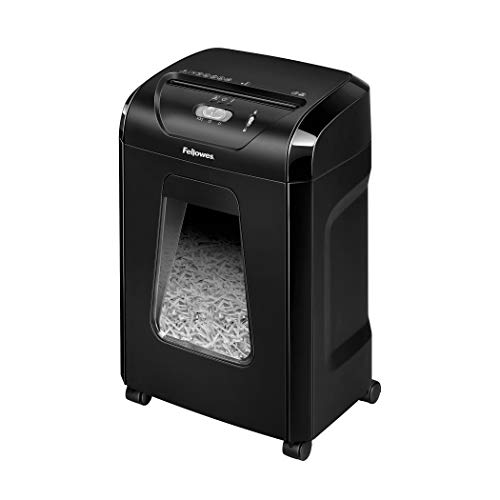
3. Fellowes 14C10 14-Sheet Cross-Cut Shredder
A 14-sheet cross-cut shredder with pieces of 5/32 by 1-9/16 inches, a 5 gallon pull-out bin that the maker says holds over 250 shredded sheets and a 10 minute continuous run time. It takes credit cards, paper clips, staples and unopened junk mail, and the maker describes quiet operation.
Suits: a home office with steady paper. Strengths: a pull-out bin and a longer run time. Weaknesses: a larger body than the 6 and 8 sheet models. Skip it if you want the smallest shredder.

View Fellowes 14C10 14-Sheet Cross-Cut Home Office Paper Shredder on Amazon

Best for a home office that also shreds discs
4. Suntiko 14-Sheet Cross-Cut Shredder
A corded 14-sheet shredder with 4 by 35 mm cross-cut pieces, a 25 liter (6.6 gallon) bin, a listed 68 dB and an ABS body. The maker says it shreds CDs, credit cards, staples and paper clips and has a jam-proof system. Its guidance mentions a duty cycle of 3 to 5 minutes on and 30 minutes off.
Suits: a home office that also shreds discs. Strengths: a 6.6 gallon bin and CD handling. Weaknesses: a lesser-known brand and a short duty cycle. Skip it if you want a long run time.

View Suntiko 14-Sheet Cross-Cut Heavy Duty Paper Shredder on Amazon

Best for a team that shreds batches
5. Amazon Basics 200-Sheet Auto Feed Shredder
An auto feed cross-cut shredder with a 200-sheet tray, a manual slot for 10 sheets, 4 by 20 mm pieces and an 8.5 gallon pull-out bin. The maker lists a 60 minute run with the auto tray, then a 45 minute rest, plus anti-jam reverse and a sleep mode. It weighs 32.9 pounds.
Suits: a team that shreds batches. Strengths: hands-free feeding and a big bin. Weaknesses: the largest and heaviest here at 32.9 pounds. Skip it if space is tight.

View Amazon Basics 200-Sheet Auto Feed Cross-Cut Paper Shredder on Amazon
Best for a busy office
6. Fellowes Powershred 99Ci Cross-Cut Shredder
A heavy-duty cross-cut shredder with a 9 gallon bin, a 30 minute continuous run time and 5/32 by 1-1/2 inch pieces. The maker says it also takes staples, credit cards, paper clips, CDs, DVDs and junk mail and calls it jam-proof. The bullet text says 18 sheets while the details table says 34, so check the page.
Suits: a busy office. Strengths: a long run time and a 9 gallon bin. Weaknesses: 36.4 pounds and conflicting sheet figures. Skip it if you want a light machine.
View Fellowes Powershred 99Ci Cross-Cut Paper Shredder on Amazon
Care and Setup
- Follow the maker’s run and rest times.
- Follow the maker’s guidance on unplugging before you empty the bin.
- Read the maker’s manual for what to keep clear of the opening.
- Do not exceed the stated sheet count.
Mistakes to Avoid
- Feeding more sheets than the listed capacity.
- Shredding items the maker does not list.
- Ignoring the rest time after a long run.
- Choosing a bin too small for your volume.
Security Levels and Particle Size
A cross-cut shredder cuts paper into small pieces, and how small they are decides how hard it is to piece a page back together. Particle size is usually given in millimeters or inches. A smaller piece means a more secure result, because the text is divided into more fragments. Some makers use a standard security level, such as P-3 or P-4, to describe the cut. Check the listing to see if a level is stated, and remember that makers’ figures come from the maker.
Consider what you shred. Junk mail, envelopes and old flyers need little security, while bank statements, tax records, medical forms and documents with account numbers deserve a finer cut. If you handle sensitive material for a business, check whether your industry has rules about how documents must be destroyed. A home user may be well served by a standard cross-cut, while an office handling client files may want a finer cut.
Finer cuts have trade-offs. They often reduce the sheet capacity and produce more waste volume, so the bin fills with more pieces. The machine may also run slower. If you do not need high security, a coarser cross-cut gives you more capacity per pass and less wear on the blades.
Remember that shredding is only part of protecting your data. Digital records, old drives and printed labels also need attention. Shred whole pages rather than tearing them first, and mix pieces from different documents when disposing of them.
Duty Cycle, Motor and Heat
The duty cycle describes how long a shredder can run before it needs to rest. Many compact models run for a few minutes and then require a long cool-down, while larger machines run for far longer. If you shred a few pages a week, a short run time is fine. If you clear a backlog of paper in one go, a longer run time saves frustration.
Overheating protection is common. The machine stops when the motor gets hot and restarts after a rest. This protects the motor but interrupts your work, so check the run and rest times in the listing and compare them with your volume. Do not try to bypass the rest period. Giving the motor time to cool prolongs its life.
Motor strength affects capacity and noise. A stronger motor handles thicker stacks but also generates more heat and noise. Noise levels are often listed in decibels, though makers measure them differently, so treat them as a rough guide. If you work in a shared space or at home, quieter operation can matter, and a model with a sleep mode reduces idle noise.
Feed more sheets than the machine can handle and you invite jams, slower cutting and possible damage. Stay within the stated sheet count, and feed paper straight. If the listing gives different capacity numbers in different places, as one in this guide does, check the manual or ask the seller before relying on a figure.
What Else It Can Shred and What to Avoid
Many shredders accept more than paper. Common extras include staples, small paper clips, credit cards and sometimes discs. Always check the listing and manual to see what is allowed, and how many at once. A card is typically fed one at a time, and a machine that takes discs usually has a separate opening or a specific cutter.
Some items should never go in. Avoid laminated sheets unless the maker allows them, along with adhesive labels, sticky notes in bulk, thick cardboard, plastic bags, fabric and anything damp. Large metal items such as binder clips or heavy staples can damage the blades. Remove them before shredding if the machine does not list them as allowed.
Junk mail can be fine if the machine lists it, but envelopes with plastic windows and glossy materials can leave residue on blades. If your shredder offers a reverse function, use it to clear stuck material, and follow the instructions for jams. Unplug the machine before clearing a jam by hand, and keep fingers, hair, ties and loose clothing away from the opening.
Oil is another point. Some shredders need periodic lubrication of the blades, and others are designed not to need it. Check the manual. Using the wrong lubricant can harm the machine, so follow the maker’s advice. A shredder that has been lubricated correctly runs quieter and handles stacks better.
Bin Size, Footprint and Where It Will Live
A larger bin means fewer trips to empty it, but a larger machine takes more space. Compare the bin volume in the listing with your habits. If you shred a small stack each week, a compact bin is fine. For a busy home office, a bigger bin saves time. Some models have a pull-out bin that makes emptying easy, while others require lifting the head off the container.
Measure the space you plan to use. Under-desk shredders need clearance for the bin and the opening. A deskside model should fit near the paper source so you do not need to carry documents across the room. Consider the cord length and the location of the outlet, and keep the machine away from damp areas and heat sources.
Weight matters if you move it. Lightweight machines are easy to carry from a closet to a desk, while heavier models often have wheels. Look for sturdy casters if the machine is meant to travel.
Also think about bin liners. Some bins accept a bag, which makes disposal tidy. Others do not, and you may need to empty into a separate bag. Check whether the bin has a window or sensor that shows when it is full, because an overfull bin can jam the cutting head. Finally, consider the safety features. Look for an auto-stop when the head is lifted, a lock for children and a clear indication of the machine’s status.
Matching the Shredder to Your Volume and Budget
Start by estimating your weekly volume. Light users, perhaps a handful of sheets, can choose a small machine and accept a short run time. Home offices with a steady flow of paper benefit from a mid-size model with a larger bin. Offices that process stacks should look at auto-feed models or machines built for longer runs, which cut down on hands-on time.
Budget tiers are easy to understand. Entry-level shredders keep the sheet capacity low and the bin small, and they suit occasional use. Mid-range models offer higher capacity, longer run times and more convenience. Higher tiers add heavy-duty motors, large bins and auto feed, at a larger size and weight. A larger machine is not always better, because a heavy unit that stays unused in a closet does not protect your documents.
Questions to ask before buying: How many sheets will I shred at a time? How long will each session last? What items besides paper do I need to handle? Where will it sit, and how will I empty the bin? Is the warranty clear, and does it cover the motor and the cutters?
Signs that it is time to replace a shredder include repeated jams with the right sheet count, a motor that struggles, a burning smell, cutters that leave uncut strips, and a cracked housing or bin. If the machine is still under warranty, contact the maker before giving up on it.
What Belongs in the Shred Pile
People often shred too little or too much. Before buying, sort what you actually handle at home or in a small office, because the volume and the types of material determine how much machine you need.
| Item | Usually worth shredding? | Note |
|---|---|---|
| Bank statements and bills | Yes, once no longer needed | Keep what the law or your accountant tells you to retain |
| Pre-approved offers | Yes | Contain personal details |
| Medical paperwork | Often | Check how long you should keep records |
| Junk mail without personal data | Optional | Recycle if the label has no names |
| Old tax files | After the retention period | Ask a tax professional or official guidance |
| Cards, discs and staples | Only if the maker lists them | Follow the manual |
If you are unsure how long to keep a document, ask the issuing organization or a qualified professional before destroying it.
Setting Up a Shredding Routine
Shredding a little each week is easier on both you and the machine than facing a mountain of paper once a year. A tidy routine keeps the shredder from jamming and saves time.
- Keep a labeled tray or folder for items to be shredded.
- Remove large clips, binder rings and thick bindings from paper first, unless the manual says the shredder can handle them.
- Feed sheets squarely and in batches below the stated sheet capacity, allowing a cooling pause if the machine has a duty cycle.
- Empty the bin before it fills completely, because a packed bin can trigger a stop or cause jams.
- Switch the machine off and unplug it before clearing a jam or cleaning inside.
Keep fingers, jewelry, long sleeves, ties and hair away from the feed opening. Follow the safety notes in the manual.
Where the Shredded Paper Goes Next
Cross-cut confetti has a second life. Check your local recycling rules first, because some programs accept shredded paper only in clear bags or sealed paper sacks, and others do not take it at all. Some gardeners add paper shreds to compost, though plain white and uncoated paper is the usual guidance, and glossy or heavily inked pages are better avoided.
Packing material
Shredded paper can cushion fragile items for storage or shipping. Keep it dry and free from sensitive text, and shake a handful out onto a table to confirm that the pieces are small enough that nothing readable remains.
Pet bedding and crafts
Check with the pet product maker or a veterinarian before using shredded paper as bedding. For crafts, use clean offcuts only.
Noise and Placement
Shredders can be loud, which matters in a shared flat or a quiet office. Place the machine on a stable surface or in a low cabinet with the opening accessible and the power cord out of walkways. Allow ventilation around the motor housing as instructed by the maker. If the unit feels hot or smells like it is struggling, turn it off and give it time to rest before trying again.
Going Deeper: The Details That Decide How a Cross-Cut Paper Shredder Works Out
Spec sheets and headline features only tell part of the story with any cross-cut paper shredder. The picks above were chosen against the criteria in the main guide, but once a cross-cut paper shredder is in daily use, a second layer of detail decides whether it stays convenient or becomes a chore. The points below dig into that second layer, so you can weigh the options in this guide against the way you actually work rather than against a generic checklist.
Sheet capacity is a best-case number
The capacity on the box assumes perfect paper, fed straight, by a patient person. Real capacity for mixed office paper is lower, and feeding at the true comfortable maximum is what keeps a shredder fast and jam-free for years. When comparing picks, treat the headline number as a ceiling and choose the machine whose comfortable working load covers your typical handful, not the one whose ceiling you will lean on daily.
When you compare the picks in this guide on this point, look past the headline claim and ask how it behaves in the second month rather than the first day. Small differences here compound: a slightly better design choice saves a few minutes or avoids one recurring annoyance every single time you use the cross-cut paper shredder, and over a year that matters more than a feature you will only touch once. If two options look equal elsewhere, let this criterion break the tie.
Run time and cool-down shape big jobs
Home and small-office shredders work in bursts: a period of continuous shredding, then a thermal rest. For a weekly handful this never matters; for an annual archive purge it is the whole story. Match the duty pattern to your worst realistic job, or plan to work in sessions. A machine that overheats mid-purge and sulks for half an hour teaches its owner to dread the task.
When you compare the picks in this guide on this point, look past the headline claim and ask how it behaves in the second month rather than the first day. Small differences here compound: a slightly better design choice saves a few minutes or avoids one recurring annoyance every single time you use the cross-cut paper shredder, and over a year that matters more than a feature you will only touch once. If two options look equal elsewhere, let this criterion break the tie.
Bin size and emptying manners
You will empty this bin for years, so its design deserves scrutiny: a pull-out bin that does not shed confetti across the floor, a window or sensor that tells the truth about fullness, and a size matched to how much you shred between emptying days. Overfilled bins are a hidden cause of jams, because paper backs up into the cutting head when it has nowhere to fall.
When you compare the picks in this guide on this point, look past the headline claim and ask how it behaves in the second month rather than the first day. Small differences here compound: a slightly better design choice saves a few minutes or avoids one recurring annoyance every single time you use the cross-cut paper shredder, and over a year that matters more than a feature you will only touch once. If two options look equal elsewhere, let this criterion break the tie.
What else it can safely eat
Credit cards, discs, staples and clips separate the shredders in this guide more than paper performance does. Feeding the wrong item can dull or damage cutters, so the honest list of approved materials matters. If your shredding pile regularly includes cards or media, choose a machine built and rated for them rather than hoping a paper-only head will forgive the experiment.
When you compare the picks in this guide on this point, look past the headline claim and ask how it behaves in the second month rather than the first day. Small differences here compound: a slightly better design choice saves a few minutes or avoids one recurring annoyance every single time you use the cross-cut paper shredder, and over a year that matters more than a feature you will only touch once. If two options look equal elsewhere, let this criterion break the tie.
Planning Around Your Space, Routine and Budget of Attention
Place the shredder where paper accumulates, not where it looks tidy. Documents destined for shredding pile up beside the machine that exists; if the shredder lives in a cupboard, the pile lives on the desk and grows until it becomes a weekend project. Beside the desk, plugged in and ready, a shredder turns disposal into a ten-second habit.
Think about the noise and the audience. Shredders are not quiet, and one in a shared home office will interrupt calls and concentration. If your shredding can be batched, a louder, stronger machine used twice a week may suit the household better than a quieter one fed continuously. Wheels and a modest footprint help it live where it is used.
Decide the security habit, not just the security level. Cross-cut output only protects you if documents actually reach the shredder promptly. A simple rule, such as nothing with an account number leaves the desk unshredded, beats an elaborate policy that collapses in busy weeks. Keep a small tray for pending items so the rule has a physical home.
Which Setup Fits Your Situation?
The same cross-cut paper shredder can be the right answer in one home and the wrong one in another. These scenarios translate the criteria above into recognisable situations, so you can find the one closest to yours and borrow its conclusion.
The home worker clearing a weekly pile
Your load is small but regular: statements, drafts, addressed envelopes. A compact machine with a modest bin, placed at the desk, emptied into the recycling rhythm of the house, suits you best. Prioritise easy feeding and a head that handles the odd staple without drama, because your pile will always contain one.
A household purge of years of paperwork
The annual or moving-house purge is a marathon of mixed paper, cards and surprises. Work in sessions inside the machine’s run time, sort before you shred so non-sensitive paper can go straight to recycling, and expect to empty the bin often. For a true once-a-decade mountain, honestly consider whether a shredding service handles the bulk while the home machine takes over the ongoing habit.
A small office with compliance habits
Where client or patient paperwork is involved, consistency matters more than speed: a defined point in the document’s life where it is shredded, a machine that handles the office’s real daily volume without overheating, and a bin routine that never leaves sensitive confetti sitting in an open container over a weekend. Choose the pick whose capacity gives headroom on your busiest day, not your average one.
First-Time Setup, Done Carefully
Set the shredder on a level floor or a sturdy low stand, plug it directly into a wall socket rather than a flimsy strip, and read the approved materials list before the first feed. Run a few single sheets to learn its sound and pace, then a typical handful. That baseline sound is your diagnostic reference: a healthy shredder sounds boring, and changes in pitch usually announce a jam or an overfeed before either becomes a problem.
Feed the first real batch deliberately: straight, centred, within the comfortable count, letting the machine finish each mouthful before offering the next. Most early jams are impatience jams. Keep the manual’s reverse and clearing instructions somewhere you can find them with paper already stuck, not filed in the box in the loft.
Decide where the output goes from day one. Shredded paper is bulky, dusty and usually unwelcome in some recycling streams when bagged wrongly, so check your local rules once and set up the bag or bin routine to match. A shredder whose output has no planned home creates its own secondary mess beside the desk.
A Care Routine That Keeps Performance Steady
Oil the cutters on the rhythm the maker suggests, using the approved method, because dry cutters work harder, sound rougher and dull faster. In a busy spot, tie oiling to a memorable trigger such as emptying the bin a set number of times. It takes a minute and is the single maintenance act that most extends a shredder’s useful life.
Keep the feed slot clean and the sensors wiped. Paper dust coats the sensors that detect paper and fullness, producing phantom behaviour: machines that will not start, or that run on after the page has gone. A dry cloth or a soft brush during the monthly desk tidy prevents most of these small hauntings.
Rest the machine honestly. Thermal cut-outs are protection, not insult; a shredder that stops mid-purge is asking for its designed pause. Build sessions around the limit rather than fighting it, and never leave a hot machine mid-job with paper half-fed while you make tea, because curious hands and pets find such invitations interesting.
Troubleshooting: Working Through the Common Problems
Most problems with a cross-cut paper shredder announce themselves gradually and have ordinary causes. Work through these checks in order before assuming anything has failed outright; each one starts with the cheapest, most likely explanation.
The shredder has jammed
Switch off, then use reverse as the manual directs rather than hauling on the paper, which packs a jam tighter. If the jam persists, unplug and work from the top with patience, removing small amounts at a time. When it clears, feed a single sheet to confirm the path is truly free, then resume at a smaller handful. A jam almost always means the comfortable capacity was exceeded, whatever the box promised.
It shreds slowly or sounds strained
Strain usually means dull or dry cutters, an overfull bin backing paper into the head, or a diet of thicker material than the rating allows. Empty the bin, oil the cutters, and test on a few ordinary sheets. If ordinary paper still labours, the machine may be nearing the end of its honest life, and forcing it through a purge will finish it theatrically.
It will not start at all
Check the unglamorous causes first: the bin fully seated, because many machines refuse to run with the bin ajar; the head seated correctly on its base; the thermal cut-out still resting after a heavy session; and the socket itself. Shredders are full of sensible interlocks, and most no-start mysteries are an interlock doing its job while the owner blames the motor.
How the Leading Picks Compare in Daily Use
Readers often ask how the leading picks in this guide differ once the obvious differences are set aside. The Amazon Basics Cross-Cut Paper Shredder earns its place at the top of the list through all-round balance: it is the option to start from if your needs are mixed and you want the fewest compromises. The Fellowes Cross-Cut Paper Shredder suits a narrower, more specific set of demands, and it makes most sense when that speciality matches the job you described in the scenarios above. The Suntiko Cross-Cut Paper Shredder is the one to study closely if your priority is long-term running convenience, because its design choices favour steady day-to-day use over headline features.
None of that makes any of them the wrong choice in isolation. The honest way to choose is to rank your own criteria first, using the deep-dive section above, and then see which pick’s strengths line up with the top of your list. Where two picks tie, prefer the one whose routine care and consumables fit the habits you already have, because the best cross-cut paper shredder is the one you will actually look after properly.
More Questions, Answered
Can I put shredded paper in household recycling?
Often yes when loose or in a paper bag, but rules vary and some services reject shredded paper entirely because the short fibres clog their sorting. Check your local guidance once and follow it exactly. Where recycling refuses it, shredded paper still works as compost material or packing, and councils usually accept it in general waste as a last resort.
How long should a home shredder last?
Years, if it is fed within its comfort, oiled on schedule and rested when hot. The machines that die young usually die of purges: a lifetime of light use followed by one weekend of continuous feeding at maximum capacity. Treat a big clear-out as several sessions across days, and a modest shredder will outlast several changes of desk.
Is cross-cut enough for home documents?
For household paperwork, cross-cut output is the widely accepted balance of security and practicality, turning documents into small pieces that are impractical to reconstruct. Offices handling genuinely sensitive material may step up to finer cuts, accepting slower speeds and smaller capacities. The bigger risk at home is not the cut size but the document that never reaches the shredder at all.
Should I shred junk mail and envelopes whole?
Addressed items deserve shredding for the name and address alone, and most machines in this guide handle an unopened envelope comfortably. Remove anything bulky or plasticky, watch for thick card inserts, and feed envelopes singly until you know your machine’s appetite. Window envelopes are generally fine for the cutter, though some keepers separate the plastic window for recycling purity.
Thinking Long Term: The Second Year With Your Cross-Cut Paper Shredder
The first month with a new cross-cut paper shredder is mostly about learning its habits, but the second year is where its true character shows. Parts that felt minor at purchase, such as a stiff control, a fiddly cover or a consumable that is oddly hard to source, become the texture of ownership. This is why the criteria in this guide lean so heavily on everyday behaviour rather than first impressions: a buying decision has to survive hundreds of ordinary uses, not one exciting unboxing.
Keep a light record as the months pass: what you replaced, what you cleaned, what surprised you. That record is worth more than any single review when the time comes to replace or supplement the cross-cut paper shredder, because it describes your usage rather than a stranger’s. Owners who keep even a few lines of notes make their second purchase in this category dramatically better than their first, and they waste far less money relearning lessons they already paid for once.
Getting More From What You Already Own
Before replacing a cross-cut paper shredder that seems disappointing, it is worth auditing the setup around it, because a surprising share of disappointment belongs to placement, settings and routine rather than to the product itself. Work through the basics in this guide once more, slowly, and change one thing at a time. Many owners discover that the performance they were about to pay for again was already in the house, hidden behind one wrong setting or one skipped maintenance habit.
There is also real value in mastering the mid-range option you own instead of chasing the premium one you do not. Skill and routine compound: a keeper who understands their equipment deeply, who has notes on what works in their own rooms and with their own habits, gets results that a casual owner of finer equipment often cannot match. Upgrade when a genuine limit is reached and you can name it precisely, not when frustration is merely general.
When to Repair, When to Replace
Every cross-cut paper shredder eventually presents the same question, and it helps to have principles ready before emotion and urgency get a vote. Repair when the fault is isolated, the part is available, and the rest of the unit is sound; a machine with one tired component and years of good structure is worth the fix. Replace when faults arrive in clusters, when the core of the product is what has aged, or when repair costs approach the price of a modern equivalent that would also be cheaper or kinder to run.
Sentiment complicates the maths, and so does familiarity, but downtime has a cost too, especially when other work or living things depend on the equipment. A calm rule used by many experienced owners: if you have repaired the same class of fault twice, the third occurrence is the product telling you its story. Listen early, budget honestly, and the replacement, when it comes, will feel like a decision rather than a defeat.
Teaching Someone Else to Use It Well
In most homes and small offices, a cross-cut paper shredder has more than one user, and its results quietly depend on the least careful of them. A few minutes spent showing a partner, a colleague or an older child the basics, how to load it, what to check, and what never to force, prevents the slow damage that mysterious hands cause. Write the essentials on a card kept with the equipment; memories differ, but the card is the same for everyone.
Shared equipment also benefits from a simple agreement about consumables and problems: who orders replacements, where the spare lives, and what to do when something behaves oddly. The goal is that a problem is reported the day it appears, while it is small, rather than worked around silently until it becomes the kind of failure that interrupts everyone’s week. Good equipment in a home with good habits outlasts premium equipment in a home without them, and the difference is rarely close.
Accessories and Add-Ons: What Actually Earns Its Place
Almost every cross-cut paper shredder attracts a small economy of accessories, and most of them solve problems you may never have. The disciplined approach is to live with the basic setup for a month and keep a note of every friction you actually meet; the accessory that answers a note on that list is a purchase, while everything else is decoration. This habit also reveals the opposite: sometimes the missing piece is not an accessory at all but a different routine, such as where the equipment lives or when it is used.
When you do add something, add one thing at a time and live with it for a while. Changing three variables at once makes it impossible to know which one helped, and accessories interact in surprising ways. The owners who get the most from their equipment tend to own surprisingly little of it beyond the core setup, but every piece they do own has a named job and a history of earning its shelf space.
Seasonal Changes and Your Cross-Cut Paper Shredder
Rooms are not constant through the year, and neither is the behaviour of the equipment in them. Heating in winter dries the air and changes how materials behave; summer humidity, open windows and holiday absences each bring their own effects. A cross-cut paper shredder that seems to develop a fault every January or August is often simply reporting the season, and a keeper who expects the pattern can prepare for it instead of troubleshooting a healthy machine.
Build the seasons into your routine deliberately: a check before the heating goes on, a plan for holiday periods when the equipment sits idle or works harder, and a note in your log of how last year’s extremes went. Two years of such notes turn seasonal surprises into a calendar, and a calendar is the difference between maintenance and emergency.
A Short Pre-Purchase Checklist to Read Twice
Before committing, read back through your own notes rather than the marketing: the space measured, the routine imagined honestly, the running costs listed, and the one criterion you decided matters most. Then check the pick you favour against that single criterion first, because a cross-cut paper shredder that wins on your main criterion and merely satisfies the rest will satisfy you daily, while one that is average at everything including your priority will quietly disappoint you in the same way every day.
Finally, imagine the purchase a year old. The novelty is gone, the equipment is dusty, a consumable needs ordering and something minor has gone slightly wrong. If the version of the product you are considering still seems like the right companion in that unglamorous scene, it almost certainly is. Buying for the ordinary Tuesday rather than the exciting Saturday is the whole secret this guide has been circling, and it works in every category we test.
Cross-Cut Shredder FAQ
What is the difference between strip-cut and cross-cut?
Strip-cut leaves long strips. Cross-cut cuts in two directions and leaves small pieces.
Can I shred credit cards?
Most models here list them, usually one at a time. Check each page for limits.
What does a security level mean on a shredder?
It describes how small the shredded pieces are, with smaller pieces being harder to reassemble. Check whether the listing states a level, and choose a finer cut for sensitive documents.
Why does my shredder stop and refuse to run?
It may have overheated, jammed, had its head lifted or its bin may be full. Check the manual, allow a rest period, clear any jam and make sure the bin and head are seated.
Should I oil my shredder?
It depends on the model. Some need regular lubrication, and others do not, so follow the maker's guidance and use only the recommended product.
Can I shred staples and paper clips?
Many models accept staples and small paper clips, but check the listing and manual. Remove large clips and binder clips unless the maker says they are allowed.
Is it safe to shred credit cards?
Some shredders list them, usually one at a time. Use the correct slot, follow the manual and keep fingers away from the opening.
How do I clear a jam?
Unplug the machine, use the reverse function if there is one and remove stuck paper by hand only when it is safe. Follow the maker's instructions to avoid damaging the blades.
How many sheets should I feed at once?
Stay at or below the stated sheet capacity, and feed paper straight. Overloading increases the chance of jams and wear.
The Short Version
For light desk use, the Amazon Basics 8-sheet. For a small light body, the Amazon Basics 6-sheet. For a pull-out bin, the Fellowes 14C10. For discs, the Suntiko. For batches, the Amazon Basics 200-sheet. For long runs, the Fellowes 99Ci.