
Where to buy
Check the latest price, availability and delivery on Amazon. Orders are placed on Amazon. We may earn a commission from qualifying purchases.
- Best white streaming PC overall: Skytech King 95, Ryzen 7 9800X3D, RTX 5070 Ti 16GB — Check on Amazon
- Best white RTX 5080 streamer, on deal days only: Skytech O11 Vision, Ryzen 7 9800X3D, RTX 5080 16GB — Check on Amazon
- Best Intel white build for streaming plus production: iBUYPOWER Element Pro White, Core i9-14900KF, RTX 5070 Ti 16GB — Check on Amazon
See 3 more Amazon options
- Best glass showcase for an on-camera setup: Thermaltake LCGS View i1470S-170, Core i7-14700F, RTX 5070 12GB — Check on Amazon
- Best dual-encoder value, on deal days: Skytech Omega, Ryzen 7 7800X3D, RTX 4070 Super 12GB — Check on Amazon
- Best way to stream for far less: Skytech Azure 3, Ryzen 7 7700X, RTX 5070 12GB — Check on Amazon
Read the full guide ↓
Disclosure: As an Amazon Associate, reviewstook.com earns from qualifying purchases. Links to Amazon on this page are affiliate links; they cost you nothing extra. Listing details such as price and availability change often, so check the current Amazon listing before you buy.
A streaming PC does two jobs at once, and this guide grades it on both. The first is the one every gaming PC does: render your game. The second runs in parallel for hours — OBS compositing your scenes, an encoder turning the finished picture into a broadcast feed, chat, alerts and a browser of dashboards competing for whatever the game leaves behind, and, if you record while you stream, a second encode writing a local copy. A machine can be an excellent gaming PC and a mediocre streaming PC, because the second job is decided by a part of the graphics card most gaming guides never mention: its hardware encoder. That is why this guide grades encoder-first: every pick is ranked by the encoder silicon it carries — how many blocks, which generation, whether it can encode AV1.
The standard single-PC setup runs the game, OBS, chat and your alerts on one machine. On Twitch, the working standard is a constant-bitrate feed of roughly 6,000 kbps with keyframes every two seconds, sent in H.264, because that is what the platform’s ingest is built around. YouTube accepts considerably more: higher bitrates, 1440p ingest, and AV1 encodes where hardware and platform support line up — which is where the AV1-capable cards here earn their keep. Streaming in 4K is platform-limited rather than hardware-limited: even the strongest machine here cannot push a 4K broadcast through a platform that does not accept one, so no pick gets credit for 4K streaming. What the hardware decides is how much of your game’s performance the broadcast costs you, and whether streaming and recording at once is a setting or a sacrifice.
Then there is the white part, which for a streamer is not pure vanity: a gaming PC in a streaming room often sits inside the camera frame, and a white build reads on camera as part of the set rather than as furniture. So every pick is also graded on how white it actually is, using only what its listing documents, never what a listing photograph appears to show. The honest headline is this: at $3,000 on Amazon, no system contracts a white graphics card, because every integrator here reserves the right to vary the card brand. You are buying documented white cases and, in the leading pick, a documented white cooler, around a card whose shroud color is a coin flip. Two more headlines: there is no RTX 5090 system anywhere near $3,000 in any color — verified RTX 5090 prebuilts sit well above this budget — so the encoder ceiling here is set by the RTX 5080 and 5070 Ti. And prices in this category move often, so check the current price on Amazon for every pick before you buy. If your budget is smaller, the same encoder-first grading in our guide to the Best White Gaming PC For Streaming Under $2500 covers the tier below.
In this guide
Quick Picks
Each row below names a streamer type and the system that suits it, with a link to the listing.
| Streamer type | Pick | Why it stands out | Link |
|---|---|---|---|
| Best white streaming PC overall | Skytech King 95, Ryzen 7 9800X3D, RTX 5070 Ti 16GB | Dual NVENC plus AV1 for stream-and-record at once; white case and AIO documented; sells under budget every day | Check on Amazon |
| Best white RTX 5080 streamer (deal days) | Skytech O11 Vision, Ryzen 7 9800X3D, RTX 5080 16GB | The strongest encoder and renderer in a white panoramic case — coupon-dependent, with a strict walk-away rule | Check on Amazon |
| Best Intel white build | iBUYPOWER Element Pro White, Core i9-14900KF, RTX 5070 Ti 16GB | Dual NVENC plus AV1 and a 24-core CPU that makes software encoding a genuine fallback; white case documented | Check on Amazon |
| Best glass showcase | Thermaltake LCGS View i1470S-170, Core i7-14700F, RTX 5070 12GB | Edge-to-edge glass white showcase for an on-camera desk; single NVENC with AV1, so stream and record share one encoder | Check on Amazon |
| Best dual-encoder value (deal days) | Skytech Omega, Ryzen 7 7800X3D, RTX 4070 Super 12GB | Two Ada-generation encoders and AV1 well below this budget when discounted — buy at the deal or not at all | Check on Amazon |
| Best way to stream for far less | Skytech Azure 3, Ryzen 7 7700X, RTX 5070 12GB | Current-generation AV1 encoding well below the ceiling — leaves room in the budget for the microphone, lights and monitor | Check on Amazon |
How These Picks Were Chosen
The budget was applied as a real ceiling, not a headline. Every system below is a live Amazon listing positioned at or under $3,000, or — for the deal-dependent picks — belongs in this budget only when a discount or coupon brings it to or under $3,000, with a stated walk-away rule. Check the current price on Amazon before you buy, because integrator pricing moves often and a fixed number printed here would go stale fast. Anything whose white version exists only in renders, whose graphics card turned out to be a tier below the headline, or whose under-$3,000 price required a rebate-card trick was excluded.
For a streaming guide, the first filter was the encoder. We read each listing’s documented graphics card and graded the encoder hardware that card carries: how many NVENC blocks, which generation, and whether AV1 encoding exists at all. That grading is deliberately unforgiving about a distinction gaming guides blur: two cards with similar gaming performance can be very different streaming machines. A card with two encoder blocks can run your broadcast encode and a high-quality local recording on separate hardware simultaneously. A card with one block shares it between the two jobs — perfectly workable, but a compromise you should buy knowingly. And AV1 encoding matters only in the present tense: it is the codec YouTube’s higher-quality ingest paths reward, while Twitch’s standard feed remains H.264, so no pick gets AV1 credit for a Twitch workflow it cannot improve today.
The white grading runs in parallel, and it is strict: renders lie politely, so we grade only what a listing documents in its specification data — case color, cooler color, memory description, graphics card model — never what a photograph appears to show. The grades are: complete, where case, card, cooler and memory are all documented white; strong partial, where the case and at least one major internal component are documented white but the card is not contracted in white; partial, where the white case is documented and the internals are unspecified or covered by a “brand may vary” clause; and case-only, where only the shell is white. No system at $3,000 on Amazon earns “complete”: every integrator below reserves the right to vary the graphics card brand, which means the largest component in your camera frame is the one part nobody contracts in white. On Amazon at $3,000 you are choosing among strong partials and partials, and the reviews name exactly which parts of each machine are documented.
The supporting parts were graded like a broadcaster’s checklist. Memory matters twice over, because the game, OBS, chat and a browser compete for it, and every pick here carries 32GB. The processor matters for everything the encoder does not do, and for the one legitimate software-encoding fallback discussed in the encoder map below. Storage matters because local recordings accumulate fast. And the network rule is absolute: stream on a wired Ethernet connection, never on Wi-Fi. None of the six listings documents a wired port speed, so this guide claims no port speed for any pick — check the live listing’s motherboard specification if the port matters to you.
We did not test these systems ourselves, and we did not run a single broadcast on any of them. We read the maker listings and specification blocks, cross-checked model numbers against maker and retailer data, and graded the encoder hardware from the documented graphics cards. Performance is described qualitatively, by tier and workload, because we have no measurements of our own to report.
The Encoder Map: What Each Card Can Actually Broadcast
Everything in the reviews below follows from this section. NVIDIA’s consumer cards carry a dedicated encoder block called NVENC, separate from the silicon that renders your game, which is why a hardware-encoded stream costs so little gaming performance. Two facts decide a card’s streaming grade: how many NVENC blocks it carries, and which generation they are — Blackwell is the ninth, Ada the eighth. AV1 encoding exists only on Ada and newer cards; nothing older can produce an AV1 broadcast encode, whatever a listing’s marketing implies.
Applied to the six documented cards here, the map is this. The RTX 5080 and RTX 5070 Ti each carry two ninth-generation NVENC blocks plus AV1 — the strongest configuration in consumer cards, and the only setup here where a Twitch H.264 broadcast and a high-quality local recording run on genuinely separate encoder hardware. The RTX 4070 Super carries two eighth-generation Ada NVENC blocks plus AV1: one generation older, the same dual-block arrangement, and for a ~6,000 kbps Twitch feed the practical difference is small. The plain RTX 5070 — note the distinction, because listings blur it — carries a single ninth-generation NVENC block plus AV1: current-generation and entirely capable, but stream and record share the block, and this guide never upgrades it to a dual-encoder claim, however the card is marketed.
The processors contribute less than beginners expect, and in two cases here, nothing at all. Intel’s Quick Sync encoder lives in a CPU’s integrated graphics — and the two Intel picks use F-suffix chips, the Core i9-14900KF and the Core i7-14700F, which have no integrated graphics and therefore no Quick Sync. No second or integrated encoder is claimed for any of the AMD-processor picks either; the graphics card is the whole encoding story. The one genuine alternative is software encoding (x264 in OBS), legitimate in exactly one place here — the Element Pro’s 24-core i9 can encode in software while gaming, at real cost to CPU headroom. On the eight-core processors elsewhere here, x264 is a stopgap, not a strategy.
The 6 Best White Gaming PCs for Streaming Under $3,000
Skytech King 95, Ryzen 7 9800X3D, RTX 5070 Ti 16GB (Model ST-KING95-1671-W-AM)
Who it suits: The streamer who wants the complete single-PC workflow — game, broadcast and a clean local recording at once — in the best-documented white build under $3,000.
The streaming case starts with the card. The RTX 5070 Ti carries two ninth-generation NVENC blocks and AV1 encoding: point OBS at one block for your live feed and the second at a high-bitrate local recording, and neither job touches the other’s headroom or your game’s rendering. On Twitch that means the standard ~6,000 kbps CBR H.264 feed runs on dedicated hardware while your recording is captured at whatever quality you choose. On YouTube, the same card can send the higher-bitrate and AV1 ingest paths the platform rewards. There is no encoder compromise to explain away in this pick.
The rest of the machine is built to feed that card. The Ryzen 7 9800X3D is the flagship gaming processor of its generation: OBS compositing, chat, alerts and the browser all draw on the processor the game is not using, and this chip leaves the most on the table. Around it sit 32GB of DDR5-5600 RGB memory, a 1TB Gen4 NVMe SSD, an 850W Gold ATX 3 power supply and a 360mm ARGB liquid cooler. The storage is the one ordinary note — recordings accumulate, and 1TB is the joint-smallest drive here — but it can be upgraded later without touching anything that makes this machine good at streaming.
The white execution is why it leads a white guide rather than merely qualifying for one. The listing documents the King 95 case in white with its wrap-around glass, and deal coverage of this exact model documents a white AIO cooler — the assembly that dominates the view through the glass, and through your camera, is white rather than a black unit behind white panels. That earns the guide’s only strong partial grade. Pricing completes the case: check the current price on Amazon — this pick sits inside the budget as an everyday purchase rather than a deal-only one, with little to no premium for the white execution against comparable black 5070 Ti systems, and an even stronger position on deal days.
- Two NVENC blocks plus AV1 — stream and record simultaneously on separate encoder hardware.
- 9800X3D leaves maximum CPU headroom for OBS, chat and the rest of the setup.
- White case and white 360mm AIO documented; the best-evidenced white execution here.
- Check price on Amazon — positioned inside the budget as an everyday buy.
Honest limitation: Skytech’s “graphics card brand may vary” clause means the card’s shroud color is not contracted — a black or silver card can ship inside this white build, and in a streaming room it will be visible on camera. No Amazon system at this budget contracts a white card; if a guaranteed-white graphics card is the whole point, that is a maker-direct or build-your-own conversation.
Choose it if you stream and record at once and want the strongest everyday purchase in this guide. Skip it if the uncontracted card color is a deal-breaker, or you are set on an RTX 5080 and willing to wait for the pick below to come to you.

Skytech O11 Vision, Ryzen 7 9800X3D, RTX 5080 16GB (Model ST-O11V-2568-W-AL)
Who it suits: The patient streamer targeting a white RTX 5080 — the strongest renderer and joint-strongest encoder here — who will only buy when a discount or coupon pulls it under the ceiling.
As a streaming machine, the specification is the strongest in this guide, full stop. The RTX 5080 carries the same dual ninth-generation NVENC configuration as the 5070 Ti, with AV1 encoding, so the stream-and-record split works identically — but the renderer behind it is a tier up, which changes what you can broadcast: this is the pick that renders demanding games at native 1440p or entry 4K while the encoders run, so a high-bitrate YouTube feed shows the game at its best rather than at the settings the stream forced. The supporting specification rises with it: the same 9800X3D, an X870 motherboard, 2TB of Gen4 NVMe storage — the drive a recording habit actually wants — 32GB of faster DDR5-6000 RGB memory, an 850W Gold ATX 3 power supply and a 360mm ARGB liquid cooler, all inside Lian Li’s PC-O11 Vision panoramic case, documented in white — the most striking machine here on camera.
Now the price discipline, stated as plainly as this guide requires. Systems like this — white, RTX 5080 — typically sit above this budget, and this listing usually sits in that territory. Check the current price on Amazon before you judge it. What brings it into a $3,000 guide is documented deal behavior in its model family: the O11 Vision 5080 line has appeared on Amazon within this budget when a discount and coupon combine — and the variant seen in that position carried a smaller SSD than this one, which the guide states rather than hides. So the rule is mechanical: buy it only when the listing in front of you, with any coupon applied, totals $3,000 or less — check price on Amazon to confirm. At that point it is the best white streaming PC in this guide by a clear margin. Above it, the King 95 is the correct purchase.
Two verification notes belong in this review. The listing’s title advertises Wi-Fi 7 while one field in its specification data says 802.11ac; the listing contradicts itself, so treat the wireless standard as unconfirmed — and for streaming the question is academic anyway, because the broadcast goes over a wire or it goes badly. Skytech’s “brand may vary” clause applies here too, so the white grade is partial. When a coupon brings it within budget, its premium for the white execution over comparable black 5080 systems on deal is modest.
- RTX 5080: dual NVENC plus AV1, behind the strongest game renderer in this guide.
- 2TB storage and DDR5-6000 — the specification a recording workflow actually consumes.
- White Lian Li O11 Vision panoramic case, documented in Amazon’s own listing.
- Check price on Amazon — under budget only when a discount or coupon brings it within the ceiling.
Honest limitation: This is a deal-only pick. Its everyday positioning sits above $3,000; the within-budget evidence belongs to a sibling variant of the same model family; and if no discount is live when you shop, this guide’s answer is the King 95, not a stretched budget. The listing contradicts itself on the Wi-Fi standard as well.
Choose it if you find it at $3,000 or under with coupon applied and you broadcast demanding games at high settings. Skip it if it is sitting at its everyday price, or if you need to buy this week whatever the deals calendar says.
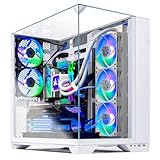
iBUYPOWER Element Pro White, Core i9-14900KF, RTX 5070 Ti 16GB (Model EPWI9N57T01)
Who it suits: The streamer whose machine also does production work — editing, rendering, compiling — who wants Intel flagship power under the same dual-encoder card as the King 95.
The streaming hardware matches the leader exactly where it counts: the RTX 5070 Ti’s two ninth-generation NVENC blocks and AV1 encoding give the same stream-on-one-block, record-on-the-other arrangement. What differs is everything around the card. The Core i9-14900KF is a 24-core flagship, overqualified for gaming alone and genuinely useful in a streaming room: the whole second job of a broadcast PC — compositing, alerts, chat, the browser, the recording software — has more processor to spread across, and it is the one machine here where software encoding is a real option rather than a stopgap, since OBS’s x264 encoder can carry a stream on that many cores while the game runs. One fact must be stated plainly: the 14900KF is an F-suffix chip with no integrated graphics, so it has no Quick Sync encoder. The NVIDIA card is the encoding story, with x264 as the CPU-costly alternative.
On white execution, this pick pairs the guide’s most plainly documented case with its least documented interior. Amazon’s listing data for this exact model states the color as White — no inference from photographs. Past the case, the listing’s specification data pins down neither the cooler type nor the internal components’ colors, and iBUYPOWER builds this family with whichever contracted parts are on the line. The grade is partial, honestly earned. The configuration otherwise runs 32GB of DDR5 RGB memory, a 1TB NVMe SSD and Windows 11 Home.
Pricing needs the same honesty: check the current price on Amazon for this exact model — iBUYPOWER’s promotion calendar moves its listing price, so confirm the live listing rather than relying on a fixed figure. For market context — clearly labeled as a sibling model at another retailer — the white Element 9 Pro, with a Core Ultra 7 and the same RTX 5070 Ti, has appeared at Newegg positioned in the middle of this budget tier in deal coverage. That is family context, not this listing’s price. The rule mirrors the O11 Vision’s: this pick belongs in a $3,000 guide only while the live listing reads at or under $3,000, and when it sits in the middle of this tier it is a competitive dual-encoder system.
- Same dual-NVENC-plus-AV1 card as the King 95 — full stream-and-record split.
- 24-core i9 makes x264 software encoding a genuine fallback, unique in this guide.
- Case color documented as White in Amazon’s own listing data.
- Keyboard and mouse included; check price on Amazon for the current positioning.
Honest limitation: No stable Amazon price could be pinned for this exact model in research, its internal component colors are not documented, and its F-suffix processor has no Quick Sync — you are buying a verified white case and a dual-encoder card, with the interior and the final price confirmed only on the live listing.
Choose it if your stream room is also your editing room and the live price reads at or under $3,000. Skip it if gaming and streaming are the whole workload — the King 95’s X3D chip is the stronger games processor — or if documented interior color matters more than the CPU.

Thermaltake LCGS View i1470S-170, Core i7-14700F, RTX 5070 12GB (Model V17S-B760-570-LCS)
Who it suits: The streamer whose desk is the set — who wants the strongest furniture-grade white showcase on camera, and whose workflow is broadcast first, recording second.
Thermaltake’s LCGS line is built by a case company, and in a streaming room that has a real argument behind it: the View i1470S-170 wraps its components in an edge-to-edge tempered-glass showcase chassis in the line’s white Snow finish, presenting the build like a display piece behind you. The streaming grade, though, turns on the card, and here the distinction this guide keeps making becomes concrete. The RTX 5070 is a Blackwell card with AV1 encoding — but the plain 5070 carries a single ninth-generation NVENC block, not the pair in the 5070 Ti and 5080 above. In practice: your Twitch or YouTube encode runs on dedicated hardware and costs the game almost nothing. What you give up is the clean split — a simultaneous local recording shares the same block as the broadcast, so stream-plus-record is a managed compromise here rather than a free one, and the Core i7-14700F under it is an F-suffix chip, so there is no Quick Sync reserve to hand the second job to. Streamers who broadcast live and clip from the VOD will never feel the difference; streamers who record everything locally should read the picks above this one first.
The rest of the specification is a strong high-refresh 1440p gaming machine: 32GB of Thermaltake’s own ToughRam DDR5-6000 RGB memory — joint-fastest in this guide — a 1TB NVMe SSD, a B760 motherboard, Wi-Fi and Windows 11. The white grade is partial, case-led: the Snow showcase chassis is the documented white element, the ToughRam’s RGB lighting is documented, and the graphics card’s shroud color is not contracted in the verified listing data — a distinction visible through edge-to-edge glass and on camera, so it is graded rather than glossed. Two specification gaps deserve naming: the verified listing data does not pin down the power supply’s wattage or the exact cooler — worth confirming on the live listing before ordering.
Price is where discipline matters most here: check the current price on Amazon, because this machine’s positioning moves noticeably between its lower and higher points. At the lower end of its range, a modest premium over the cheapest current RTX 5070 systems buys the showcase case, the faster memory and the Thermaltake build. At the upper end you are paying close to dual-encoder RTX 5070 Ti territory for a machine whose card is a tier lower and whose encoder is single rather than dual — a trade that is very hard to justify in a streaming guide. The premium for the white showcase here therefore depends heavily on where the live listing sits on the day you shop.
- Edge-to-edge glass white showcase chassis — the strongest on-camera presentation here.
- Single NVENC with AV1: a fully capable live-broadcast encoder, current-generation.
- ToughRam DDR5-6000 RGB — the joint-fastest memory specification in the guide.
- Check price on Amazon — fairest for the showcase at the lower end of its range.
Honest limitation: You are paying for presentation, and the encoder is single-block: stream and record share one NVENC, the processor has no Quick Sync to offload to, and at the upper end of its range this is a single-encoder RTX 5070 system priced close to the King 95’s dual encoders and stronger card. The verified listing data also leaves the power supply wattage and cooler model unpinned.
Choose it if the on-camera aesthetic leads, you broadcast live rather than recording everything, and you catch it at the lower end of its range. Skip it if it is sitting at the upper end of its range — buy the King 95 instead — or if simultaneous high-quality recording is central to your workflow.

Skytech Omega, Ryzen 7 7800X3D, RTX 4070 Super 12GB (Model ST-OMEGA2-1126-W-AM)
Who it suits: The competitive streamer who wants a dual-encoder machine in a white case and will buy a last-generation card at a deal price to get it.
The streaming logic of this pick is better than its “last-generation” label suggests, because encoder generations age more slowly than rendering ones. The RTX 4070 Super carries two eighth-generation Ada NVENC blocks and AV1 encoding: the same dual-block arrangement as the flagship picks, one encoder generation older. For the standard Twitch workflow — roughly 6,000 kbps CBR in H.264 — the practical difference between the eighth and ninth generations is small, and the stream-and-record split works exactly as it does on the King 95. AV1 is present for YouTube’s higher-quality paths. What is genuinely given up sits on the rendering side: no DLSS 4 multi-frame generation for the newest single-player titles, and 12GB of memory that is comfortable at 1440p and tighter at 4K. Neither touches the broadcast itself.
The Ryzen 7 7800X3D is the other half of the argument: the flagship gaming CPU of its generation, still elite precisely where competitive streamers live — CPU-limited esports titles where the frame-rate floor is set by the processor. Around the pair: 32GB of DDR5-5600 RGB memory, a 1TB Gen4 NVMe SSD, a B650 motherboard on the upgrade-friendly AM5 platform, and a 750W Gold power supply, in the white edition of Skytech’s Omega case. The white grade is partial: the white case is the documented element, and Skytech’s “graphics card brand may vary” clause leaves the card’s color uncontracted, as with its siblings above.
Everything about this pick is the price: check the current price on Amazon before you judge it. At its deal positioning it is remarkable value: a dual-encoder card, an X3D processor and 32GB of DDR5 in a white case for plain-RTX-5070 money, with effectively no premium for the white execution. At its higher positioning, the logic inverts: you would be paying close to dual-encoder 5070 Ti territory for a last-generation card, and no processor advantage closes that gap for most streamers. Buy it at its deal positioning or not at all.
- Two Ada NVENC blocks plus AV1 — the full stream-and-record split, one generation older.
- Ryzen 7 7800X3D — an elite high-refresh gaming processor; still the point of the build.
- 32GB DDR5-5600 RGB and a 750W Gold PSU on an AM5 platform with a real upgrade path.
- Check price on Amazon — dual-encoder white-build value on deal days that nothing current matches.
Honest limitation: A last-generation graphics card on the rendering side: no DLSS 4 multi-frame generation, 12GB of memory, and at the upper end of its range it is simply the wrong purchase next to the 5070 Ti systems above it in this guide.
Choose it if you catch it at its deal positioning and your broadcast is high-refresh competitive play. Skip it if it is listed at the upper end of its range, or if 4K and the newest frame-generation features are your priority — that money belongs with the King 95.

Skytech Azure 3, Ryzen 7 7700X, RTX 5070 12GB (Model ST-AZURE3-1851-W-AM)
Who it suits: The streamer whose $3,000 is a whole-setup budget — who would rather broadcast from a complete room, with a real microphone and lights, than from a flagship tower and a headset mic.
The Azure 3 is the value anchor of this guide, and its streaming specification is more serious than its price suggests. Its RTX 5070 is the same plain-5070 silicon as the Thermaltake’s: a single ninth-generation NVENC block with AV1 encoding. That makes it a fully current live-broadcast machine — the Twitch standard and YouTube’s AV1 paths are both covered by dedicated hardware — with the same single honest caveat: a simultaneous local recording shares the one encoder block with the broadcast. The Ryzen 7 7700X driving it is a strong eight-core gaming processor with ample room for OBS and chat; software encoding on it is a stopgap, not a plan.
The supporting specification is a class above the price. Memory is 32GB of DDR5-6000 RGB, joint-fastest in this guide; storage is a 1TB Gen4 NVMe SSD; the power supply is an 850W Gold ATX 3 unit, the same specification class as the flagship picks; cooling is a 360mm ARGB liquid cooler. The white Azure case is a tempered-glass design that presents as a deliberate white build on camera, and the whole specification sits on the AM5 platform with a drop-in processor upgrade path. Its white grade is partial, in the family pattern: white case documented, cooler lighting documented, and the graphics card under Skytech’s brand-may-vary clause, so its shroud color is not contracted — the same coin flip the flagship picks ask, for considerably less.
The pricing is the headline: check the current price on Amazon — this model sits among the lowest-positioned current-generation RTX 5070 systems this batch’s research has verified in any color, which makes its premium for the white execution effectively negligible. What that leaves is the interesting part for a streamer: a substantial share of a $3,000 budget unspent. The kit section below spends it in the right order — microphone before everything, then light, then the monitor — because that money improves a broadcast more than the step from a single encoder to a dual one does. The honest trade is graphics tier: at 1440p this machine is entirely at home, it leans on DLSS in the heaviest titles where the King 95 renders natively, and 4K gaming is an upscaled experience here.
- Current-generation single NVENC with AV1 — Twitch and YouTube paths both covered.
- 850W Gold ATX 3 PSU and DDR5-6000 — supporting parts a class above the price.
- Check price on Amazon — positioned low in its tier, with effectively no premium for the white execution.
- Leaves a substantial share of the budget for the microphone, lights and monitor a stream needs.
Honest limitation: The encoder is single-block, so stream and record share it, and the RTX 5070 is a tier below the 5070 Ti picks as a renderer: native 1440p in most games, DLSS-dependent in the heaviest ones, and an upscaling card at 4K. If the tower alone is the budget and a dual-encoder split is the goal, this is headroom deliberately left unused.
Choose it if your $3,000 covers the whole streaming setup, or you want a current-generation white broadcast machine with money back. Skip it if the full budget is for the tower and you record everything locally at high quality — spend up to the King 95.

Comparison Table
All six systems side by side, graded as streaming machines. Check the current price on Amazon for every system — pricing moves often. The encoder column follows the map above: only documented silicon counts, and the plain RTX 5070 is a single-encoder card wherever it appears.
| System | CPU | GPU | Encoder | RAM / Storage | White grade | Price | Link |
|---|---|---|---|---|---|---|---|
| Skytech King 95 | Ryzen 7 9800X3D | RTX 5070 Ti 16GB | 2× NVENC (9th gen) + AV1 | 32GB DDR5-5600 / 1TB | Strong partial — case + white AIO documented | Check price on Amazon | Check on Amazon |
| Skytech O11 Vision | Ryzen 7 9800X3D | RTX 5080 16GB | 2× NVENC (9th gen) + AV1 | 32GB DDR5-6000 / 2TB | Partial — white panoramic case documented | Check price on Amazon — usually over $3,000; buy only within budget with coupon | Check on Amazon |
| iBUYPOWER Element Pro White | Core i9-14900KF | RTX 5070 Ti 16GB | 2× NVENC (9th gen) + AV1; no Quick Sync (F-suffix) | 32GB DDR5 / 1TB | Partial — case documented white, interior unspecified | Check price on Amazon | Check on Amazon |
| Thermaltake LCGS View i1470S-170 | Core i7-14700F | RTX 5070 12GB | 1× NVENC (9th gen) + AV1; no Quick Sync (F-suffix) | 32GB DDR5-6000 / 1TB | Partial — white glass showcase case | Check price on Amazon | Check on Amazon |
| Skytech Omega | Ryzen 7 7800X3D | RTX 4070 Super 12GB | 2× NVENC (8th gen Ada) + AV1 | 32GB DDR5-5600 / 1TB | Partial — white case documented | Check price on Amazon | Check on Amazon |
| Skytech Azure 3 | Ryzen 7 7700X | RTX 5070 12GB | 1× NVENC (9th gen) + AV1 | 32GB DDR5-6000 / 1TB | Partial — white case documented | Check price on Amazon | Check on Amazon |
Setting Up OBS on Any of These Machines
Whichever pick you buy, the same configuration discipline applies. In OBS, choose the NVIDIA NVENC encoder for your output — on every machine in this guide, the graphics card is the encoder that matters: the King 95, O11 Vision, Element Pro and Omega broadcast from dual encoder blocks (ninth-generation on the first three, eighth-generation Ada on the Omega), and the Thermaltake and Azure 3 from a single ninth-generation block. On the dual-encoder machines, set your local recording to a separate NVENC instance at high quality and the two jobs will not compete; on the single-encoder machines, record the stream’s own output, or accept that a high-quality simultaneous recording is the upgrade you are deferring to a future card.
For Twitch, set rate control to CBR at roughly 6,000 kbps with a keyframe interval of two seconds — that pairing is the platform’s working standard, and deviating from it buys nothing. For YouTube you have headroom the Twitch feed never uses: higher bitrates, 1440p ingest, and on every card in this guide an AV1 encode option.
When a stream stutters, OBS tells you which of three different problems you have — and each has a different fix, so read the counter before changing settings at random. Dropped frames from rendering lag mean the GPU is saturated by the game and OBS cannot composite its scenes: cap the game’s frame rate or lower its settings — the encoder is innocent. Dropped frames from encoding lag mean the encoder block is overloaded: on a dual-encoder machine, check that the broadcast and the recording are not stacked on one block; on a single-encoder machine, lower the recording quality or record the stream output — and never solve it by switching to software encoding, except on the Element Pro, whose 24 cores make x264 a real, if costly, alternative. Dropped frames from network stalls mean the upload path failed, and no setting inside the PC fixes that: they are the signature of a stream sent over Wi-Fi. Which brings back the rule stated earlier: plug the machine into Ethernet before you broadcast. None of these six listings documents a wired port speed, so confirm the port on the live listing’s motherboard specification if it matters to you — but any wired port here beats the wireless alternative for a live feed.
What Else the Stream Costs
A streaming PC is the center of a setup, not the whole of it, and this guide prints no peripheral prices. What it gives you is the order, because that is where beginners waste money. Spend first on the microphone: viewers forgive a soft picture for an entire stream, but they leave over bad audio in minutes, and no encoder here can fix a headset microphone. Spend second on lighting, which does double duty in a white-build room — it makes your camera image look produced, and makes a white showcase case behind you read as a set piece rather than a gray box. Spend third on a second monitor for chat, OBS and alerts. A capture card comes last and only for one reason: bringing a console or a second PC into your broadcast. For the single-PC workflow this guide is built around, no pick needs one.
How to Choose a White Streaming PC Under $3,000
Decide whether you record while you stream — that is the real fork in this guide. If your workflow is broadcast-plus-local-recording, the dual-encoder picks are your shortlist: the King 95 and Element Pro on any ordinary day, the O11 Vision when its coupon is live, the Omega at its deal positioning. If you go live and clip from the VOD, a single-encoder machine — the Thermaltake or the Azure 3 — covers the workflow completely, and the money you save belongs in the microphone and lights.
Match the encoder to the platform. Twitch-first streamers are buying an H.264 feed at roughly 6,000 kbps, and every card in this guide produces an excellent one — the Omega’s older Ada blocks included. YouTube-first streamers get more from the current generation: higher ingest bitrates and AV1 paths reward the Blackwell cards, and 1440p ingest flatters the stronger renderers, the O11 Vision above all. Platform-limited means what it says for 4K: no pick here streams in 4K, because the platforms do not run that workflow, and any listing implying otherwise is selling you a rendering spec as if it were a broadcast one. Buyers weighing the wider tier can compare with our guide to the Best Streaming PC Under $3000 for the color-agnostic view of the same budget.
Grade the white yourself before you buy. Read the listing’s specification block, not its photo gallery: is the case documented white, the cooler documented white, the memory described as white rather than only RGB, and is the graphics card a named white-edition model — or does the listing say the brand may vary? That clause, present on every Skytech pick here, leaves the largest component in your camera frame uncontracted. If a guaranteed-white card is non-negotiable, your routes are a maker-direct configurator or building it yourself.
Check the current price on Amazon, every time. Several of these six systems move noticeably between deal and everyday positioning, and two are only in this guide at all on deal days — the same machine is a good buy one week and a poor one the next. Hold the walk-away rule from the reviews — $3,000 hard for the O11 Vision with coupon applied, the lower end of the range for the Omega and the Thermaltake — and let a listing that misses its position wait.
Check the supporting parts like a broadcaster. At $3,000 you should not accept less than 32GB of memory, a nameable power supply of 750W or better with an ATX 3 specification for 50-series cards, and Gen4 NVMe storage — and note which listings pin their power supply down and which leave it vague, as the Thermaltake’s unpinned data matters the day you upgrade the card. Plan the wired connection at the same time: the desk position needs an Ethernet run, because the broadcast does not go over Wi-Fi in any setup this guide will sign.
Common Mistakes
Streaming over Wi-Fi. The most expensive-looking problem with the cheapest cause: network dropped frames look like a weak PC and are almost always a wireless upload path. Every machine here will stream beautifully on a wire and unevenly off one — solve the cable run before you solve anything else.
Assuming an Intel processor means a Quick Sync backup. Both Intel picks here use F-suffix chips with no integrated graphics at all, so the Quick Sync encoder most Intel CPUs carry is simply absent. The graphics card is the encoder; buy it like it is.
Spending the whole $3,000 on the tower. A flagship PC broadcasting through a headset microphone in an unlit room loses viewers to a mid-range PC with a real microphone and a light, every time. The stream is a system, and the tower is only its center.
Final Recommendation
For most streamers, the answer is the Skytech King 95: dual ninth-generation encoders with AV1 for a stream and a recording that never compete, the flagship gaming processor, the best-documented white execution in the guide, and a positioning inside the budget — check the current price on Amazon to confirm. Its one compromise is the uncontracted graphics card color, and every rival at this budget asks the same one. If your timing is flexible, watch the Skytech O11 Vision instead and buy it the week a coupon pulls it to $3,000 or below; at that price its 5080 is the best streaming machine here by a margin, and at any higher price it is not this guide’s purchase at all. Between those poles the list sorts itself by workflow: streaming plus production points to the Element Pro White, the on-camera showcase to the Thermaltake at the lower end of its range, competitive high-refresh play to the Omega on deal days, and the whole-setup budget to the Azure 3. For the gaming-first view, compare our guide to the Best White Gaming PC Under $3000.
Frequently Asked Questions
Can I stream and record at the same time on these PCs?
On the dual-encoder picks — the King 95, the O11 Vision, the Element Pro White and the Omega — yes, cleanly: OBS runs the broadcast encode and a high-quality local recording on separate NVENC blocks, and neither job taxes the other or the game. On the single-encoder Thermaltake and Azure 3, both jobs share one block; it works, but recording the stream’s own output is the no-compromise setting there.
Is AV1 encoding worth paying for?
It depends on your platform. For Twitch’s standard feed — H.264 at roughly 6,000 kbps CBR — AV1 changes nothing today, and the Omega’s older Ada hardware is fully competitive. For YouTube, which accepts higher bitrates, 1440p ingest and AV1 encodes, the current-generation cards earn a real advantage. Every pick here can encode AV1; the question is whether your platform can use it.
Do any of these PCs have a backup encoder in the processor?
No. Both Intel picks use F-suffix processors — the 14900KF and the 14700F — which have no integrated graphics and therefore no Quick Sync encoder, and no second encoder is claimed for the AMD-processor picks either. The graphics card is the whole encoding story in all six machines. The one partial exception is not an encoder at all: the Element Pro’s 24-core i9 can encode in software with x264 while gaming, at real cost to CPU headroom — a fallback, not a feature.
Can I stream in 4K on an RTX 5080 PC?
Not as a standard workflow, and the limit is the platforms, not the card. The O11 Vision renders games at native 4K comfortably, but live platforms run their ingest at lower resolutions and bitrates — Twitch’s standard is the ~6,000 kbps feed described in this guide, and YouTube’s practical high end for live is a high-bitrate 1440p feed.
Is there a white RTX 5090 streaming PC under $3,000?
No — nor is there an RTX 5090 gaming PC under $3,000 in black. Verified RTX 5090 prebuilts sit well above this budget, and white 5090 systems cost more still. At $3,000 the realistic ceiling is an RTX 5080 on a deal or an RTX 5070 Ti any day of the week — and since both carry the dual-encoder configuration, the 5090’s absence costs a streamer less than it costs a pure gamer.
Related Guides
- Best White Gaming PC Under $3000
- Best White Gaming PC Under $2500
- Best White Gaming PC Under $1500
- Best White Gaming PC For Streaming Under $2500
- Best White Gaming PC For 1440p Gaming Under $3000
- Best White Gaming PC For Beginners Under $3000
- Best White Gaming PC For Small Spaces Under $3000
- Best Streaming PC Under $3000
- Best Prebuilt Gaming PC Under $3000


