Where to buy
Check the latest price, availability and delivery on Amazon. Orders are placed on Amazon. We may earn a commission from qualifying purchases.
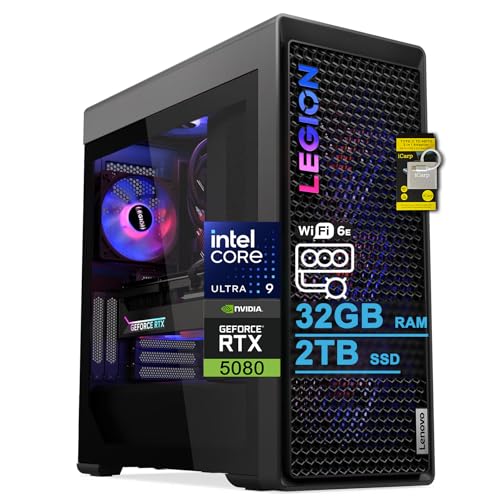
- Best prebuilt for streaming under $3,000: Lenovo Legion Tower 7i Gen 10, Core Ultra 9 285K, RTX 5080, 32GB DDR5, 2TB SSD — Check on Amazon
- CLX Set Gaming PC, Ryzen 7 9800X3D, RTX 5080, 32GB DDR5, 2TB NVMe — Check on Amazon
- Alienware Aurora ACT1250, Core Ultra 9 285, RTX 5080, 32GB DDR5, 1TB SSD — Check on Amazon
- Skytech King 95, Ryzen 7 9800X3D, RTX 5070 Ti, 32GB DDR5, 850W Gold PSU — Check on Amazon
- iBUYPOWER Y40 PRO, Ryzen 9 7900X, RTX 5070 Ti, 32GB DDR5, 2TB NVMe — Check on Amazon
- ZOTAC MEK Gaming PC, Ryzen 7 9700X, RTX 5070 Ti, 32GB DDR5-6000, Windows 11 Pro — Check on Amazon
Read the full guide ↓
Disclosure: As an Amazon Associate, reviewstook.com earns from qualifying purchases. Links to Amazon on this page are affiliate links; they cost you nothing extra. Listing details such as price and availability change often, so check the current Amazon listing before you buy.
A streaming PC has two jobs that fight each other. The game wants every core, every watt and every gigabyte of graphics memory for itself; the broadcast wants a clean, unbroken encode of that same gameplay, plus headroom for the chat overlay, the browser sources, the voice processing and the local recording you should be keeping. A machine that plays beautifully can still produce a stuttering stream if the second job was never budgeted for — so this guide grades all six prebuilts on the combined workload, not on gameplay alone.
Here is the honest headline for this tier: the encoder itself is a tie. Every machine below carries either an RTX 5080 or an RTX 5070 Ti, and both cards carry the same current-generation NVENC hardware — two encoder blocks with AV1 encoding — so the silicon that turns gameplay into a broadcast is identical across the whole guide. Nobody here wins on the encoder chip. What separates these six machines for a streamer is everything around that chip: how many processor cores remain for the game and the streaming software once the broadcast is running, how much fast storage is waiting for hours of local recordings, whether the networking is documented well enough to trust, and what price conditions are attached to each listing. Those are the axes this guide scores, and they produce a different ranking from a pure gaming guide — deliberately.
Two honesty notes before the picks. First, there is no RTX 5090 prebuilt anywhere near $3,000 — complete 5090 systems sit well above this budget — so flagship language at this level is marketing, not specification. Second, the three RTX 5080 machines here only belong in this tier when their live listings fit within the budget, each with that condition stated plainly in its review, while the three RTX 5070 Ti machines sit more comfortably within the tier on an ordinary day — check the current price on Amazon for any pick before you decide. Below: the streaming workflow these machines are graded against, the quick picks, how the grading works, a full encoder map, six detailed reviews, a comparison table, a complete OBS setup section, what the rest of the streaming kit costs you in attention if not in listed prices, buying guidance, the mistakes that ruin first streams, and the questions streamers ask most.
The Streaming Workflow These PCs Are Graded Against
Grading needs a defined workload, so here is the one used throughout this guide. On Twitch, the standard serious broadcast is 1080p60 at roughly 6,000 kbps with constant bitrate (CBR) and a two-second keyframe interval — that is the load every pick below is assumed to carry, alongside the game itself, a local recording at higher quality, and the usual supporting cast of chat, alerts and browser sources. On YouTube the ceiling is higher: larger bitrates are accepted, 1440p streams are a real option, and AV1 live encoding is supported — which is why the AV1 hardware in every pick here is worth more to a YouTube streamer than to a Twitch-only one. Twitch’s own AV1 path runs through its Enhanced Broadcasting programme and remains limited, so no pick earns credit for Twitch AV1 today. Streaming in 4K is limited by the platforms rather than by any machine in this guide; do not pay a premium for a “4K streaming” claim.
The second half of the workload is simultaneous load. When the graphics card’s hardware encoder carries the broadcast — as it should on every pick here — the processor is left to run the game, the streaming software, the recording and everything else at once. Core count and core quality therefore matter to a streamer in a way they do not to a player who never broadcasts, and they are weighted heavily below. Storage matters too: a high-quality local recording consumes drive space relentlessly, and a 1TB drive that also holds a modern game library fills faster than new streamers expect. Both factors appear in every review.
In this guide
Quick Picks
Short on time, or comparing several options at once? Each row below names a streaming buyer type and the prebuilt that suits it, with a link to the listing.
| Streamer type | Pick | Why it stands out for streaming | Link |
|---|---|---|---|
| Best overall for streaming | Lenovo Legion Tower 7i Gen 10 | 24-core processor, 2TB for recordings, documented 2.5Gb Ethernet, Quick Sync in reserve | Check on Amazon |
| Best for game-plus-stream performance | CLX Set Gaming PC | 9800X3D gaming speed, 2TB storage, standard parts — at its deal price only | Check on Amazon |
| Best big-brand streamer | Alienware Aurora ACT1250 | 24 cores and a Quick Sync reserve behind Dell’s support network — 1TB is the catch | Check on Amazon |
| Best no-drama streamer buy | Skytech King 95 | 9800X3D and a published 850W Gold platform at an everyday price | Check on Amazon |
| Best value streamer | iBUYPOWER Y40 PRO | 12-core processor and 2TB storage at the value end of this tier — once the PSU is confirmed | Check on Amazon |
| Best documented spec sheet | ZOTAC MEK Gaming PC | Every key spec published, fastest memory here, Windows 11 Pro | Check on Amazon |
How These Picks Were Chosen
Every machine below is a real Amazon listing selected to fit a budget of under $3,000 in the United States — check the current price on Amazon before you buy, because live prices move. Where a machine only fits this budget on sale, the review says so in plain language and tells you to walk away if the live listing no longer fits the budget. Listings advertising RTX 5090 performance at this budget were excluded on principle — verified 5090 systems sit well above this budget, and a page that implies otherwise is selling wording, not a computer.
The grading order is encoder first, then the combined workload. Encoder first means confirming that the graphics card’s hardware encoder can carry the broadcast without touching the game’s performance — every pick passes that test identically, as the encoder map below explains. The combined workload is where the ranking is actually decided: processor cores left over for the game and the streaming stack while the encode runs, memory capacity for a game plus broadcasting software plus a browser full of dashboards, and storage volume for local recordings, which are the streamer’s insurance policy and highlight source. Networking is scored on documentation: a wired Ethernet specification printed in the listing is evidence, and its absence is a question to ask before ordering, because a stream is only as stable as its upload path. Finally, the ownership factors from the base guide still apply — a published power supply is scored as engineering transparency, proprietary parts are weighed against the support network behind them, and listing contradictions are reported rather than repeated.
We did not use these machines ourselves. We read the maker listings and specification pages and compared processors, graphics cards, memory, storage, networking, published power supplies, cooling and warranty terms, favouring listings that publish their numbers in full. Streaming performance is described by workload class — what a given hardware combination can carry at once — rather than by invented benchmark figures for systems we have not tested.
The Encoder Map: What Actually Encodes Your Stream on Each Pick
This section exists because encoder claims are where streaming guides most often mislead, so here is the whole picture in one place, derived only from the silicon each listing documents. The RTX 5080 and the RTX 5070 Ti both carry two current-generation NVENC encoder blocks with AV1 encoding. All six picks carry one of those two cards. The consequence is an honest six-way tie at the top of the grading: on every machine in this guide, OBS should be set to the NVIDIA hardware encoder, the encode runs on dedicated silicon rather than on the processor or the game’s rendering budget, and AV1 encoding is genuinely available for the platforms that accept it. No pick below is credited with a better encoder than another, because on the documented hardware there is no better encoder to credit.
The one genuine encoder difference in the set is a reserve, not the main event. The two Intel machines — the Legion’s Core Ultra 9 285K and the Aurora’s Core Ultra 9 285 — are non-F processors with working integrated graphics, which means Intel Quick Sync is present as a second hardware encoder for H.264 and HEVC work: a sensible assignment for a simultaneous lower-bitrate recording or a second platform stream while NVENC carries the main broadcast. No AV1 claim is made for Quick Sync anywhere in this guide. The four AMD-processor machines document no such reserve that we credit: no encoder claim is made for any AMD pick’s integrated graphics, and their streaming story begins and ends with NVENC — which, given the tie above, costs them nothing on the main broadcast.
What about encoding on the processor itself, the x264 software route? On every pick here it is an emergency fallback, not a plan. Even the 24-core Intel machines would rather spend their cores on the game and the streaming stack, and on the eight-core gaming processors — the 9800X3D machines and the 9700X — asking the CPU to encode a demanding game at broadcast quality is how a strong PC produces a weak stream. Set the hardware encoder, keep x264 for the day something breaks, and let the sections below grade what actually differs: cores, storage, networking and price.
The 6 Best Prebuilt Gaming PCs for Streaming Under $3,000
Lenovo Legion Tower 7i Gen 10 — Core Ultra 9 285K, RTX 5080, 32GB DDR5, 2TB SSD
Who it suits: Streamers who want the complete checklist in one machine — cores to spare, room for recordings, documented networking — and premium-brand support behind it.
The Legion takes first place on streaming criteria because it is the only pick that documents every part of the combined workload. Start with simultaneous load: the Core Ultra 9 285K brings 24 cores, the joint-largest count in this guide, so while NVENC carries the broadcast, the processor still has deep reserves for the game, the streaming software, the recording and the browser stack competing for its attention. The 2TB SSD doubles the recording room of the 1TB picks — the difference between keeping a month of high-quality local recordings and pruning them weekly. And the networking is actually written down: the listing documents 2.5-gigabit Ethernet alongside Wi-Fi 6E and Thunderbolt 4, which makes this the one machine here whose wired upload path — the path your stream physically travels — can be verified from the listing rather than assumed. The RTX 5080’s dual NVENC blocks and AV1 encoding match every other pick, and the 285K’s Quick Sync sits in reserve for a second encode, as the encoder map describes. It sits toward the top of this tier — check price on Amazon — and Lenovo’s own store positions comparable configurations higher still, so matching the exact configuration at checkout matters, because the Legion Tower name covers many builds.
The ownership picture is the conservative premium one: Lenovo’s warranty and service network behind the whole system, an 850W power supply published rather than hidden, a 360mm liquid cooler, and a keyboard and mouse in the box. The limitation is printed in the same listing and matters more to streamers than to pure players: it states a maximum memory capacity of 32GB, so the fitted 32GB is also the ceiling. Thirty-two gigabytes is comfortable for game-plus-stream today; a creator who later adds heavy multitasking, virtual machines or a second workload to the same box has no growth path on this machine as listed. Treat that statement as authoritative and weigh it before paying the premium.
- 24-core processor and 2TB storage — the strongest simultaneous-load package here.
- Documented 2.5Gb Ethernet, Wi-Fi 6E and Thunderbolt 4; Quick Sync in reserve.
- Published 850W PSU, 360mm liquid cooling, Lenovo’s service network.
Honest limitation: The same listing caps memory at 32GB, so what is fitted is also the ceiling for the machine’s life, and its positioning toward the top of this tier sits below Lenovo’s own store positioning for comparable builds — the exact configuration has to be matched carefully at checkout.
Choose it if streaming is a primary job and you want every part of the workload documented before you pay. Skip it if growing to 64GB later is part of your plan, or check the current price on Amazon and find it has climbed toward what Lenovo charges directly.

CLX Set Gaming PC — Ryzen 7 9800X3D, RTX 5080, 32GB DDR5, 2TB NVMe
Who it suits: Streamers whose game comes first — competitive and high-refresh players who broadcast the same session — and who are disciplined enough to buy only inside the deal window.
For the game-plus-stream arrangement, this is the most exciting hardware pairing in the guide. The Ryzen 7 9800X3D is the processor the industry measures gaming against, and because NVENC carries the encode on dedicated silicon, its eight cores are spent where a gaming streamer wants them: on the game itself, with the streaming stack riding along comfortably. The 2TB NVMe drive matches the Legion’s recording room, the 360mm liquid cooler keeps sustained sessions quiet — a genuine streaming consideration, since cooler noise lives in the same room as your microphone — and CLX builds from standard retail-class components, so any competent shop can service or upgrade the machine with ordinary parts for years. For pricing, check price on Amazon — this configuration sits toward the top of this tier when it belongs in this guide at all.
Then the condition, which is absolute. Its live pricing has also been seen well above this tier after component prices rose, and which positioning greets you depends on the week. When the live listing fits within the under $3,000 budget this is arguably the best game-first streaming buy in the guide; when it sits above that budget it is not a $3,000-guide product at all — check the current price on Amazon before you decide. Two further streaming notes: the listing material we verified does not headline the power supply’s wattage, so that figure is recorded as unconfirmed rather than guessed, and no wired-Ethernet specification is documented for this pick — confirm the port on the live listing, because the wired rule in the OBS section below is not optional for a serious broadcast. CLX’s support operation is established but boutique-sized, smaller than the big brands’ networks.
- 9800X3D gaming speed with the encode carried entirely by NVENC.
- 2TB of recording storage and 360mm liquid cooling for quiet long sessions.
- Boutique standard-parts construction: serviceable and upgradeable anywhere.
Honest limitation: Its pricing for the same configuration varies widely and can sit well above this tier — a recommendation only when the live listing fits within the budget — and neither the PSU wattage nor a wired-Ethernet specification is documented in the verified listing material.
Choose it if the live listing fits within the under $3,000 budget — check price on Amazon — and your stream is built around high-end gameplay. Skip it if the price has drifted upward — the King 95 below covers most of the same ground with none of the suspense.

Alienware Aurora ACT1250 — Core Ultra 9 285, RTX 5080, 32GB DDR5, 1TB SSD
Who it suits: Streamers who want 24 cores and a second hardware encoder in reserve, backed by the largest support operation in the industry — and who will manage recording storage actively.
On simultaneous load the Aurora matches the Legion where it counts most: the Core Ultra 9 285’s 24 cores leave the same deep headroom for game, broadcast software and recording while the RTX 5080’s dual NVENC blocks carry the stream, and its non-F processor keeps Quick Sync available as the reserve encoder described in the map above. The published 1000W Platinum power supply — unusual disclosure discipline from a big brand — means the card is fed properly today with electrical headroom to spare. Check price on Amazon for this configuration — it belongs in this tier in its deal positioning, well below its usual positioning and below what Dell charges directly for a comparable build; Dell’s support network and parts logistics stand behind the whole system, which for a streamer whose income or schedule depends on the machine is a real feature, not a footnote.
Why third rather than first? Storage and conditions. The 1TB SSD is the tightest recording budget among the top picks: shared with a modern game library, it turns local recordings into a weekly housekeeping task, and the honest way to think about this machine for streaming is as the machine plus a second drive on your own schedule. Its fit in this tier is also deal-dependent in the strict sense — outside its deal positioning it is simply over budget. The ownership trade is the familiar Alienware one: Dell-format components in places mean out-of-warranty repairs run through Dell at Dell prices, and the listing’s own copy contradicts itself — describing the processor as 20-core where Intel specifies 24, and the liquid cooling as both fitted and optional — so verify the configuration in your cart before ordering. No wired-Ethernet specification is documented in the verified material either; confirm it live.
- 24 cores plus a Quick Sync reserve — simultaneous-load headroom equal to the Legion’s.
- An RTX 5080 that belongs in this tier in its deal positioning, well below its usual positioning — check price on Amazon.
- Published 1000W Platinum PSU and Dell’s support network behind the system.
Honest limitation: The 1TB drive is a recording-space catch priced as machine plus a future drive, it only belongs in this guide at its deal price, and the listing contradicts itself on core count and cooling — verify at checkout.
Choose it if you catch it when it fits within the under $3,000 budget — check price on Amazon — and value a major maker’s support behind your stream. Skip it if the live listing has drifted back over budget, or you record heavily and want the storage problem already solved.

Skytech King 95 — Ryzen 7 9800X3D, RTX 5070 Ti, 32GB DDR5-5600, 850W Gold PSU
Who it suits: Streamers who want the flagship gaming processor and a fully disclosed platform at a price that does not require sale-watching.
The King 95 is the streaming buy for people who dislike countdown timers. Its encoder is the same dual-NVENC, AV1-capable hardware as the 5080 machines — the 5070 Ti carries identical encoder silicon — so the broadcast quality available here is the guide’s ceiling, and the 9800X3D spends its cores on the game while NVENC works. Skytech publishes the power supply, an 850W Gold ATX 3 unit, which documents headroom for the machine’s whole life, and the 360mm liquid cooler suits long, quiet sessions in a room with a microphone. It sits in the middle of this tier on Amazon — an everyday positioning rather than a deal-dependent one, so the machine can be bought on a Tuesday — check price on Amazon. The build is the boutique standard-parts kind: conventional components, serviceable by any shop, with Skytech’s warranty behind the whole system.
The streaming-specific catch is the same one the Aurora carries: 1TB of storage, which a game library plus a recording habit will fill faster than expected, so budget the machine as the machine plus a second drive in its first year. Two listing disciplines apply. The listing states that the graphics card brand may vary — the GPU is fixed, the cooler design is a lottery — and the King 95 name covers near-identical variants under other listings, so match the model number ST-KING95-1671-W-AM when you order. No wired-Ethernet specification is documented in the verified material; as with every pick except the Legion, confirm the port on the live listing before relying on it.
- The guide’s full encoder ceiling — dual NVENC with AV1 — at an everyday price.
- 9800X3D gaming performance in the middle of this tier, without needing a sale.
- Published 850W Gold ATX 3 PSU and standard-parts boutique construction.
Honest limitation: The 1TB drive is the tightest recording budget here alongside the Aurora’s, the graphics card brand may vary by batch, and lookalike King 95 variants exist — the model number has to be matched.
Choose it if you want the gaming CPU, the full encoder and the transparent platform without deal-hunting. Skip it if 4K gaming headroom matters more than streaming value and a 5080 deal is live — that is the CLX’s or the Legion’s moment.

iBUYPOWER Y40 PRO — Ryzen 9 7900X, RTX 5070 Ti, 32GB DDR5, 2TB NVMe
Who it suits: Value-first streamers who want a many-core processor and solved recording storage well below the top of this tier — and who will do one piece of homework before ordering.
Judged purely as a streaming workload, the Y40 PRO’s specification is better than its price suggests. The Ryzen 9 7900X brings twelve cores — more simultaneous-load headroom than either 9800X3D machine — the 2TB NVMe drive matches the top picks’ recording room outright, and the 5070 Ti’s encoder is, once again, the same dual-NVENC AV1 hardware as every other pick. Its positioning is in a different world from the rest of the guide: it sits at the value end of this tier, well below the 5080 machines — check price on Amazon. That headroom within the budget is what a streamer can direct toward the parts of the setup this guide’s kit section covers — the microphone, the lighting, the second drive you will not need here. iBUYPOWER states a one-year manufacturer warranty on the listing, its support operation is one of the largest among integrator brands, and a keyboard and mouse are included.
The homework is unchanged from the base guide, and for a streamer it is not optional: iBUYPOWER does not headline this machine’s power-supply wattage in the listing material we verified, and a machine you depend on live should not carry an unconfirmed component at its heart. Confirm the wattage and rating with the seller or on the live listing before ordering; if the question goes unanswered, the King 95 above publishes its 850W Gold unit outright and is the fallback this guide intends. One more discipline: the Y40 PRO name also covers a different 7800X3D configuration under a separate listing — this review covers only the 7900X machine, model Y40BA9N57T01. No wired-Ethernet specification is documented in the verified material, so confirm the port live as well.
- Twelve cores and 2TB storage — a simultaneous-load package that embarrasses pricier picks.
- 5070 Ti encoder performance at the value end of this tier.
- One-year manufacturer warranty stated on the listing; keyboard and mouse included.
Honest limitation: The power supply’s wattage is not published in the verified listing material — it must be confirmed before purchase — and the Y40 PRO name is shared with a different configuration under another listing.
Choose it if check the current price on Amazon, it fits comfortably within the budget, and the power supply verifies. Skip it if the PSU question goes unanswered — the King 95’s premium buys published numbers instead.

ZOTAC MEK Gaming PC — Ryzen 7 9700X, RTX 5070 Ti, 32GB DDR5-6000, Windows 11 Pro
Who it suits: Streamers who read spec sheets closely, want the fastest memory in this guide and Windows 11 Pro, and prefer a machine whose maker publishes everything — including the power supply.
The MEK’s streaming case rests on documentation and positioning within the tier. Its encoder is the set’s standard dual-NVENC AV1 hardware; its Ryzen 7 9700X is an eight-core all-rounder that runs the game-plus-stream workload competently with NVENC carrying the encode; and its listing publishes the full picture — 32GB of DDR5-6000, the fastest memory in this guide, a 1TB NVMe SSD, a 750W 80+ Gold power supply with its rating stated, Wi-Fi 6E, Bluetooth 5.3, and display outputs enumerated as HDMI 2.1b plus three DisplayPort 2.1b. It is the only machine here shipping Windows 11 Pro rather than Home, a small but real difference for buyers who use its remote-desktop hosting or drive-encryption management. Check price on Amazon — it sits at the lower end of this tier, among the most accessible of the resident picks on positioning.
Why last on streaming criteria, then? The two axes this angle weights most. Its eight cores offer the least simultaneous-load headroom in the guide alongside the X3D machines, without the X3D’s gaming specialisation to compensate, and its 1TB drive carries the same recording-space catch as the Aurora and the King 95. Neither flaw touches the broadcast itself — the encoder tie sees to that — but a streamer choosing for years of combined workload gets more from the picks above. One editorial caution from the research trail: a secondary source flagged inconsistencies in ZOTAC’s own secondary documentation around the Windows edition and outputs, so treat the Amazon listing’s headline specification — the one cited here — as the document of record and confirm it in the cart. No wired-Ethernet specification is documented in the verified material; confirm the port on the live listing.
- The full specification is published, from the 750W Gold PSU to the enumerated display outputs.
- Fastest memory in the guide at DDR5-6000, with Windows 11 Pro in the box.
- Positioned at the lower end of this tier on Amazon — check price on Amazon.
Honest limitation: The 9700X offers the joint-least simultaneous-load headroom here and the 1TB drive fills under a recording habit; ZOTAC’s secondary documentation has contradicted the listing on details — buy against the listing’s headline spec, verified at checkout.
Choose it if documentation, memory speed and Windows Pro matter to you and your stream is a one-box, one-game workload. Skip it if heavy multitasking while live is the plan — the twelve- and twenty-four-core picks above carry that better.

Comparison Table
| Prebuilt | Processor / GPU | Encoder | Memory / Storage | Price | Link |
|---|---|---|---|---|---|
| Lenovo Legion Tower 7i Gen 10 | Core Ultra 9 285K / RTX 5080 | 2× NVENC + AV1; Quick Sync reserve | 32GB DDR5 / 2TB | Check price on Amazon | Check on Amazon |
| CLX Set | Ryzen 7 9800X3D / RTX 5080 | 2× NVENC + AV1 | 32GB DDR5 / 2TB | Check price on Amazon — deal-dependent, fits this tier only in its deal positioning | Check on Amazon |
| Alienware Aurora ACT1250 | Core Ultra 9 285 / RTX 5080 | 2× NVENC + AV1; Quick Sync reserve | 32GB DDR5-5200 / 1TB | Check price on Amazon — deal-dependent | Check on Amazon |
| Skytech King 95 | Ryzen 7 9800X3D / RTX 5070 Ti | 2× NVENC + AV1 | 32GB DDR5-5600 / 1TB | Check price on Amazon | Check on Amazon |
| iBUYPOWER Y40 PRO | Ryzen 9 7900X / RTX 5070 Ti | 2× NVENC + AV1 | 32GB DDR5-5200 / 2TB | Check price on Amazon | Check on Amazon |
| ZOTAC MEK | Ryzen 7 9700X / RTX 5070 Ti | 2× NVENC + AV1 | 32GB DDR5-6000 / 1TB | Check price on Amazon | Check on Amazon |
Setting Up OBS on Any of These Machines
The hardware makes the following setup short, because every pick is configured the same way at the encoder line. In OBS, set the stream encoder to the NVIDIA hardware encoder (NVENC) — never to x264 software encoding as your plan A, and never to any integrated-graphics encoder as the main broadcast. Use constant bitrate: around 6,000 kbps for a 1080p60 Twitch broadcast, with a two-second keyframe interval, which Twitch’s ingest expects. On YouTube you may raise the bitrate substantially, stream at 1440p, and select the AV1 encoder these cards provide; on Twitch, leave AV1 alone outside the limited Enhanced Broadcasting programme. Record locally at a higher quality setting than the stream — the recording is your highlight and upload source — and on the two Intel machines, the Legion and the Aurora, the Quick Sync reserve described in the encoder map is a sensible assignment for that recording encode if you want NVENC carrying nothing but the broadcast. Before your first public stream, run a one-hour full-load rehearsal — game, broadcast, recording, full streaming stack — inside the machine’s return window, and watch the three counters below.
Rendering lag means the graphics card is saturated by the game and OBS cannot get its frames composed in time. The counter that reports frames missed due to rendering lag points at the GPU, not the encoder: the fixes are to cap the game’s frame rate rather than letting it run unbounded, lower the heaviest in-game settings a notch, and keep the broadcast at 1080p output even when the game renders higher. Encoding lag means the chosen encoder is overloaded — on these machines it almost always means the encoder is set wrong, because dual NVENC blocks do not break a sweat at 6,000 kbps. If the encoding-lag counter climbs, confirm the stream is actually on NVENC; if a setting has silently fallen back to x264, the eight-core picks will show it first and worst. Network lag — dropped frames in OBS’s accounting — is neither the game’s nor the encoder’s fault: it is the upload path. The rule is absolute: stream over wired Ethernet, not Wi-Fi, however good the wireless specification looks. Only the Legion’s wired port is documented in its listing (2.5-gigabit Ethernet); for the other five picks, confirm the Ethernet port on the live listing before ordering, and treat a machine you cannot wire as a machine you cannot stream from seriously.
What the Rest of the Streaming Kit Demands
A tower is most of a streaming budget, but it is not all of one, and this section deliberately names no prices — accessory listings churn too fast for printed figures to stay honest. Spend your attention in this order. First, the microphone: your voice is the one part of the broadcast viewers judge continuously, and it outranks every other accessory combined — a modest microphone placed close, with the room’s noise (including your PC’s cooler, which is why the liquid-cooled picks’ quiet running matters) kept out of it, does more for a young channel than any camera. Second, lighting: a single soft light on your face transforms an ordinary webcam image more than a camera upgrade does. Third, the webcam itself, which only needs to be competent once the light is right. Last, the capture card — and only for console play or a two-PC arrangement: for games running on the same machine you are streaming from, a capture card does nothing at all, and buying one for a one-box setup like every arrangement in this guide is money spent on a misunderstanding. The Y40 PRO’s value positioning in this guide makes the point concrete: the headroom it leaves within the budget against the 5080 machines is exactly the room a proper kit needs.
How to Choose a Prebuilt Gaming PC for Streaming Under $3,000
- Start from the tie, not the headline. Every pick carries dual NVENC blocks with AV1 encoding, so encoder quality does not choose between them. Choose on simultaneous load, recording storage, documented networking and price conditions — the axes that actually differ.
- Count cores for the combined workload. The 24-core Intel machines and the 12-core Y40 PRO leave the most headroom for game plus broadcast plus recording; the eight-core picks rely on NVENC discipline, which works — provided the encoder is set correctly and x264 stays a fallback.
- Price recording storage honestly. A 1TB pick shared with a game library is the machine plus a second drive on a schedule; a 2TB pick has the problem solved. Neither is wrong — but only one of them has that extra cost already covered in the machine itself.
- Refuse the 5090 mirage. Verified RTX 5090 prebuilts sit well above this budget, nowhere near this tier. A listing gesturing at flagship performance for $3,000 is selling language, not hardware.
- Respect the deal rules. The Aurora and the CLX belong here only when their live listings fit within the under $3,000 budget, not in their usual over-budget positioning; the Legion sits toward the top of this tier, below Lenovo-direct positioning. Check the current price on Amazon and set your walk-away point at the budget before you open the listing.
- Demand the wired path in writing. Only the Legion documents its Ethernet port in the listing material we verified. For any other pick, confirm the port on the live listing — a serious stream runs on a cable.
- Score the power supply. Published wattage and rating (1000W Platinum, 850W Gold, 750W Gold) mean engineered headroom in writing. An unpublished PSU — the Y40 PRO, the CLX — is a question to get answered before money moves, not a detail to discover afterwards.
- Check the memory ceiling, not just the memory. 32GB is the correct amount today on every pick — but the Legion’s listing names 32GB as the maximum while the others can grow. A stated ceiling is a specification; read it before it surprises you.
- Verify the exact configuration in the cart. Legion Tower, King 95 and Y40 PRO are product families spanning many builds, not single machines, and the Alienware’s page even argues with itself over core count and cooling. Model numbers — ST-KING95-1671-W-AM, Y40BA9N57T01 — are the ground truth.
- Spend what you save where viewers notice. If the Y40 PRO or the MEK covers your workload, the difference against a 5080 machine buys the microphone and lighting that audiences actually judge — see the kit section above, and our Best Prebuilt Gaming PC Under $2500 guide for the tier below.
Common Streaming Buying Mistakes
- Paying for encoder claims instead of checking the silicon. At this tier the encoder is identical across the guide; the premium prices buy cores, storage and support, and should be justified as such.
- Setting OBS to x264 on an eight-core gaming processor and blaming the PC. The hardware encoder exists precisely so the game keeps the cores; software encoding is the fallback, not the setup.
- Streaming over Wi-Fi because the wireless spec looked fast. Dropped frames are an upload-path problem, and the fix is a cable — the network-lag counter does not care about your router’s headline speed.
- Buying a capture card for a one-box setup. It captures external sources; for games on the same PC it is furniture. Console streamers need one; nobody in this guide’s arrangement does.
- Ignoring recording storage until the drive is full mid-season. The 1TB picks are fine machines with a known catch — treat it as machine plus drive from the start.
- Paying the usual price for a deal-dependent machine. The Aurora and the CLX in their over-budget positioning are different purchases from the ones this guide recommends; the recommendation depends on the live listing fitting this tier as much as on the PC — check price on Amazon.
- Ordering the family instead of the configuration. Legion Towers, King 95s and Y40 PROs span wide spec ranges under one name; the model number in the cart is the machine you are buying.
- Skipping the rehearsal. One hour at full load inside the return window finds the mis-set encoder, the saturating game settings and the weak upload path while they are still free to fix.
Final Recommendation
- Best overall for streaming: Lenovo Legion Tower 7i Gen 10.
- Best for game-first streamers: CLX Set — inside its deal window only.
- Best big-brand streamer: Alienware Aurora ACT1250 — at its deal price.
- Best no-drama buy: Skytech King 95.
- Best value: iBUYPOWER Y40 PRO — after the PSU check.
- Best documented machine: ZOTAC MEK.
Our top two are the Legion and the CLX: the Lenovo Legion Tower 7i for streamers who want the whole workload — cores, recording room, documented wired networking, a reserve encoder — verified in one listing, and the CLX Set for players whose game leads and whose stream follows, bought strictly inside its deal window. If neither machine’s live listing fits the budget when you shop, do not stretch: the King 95 delivers the same encoder ceiling and the flagship gaming processor at an everyday positioning, and the Y40 PRO sits well below the rest of the guide if its power supply checks out, freeing real headroom in the budget for the microphone and lighting your audience will actually judge. Buyers speccing a dedicated streaming machine rather than a gaming PC that streams should also read our Best Streaming PC Under $3000 guide, and anyone splitting this budget across the whole desk should start from the Best Prebuilt Gaming PC Under $3000 guide and work down. Check the live price, match the model number, confirm the one specification your pick leaves unstated — then wire the Ethernet cable before your first broadcast.
Frequently Asked Questions
Which of these PCs has the best encoder for streaming?
None of them — and that is the honest answer this tier deserves. The RTX 5080 and RTX 5070 Ti carry the same dual NVENC encoder blocks with AV1 encoding, so all six picks encode identically. The two Intel machines add Quick Sync as a reserve encoder for a second job such as a local recording; the AMD machines make no such documented claim, and lose nothing on the main broadcast because of it. Choose between these PCs on cores, storage, networking and price conditions instead.
Can I stream in 4K with a PC under $3,000?
The machines are not the limit; the platforms are. Twitch’s standard broadcast is 1080p60 at around 6,000 kbps, and its AV1 path remains limited to a programme; YouTube accepts higher bitrates, 1440p streams and AV1 live encoding, which is where these cards’ AV1 hardware earns its keep. Budget for an excellent 1080p or 1440p broadcast rather than a 4K one, whatever the listing language suggests.
Is the RTX 5070 Ti enough for streaming, or do I need the 5080?
For the broadcast itself, they are the same hardware — identical encoders, identical stream quality. The 5080 buys gaming headroom: higher settings and resolutions in the game being streamed, held for longer into the machine’s life. If your stream is built around demanding 4K or high-refresh gameplay, the deal-priced 5080 machines earn their premium; if you play and broadcast at 1440p or 1080p, the 5070 Ti picks — the King 95, the Y40 PRO, the MEK — lose nothing on air.
Why does this guide keep insisting on wired Ethernet?
Because the network-lag counter in OBS measures your upload path, and wireless is the most common cause of dropped frames on otherwise powerful machines. Every pick here can game happily on Wi-Fi; a serious broadcast should not run on it. Only the Legion’s 2.5-gigabit Ethernet port is documented in its listing, so for the other five, confirming the wired port on the live listing is part of the purchase — as is running the cable before your first stream, not after your first dropped-frame report.
Do I need a capture card with one of these PCs?
Only if your gameplay source is external — a console, or a second PC in a two-box arrangement. For games running on the same machine that is streaming, which is the arrangement every pick in this guide is bought for, a capture card contributes nothing; the graphics card captures its own output for OBS directly. Spend that part of the budget in the order the kit section gives: microphone, lighting, then camera.
How much should I actually spend — is a cheaper tier enough to stream?
For many streamers, yes. The encoder ceiling in this guide is reached by graphics cards that also appear in cheaper machines, and the Y40 PRO in this very guide sits well below the top of this tier with twelve cores and 2TB of storage. Our Best Prebuilt Gaming PC For Streaming Under $2500 and Best Prebuilt Gaming PC Under $1500 guides apply the same encoder-first grading below this tier; spend the difference on the microphone, the lighting and the monitor if yours are the oldest parts of your setup.


