Where to buy
Check the latest price, availability and delivery on Amazon. Orders are placed on Amazon. We may earn a commission from qualifying purchases.
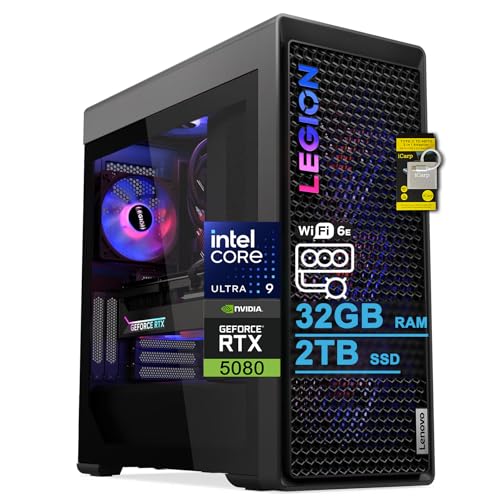
- Best for streaming overall: Lenovo Legion Tower 7i Gen 10, Core Ultra 9 285K, RTX 5080, 2TB SSD, Thunderbolt 4 — Check on Amazon
- CLX Set Gaming PC, Ryzen 7 9800X3D, RTX 5080, 2TB SSD, 850W Gold — Check on Amazon
- Alienware Aurora ACT1250, Core Ultra 9 285, RTX 5080, 1000W Platinum PSU — Check on Amazon
- Skytech King 95, Ryzen 7 9800X3D, RTX 5070 Ti, 850W Gold ATX 3 PSU — Check on Amazon
See 2 more Amazon options
- iBUYPOWER Y40 PRO, Ryzen 9 7900X, RTX 5070 Ti, 2TB SSD — Check on Amazon
- ZOTAC MEK Gaming PC, Ryzen 7 9700X, RTX 5070 Ti, 750W Gold, Windows 11 Pro — Check on Amazon
Read the full guide ↓
Disclosure: As an Amazon Associate, reviewstook.com earns from qualifying purchases. Links to Amazon on this page are affiliate links; they cost you nothing extra. Listing details such as price and availability change often, so check the current Amazon listing before you buy.
A streaming desktop has two jobs that fight each other. The first is the game, which wants every core and every watt for itself. The second is the broadcast wrapped around it: an encoder turning your gameplay into a clean feed, a chat window, a browser full of dashboards and alerts, voice software, and — if you keep local copies — a high-quality recording written to disk at the same time. At $3,000 the honest headline is that the encoding half of that fight is effectively settled by the graphics cards in this guide. Every one of the six desktops below carries either an RTX 5080 or an RTX 5070 Ti, and both cards bring the same streaming hardware: two ninth-generation NVENC encoder blocks with AV1 encoding. One block can run your live stream while the second records a high-bitrate local copy, and neither asks the CPU or the game’s rendering budget for anything. What separates these machines as stream stations is everything around that encoder: processor headroom for the simultaneous load, storage room for recordings, wired networking, and how much of the $3,000 is left over for the microphone and lighting your viewers will actually judge.
The workflow this guide grades against is the real one. On Twitch, the working standard is a 1080p60 feed at roughly 6,000 kbps with constant bitrate and two-second keyframes, encoded in H.264 — a ceiling set by the platform, not by your hardware. YouTube accepts considerably more: higher bitrates, 1440p streams, and AV1 ingest, which is where these cards’ newest encoder earns its keep, delivering a cleaner picture at a given bitrate than H.264 can. Streaming in 4K is limited by the platforms rather than by anything in this guide, so no pick earns credit for it. One market honesty note before the picks: three of these desktops are RTX 5080 systems positioned at the top of this budget tier, while the RTX 5070 Ti machines sit lower in the tier — check the current price on Amazon for each before you compare them. And there is no RTX 5090 desktop anywhere near this money — complete 5090 systems sit well above this budget — so any listing implying one at $3,000 is selling a different card, a barebones kit, or a mistake.
In this guide
Quick Picks
Short on time, or comparing several options at once? Each row below names a streaming buyer type and the desktop that suits it, with a link to the listing.
| Buyer type | Pick | Why it stands out for streaming | Link |
|---|---|---|---|
| Best for streaming overall | Lenovo Legion Tower 7i Gen 10 | 24-core 285K for the simultaneous load, RTX 5080, 2TB for recordings, 2.5Gb Ethernet and Thunderbolt 4 — check price on Amazon | Check on Amazon |
| Best for game-first streamers | CLX Set Gaming PC | 9800X3D plus RTX 5080 on standard parts, 2TB storage, four RAM slots — check price on Amazon | Check on Amazon |
| Best big-brand stream station | Alienware Aurora ACT1250 | RTX 5080 with a 24-core CPU and the guide’s biggest PSU at 1000W Platinum — check price on Amazon | Check on Amazon |
| Best 5070 Ti stream value | Skytech King 95 | Same dual-NVENC encoder as the 5080 picks, 9800X3D, published 850W Gold ATX 3 PSU — check price on Amazon | Check on Amazon |
| Best budget left for the kit | iBUYPOWER Y40 PRO | 5070 Ti, twelve-core 7900X and 2TB, positioned at the lower end of this tier — the most budget returned to your mic and lights; check price on Amazon | Check on Amazon |
| Cleanest published spec sheet | ZOTAC MEK Gaming PC | Every part named, down to DDR5-6000 and a 750W Gold PSU, with Windows 11 Pro — check price on Amazon | Check on Amazon |
How These Picks Were Chosen
The grading order in this guide is the streaming order. First comes the encoder, because it decides your picture quality before anything else does: all six picks carry an RTX 5080 or RTX 5070 Ti, which means all six carry two ninth-generation NVENC blocks with AV1 encoding, and the encoder contest inside this guide is honestly a tie. That tie is exactly why the remaining criteria matter. Second is simultaneous-load headroom — the processor’s ability to run the game, OBS, chat, a browser, voice software and a local recording at once without any of them stuttering. Third is the recording workflow: storage capacity for high-bitrate local copies, and memory headroom for the creator software that turns those recordings into uploads. Fourth is the unglamorous infrastructure — a wired Ethernet port worth using, a power supply with published wattage, and cooling that holds up through a long session. A pick could not buy its way up this list with a bigger GPU badge, because at this tier the GPU badge no longer changes the broadcast.
The budget was applied as a ceiling on the complete, working desktop: every system below is a real Amazon listing positioned at or under the $3,000 tier in the United States — check the current price on Amazon before you order, since listings in this category move within the tier. We did not use these desktops ourselves. We read the maker listings, specification sheets and seller Q&A, and compared encoder hardware, CPU core counts and cooling, power-supply wattage and rating where published, memory capacity and its upgrade ceiling, storage, and networking. Where a listing failed to publish a figure we wanted — one pick’s power-supply wattage appears nowhere in its verified material — the review flags the gap as something to confirm before ordering instead of filling it in. Systems whose only route under $3,000 was a stripped configuration, a barebones kit or a listing we could not verify were excluded.
The Encoder Map: What Actually Encodes Your Stream
Because the encoder decides the broadcast, it deserves its own plain statement before the reviews. NVENC is a dedicated block of silicon on the graphics card that encodes video without meaningfully touching the hardware your game is using, which is why a single PC at this level streams and plays at the same time without the compromises older guides warned about. The ninth-generation NVENC in both the RTX 5080 and the RTX 5070 Ti adds AV1 encoding alongside H.264 and HEVC, and — the detail streamers should care about most — there are two independent blocks. Run the live stream on one at Twitch’s 6,000 kbps and a local recording on the other at a far higher bitrate, and the two encodes do not compete. For YouTube, the same hardware can send a 1440p AV1 feed that the platform rewards with a visibly cleaner result than a bitrate-matched H.264 stream.
The two Intel-based picks carry a second hardware encoder in reserve: the Core Ultra 9 285 and 285K are non-F processors with integrated graphics, whose Quick Sync encoder can take a secondary job — a recording, a vertical clip feed for short-form platforms, a backup stream — while NVENC handles the main broadcast. Treat it as a bonus utility encoder, not a reason to buy; the NVIDIA hardware is the primary story in every pick here. Software x264 encoding on the CPU is the fallback of last resort at this tier: even the 24-core processors below are better spent on the game and your applications than on an encoding job a dedicated block does better. Finally, the platform ceilings, stated once so no review has to repeat them: Twitch’s standard ingest is built around roughly 6,000 kbps CBR at 1080p60 in H.264, YouTube accepts higher bitrates, 1440p and AV1, and 4K live streaming is constrained by the platforms rather than by any machine in this guide.
The 6 Best Gaming Desktops for Streaming Under $3,000
Lenovo Legion Tower 7i Gen 10 — Core Ultra 9 285K, RTX 5080, 2TB
Who it suits: Streamers whose broadcast is a production — game, overlays, chat, browser dashboards, voice processing and a local recording, all at once — and creator-streamers who edit what they capture on the same machine.
The Legion takes the top spot in this guide for a reason the base specification only hints at: streaming is a multitasking workload wearing a gaming costume, and the Core Ultra 9 285K is the strongest multitasking processor here. Its 24 cores, boosting to 5.6GHz per the listing, absorb the simultaneous load — the game on the performance cores, OBS compositing, chat, a browser full of tabs, Discord, a recording writing in the background — with more room to spare than any other pick, while the RTX 5080’s dual ninth-generation NVENC blocks handle the stream and the recording encodes without touching that CPU budget at all. The Quick Sync encoder in the 285K’s integrated graphics sits behind them as a third path for a secondary feed. Around that core, the supporting cast reads like a streamer’s checklist: 2TB of SSD storage fitted as standard, so high-bitrate local recordings are a workflow rather than a space negotiation; a 360mm liquid cooler for long sessions; an 850W power supply; Wi-Fi 6E; 2.5Gb Ethernet for the wired connection this guide insists on; and Thunderbolt 4 for fast capture and storage peripherals, with a keyboard and mouse in the box. Check the current price on Amazon before you buy, and compare the exact configuration at checkout, since channel pricing for this family varies.
The caveats are the ones a streamer should weigh precisely. Lenovo’s listing for this configuration states a maximum memory of 32GB — the amount fitted. For the broadcast itself that is ample and will stay ample; the pressure point is the creator second job, where large video timelines and a desk full of editing software can lean on memory harder than any game does, and this machine cannot grow past its ceiling. Treat it as a superb fixed configuration rather than an expanding platform. The second caution is clerical but real: Legion Tower variants multiply, and not every 7i listing is this 285K/5080 configuration, so match the exact specification at checkout. Bought as the finished article it is, this is the most complete single-box stream station in the guide.
- Dual ninth-generation NVENC with AV1, plus Quick Sync in reserve — three hardware encode paths.
- 24-core 285K: the most simultaneous-load headroom here for game + OBS + chat + recording.
- 2TB storage, 2.5Gb Ethernet and Thunderbolt 4 fitted as standard.
- Positioned at the top end of this budget tier — check price on Amazon.
Honest limitation: The listing caps memory at the fitted 32GB, which heavy editing timelines may outgrow, and Legion variants are easy to confuse — match the exact configuration.
Choose it if your stream is a full production and you edit on the same desk. Skip it if a future 64GB memory upgrade is already in your plans — the CLX below is built for that.

CLX Set Gaming PC — Ryzen 7 9800X3D, RTX 5080, 850W Gold
Who it suits: Game-first streamers who want the strongest gaming processor in the guide, a broadcast that never touches it, and a standard-parts machine they can service and expand for years.
If the Legion is the production station, the CLX Set is the player’s station. AMD’s Ryzen 7 9800X3D is the processor gaming benchmarks keep crowning, and pairing it with an RTX 5080 produces the cleanest division of labour in this guide: the X3D chip does nothing but play your game at its best, while the card’s two ninth-generation NVENC blocks run the stream encode and a local recording encode independently. OBS still needs CPU for compositing scenes and sources, and chat, browsers and voice software still need somewhere to live — an eight-core flagship gaming chip with this much cache handles that load comfortably alongside a hardware-encoded broadcast, which is precisely why the old advice about needing a second PC has expired at this tier. The platform around the pairing is the most expandable here: 32GB of DDR5-5600 across a four-slot board (Newegg’s listing for the same model confirms four slots and a 256GB ceiling, so memory growth is an errand, not a project), 2TB of NVMe storage for the recording archive, a 360mm liquid cooler, and a power supply the listing actually names — 850 watts, Gold-rated, confirmed in Amazon’s own product information for this ASIN — inside a standard-parts tower any shop can service. Positioned at the top end of this tier — check the current price on Amazon — it is the gaming-first way to spend the budget.
The discipline is in the comparison. Pricing in this category moves, and the machine does not change when the market does — so check the current price on Amazon and compare it directly with the Legion above before you buy. If the current listing no longer sits comfortably inside this budget tier, patience beats forcing the purchase. One builder’s caveat applies, and it is printed in CLX’s own listings: component brands may vary, so the GPU, memory and PSU brands inside your unit may differ from another buyer’s, while the core specifications — 5080, 850W Gold, the capacities — are held constant. If a specific board-partner card matters to you, confirm it with the seller before ordering rather than assuming.
- 9800X3D plus RTX 5080 — the strongest pure-gaming pairing here, with encoding fully offloaded.
- Dual NVENC: stream and high-bitrate local recording run as independent encodes.
- Standard retail parts throughout, four RAM slots, 2TB storage, verified 850W Gold PSU.
Honest limitation: Pricing in this category moves — check the current price on Amazon before you order — and component brands may vary between units.
Choose it if the game comes first, the stream rides on NVENC, and the current listing fits the top of your budget — check price on Amazon. Skip it if the current listing has moved out of this tier — positioning in this category has a habit of returning.

Alienware Aurora ACT1250 — Core Ultra 9 285, RTX 5080, 1000W Platinum
Who it suits: Streamers who want flagship encoding and a 24-core processor from a major brand, with a single warranty and engineered manners in a shared or microphone-sensitive room.
The Aurora’s streaming case starts where Dell started: with the power supply. A 1000W Platinum-rated unit — the most generous in this guide — runs an RTX 5080 system in its efficient, quiet middle range, shrugs off the transient spikes modern GPUs are known for, and will not be the limiting factor in a future GPU swap on wattage grounds alone. For a streamer, that calm electrical headroom pairs with the rest of the specification: Intel’s Core Ultra 9 285 brings the same 24-core simultaneous-load argument as the Legion’s 285K, the RTX 5080 brings the same dual ninth-generation NVENC blocks with AV1, and the 285’s integrated graphics add Quick Sync as a reserve encoder for a secondary feed. A 240mm liquid loop cools the processor in Alienware’s current clear-panel tower. Check the current price on Amazon — positioned in the upper part of this tier, it is a direct route into a 5080 stream station from a major brand in this guide.
Two cautions, one clerical and one structural. The clerical one: Amazon’s own product information contradicts itself on this machine, describing the Ultra 9 285 as a 20-core part in one place (Intel specifies 24 cores — eight performance plus sixteen efficiency) and describing the liquid cooling as both fitted and “optional” in others. Trust Intel’s specification, and confirm the cooling configuration with the seller before ordering. The structural caution matters to streamers who record everything: storage is 1TB, half the Legion’s and the CLX’s, and high-bitrate local recordings are the fastest way known to fill a drive — budget a second SSD into this machine’s first year, which is at least an ordinary job, since memory and storage upgrade normally. The deeper design trade is the standing Alienware one: the motherboard and power supply use Dell’s proprietary formats and connectors, so long-term self-service runs through Dell parts rather than retail ones, even though the PSU has wattage to spare. Buy it as a finished, warrantied appliance — which is what many streamers, mid-season, actually want.
- RTX 5080 dual NVENC with AV1, a 24-core CPU, and Quick Sync in reserve.
- The strongest PSU in this guide: 1000W, Platinum-rated, with real headroom.
- Positioned in the upper part of this tier — check price on Amazon.
Honest limitation: 1TB of storage is tight for a record-everything workflow, proprietary motherboard and PSU formats limit long-term self-service, and the listing copy contradicts itself on core count and cooling — verify at checkout.
Choose it if you want 5080 encoding with the biggest PSU and one big-brand warranty. Skip it if your long-term plan is rebuilding around future retail motherboards or power supplies.

Skytech King 95 — Ryzen 7 9800X3D, RTX 5070 Ti, 850W Gold ATX 3
Who it suits: Streamers who understand that the broadcast does not need the 5080 premium — the encoder is identical — and would rather keep several hundred dollars for the microphone, lighting and monitor their viewers actually notice.
The King 95 is this guide’s control experiment, and its result is the most useful fact in it: swap the RTX 5080 for an RTX 5070 Ti and the streaming hardware does not change at all. The 5070 Ti carries the same two ninth-generation NVENC blocks with the same AV1 encoding, so a King 95 sends the same Twitch feed and records the same local copy as the 5080 machines above — the difference lives entirely in game rendering, where the 5070 Ti remains a superb 1440p high-refresh card. Around that identical encoder, Skytech pairs the same Ryzen 7 9800X3D as the CLX — the strongest gaming CPU here, with the broadcast riding on the card — with 32GB of DDR5-5600, a 1TB Gen4 NVMe drive and a 360mm ARGB liquid cooler. The power supply is the detail that earns this machine its place in a desktop guide: 850 watts, Gold-rated, built to the ATX 3 standard and named in the listing, designed for modern GPUs’ excursion spikes and carrying the native connector current and future cards want. Positioned below the 5080 machines in this tier — check the current price on Amazon — it returns a streaming kit’s worth of budget to the desk.
The honest notes are about variance and one capacity figure. Skytech’s listing states that the graphics card brand may vary — what you are buying is a 5070 Ti 16GB, not one specific manufacturer’s model — and near-identical King 95 variants circulate under other ASINs in different parts of the tier. Match the specification and the model number ST-KING95-1671-W-AM, not the King 95 name alone. Storage is the merely adequate figure: 1TB fills quickly when every session is recorded at high bitrate, and a second NVMe drive is the first upgrade most streaming owners will make — an easy, inexpensive one in a standard tower like this, and still cheaper than the 5080 premium you declined. Judged as a stream station rather than a spec sheet, this is the pick that spends on the platform and the kit, and lets the GPU be one step down in the one place viewers cannot see it.
- Identical dual-NVENC AV1 encoder to the 5080 picks — the broadcast does not change.
- 9800X3D gaming performance behind a named 850W Gold ATX 3 power supply.
- Positioned below the 5080 picks in this tier, funding the streaming kit — check price on Amazon.
Honest limitation: GPU brand may vary, lookalike King 95 variants exist under other ASINs, and the 1TB SSD is the first thing a recording-heavy owner will expand.
Choose it if your viewers’ experience — audio, light, picture — matters more than a rendering tier they cannot see. Skip it if nothing but an RTX 5080 will do — that is what the 5080 picks above are for.

iBUYPOWER Y40 PRO — Ryzen 9 7900X, RTX 5070 Ti, 2TB
Who it suits: Value-hunting streamers who want the full dual-NVENC broadcast, a twelve-core processor for the simultaneous load and 2TB of recording room at the lower end of this tier, and who will verify one unpublished specification before ordering.
The Y40 PRO is the value shock of this guide, and for a streamer its arithmetic is doubly kind. The RTX 5070 Ti brings the same dual ninth-generation NVENC encoder with AV1 as every other pick, so the broadcast is not the compromise. The Ryzen 9 7900X brings twelve cores, which is a genuinely comfortable home for the simultaneous load — game, OBS, chat, browser, voice — at a tier where the eight-core picks ask the hardware encoder to keep the CPU’s job small. The 2TB NVMe SSD matches the flagship picks for recording room, 32GB of DDR5 covers the desk, a keyboard and mouse are included, a one-year manufacturer warranty backs it, and iBUYPOWER builds on standard parts in its Y40 case, so memory, storage and graphics upgrades are ordinary retail jobs. Its positioning is the headline: it sits at the lower end of this tier, below every other pick here — check the current price on Amazon. For a streamer the difference is not abstract — it is the microphone, the light and the camera, bought out of the tower’s savings instead of on top of them.
The catch is a missing number. Nowhere in the listing material we could verify does iBUYPOWER headline this configuration’s power-supply wattage, and at this tier that figure is not trivia: a 5070 Ti system wants a quality 750W-class unit, and the PSU decides both today’s stability under transient spikes and tomorrow’s GPU upgrade path. Never guess it, and never let a marketplace summary guess it on your behalf — read the listing’s full specification or ask the seller directly, and treat a vague answer as your cue to choose the King 95 instead, whose PSU is published to the standard. The naming needs one more caution: Y40 PRO badges more than one configuration, among them a 7800X3D variant under a different ASIN at a different price; this review covers only the 7900X model Y40BA9N57T01. Verify the model, confirm the PSU, and this is the easiest streaming recommendation in the guide.
- Same dual-NVENC AV1 encoder as the flagship picks; twelve-core 7900X for the simultaneous load.
- 2TB storage and 32GB memory at the lower end of this tier — the guide’s best value positioning; check price on Amazon.
- Standard-parts Y40 case, with keyboard, mouse and a one-year warranty in the box.
Honest limitation: No power-supply wattage is published in the verified listing material — get it confirmed before you buy — and the Y40 PRO name covers other configurations.
Choose it if the current listing sits at the lower end of this tier — check price on Amazon — the seller confirms a quality PSU, and the savings are headed for your kit. Skip it if you cannot get the PSU specification in writing — the King 95 publishes its own.

ZOTAC MEK Gaming PC — Ryzen 7 9700X, RTX 5070 Ti, 750W Gold
Who it suits: Detail-reading streamers who want Windows 11 Pro, the fastest memory kit in this guide and a spec sheet with no mysteries, and who do not plan a future flagship GPU upgrade.
ZOTAC publishes the cleanest specification in this guide, and in a market of “brand may vary” that is a genuine feature for a buyer configuring a broadcast around the machine. The MEK pairs ZOTAC’s own RTX 5070 Ti — the same dual ninth-generation NVENC encoder with AV1 as every pick here — with AMD’s Ryzen 7 9700X, an eight-core processor that, with encoding offloaded to the card, covers the simultaneous load of a game, OBS, chat and a recording without drama. The supporting specification is the tidiest paperwork in the guide: 32GB of DDR5-6000, the fastest memory fitted to any pick here; a 1TB NVMe drive; Wi-Fi 6E and Bluetooth 5.3; Windows 11 Pro, whose policy and update controls some streamers actively prefer on a broadcast machine; and modern display outputs — HDMI 2.1b and three DisplayPort 2.1b — for high-refresh and multi-monitor desks, which matters when one screen plays, one monitors OBS and one holds chat. Check the current price on Amazon; it sits in the same part of the tier as the King 95 while offering the cleaner documentation. One quirk deserves the footnote ZOTAC’s own materials earn: a secondary source flagged inconsistencies in the maker’s supporting documents around the Windows edition and outputs, so trust the Amazon listing’s headline specification — the one cited here — over PDFs.
The one judgment call is the power supply — 750 watts, Gold-rated. For the fitted 5070 Ti that is the correct, manufacturer-appropriate size, and the machine as configured wants for nothing — a long stream at full load sits comfortably inside it. What 750W is not is a flagship upgrade platform: a future 5080-class card would put you at the edge of the envelope and into a PSU replacement, where the King 95’s 850W ATX 3 unit simply absorbs the swap. Storage asks for the same forward look as the other 1TB picks — a second drive is the recording archive’s natural first expansion. That is the whole choice between the two value 5070 Ti desktops: the MEK is the more completely documented machine to own exactly as delivered, the King 95 is the better chassis to grow. Streamers who replace whole machines should weight the paperwork; streamers who upgrade should weight the PSU.
- Same dual-NVENC AV1 encoder, with every surrounding component published: DDR5-6000, 750W Gold, Wi-Fi 6E.
- Windows 11 Pro and current-generation display outputs for multi-monitor stream desks.
- Positioned alongside the King 95 in this tier — check price on Amazon.
Honest limitation: Right-sized for the fitted card, the 750W PSU leaves the least flagship-upgrade headroom in this guide, and ZOTAC’s secondary documentation has inconsistencies — trust the listing.
Choose it if the most transparent spec sheet in the guide appeals and you will run the machine as delivered. Skip it if a future 5080-class upgrade already features in your plans.

Comparison Table
| Product | CPU / GPU | Encoder | Storage | Best streaming use | Link |
|---|---|---|---|---|---|
| Lenovo Legion Tower 7i Gen 10 | Ultra 9 285K / RTX 5080 | 2× NVENC 9th-gen, AV1 + Quick Sync reserve | 2TB | Full productions and same-desk editing | Check on Amazon |
| CLX Set Gaming PC | 9800X3D / RTX 5080 | 2× NVENC 9th-gen, AV1 | 2TB | Game-first streaming on an expandable platform | Check on Amazon |
| Alienware Aurora ACT1250 | Ultra 9 285 / RTX 5080 | 2× NVENC 9th-gen, AV1 + Quick Sync reserve | 1TB | Big-brand station with the biggest PSU | Check on Amazon |
| Skytech King 95 | 9800X3D / RTX 5070 Ti | 2× NVENC 9th-gen, AV1 | 1TB | Identical broadcast, money back for the kit | Check on Amazon |
| iBUYPOWER Y40 PRO | Ryzen 9 7900X / RTX 5070 Ti | 2× NVENC 9th-gen, AV1 | 2TB | Lower-tier positioning with flagship storage | Check on Amazon |
| ZOTAC MEK Gaming PC | Ryzen 7 9700X / RTX 5070 Ti | 2× NVENC 9th-gen, AV1 | 1TB | Transparent spec sheet, Windows 11 Pro | Check on Amazon |
Setting Up OBS on Any of These Desktops
The hardware makes the setup short, because every pick in this guide encodes the same way. In OBS, choose the NVIDIA NVENC encoder — never x264 — and let the card’s dedicated silicon carry the broadcast. For Twitch, set constant bitrate at around 6,000 kbps, a keyframe interval of two seconds, and a 1080p60 output; the platform’s ingest is built around that shape, and sending more does not buy a better picture. Run your local recording as a separate encode on the second NVENC block at a much higher bitrate, so the archive you edit later is not limited by what the stream could carry. For YouTube, the same machine can send a 1440p feed at a substantially higher bitrate, and selecting AV1 encoding there is worthwhile: the platform accepts it, and AV1 holds detail in motion better than H.264 at the same bitrate. On the two Intel picks, the Quick Sync encoder can take a genuinely secondary job — a vertical-format feed for short-form platforms, or the recording while NVENC streams — but keep the main broadcast on NVENC, which is the stronger encoder in the box.
When a stream stutters, OBS tells you which of three counters is responsible, and each has a different fix. Rendering lag means the game has saturated the graphics card and OBS cannot draw its preview and scenes in time; the fix is to cap the game’s frame rate or lower its settings a notch, reserving a slice of GPU for compositing — the most common issue on high-refresh setups, and the reason “the game runs fine offline” proves nothing. Encoding lag means the encoder itself is overloaded; on NVENC hardware in this guide it should be rare, and the fix is to step the encoder preset down one quality level rather than touching the game’s settings. Dropped frames blamed on the network are the third counter, and the fix is not in the software at all: stream over a wired Ethernet connection, full stop. Wi-Fi that speed-tests beautifully still stutters under a sustained three-hour upload, and no pick in this guide should be broadcasting over it — plug in, and on the Legion its 2.5Gb port makes that connection as fast as the rest of the desk.
What the Rest of the Stream Costs
No price in the reviews above includes the equipment your audience actually experiences, so this section exists to keep the tower’s budget honest — and it is deliberately free of prices, because the right spend depends on your room and your format. Buy in this order. First, the microphone and its interface or USB connection: viewers forgive a soft picture for an evening and forgive bad audio for about a minute, and a close-placed microphone matters more than any specification on it. Second, lighting: a single decent light aimed at your face does more for a webcam picture than a camera upgrade does, because small sensors are starved for light long before they are starved for resolution. Third, the webcam itself, which only earns an upgrade once the light feeding it is sorted. A capture card belongs on the list only if a console is one of your sources — for a single-PC setup like every pick in this guide, the games are already inside the machine and a capture card captures nothing. Whatever the kit totals, it is a separate line from the desktop: judge the towers above on the tower money, and let the King 95’s or Y40 PRO’s savings — not a stretched budget — be the kit’s natural funding.
How to Choose a Gaming Desktop for Streaming Under $3,000
- Start from the encoder, then stop worrying about it. Every pick here carries two ninth-generation NVENC blocks with AV1, on both the RTX 5080 and the RTX 5070 Ti. Once that box is ticked — and at this tier it always is — choose on the things that actually differ: processor headroom, storage, networking and price.
- Match the CPU to your simultaneous load. If your broadcast is a game plus a simple overlay, the eight-core gaming picks are comfortable with encoding on the card. If your stream is a production — browser dashboards, alerts, voice processing, recording, editing afterwards — the 24-core Intel picks and the twelve-core 7900X earn their place. Paying creator money for a pure gaming desk — or gaming money for a workstation — is the symmetrical waste.
- Count storage in recorded hours, not gigabytes. High-bitrate local recordings accumulate faster than game installs. The 2TB picks (Legion, CLX, Y40 PRO) hold a real archive; the 1TB picks are fine stream stations that will ask for a second drive in their first year if you record everything.
- Read the power supply before the lighting. Look for a named wattage and rating: 850W Gold or better for a 5080 or an upgrade path, ATX 3 standard preferred for modern GPU power spikes. An unpublished PSU specification is a question to resolve with the seller, not a detail to skip.
- Check the memory ceiling, not just the memory. 32GB is today’s correct amount for streaming, but one pick here is capped at 32GB by its own listing while another offers four slots and a documented 256GB ceiling. If this machine must also become your editing desk, the ceiling matters.
- Wire it. Whatever you buy, budget the Ethernet cable run as part of the installation. A stream is a sustained upload measured in hours, and the wired rule has no exceptions at any price in this guide.
- Check the current price before you buy. The 5080 picks sit at the top of this budget tier, so check price on Amazon when you are ready to buy, and let the live listing settle the question.
Common Buying Mistakes
- Paying the 5080 premium “for streaming.” The RTX 5070 Ti carries the same dual NVENC encoder with the same AV1 support; the premium buys game rendering, not a better broadcast.
- Encoding on the CPU. Selecting x264 in OBS on a machine with ninth-generation NVENC trades away performance twice — a worse encode and a busier processor.
- Streaming over Wi-Fi because the speed test looked fast. Sustained upload stability is a different property from burst download speed, and dropped frames are its verdict.
- Believing an RTX 5090 desktop exists near $3,000. Nothing verified comes close — complete 5090 systems sit well above this budget — so a listing that suggests otherwise is a different card, a barebones kit or an error.
- Ignoring the power supply entirely. Wattage, efficiency rating and ATX standard decide stability under GPU power spikes and whether a future card upgrade is a swap or a rebuild — and one pick here does not publish its wattage at all.
- Buying a lookalike variant. Legion Tower, King 95 and Y40 PRO are family names stretched over multiple configurations and ASINs; the model number and full specification are the machine, the family name is not.
- Spending the entire budget on the tower and nothing on the microphone. Your audience hears you more than they see your settings menu; the kit is part of the streaming purchase, and two picks in this guide exist partly to fund it.
Final Recommendation
- Best for streaming overall: Lenovo Legion Tower 7i Gen 10.
- Best for game-first streamers: CLX Set Gaming PC.
- Best big-brand stream station: Alienware Aurora ACT1250.
- Best 5070 Ti stream value: Skytech King 95.
- Best budget left for the kit: iBUYPOWER Y40 PRO.
- Cleanest spec sheet: ZOTAC MEK Gaming PC.
Our top two are the Lenovo Legion Tower 7i Gen 10, for the most simultaneous-load headroom in the guide, 2TB of recording room and the wired connectivity a broadcast desk should start from, and the CLX Set, for buyers who want the same 5080 encoding tier behind the strongest gaming CPU, on standard parts they can service and expand forever. Between them they state this tier’s real streaming choice: the production station or the player’s platform. If the 5080 picks sit above where you want to spend when you shop, the Skytech King 95 is the disciplined answer — the identical encoder, the same gaming CPU as the CLX, the best-specified PSU among the 5070 Ti machines, and more of the budget returned to the microphone and monitor. Shoppers whose real ceiling is lower should start with Best Gaming Desktop For Streaming Under $2500, and those still deciding how much tower they need will find the wider view in Best Gaming Desktop Under $3000. Whatever you choose, confirm the model number and the PSU, and check the current price on Amazon before you order — and plug in an Ethernet cable before your first stream.
Frequently Asked Questions
Do I still need a second PC to stream at this level?
No. The dual-PC streaming rig was a workaround for weak encoders and busy processors. Every desktop in this guide carries two independent ninth-generation NVENC blocks — one for the stream, one for a local recording — on top of processors with eight to twenty-four cores, so a single machine plays, broadcasts and records at once. A second PC still has niche uses in very large productions, but it is no longer the price of a clean stream.
Twitch or YouTube — does the platform change which desktop I should buy?
It changes your OBS settings more than your hardware. Twitch’s standard workflow is a 1080p60 H.264 feed at roughly 6,000 kbps CBR, which every pick here exceeds without effort. YouTube accepts higher bitrates, 1440p and AV1 ingest, and AV1 is where these cards’ newest encoder shows its advantage — but since all six picks carry the same NVENC hardware, the platform choice does not separate them. Choose the machine on CPU headroom, storage and price instead.
Is the RTX 5080 worth it over the RTX 5070 Ti for a streamer?
For the broadcast alone, no: the encoder is identical, so your viewers receive the same stream from either card. The 5080 earns its premium in the game itself — higher settings and 4K play — and the 5080 picks sit at the top of this tier, so check the current price on Amazon before judging the premium. The 5070 Ti picks, especially the King 95 positioned lower in the tier, are often the better allocation, with the difference better spent on audio and light.
How much storage does a streaming desktop need?
More than a gaming-only one, because local recordings at high bitrate accumulate relentlessly. The 2TB picks in this guide — the Legion, the CLX and the Y40 PRO — hold a working archive alongside a game library. The 1TB picks stream identically but will ask for a second drive within the first year if you record every session; in the standard-parts towers that is an inexpensive, ordinary upgrade.
Is 32GB of RAM enough for streaming and editing?
For the broadcast itself, comfortably: the game, OBS, chat and a browser fit in 32GB with room to spare. The pressure comes from the second job — large editing timelines and heavy multitasking — which is why this guide flags the one pick whose listing caps memory at the fitted 32GB, and favours four-slot boards for buyers whose streaming desk will grow into an editing desk.
Can I buy an RTX 5090 streaming desktop for under $3,000?
No. Complete RTX 5090 systems on Amazon sit well above this budget. The $3,000 tier honestly covers the RTX 5080 at the top of the tier or the RTX 5070 Ti lower in the tier — and for streaming specifically that costs you nothing, because the encoder story at this tier is already complete.


