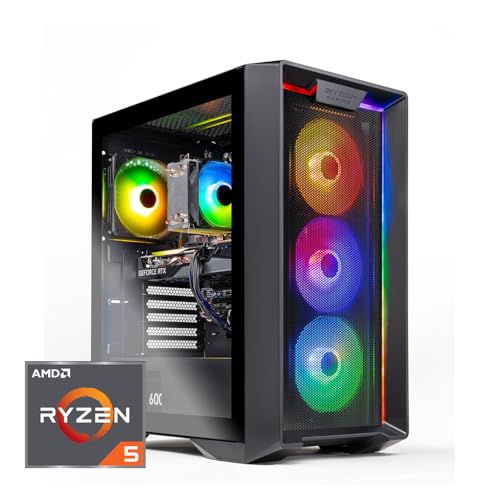
Where to buy
Check the latest price, availability and delivery on Amazon. Orders are placed on Amazon. We may earn a commission from qualifying purchases.
- Best gaming desktop for a small space: Skytech Nebula (ST-NEBULA-1344-B-AM), Ryzen 5 5600, RTX 3050 6GB — Check on Amazon
- iBUYPOWER SlateMesh (SlateMeshA5N4601), Ryzen 5 7600, RTX 4060 — Check on Amazon
- ZOTAC MEK Gaming PC, Ryzen 5 5500, RTX 3050 — Check on Amazon
- CyberPowerPC Gamer Xtreme VR (GXiVR8060A24), Core i5-13400F, RTX 4060 — Check on Amazon
See 2 more Amazon options
- MXZ Gaming PC, Ryzen 5 5500, RTX 4060 — Check on Amazon
- STGAubron Gaming PC (ABR1722), Ryzen 5 5500, RTX 3050 6GB — Check on Amazon
Read the full guide ↓
Disclosure: As an Amazon Associate, reviewstook.com earns from qualifying purchases. Links to Amazon on this page are affiliate links; they cost you nothing extra. Listing details such as price and availability change often, so check the current Amazon listing before you buy.
Start with the sentence nobody puts in a headline: none of the six machines in this guide is small. Every one is a standard desktop tower, because under $800 that is what a gaming desktop is — the genuinely compact gaming PCs live in other categories and mostly at other prices. This guide exists for the much more common situation: the room is small, even if the computer cannot be. A dorm corner, a bedroom desk that also holds a monitor, a keyboard and a life, a living-room floor beside a media unit. In rooms like those, the question is not which tower is smallest on a spec sheet. The question is which tower behaves best in the space around it — how much air it needs on each side, how deep the cable bundle behind it runs, how soon you will have to pull it out and open it, and how much heat it pours into a room that has nowhere for heat to go.
So this guide grades the installation, not the specification. The six desktops below are the verified under-$800 set from our research — two RTX 4060 towers, three RTX 3050 towers, and one more 4060 machine that only makes sense on a strict price watch — re-examined purely as objects that have to live somewhere. One of them arrives with its storage and power supply already finished, so it can be pushed into its spot and left alone. One has the documented mesh front in the set, which makes its breathing predictable. One carries Wi-Fi 6E, which deletes the longest cable run in most small rooms. Two ship with 500GB drives that make a case-opening second-SSD job a near certainty — which means the side panel needs room to come off, not just on delivery day. And all six share the rule that outranks every other in a tight space: a tower is an air-moving machine, and a sealed cabinet is not a home for one, at any price, in any guide. Below are the quick picks, detailed reviews of all six, a comparison table, a five-step measure-before-you-buy routine, the placement mistakes that suffocate good machines, and the questions small-room buyers ask most.
In this guide
Quick Picks
Short on time, or comparing several options at once? Each row below names a placement situation and the desktop that suits it, with a link to the listing.
| Placement | Pick | Why it stands out | Link |
|---|---|---|---|
| Install it once, then forget it | Skytech Nebula (ST-NEBULA-1344-B-AM) | 1TB storage and a named 650W Gold PSU fitted from day one — the tower you are least likely to reopen | Check on Amazon |
| Most predictable breathing | iBUYPOWER SlateMesh (SlateMeshA5N4601) | The set’s documented mesh-front case, on the AM5 platform — check price on Amazon | Check on Amazon |
| Lightest cable drop | ZOTAC MEK Gaming PC | Wi-Fi 6E makes the Ethernet run genuinely optional; check price on Amazon, with a named 650W Gold PSU | Check on Amazon |
| Strongest machine in the set | CyberPowerPC Gamer Xtreme VR (GXiVR8060A24) | RTX 4060, DDR5 and 1TB Gen4 storage — check price on Amazon | Check on Amazon |
| Most air paths to keep clear | MXZ Gaming PC | Six RGB fans and 1TB storage — check price on Amazon, and buy only when it sits within the budget | Check on Amazon |
| Cheapest, with homework | STGAubron Gaming PC (ABR1722) | A budget-tier entry — check price on Amazon — but its storage contradiction must be verified on delivery | Check on Amazon |
How These Picks Were Chosen
The set was built the way our desktop research always builds it: a machine qualifies if it is a real Amazon listing in the United States that fits this guide’s under-$800 budget frame, and because listing prices change often, each review points you to check price on Amazon rather than printing a fixed figure. Each pick carries its buying rule where it matters. We did not use these PCs ourselves. We read the maker listings, specification pages and price-tracker records behind the set, and compared graphics card class, processor platform, memory, storage and power supply. Those facts are reused here unchanged; what this guide adds is a second pass over the same six machines with a tape measure in hand — a figurative one, for a reason the next paragraph explains.
That reason is a discipline this guide holds strictly: the research behind this set documents no case dimensions, no weights, no VESA mounts and no noise figures for any of these six towers. So this guide prints none. Where a smaller-PC guide can sometimes quote a documented litre figure, a tower guide like this one grades by form-factor class — standard tower, internal power supply, rear-panel cabling — and by the placement behaviour that follows from documented features: one case line’s mesh front, another’s six fans, wireless standards on three picks. Anything more precise belongs to the live listing’s specification table, and the checklist below ends by telling you to read it there. A guide that invented dimensions to sound thorough would be sending you to measure your desk against numbers nobody verified.
Three installation filters were then laid over the set. The first is the reopening filter: how soon will this machine need to come out of its spot and be opened? A tower that ships with 1TB of storage and a published power-supply wattage may not need opening for years; a tower with a 500GB drive has a second-SSD appointment written into its future, and a tower with an unpublished power supply has a label you will want to read on delivery day. In a small room, reopening is a space cost — the panel needs lateral room, the machine needs to slide — so it is graded like one. The second is the air filter: every tower here pulls air in and pushes heated air out, and the honesty rule is absolute — none of them belongs in a sealed cabinet, a closed closet or a cubby with a door, whatever the furniture catalogue suggests. The third is the cable filter: a tower’s real depth is its case plus the connectors and bend radius behind it, and the picks differ here: a documented Wi-Fi 6E or Wi-Fi 6 radio can retire the single longest cable run in a small room, while the display and power cables remain for everyone.
The Space a Tower Really Occupies
A tower’s listing footprint — where listings state one at all — describes a box at rest on a product page. The installed footprint is larger in four directions, and in a small room all four are paid for. The first is the air jacket. A gaming tower is a heat pump with a computer attached: it draws cool air through its intake faces and expels warmed air through its exhausts, continuously, for as long as it runs. Every vented face needs room in front of it — not a wall, not a curtain, not the side of a wardrobe — because a tower pressed against a surface on its intake side is a tower breathing its own exhaust, and it will repay the arrangement with heat, noise and shortened boost clocks. This is why the sealed-cabinet refusal in this guide is not a preference: a closed cabinet is an air jacket of zero, and no pick below is graded as able to live in one.
The second hidden footprint is the cable drop. Everything a tower connects to arrives at its rear panel: the power cord, one or more display cables, USB for keyboard, mouse and headset, and — unless the pick’s wireless carries the network — an Ethernet run. Connectors do not bend at right angles; each cable leaves the panel, curves, and falls, and that curve is installed depth. A tower whose rear sits a cable-bend away from the wall is several inches deeper than its case, and a desk pushed flush ends up holding the machine at an angle, cables pinched against the plaster. Walk the drop before you order: from the rear panel, where does each cable actually go — down to a floor socket, across to a monitor arm, along a skirting board to a router in another room? The picks with documented Wi-Fi 6E and Wi-Fi 6 can delete the longest of those journeys. None of them can delete the display cable or the power cord.
The third is access, the dimension furniture never advertises. A desktop tower is the one form factor designed to be opened — that is its entire long-term argument — and opening one takes room: the machine slides out, a side panel comes off sideways, and hands and a screwdriver work in the gap. Two picks below ship with 500GB drives that make a second-SSD fitting a planned event; two more ship with power supplies whose labels you are instructed to read on delivery day. Placed in a spot with no lateral room — wedged between a desk leg and a wall, say — each of those ten-minute jobs becomes an unplug-everything excavation. The correct small-space question is not only “does it fit?” but “does it fit in a way I can still open?” If the honest answer is no, the pick that arrives finished — storage fitted, power supply published — is worth more than its spec sheet says.
The fourth is heat into the room itself. A tower under gaming load converts most of the power it draws into heat delivered to the air around it. In a hallway-sized bedroom or a box-room office, an evening of gaming is also an evening of space heating — pleasant in January, a genuine comfort cost in July, and a reason the machine’s exhaust should point into the room’s open air rather than into the enclosed pocket under a desk where the player’s legs also live. None of this requires a measurement to act on: place the tower where its exhaust has somewhere to go, keep its intakes in the room’s coolest available air, and treat a closed door on the space — cabinet, closet or cubby — as the one arrangement this guide refuses for all six picks.
The 6 Best Gaming Desktops for Small Spaces Under $800
Skytech Nebula Gaming PC (ST-NEBULA-1344-B-AM)
Who it suits: Small-room buyers who want to place a tower once and then leave it alone — the machine in this set that asks the least of the space around it over the years it will sit there.
The Nebula’s small-space argument is not its size; it is its finished state. It arrives with a full 1TB NVMe SSD already fitted, so the second-drive opening that two other picks schedule into your future is not on this machine’s calendar. Its power supply is a named 650W Gold unit, published in the specification, so the delivery-day label hunt that two other picks require is also unnecessary — the number your future graphics card swap depends on is known before the box arrives. Around those two paperwork virtues sits an honest specification: a Ryzen 5 5600, an RTX 3050 6GB, 16GB of DDR4 3200 memory and Wi-Fi. As a games machine it is a 1080p desktop — esports and older titles at high settings, current heavy titles at medium settings with DLSS doing honest work — and, as a mid-range pick within this budget, it is the strongest straightforward pick here — check price on Amazon before you order.
Placed, it behaves like what it is: a standard tower with an internal power supply, so there is no brick to house — the power question is simply whether a wall socket is within the cord’s reach of your spot, and whether the rear panel keeps its cable-bend of clearance. Its air jacket is the standard tower arrangement: open room at the vented faces, exhaust into the room’s air, and no sealed furniture. The one placement note its paperwork raises: the finished AM4 platform’s upgrade road is an in-socket Ryzen 5000 step and the graphics card swap its 650W Gold supply supports — both jobs done through the side panel, which is worth remembering when you decide how much lateral room to leave it. Skytech also lists the graphics card brand as “may vary,” which is normal for system integrators and is a delivery-day check, not a placement issue.
- 1TB storage fitted and a named 650W Gold PSU — the least reopening of any pick here.
- Standard tower with an internal power supply: no brick to find a home for.
- A mid-range option within the budget frame: check price on Amazon.
Honest limitation: The RTX 3050 6GB is entry class — 1080p at medium settings in modern heavy games — and the finished AM4 platform’s road ends with the Ryzen 5000 generation; it is a tower, and needs a tower’s air jacket on every vented side.
Choose it if your spot is tight enough that pulling the machine out again is a project you want to postpone for years. Skip it if high settings in current titles are the point — that is what the two RTX 4060 machines below exist for — check price on Amazon for each.

iBUYPOWER SlateMesh Gaming PC (SlateMeshA5N4601)
Who it suits: Buyers whose small space still has one honest patch of open air — a desk end or a floor corner with an unobstructed front — and who are buying a platform for years, not a season.
The SlateMesh is the one pick whose breathing is documented rather than assumed. The case line is built around a mesh front panel, and mesh is an installation fact before it is a styling one: the graphics card draws its air through that front face, so the placement rule writes itself — the front of this machine faces the room’s open air, never a wall, a curtain or the back of a cubby. Give it that and it holds the other half of the bargain, feeding the card room air instead of recycled exhaust. The machine inside is this set’s longest road: AMD’s AM5 platform around a Ryzen 5 7600 — the one socket here still receiving new processors — with an RTX 4060 8GB, 16GB of DDR5 memory at 5200MHz, Windows 11 Home, and an RGB keyboard and mouse in the box, a bundled detail that matters in a small room because the machine is playable the evening it arrives without a second shopping trip. Check price on Amazon before you order — as a top-end option within this budget frame, it sits at the upper edge of the tier.
Its space cost is scheduled, not hidden: the 500GB NVMe SSD is the smallest in this guide, and with modern game installs commonly running 70–150GB it holds the operating system and a few large titles before the juggling starts. A second SSD is a planned purchase on this platform — the fitting is easy, but it is a side-panel job, so place the machine where the panel can come off: beside a desk rather than inside a desk-shaped hole. One more delivery-day item the sources leave open: whether the 16GB of memory ships as one stick or two is not confirmed, and a single stick leaves real performance on the table, so check the live listing and then the slots on arrival — if it is one stick, the matching second stick is the cheapest upgrade in this guide, and it is also a panel-off job, best done the same evening as the inspection rather than after the machine has been wedged into its final centimetre.
- Documented mesh-front case: the set’s most predictable intake — face it into open air.
- AM5 socket with new processors still arriving for it — the longest CPU road in the set.
- RTX 4060 8GB and DDR5 memory, with keyboard and mouse included in the box.
Honest limitation: The 500GB SSD makes a panel-off second-drive job a near certainty, its price sits at the top of this budget tier, so check price on Amazon before ordering, and the memory stick configuration is unconfirmed in the sources.
Choose it if you can give its mesh front open air and its side panel working room — its platform is the longest road in the guide. Skip it if the only available spot is an enclosed cubby, or a large library must fit on day one with no extra spending.

ZOTAC MEK Gaming PC (MEK3050A5500BG0V1)
Who it suits: Buyers whose router lives nowhere near the desk — the pick whose cable drop is the lightest in this set, because its longest cable is optional.
Every tower in this guide trails the same minimum bundle — power cord, display cable, USB — but the network cable is where small rooms suffer: an Ethernet run to a router in another room crosses floors, doors and skirting boards, and in a rented room it may not be permitted at all. The MEK carries Wi-Fi 6E, the strongest wireless specification in this set, which makes that run genuinely optional rather than a compromise to apologise for; its installed depth is then just the case, the rear cable bend, and the cables that remain. The rest of the machine follows the owner-friendly pattern: a Ryzen 5 5500, an RTX 3050, 16GB of DDR4 memory, and a 650W 80 Plus Gold power supply published in the specification — the same install-and-plan-around-it paperwork as the Skytech. Check price on Amazon — it is positioned as a budget-tier entry in the guide.
Two cautions shape its placement. The first is storage: its 500GB NVMe SSD ties the iBUYPOWER as the smallest here, so the second-drive appointment exists on this machine too — plan the side-panel access when you place it, and remember that a second drive is a separate purchase to plan for before calling this the finished desktop. The second is a paperwork check rather than a space issue: the listing material did not headline the RTX 3050’s VRAM figure, so this review does not assert one — confirm it on the live listing before ordering. In games it is the Nebula’s near-twin: 1080p, esports at high settings, heavy modern titles at medium with DLSS, on a finished AM4 platform whose second year is a graphics card swap the published PSU already supports.
- Wi-Fi 6E: the Ethernet run — the longest cable in most small rooms — becomes optional.
- 650W 80 Plus Gold PSU published in the spec, and standard parts throughout.
- A budget-tier option in this set: check price on Amazon.
Honest limitation: The 500GB SSD will need a second drive for any serious library — a panel-off job to plan access for — and the RTX 3050’s VRAM is not headlined in the listing material, so verify it on the live listing rather than assuming.
Choose it if the router is far away, the room is small, and a budget-tier entry into an upgradeable tower is the goal. Skip it if you want the storage already fitted — the Skytech is the same idea with the drive included.

CyberPowerPC Gamer Xtreme VR Gaming PC (GXiVR8060A24)
Who it suits: Buyers with one good tower-sized spot — open air, a reachable socket, room to open the case once — who can shop patiently and want the strongest machine this budget reaches placed in it.
As a specification, this is the most complete desktop in the guide: an Intel Core i5-13400F with a GeForce RTX 4060 8GB, 16GB of DDR5 memory and a 1TB PCIe Gen4 SSD, with no component the obvious weak link. The 4060 plays modern titles at high settings at 1080p and esports at high-refresh rates, with DLSS frame generation stretching it further in supported games. Check price on Amazon before you order: it belongs in this guide only when the live listing sits within the under-$800 budget frame, and outside that frame it is simply not an under-$800 desktop. For placement it is a standard tower with Wi-Fi Ready in the specification, so the network cable is a choice rather than a necessity, and the 1TB drive means no storage opening is scheduled — the machine can go into its spot and stay there.
The one appointment it does schedule is a reading, not a purchase. The listing material does not publish the power supply’s wattage, and that label — visible through the case window or with the panel off — is the number that decides how ambitious a year-two graphics card can be. In a small room that translates into one instruction: do not wedge this machine into its final position on delivery day. Leave it somewhere openable, read the label, note the configuration against the listing — CyberPower reuses model numbers across configurations, so confirm processor, card, memory and storage on the live listing before ordering and against the delivered machine after — and only then give it the tight spot. A buyer who does that owns the machine’s paperwork; a buyer who buries it first will be excavating it later, in less space, with more cables attached.
- RTX 4060 8GB with DLSS frame generation — the most graphics this budget catches.
- 1TB PCIe Gen4 SSD fitted: no storage opening scheduled after placement.
- Core i5-13400F and 16GB DDR5 — headroom for a later GPU swap.
Honest limitation: It belongs here only when its live Amazon price sits within the budget — check price on Amazon — and the unpublished PSU wattage means one open-the-case inspection on delivery day is part of the purchase — plan the access before you place it.
Choose it if the live price on Amazon sits within budget and your spot has the standard tower air jacket plus room to open the case once. Skip it if you cannot confirm it within budget on Amazon, or the only available space is a sealed enclosure — the Skytech is the honest same-week purchase.
MXZ Gaming PC (Ryzen 5 5500, RTX 4060)
Who it suits: Patient price-watchers with a genuinely open placement — floor space or a wide desk end with air on every side — who will buy a 4060 tower the one week its price falls through the floor and ignore it every other week.
The MXZ is the most installation-demanding machine in this guide, and the reason is printed in its own feature list: six RGB fans. Every fan is an air path, and air paths are clearance obligations — intake faces that must not sit against a wall or a curtain, exhaust faces that must not blow into a pocket of trapped air under a desk. A buyer with a genuinely open spot gets the benefit in full, a graphics card fed with room air and a case that sheds heat in every direction it was designed to. A buyer whose “spot” is a narrow slot between furniture gets the opposite: six fans negotiating with upholstery. Judge your room honestly against that, because this is the pick where the air jacket matters most. The machine inside the airflow is easy to like — an RTX 4060 with a Ryzen 5 5500, 16GB of DDR4 3200, a full 1TB NVMe SSD and Windows 11 Pro — and its storage means, like the CyberPower, it schedules no second-drive opening.
Its price discipline is the strictest in the guide, and it is not negotiable in either direction. This is a premium-positioned listing for the strongest graphics class here, so check price on Amazon and buy it only when the live price sits within the under-$800 budget frame. Outside that frame it is a poor purchase for this guide, however good the hardware is. Set an alert at the $800 budget ceiling and buy the week it drops into range. One technical note completes the picture: the Ryzen 5 5500 connects its graphics card at PCIe 3.0 speeds and the RTX 4060 uses a narrow x8 link, a combination that costs a few percent in some games versus the same card in the CyberPower’s newer platform — a small, real tax, worth knowing about rather than worrying about.
- An RTX 4060 with 1TB fitted — check price on Amazon and buy only within budget.
- Six-fan case: the most airflow here, for a spot that can actually supply it.
- Windows 11 Pro and the fullest feature list in the guide.
Honest limitation: It is a price-watch pick only — check price on Amazon and buy only when it sits within budget — and its six fans make it the wrong machine for a tight slot: it needs open air on more faces than any other pick.
Choose it if your placement is genuinely open and you can wait for the price to come to you. Skip it if the purchase is on a deadline, the live price on Amazon sits outside the budget, or the tower’s home is a narrow gap between furniture.

STGAubron Gaming PC (ABR1722)
Who it suits: Buyers working to the tightest version of this budget, in a spot with enough access to do a careful delivery-day inspection — the cheapest route here to a discrete-GPU tower, with homework attached.
On paper the formula matches the towers above it: a Ryzen 5 5500, an RTX 3050 6GB per the headline specification, 16GB of DDR4, Wi-Fi 6 and Bluetooth 5.2 — a budget-tier machine, so check price on Amazon before you order. The wireless deserves its small-space credit: like the ZOTAC, this machine can retire the cross-room Ethernet run, leaving its cable drop at the standard minimum of power, display and USB. In games, expect its card’s class behaviour — 1080p esports comfortably, modern titles at medium settings with upscaling — and as an object it is a standard tower with standard, replaceable parts, which is the correct shape for a machine bought cheaply and kept honestly.
The inspection is the review, because this is the least well documented machine in the guide, and in a small room undocumented machines cost double: every check happens in the space you have. The listing’s own copy contradicts itself on storage — the headline specification says 512GB while quoted listing text elsewhere mentions a 1TB drive, and this guide follows the headline figure — so check the live listing, then check the drive the delivered machine actually reports, inside the return window. The power supply’s wattage and rating are likewise unpublished, which makes its year-two story unwritten rather than bad: a graphics card swap may be perfectly possible, but you will learn it from the label on the unit in your machine, so read it on delivery day and write the number down. All of that argues for one placement decision: keep this tower somewhere openable until the checks are done and the return window has closed. Buy it as a good-value machine for today with verification attached, not as a documented upgrade platform, and not as a machine to bury behind furniture on day one.
- The cheapest route here to a discrete-GPU tower: a budget-tier pick — check price on Amazon.
- Wi-Fi 6 and Bluetooth 5.2: the cross-room Ethernet run is optional.
- A standard tower, so whatever is inside can be replaced when it matters.
Honest limitation: The listing contradicts itself on storage (512GB headline versus 1TB in quoted listing text) and does not publish the power supply — both must be verified on the live listing and again on delivery, so it needs an openable spot until the return window closes.
Choose it if the tightest budget is decisive, your spot allows the delivery-day checks, and you will genuinely do them. Skip it if you want the upgrade path documented before you pay — that documented paperwork is the Skytech and ZOTAC’s advantage.

Comparison Table
| Product | Installation profile | Best use | Link |
|---|---|---|---|
| Skytech Nebula (ST-NEBULA-1344-B-AM) | Standard tower, internal PSU, nothing scheduled to reopen | Install once in a tight spot and leave it for years | Check on Amazon |
| iBUYPOWER SlateMesh (SlateMeshA5N4601) | Standard tower, documented mesh front, second SSD scheduled | Open-front placement on the longest upgrade road | Check on Amazon |
| ZOTAC MEK Gaming PC | Standard tower, Wi-Fi 6E cable diet, second SSD scheduled | Rooms where the router is nowhere near the desk | Check on Amazon |
| CyberPowerPC Gamer Xtreme VR (GXiVR8060A24) | Standard tower, one delivery-day label reading | Strongest spec, placed once its paperwork is read | Check on Amazon |
| MXZ Gaming PC | Standard tower, six fans — the widest air jacket here | Genuinely open placements, bought on price watch within budget | Check on Amazon |
| STGAubron Gaming PC (ABR1722) | Standard tower, verification before it is buried | Cheapest entry, kept openable until checks are done | Check on Amazon |
How to Choose: The Five-Step Measure-Before-You-Buy Routine
Step 1 — Measure the spot. Before any listing is opened, measure the place the tower will actually live: floor beside the desk, desk end, or the top of a sturdy unit — width, depth and height, written down. Towers in this class are floor-or-solid-desk machines; a shelf that bows under a monitor will not thank you for a tower, and furniture ratings, not optimism, decide. Read the candidate listing’s specification table for its stated case size — this guide prints no dimensions because its research verified none — and hold the listing’s figure against your measurements, not against a competitor’s.
Step 2 — Reserve ventilation clearance. Around the measured case, reserve open air on every vented face: intakes drawing from the room, exhausts blowing into the room, nothing sealed. If the spot you measured in Step 1 is a cabinet, a closet or a cubby with a door, stop — no pick in this guide is graded for that home, and the correct purchase is a different spot, not a different tower. The mesh-front iBUYPOWER wants its front face in open air most of all; the six-fan MXZ wants the widest jacket of the set; all six want the rear exhaust out of corners and curtains.
Step 3 — Give the power supply an address. All six picks carry internal power supplies, so there is no brick to house — the address question is the wall socket. The cord leaves the rear panel and needs a reachable outlet without an extension lead stretched across the room, and the rear of the case needs its exhaust path kept clear of the wall the socket sits in. The socket’s position decides which way the tower faces: rear toward the outlet wall, front toward you, and no arrangement that puts the machine’s back hard against plaster to make the cord reach.
Step 4 — Walk the cable drop. Stand at the chosen spot and walk each cable to its destination. The display cable climbs to the monitor — is there slack for the monitor’s actual position, or will the drop pull the tower’s rear around? USB reaches keyboard, mouse and headset without crossing the player’s legs. Then the network decision, which is where these picks honestly differ: the ZOTAC’s Wi-Fi 6E, the STGAubron’s Wi-Fi 6 and the CyberPower’s Wi-Fi Ready can retire the Ethernet run entirely, while a wired connection for the others means measuring the run along the skirting board, not through the air. Whatever remains, add its bend behind the case to the depth you measured in Step 1 — that sum is the tower’s real footprint.
Step 5 — Then order, and verify on arrival. Order only when the first four steps have a spot that passes all of them — and keep the machine somewhere openable until the delivery checks are done, inside the return window. The checks are the picks’ own documented traps: the STGAubron’s storage, against its self-contradicting listing — headline 512GB, 1TB mentioned elsewhere; the CyberPowerPC’s configuration against its reused model number, and its power-supply label, read and written down; the iBUYPOWER’s memory, one stick or two, and its 500GB drive’s planned successor; the ZOTAC’s RTX 3050 VRAM line, confirmed on the live listing because its material does not headline it; the MXZ’s price, checked on Amazon and bought only within budget or not at all. Keep the packaging until the second week — a tower that has to go back travels in its own box or not at all.
Common Buying Mistakes
- Measuring the case and forgetting the installation. The installed footprint is the case plus its air jacket, its cable bend and its opening access — a tower that “fits” on paper and suffocates in place was measured wrong, not made wrong.
- Putting a tower in a sealed cabinet, closet or doored cubby. Every pick in this guide moves air for a living; a closed door on the space is the one arrangement refused outright for all six.
- Pushing the rear panel flush against the wall. Connectors need their bend, exhausts need their exit, and a tower held at an angle by pinched cables was placed by its case depth alone.
- Wedging the machine into a spot where the side panel cannot come off. Two picks schedule a second SSD, two schedule a power-supply label reading, and every tower eventually wants dust cleared — access is a dimension, and it is spent the day you place the machine.
- Treating a past price as the current price. The two strongest towers and the MXZ belong in this guide only when their live Amazon prices sit within the budget; buying any of them without checking the live price on Amazon first is the most expensive mistake at this tier.
- Assuming wireless deletes the cable problem. Wi-Fi retires the network run — a genuine saving on the picks that carry it — but the display cable, the power cord and USB remain, and their drop still sets the installed depth.
- Judging a finished platform as a failed one. AM4 and LGA1700 machines are good value precisely because their roads are shorter; the mistake is paying a living platform’s price without noticing which one you bought.
- Throwing the box away on day one. Transit knocks and wrong-configuration deliveries surface in the first week, and returning a desktop without its packaging is a project nobody needs.
Final Recommendation
- Best for a small space overall: Skytech Nebula — the tower you install once and reopen last.
- Longest road, documented breathing: iBUYPOWER SlateMesh — check price on Amazon.
- Lightest cable drop: ZOTAC MEK — Wi-Fi 6E and a published 650W Gold PSU.
- Strongest machine: CyberPowerPC Gamer Xtreme VR — check price on Amazon.
- Open spot, patient buyer: MXZ — only when the live price is within the $800 budget; check price on Amazon.
- Cheapest entry, with homework: STGAubron ABR1722 — verified before it is buried.
Our top two are the Skytech Nebula and the iBUYPOWER SlateMesh, because they are the two honest shapes of this search. The Nebula is the placement you make once: storage fitted, power supply published — check price on Amazon — the tower for a spot tight enough that pulling the machine out again is a genuine cost. The SlateMesh is the placement you make for years: the AM5 platform with CPUs still coming, a mesh front whose breathing you can plan around, and one scheduled panel-off job — the second SSD — that its placement should be chosen to allow. Between them they cover most small rooms. If the router is in another room and the cable run is the real enemy, the ZOTAC MEK’s Wi-Fi 6E is the answer as a budget-tier option — check price on Amazon; if its live price sits within budget and the spot can spare one openable afternoon, the CyberPowerPC is the strongest machine this budget catches. Shoppers working lower should see Best Gaming Desktop Under $700, those weighing the step up should see Best Gaming Desktop Under $1200, and anyone whose room is small enough that a tower is the wrong shape entirely should start with Best Small Form Factor Gaming PC Under $800 instead. Measure the spot, reserve the air, walk the cables — then order.
Frequently Asked Questions
Can a gaming desktop go inside a cabinet or TV unit?
Not a sealed one — that arrangement is refused for every pick in this guide. A tower draws air in and pushes heated air out for as long as it runs; a closed cabinet gives it a fixed volume of its own exhaust to breathe, and heat, noise and throttled performance follow. An open-backed unit with generous clearance on the vented faces is a different arrangement and can work; a door that closes on the machine is the line. If the cabinet is non-negotiable, the honest answer is a different form factor, not a different tower.
How much clearance does a tower actually need?
Enough that every vented face breathes room air and the rear cables keep their bend — this guide grades clearance qualitatively because its research documents no dimensions to measure against, and invented precision would be worse than none. In practice: open air at the front intake and rear exhaust, no face pressed to a wall, curtain or wardrobe side, and the rear held off the wall by the cable drop rather than by the case. The six-fan MXZ wants the most room of this set; the mesh-front SlateMesh wants its front face unobstructed above all.
Floor or desk — where does a tower belong in a small room?
Either, with conditions. The floor beside a desk is the classic tower home: it frees the desk surface entirely, and its costs are dust, kicked cables and exhaust warming the player’s legs if the spot is a closed under-desk pocket. A desk end gives the machine cleaner air and easier panel access, and costs the surface it stands on. What neither arrangement may be is enclosed — and on carpet, check the listing’s intake layout before placing, since a bottom-intake design buried in deep pile is breathing through a blanket.
Does Wi-Fi really change the placement?
It changes the longest cable, which is not nothing. The ZOTAC’s Wi-Fi 6E, the STGAubron’s Wi-Fi 6 and the CyberPower’s Wi-Fi Ready can each retire a cross-room Ethernet run — the cable most likely to cross a doorway or require permission in a rented room. The display cable, power cord and USB leads remain for every pick, so the cable drop shrinks rather than vanishes, and a competitive player who wants wired latency can still run the cable on the picks that offer both. Grade it as one fewer journey, honestly counted.
Which of these towers will I have to open first?
The two 500GB machines — the iBUYPOWER and the ZOTAC — schedule a second-SSD fitting as soon as the library outgrows the drive, and the iBUYPOWER may add a memory-stick check on delivery day. The CyberPowerPC and the STGAubron schedule a reading rather than a purchase: a power-supply label the listing never published, checked while the return window is open. The Skytech and the MXZ, with 1TB fitted and — in the Skytech’s case — a published PSU, are the picks that can stay closed the longest, which is exactly why the Nebula leads this guide.
Is a tower simply the wrong answer for a very small room?
It can be, and this guide would rather say so than sell you one. If the honest measurements from Step 1 leave no spot with open air and opening access — a room where the only candidate space is a sealed cabinet or a slot between furniture — then the tower form factor is the problem, and the money belongs in a machine designed for the space: see Best Mini Gaming PC Under $800 and Best Compact Gaming PC Under $800 for the shapes built for that job. A tower in a room that can host it properly remains the best-value, longest-lived gaming purchase under $800; a tower suffocating in the wrong room is neither.
- Best Gaming Desktop Under $800
- Best Gaming Desktop Under $700
- Best Gaming Desktop Under $1200
- Best Gaming Desktop For Beginners Under $800
- Best Gaming Desktop For Streaming Under $800
- Best Gaming Desktop For 1440p Gaming Under $800
- Best Gaming Desktop For Small Spaces Under $700
- Best Gaming Desktop For Small Spaces Under $1200
- Best Small Form Factor Gaming PC Under $800
- Best Gaming PC Under $800
- Best Prebuilt Gaming PC Under $800


