Where to buy
Check the latest price, availability and delivery on Amazon. Orders are placed on Amazon. We may earn a commission from qualifying purchases.
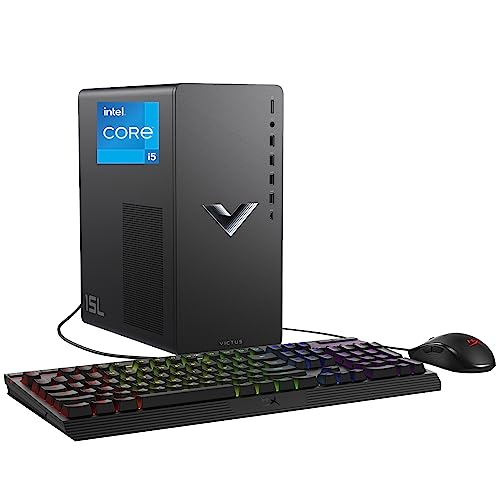
- Best for a small space: HP Victus 15L TG02-1020h — Core i5-13400F, RTX 3050, 8GB RAM, 512GB SSD — Check on Amazon
- IPASON Gaming PC — Ryzen 5 5600, RTX 3060 12GB, 16GB RAM, 1TB NVMe — Check on Amazon
- ZOTAC MEK Gaming PC — Ryzen 5 5500, RTX 3050, 16GB RAM, 500GB NVMe, 650W Gold PSU — Check on Amazon
- Skytech Blaze 3.0 — Core i5-10400F, RTX 3060, 16GB RAM, 1TB SSD, 600W Gold PSU — Check on Amazon
See 2 more Amazon options
- ZER-LON Gaming PC — Ryzen 5 5500, RTX 4060 8GB, 16GB RAM, 1TB NVMe — Check on Amazon
- STGAubron Gaming PC — Ryzen 5 5500, RTX 3050 6GB, 16GB RAM, 1TB SSD — Check on Amazon
Read the full guide ↓
Disclosure: As an Amazon Associate, reviewstook.com earns from qualifying purchases. Links to Amazon on this page are affiliate links; they cost you nothing extra. Listing details such as price and availability change often, so check the current Amazon listing before you buy.
A small room changes what a good first gaming PC is. In a big setup, a tower is furniture you place once and forget; in a studio flat, a dorm room or a box-room desk setup, the same tower is a piece of architecture — it decides where the chair goes, whether the desk drawers still open, and how warm the corner you sleep in gets on a summer evening. So this guide grades the six entry level machines under $700 as installations first and spec sheets second: how much room each one really occupies once the cables bend behind it, whether you can open its side panel where it lives, where its heat goes, and whether the upgrade it promises happens inside the box you already placed or demands a second, bigger one later.
One honesty note has to come before the picks, because the keyword invites a wrong picture. At $700, entry level gaming means a real discrete graphics card — an RTX 3060 or RTX 3050 — and cards like that live in towers. There is no mini PC in this guide: the palm-sized machines that hide behind a monitor are the integrated-graphics PCs of the cheaper tiers, a different performance class entirely, and no verified listing at this budget puts a current discrete card into a sub-litre case. What “small spaces” honestly means here is a choice between one genuinely compact tower — HP’s Victus 15L, the only pick whose case is documented at around 15 litres — and five standard towers that differ in the things a small room actually feels: how deep the installed footprint runs once cables are plugged in, how much clearance the side panel needs for the memory stick or graphics card you will fit later, and how much warm air the machine pours into a room with one window. Read the measurements section before you fall for a product photo: every tower on the internet is photographed alone, at an angle, with nothing plugged into it.
In this guide
Quick Picks
Short on time, or comparing several options at once? Each row below names a small-space situation and the product that suits it, with a link to the listing.
| Your space | Pick | Why it stands out | Link |
|---|---|---|---|
| Smallest real footprint | HP Victus 15L TG02-1020h — i5-13400F, RTX 3050 | The only documented compact case here, at around 15 litres — but it ships with 8GB of RAM | Check on Amazon |
| One tower, placed once, kept for years | IPASON — Ryzen 5 5600, RTX 3060 12GB | The strongest card and 1TB of storage, so nothing else needs bolting on or plugging in beside it | Check on Amazon |
| Upgrades that stay inside the same box | ZOTAC MEK — Ryzen 5 5500, RTX 3050 | A named 650W Gold power supply means the future graphics card fits the footprint you already have | Check on Amazon |
| The tinkerer’s corner | Skytech Blaze 3.0 — i5-10400F, RTX 3060 | Standard parts throughout — the easiest case in the guide to open, service and grow in place | Check on Amazon |
| Best graphics — sale only | ZER-LON — Ryzen 5 5500, RTX 4060 8GB | Current-generation GPU and DLSS frame generation, but only buy it when it falls within this guide’s budget — check price on Amazon | Check on Amazon |
| A big library in a small room | STGAubron — Ryzen 5 5500, RTX 3050 6GB | 1TB of storage inside the box — no external drive on the desk — with an unpublished power supply to inspect | Check on Amazon |
How These Picks Were Chosen
The $700 figure was treated as a ceiling, never a target: every product below is a real Amazon listing in the United States, and because prices at this tier change often, check the current price on Amazon before you buy rather than relying on any figure printed in a guide. One pick, the ZER-LON, often sits above this guide’s budget; it earns its place only for the times when it falls within budget, and its review states the rule in bold: when it sits above budget, it is not this guide’s pick any more, however good the card inside it is.
On top of that sat three filters specific to small rooms. The first is documented size, and it is a strict one: a pick earns a size claim only where the base research for this batch documents it. That is why the HP’s roughly 15-litre case is the only volume figure in this guide — it is the one figure the verified material supports. The other five are standard tower class, and rather than invent measurements for them, this guide grades them by class and tells you, in the checklist below, exactly which numbers to take from the live listing’s specification table before you order. Any guide that prints precise dimensions it cannot source is decorating, not measuring.
The second filter is the installed footprint. A tower’s real depth is its case depth plus the bend radius of the power cord, display cable and Ethernet lead plugged into its back — a run of extra inches that product photos never show and shallow desks always feel. Its real width includes the side panel’s swing or slide path, because every machine in this guide will be opened where it lives: the HP needs a memory stick fitted, the standard towers invite a graphics card swap, and a tower wedged panel-first against a wall turns a ten-minute upgrade into a furniture-moving expedition. The third filter is heat. A gaming tower is a small fan heater that also plays games; in a large room that is trivia, in a small one it decides whether the machine lives on the desk beside you, on the floor with its exhaust path clear, or not in the bedroom at all. Picks were graded on how honestly their placement story works — open air, clearance at the exhaust, and no sealed cabinets, which no pick in this guide survives.
The Space You Cannot See on the Spec Sheet
The cable bend is part of the machine. Power, display and network cables leave the back of a tower in a stiff arc before they drop. On a deep desk that arc is invisible; on a shallow desk or a shelf it pushes the tower forward until its front feet near the edge, or it crushes the cables against the wall and stresses the ports. When you measure your spot, measure to the wall and then subtract the bend — the checklist below builds this in as a step, because it is the single most common reason a “it should fit” tower does not.
There is no power brick to hide — the tower is the object. Mini PCs ship with external adapters that need their own ventilated home; every pick here draws power through an internal supply, so the brick problem disappears and is replaced by a simpler one: the case itself is the largest single object in your setup after the monitor, and its power cord needs an outlet within reach without crossing the room. That is a genuine small-space virtue of the tower class — one box, one cord — and it is why the internal power supply’s quality matters twice in this guide: the named 650W and 600W Gold units in the ZOTAC and Skytech are both upgrade headroom and one less thing to replace later.
Heat leaves the case and enters the room. All six machines exhaust warm air, and in a small room that air has nowhere to dilute. Placement rules follow: never inside a sealed cabinet or a closed TV unit — the machine will rebreathe its own exhaust and throttle; keep the rear and top vents clear of walls, curtains and bedding; and if the PC shares your sleeping room, floor placement beside the desk, exhaust pointed into open room air, beats a desk corner aimed at the bed. None of this needs a number to be true, and this guide claims no noise figures for any pick, because the base research documents none: graded by class, a tower’s fans are audible in a quiet small room under load, and distance is the only volume control — another argument for floor placement with a clear exhaust path rather than a tower at ear height beside the monitor.
Access is a dimension too. Every pick here will be opened: the HP on day one for its second memory stick, the standard towers in year two or three for a graphics card or a second drive. A tower that fits its shelf exactly, with no room to slide the side panel off or swing it open, does not actually fit. Leave the panel’s working room in your measurement, or accept that upgrades mean dragging the machine to a table — in a small flat, that table may be the bed.
The 6 Best Entry Level Gaming PCs for Small Spaces Under $700
HP Victus 15L Gaming Desktop TG02-1020h — Core i5-13400F, RTX 3050, 8GB RAM, 512GB SSD
Who it suits: Buyers whose room is the binding constraint — a small desk, a shelf unit, a dorm — who want a major brand behind their first PC and are willing to do one five-minute upgrade.
This is the only pick that answers the keyword directly. The 15L in its name is its case class: a compact tower of around 15 litres, the one volume figure the verified research behind this guide documents, and it makes the Victus a different kind of object from the five standard towers below — a machine that sits on a small desk beside the monitor instead of colonising the floor, that fits a media shelf, that can be carried to another room under one arm when the setup changes. Around that case, HP’s specification is genuinely strong: the Core i5-13400F is the most modern processor in this guide, a 10-core design (six performance cores plus four efficiency cores, per Intel’s published configuration) that will not hold back a future graphics card, and the Victus line is HP’s real gaming range, with HP’s support network behind it when something goes wrong in year one. Check the current price on Amazon before you buy — when HP’s own sales cycle turns, the smallest machine here can also be one of the more accessible ways into a current platform in this tier.
Two limits, and in a small room both are placement-shaped. The first is the asterisk in its full size: this machine ships with 8GB of RAM, and 8GB is not enough for a gaming PC in 2026. Windows, a browser, Discord and a modern game together push past it, and the symptom — stutter no graphics setting fixes — is the classic “my new PC feels slow” complaint. The fix is one matching memory stick, the cheapest upgrade in PC gaming, fitted in minutes through the side panel; this guide’s recommendation is conditional on it, so count the pick as machine plus stick, and note what the small-spaces angle adds: fitting that stick is the moment the access rule in this guide stops being theory. Place the Victus where its panel can open, or the five-minute job becomes a furniture job. The second limit is structural and permanent: the compact case and its proprietary power supply leave little room for a bigger graphics card later, so the LGA1700 platform’s headroom is partly theoretical — the processor can grow, the graphics mostly cannot. In space terms that is a fair trade, honestly stated: you are spending future upgradability to buy present smallness. Buy it as a strong, supported, genuinely compact PC for this console generation of games, and it earns the top spot in this guide.
- Around 15 litres — the only documented compact case in the guide, small enough for a desk or media shelf.
- Core i5-13400F — the newest, strongest processor here for mixed use.
- A compact major-brand option in this tier — check price on Amazon.
Honest limitation: Ships with only 8GB of RAM — budget the second stick from day one — and the proprietary compact case and power supply cap future graphics upgrades.
Choose it if floor and desk space are what you are shortest of, and you will add the RAM stick immediately. Skip it if your plan is a big graphics upgrade later — the standard towers exist for that — or you will never open a case, in which case buy a 16GB machine from the picks below.

IPASON Gaming PC — Ryzen 5 5600, RTX 3060 12GB, 16GB RAM, 1TB NVMe
Who it suits: Small-room buyers with one proper tower spot — a desk end, a floor corner — who want to fill it once with the strongest machine and add nothing beside it for years.
A standard tower is a standard tower, and this guide will not pretend otherwise: the IPASON occupies the same class of footprint as the other full-size picks, and its case dimensions are not among the figures the verified research documents, so take them from the live listing’s specification table before you commit your corner. What earns it second place in a small-spaces guide is everything it does not add to the room. The RTX 3060 inside carries 12GB of video memory — the most in this guide, and the figure that decides whether modern games at 1080p high settings keep their textures sharp in 2027 or quietly turn themselves down — and it is paired with a Ryzen 5 5600 six-core processor, 16GB of DDR4-3200 memory, a stated 550W power supply, Windows 11 Home, and a 1TB NVMe drive. That last item is a space feature, not just a spec: at 50 to 150GB per modern title, 1TB is the size that holds a library inside the box, where a 500GB machine eventually sprouts an external drive, its cable and its own claim on the desk. Check price on Amazon — this is the most complete specification in this guide, in exactly one box.
The cautions are about the listing, not the hardware, and one of them is an arrival-day habit worth learning in a small flat: confirm the style name in your cart says Ryzen 5 5600 and RTX 3060, and confirm it again on the box before you unpack — this listing family has shown configuration drift under its style names, and the listing notes the graphics card brand may vary, which does not change the RTX 3060 underneath. In a small room, that check matters more than usual: returning a tower is a bigger errand than returning a mini PC. On placement, the standard rules apply with force — open air, exhaust clearance behind, side panel reachable, because the AM4 platform underneath gives this machine a real second act: AMD’s final AM4 processors, including the gaming-celebrated X3D models, remain on sale and drop into this board, and a graphics card swap happens inside the same case. The tower you place this year is the tower you upgrade in place; its footprint never grows.
- RTX 3060 carrying 12GB of VRAM — more graphics memory than any other card in this guide, and the buffer that ages best.
- 1TB NVMe inside the box — a full library with no external drive on the desk.
- The full day-one specification in one box — check the current price on Amazon.
Honest limitation: A full-size tower whose exact dimensions you must take from the live listing, and a listing whose configuration has drifted under its style names — verify in the cart and on arrival.
Choose it if you have one honest tower spot and want the strongest machine in it, bought once. Skip it if your only spot is a shelf or a small desk — that is the HP’s job — or the live listing’s style no longer matches this specification.

ZOTAC MEK Gaming PC — Ryzen 5 5500, RTX 3050, 16GB RAM, 500GB NVMe, 650W Gold PSU
Who it suits: Buyers placing a tower in a tight corner who plan to upgrade the graphics card in a few years — and want that upgrade to happen inside the footprint they already have.
ZOTAC makes graphics cards first and whole PCs second, and the listing reads like it: Ryzen 5 5500 six-core processor, an RTX 3050, 16GB of DDR4-3200, a 500GB NVMe drive, Wi-Fi 6E, Windows 11 Home — and, almost unheard of at this tier, a power supply that is actually named: 650 watts, 80 Plus Gold. In a small-spaces guide that PSU line is the review. A future graphics card upgrade is where compact setups usually break: the new card needs more power, the old supply cannot give it, and the “upgrade” becomes a second machine while the first one takes up storage space you do not have. The MEK’s documented 650W Gold unit is headroom bought in advance — when a stronger card tempts you in two or three years, it goes into this case, on this supply, in this corner, and the room never notices. The AM4 board underneath likewise takes a stronger processor from the platform’s deep, discounted catalogue. Its positioning in this tier backs a buy-any-day placement decision: a machine presented for this budget rather than only visiting it on promotion, so you can measure your corner, check price on Amazon, and order.
The trades are the graphics card and the drive. The RTX 3050 is the entry class of its generation: a genuine discrete card with its own memory, DLSS upscaling and proper game drivers — a different world from integrated graphics — but at 1080p it is a medium-to-high settings card in modern titles, not a high-settings one, and the most demanding games will ask for DLSS and a few settings turned down. (The verified sources do not state this card’s VRAM figure, so this guide does not claim one.) The 500GB drive is the second compromise, and the small-spaces framing cuts both ways: it fills after a handful of large games, and the fix — a second internal drive — at least happens inside the case rather than as another box on the desk, provided you kept the side panel reachable. Neither trade is hidden. The parts that are hard to change later — power supply, platform, documentation — are the strong ones here; the parts that are easy to change are where the money was saved, and every change happens within the footprint you measured on day one.
- Named 650W 80 Plus Gold power supply — the future graphics card fits the corner you already have.
- Positioned squarely in this tier on normal days — check the current price on Amazon.
- Wi-Fi 6E — one less cable run across a small room.
Honest limitation: In modern games the RTX 3050 is a medium-to-high settings card at 1080p, and the 500GB drive fills sooner than you expect.
Choose it if your tower spot is fixed and permanent, and you want the upgrades to come to the machine instead of the machine going to storage. Skip it if you want maximum settings today — that is the IPASON — or your library needs 1TB from day one.

Skytech Blaze 3.0 — Core i5-10400F, RTX 3060, 16GB RAM, 1TB SSD, 600W Gold PSU
Who it suits: The tinkerer in a small flat — a buyer who expects to open the case more than once, and wants a machine that rewards it without ever needing a bigger spot.
The Blaze 3.0’s specification reads like the IPASON’s with the decades swapped: RTX 3060-class graphics, 16GB of DDR4-3200 memory, a 1TB solid-state drive, and a power supply that is named and generous — 600 watts, 80 Plus Gold. (As with the ZOTAC’s card, the verified sources do not headline this card’s VRAM, so this guide does not state one.) What it gives back is the processor: Intel’s Core i5-10400F is a six-core chip from an older generation, entirely adequate for feeding an RTX 3060 at 1080p — the card, not the CPU, sets the frame rate in most games at this tier — but a step behind the Ryzen 5 5600 in newer, CPU-heavy titles, and sitting on Intel’s finished LGA1200 platform, which has no meaningful processor upgrade left in it. Check the current price on Amazon, and compare it against the IPASON in the same week before committing: when the IPASON checks out as the better value that week, the IPASON is the better buy, full stop.
For a small space, though, this machine’s virtue is the one the other standard towers only partly match: everything inside is standard. A normal case, a standard power supply with real headroom, a graphics card held in by screws rather than compromises. In a flat where the PC’s corner is also its workshop, that matters — a graphics upgrade in 2028 is a side-panel-off, card-out, card-in job done where the machine sits, on forgiving hardware, with no proprietary rails or oddball supply to work around, and the upgraded machine occupies precisely the space the old one did. Two listing notes before you measure for it: it ships with Windows 10 Home in the listing specification, so confirm the free Windows 11 upgrade path on arrival (the processor is on Microsoft’s supported list), and patience can be a strategy — check the current price on Amazon and compare it with the guide’s other picks in the same week before you commit. Take its exact case dimensions from the live listing, as with every standard tower here; what this guide can promise is the class, and the class is the easiest in the guide to live with at close quarters.
- RTX 3060-class graphics with a named 600W Gold power supply.
- Standard parts throughout — servicing and upgrading in place, in the corner it already occupies.
- 16GB of RAM and a 1TB drive — nothing to add on day one.
Honest limitation: An older processor on a finished platform with no CPU upgrade left, Windows 10 in the listing specification — check price on Amazon before you buy.
Choose it if you will open the case more than once and want standard parts when you do. Skip it if the IPASON is in stock and checks out as the stronger value the same week — it is the stronger machine on specification — or your spot cannot take a full-size tower at all.

ZER-LON Gaming PC — Ryzen 5 5500, RTX 4060 8GB, 16GB RAM, 1TB NVMe (Model AOV4060)
Who it suits: Patient buyers with a measured tower spot who can watch a price for a few weeks and want the newest graphics technology this budget can reach.
The hardware case is simple: this is the only current-generation graphics card in the guide. The RTX 4060 is a generation newer than the 3060 and 3050 cards around it — more efficient, faster at the same settings, and supporting DLSS frame generation, which uses AI to insert extra frames and can make a demanding game feel smooth on settings that would otherwise stutter. Efficiency has a small-spaces meaning of its own: a newer card doing the same work draws its power more effectively, though this guide claims no wattage or heat figures the research does not document — graded by class, treat it as a standard tower with a standard tower’s placement rules. The rest of the specification is sound and space-complete: a Ryzen 5 5500 six-core processor (a step below the IPASON’s 5600, close enough that the card decides most games), 16GB of memory, a 1TB NVMe drive — the library inside the box, no external drive — Wi-Fi, Windows 11 Home, and the same upgradeable AM4 platform as the top tower picks. Its case dimensions, like the other standard towers’, come from the live listing before you order.
Then the rule that decides whether any of that matters. On many days this machine sits above this guide’s budget — on those days, it is not an under-$700 PC at all. When it does fall within budget, there is a real argument it is the best buy in the guide. When it sits above budget, walk away and buy the IPASON instead — check price on Amazon for both before you decide. In a small room there is a second, quieter reason to hold the line: a tower bought in a panic at the wrong price is a tower you resent in a room you cannot escape it in. One more fine-print item, and it is an access item too: the listing does not publish its power supply wattage in the material we verified, so when the machine arrives, read the PSU label during your first-week inspection — which means, per this guide’s recurring rule, placing it somewhere the side panel can actually come off — and keep a photo of the label for the day you plan a graphics upgrade.
- An RTX 4060 — the guide’s only current-generation card, frame generation included.
- 16GB of RAM and 1TB NVMe, the complete day-one specification in one box.
- When it falls within budget on sale, the strongest graphics value on this page — check price on Amazon.
Honest limitation: It often sits above this guide’s budget — a sale pick to buy only when it falls within budget — and its power supply wattage is unpublished.
Choose it if the current price on Amazon falls within this guide’s budget and your tower spot is already measured. Skip it if it sits above budget today — as it often does — or you need the machine this week regardless.

STGAubron Gaming PC — Ryzen 5 5500, RTX 3050 6GB, 16GB RAM, 1TB SSD
Who it suits: Value hunters with large game libraries and small rooms — buyers who would rather have 1TB of storage inside the tower than an external drive, a cable and a shelf argument outside it.
On the numbers a buyer can see, this is a lot of PC: a Ryzen 5 5500 six-core processor, an RTX 3050 in its 6GB form, 16GB of memory, and a full 1TB solid-state drive — double the ZOTAC’s storage — with Wi-Fi 6, Bluetooth 5.2 and Windows 11 Home. The small-spaces case for it is the storage arithmetic. At 50 to 150GB per modern title, the difference between 500GB and 1TB is the difference between a library that lives inside the tower and a rotation that eventually lives partly on an external drive — and an external drive in a small room is never just a drive: it is a cable across the desk, a second object that needs a home, and one more thing glowing at you at night. This machine keeps the whole setup to one box and one power cord, which is the correct shape for a small room. Underneath, the AM4 platform offers the same processor upgrade path as the guide’s other Ryzen machines, and its RTX 3050 delivers the same honest 1080p medium-to-high experience as the ZOTAC’s card, with DLSS in reserve when a game asks too much. Its exact case dimensions, as with every standard tower here, come from the live listing’s specification table.
The condition attached to this pick is the longest in the guide, and skipping it is not part of the deal. Its listing leaves out the power supply’s wattage and brand, the memory’s speed, and whether the 1TB drive runs over the fast NVMe interface or the slower SATA one — three facts every other pick here states openly, and the first of them is the one that decides what you can upgrade later. So the bargain runs like this: buy it for the storage and its positioning in this tier, then use the first week to verify — the power supply label read through the side panel, the drive and memory checked in Windows’ own system tools, your most demanding game run, all of it while the return window is still open. Note what that inspection requires of your room: a spot where the panel can come off and you can see inside with a light. Place this tower in a sealed corner you cannot open it in, and you have bought the one pick whose homework you cannot do. Buyers who complete the inspection and find honest parts have the strongest storage offer in this guide, in a single box; buyers who will not inspect should buy the ZOTAC, whose maker publishes everything this listing leaves out.
- 1TB of storage in the lower part of this tier — check price on Amazon — with no external drive on the desk.
- An RTX 3050 6GB with 16GB of RAM — the full day-one gaming specification.
- Built on AM4, so its processor upgrade path matches the other Ryzen picks here.
Honest limitation: The listing does not publish power supply wattage or brand, memory speed, or the SSD’s interface — a first-week inspection is a condition of this pick, and it needs an openable spot.
Choose it if storage and value in this tier lead your list and your tower spot lets you open the case where it sits. Skip it if unpublished specifications make you uneasy — the ZOTAC MEK exists precisely for you — or your only spot is a shelf the HP was built for.

Comparison Table
| Product | Graphics card | Space class | Best use | Link |
|---|---|---|---|---|
| HP Victus 15L TG02-1020h | RTX 3050 | Compact tower, ~15L documented | Smallest footprint — add a RAM stick | Check on Amazon |
| IPASON Gaming PC | RTX 3060 12GB | Standard tower | Strongest machine, placed once — 1TB inside the box | Check on Amazon |
| ZOTAC MEK | RTX 3050 | Standard tower | Named 650W Gold PSU — upgrades stay in the same footprint | Check on Amazon |
| Skytech Blaze 3.0 | RTX 3060 | Standard tower | Standard parts — easiest case to open and service in place | Check on Amazon |
| ZER-LON AOV4060 | RTX 4060 8GB | Standard tower | Newest GPU features — only when within budget on sale; check price on Amazon | Check on Amazon |
| STGAubron Gaming PC | RTX 3050 6GB | Standard tower | 1TB with no external drive — inspect the parts on arrival | Check on Amazon |
How to Choose: Measure Before You Buy
Five steps, in order. Do them before you order anything in this guide, and the tower that arrives will fit the room you actually have.
- Step 1 — Measure the spot, not the tower. Start with the space: shelf depth, desk depth, the floor corner’s width between the desk leg and the wall. Then take the candidate tower’s dimensions from its live Amazon listing’s specification table — this guide prints only the HP’s documented ~15-litre class because that is the figure the verified research supports, and it will not invent the others. Compare like with like: your measured depth must beat the tower’s stated depth with room to spare, because step 2 is not optional.
- Step 2 — Reserve ventilation clearance. Behind the tower, leave space for two things at once: the exhaust air’s escape route and the cable bend described above — stiff power and display leads arc out several inches before they drop. Above and beside the case, keep vents clear of walls, curtains and stored clutter. If your measured spot only works with the tower flush against the wall and a cabinet door closed in front of it, the spot does not work for any pick in this guide; that is what the HP’s compact class, a different shelf, or the mini PC tiers are for.
- Step 3 — Give the power supply an address. Every pick here has an internal power supply, so there is no external brick to house — the tower class’s quiet small-space virtue. What the supply does need is an outlet: within the power cord’s reach, without the cord crossing a walkway or sharing a tired power strip with a heater. While you are there, decide the exhaust’s address too — the warm air leaves the back and top of the case, and in a small room it should leave into open room air, not into the gap behind a wardrobe.
- Step 4 — Walk the cable drop. Trace, physically if you can, the path each cable will take: monitor to the graphics card’s ports on the tower’s rear — never the motherboard’s, which on these discrete-card machines is the classic first-evening mistake — Ethernet if you wire it (recommended; one cable along a skirting board beats Wi-Fi through two walls), keyboard and mouse, and the power cord from step 3. In a small room the drop is short but visible, so plan it as part of the furniture: behind the desk, down a leg, along the wall. If the tower’s spot makes the drop cross the room, the spot is wrong even if the tower fits it.
- Step 5 — Then order, and verify on arrival. Confirm the style name in the cart against the review — prebuilt listings drift between configurations under one page — and confirm it again on the box. Then do the arrival checks each review assigns: the HP gets its second memory stick fitted and recognised; the ZER-LON and STGAubron get their power supply labels read and photographed; every machine gets its delivered configuration checked in Windows’ own system tools while the return window is open. In a small room, verify before you arrange the furniture around the machine — the order matters.
Common Buying Mistakes
- Measuring the tower and forgetting the cables. The installed depth is the case plus the rear cable bend; shallow desks and shelves fail on the bend, not the box.
- Putting a gaming tower in a sealed cabinet or a closed TV unit. Every pick here exhausts warm air; a closed door makes it rebreathe its own heat until it throttles. No pick in this guide is exempt.
- Buying the standard tower for a shelf only the HP fits. Five of these six are full-size tower class; if your spot is a media shelf or a small desk, the Victus 15L is the guide’s answer, and forcing a standard tower into that spot ends with it on the floor anyway.
- Wedging the case panel-first against a wall. The HP needs its panel off on day one for the RAM stick; the STGAubron and ZER-LON need theirs off in week one for the PSU label; the standard towers need theirs off on upgrade day. A tower you cannot open where it lives is a tower half-bought.
- Assuming “compact” on a listing means small. Only one pick here documents a compact volume — the HP’s ~15 litres. For the rest, the specification table on the live listing is the only measurement worth trusting, including against this guide.
- Paying well above this guide’s budget for the RTX 4060 machine because a guide said the card can fall within budget. It can — on sale. Above budget the value ranking changes completely; compare against the next tier, Best Entry Level Gaming PC Under $800, before paying it.
- Accepting the HP’s 8GB of RAM as “fine for now” without budgeting the second stick. It is the cheapest performance fix in PC gaming and the most commonly skipped — and in this pick it is a condition of the recommendation, not an accessory.
- Spending the whole budget on the tower and nothing on the room: no surge protection, no cable management, a monitor at the wrong height. In a small space the setup around the PC is not decoration; it is the difference between a corner that works and a corner that annoys you daily.
Final Recommendation
- Tightest space: HP Victus 15L — plus one RAM stick.
- One tower spot, maximum machine: IPASON Gaming PC — RTX 3060 12GB.
- Upgrades inside the same footprint: ZOTAC MEK.
- Servicing at close quarters: Skytech Blaze 3.0.
- Sale-watchers with patience: ZER-LON — RTX 4060 only when it falls within budget, never above.
- Big libraries, one box: STGAubron — with a first-week inspection.
Our top two for a small space at this budget are the HP Victus 15L, for the simple reason that it is the only machine here that shrinks the problem — a documented compact case, the newest processor in the guide and a major brand’s support, bought at the honest price of one memory stick and a capped graphics future — and the IPASON, for rooms that have exactly one proper tower spot and want it filled with the strongest complete specification in this tier: the 12GB RTX 3060 and the 1TB drive that keeps the library, and the desk, inside one box. Between them they cover the two shapes a small-room purchase takes: make the machine smaller, or make the one machine count. The ZOTAC is the pick when the tower’s corner is permanent and the upgrades must come to it; the Skytech, when you expect to be inside the case more than once; the ZER-LON beats everything on the weeks when it falls within budget and loses on the weeks it does not; and the STGAubron is the value play for library-rich buyers whose spot still lets them open the panel. If even the HP’s footprint is too much, the honest step down is a different class of machine entirely — see Best Compact Gaming PC For Small Spaces Under $700 — and buyers whose constraint is experience rather than space should see Best Entry Level Gaming PC For Beginners Under $700. Measure the spot, reserve the clearance, walk the cable drop, then check the style name in the cart and the live price before you order.
Frequently Asked Questions
Is there a mini PC in this guide?
No, and that is the honest answer to the keyword at this budget. The palm-sized PCs that mount behind a monitor run integrated graphics — a real class of gaming machine, covered in the cheaper tiers — but no verified listing under $700 puts a discrete RTX-class card into a sub-litre case. At $700, “small spaces” means choosing between one documented compact tower, the HP Victus 15L at around 15 litres, and standard towers graded on how their installation behaves. If hiding the PC entirely matters more than graphics settings, step down a tier rather than up in hope.
Can I mount any of these behind my monitor?
No pick in this guide documents a VESA mount or bracket, and towers are not monitor-mount machines — this guide will not claim a mounting option the research does not support. The HP’s compact case is the desk-and-shelf answer at this tier; genuine behind-the-monitor mounting belongs to the mini PC class in the guides below this one.
How much clearance does a gaming tower actually need?
Enough for two things: the cables plugged into its back to bend without being crushed against the wall, and the exhaust air to escape into the room instead of pooling around the case. Measure your spot to the wall, subtract the cable bend, and keep the top and rear vents unobstructed; never run any of these machines inside a sealed cabinet. The five-step checklist in the How to Choose section turns this into a measuring routine you do once, before ordering.
Where should a tower go in a small bedroom — desk or floor?
Floor, beside the desk, for most small rooms: it frees the desk for the monitor and keyboard, puts the fan noise further from your ears and the exhaust into open room air rather than across your hands. Two conditions: the floor spot must still let the side panel come off — every pick here gets opened sooner or later — and the vents must stay clear of bedding, curtains and the dust layer that carpets grow. The exception is the HP: at ~15 litres it is the one pick genuinely sized for the desk or a media shelf, which is what it is for.
Is $700 really enough for a first gaming PC?
Yes. $700 is where the compromises of the tiers below — integrated graphics borrowing your system memory, or renewed office hardware — fall away. A new prebuilt at this budget carries a discrete RTX 3060 or RTX 3050, a six-core processor, 16GB of RAM and fast storage, and plays modern games at 1080p on high or medium-to-high settings with nothing added on day one. The single exception is the HP pick’s second RAM stick, flagged wherever that machine appears in this guide.
Can these PCs handle 1440p or 4K?
At high settings, no — and no honest $700 machine can. At 1440p these PCs manage lighter and older titles natively, and modern games with DLSS upscaling doing the heavy lifting: playable and sometimes handsome, but not the native 1440p experience the tiers above sell. At 4K the answer is simply no. If a 1440p monitor is in your plans within the year, read Best Entry Level Gaming PC For 1440p Gaming Under $700 before you spend, and expect upscaling to be part of the answer.
Should I wait for the RTX 4060 machine to go on sale?
Only when your timeline genuinely flexes. The ZER-LON often sits well above this budget and only sometimes falls within it, so the wait can run to weeks. If the room is measured and the birthday is fixed, the IPASON — check its current price on Amazon — is the rational purchase; if you are shopping for yourself with no deadline, set an alert for this guide’s budget ceiling and let the sale come to you.
Can I upgrade these machines later, or are prebuilts sealed boxes?
Mostly, you can — and in a small room, upgrading in place is the whole point, because the machine never needs a bigger spot. Graphics cards, storage and memory upgrade with a screwdriver in the standard-case picks (Skytech, ZOTAC, IPASON, STGAubron, ZER-LON), subject to power supply headroom — which is why the named supplies are praised and the unpublished ones get a label check. The exception is the HP’s compact proprietary format, where the case and PSU cap the graphics card’s size and appetite: the deliberate price of the smallest footprint here.
- Best Entry Level Gaming PC Under $400
- Best Entry Level Gaming PC Under $500
- Best Entry Level Gaming PC Under $800
- Best Entry Level Gaming PC For Beginners Under $700
- Best Entry Level Gaming PC For Streaming Under $700
- Best Entry Level Gaming PC For 1440p Gaming Under $700
- Best Compact Gaming PC For Small Spaces Under $700
- Best 1080p Gaming PC Under $700


