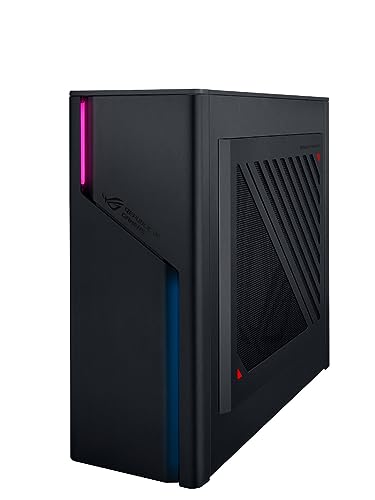
Where to buy
Check the latest price, availability and delivery on Amazon. Orders are placed on Amazon. We may earn a commission from qualifying purchases.
- Best for a small desk corner: ASUS ROG G22CH, Core i7-13700KF, Desktop RTX 4070, 32GB DDR5, 1TB SSD — Check on Amazon
- ASUS ROG NUC (2025), Core Ultra 9 275HX, RTX 5070 Ti Mobile, 16GB DDR5, 1TB SSD — Check on Amazon
- Minisforum AtomMan G7 Pro, Core i9-14900HX, RTX 5070 Laptop GPU, 32GB DDR5, 1TB SSD — Check on Amazon
- ASUS ROG NUC 970, Core Ultra 9 185H, RTX 4070 Laptop GPU, 32GB DDR5, 1TB SSD — Check on Amazon
See 2 more Amazon options
- Minisforum AtomMan G7 Ti, Core i9-14900HX, RTX 4070 Laptop GPU, 32GB DDR5, 1TB SSD — Check on Amazon
- Minisforum AtomMan G1 Pro, Ryzen 9 8945HX, Desktop RTX 5060, 32GB DDR5, 1TB SSD — Check on Amazon
Read the full guide ↓
Disclosure: As an Amazon Associate, reviewstook.com earns from qualifying purchases. Links to Amazon on this page are affiliate links; they cost you nothing extra. Listing details such as price and availability change often, so check the current Amazon listing before you buy.
A compact PC’s product photo lies by omission. The box in the picture is real enough — two and a half liters, three liters, a slim slab standing like a book — but the machine you actually install is bigger than the box. It includes a power brick the size of a paperback that needs a ventilated home of its own, a bundle of cables that bend behind the desk and add depth no spec sheet prints, and a margin of empty air on every vented side that the cooling system treats as part of the machine. In a large room those extras vanish. In a small one — a studio flat, a box-room desk, a shelf under the TV — they are the purchase. So this guide grades the six verified compact gaming PCs under $2,500 as installations, not as photographs: what footprint each one truly occupies once the brick, the cable drop and the breathing room are counted, and which kind of small space each one genuinely suits.
The six machines are the same verified set as our main compact guide, and the honesty rules carry over unchanged. Every pick has maker-published dimensions that put it at roughly 10.7 liters or smaller — no 40-liter mid-tower wearing the word “compact” appears here. The smallest boxes use laptop GPUs, because a desktop card does not fit under about 4 liters, and each review names which kind of graphics you are getting: an RTX 5070 Ti Mobile or an RTX 4070 Laptop GPU is a step below the desktop card of the same name. There is no RTX 5080 in a true small-form-factor PC under $2,500 — the one genuine sub-4-liter 5080 machine sits well above this budget. Two more ground rules for this angle. First, mounting: none of the six has a maker-documented VESA bracket in the material we checked, so no pick below is credited with one — placement is graded on stands, shelves and desk corners, and the FAQ explains how to confirm mounting on the live listing. Second, dimensions: where a maker publishes them, we print them; where the published figures conflict or were never published, the pick is graded by its size class and nothing is invented to fill the gap.
In this guide
Quick Picks
Short on time, or comparing several options at once? Each row below names a small-space situation and the product that suits it, with a link to the listing.
| Your space | Pick | Why it fits there | Link |
|---|---|---|---|
| A small desk corner or media shelf | ASUS ROG G22CH (DB779) | Desktop RTX 4070 parts in ~10.7 liters, with an internal power supply — no brick to house | Check on Amazon |
| The least desk, the most power | ASUS ROG NUC (2025), RTX 5070 Ti Mobile | The strongest GPU in this guide inside a ~3-liter slab — under $2,500 only at its deal price | Check on Amazon |
| A shelf or a stand beside the monitor | Minisforum AtomMan G7 Pro | Current-generation RTX 5070 Laptop GPU in a slim upright slab, without the ASUS badge premium | Check on Amazon |
| Behind a monitor, or in a backpack | ASUS ROG NUC 970 | 2.5 liters and a stand in the box — the smallest serious gaming PC here | Check on Amazon |
| Beside the TV, standing upright | Minisforum AtomMan G7 Ti | A book-thin slab with the best review record of the 4070 class — budget for a USB hub | Check on Amazon |
| A TV stand with no brick clutter | Minisforum AtomMan G1 Pro | Internal power supply and a swappable desktop card in 3.8 liters | Check on Amazon |
How These Picks Were Chosen
The starting point is the verified set from our main Best Compact Gaming PC Under $2500 guide: every machine has dimensions published by its maker, converted to liters the same way throughout (width × depth × height in centimeters, divided by 1,000), and every machine is roughly 10.7 liters or smaller. Anything larger was excluded before this angle was applied, which is why no famous mid-tower appears — at 35 to 45 liters those are good PCs with their own guides, but they are not answers to a small-space question. Prices change constantly, so no static price is printed for any pick — check the current price on Amazon instead — and every deal rule from the base research is kept: one pick belongs under $2,500 only at its deal pricing, and the style-selector warnings on the Minisforum listings are repeated wherever they apply.
What this variant adds is an installation grade, built from four things the spec sheet does not total up. First, the true footprint: the chassis plus the bend radius of the cables leaving its rear panel, because a 50mm-deep slab with stiff display and power cables behind it installs more like 120mm deep. Second, the power supply’s address: two of these machines carry internal power supplies and need no brick space at all, while the four mini PCs run on external laptop-style adapters that need a flat, ventilated spot roughly the size of a paperback — we do not print brick wattages or brick dimensions, because the base research does not document them, but the brick’s existence is graded for every pick. Third, air: each machine’s intakes and exhausts need clearance, and in a small room the exhaust heat goes into a smaller volume of air, so placement rules are stated per pick rather than assumed. Fourth, noise where reviewers documented it: in a small space the PC is usually closer to your ears, and a machine that is merely “audible” across a living room is a presence at arm’s length on a desk.
One discipline note, because small-space guides are where it usually breaks: we claim no dimension, weight, VESA pattern or noise figure that the base research does not document. The NUC 970’s 2.5 liters and the G22CH’s published centimeter dimensions are printed because ASUS publishes them. The G7 Ti gets its documented ~80mm thickness and 2.6kg weight but no liter figure, because published dimension sets for that chassis conflict. The G7 Pro is graded as a slim upright slab, full stop. And no pick is credited with monitor mounting: if a bracket matters to you, the live listing’s contents line is the only authority, and the checklist below tells you when to check it.
The 6 Best Compact Gaming PCs for Small Spaces Under $2,500
ASUS ROG G22CH (DB779) — Core i7-13700KF, Desktop RTX 4070, 32GB DDR5, 1TB SSD
Who it suits: Small-space buyers whose “small” is a desk corner, a media-unit shelf or the end of a worktop — and who want desktop parts and desktop behavior once it is placed there.
Start with the honest framing: at roughly 10.7 liters, from ASUS’s published 11.5 × 32.3 × 28.7 cm, the G22CH is the largest machine in this guide, three to four times the volume of the mini PCs below. In a small-space guide it earns its place on what it does not add. Its 600W 80+ Gold power supply is internal, so the installation is the box and nothing else — no brick hunting for a home on the floor, no adapter warming the carpet behind the TV unit. Inside are a genuine desktop RTX 4070 DUAL card with 12GB of GDDR6X, a 16-core Core i7-13700KF, 32GB of DDR5 and a 1TB PCIe 4.0 SSD: a strong 1440p machine and a credible entry-level 4K machine with DLSS, running at desktop power with desktop cooling volume. That cooling volume is also why reviewers’ experience makes it the quietest machine of the six under the same games — in a small room, where the PC is rarely more than a few feet from you, that matters as much as the liters. A wired keyboard and mouse are in the box, one less parcel and one less cable decision on day one.
Placement is a shelf-and-corner story. The wedge shape stands vertically, so its desk footprint is its narrow side; give it open air above and behind rather than a closed media-unit compartment, because a desktop card’s exhaust has to go somewhere and a sealed cabinet will hand the heat straight back. The ceilings are the ones the base guide documents: memory is two SO-DIMM slots and ASUS rates the platform at 32GB maximum, so what you buy is what you keep; a graphics-card swap is possible only within the case’s length and the 600W budget, meaning same-class dual-fan cards rather than a future flagship; the LGA1700 platform makes the processor a final answer too. Pricing needs the base guide’s care: prices on this listing swing widely between sellers, and a lesser 13700F/16GB variant circulates alongside the DB779 — check the model number and the sold-by line, and check the current price on Amazon, because on this listing the variant is the price.
- A real desktop RTX 4070 with 12GB — the full card, not a mobile namesake.
- Internal 600W Gold power supply: the only installation item is the box itself.
- The quietest machine here under load — a real virtue at arm’s length.
Honest limitation: At ~10.7 liters it needs a genuine shelf or desk corner; it will not hide behind a monitor, and its memory is capped at 32GB with no processor upgrade path.
Choose it if your small space has one honest shelf or corner and you want the machine that behaves most like a normal desktop once placed. Skip it if the PC must disappear — the three mini PCs below are a third of its size.

ASUS ROG NUC (2025) — Core Ultra 9 275HX, RTX 5070 Ti Mobile, 16GB DDR5, 1TB SSD
Who it suits: Buyers whose space budget is measured in centimeters — a shallow shelf, the corner of a small desk, a spot beside a monitor — who want the most graphics power that exists at this size and will buy it at the right moment.
The chassis is 282.4 × 187.7 × 56.5 mm, almost exactly 3 liters: a wide, thin slab that stands or lies flatter than a hardback novel. This configuration (model RNUC15JNK9X369AU) pairs Intel’s 24-core Core Ultra 9 275HX with an RTX 5070 Ti Mobile GPU carrying 12GB of GDDR7, cooled by three fans and dual vapor chambers, with dual Thunderbolt 4 for a genuinely short cable list — one cable can carry display and peripherals through a dock, which in a small space is a real installation advantage. Graded purely as an object, it is the easiest flagship to place in this guide: shelf-depth is rarely a problem at 56.5mm thick, and the slab silhouette reads as furniture rather than machinery. Like the other mini PCs here it runs on an external adapter, so add the brick’s ventilated spot to the plan; the base research does not document the brick’s size, so give it a paperback’s worth of shelf or floor and air around it.
The two catches from the base guide are unchanged, and both touch small-space buyers directly. The first is memory: this configuration ships with 16GB of RAM, the minimum a machine at this price should carry, and the two SO-DIMM slots make upgrading easy — but budget the second stick as part of the installation plan, because a machine at this level should have included it. The second is the price itself. This configuration surfaces on Amazon at deal pricing that brings it inside this budget; ASUS’s own store prices the ROG NUC (2025) family above this budget, and the RTX 5080 version of the same chassis sits higher still. So the deal rule is absolute: this pick belongs in an under-$2,500 guide only while its deal pricing holds, and at shelf price it belongs in the under-$3,000 guide. And keep the naming honest in your head while you shop: the mobile 5070 Ti’s 12GB and lower power limit put it a step below the desktop card of the same name, which at this money only comes in mid-towers.
- The most powerful graphics available in a ~3-liter box: RTX 5070 Ti Mobile, 12GB GDDR7.
- Dual Thunderbolt 4: the shortest possible cable list for a small desk.
- A 56.5mm-thin slab that fits shelves too shallow for any tower.
Honest limitation: Only 16GB of RAM as shipped, a soldered GPU, and an under-$2,500 price that exists only at deal pricing — at shelf pricing it is over budget.
Choose it if you catch it at its deal price and your shelf is shallow but your performance demands are not. Skip it if the deal has ended and the shelf price is showing, or if fitting a RAM upgrade yourself is something you refuse to do.

Minisforum AtomMan G7 Pro — Core i9-14900HX, RTX 5070 Laptop GPU, 32GB DDR5, 1TB SSD
Who it suits: Small-space buyers who want current-generation graphics in a slim upright slab that stands on a shelf or beside a monitor like a hardback book — without paying the ASUS badge’s premium for the same recipe.
The G7 Pro is graded here by class, because the base research documents no verified dimension set for this chassis: it is a slim, vertical mini PC in the same book-on-a-shelf format as the G7 Ti below, designed to stand upright and take its space vertically rather than across your desk. The hardware is the current generation’s: a 24-core Core i9-14900HX boosting to 5.8GHz, an RTX 5070 Laptop GPU with 8GB of GDDR7 tested at around 115W — a genuine 1440p part with DLSS 4 — 32GB of DDR5 that can grow to 96GB across two SO-DIMM slots, a 1TB SSD with a second M.2 slot waiting empty, Wi-Fi 7, USB4 and HDMI 2.1. Upright placement is the small-space virtue: the footprint on the shelf is the thin edge, the vents get vertical air, and the machine reads as an object rather than an appliance. It runs on an external adapter like the other mini PCs here, so the brick needs its own ventilated address in the plan.
The base guide’s two warnings stay at full size. First, the style selector: the same Amazon listing sells a barebone version with no memory, no storage and no operating system, and the price gap between the styles has fooled buyers before — the pick here is the configured 32GB + 1TB style, and the style name is the product. Second, reviewers found their test units shipped with a single 32GB memory stick, which runs the memory in single-channel mode and leaves performance on the table; check on arrival, because a matched SO-DIMM is the easiest upgrade in this guide. On price, the discipline is the base guide’s: through Minisforum’s own channels the configured machine sits in the lower half of this budget, with the barebone style below it, and Amazon pricing tends to run higher — so check the current price on Amazon, and anywhere in its usual band it lands well inside this budget. The structural ceiling is the GPU’s 8GB of VRAM, which will age first at 1440p ultra settings, and neither CPU nor GPU can ever be changed.
- A 24-core i9-14900HX driving an RTX 5070 Laptop GPU — this generation’s 1440p recipe.
- Upright slab format: shelf space is spent vertically, not across the desk.
- Memory to 96GB and a second SSD slot: rare headroom in a mini PC.
Honest limitation: The 8GB of VRAM will date first, review units arrived running single-channel memory, and the barebone style on the same listing is waiting to catch anyone who orders by price alone.
Choose it if you want the newest GPU generation standing on a shelf without the ROG premium. Skip it if your 1440p plans involve heavy texture packs or mods that want more than 8GB of VRAM.

ASUS ROG NUC 970 — Core Ultra 9 185H, RTX 4070 Laptop GPU, 32GB DDR5, 1TB SSD
Who it suits: Buyers for whom the PC must genuinely disappear — behind a monitor, on the shallowest shelf in the room, or in a backpack between home, office and LAN.
This is the smallest machine in the guide with its dimensions published: 2.5 liters, 270 × 180 × 50 mm, and a vertical stand included in the box, which is the placement detail that matters — standing upright on its stand, its shelf footprint is a 180 × 50 mm sliver, the smallest installed footprint of any pick here once its external adapter is given a home behind or beneath the furniture. Inside, a Core Ultra 9 185H and an RTX 4070 Laptop GPU running at its full 140W limit, the same wattage as the G7 Ti below, which is why this little box performs like a good 4070 gaming laptop: strong at 1080p, genuinely capable at 1440p with DLSS. You get 32GB of DDR5-5600 (the platform supports up to 64GB), a 1TB SSD, Thunderbolt 4 for a short cable list, an SD card reader, and ASUS’s support ecosystem behind it. Check the current price on Amazon — it regularly appears below its list price, and at deal pricing it is the most portable route into 4070-class gaming carrying a major brand’s badge.
One mounting honesty note, because this is the pick readers most often imagine screwed to a monitor: the base research documents the included vertical stand, and no VESA bracket — so plan on the stand, a shelf or a backpack, and if a bracket is a requirement, confirm it on the live listing before ordering rather than assuming the NUC name implies one. The arithmetic problem from the base guide is also unchanged: the AtomMan G7 Ti matches this machine’s GPU wattage, matched or beat it in independent testing (Digital Trends’ reviewer found the G7 Ti outclassed the NUC 970 outright), and has sold for noticeably less through Minisforum’s channels. What the ASUS premium buys is the smallest chassis, Thunderbolt, the brand’s support network and resale value. The platform is the 2024 generation — the 185H gives up cores and clocks to the 14900HX machines — and the GPU is soldered for life. Buy it for the size and the badge, at its deal pricing, and it earns its place.
- 2.5 liters with a stand in the box — the smallest installed footprint in this guide.
- An RTX 4070 Laptop GPU at its full 140W — the tiny size cost it nothing in wattage.
- Thunderbolt 4 and an SD reader: a short, tidy cable list.
Honest limitation: The G7 Ti delivers the same GPU class for less; the premium here buys the last liter of smallness, the port selection and the badge, and the GPU is soldered permanently.
Choose it if the PC must vanish behind a monitor or travel in a backpack and you value ASUS support. Skip it if frames per dollar outrank size — the G7 Pro and G7 Ti win that contest.

Minisforum AtomMan G7 Ti — Core i9-14900HX, RTX 4070 Laptop GPU, 32GB DDR5, 1TB SSD
Who it suits: Living-room and small-desk gamers who want a slim upright box standing beside the TV or monitor like a console — and who sit far enough away, or play with the sound up, that its fans are a footnote.
The documented figures are a slab about 80mm thick and 2.6kg in weight; we deliberately give no liter figure, because published dimension sets for this chassis conflict, and a small-space guide does not invent the number it most wants. What the shape means in a room is clear enough without it: it stands vertically, spends its space as a thin slice beside a screen, and takes the shelf depth of a row of game cases. The hardware is a gaming laptop’s best with the screen removed — a 24-core Core i9-14900HX and an RTX 4070 Laptop GPU at its full 140W limit, 32GB of DDR5-5600 expandable to 96GB, a 1TB SSD with a second M.2 slot free, Wi-Fi 7 and USB4. Reviewers have been unusually kind to it: Digital Trends scored it near-perfectly and found it outclassing the ROG NUC 970, Notebookcheck measured strong sustained performance, and Tom’s Guide calls it great for 1080p and 1440p while noting 4K is beyond it. Through Minisforum’s channels the configured machine sits toward the lower end of this budget, with Amazon typically running higher — check the current price on Amazon, and anywhere in its usual band it leaves much of a $2,500 budget unspent.
The catches are the ones its shape dictates, and both are small-space catches. A slim slab cooling a 140W GPU and a 24-core HX processor uses small fans spinning fast, and under sustained load it is audible in a quiet room in a way the 10-liter G22CH is not: across a living room that is nothing, but on a small desk at arm’s length it is a character trait, and the measure checklist below treats your seating distance as part of the specification. The port count is the second: reviewers counted just two USB-A ports, so a hub belongs in the budget from day one — and in a small space the hub is also an object, with its own small footprint and cable, so plan its home too. And the listing sells configured and barebone styles side by side: confirm the style name says 32GB + 1TB before ordering, because the barebone arrives without memory, storage or Windows.
- Its RTX 4070 Laptop GPU runs the full 140W, where throttled rivals give up real performance.
- Reviewers rate it above everything else here — it beat the ROG NUC 970 in direct testing.
- An ~80mm-thick upright slab: console placement, bookshelf manners.
Honest limitation: Fan noise under load is the price of the slim shape, the two USB-A ports make a hub (and its footprint) mandatory, and the GPU’s 8GB of VRAM caps its 1440p ultra-settings future.
Choose it if console-style placement is the plan and you want the 4070 class’s best-reviewed value. Skip it if your desk must stay quiet — slim costs noise — or if the G7 Pro’s newer 50-series GPU is the draw.

Minisforum AtomMan G1 Pro — Ryzen 9 8945HX, Desktop RTX 5060, 32GB DDR5, 1TB SSD
Who it suits: TV-stand buyers who want the cleanest possible installation — no power brick on the floor, one power cable, a box smaller than a console — and the only sub-4-liter machine here whose graphics card can be replaced.
The G1 Pro’s chassis is 3.8 liters; Tom’s Guide measured it at 12.4 × 8.5 × 2.25 inches, smaller than a PS5 standing on its side, and it stands vertically in that console posture. Its installation advantage is the one the other mini PCs cannot match: the 350W power supply is internal, so the setup is the box, a power cable and a display cable — no external brick warming the floor behind the TV unit, no adapter to find a ventilated home for. Inside that box sits a genuine desktop graphics card, a low-profile GeForce RTX 5060 running at 145W in a real PCIe x16 slot, swappable for another low-profile card when one exists that is worth having. Around it: a 16-core Ryzen 9 8945HX, 32GB of DDR5-5200 expandable to 96GB, a 1TB SSD with a second M.2 slot, 5-gigabit Ethernet for a wired drop that stays put, and Wi-Fi 7. Check the current price on Amazon — it sits comfortably inside this budget — and Minisforum sells a sibling configuration with a 16GB Radeon RX 9060 XT in the same chassis at similar money — a separate listing, noted here because VRAM-hungry buyers should know it exists.
The review record adds three honest footnotes, two of which are placement footnotes. The machine ships in an 80W gaming mode that hides roughly a fifth of its performance behind a toggle in Minisforum’s software — set the full-performance mode on day one, during setup, or you will be benchmarking a slower PC than you bought. Under heavy load it gets loud, as 3.8 liters moving this much heat tends to, and Tom’s Guide named the noise its main manners problem: on a TV stand across the room it fades, but do not plan this box for a quiet desk at arm’s length. Reviewers also flagged that Minisforum’s control utility ships a system driver Windows Defender identifies as vulnerable — a fixable software wart to know about before setup, not after. And the GPU class is itself the compromise: the RTX 5060 is a step below the 4070-class machines above, an honest 1080p-and-1440p card rather than a flagship. You are paying for the chassis, the slot and the internal power supply — for a clean install and the right to upgrade later.
- Internal 350W power supply: the cleanest cable story in this guide.
- A swappable desktop graphics card in a PCIe x16 slot — unique at this size.
- 3.8 liters, console posture: built for a TV stand.
Honest limitation: Its RTX 5060 sits a class under the 4070/5070 picks, the low-power shipping mode has to be switched off by you, and sustained load makes it loud.
Choose it if a brick-free TV-stand install and future upgradability matter more than this year’s GPU class. Skip it if you want the most frames per dollar today, or a quiet desk — the G7 Pro and G7 Ti are faster, the G22CH is quieter.
Comparison Table
| Product | Published size | Power supply | Best placement | Link |
|---|---|---|---|---|
| ASUS ROG G22CH (DB779) | ~10.7 L (11.5 × 32.3 × 28.7 cm) | Internal 600W Gold — no brick | Desk corner or media shelf; quietest here | Check on Amazon |
| ASUS ROG NUC (2025) | ~3 L (282.4 × 187.7 × 56.5 mm) | External adapter — needs a home | Shallow shelf or small desk, at its deal price | Check on Amazon |
| Minisforum AtomMan G7 Pro | Slim upright slab (no verified dimensions published) | External adapter — needs a home | Standing on a shelf beside the monitor | Check on Amazon |
| ASUS ROG NUC 970 | 2.5 L (270 × 180 × 50 mm) | External adapter — needs a home | On its stand behind a monitor, or in a backpack | Check on Amazon |
| Minisforum AtomMan G7 Ti | Slim slab, ~80mm thick, 2.6kg (liter figures conflict) | External adapter — needs a home | Standing beside the TV, hub planned in | Check on Amazon |
| Minisforum AtomMan G1 Pro | 3.8 L (12.4 × 8.5 × 2.25 in measured) | Internal 350W — no brick | TV stand, console posture | Check on Amazon |
How to Choose: Measure Before You Buy
Work through these five steps in order, with a tape measure, before any money moves. They take ten minutes and they are the difference between a compact PC that fits your room and one that merely fits its box.
- Step 1 — Measure the spot, in three dimensions. Shelf depth first: the shelf must hold the chassis depth plus the cables behind it, so subtract at least a hand’s width for the rear cable bend from any shelf measurement before comparing it with a spec sheet. Then width and height, including the stand if the machine stands vertically. Compare against published figures only — 2.5 liters (NUC 970), ~3 liters (ROG NUC 2025), 3.8 liters (G1 Pro), ~10.7 liters (G22CH) — and where no verified figure exists (the two AtomMan slabs), assume the class, not a number, and leave margin.
- Step 2 — Reserve the ventilation clearance. All six machines inhale and exhale through their side or top panels. Keep the vented faces clear by several centimeters, keep the top unstacked, and treat a closed cabinet door as a refusal: a compact PC sealed in a media-unit compartment will throttle and roar, whatever its size. If your only spot is enclosed, the answer is a different spot, not a smaller PC.
- Step 3 — Give the power brick an address. Four of these six machines run on external adapters. Decide now where the brick lives: flat on a ventilated surface, not buried in a cable box, not under a rug, not dangling by its cable. If no honest address exists in your setup, that is a genuine argument for the two internal-supply machines — the G22CH and the G1 Pro — whose whole power story is one cable.
- Step 4 — Walk the cable drop. Trace, physically, where each cable will run: display cable from the PC’s rear panel to the screen, power from the wall to the brick or box, Ethernet if you wire it, and the hub if the pick needs one (the G7 Ti, with its two USB-A ports, always does). Rear-facing ports on a machine pushed against a wall need bend room; a slab standing beside a TV needs its cables to fall behind the unit, not across the shelf. Thunderbolt machines (both NUCs) can shorten the list through a dock — but the dock is another object with another footprint, so place it in the plan too.
- Step 5 — Then order, and verify on arrival. Only now does the listing matter, and the base guide’s checks apply unchanged: on the Minisforum listings, confirm the style name says the configured version (32GB + 1TB), not the barebone; on the G22CH, confirm the DB779 model number and the seller; on the G7 Pro, check whether the memory arrived as one stick or two; on the G1 Pro, switch off the 80W shipping mode during setup; on the ROG NUC (2025), confirm the price on the page is the deal price before anything else, because at shelf price the pick changes.
Three further judgments sit underneath the checklist. Match the machine’s posture to the furniture: upright slabs (G7 Pro, G7 Ti, G1 Pro) spend space vertically and suit shelves and TV stands; the NUC 970 on its stand suits a monitor’s shadow; the G22CH needs a real corner. Count your ears as well as your centimeters: in a small room the machine is close, and the reviewer-documented noise ranking here — G22CH quietest, the slim slabs and the G1 Pro audible to loud under load — should be weighed alongside the liters. Price the whole installation: a hub for the G7 Ti, a second memory stick for the ROG NUC (2025) and possibly the G7 Pro, and a second SSD later belong in the same budget conversation as the machine. Readers whose space turns out to allow more than these machines should also see Best Compact Gaming PC Under $3000, and tighter budgets are covered by Best Compact Gaming PC For Small Spaces Under $1500.
The Space You Cannot See in the Product Photo
Heat is the invisible tenant. A gaming PC converts most of the electricity it draws into heat, and these machines draw it in a small room’s worth of air. The wattage classes here — a 140W laptop GPU in the NUC 970 and G7 Ti, a desktop 4070 in the G22CH — will warm a small, closed room noticeably over a long session, and the machine’s own intake air warms with the room. None of this is a defect; it is why Step 2 exists, and why a compact PC placed beside a radiator or in the sun’s patch on a shelf is being installed in an oven of its own making. Place for the room’s air, not just the shelf’s dimensions: out of direct sun, off the radiator’s convection path, and with the exhaust pointed at open room rather than at a wall two inches away.
Noise obeys the same geometry. Fan noise falls with distance, and small spaces remove the distance. Every slim machine in this guide is reviewer-noted as audible under sustained gaming load, and the G1 Pro is noted as loud; across a living room, under a TV soundtrack, that is background. At a desk in a studio flat at midnight, it is the loudest thing in the room, and it will share that room with anyone trying to sleep in it. The honest mitigations are placement and posture, not hope: the machine across the room rather than beside the monitor, the full-performance mode chosen knowingly (it is louder than the shipping mode), and headphones accepted as part of the small-space kit. If silence is a first-rank requirement and the room is small, the physics is giving you the same advice as the base guide: take the largest machine here, the G22CH, whose desktop cooling volume is exactly what the others traded away.
Common Buying Mistakes
- Measuring the box and forgetting the installation. Brick, cable bend and clearance routinely add a third again to the space a mini PC actually occupies.
- Assuming a VESA bracket exists because the PC is small. None of these six has one documented in the material we checked — confirm on the live listing or plan on the stand.
- Sealing the PC in a TV-unit cabinet. Box in the intakes and even the smallest machine here will throttle, then shout about it; small PCs breathe or they suffer.
- Ordering a Minisforum barebone style by mistake and opening a box with no memory, no storage and no Windows in it. Read the style name as if it were the whole product description — because it is.
- Leaving the shipping power mode on. The G1 Pro’s 80W default gives away about a fifth of the performance you paid for until you switch it.
- Ignoring memory as shipped. 16GB in the ROG NUC (2025), or a single stick in the G7 Pro’s review units, are real configurations in this guide — check what ships, not what is supported.
- Forgetting the hub’s footprint. The G7 Ti’s two USB-A ports make a hub mandatory, and the hub is another object on the same small desk.
- Buying the ROG NUC (2025) at shelf price because the guide listed it. Its place here rests on its deal pricing; at shelf price it belongs to a different budget.
- Trusting the word “compact” elsewhere on Amazon. Many listings wearing it are 35–45 liter mid-towers; do the liter math from published dimensions before believing any adjective — including in guides like Best Small Form Factor Gaming PC Under $2500, where the same filter applies.
Final Recommendation
- Most small desks and shelves: ASUS ROG G22CH — desktop performance, internal power supply, the quietest install, if your space has one honest corner.
- Least space, most power: ASUS ROG NUC (2025) — but only at its deal pricing, and with a memory upgrade budgeted.
- Best value standing on a shelf: Minisforum AtomMan G7 Pro.
- The disappearing act: ASUS ROG NUC 970, on its stand, behind the monitor.
- Beside the TV: Minisforum AtomMan G7 Ti, with a hub planned into the same shelf.
- The cleanest TV-stand install: Minisforum AtomMan G1 Pro — no brick, and a graphics card you can replace.
Our top two for small spaces are the G22CH and the G7 Pro, for opposite reasons. The ASUS ROG G22CH is the machine that asks the least of a small room once it is placed: no brick, no hub arithmetic, the gentlest noise, and desktop parts — it simply needs the one thing the others do not, which is a shelf or corner with real depth. The Minisforum AtomMan G7 Pro is the machine that asks the least space: an upright slab with the current generation’s graphics, with the strongest value case of any pick here, provided you read its style selector and check its memory on arrival. Between them sit a deal-dependent flagship slab, the smallest brand-name gaming PC made, the best-reviewed 4070 slab, and the one brick-free upgradable mini. Whichever you choose: run the five measurement steps first, check the current price on Amazon, and let the room — measured, not imagined — make the final decision. First-time buyers new to the category may also want Best Compact Gaming PC For Beginners Under $2500 before ordering.
Frequently Asked Questions
Can I mount one of these PCs behind my monitor?
Not on the evidence of the makers’ published material we checked: none of the six documents a VESA bracket or mounting plate, and we do not credit any of them with one. The NUC 970 includes a vertical stand and is small enough to sit behind most monitors on the desk; the slabs stand beside the screen rather than behind it. If mounting is a hard requirement, check the live listing’s contents line for the exact configuration before ordering — and treat any listing photo showing a bracket as a claim to verify, not a specification.
How much space does the power brick really take?
Plan for roughly a paperback’s footprint on a flat, ventilated surface, plus its cable — we do not print exact brick dimensions because the base research does not document them for these models. Four of the six picks (both NUCs and both AtomMan G7 machines) use external adapters. If your space genuinely has no honest home for a brick, the G22CH and the G1 Pro are the picks: both carry internal power supplies and install with a single power cable.
Can I put a compact gaming PC inside a TV unit or cabinet?
Not with the door closed. Every machine here cools through its sides or top, and a sealed compartment returns its exhaust heat to its own intakes until it throttles and its fans run at full speed. An open-backed unit with several centimeters of clearance on the vented faces is workable for the lower-power picks; a closed cabinet is a refusal for all six, whatever their size.
Which of these is quietest in a small room?
The G22CH, by the physics of its larger cooling volume — it is the only desktop-cooled machine here. The slim slabs (G7 Pro, G7 Ti) and the G1 Pro are all reviewer-noted as audible under sustained load, the G1 Pro as loud; distance is the mitigation, so across a living room they fade, and at arm’s length on a desk they do not. No decibel figure is printed for any pick, because the base research documents none for this set.
Will one of these heat up a small room?
Yes, measurably, over a long session — a gaming PC turns most of its power draw into heat, and a small room has less air to absorb it. Keep the machine out of direct sun and away from radiators, give its exhaust open room to spill into, and expect the room, and therefore the PC’s intake air, to warm during marathon sessions. It is a placement consideration, not a reason to avoid the category.
Which of these can I upgrade later?
Memory and storage on all six — several grow to 96GB of RAM and carry a second SSD slot. The graphics card on two: the G1 Pro takes replacement low-profile desktop cards in its PCIe slot, and the G22CH can swap its desktop card within the case’s size and its 600W supply’s limits. The two ROG NUCs and the G7 Pro/G7 Ti have soldered GPUs and processors — what you buy is what you keep, which is worth weighing before you let a small footprint talk you out of a machine you can grow.
What if my space turns out bigger than I thought?
Then spend the money on performance instead of smallness: the towers in Best Gaming PC Under $2500 buy a desktop RTX 5070 Ti class of graphics at this budget, and Best Mini Gaming PC Under $2500 covers the neighboring category if small still matters but gaming-first mini PCs are the shape you want. The compact tax is only worth paying for space you actually lack.


