Where to buy
Check the latest price, availability and delivery on Amazon. Orders are placed on Amazon. We may earn a commission from qualifying purchases.
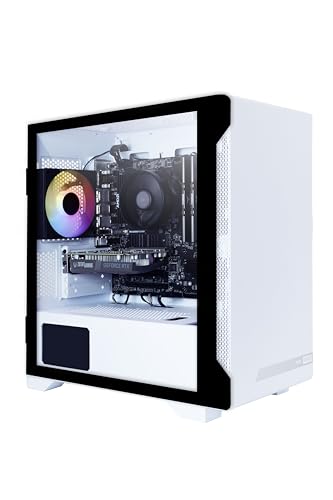
- Best first compact gaming PC for most beginners: ZOTAC MEK AI-Enhanced Gaming PC, Ryzen 5 5500, GeForce RTX 3050 — Check on Amazon
- GMKtec NucBox K8 Plus Mini PC, Ryzen 7 8845HS, 32GB DDR5, 1TB SSD, OCuLink — Check on Amazon
- Beelink SER8 Mini PC, Ryzen 7 8745HS, Radeon 780M, 32GB DDR5, 1TB SSD — Check on Amazon
- HP Victus 15L Gaming Desktop TG02-1020h, Core i5-13400F, GeForce RTX 3050 — Check on Amazon
See 2 more Amazon options
- Beelink SER5 MAX Mini PC, Ryzen 7 7735HS, Radeon 680M, 24GB LPDDR5 — Check on Amazon
- GMKtec NucBox M6 Mini PC, Ryzen 5 6600H, Radeon 660M, 16GB DDR5 — Check on Amazon
Read the full guide ↓
Disclosure: As an Amazon Associate, reviewstook.com earns from qualifying purchases. Links to Amazon on this page are affiliate links; they cost you nothing extra. Listing details such as price and availability change often, so check the current Amazon listing before you buy.
If this is your first gaming PC, “compact” is the friendliest place to start — and also the easiest place to be misled, because the word covers two very different kinds of machine. The first kind is a small tower: a shrunken desktop that still contains a separate graphics card, the part that does most of the work in games. The second kind is a mini PC: a box the size of a thick paperback, built from laptop parts, with graphics built into the processor instead of on their own card. Both fit on a shelf or hide behind a monitor. They do not play games equally, and this guide’s first job is to make sure you know which kind you are buying before money moves.
So here is what $700 honestly buys a beginner, stated before any product names. It buys a compact machine that plays modern games properly at 1080p — the resolution of a standard HD monitor — with settings turned down a notch or two in the most demanding titles. In the two small towers below, a real desktop graphics card (an RTX 3050, the entry level of current desktop cards) does that work. In the four mini PCs, AMD’s strongest class of built-in graphics does it instead, one step behind. What $700 does not buy, in any compact shape, is a machine for 1440p or 4K gaming, for maximum settings, or for brand-new blockbuster releases at their prettiest. Anyone who tells you a $700 mini PC does those things is selling you the box, not the truth. Chosen with open eyes, a compact PC under $700 is a genuinely good first gaming machine: quiet, undemanding of space, and — in two picks below — able to grow with you.
One more promise. Prices change often, so every pick below tells you to check price on Amazon before you buy — and where a machine only belongs in this guide when it sits inside this budget, the review says so and tells you what to do if the live price is higher. Two picks have homework attached (one needs a memory stick added, one is only a buy at the right price), flagged wherever they appear, not buried. Nothing here is renewed or refurbished; all six picks are sold new.
Words You Will See in Every Listing, in Plain English
PC listings are written in shorthand. These are the twelve terms that decide whether a compact PC is right for you; every review below uses them, so this is the only jargon section you need.
- Graphics card (GPU) vs integrated graphics. The part that draws the game. A separate graphics card is its own component with its own memory, and it is much stronger; integrated graphics are built into the processor and share the machine’s ordinary memory. Two picks below have a real card; four rely on integrated graphics — good ones, but with a lower ceiling.
- VRAM and shared memory. VRAM is the graphics card’s own fast memory for textures and game worlds. Integrated graphics have none of their own and borrow from the main RAM — which is why RAM matters twice in a mini PC: it feeds the processor and the graphics at once.
- CPU (processor). The machine’s general-purpose brain: game logic, Windows, your browser, everything else. All six picks have processors comfortably strong enough for their graphics — the CPU is rarely the limit at this budget.
- RAM (memory). The workspace everything open right now sits in. For gaming in 2026, 16GB is the sensible floor, 32GB is comfortable, and 8GB is not enough — one pick below ships with 8GB, and its review treats a second stick as part of the purchase. In some mini PCs RAM is soldered, fixed to the board forever; the reviews say which.
- SSD (storage). Where games live when not running. Modern games are enormous, so 500GB fills after a handful of big titles; 1TB is breathing room. Every pick here uses a fast SSD, not an old spinning hard drive.
- Resolution. How many pixels the picture has. 1080p (1920 × 1080) is standard HD, and it is what every pick here is for. 1440p and 4K are sharper and far more demanding — beyond this budget in compact form, whatever a listing implies.
- Refresh rate. How many times per second your monitor can show a new picture, measured in Hz. A 144Hz gaming monitor can show far more than a 60Hz one — but only if you switch it to that rate in Windows, since monitors often arrive set to 60Hz. The setup walkthrough below includes that step.
- Upscaling (DLSS and FSR). A trick where the game renders at a lower resolution and smart software rebuilds a sharper picture, easing the load. NVIDIA’s version is DLSS and needs an RTX card (the two towers have one); AMD’s is FSR and works on the mini PCs’ Radeon graphics. Upscaling is how integrated graphics stay playable in demanding games.
- PSU and power brick. The PSU (power supply unit) converts wall power into what the parts need. Towers have one built inside; mini PCs use an external power brick, like a large laptop charger, which is included in the box and needs a home on or under the desk. A PSU’s wattage also decides whether a stronger graphics card can be fitted later.
- Prebuilt. A complete PC assembled by the maker, with Windows installed — you unbox, plug in, and set up. Every pick here is a prebuilt. The opposite is a barebones kit, which arrives missing memory, storage or Windows; one pick below has barebones versions of itself on related listings, and its review warns you how to avoid ordering one by mistake.
- Renewed / refurbished. A used machine checked, repaired if needed, and resold, usually with a shorter warranty. None of the six picks here is renewed — all are new — but renewed versions of similar machines appear at tempting prices, and they are a different purchase with a different risk.
- OCuLink. A special port on one pick below that connects an external dock holding a full desktop graphics card — the only way a mini PC can later gain card-level graphics without being replaced. The port alone does nothing: the dock, its power supply and the card are separate purchases, explained honestly further down.
In this guide
Quick Picks
Short on time, or comparing several options at once? Each row below names a buyer type and the product that suits it, with a link to the listing.
| Buyer type | Pick | Why it stands out | Link |
|---|---|---|---|
| Best first compact PC for most beginners | ZOTAC MEK AI-Enhanced Gaming PC, RTX 3050 | A real graphics card in a small tower, at a price that sits inside the budget without waiting for a sale | Check on Amazon |
| Best mini PC, and the one that can grow | GMKtec NucBox K8 Plus, 32GB/1TB | About a liter in size, the strongest built-in graphics here, and a special port for a future graphics-card dock — buy only when it sits inside this budget; check price on Amazon | Check on Amazon |
| Best beside a TV | Beelink SER8, Ryzen 7 8745HS | The smallest full-strength box here, and independently measured as one of the quietest in its class | Check on Amazon |
| Best big-brand choice | HP Victus 15L TG02-1020h | A real graphics card and HP’s warranty — but it ships with too little memory, and fixing that is part of the deal | Check on Amazon |
| Best value | Beelink SER5 MAX, Ryzen 7 7735HS | Most of the mini PC experience for notably less — check price on Amazon | Check on Amazon |
| Cheapest complete start | GMKtec NucBox M6, Ryzen 5 6600H | The lightest graphics here, honestly framed — a budget-tier complete start; check price on Amazon | Check on Amazon |
How These Picks Were Chosen
We did not use these products ourselves. We read the makers’ listings and specification pages and independent review coverage for the exact listings linked, and compared what decides a first compact PC: which kind of graphics it has and which tier, how much memory and storage it carries and whether either can ever change, its size, its ports, and measured fan noise where reviewers report it.
Three filters did the heavy lifting. The graphics filter: every pick had to play modern games credibly at 1080p, which at this budget means either an entry-level desktop card (RTX 3050 class) or one of AMD’s top two tiers of integrated graphics; weaker machines were left out however cheap they were. The total-cost filter: any pick whose real price includes something it does not ship with — a memory stick, a second drive, a graphics dock — has that cost named in its review. The price-honesty filter: a machine whose pricing is volatile is presented as a buy-only-inside-this-budget pick — check price on Amazon — instead of a standing recommendation at any price.
Beginners were the tiebreaker throughout: where two machines were close, the one that asks less of a first-time owner ranked higher — clearer listings, fewer configuration traps, memory already sufficient, a warranty you can actually use. The two picks that break that rule, the HP (a memory stick) and the K8 Plus (price patience), say so wherever they appear, so the trade is yours to make with open eyes.
The 6 Best Compact Gaming PCs for Beginners Under $700
ZOTAC MEK AI-Enhanced Gaming PC — Ryzen 5 5500, GeForce RTX 3050, 16GB, 500GB
Who it suits: The beginner who wants the fewest compromises: a small tower that games like a desktop, because inside it is a desktop — graphics card and all.
Start with the part that matters most: the RTX 3050 is a separate graphics card with its own memory, and that single fact puts its gaming a clear step above every mini PC here — modern games at 1080p on medium-to-high settings, fast and smooth in competitive titles, and NVIDIA’s DLSS upscaling to help the most demanding games along. Around it sits a sensible supporting cast — a Ryzen 5 5500 processor, 16GB of memory, Wi-Fi 6E and Windows 11 Home — in a compact tower case a fraction of a normal tower’s size. The power supply is a 650W 80+ Gold unit, far more than these parts draw, and an oversized supply runs cool and quiet because it is never straining. Check price on Amazon for the current listing — it is positioned inside this guide’s budget tier as an everyday pick, not only as a sale you have to catch.
The compromises are two, and both are manageable. The 500GB SSD is the tightest storage here: Windows plus three or four large games will fill it, so expect to add or swap a drive eventually — a ten-minute job with the tower’s side panel off — and the roomy power supply leaves the door open to a stronger graphics card later too. The platform underneath is the older DDR4 generation, so the processor side is finished as it ships; the growth path here is the graphics card, not the CPU. Neither point stops it being the most complete answer in this guide for a first-time buyer.
- A real desktop graphics card — the strongest gaming in this guide, no asterisks about integrated graphics.
- 650W 80+ Gold power supply: quiet headroom now, and the electrical room for a future card upgrade.
- Positioned inside this budget tier — check price on Amazon before you buy.
Honest limitation: The 500GB SSD fills quickly with modern game installs, and the older platform means the graphics card is the only meaningful upgrade path.
Choose it if you want the strongest gaming $700 buys in compact form and a small tower fits your space. Skip it if the PC must hide behind a monitor or inside a TV cabinet — that is what the mini PCs below are for.

GMKtec NucBox K8 Plus Mini PC — Ryzen 7 8845HS, Radeon 780M, 32GB DDR5, 1TB SSD, OCuLink
Who it suits: Beginners who love the tiny-box idea and want the strongest version of it — with the only upgrade path in this guide that can one day turn a mini PC into a desktop-class gaming machine.
The K8 Plus is about 132 × 125 × 58 mm — roughly a liter — and it is the best-equipped mini PC here. Its Ryzen 7 8845HS carries Radeon 780M graphics, the strongest integrated graphics in this class: demanding games at 1080p on medium settings, light and competitive games running fast, FSR upscaling to close gaps. Real gaming — a step below the ZOTAC’s card, a step above everything else here. The rest of the specification is generous: 32GB of memory in removable slots (growable to 96GB), a 1TB SSD with a second slot beside it, two network ports, two USB4 ports, and modern display outputs. Then there is the port no other pick has: OCuLink, which connects an external dock holding a full desktop graphics card. The OCuLink section below prices that future honestly — dock, power supply and card are all extra — but as an option to exercise in a year or two, it is unique here.
Now the condition, and it is a firm one: this listing’s pricing is volatile. Check price on Amazon before you buy. When it sits inside this guide’s budget, it is one of the two best picks in this guide. When it is priced well above that budget tier, it is a bad buy, and the SER8 or SER5 MAX below are the right answers instead. Treat the live price as part of the product: if it is sitting high, wait or walk to the next pick. Beginners should also know the dock connection is not hot-pluggable — you connect and disconnect it with the machine off, like the internal hardware it electrically is.
- Radeon 780M graphics, 32GB of removable memory and 1TB of storage in about a liter.
- The OCuLink port: the only route in this guide to desktop-card graphics later without replacing the PC.
- Two memory slots, two SSD slots, dual network ports — expansion far beyond its size.
Honest limitation: The price is volatile — check price on Amazon and only buy it inside this budget — and the docked-graphics future adds substantial extra cost beyond the box before it renders anything.
Choose it if the live price sits inside this guide’s budget — check price on Amazon — and the tiny box with a future appeals to you. Skip it if the listing is sitting near its highs, or you want graphics-card performance on day one — that is the ZOTAC above.

Beelink SER8 Mini PC — Ryzen 7 8745HS, Radeon 780M, 32GB DDR5, 1TB SSD
Who it suits: Beginners putting the PC beside a TV or in a bedroom — anyone for whom the real question is not size but noise.
The SER8 is the smallest full-strength machine in this guide: 135 × 135 × 44.7 mm, about 0.81 liters, and 0.75 kg — it hides behind a monitor, under a TV, or in a backpack. Its Ryzen 7 8745HS is essentially the K8 Plus’s chip without the AI extras — same eight cores, same Radeon 780M graphics — so the gaming story is identical: 1080p on medium settings in demanding games, fast in lighter ones, FSR when a title needs help. This listing’s headline configuration pairs it with 32GB of memory and a 1TB SSD, with picture on up to three 4K screens over HDMI, DisplayPort and USB4. What earns the SER8 its own place, ahead of cheaper machines with the same graphics, is sound. Notebookcheck, a publication that measures these things, recorded its fan noise at around 34.6 dB(A) under full load — among the quietest results for a mini PC of this performance. At sofa distance, that is the difference between a machine you forget and one you hear over dialogue.
Two things to check before ordering. First, the configuration: this is a multi-version listing, and its styles sit in different price tiers — check price on Amazon for the exact style. Match the style name on the listing to the 32GB/1TB configuration in this review, and treat any style priced over this guide’s budget as a different purchase. Second, the upgrade ceiling: there is no OCuLink port, so a future graphics dock would connect over USB4 — workable, but a slower version of the K8 Plus’s trick. Memory (to 64GB) and a second SSD can still grow inside the box, which is the growth most beginners actually use.
- 0.81 liters and 0.75 kg — the easiest machine here to place, hide or carry.
- Independently measured at about 34.6 dB(A) under load: the quiet pick, verified rather than claimed.
- Removable memory up to 64GB and a second SSD slot — rare growing room at this size.
Honest limitation: No OCuLink port, so a future graphics dock runs over the slower USB4 connection — and the multi-style listing demands care, because the attractive price is not always attached to the configuration reviewed here.
Choose it if the machine will sit in a quiet room and 1080p from the 780M is all the gaming you need. Skip it if the docked-graphics plan is central to your purchase — the K8 Plus is the pick built for it.

HP Victus 15L Gaming Desktop TG02-1020h — Core i5-13400F, GeForce RTX 3050, 8GB, 512GB
Who it suits: Beginners who want a big brand behind their first PC — a proper warranty, a support line, a machine a non-technical household can get serviced — and who are willing to do one small, clearly explained job in the first week.
The Victus 15L is the big-brand version of compact: about 15.5 × 29.7 × 33.7 cm, roughly fifteen liters, 6.31 kg. That is several times a mini PC’s volume and still far smaller than a normal tower — it fits the end of a desk or a shelf no full tower would. Inside are a Core i5-13400F processor and the same RTX 3050 graphics card as the ZOTAC, with the same honest gaming story: modern games at 1080p, DLSS available, a clear tier above integrated graphics. What HP adds is ownership peace of mind — warranty channel, recovery tools, spare-parts availability. Pricing varies between HP’s sale cycles and third-party sellers — check price on Amazon before you buy. The rule is simple: when it sits inside this guide’s budget it belongs in this guide; above that, it does not.
The job in the first week is memory. This configuration ships with 8GB of RAM, below the working floor for modern games — they will stutter in scenes the graphics card itself handles fine, because the machine constantly shuffles data in and out of its too-small workspace. The fix is a second matching DDR4 memory stick, the case is designed to be opened, and the cost is small — but it is a real cost and a real task, so count both in your decision. The second caveat is the long-term one: the power supply is an HP unit in HP’s own shape, so a future graphics-card upgrade is limited to what that supply and case were designed around. Buy this as a supported, finished appliance with one cheap upgrade pending — not as a project platform.
- About fifteen liters holding a desktop RTX 3050: small for a tower, generous next to a mini PC.
- HP’s warranty and support network: the lowest-risk ownership in this guide.
- Check price on Amazon — it belongs in budget whenever HP’s sale pricing is live.
Honest limitation: 8GB of memory as shipped is not enough for modern games — a second stick is effectively part of the purchase — and the HP-specific power supply caps future graphics upgrades.
Choose it if brand support matters most and the memory stick in week one is no hardship. Skip it if you want the machine finished exactly as it ships — the ZOTAC is the same graphics with nothing pending.

Beelink SER5 MAX Mini PC — Ryzen 7 7735HS, Radeon 680M, 24GB LPDDR5, 500GB SSD
Who it suits: Value-first beginners: most of the mini PC experience — strong integrated graphics in a palm-sized, quiet box — for notably less than the flagship mini PCs above.
The SER5 MAX runs the previous step of AMD’s integrated graphics, and in practice the step down is gentle. Its Ryzen 7 7735HS carries Radeon 680M graphics, one tier below the 780M in the K8 Plus and SER8, alongside 24GB of memory and a 500GB SSD. Check price on Amazon — it sits in a value tier below the flagship mini PCs, as a pick you can consider in any week, not only during a sale you must catch. The gaming framing steps down exactly one notch with the graphics: competitive and older games at 1080p running fast, demanding modern games at 1080p on low-to-medium settings or with FSR upscaling doing real work. For the libraries most first PCs actually serve — indie games, strategy titles, the last decade’s catalog — the gap to the flagship machines will rarely be visible.
The trade is permanence, stated plainly so you can choose it deliberately. The 24GB of memory is soldered — fixed to the board — so what it ships with is what it keeps forever. Twenty-four gigabytes is generous today, so for most buyers this never bites; but there is no slot to fill if your needs grow. The 500GB SSD, unlike the memory, can be replaced with a bigger one, though a growing library will force that question early. There is no OCuLink port, so no docked future either. What you get instead is the cleanest value proposition in this guide: buy it, accept the configuration as final, and own a compact gaming PC whose only real compromises are one graphics tier and a modest drive.
- Radeon 680M graphics with 24GB of memory — check price on Amazon; the value center of this guide.
- A price that stays put rather than a sale you have to catch — buy it in any week, not only the right one.
- The same hide-anywhere Beelink format as the SER8, from the category’s most established brand.
Honest limitation: The 24GB of memory is soldered and can never be upgraded, and 500GB of storage is tight for a modern game library.
Choose it if a finished, fixed-configuration value machine appeals more than spending up to the top of this budget on room to grow. Skip it if you keep machines for many years and want memory you can grow — the SER8 and K8 Plus both take removable memory.

GMKtec NucBox M6 Mini PC — Ryzen 5 6600H, Radeon 660M, 16GB DDR5, 512GB SSD
Who it suits: The smallest sensible spend in this guide: a first compact PC for a kids’ room, a spare TV, or a beginner whose library is competitive games, indies and older favorites.
The M6 is the floor of the guide, and its review starts with the number that defines it. Its Radeon 660M integrated graphics sit two tiers below the 780M picks, and that sets an honest ceiling: competitive titles, older big games and the indie catalog run well at 1080p, while demanding modern releases are a lower-settings or FSR conversation — and some are simply beyond it. Around that ceiling, the machine is better than its budget tier suggests: a Ryzen 5 6600H processor, 16GB of memory in removable slots (unlike the soldered SER5 MAX), a 512GB SSD with a second slot, two fast network ports, a full-feature USB4 port and Windows 11 Pro. It is the cheapest complete pick in this guide — check price on Amazon — and that lower tier is a feature for a beginner: room left in the budget can go toward the monitor, the controller and the games, or simply stay in your pocket.
Two cautions, one small and one that matters at checkout. The small one: the fitted SSD is the older, slower PCIe 3.0 type, though in game loading you would struggle to feel it. The one that matters: GMKtec sells this model in several configurations, including barebones versions on related listings — kits arriving without the memory, storage or Windows this review describes. Before paying, confirm the listing in front of you is the complete 16GB/512GB Windows machine. There is no OCuLink port, so the docked-graphics future belongs to the K8 Plus; the USB4 port is the only external-graphics route and the weakest version of it. Bought with the right configuration confirmed — check price on Amazon — this is the easiest recommendation in the guide for a genuinely tight budget.
- The cheapest complete machine in this guide — check price on Amazon.
- Removable memory and two SSD slots: growing room the same-price soldered rivals lack.
- Dual fast network ports and USB4 give it a capable second life as a little home server later.
Honest limitation: The Radeon 660M is a competitive-and-back-catalog graphics tier; demanding modern games mean low settings or aggressive upscaling, and there is no OCuLink port for a docked escape route.
Choose it if the real budget is tight and your library is esports, indie and older titles. Skip it if current big releases at 1080p are the point — step up to the 780M picks or the ZOTAC.

Comparison Table
| Product | Size | Graphics | Best use | Link |
|---|---|---|---|---|
| ZOTAC MEK AI-Enhanced, RTX 3050 | Compact tower | RTX 3050 graphics card | Strongest gaming here, small footprint | Check on Amazon |
| GMKtec NucBox K8 Plus, 32GB/1TB | ~132 × 125 × 58 mm, ~1L | Radeon 780M + OCuLink port | Best mini PC, and the docked-graphics future | Check on Amazon |
| Beelink SER8, 8745HS | 135 × 135 × 44.7 mm, 0.81L | Radeon 780M | Quiet living-room and bedroom gaming | Check on Amazon |
| HP Victus 15L TG02-1020h | ~15.5 × 29.7 × 33.7 cm, ~15L | RTX 3050 graphics card | Brand-name support in a compact tower | Check on Amazon |
| Beelink SER5 MAX, 7735HS | Mini PC, sub-liter class | Radeon 680M | Most of the experience for less — check price on Amazon | Check on Amazon |
| GMKtec NucBox M6, 6600H | Mini PC, sub-liter class | Radeon 660M | Cheapest complete compact — check price on Amazon | Check on Amazon |
Your First Evening: Setting Up, Step by Step
Every pick here is a prebuilt with Windows installed, so setup is an evening, not a project. Work through these steps in order and you will avoid the mistakes almost every first-time owner makes.
- 1. Unbox and place it with air around it. Mini PCs exhaust heat through small vents; towers breathe through their panels. Give every vent a few centimeters of open air, never seal the machine in a closed cabinet, and if you mount a mini PC behind a monitor, leave a gap rather than pressing it against the warm back panel.
- 2. Connect the power. Towers take a standard power cable into the back, with a small switch beside the socket — set it to on. Mini PCs use the power brick in the box: wall first, then the cable into the PC, and give the brick a resting place where air can reach it, not buried behind cushions.
- 3. Plug the monitor into the graphics card — this is the classic beginner mistake. On the two towers (ZOTAC and HP), the back panel has display sockets in two places: a cluster belonging to the motherboard and a separate row belonging to the graphics card. Plug your HDMI or DisplayPort cable into the graphics card’s row. Plugged into the motherboard instead, the PC will still show a picture — but games will run on weak built-in graphics or not at all, and the card you paid for will sit idle. On the mini PCs there is no separate card, so any display output is correct.
- 4. First switch-on and Windows setup. Follow the on-screen steps: language, Wi-Fi, a Microsoft account (or the offline option where offered), and let it reach the desktop. This takes a while and may restart more than once; that is normal.
- 5. Run Windows Update, then the graphics driver. In Settings, run Windows Update repeatedly until it finds nothing new — fresh PCs ship months behind. Then update the graphics driver, the software that most affects game performance: NVIDIA’s app on the two towers, AMD’s software on the four mini PCs, both free from the makers’ websites.
- 6. Set your monitor’s real refresh rate. In Windows Settings, under Display and then Advanced display, choose the highest refresh rate your monitor offers. Gaming monitors routinely sit at 60Hz out of the box even when they can do 144Hz or more, and no game setting can fix a screen Windows has capped.
- 7. Install a game store and verify what actually arrived. Install Steam (free) or whichever store your games live on, start with a light title, and confirm everything feels smooth. Then do the five-minute check that protects the whole purchase: in Windows Settings, under System and About, confirm the processor, memory and Windows edition match what you ordered — and on multi-version listings like the SER8’s, the storage size too. If anything differs, you are inside the return window and it costs nothing to fix now.
What Else You Will Spend
Every price in this guide is for the PC alone. None of the six picks includes a monitor, and that screen is the first and most important extra — a 1080p monitor is the right partner for every machine here, and buying a 1440p or 4K screen for these PCs spends money on sharpness their graphics cannot feed in games. After the screen come a keyboard and mouse (or a controller, if your games suit one), and somewhere to hear the game: headphones or simple speakers. None of those prices is folded into any pick’s price here, and none is quoted, because the research behind these picks documents the PCs, not the peripherals — treat accessories as their own small shopping list.
Two picks carry extras of their own, already flagged in their reviews. The HP Victus needs a second memory stick to reach the 16GB floor — budget for it in week one. Any pick with a 500GB-class drive will eventually want more storage, and the towers and socketed mini PCs all have room for it when the day comes. The K8 Plus’s OCuLink future is an extra with its own cost, explained in the next section — an option, never a requirement.
The OCuLink Option, Explained Honestly
One port deserves its own plain-English section, because listings make it sound like free performance and it is not. OCuLink — fitted to the K8 Plus only — is a socket that carries the same kind of connection a graphics card uses inside a desktop, at about 64Gbps. With it, you can later buy an external dock, put a full desktop graphics card in it, and let the card do the gaming while the mini PC runs everything else. It works, and it is the only way any machine here can outgrow its built-in graphics ceiling without being replaced.
Here is the whole picture, because this is where compact guides usually stop counting. With the K8 Plus you get the port — and nothing beyond it. A dock such as Minisforum’s DEG1, available on Amazon, is an open frame with a slot for the card and a connector for a power supply — and that supply, a desktop ATX or SFX unit, is a second purchase the dock does not include. The graphics card is a third. So the docked setup adds substantial extra cost beyond the mini PC itself before it plays its first game at desktop level, and the connection costs a little performance versus the same card inside a desktop. It can still be the right plan — bought in stages, with the card able to move to a future desktop — but if your real budget is this guide’s budget all-in, buy the ZOTAC or the strongest integrated-graphics box and skip the port entirely.
Upgrades, in Plain Terms
Beginners are often sold a first PC on its upgrade potential, so here is exactly what can and cannot grow in each pick — nothing beyond what the makers document.
- ZOTAC MEK: The graphics card can be swapped later — the 650W Gold supply has the electrical headroom, and the case opens like a normal desktop. Storage can grow the same way. The processor platform is the older generation, so treat CPU and memory type as finished; the card is the growth path.
- HP Victus 15L: Memory can and should grow — that second stick is the first upgrade, not an optional extra. Beyond that, be conservative: the HP-shaped power supply limits which graphics cards can ever be fitted, so no card upgrade is promised here. Buy it as a finished appliance.
- GMKtec K8 Plus: Memory grows in its two slots (to 96GB), a second SSD fits beside the first, and the OCuLink port offers the docked-card route explained above. The fullest future in this guide.
- Beelink SER8: Memory grows to 64GB and a second SSD can be added. A graphics dock is possible over USB4, but it is the slower version of the K8 Plus’s route, so no card-level promise is made — buy it for what it is.
- Beelink SER5 MAX: The memory is soldered and permanent — 24GB is what it keeps forever. The SSD can be replaced with a larger one. That is the whole upgrade story, and for a value-tier machine it is a fair one.
- GMKtec NucBox M6: Memory grows in its slots and a second SSD fits — genuinely good growing room for the cheapest pick. There is no OCuLink, so its graphics ceiling is the one it ships with.
How to Choose a Compact Gaming PC Under $700
- Decide the shape first: small tower or mini PC. A tower holds a real graphics card and gives the strongest gaming at this budget. A mini PC disappears behind the display and sips power, with integrated graphics as its ceiling unless it has the OCuLink port. Every other choice sits inside that one.
- Learn the integrated-graphics ladder. At this budget it runs Radeon 660M (competitive and older games), 680M (a solid step up), and 780M (the strongest here, credible 1080p at medium settings in demanding games). One tier is worth roughly one settings notch. If a listing hides the model behind vague words like “Radeon Graphics,” it is hiding the thing you are paying for.
- Check whether the memory can ever change. Removable memory (K8 Plus, SER8, M6, both towers) can grow later. Soldered memory (SER5 MAX) is fixed at purchase — fine when the fitted amount is generous, a trap when it is small.
- Count storage in game installs, not gigabytes. A 500GB drive holds Windows and perhaps three modern games. Every 500GB pick here has an expansion route — confirm yours exists before the library does.
- Price the whole setup, not the headline. The honest total for some picks includes a memory stick, a later second drive, or a dock chain. Compare totals, and let a pick that needs nothing extra claim that as the advantage it is.
- Respect the price rules. The K8 Plus is a buy only when it sits inside this guide’s budget and a walk-away above it; the HP belongs here only inside that same budget. Check price on Amazon — a volatile listing at its high is a different, worse product than the same listing at its low.
- Match the exact configuration at checkout. Multi-version listings (the SER8’s styles, the M6’s barebones siblings) mean the attractive price is sometimes attached to a lesser machine. Read the style name, the memory, the storage — then pay.
Common Buying Mistakes
- Plugging the monitor into the motherboard instead of the graphics card on a tower — the PC works, the games crawl, and the card you paid for does nothing. The setup walkthrough above exists largely because of this one.
- Believing “compact” in a listing title. Full-size towers are routinely sold as compact gaming PCs. The picks here span 0.81 liters to about 15 — measure your space and compare it with real dimensions, not adjectives.
- Counting an OCuLink port as performance. The port renders nothing; the dock, its separate power supply and the card are extra purchases beyond the box, and none of them are in the box.
- Accepting 8GB of memory as a finished machine. The HP in this guide is a good PC with one mandatory fix; a listing that ships 8GB with no slot to fill is not a bargain, it is stutter with a warranty.
- Ordering a barebones kit by mistake. The M6 is sold in kit versions that arrive without memory, storage or Windows. Confirm the listing says the complete configuration before paying.
- Paying a volatile listing’s high price. The K8 Plus pricing moves — check price on Amazon and only buy it inside this budget. Paying the high turns the guide’s best mini PC into its worst buy; wait, or take the SER8.
- Sealing a small PC inside furniture. Closed cabinets and vents pressed to a wall make compact machines throttle down to the tier below — the most expensive free mistake in this category.
- Pairing these PCs with a 4K monitor for gaming. The screen will look sharp on the desktop and the games will still render at 1080p — spend the difference on the PC or keep it.
Final Recommendation
- Most beginners: ZOTAC MEK AI-Enhanced Gaming PC — a real graphics card at a standing in-budget price, with nothing pending to fix.
- Tiny box, real future: GMKtec NucBox K8 Plus, bought only when it sits inside this guide’s budget — check price on Amazon.
- Living rooms and quiet rooms: Beelink SER8.
- Big-brand peace of mind: HP Victus 15L, plus one memory stick in week one.
- Value pick: Beelink SER5 MAX — check price on Amazon.
- Tightest budgets: GMKtec NucBox M6 — check price on Amazon, with the complete configuration confirmed.
Our top two for a first compact gaming PC are the ZOTAC MEK, because a small tower with a real graphics card is the most complete answer this budget has — no asterisks, no homework — and the GMKtec K8 Plus at the right price, because a liter of the strongest integrated graphics with a genuine growth path is the mini PC done properly. Between them they cover the two honest shapes of this search. If the machine will live beside a TV, the SER8’s measured quiet makes it the pick; if the budget is tighter, the SER5 MAX gives up one graphics tier and nothing else that matters. Beginners weighing the same money in a full-size tower should compare Best Gaming PC For Beginners Under $700 and Best Budget Gaming PC For Beginners Under $700, those starting smaller still can look at Best Compact Gaming PC For Beginners Under $500, and anyone ready to step up can see Best Compact Gaming PC For Beginners Under $800. Whichever you choose: check price on Amazon, confirm the exact configuration on the listing, and plug the monitor into the right sockets on the first evening.
Frequently Asked Questions
I have never owned a gaming PC. Which of these should I actually buy?
For most beginners, the ZOTAC MEK: it is the strongest gaming machine here, it needs nothing added, and its price sits inside the budget without sale-watching. Buy a mini PC instead — the K8 Plus at the right price, or the SER8 — only when the tiny size or the quiet is itself the point, and accept the one-step-lower graphics that comes with it.
What is the difference between a graphics card and integrated graphics, in one sentence?
A graphics card is a separate, powerful component with its own memory that exists only to draw games; integrated graphics are a smaller drawing unit built into the processor that borrows the machine’s ordinary memory — good enough for a lot of gaming at 1080p, and the reason the mini PCs cost and weigh less.
Can any of these play games at 1440p or 4K?
Not honestly, no. Every pick is a 1080p gaming machine; all can display a 1440p or 4K desktop and play video at those resolutions, and lighter games will run higher on the towers, but demanding modern games at native 1440p or 4K need a stronger, more expensive class of PC. Buy the monitor for the PC you have.
Is 8GB of memory really that bad?
For modern games, yes. The HP Victus ships with 8GB, and games will stutter in busy scenes because the machine runs out of workspace and shuffles data to the much slower SSD. A second matching stick is a small, simple fix — which is why the guide treats it as part of that pick’s purchase rather than a reason to reject it.
What is OCuLink, and should a beginner care?
It is a port on the K8 Plus that lets you connect an external dock holding a desktop graphics card. A beginner should care only as a future option: the port alone adds no performance, and using it later means buying a dock, a separate power supply and the card itself as extra purchases. Buy the K8 Plus for what it does on day one; treat the port as a bonus you may never use.
Why does the K8 Plus price change so much, and when should I buy it?
Mini PC prices follow memory and storage costs, and this listing’s pricing has been volatile. Check price on Amazon before you buy. The rule from its review stands: when it sits inside this guide’s budget it is one of the two best picks in this guide; above that, buy the SER8 or SER5 MAX instead and let the K8 Plus’s price come back to you.
None of these includes a monitor. What else do I need on day one?
A 1080p monitor, a keyboard and mouse (or a controller), and a way to hear the game. Everything else — Windows, the mini PCs’ power bricks, power cables — is in the box. The what-else section above lists the pick-specific extras (the HP’s memory stick, eventual extra storage) so there are no surprises after checkout.
- Best Compact Gaming PC Under $700
- Best Compact Gaming PC Under $500
- Best Compact Gaming PC Under $800
- Best Compact Gaming PC For Small Spaces Under $700
- Best Compact Gaming PC For Streaming Under $700
- Best Compact Gaming PC For 1440p Gaming Under $700
- Best Mini Gaming PC Under $700
- Best Mini PC For Beginners Under $700


