Where to buy
Check the latest price, availability and delivery on Amazon. Orders are placed on Amazon. We may earn a commission from qualifying purchases.
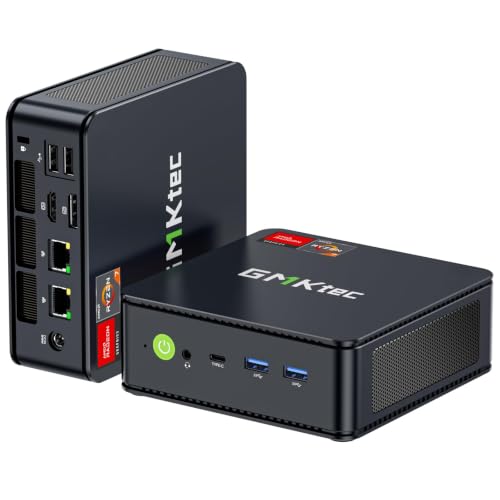
- Best overall for streaming: GMKtec M5 Plus Gaming Mini PC, Ryzen 7 5825U, 32GB RAM, 1TB SSD — Check on Amazon
- Beelink SER5 MAX Mini PC, Ryzen 7 5800H, 16GB RAM, 500GB SSD — Check on Amazon
- BOSGAME P4 Light Gaming Mini PC, Ryzen 7 5700U, 32GB RAM, 1TB SSD — Check on Amazon
- ACEMAGICIAN AM06 Pro Mini Gaming PC, Ryzen 7 5800U, 16GB RAM, 512GB SSD — Check on Amazon
See 2 more Amazon options
- KAMRUI E3B Mini Gaming PC, Ryzen 5 7430U, 32GB RAM, 512GB SSD — Check on Amazon
- Dell RGB Gaming Tower, Core i7, GTX 1050 Ti, 16GB RAM, 512GB SSD (Renewed) — the only dedicated streaming encoder here, in a full-size tower that is not compact at all — Check on Amazon
Read the full guide ↓
Disclosure: As an Amazon Associate, reviewstook.com earns from qualifying purchases. Links to Amazon on this page are affiliate links; they cost you nothing extra. Listing details such as price and availability change often, so check the current Amazon listing before you buy.
A streaming PC is judged by a different specification from a gaming PC, and under $400 that distinction decides everything. The specification that matters is the encoder — the piece of hardware that compresses your gameplay, your camera and your voice into the stream your viewers actually watch. A machine can run a game perfectly and still produce a smeared, blocky broadcast if the encoding is handed to hardware never built for it. So this guide grades six compact PCs encoder-first: what encodes the picture on each machine, what that encoder does to image quality at the bitrates the platforms allow, and how much of the machine is left over for the game, the browser and the chat running beside it.
Here is the honest shape of the field before any product names. Five of the six picks are sub-litre mini PCs built on AMD laptop processors, and all five encode through the same Vega-generation AMD video hardware — a real hardware encoder, but an older one: it produces a visibly softer picture than a modern NVIDIA encoder at Twitch’s roughly 6,000 kbps ceiling, and it has no AV1 at all. In fact, no machine in this guide encodes AV1, on any platform, at any setting — if AV1 is the reason you are shopping, this budget cannot serve you. The sixth pick is the exception that defines the category: a renewed full-size Dell tower whose GTX 1050 Ti carries a dedicated NVIDIA encoder block. That block is Pascal generation — genuinely dedicated hardware that frees the processor entirely, but a generation older than the leap NVIDIA made with Turing, and no AV1 either. It is also the only pick that is not compact, not new, and not on a platform with a future.
What, then, can a sub-$400 compact PC honestly stream? Three workloads, defined now so every review below can be graded against them. First, talk and desktop streams — just-chatting, watch parties, tutorials, podcast-style broadcasts — which every pick here handles at full stream quality, because the load is light and the picture mostly still. Second, console streaming: plug a capture card into any of these machines and let it encode a PlayStation, Xbox or Switch feed while the console does the gaming work — again, every pick qualifies, and this is the strongest use of a mini PC here. Third, one-machine game streaming, where the same small box renders the game and encodes the broadcast: here the field splits. Light and esports titles at OBS output of 720p60 or 1080p30 are realistic on the stronger picks; demanding modern games rendered and streamed by the same mini PC are not, and no listing copy at this price should persuade you otherwise. Grade the picks against those three workloads, not against the word “gaming” in their titles.
In this guide
Quick Picks
Short on time, or comparing several options at once? Each row below names a streaming job and the product that suits it, with a link to the listing.
| Streaming job | Pick | Why it stands out | Link |
|---|---|---|---|
| Best overall for streaming | GMKtec M5 Plus, Ryzen 7 5825U, 32GB/1TB | The most memory and recording space in a 0.78-litre box — the simultaneous-load pick | Check on Amazon |
| Strongest chip for game-plus-stream | Beelink SER5 MAX, Ryzen 7 5800H, 16GB/500GB | A 54W-mode H-series chip in the smallest case here, about 0.6 litres | Check on Amazon |
| Best storage value | BOSGAME P4, Ryzen 7 5700U, 32GB/1TB | 32GB and a full terabyte for recordings — check price on Amazon | Check on Amazon |
| Best console-capture station | ACEMAGICIAN AM06 Pro, Ryzen 7 5800U, 16GB/512GB | VESA-mounts behind the TV it captures from, with a bay for a recording drive | Check on Amazon |
| Cheapest credible stream box | KAMRUI E3B, Ryzen 5 7430U, 32GB/512GB | Dual-channel 32GB in a 0.68-litre case — check price on Amazon | Check on Amazon |
| Only dedicated encoder (not compact) | Dell Gaming Tower, GTX 1050 Ti (Renewed) | A Pascal NVENC block that encodes without touching the CPU — in a refurbished full-size tower | Check on Amazon |
How These Picks Were Chosen
The first filter was the same one the base compact guide applied: a pick had to be a complete, ready-to-run PC — processor, memory, storage and Windows installed — sold on Amazon at or regularly within $400, and genuinely compact, meaning a mini PC of roughly one litre or less. Barebones kits were excluded however strong their chips, because a kit without RAM, storage or an operating system is not a $400 streaming computer. Five picks pass both tests. The sixth, the renewed Dell tower, fails the size test openly and is labelled as failing it wherever it appears; it earns its place because it holds the only dedicated streaming encoder available at this money, and readers deserve to see the trade.
On top of that sat three streaming-specific judgments. The first is the encoder audit: for every pick we identified, from the documented silicon, which hardware block compresses the stream. On the five mini PCs it is the AMD video-encode block built into their Vega-generation integrated graphics — the same class of encoder across all five, which is why this guide grades them on everything around the encoder rather than pretending one Vega chip out-encodes another. On the Dell it is the NVENC block inside the GTX 1050 Ti: Pascal-generation, dedicated, and a real step up — the encoding stops competing with the game for processor time — while remaining a generation behind the quality modern NVIDIA cards are known for. No pick was credited with an encoder its hardware does not have, and AV1 is absent from the guide because it is absent from every chip in it.
The second judgment is simultaneous load. A streaming PC never runs one program: it runs the game, OBS, a browser with chat and alerts, and often a local recording, all at once. On a mini PC that load lands on one shared pool of memory, because the integrated graphics borrow system RAM while OBS and the browser take their share from the same sticks. That is why memory configuration carries so much weight below: 32GB in dual channel is not a luxury in a streaming box, it is the headroom that lets everything coexist without swapping; a 16GB machine is workable but tighter. The third judgment is recording storage. Streamers who keep local recordings — and recording at higher quality than you stream is the standard habit — consume disk at a rate gaming alone never reaches. A 500GB drive that also holds a game library is a constraint; a 1TB drive, or a bay that accepts a cheap second drive, is a feature, and the reviews grade it as one.
We did not use these products ourselves. We read the maker listings and specification pages and compared processors, graphics, memory configuration, storage, dimensions and port layouts, favouring listings that publish their numbers in full. Check price on Amazon for the current figure on each listing, because mini PC pricing moves weekly with coupons and Prime pricing.
The Encoder Is the Streaming Spec
Everything a viewer sees passes through one block of silicon, so it deserves a section of its own. Three encoder families appear in this guide, and the differences between them are the differences between the picks. The first is AMD’s Vega-era video encoder, built into the integrated graphics of all five mini PCs. It is proper hardware encoding — OBS lists it as an AMD hardware option, and it compresses H.264 without asking the processor cores to do the work. Its limits are generation limits: this is AMD’s pre-RDNA encoder design, and at Twitch’s roughly 6,000 kbps ceiling it holds noticeably more softness and blockiness in fast motion than a modern NVIDIA encoder given the same bits. On YouTube, where higher bitrates are available, the gap narrows, because bitrate forgives what encoder efficiency cannot. It has no AV1 encode — that arrived in AMD’s much later hardware — and no setting changes that.
The second family is the Dell’s Pascal NVENC. NVENC is a separate block on the graphics card that does nothing but encode, and that separation is the point: the stream is compressed without taking processor cores from the game and without borrowing the mini PCs’ shared memory pool. Pascal’s block predates the generational jump NVIDIA made with its Turing cards, so at equal bitrate its picture sits between the Vega encoder and a modern card’s — cleaner than the AMD block at Twitch bitrates, and likewise H.264-only, with no AV1. The third option is not hardware at all: x264, encoding on the processor itself. On the eight-core chips in most of this guide, x264 at its veryfast preset is a legitimate fallback for talk and desktop content, where the picture is mostly static. As a plan for gameplay streaming it fails here, because the game wants the same cores at the same moment — the reviews treat x264 as a talk-show tool, never as the strategy.
Two platform facts frame all of this. Twitch’s standard ceiling is around 6,000 kbps with constant bitrate and a two-second keyframe interval — exactly the regime where encoder quality differences show; YouTube accepts considerably more bitrate and rewards it. And the wired rule sits underneath everything: an encoder can only send what the network carries, and a stream pushed over congested Wi-Fi drops frames no hardware can recover. Every pick here is graded assuming an Ethernet cable, and the OBS section below treats the cable as part of the streaming specification, not an accessory.
The 6 Best Compact Gaming PCs for Streaming Under $400
GMKtec M5 Plus Gaming Mini PC — Ryzen 7 5825U, 32GB RAM, 1TB SSD
Who it suits: The streamer who wants one small box to do the whole job — game, broadcast, browser and recording archive — with the least juggling of anything in this guide.
The M5 Plus encodes, like every mini PC here, through the Vega-generation AMD hardware block in its Ryzen 7 5825U, so its stream picture is the guide’s shared mini-PC picture: competent H.264, softer than a modern NVIDIA encoder at Twitch bitrates, cleaner on YouTube where more bitrate is available. What separates this machine is everything around the encoder. The 5825U is an eight-core Zen 3 chip, which leaves genuine x264 veryfast capacity for talk and desktop streams, and the memory configuration is the best in this guide for simultaneous load: 32GB in dual channel, so the integrated graphics get their bandwidth, OBS gets its share, and a browser full of chat and alerts still leaves the game room to breathe. On a 16GB machine that negotiation is constant; on this one it mostly disappears.
Storage completes the argument: the 1TB NVMe drive is the only capacity here that treats local recording as a normal habit rather than a rationed one, holding a game library and a recording archive together for a long while. The physical package stays out of the way — about 128.8 × 127 × 47.8 mm, roughly 0.78 litres, around half a kilogram, VESA-mountable behind the monitor, so the streaming desk gains no visible hardware. Dual 2.5-gigabit Ethernet ports make the wired rule effortless, triple 4K display output covers a two-screen streaming layout, and WiFi 6E handles everything except the stream itself. The 5825U is a 15W-class chip, so the fan works at the gentlest sustained load in this guide — worth having when a microphone shares the desk. Check price on Amazon — it is the most complete streaming package under $400. The standing value-brand caution applies: support runs through the seller, so keep the order records.
- 32GB dual-channel memory and 1TB of storage — the simultaneous-load and recording headroom the rest of the guide is measured against.
- Eight Zen 3 cores give a real x264 veryfast fallback for talk and desktop streams.
- Dual 2.5GbE ports and a 15W-class chip: wired streaming and a quiet desk for the microphone.
Honest limitation: The encoder is the shared Vega-generation AMD block — no AV1, and a softer picture than modern NVENC at Twitch’s bitrate ceiling; the U-series chip also gives up sustained clock speed to the H-series Beelink when the game is the load.
Choose it if one machine must run the game, the stream, the browser and the recording archive at once. Skip it if your priority is the strongest game rendering in the smallest box and you record nothing — that trade is the Beelink’s.

Beelink SER5 MAX Mini PC — Ryzen 7 5800H, 16GB RAM, 500GB SSD
Who it suits: The game-first streamer: whose broadcast is gameplay, who wants the strongest sustained rendering feeding the encoder, and who accepts the tightest memory and storage in exchange.
The SER5 MAX is the smallest machine here — the listing puts it at 4.96 × 4.44 × 1.65 inches and 2.44 lb, roughly 0.6 litres — and it hides the guide’s most serious processor. The Ryzen 7 5800H is a 45W-class H-series chip and this listing runs it at a 54W TDP setting, against 15W-class U-series parts elsewhere here: under a long session, this is the chip that keeps its clocks while others quietly shed theirs. For a one-machine stream that matters twice over: a chip that throttles mid-stream degrades the game and the broadcast in the same moment. Encoding runs on the same Vega-generation AMD hardware block as the other mini PCs — the picture quality at a given bitrate is the guide’s shared picture — and the eight cores provide the same x264 veryfast talk-and-desktop fallback as the GMKtec.
The constraints are the flip side. Memory is 16GB: correctly dual-channel, but the smallest pool here for a game, OBS and a browser to share. Storage is 500GB, which alongside a game library makes local recording a discipline — record selectively, offload often. Both constraints have documented exits: the listing supports RAM up to 64GB and storage up to 2TB, making this the most upgradeable mini PC in the guide, so the tight specification is a starting point, not a life sentence. Heat is the placement condition: 54W in 0.6 litres is the densest thermal load here, the fan is the most audible under sustained load, and the machine needs open air — a desk or a VESA mount, never a sealed cabinet, where it throttles sooner than anything else in the guide and takes the stream’s smoothness with it. Check price on Amazon — in this budget tier it is the strongest game-plus-encode silicon here. Triple display output over HDMI, DisplayPort and USB-C and Windows 11 Pro round it out.
- 54W-mode 5800H: the only chip here that sustains H-series clocks through a long game-plus-stream session.
- Smallest case in the guide at roughly 0.6 litres, with RAM to 64GB and storage to 2TB per the listing.
- Strong game-plus-encode performance for this budget tier — check price on Amazon.
Honest limitation: 16GB of shared memory and 500GB of storage are the guide’s tightest simultaneous-load and recording budgets, and the 54W mode in a 0.6-litre case makes this the most placement-sensitive and most audible pick under load.
Choose it if gameplay rendering is the priority and you will upgrade memory or storage when the budget recovers. Skip it if the PC must live in a closed cabinet, or you record everything and never want to manage an archive.

BOSGAME P4 Light Gaming Mini PC — Ryzen 7 5700U, 32GB RAM, 1TB SSD
Who it suits: The value-minded streamer who wants the GMKtec’s memory-and-storage recipe — the two things simultaneous load and recording actually consume — at a more budget-focused tier — check price on Amazon.
The P4’s streaming arithmetic is simple. Its configuration — Ryzen 7 5700U, 32GB of dual-channel DDR4 and a 1TB NVMe SSD — delivers the full simultaneous-load specification at a budget-tier position below the guide’s top pick — check price on Amazon. The 5700U is a close relative of the GMKtec’s 5825U — the same eight-core Zen 3 layout and the same Vega 8 integrated graphics, with a fraction less boost headroom — so the streaming story is the same honest one: the Vega-generation AMD hardware encoder produces the guide’s shared mini-PC picture, the eight cores cover x264 veryfast for talk and desktop content, and the 32GB pool means the game, OBS and a chat browser stop negotiating for memory. The terabyte makes local recording archives a habit instead of a ration. The chassis is the same class too — the P4 family measures about 5.1 inches square and 1.8 inches tall, roughly 0.77 litres, at about 2.2 lb — and the port list is a streamer’s friend: dual 2.5-gigabit Ethernet for the wired rule, triple 4K output over HDMI, DisplayPort and USB-C for a game screen and a chat screen, and WiFi 6E for the rest of the desk. Memory can grow to 64GB per the listing details.
Two cautions belong to this pick alone, and both deserve plain statement. The first is the listing family: BOSGAME has sold this P4 line in both 5700U and 5825U variants under near-identical titles, so the machine in your head must be the configuration on the live page — read the processor line and the memory and storage figures before ordering, not the title alone, because the streaming case for this pick rests on the 32GB/1TB configuration. The second is the brand: BOSGAME is a value label whose support channel is the seller storefront rather than a global service network, so buy it as a specification, not as a service promise. On noise, the U-series chip keeps the gentle profile of the guide’s other 15W-class machines: audible under load in a silent room, unobtrusive across one. If the live configuration matches, check price on Amazon — this is among the strongest streaming-hardware value in the guide.
- 32GB dual-channel and 1TB fitted — the value configuration for simultaneous load and recording; check price on Amazon.
- Dual 2.5GbE LAN and triple display output suit a wired, two-screen streaming desk.
- Sub-litre P4 chassis, about 5.1 inches square, disappears onto a desk or TV shelf.
Honest limitation: The listing family mixes 5700U and 5825U variants under near-identical titles, so the live page’s configuration must be confirmed before ordering — and support is a seller storefront, not a service network.
Choose it if the live listing shows the 32GB/1TB configuration — check price on Amazon. Skip it if the page shows a lesser variant at the same money, or if in-warranty support quality matters more to you than specification for the budget.

ACEMAGICIAN AM06 Pro Mini Gaming PC — Ryzen 7 5800U, 16GB RAM, 512GB SSD
Who it suits: The console streamer and living-room broadcaster — the buyer whose PC exists to encode a capture card’s feed and run the stream, mounted invisibly behind the television the console plays on.
Reframe this machine around the second workload from the intro and it becomes the most purposeful pick in the guide. When the gaming happens on a console, the PC’s rendering hardware is irrelevant; what matters is a competent hardware encoder, enough processor to run OBS and a browser, and a box that can live where the console lives. The AM06 Pro answers all three. Its Ryzen 7 5800U — eight Zen 3 cores to 4.4GHz — encodes through the same Vega-generation AMD hardware block as the other mini PCs, which is entirely sufficient when the incoming picture arrives from a capture card rather than from a game the same chip is rendering, and the eight cores leave the x264 veryfast fallback available for talk segments. The case is the largest mini PC here and still tiny — 5.19 × 5.19 × 1.96 inches, about 0.86 litres — and it VESA-mounts behind a TV or monitor, so the streaming station takes literally no furniture: console, capture card, and a PC that has vanished behind the screen. Dual LAN ports make the wired rule easy, and triple 4K output covers the TV plus a small chat monitor if the setup grows one.
The storage detail matters most to streamers: alongside the 512GB NVMe system drive there is a 2.5-inch expansion bay, and for a capture station that bay is the archive — a cheap SATA drive dropped in later becomes the recording library, leaving the system drive for Windows, OBS and the current session. No other pick in this guide offers a second-drive bay at this size. Memory is the honest constraint: 16GB, dual-channel and adequate for the capture-and-talk workload this review recommends, but the guide’s floor rather than its comfort zone if you later ask the same box to render and stream a PC game at once. The 5800U’s 15W-class profile makes this, with the GMKtec, one of the two calmest fan behaviours here — behind a TV, effectively out of the room. On price: check price on Amazon before comparing, as the live figure can vary by membership. One brand note: ACEMAGICIAN is a value brand whose wider family of labels has drawn scrutiny in past years over bundled software, so the standard budget-mini-PC advice applies — a security scan on first boot, and a clean Windows install is a reasonable first hour.
- VESA-mounts behind the TV it captures from — the zero-footprint console-streaming station.
- 2.5-inch expansion bay gives recordings a cheap dedicated home; no other pick here offers one.
- 15W-class chip and the largest case here make for the calmest fan behaviour under load.
Honest limitation: 16GB of RAM is the guide’s floor for shared-memory simultaneous load, and the live price can vary by Prime membership — check price on Amazon.
Choose it if the streaming source is a console or mostly talk, and the PC should disappear behind the screen. Skip it if you want 32GB fitted from day one for one-machine PC game streaming — that is the GMKtec or the BOSGAME.

KAMRUI E3B Mini Gaming PC — Ryzen 5 7430U, 32GB RAM, 512GB SSD
Who it suits: The budget disciplinarian starting a channel: the cheapest credible streaming station in this guide, for talk, desktop, console capture and light games rather than demanding one-machine gameplay broadcasts.
The E3B’s case for streaming is its memory configuration at its price. For a budget-tier pick it fits 32GB of RAM across two sticks, dual-channel, the specification simultaneous load rewards — check price on Amazon. The game or capture feed, OBS, and a browser running chat and alerts share one pool on a mini PC; at 32GB the sharing stops being a negotiation. The processor is a Ryzen 5 7430U: six Zen 3 cores to 4.3GHz, a step down in core count from the eight-core picks, with Radeon Vega 7 graphics — one compute unit below the Vega 8 machines. For encoding, the distinction that matters is narrower than the gaming one: the Vega 7 carries the same Vega-generation AMD hardware encoder class as its siblings, so the stream picture is the guide’s shared picture, while the six cores still cover x264 veryfast for talk and desktop segments, with less headroom to spare than the eight-core picks when a game is also asking. Grade it as a talk, desktop and console-capture station first and a light-game streamer second — at 720p60 or 1080p30 OBS output for esports and indie titles it is credible; as a machine for rendering and broadcasting demanding games simultaneously, it is the first pick here to run out of room.
The physical package suits the desk: the E3B chassis measures 128 × 128 × 41.2 mm, about 0.68 litres and roughly 560 grams, and KAMRUI includes a VESA plate, so the whole station can ride on the back of the monitor and take no desk at all. Storage is 512GB — the guide’s standard compromise, and for a recording habit it means curating the archive. The U-series chip keeps the noise profile gentle — quiet at desktop distances, audible in a silent room under load — and the behind-monitor position gives it open air by design. The brand caveat matches the AM06 Pro’s — KAMRUI sits in the same value-brand family, so the first-boot routine of security scan, updates and verification is part of the purchase — and there is a configuration trap specific to this listing family: a 16GB sibling exists under a separate listing, so confirm the page in front of you says 32GB before ordering, because at 16GB the streaming argument changes. Bought correctly, the E3B is the guide’s proof that a properly configured streaming station does not require the top of this budget — check price on Amazon.
- Budget-tier 32GB dual-channel configuration here — simultaneous-load headroom without stretching the budget; check price on Amazon.
- 0.68-litre chassis and a VESA plate in the box — the station mounts behind the monitor from day one.
- Same Vega-generation hardware encoder class as the Vega 8 picks; six efficient cores keep talk and capture loads quiet.
Honest limitation: Six cores and Vega 7 graphics make this the first pick to run out of room on demanding one-machine game streams, 512GB rations the recording archive, and the value-brand first-boot routine is part of the deal.
Choose it if your stream is talk, desktop, console capture or light games and you want 32GB in a budget-tier pick — check price on Amazon. Skip it if rendering and broadcasting heavier PC games from one box is the plan — step up to the eight-core picks.
Dell RGB Gaming Tower Computer — Core i7, GTX 1050 Ti 4GB, 16GB RAM, 512GB SSD (Renewed)
Who it suits: The streamer who read the encoder section and chose the dedicated hardware anyway — who has floor space for a tower and wants the one thing no mini PC under $400 can offer: an NVIDIA encoder that works alone.
Everything about this pick is a disclosed exception, and the streaming case for it is exactly one component. Inside this renewed full-size tower sits a GeForce GTX 1050 Ti, and inside that card sits a Pascal-generation NVENC block: a dedicated encoder that compresses the broadcast without touching the processor and without borrowing the mini PCs’ shared memory pool. At Twitch’s roughly 6,000 kbps ceiling its picture holds up better than the Vega-generation AMD block in the five mini PCs — and for a gameplay streamer that is the whole argument. It is not a modern encoder: Pascal predates the quality leap of NVIDIA’s Turing generation, it encodes H.264 only with no AV1, and the card around it was entry-level when new. The rest of the machine frames the trade. It is not compact — it is a full-size RGB tower that lives on or under a desk. It is not new — it is an Amazon Renewed machine on a 6th-generation Intel Core i7 platform that was current a decade ago, with 16GB of RAM and a 512GB SSD, professionally inspected rather than factory-warrantied, with unit-to-unit variation a new mini PC does not have. And its price will not sit still: check price on Amazon, because renewed listings move in and out of this budget regularly.
That record produces this guide’s firmest rule, stated here as in the table: this machine is a buy only on days its live price is at or under $400. Above the line it costs more than brand-new streaming stations with warranties and futures, and the correct action is to pass and wait, because renewed pricing moves regularly. The platform is a dead end — no meaningful processor upgrade path, older connectivity — and the 1050 Ti plays and streams the back catalog rather than the future, though within that catalog the combination is coherent: the card renders its era’s games at 1080p while its encoder handles the broadcast, a division of labour no integrated-graphics box can replicate. Plan accordingly: set it up immediately and run a full game-plus-stream stress test across several sessions inside the renewed return window, so any weakness surfaces while returning it is still easy. If the three trades — size, newness, platform future — are acceptable and the live price is under the line, this is a legitimate back-catalog streaming PC with the best encoder in the guide. If any of them is not, the honest $400 purchase is one of the mini PCs above.
- The only dedicated encoder in this guide — Pascal NVENC encodes without consuming CPU cores or shared memory, and out-pictures the Vega block at Twitch bitrates.
- Renewed pricing sometimes dips under the budget line — check price on Amazon before buying.
- A standard tower interior — the only pick here with any room to change components.
Honest limitation: It fails this guide’s own category — full-size, refurbished, on a decade-old platform with no upgrade path — its encoder predates the Turing quality leap with no AV1, and its live price often sits above $400; it is a buy only on days the live price is at or under $400.
Choose it if encoder quality outranks size, newness and future upgrades, and the live price is under the line. Skip it if any of those three matter — or on any day the listing sits above $400.

Comparison Table
| Product | Encoder | Memory / storage | Best streaming use | Link |
|---|---|---|---|---|
| GMKtec M5 Plus, 5825U, 32GB/1TB | AMD Vega-generation hardware (H.264) | 32GB dual-channel / 1TB | One-machine streaming with recording headroom | Check on Amazon |
| Beelink SER5 MAX, 5800H, 16GB/500GB | AMD Vega-generation hardware (H.264) | 16GB dual-channel / 500GB | Strongest game rendering feeding the stream | Check on Amazon |
| BOSGAME P4, 5700U, 32GB/1TB | AMD Vega-generation hardware (H.264) | 32GB dual-channel / 1TB | Storage and memory value | Check on Amazon |
| ACEMAGICIAN AM06 Pro, 5800U, 16GB/512GB | AMD Vega-generation hardware (H.264) | 16GB dual-channel / 512GB + 2.5″ bay | Console capture behind the TV | Check on Amazon |
| KAMRUI E3B, 7430U, 32GB/512GB | AMD Vega-generation hardware (H.264) | 32GB dual-channel / 512GB | Talk, desktop and capture on the smallest budget | Check on Amazon |
| Dell Gaming Tower, GTX 1050 Ti (Renewed) | NVIDIA Pascal NVENC, dedicated (H.264, no AV1) | 16GB / 512GB | Best encoder here — if size does not matter and the price is under $400 | Check on Amazon |
How to Choose a Compact Gaming PC for Streaming Under $400
- Name your workload before your machine. Talk and desktop streams, console capture, and one-machine game streaming are three different purchases wearing one keyword. The first two are served by every pick here; the third is where core counts, sustained wattage and memory pools start to separate the field. Decide which stream you are actually starting.
- Grade the encoder, not the game benchmarks. Your viewers never see your frame rate; they see the encoder’s output at the platform’s bitrate. Here that means a shared Vega-generation AMD picture on the mini PCs and a dedicated Pascal NVENC picture on the Dell — choose which of those your channel’s look depends on.
- Accept the AV1 fact early. No chip in this guide encodes AV1. If AV1 streaming is a requirement rather than a wish, this budget is the wrong one, and the money is better saved toward a newer graphics card than spent here and regretted.
- Put dual-channel memory first on the checklist. The game, the encoder’s support work and your browser all draw on the same pool, and two sticks roughly double the bandwidth the integrated graphics can use. 32GB dual-channel is this guide’s comfort specification; 16GB is its floor, and single-stick configurations were treated as defects.
- Count recording storage separately from game storage. A local recording habit consumes disk at a rate a game library never reaches. 1TB picks absorb it; 500GB picks ration it; the AM06 Pro’s 2.5-inch bay postpones the question cheaply.
- Budget the cable. Stream over Ethernet, full stop. Wi-Fi is for the rest of the desk. The dual 2.5-gigabit ports on the GMKtec and BOSGAME make this trivially easy; on any pick, a wired run to the router is part of the streaming specification.
- Check the exact configuration on the live page. Mini PC listing families swap processors and memory sizes under near-identical titles — this guide flags the P4’s processor variants and the E3B’s 16GB sibling explicitly. The title is marketing; the specification table is the product, and for streaming the memory line is the specification that matters most.
- Place for heat, because heat is stream stability. A mini PC sealed in an unventilated cabinet will throttle mid-broadcast and drop frames in clumps. Open air, a hand’s width around the vents, or a VESA mount behind the monitor — placement is a streaming setting.
- Do the first-boot routine on any value brand. Security scan first, then Windows and driver updates, then a look through the installed programs — an hour of hygiene that converts an unknown software state into a known one before your audience ever sees the machine work.
Set Up OBS Once, Correctly
The same configuration discipline applies to every pick, and most of it is decided before your first broadcast. Start with the encoder selection inside OBS: on the five mini PCs, choose the AMD hardware encoder — it exists precisely so the processor cores stay available for the game and the browser. On the Dell, choose NVENC. Reserve x264 for talk and desktop scenes on the eight-core machines, at the veryfast preset; the moment a game joins the load, hand the work back to the hardware. Set the rate control to constant bitrate: around 6,000 kbps is Twitch’s standard ceiling for a 1080p60 broadcast, with a two-second keyframe interval, and if your connection or your content is lighter, 720p60 at a proportionately lower bitrate will look cleaner from these encoders than 1080p starved of bits. YouTube accepts substantially higher bitrates, and that headroom is the cheapest picture-quality upgrade available — the Vega encoder’s softness at 6,000 kbps largely dissolves when it is fed more.
Then learn the three counters in OBS’s Stats window, because each one accuses a different part of your setup. Frames dropped for network reasons mean the connection failed, not the computer: the fixes are the Ethernet cable and a lower bitrate — no setting inside the PC repairs a congested Wi-Fi link. Frames lost to encoding lag mean the encoder was asked for more than it can give: lower the output resolution or frame rate, confirm you selected the hardware encoder rather than x264, and check the machine is not throttling in a sealed cabinet. Frames lost to rendering lag mean the graphics hardware saturated — the game took everything — so cap the game’s frame rate, lower its settings, or accept a 720p60 output for that title. Read the counter before touching a setting and the fix is usually the first one you try. Finally, record locally at a higher quality than you stream if storage allows; the archive outlives the broadcast.
What $400 Does Not Include
The budget in this guide buys the computer, and a streaming setup is more than the computer. Cost the rest separately, in this order, and never let a listing’s headline price pretend otherwise. A microphone comes first — it is the single largest quality difference your audience will perceive, larger than any encoder gap in this guide, and a stream with a clean voice and a soft picture beats the reverse every time. Lighting comes second, because a camera in a dim room produces noise no encoder setting can remove. A webcam follows if your format puts you on screen; talk and gameplay-first formats can start without one. A capture card is a console-only purchase — essential if a PlayStation, Xbox or Switch is your source, and entirely unnecessary if the games run on the PC itself, so do not buy one by default. Add the Ethernet run to the router, which this guide treats as part of the streaming specification, and a display, keyboard and mouse or controller if the room does not already have them. None of these items is included with any pick above — check price on Amazon or at the retailer when you shop for them.
Common Buying Mistakes
- Shopping by game performance and never asking what encodes the stream. The encoder is the product your viewers receive; a faster game on a weaker encoder looks worse on air.
- Expecting AV1 at this budget. No pick here encodes it — not the mini PCs, not the renewed tower — and no listing implication changes that.
- Streaming over Wi-Fi because the desk looks cleaner. Dropped frames from a congested wireless link cannot be configured away, and the Ethernet cable is the cheapest quality upgrade in this entire guide.
- Sealing the mini PC inside an unventilated TV cabinet, then blaming the encoder for the throttling and dropped frames that follow an hour into the broadcast.
- Choosing a 16GB configuration to save money, and starving the shared pool that the game, OBS and the browser draw from — or worse, landing on the E3B’s 16GB sibling listing by mistake.
- Ordering from a listing family without confirming the live configuration; the P4’s processor variants and the E3B’s memory sibling are this guide’s standing examples.
- Paying above $400 for the renewed Dell because the encoder tempted you. Its rule is absolute: at or under the line on the day you buy, or pass and check the live price again another day.
- Setting x264 to a slow preset on a U-series chip, then watching the game and the stream strangle each other for the same cores.
- Recording everything to a nearly full 500GB drive and losing a session to a disk that filled mid-stream.
Final Recommendation
- Most streamers: GMKtec M5 Plus.
- Gameplay-first broadcasts: Beelink SER5 MAX.
- Value pick: BOSGAME P4.
- Console capture and living rooms: ACEMAGICIAN AM06 Pro.
- Smallest budgets, talk and capture channels: KAMRUI E3B.
- The best encoder, whatever it costs in size and condition: Dell Gaming Tower (Renewed) — only at or under $400, with every caveat in its review attached.
Our top two for streaming buyers at this budget are the GMKtec M5 Plus, for the complete 32GB/1TB specification for simultaneous load and recording, in a 0.78-litre box that disappears behind the monitor, and the Beelink SER5 MAX, for the strongest sustained chip in the smallest case here — the pick when the game itself is the show and its rendering must not sag mid-broadcast. If the budget is firm, the BOSGAME P4 matches the GMKtec’s recipe as the value alternative — check price on Amazon; if the source is a console, the AM06 Pro is the one designed to vanish behind the TV it captures from; and if the channel is talk and capture on the smallest budget, the KAMRUI E3B does the job as the budget-tier option in the guide. Streamers whose ambitions already exceed this tier should also see Best Compact Gaming PC For Streaming Under $500 and the wider field in Best Streaming PC Under $400, while readers still deciding whether compact itself is right should start from the gaming-first view in Best Compact Gaming PC Under $400. Name your workload, confirm the configuration on the live listing, wire the Ethernet cable, and check the live price before you order — at $400, that homework is the whole difference between a channel that looks deliberate and one that looks accidental.
Frequently Asked Questions
Can a compact PC under $400 really stream?
Yes — within the workloads this guide defines. Talk and desktop streams and console capture are realistic on every pick here. One-machine game streaming is realistic for light and esports titles at 720p60 or 1080p30 output on the stronger picks. Demanding modern games rendered and broadcast by the same sub-$400 box are not realistic, and neither is AV1 encoding here.
Which encoder do these mini PCs use, and does it matter?
All five mini PCs encode through the Vega-generation AMD hardware block in their integrated graphics. It matters in one specific way: at Twitch’s roughly 6,000 kbps ceiling its picture is visibly softer in fast motion than a modern NVIDIA encoder’s, while on YouTube, where higher bitrates are accepted, the difference largely closes. It is a competent encoder with a generational ceiling, and this guide grades the machines around it: cores, memory and storage.
Why is the only dedicated encoder in a full-size renewed tower?
Because that is what the market under $400 actually contains. A new discrete graphics card consumes most of this budget by itself, before a case, processor or storage is bought, so no new compact machine at this price carries one. The renewed Dell is included, labelled as the non-compact exception it is, so readers can see the real price of a dedicated NVENC block at this money: size, newness and platform future.
Is the Dell’s older NVENC still better than the mini PCs’ encoder?
For gameplay streaming at Twitch bitrates, yes — a dedicated Pascal block encodes without consuming processor cores or shared memory and holds a cleaner picture than the Vega-generation AMD block at the same bitrate. It is not better than a modern NVIDIA encoder, it predates the Turing generation’s quality leap, and it has no AV1. Whether that is worth a refurbished full-size tower on a decade-old platform is the judgement its review lays out.
Do I need a second PC to stream?
No. A two-PC setup is a high-end arrangement for separating rendering from encoding at maximum quality; nothing at this budget requires it. Every pick here is a complete one-machine streaming station for the workloads described, and for console streaming the machine is not even rendering — it only encodes the capture card’s feed, the lightest job in this guide.
Can these PCs stream a console?
Yes — this is one of their strongest uses. Connect a capture card and the console renders while the PC runs OBS, the encoder and your overlays. The AM06 Pro is graded first for this job because it VESA-mounts behind the same TV and its 2.5-inch bay gives recordings a dedicated home, but every pick can do it.
What else do I need to budget for?
A microphone first, then lighting, a webcam if your format shows you, a capture card only if a console is your source, an Ethernet run, and a display and controls if the room lacks them. The computers are complete — Windows is installed — but no pick in this guide includes streaming peripherals.


