Where to buy
Check the latest price, availability and delivery on Amazon. Orders are placed on Amazon. We may earn a commission from qualifying purchases.
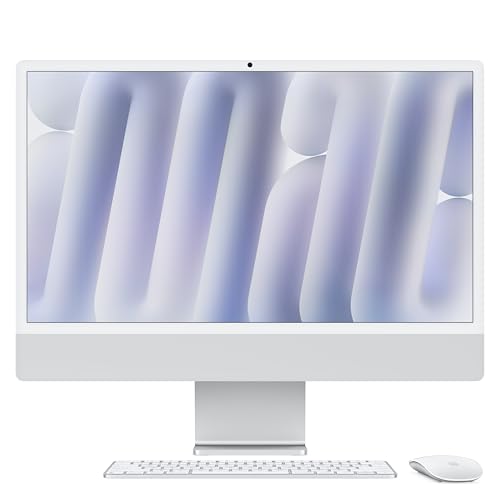
- Best overall: Apple 2024 iMac with M4 Chip, 24-inch 4.5K Retina, 16GB, 256GB — Check on Amazon
- Dell 27 All-in-One EC27250, Core 7 150U, GeForce MX570A, 32GB, 1TB — Check on Amazon
- HP OmniStudio 27, Ryzen AI 7 445, Radeon 840M, 16GB, 512GB — Check on Amazon
- Dell 27 All-in-One EC27250, Core 5 120U, 16GB, 512GB — Check on Amazon
- HP 27-inch All-in-One, Ryzen 5 7520U, 16GB, 1TB, Touchscreen — Check on Amazon
See 1 more Amazon option
- Apple 2023 iMac with M3 Chip, 24-inch 4.5K Retina, 8GB, 256GB — Check on Amazon
Read the full guide ↓
Disclosure: As an Amazon Associate, reviewstook.com earns from qualifying purchases. Links to Amazon on this page are affiliate links; they cost you nothing extra. Listing details such as price and availability change often, so check the current Amazon listing before you buy.
Twelve hundred dollars is the tier where an all-in-one stops being a compromise you apologize for and becomes a machine you chose on purpose. Cheaper all-in-ones cut the same three corners every time: a dim, washed-out screen, 8GB of memory that cannot be changed later, and a processor borrowed from a budget laptop. At $1,200 those corners are mostly — not entirely — straightened out. The screens get bigger and better, 16GB of memory becomes the floor rather than the upgrade, the processors are current-generation parts, and one machine in this guide, the iMac, brings a 4.5K Retina display that no Windows all-in-one at this price currently answers. This is also the tier where the all-in-one’s central bargain deserves to be stated plainly, because it does not go away at any price: you are paying for the design and the display, and the same $1,200 spent on a tower and a separate monitor buys more raw performance, every time. What the premium buys here is a desk with one cable, a screen you look at for a decade, a camera and speakers built in, and a computer that disappears into the room. Buy it for those things with your eyes open and it is money well spent. Buy it expecting tower performance and it will disappoint you by design.
Three honesty notes frame everything below. First, the display: of the six machines here, only the two iMacs have a panel sharper than 1080p. Every Windows pick is a 27-inch Full HD screen — roomy, pleasant, and visibly less sharp than the iMac’s 4.5K panel or a QHD monitor, especially for text. During this research, no Windows all-in-one with a 27-inch QHD display could be verified selling under $1,200 on Amazon in the US; if a listing claims one at this price, read its specification table twice. Second, graphics: five of these six machines run on integrated graphics. The one exception, Dell’s EC27250 with a GeForce MX570A, carries a genuine discrete GPU — but it is an entry-level laptop-class part with 2GB of memory, suited to light gaming and GPU-accelerated apps, not a gaming card in the desktop sense. Nobody should buy any machine in this guide primarily to play demanding games. Third, sellers: Amazon is a marketplace as well as a store. Some of these listings are sold by Amazon itself, some by the brand, and one below is sold by a third-party seller that opens the box to install its advertised upgrades. That difference decides who handles your warranty and your return, and each review below names the seller situation we verified. Below are the quick picks, detailed reviews of all six machines, a comparison table, a buying checklist, the mistakes that waste money in this category, and the questions buyers ask before committing to a computer they cannot upgrade.
In this guide
Quick Picks
Short on time, or comparing several options at once? Each row below names a buyer type and the machine that suits it, with a link to the listing.
| Buyer type | Pick | Why it stands out | Link |
|---|---|---|---|
| Best overall | Apple 2024 iMac, M4, 24-inch | 4.5K Retina display, 16GB memory standard, sold by Amazon | Check on Amazon |
| Best Windows specs on paper | Dell 27 EC27250, Core 7, MX570A | The only discrete GPU here, plus 32GB RAM, 1TB, touchscreen | Check on Amazon |
| Best current-generation Windows pick | HP OmniStudio 27, Ryzen AI 7 445 | Newest chip in the guide, strong Radeon 840M graphics, Amazon-sold | Check on Amazon |
| Best mainstream Windows value | Dell 27 EC27250, Core 5 | Same well-rated 27-inch design, honest everyday spec, lower price | Check on Amazon |
| Best touchscreen bundle under budget | HP 27-inch, Ryzen 5 7520U | 27-inch touch, 1TB and Windows 11 Pro — with a weak CPU caveat | Check on Amazon |
| Best for the display on a budget | Apple 2023 iMac, M3, 24-inch | The same 4.5K Retina panel for less — with an 8GB memory warning | Check on Amazon |
How These Picks Were Chosen
The budget was applied as a ceiling for the whole purchase: every machine below is a real Amazon listing positioned for this budget in the United States — check price on Amazon to confirm the current listing still fits the ceiling before you buy. Two machines in this guide, the Dell Core 7 and the HP OmniStudio, are deal-dependent picks whose pricing can move above the ceiling; both are included because they belong in this tier, and their reviews tell you, in so many words, to buy only when the live price fits the budget. Anything positioned well above this tier — larger 4K all-in-ones, workstation-class machines — was excluded, however good it might be, because it does not answer the search you actually made.
We did not use these computers ourselves. We read the manufacturer listings, specification pages and price histories, and compared the things that decide an all-in-one purchase in the order they should be decided: display first, because in an all-in-one the display is a life sentence — it cannot be swapped when it disappoints, and it will outlive every other component’s relevance; memory second, because 16GB is the difference between a machine that ages gracefully and one that stutters in year three, and on most of these machines it can never be added later; storage and processor third; and the seller last but not least, because on Amazon the name in the “sold by” line determines whether a problem in month two is a simple return or an argument. Integrated graphics were judged as integrated graphics — capable for office work, photo editing, streaming and light games — and no pick was credited with gaming ability its hardware does not have. Where a listing’s own specification table contradicts its headline, as one below does, the review says so and tells you which figure to trust less.
One filter sat on top of all of that, and it is the filter this entire category lives or dies by: the five-year test. An all-in-one is bought as a finished appliance. You cannot meaningfully upgrade the processor or graphics later, memory is soldered or sealed on most of these designs, and when the computer half becomes obsolete the excellent screen half is retired with it. So every pick was asked the same question: will this exact configuration — this chip, this much memory, this much storage, this panel — still be pleasant in five years? Machines that failed on memory or storage were either excluded or carry their failure as their stated honest limitation, so you can decide with the facts rather than discover them.
The 6 Best All-in-One PCs Under $1,200
Apple 2024 iMac with M4 Chip, 24-inch 4.5K Retina (16GB, 256GB) — Silver
Who it suits: Buyers who want the best screen in this guide, a silent and beautiful desk machine, and who live happily inside macOS — home offices, writers, photographers, students, and families who keep a computer for a long time.
The display is the argument, and it is not close. The iMac’s 24-inch Retina panel runs at 4480 × 2520 — roughly four times the pixels of every Windows machine in this guide — at 500 nits with a wide color gamut, so text looks printed, photos look like the thing photographed, and there is no visible pixel structure at any sane viewing distance. In an all-in-one, where the screen is the one component you can never change, starting with the best screen available at the price is not a luxury decision; it is the correct order of priorities. Behind it sits Apple’s M4 chip in its 8-core CPU / 8-core GPU configuration, with 16GB of unified memory as standard — the first base iMac in years that does not ask you to pay extra for the memory a machine at this price should have always had. Everyday performance is emphatically not the compromise here: this is a fast, silent computer for office work, browsing with dozens of tabs, photo editing and light video work, and its 12MP Center Stage camera and six-speaker system are the best in this guide by a wide margin, which matters every single day on video calls. The listing tracked here is sold by Amazon.com — check price on Amazon to confirm the current price and any coupon before you order.
The compromises are Apple’s usual ones, and they are structural. Storage is 256GB, which is the smallest in this guide, and neither it nor the memory can ever be upgraded; a photo library, a few large apps and five years of accumulation will push you toward external storage or cloud subscriptions, and you should budget for that reality rather than discover it. The 24-inch screen, for all its sharpness, is smaller than the 27-inch Windows panels here, and some buyers will trade the iMac’s pixels for the Dells’ sheer area. There is no touchscreen, the stand adjusts for tilt only, and gaming is the weakest story in this guide — macOS simply does not have the game library, and the M4’s integrated GPU, strong as it is for an integrated part, is not a substitute for a Windows gaming PC. And the whole machine runs macOS: if your work software, your games or your habits are Windows, none of the display’s brilliance changes that answer.
- The best display under $1,200 in any all-in-one: 4.5K Retina, 500 nits, wide color.
- 16GB of unified memory is standard on the M4 generation — the old base-model trap is gone.
- Sold by Amazon.com — check price on Amazon.
Honest limitation: 256GB of storage, sealed forever, in the most expensive machine here — and the day the computer ages out, the superb screen is retired with it.
Choose it if you want the finest screen and the quietest desk at this budget and macOS suits your software. Skip it if you need Windows, a 27-inch screen, a touchscreen, or internal storage measured in terabytes.

Dell 27 All-in-One EC27250 — Core 7 150U, GeForce MX570A, Touchscreen (32GB, 1TB)
Who it suits: Windows buyers who want the strongest specification sheet in this guide — the most memory, the most storage, a touchscreen, and the only discrete graphics chip — for a family desk, a home office, or light creative and gaming duties.
Read the specification line slowly, because it is doing something no other Windows pick here does: an Intel Core 7 150U processor, 32GB of DDR5 memory, a 1TB SSD, a 27-inch Full HD touchscreen, Windows 11 Pro, Dell’s onsite service — and an NVIDIA GeForce MX570A discrete GPU. The memory and storage are the quiet headline. Thirty-two gigabytes is the configuration that passes the five-year test without argument, 1TB is the storage figure that does not need managing, and having both at this ceiling, in a name-brand all-in-one with a service-backed warranty, is genuinely rare. The MX570A needs honest framing rather than either hype or dismissal: it is a real discrete GPU, which separates this machine from every integrated-graphics rival for GPU-accelerated photo and video work, older and lighter games, and multi-monitor flexibility — but it carries 2GB of graphics memory and sits in the entry class, so modern demanding games at high settings are beyond it, and it does not turn this into a gaming PC. The panel is a 27-inch FHD IPS touchscreen: large, bright enough for a home office, and touch-enabled, which the iMac is not. Pricing is the discipline this pick demands: check price on Amazon, because this is a buy-only-when-the-live-price-fits-the-budget pick, full stop.
The limitations follow from the same sheet. The display is Full HD stretched across 27 inches, so text is visibly softer than on the iMac or any QHD panel; if you read and write all day, that softness is the thing you will notice most, every day, for years. The MX570A’s 2GB of VRAM will age faster than any other component in the machine. And this is a configuration sold through Amazon’s marketplace ecosystem at volatile prices, so the seller name and the exact configuration on the live listing deserve a careful read before ordering, and the purchase should only happen when the price on the page is at or under $1,200.
- 32GB of DDR5 and 1TB of storage — the only pick that needs no memory or storage apology.
- The only discrete GPU in the guide: GeForce MX570A, for light gaming and GPU-accelerated work.
- 27-inch touchscreen, Windows 11 Pro and Dell onsite service included.
Honest limitation: It only fits this budget when its live price dips into this tier — check price on Amazon before you buy — and the MX570A’s 2GB of VRAM is an entry-level ceiling, not gaming headroom.
Choose it if you want maximum Windows specifications and light-gaming ability, and you are willing to wait for the price dip. Skip it if you need a sharp QHD-class picture, serious gaming, or a price that is under budget every day rather than on deal days.

HP OmniStudio 27 (27-cw0102, 2026) — Ryzen AI 7 445, Radeon 840M (16GB, 512GB)
Who it suits: Windows buyers who want the newest platform in this guide — a current-generation AI-era processor with the strongest integrated graphics here — in a clean, modern design sold by Amazon itself.
Most all-in-ones at this price are built around chips a generation or two old; the OmniStudio 27 is the exception. Its AMD Ryzen AI 7 445 is a current-generation processor with a built-in neural processing unit for Windows 11’s on-device AI features, and its Radeon 840M integrated graphics are the strongest built-in graphics in this guide — a genuine step above the Intel integrated graphics in the Dells for photo editing, casual and older games at modest settings, and any app that leans on the GPU. Sixteen gigabytes of DDR5 and a 512GB SSD are the sensible mainstream pairing, the 27-inch Full HD panel is large and easy on the eyes for office work, the Jet Black design is the most contemporary-looking Windows machine here, and the stand adjusts to a comfortable working position. The seller situation is the cleanest of the Windows picks: HP’s own coverage and other sources agree Amazon sells this model directly, which keeps delivery, returns and warranty routing simple. Pricing moves around for this model — check price on Amazon — so, like the Dell Core 7, this is a machine to buy when the live price fits this budget.
The compromises are storage and sharpness. Five hundred twelve gigabytes is workable but not generous at $1,200, and on this design you should treat it as permanent: reporting on this model notes the memory is not upgradeable, and all-in-one storage upgrades are a service job at best, so external drives or cloud storage are the expansion plan. The 27-inch panel is Full HD, with the same text softness as the Dells. The Radeon 840M, for all its class-leading status among integrated parts, remains integrated — the listing’s own marketing phrase about “top-tier gaming experiences” should be read as light and older games at modest settings, and the review you are reading will not upgrade that claim. Finally, it is a recent model with a still-small pool of buyer ratings, so its long-term record is unwritten in a way the Dell design’s is not.
- Newest processor in the guide, with an NPU for Windows AI features.
- Radeon 840M — the strongest integrated graphics here.
- Sold by Amazon directly — check price on Amazon and buy when the live price fits this budget.
Honest limitation: 512GB of storage and 16GB of memory are effectively permanent, the panel is 1080p, and its pricing can move above this budget — check price on Amazon and buy only when it fits.
Choose it if you want the most modern Windows all-in-one platform and Amazon-direct simplicity. Skip it if you need 1TB or more of internal storage, 32GB of memory, or a sharper-than-1080p screen.

Dell 27 All-in-One EC27250 — Core 5 120U (16GB, 512GB)
Who it suits: The mainstream Windows buyer — home office, family desk, students — who wants a large, well-reviewed screen and an honest everyday specification from a major brand, without paying for the flagship configuration above.
This is the same EC27250 design as the Core 7 model in this guide, in its sensible mainstream configuration: an Intel Core 5 120U processor, 16GB of DDR5 memory, a 512GB SSD, and the 27-inch Full HD IPS panel with 99% sRGB coverage that anchors the whole family. For the work most all-in-ones actually do — browser tabs by the dozen, documents and spreadsheets, video calls, streaming, photo organization — this specification is not a compromise at all; it is the correct amount of computer, and the Core 5’s ten cores keep it responsive in exactly that multitasking pattern. Check price on Amazon — in other words, it is positioned as a mainstream pick in this budget in a way its Core 7 sibling is not, and a shopper patient enough to catch a sale may do better still.
What you give up against the Core 7 configuration is a clear list, and it should be read before choosing between them: half the memory (16GB rather than 32GB, still the right floor for five years of office use, but with less headroom), half the storage, integrated Intel graphics instead of the discrete MX570A — so light gaming becomes very light gaming — no touchscreen, and Windows 11 Home rather than Pro. The panel is the same Full HD 27 inches, with the same softness for text. And one specification detail deserves a mention because it decides upgrade hopes: Dell’s own family documentation shows memory configurations built from one or two sticks depending on variant, so whether this exact unit has a free slot is a question for the live listing and Dell’s service manual, not an assumption to buy on.
- 27-inch FHD IPS panel with 99% sRGB, Wi-Fi 6E, keyboard and mouse included.
- Positioned in this budget as a mainstream pick, not only on deal days — check price on Amazon.
Honest limitation: Integrated graphics only, no touchscreen, and 512GB of storage — this is the sensible configuration, not the generous one, and the 27-inch 1080p panel’s softness is permanent.
Choose it if you want a proven, mainstream Windows all-in-one for everyday work at a fair price. Skip it if you want touch, discrete graphics, 32GB of memory or a terabyte of storage — that is the Core 7 configuration above, when its live price fits the budget.

HP 27-inch All-in-One — Ryzen 5 7520U, Touchscreen (16GB, 1TB)
Who it suits: Buyers whose checklist is features per dollar — a 27-inch touchscreen, a full terabyte of storage, Windows 11 Pro and a wireless keyboard and mouse — and whose actual workload is browsing, documents, video calls and streaming rather than heavy multitasking or creative work.
On paper, this listing is the value play of the guide: a 27-inch Full HD touchscreen, 16GB of memory, a 1TB SSD, Windows 11 Pro with Microsoft Office included per the listing title, Wi-Fi 6 and a wireless keyboard and mouse — check price on Amazon. It is positioned as a lower-priced option in this guide, comfortably within this budget tier. For a family desk, a reception counter, a kitchen command center or a grandparent’s first computer, that bundle answers the brief completely, and the touchscreen at 27 inches is genuinely useful in exactly those shared, standing, tap-to-check settings. It earns its place in this guide on that basis, and for light-duty buyers it may be the smartest spend of the six.
Now the part the headline does not tell you, stated as plainly as this guide can state it: the Ryzen 5 7520U is an entry-level chip built on an older architecture with four cores, originally designed for budget laptops. It is the weakest processor in this guide by a wide margin — every other pick will feel faster in year one and dramatically faster in year four — and its integrated graphics are the modest kind suited to video and very light games. The seller matters here too: this listing is sold by a third-party seller, Smartisan Tech, not by Amazon or HP, and listings of this type are typically machines whose box has been opened so the seller can install the advertised memory and storage upgrades; the listing’s own specification table even contradicts itself, listing DDR4 memory for a platform built around LPDDR5, which is exactly the kind of detail that tells you to verify the delivered machine against the order. None of this makes it a bad purchase for light work. All of it makes it the wrong purchase for anyone expecting a $1,200-class five-year computer.
- The most features per dollar: 27-inch touch, 1TB, Windows 11 Pro, wireless peripherals.
- Positioned as a lower-priced option in this guide — check price on Amazon.
- A complete bundle for shared, light-duty spaces: family desk, reception, kitchen.
Honest limitation: The Ryzen 5 7520U is a budget-laptop-class chip — the weakest here by far — the seller is a third party that opens the box to fit upgrades, and the listing’s spec table contradicts itself on memory type. Verify everything on delivery.
Choose it if your workload is light, your space is shared, and the feature bundle matters more than processor headroom. Skip it if this is your main computer for the next five years — spend the difference on the Dell Core 5 or the HP OmniStudio.

Apple 2023 iMac with M3 Chip, 24-inch 4.5K Retina (8GB, 256GB) — Silver
Who it suits: Buyers who fell for the iMac’s screen in the first review but not its price — writers, readers, photo browsers and light-duty home users who want the 4.5K Retina experience and can honestly live within 8GB of memory.
Everything said about the M4 iMac’s display applies here unchanged, because it is the same display: 24 inches, 4480 × 2520, 500 nits, wide color — the sharpest, most pleasant panel in this guide, in the same thin, silent, beautifully built enclosure, with the same class-leading camera and speakers. The M3 chip is a generation older and still entirely capable for everyday work: documents, browsing, email, streaming, photo organization and light editing all run exactly as a home user hopes. And the price positioning is the point — check price on Amazon. It is the lower-priced route in this guide to a screen of this quality compared with its M4 sibling. For a machine bought mostly to read, write and browse on a gorgeous display, that saving is real value honestly kept.
But this pick carries the guide’s most important warning label, and it is not the processor. It is the memory: 8GB, soldered, forever. The M4 generation made 16GB standard precisely because 8GB had become the base iMac’s defining compromise, and on this M3 model it remains. For genuinely light use — a browser, mail, documents, streaming — 8GB works, and macOS manages it gracefully. For anyone who keeps forty tabs, edits photos seriously, runs virtual machines or expects this machine to feel fresh in five years, 8GB is the ceiling they will meet first and most often, and no money can be spent later to raise it. Storage is the same sealed 256GB as its sibling. Read the pick this way: it is a display purchase with a good computer attached, for light users, at a fair price — and a false economy for everyone else, for whom the extra money for the M4 model is the best-spent upgrade in this entire guide.
- The same 4.5K Retina display as the M4 iMac, for less — check price on Amazon.
- The lower-priced premium-screen route here — check price on Amazon.
- M3 performance remains entirely capable for everyday home and office work.
Honest limitation: 8GB of unified memory, sealed permanently — the one specification in this guide most likely to define the machine’s useful life, and the reason heavier users should buy the M4 instead.
Choose it if your use is genuinely light and the display is what you are buying. Skip it if you multitask heavily, edit media, or keep computers for five-plus years — the M4 iMac’s 16GB is worth every cent of the difference.

Comparison Table
| Product | Display | Processor / Graphics | Memory / Storage | Link |
|---|---|---|---|---|
| Apple 2024 iMac, M4 | 24-inch 4.5K Retina, 500 nits | Apple M4 (8-core CPU / 8-core GPU) | 16GB / 256GB | Check on Amazon |
| Dell 27 EC27250, Core 7 | 27-inch FHD touchscreen | Core 7 150U / GeForce MX570A 2GB | 32GB / 1TB | Check on Amazon |
| HP OmniStudio 27 (27-cw0102) | 27-inch FHD | Ryzen AI 7 445 / Radeon 840M | 16GB / 512GB | Check on Amazon |
| Dell 27 EC27250, Core 5 | 27-inch FHD IPS, 99% sRGB | Core 5 120U / Intel integrated | 16GB / 512GB | Check on Amazon |
| HP 27-inch, Ryzen 5 7520U | 27-inch FHD touchscreen | Ryzen 5 7520U / integrated | 16GB / 1TB | Check on Amazon |
| Apple 2023 iMac, M3 | 24-inch 4.5K Retina, 500 nits | Apple M3 (8-core CPU / 8-core GPU) | 8GB / 256GB | Check on Amazon |
How to Choose an All-in-One PC Under $1,200
- Choose the display first, and be honest about resolution. In an all-in-one the screen is permanent. At this budget the real choice is between the iMacs’ smaller, razor-sharp 4.5K panel and the Windows machines’ larger, softer 27-inch 1080p panels. If you read and write all day, sharpness wins. If the machine is shared, watched from a distance, or used for video, size may win. What does not exist, verified, is a Windows 27-inch QHD all-in-one under $1,200 on Amazon US — treat any listing claiming one as a specification error until proven otherwise.
- Treat 16GB of memory as the floor, and 8GB as a warning. Memory decides how an all-in-one ages, and on most of these designs it can never be added. Sixteen gigabytes is comfortable for years of office multitasking; the one 8GB pick in this guide is fenced around with warnings for a reason.
- Do the tower arithmetic once, honestly. The same $1,200 buys a tower and a good separate monitor with more performance and real upgrade paths. If that sentence bothers you, buy the tower. If a clean desk, one cable and a built-in camera matter more, buy the all-in-one knowingly — that is a legitimate purchase, not a mistake.
- Read the seller line before the specification line. Sold by Amazon or by the brand means straightforward returns and warranty. Sold by a third-party marketplace seller — especially one that opens the box to install upgrades — means checking who warranties the machine, verifying the delivered configuration against the order, and keeping the packaging until you have.
- Match storage to your library, not your optimism. 256GB suits cloud-based light users; 512GB is the mainstream minimum; 1TB is for photo and media libraries kept locally. Internal storage on an all-in-one is effectively permanent, so external drives are the expansion plan, not an afterthought to resent.
- Be realistic about graphics. Integrated graphics — including the strong Radeon 840M — mean office work, media, photo editing and light or older games. The one discrete GPU here, the MX570A, is entry-level with 2GB of memory. If gaming is a primary purpose, no all-in-one in this guide is the right $1,200.
- Check the camera, speakers and stand — you will use them daily. These are the all-in-one’s real quality-of-life components. The iMac’s camera and speakers lead this guide by a distance; among the Windows picks, confirm camera resolution and whether the stand adjusts for height, not only tilt, if the machine is shared between people of different heights.
- Price-shop this category with patience. All-in-one prices on Amazon can swing widely. Two picks in this guide belong here only when their live price fits the budget; checking the live price and a week of patience are worth more than any single specification upgrade at this tier.
- Confirm the exact configuration on the live listing. All-in-one families ship in many variants under near-identical names. Match the processor, memory, storage and panel on the page to the review you read — a cheaper variant wearing the same product name is the oldest trick in this category.
What the Premium Tier Actually Buys
Shoppers moving up from the $700–$800 all-in-ones reasonably ask what the extra money does, because in this category it does not buy what it buys in towers. It does not buy a gaming graphics card — the strongest graphics here are a 2GB entry-level discrete chip and a good integrated one. It does not buy upgradeability, which remains minimal at every price. What it buys is the removal of the cheap tiers’ three taxes. The screen tax goes first: panels get larger, brighter and better calibrated, and in the iMac’s case genuinely high-resolution. The memory tax goes second: 16GB becomes standard and 32GB becomes available, which is the difference between a machine that ages and a machine that complains. And the processor tax goes third: budget-laptop chips give way to current-generation parts with real multitasking headroom — with one deliberate exception in this guide, fenced with warnings, where the money was visibly spent on features instead. Judge every premium all-in-one by those three removals. A $1,200 machine still charging any of the three taxes — a dim screen, 8GB of memory, an entry processor — should be priced like the cheaper machine it is.
Sold by Whom? The Amazon Seller Check
Because these are among the most expensive single items most households buy on Amazon, the seller deserves its own section. Three of the patterns in this guide cover nearly the whole marketplace. Sold and shipped by Amazon — the iMac M4 and, per brand reporting, the HP OmniStudio — is the simplest pattern: Amazon’s return window, Amazon’s logistics, the manufacturer’s warranty behind it. Brand and authorized listings, the pattern around the Dell configurations, add model-specific service arrangements — Dell’s onsite service is a genuine differentiator when a sealed machine fails, because the technician comes to the computer rather than the computer going to a depot. The third pattern, the third-party upgrade seller behind the HP Ryzen 5 listing, is legitimate but different in kind: the seller opens the manufacturer’s seal to install the advertised memory and storage, which means the seller, not the factory, is responsible for those components being what the title claims, and the listing’s own internal contradictions — a memory type that does not match the platform — are your signal to verify the delivered machine specification by specification during the return window. None of this is a reason to avoid marketplace listings. It is a reason to read the “sold by” line with the same attention as the processor line, and to photograph the system information screen the day the machine arrives.
Common Buying Mistakes
- Buying an all-in-one for gaming. At $1,200 the category offers integrated graphics and one entry-level discrete chip; a gaming tower at the same money is a different universe of performance.
- Accepting 8GB of memory to save money. On a sealed machine that saving is collected back, with interest, in year-three stutter — the M3 iMac’s warning applies to every brand.
- Assuming a 27-inch screen is a sharper screen. Every 27-inch pick here is 1080p; the smaller iMac panels carry four times the pixels. Size and sharpness are different purchases.
- Paying a higher price for a deal-dependent machine. Two picks in this guide are only under budget when their live price dips into this tier; buying them when the live price sits above the budget overpays for nothing.
- Ignoring the seller. A third-party listing can be a fine purchase, but ordering without noting who sells it, who warranties it, and whether the box was opened to fit upgrades is how specification surprises happen.
- Trusting the headline over the specification table — or the table over the headline — without noticing they disagree. On the HP Ryzen 5 listing they do. Verify the delivered machine.
- Underbuying storage because “the cloud exists.” Cloud subscriptions for a photo library cost real money every year for the life of the machine; price them into the 256GB decision honestly.
- Forgetting the screen is retired with the computer. A tower’s monitor survives three PCs. An all-in-one’s panel, however good, is done when the computer is — one more reason the display deserves first priority and the processor second.
- Skipping the return-window checks: dead pixels, the exact memory and storage in system settings, camera and speakers on a real call, and the seller’s name against the invoice.
Final Recommendation
- Most buyers who can use macOS: Apple 2024 iMac with M4.
- Maximum Windows specifications, bought when its live price fits the budget: Dell 27 EC27250, Core 7 with MX570A.
- Newest Windows platform, Amazon-sold: HP OmniStudio 27 (27-cw0102).
- Mainstream Windows value: Dell 27 EC27250, Core 5.
- Light-duty shared spaces on a feature budget: HP 27-inch, Ryzen 5 7520U.
- The premium display for light users: Apple 2023 iMac with M3.
Our top two at this budget are the M4 iMac, for the display that defines the category and a specification finally free of the base-model trap, and the Dell EC27250 in its Core 7 configuration, for buyers who need Windows and can catch it when its live price fits the budget — the only pick here with 32GB of memory, a terabyte of storage and a discrete GPU. Between them they cover the two honest shapes of this search: the best screen, or the biggest specification sheet. If neither fits, the Dell Core 5 is the safe mainstream answer, the OmniStudio is the modern one, and both iMac warnings and the HP’s processor warning in this guide exist so that the cheaper picks can be chosen knowingly rather than regretfully. Shoppers working to a tighter budget should also see Best All In One PC Under $800, and those with more room can step up to Best All In One PC Under $1500. Check the live price and the exact configuration before you order — at $1,200, in a machine you cannot upgrade, that homework is the whole purchase.
Frequently Asked Questions
Is a $1,200 all-in-one better than a $1,200 tower and monitor?
It is better looking, quieter to live with and simpler — and slower for the money, with almost no upgrade path. The tower wins on performance, graphics and longevity of the individual parts; the all-in-one wins on desk space, cables, and having a good screen, camera and speakers integrated from day one. Neither answer is wrong; buying the all-in-one while expecting the tower’s performance is the only wrong move.
Can any of these all-in-ones play games?
Light ones, honestly framed. The Dell Core 7’s MX570A discrete GPU and the HP OmniStudio’s Radeon 840M integrated graphics handle older titles, esports games and modest settings; the rest are office graphics. None of the six is a gaming machine in the sense a $1,200 gaming tower is, and this guide’s gaming-PC counterparts start from that different premise entirely.
Why is there no 27-inch QHD Windows all-in-one in this guide?
Because none could be verified selling under $1,200 on Amazon in the US during research. The Windows picks are 27-inch Full HD; the sharp panels at this budget are the iMacs’ 24-inch 4.5K displays. QHD Windows all-in-ones exist in the market, but at higher prices or through bundles that did not verify inside this ceiling.
How much memory does an all-in-one really need?
Sixteen gigabytes for a machine expected to serve five years of browsing, office work and video calls; 32GB — offered here only by the Dell Core 7 — for heavier multitasking, large spreadsheets, light creative work and maximum headroom. Eight gigabytes, on the M3 iMac, is workable only for genuinely light use, and it cannot be changed later on any of these machines’ sealed designs.
Does it matter who sells the machine on Amazon?
Yes, more than on most purchases. Amazon-sold and brand listings give you the retailer’s return process and the manufacturer’s warranty in their standard forms. Third-party upgrade sellers open the box to fit the advertised parts, which makes them responsible for those parts matching the title — verify the delivered configuration during the return window, as the HP Ryzen 5 review in this guide explains.
Can I upgrade an all-in-one later?
Plan on no. Processors and graphics are never upgradeable in this class; memory is soldered on the iMacs and reported non-upgradeable on the HP OmniStudio; storage changes, where possible at all, are service procedures rather than user upgrades. That is precisely why this guide weights the as-bought configuration — memory and storage especially — so heavily.
iMac or Windows all-in-one at this price?
Decide by software, not hardware. If your applications, games or workplace require Windows, the Dells and HPs are your list, and the iMac’s display cannot change that. If your work is browser, documents, photos and communication, the M4 iMac’s screen, camera, speakers and silence make it the strongest single purchase in this guide — with its 256GB of storage as the standing caveat.


