Where to buy
Check the latest price, availability and delivery on Amazon. Orders are placed on Amazon. We may earn a commission from qualifying purchases.
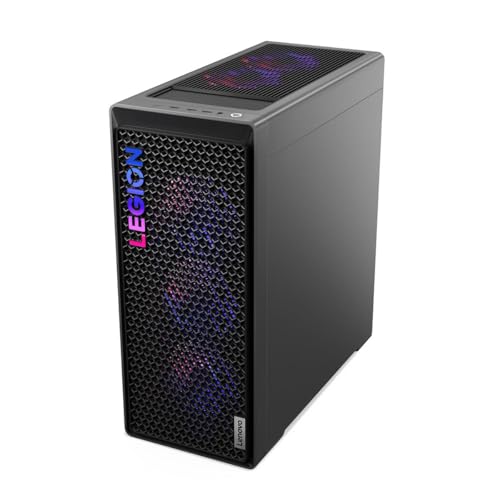
- Best overall when the deal is live: Lenovo Legion T7 34IAS10, Core Ultra 7 265KF, RTX 5080 — Check on Amazon
- Skytech King 95, Ryzen 7 9800X3D, RTX 5070 Ti — Check on Amazon
- CyberPowerPC Gamer Supreme, Ryzen 7 9800X3D, RTX 5070 Ti (SLC8480A9) — Check on Amazon
- iBUYPOWER Y40 PRO, Ryzen 9 7900X, RTX 5070 Ti — Check on Amazon
See 2 more Amazon options
- ZOTAC MEK Hero A7748S, Ryzen 7 7700X, RTX 4080 Super — Check on Amazon
- CyberPowerPC Gamer Supreme Liquid Cool, Ryzen 7 7800X3D, RTX 4070 Ti Super (SLC8480A3) — Check on Amazon
Read the full guide ↓
Disclosure: As an Amazon Associate, reviewstook.com earns from qualifying purchases. Links to Amazon on this page are affiliate links; they cost you nothing extra. Listing details such as price and availability change often, so check the current Amazon listing before you buy.
Twenty-five hundred dollars is the first budget in this entire series where 4K stops being a negotiation. Every tier below this one asks you to give something up: render resolution, texture quality, ray tracing, frame rate — pick two and surrender the rest. At $2,500 the surrender ends. This is the tier of the RTX 5070 Ti and the RTX 4080 Super, graphics cards with 16GB of video memory and the raw throughput to drive 3,840 × 2,160 at high settings, and — on the days the deals align — it is even the tier where an RTX 5080 system slips under the line. The six machines in this guide are all built around 16GB graphics cards, all carry 32GB of DDR5 system memory except one honestly flagged exception, and all of them will play modern games at 4K in a way that a $1,500 machine, however good, simply cannot match.
The honesty note for this tier is about prices, not performance, because the performance is real. The standing, everyday picks in this guide sit tightly against this budget — the Skytech King 95 anchors the tier, and even its regular list positioning sits above this budget, which tells you how tightly this tier is priced. Check the current price on Amazon for any pick before you order, because positioning at this tier moves often. Above the standing picks sits the RTX 5080 question. A complete 5080 system normally sits above this budget on Amazon, in the tier above — that is where the Legion T7 at the top of this guide sits at its regular list positioning, alongside other 5080 prebuilts. The Legion only belongs in an under-$2,500 guide because a limited-time Amazon deal can bring it under the ceiling — check price on Amazon to see whether that deal is live. It is flagged as deal-dependent every time it appears below: if the deal is live when you read this, it is the strongest machine here by a clear margin; if it is not, it belongs to the under-$3,000 guide and the King 95 becomes the default recommendation. Everything else in the guide stands on its regular pricing.
What “proper 4K” means in practice is worth defining before the picks, because marketing departments define it loosely. A proper 4K gaming PC holds 60 frames per second or better at 4K in demanding games at high settings, using DLSS or FSR upscaling in its quality mode where a game offers it — that is how every card in this class is designed to be used — and it has the 16GB of VRAM that 4K textures, ray tracing and frame generation jointly demand. Cards with 12GB can visit 4K; cards with 16GB live there. Every pick below clears that bar, but they clear it differently: the 5080 clears it with headroom to spare, the 5070 Ti and 4080 Super clear it as their home resolution, and the previous-generation 4070 Ti Super at the bottom of the guide clears it as a value play for buyers who would rather stay well under the ceiling. Below are the quick picks, detailed reviews of all six, a comparison table, a buying checklist built for 4K specifically, the mistakes that waste money at this tier, and the questions readers ask before spending this much.
In this guide
Quick Picks
Short on time, or comparing several options at once? Each row below names a buyer type and the machine that suits it, with a link to the listing.
| Buyer type | Pick | Why it stands out | Link |
|---|---|---|---|
| Best overall — deal-dependent | Lenovo Legion T7 34IAS10, RTX 5080 | The only 5080 under the ceiling, and only while its deal runs | Check on Amazon |
| Best standing 4K pick | Skytech King 95, 9800X3D, RTX 5070 Ti | Fastest gaming CPU here, published 850W Gold PSU, 360mm AIO | Check on Amazon |
| Best storage at this tier | CyberPowerPC Gamer Supreme SLC8480A9, RTX 5070 Ti | 9800X3D with a 2TB SSD where rivals ship 1TB | Check on Amazon |
| Best value 5070 Ti | iBUYPOWER Y40 PRO, Ryzen 9 7900X, RTX 5070 Ti | 12-core creator CPU, 2TB SSD, repeatedly discounted | Check on Amazon |
| Best raw raster value | ZOTAC MEK Hero A7748S, RTX 4080 Super | 4080 Super positioned toward the lower end of this tier — check price on Amazon — but only 16GB of system RAM | Check on Amazon |
| Best budget true-4K | CyberPowerPC Gamer Supreme SLC8480A3, RTX 4070 Ti Super | Previous-gen 16GB card, X3D CPU, positioned at the value end of this tier | Check on Amazon |
How These Picks Were Chosen
The budget was applied as a hard ceiling of $2,500 on Amazon in the United States, with one declared exception handled in the open: a machine whose regular list positioning is above the ceiling qualifies only when a limited-time Amazon deal brings it below, and it is then labelled deal-dependent wherever it appears — check the current price on Amazon to confirm which side of the ceiling it sits on. That is the Legion T7’s situation, and the guide never lets you forget it. Every other pick is positioned at or below the ceiling in this tier — though at this tier positioning itself moves, and two picks carry regular list positioning a little above the ceiling while regularly being listed below it. Where that is true, the review says so and tells you to check the current price on Amazon before ordering.
The performance filter was a single line drawn at the graphics card: 16GB of VRAM, no exceptions. At 4K, video memory is not a specification to compromise on. High-resolution texture packs, ray-tracing acceleration structures and frame generation all draw from the same pool, and 12GB cards that look adequate in a 1440p benchmark begin swapping, stuttering and quietly dropping texture quality at 4K in exactly the games this budget is meant for. That filter admits four GPU families — RTX 5080, RTX 5070 Ti, RTX 4080 Super and RTX 4070 Ti Super — and excludes a long list of cheaper, newer-sounding machines built around 12GB cards. If a $2,500 listing is built around a 12GB GPU, it is not a 4K machine at this price, whatever the product title claims.
We did not use these machines ourselves. We read the maker listings and specification pages and compared the parts that decide 4K ownership: GPU model and VRAM, CPU class, RAM capacity and speed, SSD capacity, power supply wattage and rating where published, and cooling. Two disclosure habits of the industry shaped the rankings. First, a published PSU is worth money: the King 95 states an 850W Gold ATX 3.0 supply in its listing, while several rivals leave the wattage unstated, and at 300W-plus graphics cards the power supply is not a detail. Second, configuration drift is real — Skytech’s listing notes the graphics card brand may vary, and the King 95 name covers multiple configurations — so every review names the exact model number to check on the live listing before ordering. Because prices change often, this guide does not print static figures for individual machines; check the current price on Amazon on the live listing instead.
The 6 Best 4K Gaming PCs Under $2,500
Lenovo Legion T7 34IAS10, Core Ultra 7 265KF, RTX 5080 (Model 90Y6003KUS) — Deal-Dependent
Who it suits: The buyer who can move quickly — someone ready to order the week the deal is live, who wants the strongest 4K graphics card that ever appears under this ceiling.
Start with the condition, because everything about this pick hangs on it. The Legion T7’s regular list positioning on Amazon sits above this guide’s ceiling, in the tier above. A limited-time deal can bring it under the ceiling — check price on Amazon to see whether it is live. When it sits under the ceiling, this is not a close contest: the RTX 5080 is a generation-defining 4K card, 16GB of GDDR7 on NVIDIA’s Blackwell architecture with DLSS 4 and Multi Frame Generation, a class above every other GPU in this guide in ray tracing and comfortably ahead in raster work. Paired with it is Intel’s Core Ultra 7 265KF, a 20-core Arrow Lake processor boosting to 5.5GHz, with 32GB of DDR5 at 5600MHz, a 1TB SSD, Windows 11 Pro, Wi-Fi 6 and Bluetooth in Lenovo’s 34-litre Storm Gray tower at just under 40 pounds. The model’s published specification includes an 850W power supply. Lenovo builds the most appliance-like machines in this guide: standard parts layout, a proper OEM warranty organisation behind it, and none of the boutique assembler’s variability.
At 4K the 5080 changes the conversation from “which compromises” to “which luxuries.” Native-resolution high settings in most games, ray tracing on rather than off, path tracing made plausible by Multi Frame Generation in the titles that support it, and enough headroom that a 4K 120Hz display stops being an aspiration and becomes the sensible pairing. The 265KF is not the fastest pure gaming CPU in this guide — the X3D chips below hold that title — but at 4K the graphics card does the heavy lifting and the Intel chip’s core count makes the machine the second-best creator in the line-up after the Y40 PRO. The honest weaknesses are the 1TB SSD, small for a flagship in an era of 150GB installs, and the deal itself. Deals end. If the listing is sitting at its regular positioning above this budget when you open it — check the current price on Amazon — this machine has left this guide’s budget, and the correct move is to buy the King 95 below or take the T7 into under-$3,000 territory with your eyes open.
- RTX 5080 16GB GDDR7 — the strongest 4K GPU in this guide, with DLSS 4 Multi Frame Generation.
- Core Ultra 7 265KF (5.5GHz boost), 32GB DDR5-5600, Windows 11 Pro.
- OEM build and support from Lenovo; published specification includes an 850W PSU.
Honest limitation: It is under $2,500 only while a limited-time deal runs — its regular list positioning sits above this budget — and the 1TB SSD is tight for a flagship machine.
Choose it if the deal is showing when you check price on Amazon and you want maximum 4K performance anywhere near this budget. Skip it if the listing is at its regular list positioning — above this ceiling, it answers a different guide’s question.

Skytech King 95, Ryzen 7 9800X3D, RTX 5070 Ti (Model ST-KING95-1671-W-AM)
Who it suits: The buyer who wants the strongest standing — not deal-dependent — 4K machine in the guide, and who plays CPU-sensitive games alongside the 4K showcases.
When the Legion’s deal is not live, this is the recommendation. The King 95 pairs the RTX 5070 Ti — 16GB of GDDR7, Blackwell architecture, DLSS 4 — with the Ryzen 7 9800X3D, the fastest gaming processor AMD makes: eight Zen 5 cores boosting to 5.2GHz with 3D V-Cache that shows its worth in simulation, strategy and MMO titles and in the 1% lows everywhere else. Around that pairing Skytech publishes the specification sheet the rest of this tier should copy: 32GB of DDR5-5600 RGB memory, a 1TB Gen4 NVMe SSD, a 360mm ARGB liquid cooler, and — the detail that separates serious assemblers from the rest — an 850W Gold ATX 3.0 power supply, stated in the listing, sized correctly for a 300W graphics card and its transients. The white King 95 case shows the build off, Wi-Fi is built in, and Windows 11 is preinstalled.
The pricing needs the same honesty as the Legion’s, in a milder dose. The King 95 is regularly listed under this guide’s ceiling on Amazon, which is why it anchors this guide — but its regular list positioning sits above the ceiling, and other configurations sold under the King 95 name, including a 2TB, DDR5-6000 variant, sit higher still, in the tier above. Hold the listing to the model number ST-KING95-1671-W-AM and check the current price on Amazon to confirm it sits at or under this guide’s ceiling; if both are true, you are buying the best-balanced standing machine here. Two further caveats from the listing itself: Skytech notes the graphics card brand may vary, which is normal for an assembler but means the exact cooler design is a lottery, and the 1TB SSD is the same flagship-tier tightness as the Legion’s. At 4K the 5070 Ti is the tier’s reference card — high settings, DLSS Quality, ray tracing with frame generation — and behind a 9800X3D it will stay fed in every genre, not just the GPU-bound ones.
- Ryzen 7 9800X3D — the fastest gaming CPU in this guide — behind an RTX 5070 Ti 16GB.
- Published 850W Gold ATX 3.0 PSU and 360mm AIO: the most complete spec sheet here.
- 32GB DDR5-5600 and a Gen4 NVMe SSD in a showcase white case.
Honest limitation: Regular list positioning sits above the budget — its place rests on how it is regularly listed under the ceiling, so check the current price on Amazon — and the GPU brand may vary; the 1TB SSD fills fast at 4K install sizes.
Choose it if you want the default buy: strongest CPU, proper 4K card, nothing in the spec left to guess. Skip it if the current price on Amazon has climbed above this guide’s ceiling with no deal running — the CyberPowerPC below offers the same silicon pairing with twice the storage.

CyberPowerPC Gamer Supreme, Ryzen 7 9800X3D, RTX 5070 Ti (Model SLC8480A9)
Who it suits: The 4K buyer whose library is already large — anyone who has priced a second SSD into every 1TB machine above and would rather not need one.
On paper this is the King 95’s pairing bought differently: the same Ryzen 7 9800X3D, the same RTX 5070 Ti with 16GB of GDDR7, the same 32GB of DDR5 — and then one decisive upgrade, a 2TB PCIe 4.0 SSD where both machines above ship 1TB. At 4K that difference is not a luxury line on a spec sheet. Modern flagship installs run 100–150GB, texture packs add more, and a 1TB drive in a 4K machine is a library of six or seven big games plus Windows before the juggling starts. The SLC8480A9 simply removes the problem for the life of the machine, and it does it while keeping the fastest gaming CPU in the guide. CyberPowerPC ships it Wi-Fi ready with Windows 11 Home, in the Gamer Supreme line that has been the brand’s high-end shelf for years.
The trade is disclosure. Where Skytech publishes its 850W Gold supply and 360mm cooler, the verified material for this model does not state the power supply wattage or the RAM speed — independent spec tables for the model list a B850 chipset, but the PSU, the single most important supporting part behind a 300W graphics card, is not published in what we could verify. That does not make it a bad machine; CyberPowerPC’s Supreme line is a known quantity, and the core silicon is identical to the pick above it. It makes it a machine to buy with one extra step: confirm the PSU wattage and the memory speed on the live listing or with the seller before ordering, and treat anything under 750W Gold as a reason to choose the King 95 instead. Judge this model on the live listing — check price on Amazon — against a simple rule: positioned comparably to the King 95 within this tier, the double-size SSD wins the comparison; positioned clearly above it, it does not.
- 9800X3D + RTX 5070 Ti 16GB — the guide’s reference pairing — with a 2TB PCIe 4.0 SSD.
- 32GB DDR5 and Windows 11 Home, Wi-Fi ready.
- The storage problem that dogs the two picks above is simply absent.
Honest limitation: PSU wattage and RAM speed are not published in the verified listing material — confirm both before buying — and its value depends on where it sits in this tier when you check the current price on Amazon.
Choose it if storage is your deciding factor and, when you check price on Amazon, it sits comparably to the King 95 in this tier. Skip it if you cannot confirm an adequate power supply, or it sits clearly above the Skytech for identical silicon.

iBUYPOWER Y40 PRO, Ryzen 9 7900X, RTX 5070 Ti (Model Y40BA9N57T01)
Who it suits: The player-creator — someone whose 4K machine will also edit video, render, compile or stream, and who shops the deal cycle patiently.
The Y40 PRO makes a different CPU bet from the two X3D machines above. Its Ryzen 9 7900X is a 12-core, 24-thread processor: in games it trails the 9800X3D, because no conventional chip matches the X3D’s cache at play, but the moment the workload widens — timeline renders, shader compiles, a stream encoded while a game runs, forty browser tabs behind all of it — the extra cores earn their keep, and at 4K, where the graphics card is the bottleneck in nearly every title, the gaming gap narrows to a few frames in most games anyway. The rest of the build is this tier done properly: an RTX 5070 Ti 16GB, 32GB of DDR5 RGB at 5200MHz, a 2TB NVMe SSD matching the CyberPowerPC’s storage advantage, Windows 11 Home, and a keyboard and mouse in the box, all in the HYTE Y40 case whose panoramic glass makes it the best-looking machine in this guide.
It is also the guide’s most reliably discounted standing pick. It is regularly discounted from its regular list positioning toward the lower end of this tier, including in Black Friday cycles — check price on Amazon for where it sits today. A machine with this specification positioned toward the lower end of the tier is the best value in the guide that does not depend on a single flagship deal going your way — in that position it sits below the X3D pair in the tier while giving up little at 4K and gaining cores everywhere else. The honest notes: the 5200MHz memory is a step slower than the King 95’s 5600 kit, the Y40 case prioritises the view over raw intake airflow, and iBUYPOWER does not headline the PSU in the material we verified, so apply the same pre-purchase confirmation as with the CyberPowerPC. None of that overturns the balance. For the buyer whose PC works as well as plays, this is the smartest standing spend in the guide.
- Ryzen 9 7900X 12-core — the best multitasking and creation CPU here — with an RTX 5070 Ti 16GB.
- 2TB NVMe SSD and 32GB DDR5, in the panoramic-glass HYTE Y40 case.
- Repeatedly discounted toward the lower end of this tier — check price on Amazon.
Honest limitation: The 7900X trails the X3D chips in pure gaming, the RAM is 5200MHz rather than 5600, and the PSU is not headlined in verified material — confirm it before ordering.
Choose it if your machine creates as well as plays, or you catch it in one of its regular discounted windows — check the current price on Amazon. Skip it if every last gaming frame matters and nothing else runs on your PC — the X3D machines exist for you.

ZOTAC MEK Hero A7748S, Ryzen 7 7700X, RTX 4080 Super
Who it suits: The raster purist on a deal hunt — a buyer who values the 4080 Super’s raw rendering muscle and mature drivers, and who is willing to fix one obvious shortcoming themselves.
The MEK Hero is the previous generation’s flagship formula, sold by the company that made its graphics card. ZOTAC’s own Trinity Black Edition RTX 4080 Super — 16GB of GDDR6X, 10,240 CUDA cores, a 2,610MHz boost clock per ZOTAC’s launch material — remains a superb 4K GPU: in traditional raster rendering it trades blows with the 5070 Ti, its ray tracing is a generation behind Blackwell but entirely serious, and DLSS 3 frame generation covers the demanding titles. Around it ZOTAC builds a tidy machine: a Ryzen 7 7700X eight-core boosting to 5.4GHz under a 240mm AIO liquid cooler, an 800W 80+ Gold power supply published in the launch specification, Wi-Fi 6E, Bluetooth 5.2, 2.5-gigabit Ethernet, a 1TB NVMe SSD, Windows 11 Home with no bloatware, hand-assembly and testing in the United States, and a 3-year warranty on the graphics card itself. It is positioned toward the lower end of this tier, and Amazon deal listings bring it lower still — check price on Amazon — delivering 4080 Super performance at a value position in this tier.
Now the shortcoming, and it is not subtle: the A7748S ships with 16GB of DDR5-4800 system memory. In a guide where every other machine carries 32GB, that is half the RAM this tier expects, and it is slow RAM by current standards. For pure gaming today it is workable — games themselves rarely exceed it — but the buyer streaming, recording, or keeping a creator’s desktop open behind the game will feel the ceiling, and DDR5-4800 leaves a little CPU performance unclaimed in the meantime. The saving grace is that this is the most fixable flaw in the guide: RAM is the cheapest, easiest upgrade in any desktop, the AM5 platform takes standard DDR5, and a buyer who treats the MEK Hero as a GPU-and-chassis purchase plus a memory upgrade still comes out ahead of most of this tier. Buy it with that plan stated, not as a surprise. Also note the platform’s age honestly: the 7700X is a fine gaming CPU that the X3D chips outclass, and the 4080 Super has no Multi Frame Generation — DLSS 3’s single generated frame is its ceiling.
- RTX 4080 Super 16GB GDDR6X — flagship-class raster power, positioned toward the value end of this tier — check price on Amazon.
- Published 800W 80+ Gold PSU, 240mm AIO, Wi-Fi 6E and 2.5GbE, US hand-assembly.
- 3-year warranty on the ZOTAC graphics card component.
Honest limitation: Only 16GB of DDR5-4800 system RAM — half this tier’s standard, and slow — so budget a memory upgrade into the real price; no DLSS Multi Frame Generation on the 40-series card.
Choose it if the deal is live when you check price on Amazon and you are comfortable adding a 32GB memory kit. Skip it if you want the finished article out of the box, or you stream and create heavily from day one.

CyberPowerPC Gamer Supreme Liquid Cool, Ryzen 7 7800X3D, RTX 4070 Ti Super (Model SLC8480A3)
Who it suits: The value hunter who wants genuine 4K hardware — 16GB card, X3D processor — and is happy to buy the previous generation at its clearance price to get it.
Every guide in this series has a pick that exists because a generation turned over, and this is the $2,500 tier’s. The SLC8480A3 pairs the Ryzen 7 7800X3D — the X3D chip that defined gaming CPUs before the 9800X3D succeeded it, and still within a few percent of it in most titles — with the RTX 4070 Ti Super, a 16GB GDDR6X card whose whole design brief was 4K: the Ti Super’s upgrade over the plain Ti was precisely the move from 12GB to 16GB and the wider memory bus that 4K textures demand. Around them: 32GB of DDR5, a 2TB PCIe Gen4 SSD, liquid cooling as the model name states, Wi-Fi and Windows 11 Home. Nothing in that specification is a compromise at 4K. The 4070 Ti Super plays this resolution at high settings with DLSS Quality and frame generation in the same manner as the 5070 Ti; it simply does it with the previous generation’s feature set.
Its positioning is the clearest value story in this guide: it sits well under this guide’s ceiling at the value end of the tier across regular deal cycles — check price on Amazon. Read that against the tier: a buyer can stay well under this budget — leaving meaningful headroom for the 4K monitor this machine deserves — and still own a true 4K PC with the right CPU class and the right VRAM count. The honest costs are generational. There is no DLSS Multi Frame Generation, so in the small set of titles where the 50-series cards pull away using it, this machine cannot follow. The configuration dates from the 40-series cycle, which means remaining stock is clearance stock: availability will end rather than refresh, the exact unit’s age on a shelf is unknowable, and the listing’s supporting details deserve the same PSU-confirmation step as its CyberPowerPC sibling above. Buy it as what it is — last generation’s proper 4K machine at this generation’s value price — and it is the easiest recommendation in the guide to defend.
- 7800X3D + RTX 4070 Ti Super 16GB — a genuine 4K pairing, not a cut-down one.
- 32GB DDR5 and a 2TB Gen4 SSD, liquid cooled.
- Positioned well under the ceiling at the value end of this tier — check price on Amazon.
Honest limitation: Previous-generation hardware in clearance: no Multi Frame Generation, finite remaining stock, and the same unpublished-PSU confirmation step as its sibling.
Choose it if value matters more than the newest feature set and you would rather fund the monitor too. Skip it if Multi Frame Generation titles top your list, or you keep a PC for five-plus years and want the current platform’s full runway.

Comparison Table
| Product | GPU / VRAM | CPU | RAM / Storage | Best use | Link |
|---|---|---|---|---|---|
| Lenovo Legion T7 34IAS10 | RTX 5080 / 16GB GDDR7 | Core Ultra 7 265KF | 32GB DDR5 / 1TB | Maximum 4K power — deal-dependent | Check on Amazon |
| Skytech King 95 | RTX 5070 Ti / 16GB GDDR7 | Ryzen 7 9800X3D | 32GB DDR5 / 1TB | Best standing all-round 4K pick | Check on Amazon |
| CyberPowerPC Gamer Supreme SLC8480A9 | RTX 5070 Ti / 16GB GDDR7 | Ryzen 7 9800X3D | 32GB DDR5 / 2TB | Big libraries, no storage juggling | Check on Amazon |
| iBUYPOWER Y40 PRO | RTX 5070 Ti / 16GB GDDR7 | Ryzen 9 7900X | 32GB DDR5 / 2TB | Playing and creating on one machine | Check on Amazon |
| ZOTAC MEK Hero A7748S | RTX 4080 Super / 16GB GDDR6X | Ryzen 7 7700X | 16GB DDR5 / 1TB | Raster value, plus a RAM upgrade | Check on Amazon |
| CyberPowerPC Gamer Supreme SLC8480A3 | RTX 4070 Ti Super / 16GB GDDR6X | Ryzen 7 7800X3D | 32GB DDR5 / 2TB | True 4K for the least money | Check on Amazon |
How to Choose a 4K Gaming PC Under $2,500
- Draw your line at 16GB of VRAM. Every pick in this guide carries a 16GB graphics card, and that is the tier’s defining rule. At 4K, textures, ray-tracing data and frame generation share one memory pool; 12GB machines at this price are 1440p PCs in 4K clothing. If a $2,500 listing’s GPU has 12GB, close the tab.
- Decide your deal posture before you shop. This tier’s single best machine is deal-dependent and its runner-up straddles the ceiling. If you can wait for a sale window, the Legion T7 when its deal brings it under the ceiling and the Y40 PRO in one of its discounted windows are the two listings worth setting alerts for — check price on Amazon. If you are buying today at standing positioning, buy the King 95 or the SLC8480A9 and stop second-guessing.
- Match the CPU to your second job. At 4K the GPU leads, so the CPU choice is about everything else: X3D chips (9800X3D, 7800X3D) for the purest gaming and the smoothest lows, the 12-core 7900X or the 20-core Ultra 7 for machines that render, compile and stream. Nobody in this guide has a wrong CPU — they have different second jobs.
- Treat 1TB as a known future purchase. Three of six picks ship 1TB. With 4K-era installs at 100–150GB, either choose a 2TB pick (SLC8480A9, Y40 PRO, SLC8480A3) or price a second NVMe drive into the Legion, King 95 or MEK Hero from the start and call it part of the cost.
- Demand a published power supply. A 300W-class GPU wants a quality 750–850W supply with the right connectors. The King 95 (850W Gold ATX 3.0) and MEK Hero (800W Gold) publish theirs; where a listing does not, confirm wattage and rating with the seller before money moves — and walk away from answers that stay vague.
- Check the exact model number, not the family name. King 95, Gamer Supreme and Y40 are families, not machines; configurations under one name vary in GPU, storage and memory. The model numbers in this guide — ST-KING95-1671-W-AM, SLC8480A9, Y40BA9N57T01, SLC8480A3, 90Y6003KUS — are the products reviewed. Match them character for character on the live listing.
- Plan the display with the PC. A $2,500 4K machine deserves a 4K 120Hz-plus display with variable refresh; on a 60Hz panel or a 1440p monitor, half of what you bought goes unseen. If the monitor budget does not exist yet, the SLC8480A3’s savings are the honest way to fund it.
- Value the warranty organisation. At this money, who stands behind the machine matters: a global OEM (Lenovo), established assemblers with published support (Skytech, CyberPowerPC, iBUYPOWER), or a component maker warranting its own card for 3 years (ZOTAC). All six picks clear that bar; anonymous marketplace brands at suspicious prices do not.
Native 4K, DLSS and Frame Generation: What Your Money Actually Buys
Readers arriving from the cheaper guides often carry a suspicion that “4K gaming” at any price is a marketing phrase held together by upscaling. At this tier it is worth being precise, because the truth is better than the suspicion. The cards in this guide — 5080, 5070 Ti, 4080 Super, 4070 Ti Super — render demanding games at native 4K at high settings at playable, often excellent frame rates. Upscaling in its DLSS Quality mode is not a crutch here; it is the designed operating point of modern engines, frequently matching or exceeding native image quality while returning a third or more performance, and it is what converts ray tracing from a slideshow feature into a setting you leave on. Frame generation then multiplies fluidity on top: DLSS 3 adds one generated frame on the 40-series picks, and DLSS 4’s Multi Frame Generation on the 50-series machines can add up to three — which is why the generational gap between the guide’s two halves shows up less in raw benchmarks than in the most demanding, path-traced titles at the highest refresh rates.
What the money does not buy is immunity from settings menus. Path tracing at native 4K with no assistance remains beyond every card here and, frankly, every card anywhere; a small number of flagship showcases will still ask a 5070 Ti for DLSS Balanced rather than Quality; and VRAM, while sufficient at 16GB, is not infinite — ultra texture packs plus heavy ray tracing plus frame generation is the combination that tests it, and the reason the 16GB rule in this guide is a rule. Set expectations at “4K, high settings, 60fps-plus as the floor and well beyond it in most of the library,” and every machine in this guide meets them. That sentence could not be written honestly about any tier below this one.
The Verified Ceiling: Why There Is No Standing RTX 5080 Pick
Because the question will be asked: if the 5080 is the best 4K card here, why is its only appearance deal-dependent? Because that is what verification found. Complete RTX 5080 systems on Amazon sit above this guide’s ceiling, in the tier above — the Legion T7’s own regular list positioning is an example, alongside other 5080 prebuilts — and the only way one appears under this ceiling is a limited-time deal on a single model. Check the current price on Amazon to see whether that deal is live. A guide that presented the 5080 as a standing under-$2,500 option would be describing a market that does not exist. The same discipline sets this guide’s everyday shape: the strongest standing picks are the 5070 Ti and 4080 Super machines, and the honest shape of the tier is “5070 Ti and 4080 Super territory, with a 5080 available to the patient.” Buyers whose budget is firm and whose timing is flexible should treat the Legion’s deal cycle as part of the product. Buyers who need a machine this week lose remarkably little: the 5070 Ti is the card this tier is built around, and at 4K it is nobody’s consolation prize.
Common Buying Mistakes
- Paying $2,500 for a 12GB graphics card because the listing says “4K ready.” At this price, 16GB is the entry ticket; a 4070 Super or 5070 machine at $2,500 is a pricing failure, not a 4K PC.
- Buying the Legion T7 at its regular list positioning above this ceiling from an under-$2,500 guide without noticing the deal has ended. The pick is the deal; check the current price on Amazon first.
- Shopping by family name. A “King 95” or “Gamer Supreme” can be several different computers; buyers who skip the model number can receive a different GPU, half the storage or slower memory than the review described.
- Ignoring the power supply because the GPU looked right. Unpublished wattage at this tier is a question to resolve before purchase, not a surprise to discover during the first summer gaming session.
- Spending the whole budget on the tower and playing on a 4K 60Hz television with no variable refresh, then blaming the PC for judder. The display is half the 4K experience; budget for it, even if it means choosing the value pick.
- Overlooking system RAM while comparing GPUs. The MEK Hero’s 16GB is this guide’s standing warning: two machines with similar cards are not similar machines if one carries half the memory of the other.
- Assuming last generation means slow. The 4070 Ti Super and 4080 Super picks hold 16GB cards and X3D-class pairings; what they lack is specific features (Multi Frame Generation), not 4K ability. Dismissing them unread overpays for a logo.
- Filling a 1TB SSD in the first month and running the machine permanently at 95% capacity, throttling the drive and the updates. Either buy 2TB up front or add the second drive while the first still has room.
Final Recommendation
- Deal live? Buy the flagship: Lenovo Legion T7, RTX 5080.
- Best standing buy: Skytech King 95, 9800X3D, RTX 5070 Ti.
- Big library, same silicon: CyberPowerPC Gamer Supreme SLC8480A9.
- Players who also create: iBUYPOWER Y40 PRO, Ryzen 9 7900X.
- Raster value, hands-on buyer: ZOTAC MEK Hero A7748S, RTX 4080 Super.
- Least money for true 4K: CyberPowerPC Gamer Supreme SLC8480A3, RTX 4070 Ti Super.
Our top two at this budget are the Legion T7 when its deal is live — an RTX 5080 under $2,500 is the strongest value event this tier produces — and the Skytech King 95 as the standing recommendation, the machine with the fastest gaming CPU, a proper published power supply and the tier’s reference graphics card. Between them they cover the tier’s two honest strategies: patience rewarded, or excellence bought today. If your library is large, take the same pairing with 2TB in the SLC8480A9; if your PC also earns its keep, the Y40 PRO’s twelve cores and deal cycle make it the smart spend; and if the monitor still needs funding, the SLC8480A3’s clearance pricing buys true 4K and leaves the money where it is needed. Readers speccing above this tier should see Best 4K Gaming PC Under $3000, and those who would rather keep the change should compare Best 4K Gaming PC Under $1500 before deciding the step up to this tier is necessary. Check the model number, check the power supply, check the live price — at $2,500, that homework is the whole difference between a flagship and an expensive lesson.
Frequently Asked Questions
Is $2,500 really enough for a proper 4K gaming PC?
Yes — this is the first tier where the answer needs no asterisks about resolution or settings. Every pick here pairs a 16GB graphics card (RTX 5070 Ti, 4080 Super, 4070 Ti Super, or the deal-dependent 5080) with 32GB of RAM in five cases out of six, and that combination plays modern games at 4K high settings at 60fps and beyond, using DLSS Quality where offered. What $2,500 does not buy is a standing RTX 5080 — those systems sit above this ceiling, in the tier above — or path tracing at native resolution with no assistance, which no current card offers.
Why is 16GB of VRAM treated as non-negotiable?
Because 4K spends video memory three ways at once: high-resolution textures, ray-tracing structures, and frame generation all draw from the same pool. A 12GB card can post good 4K benchmark numbers in yesterday’s games and then stutter, swap or quietly downgrade textures in the newest ones. At $2,500 there is no reason to accept that risk — every credible machine at this price carries 16GB, and any that does not is mispriced.
The Legion T7 usually sits above this budget. Why is it in this guide?
Because a limited-time Amazon deal on this exact model can bring it under this guide’s ceiling — check the current price on Amazon — and when it sits under the ceiling it is the best machine here by a distance. It is labelled deal-dependent in the buy box, the quick picks, its review and the final recommendation, and the guide states plainly that at list price it belongs to the under-$3,000 tier. If the deal is not showing when you check, buy as if it were not in the guide — the King 95 is the standing recommendation.
RTX 5070 Ti or RTX 4080 Super — which should I choose?
For most buyers, the 5070 Ti: it matches the 4080 Super closely in raster work, adds DLSS 4 Multi Frame Generation, and sits in newer machines with 32GB of RAM and current warranties — the King 95, SLC8480A9 and Y40 PRO in this guide. The 4080 Super’s case is value positioning: the MEK Hero sits toward the lower end of this tier — check price on Amazon — and a buyer willing to upgrade its 16GB of RAM themselves gets flagship-class rendering at the value end of the tier. Choose on the total cost once that upgrade is factored in, not the headline positioning.
Does the CPU matter at 4K, or is it all GPU?
Mostly GPU — at 3,840 × 2,160 the graphics card sets the frame rate in the great majority of titles, which is why this guide spends its money there first. The CPU still decides the floors: X3D chips hold higher 1% lows and dominate in simulation, strategy and MMO genres, while the higher-core 7900X and Ultra 7 pull ahead the moment streaming, rendering or compiling joins the session. Pick by your second job; at 4K there is no wrong answer among the six here.
Is 1TB of storage enough for a 4K gaming PC?
Briefly, and then it is a management chore. Flagship installs of 100–150GB mean a 1TB drive holds perhaps six large games beside Windows and your applications. Three picks here ship 2TB (both CyberPowerPC models and the Y40 PRO) and are the low-effort choice for big libraries; with the 1TB picks, budget a second NVMe drive as a planned, inexpensive upgrade rather than an emergency.
Should I wait for an RTX 5080 deal or buy a 5070 Ti now?
It depends on your deadline. The 5080 is the stronger card — decisively in ray tracing, comfortably in raster — and when the Legion’s limited-time deal brings it under this ceiling it can sit below where several standing 5070 Ti listings sit in this tier — check price on Amazon — which makes patience unusually well paid at this tier. But deals come and go without a schedule. If you need the machine now, a 5070 Ti system within this tier is a complete 4K PC with no apology attached; if your current machine still serves, setting a price alert on the Legion is the highest-value waiting game in this guide.


