Disclosure: As an Amazon Associate, reviewstook.com earns from qualifying purchases. Links on this page are affiliate links; they cost you nothing extra. Prices and availability change often, so check the current Amazon listing before you buy.
Learning how to choose a baby security camera is mostly learning what to decide in what order, because the parents who end up delighted and the parents who end up returning boxes rarely differ in budget — they differ in sequence, every time. This guide on how to choose a baby security camera gives you that sequence: the concepts to understand first, eight decision steps in the order that makes each one easy, the shortlist the steps lead to, and the mistakes that undo an otherwise good choice.
The short answer, before the detail: decide the architecture first — app-based Wi-Fi, hybrid with a parent unit, closed non-Wi-Fi, or a general smart camera — because that single decision determines your privacy exposure, your ongoing costs, and your failure modes. Then judge the night picture and the alerts, then price the whole ownership, and only then compare models. Parents who follow that order almost always end up with a camera their household loves; parents who start from a product photograph and work backwards almost always end up having the architecture argument later, at a worse moment, with a return label in hand. And one boundary stands outside the sequence entirely: a camera is a monitoring convenience, never a safety or medical device. It cannot prevent SIDS or any harm. Safe sleep — back sleeping, bare crib, firm flat mattress — is what protects your baby; the camera merely keeps you informed.
Key Takeaways
- Architecture before model, always: the connected-versus-closed decision shapes everything downstream of it, from who can watch to what the system costs in year three and how it behaves when the internet fails.
- Your household is the specification — its caregivers, its home layout, its travel patterns, and its temperament outrank any feature list a manufacturer can print on a box or a product page.
- Judge the night picture and alert quality first among all the features; they are the daily experience you will actually live with, long after the novelty of everything else has faded away completely.
- Price the whole ownership honestly — the plan, the mounts, the viewing screen, the second camera — and never the sticker alone, because the sticker is the one number designed to mislead you.
- Test in your own home during the returns window; the nursery is the only laboratory that counts, and a week of real nights will teach you more than a month of comparison pages ever could.
In this guide
What You Need to Know Before Comparing
A word about who this sequence serves, because it is not quite everyone in the same way. First-time parents benefit most from the full eight steps, because they are choosing without a reference household — everything is hypothetical, and the steps exist to make the hypotheticals concrete before money rides on them. Second-time parents should run the sequence anyway but expect it to run faster and land differently: they know their checking temperament, their Wi-Fi’s weak rooms, and whether the first camera’s alerts were trusted or muted, and that knowledge is worth more than any review. Grandparents buying for a nursery they will visit rather than run should weight Step 2 above all — the system will live in someone else’s house and be operated by its owners, so the gift that delights is the one matched to the parents’ architecture, not the grandparents’ preference. And anyone replacing a camera that failed them should begin with a diagnosis before Step 1: name the failure precisely — alerts, app, network, privacy, price — because the replacement choice is simply the step that failure points to, run honestly.
Four concepts do most of the work in this category, and ten minutes with them will save you hours of confused comparison. The first is architecture. An app-based camera sends its feed through your Wi-Fi and the maker’s cloud to your phone: viewable anywhere, rich in features, dependent on networks and usually supported by a subscription for its best layer. A hybrid adds a dedicated parent unit that talks to the camera directly, so in-home viewing survives internet outages while the app covers the away case. A closed system removes the internet entirely — camera and screen, nothing else — trading remote access for privacy and simplicity. A general smart camera is a mainstream indoor camera aimed at the crib: cheapest, most flexible, least baby-aware.
The second concept is the difference between seeing and knowing. Every camera here lets you see. The premium connected systems also interpret — sleep summaries, cry labelling, pattern reporting. Interpretation is genuinely useful for shaping routines, and it is also where subscriptions live and where over-reading begins. Decide in advance whether you are shopping for a window or an analyst; the prices and the daily experience differ accordingly.
The third concept is the alert chain. A monitor’s real job is not the feed, which you glance at, but the alert, which interrupts you. Trace the chain for any model you consider: what events trigger it, how it reaches you (phone notification, parent-unit sound), how it behaves with your phone locked and silenced, and how finely you can tune it. A camera whose alerts you mute in week two is a camera you no longer own in any meaningful sense.
The fourth concept is placement physics. A camera’s view is decided by where it can safely sit: it must see the whole crib, and it and its cord must stay completely out of the baby’s reach — cords near a crib are a strangulation hazard, with at least three feet from the crib the standard guidance. Some nurseries suit an overhead mount, some a high shelf, some a stand. Walk your actual room with these constraints before falling for any particular model, because the best camera in the wrong geometry loses to a lesser camera in the right one. The physical method is covered fully in how to install baby security camera.
A fifth, quieter concept underlies the other four: every camera in this category is a convenience layered on top of care, not a component of safety. It will not watch your baby so that safe sleep can relax; it will not catch the emergency that safe sleep exists to prevent. Parents who internalise this choose calmly, because they are buying information and rest rather than protection, and information can be weighed, priced, and trialled without fear. Parents who half-believe the camera protects will overbuy, over-check, and under-sleep. The concept costs nothing and changes everything, which is why it belongs in the foundations rather than the fine print.
How to Choose a Baby Security Camera in 8 Steps
Step 1: Decide Whether the Nursery Goes Online
This is the fork everything else hangs from, so take it deliberately. Going online buys remote viewing, smart alerts, recorded nights, and interpreted sleep — and it costs a cloud account holding your nursery’s footage, dependence on your network and the maker’s servers, and usually a subscription for the full feature set. Staying offline buys privacy, simplicity, and total independence — and costs every remote and smart feature. There is no coward’s answer and no wrong one; there is only the answer your household actually believes. If the two parents disagree, the hybrid exists precisely for you: offline-grade in-home viewing with an online option attached. Write the decision down; it filters the market to a third of its size in one stroke.
A practical way to force the honest answer is to rehearse the two signature moments. Imagine the business trip: your partner is home, the baby is asleep, and you are in a hotel — do you reach for the app, or are you content to text and trust? Now imagine the headline: a camera brand in the news for an account breach — do you shrug at a well-secured account, or does your stomach drop at the thought of your nursery in that story? Neither reaction can be argued with, and between them they locate your household on the connected spectrum more accurately than any feature comparison. Households that rehearse honestly rarely revisit Step 1; households that skip the rehearsal revisit it at the worst time, which is after the mount is on the wall.
Step 2: List Who Will Watch, and How
Make the caregiver list explicit: both parents, a grandparent twice a week, a sitter on Fridays. For each, note the device they will realistically use. A tech-comfortable partner is an app account. A grandparent who struggles with smartphones is a parent unit, full stop — hand them one and the monitoring simply works. A sitter is whoever is easiest to grant and revoke: an app guest account, or the household’s parent unit left on the counter. This step quietly eliminates more models than any other, and it is the one most buyers skip, discovering at the first date night that their elegant app-only system requires lending a sitter their unlocked phone.
Include the night shift in the list, because the watcher at 3 a.m. is a specific person in a specific state. If one parent is the designated night responder, the viewing device should live on their side of the bed, charged — a parent unit on its dock or a dedicated phone — rather than being whichever phone happens to be alive. And include the future watchers: the nursery school of life adds people (a new sitter, a visiting relative) faster than it removes them, so favour systems whose access model — named accounts, revocable guests, a shareable screen — grows gracefully rather than by password-lending.
Step 3: Audit Your Home’s Reality
Stand in the nursery with your phone and check the Wi-Fi signal; make a video call from beside the crib and watch whether it holds. Note the room’s geometry: where the crib stands, where a camera could mount or sit with a full view, where the nearest socket is, and how a cord could run along the wall entirely out of reach. Note the distances the system must cover — a parent unit’s link from nursery to garden, an app feed to a workplace across town. Note the future: is a second child plausible, a house move, a toddler bed within the camera’s service life? Connected models rise or fall on the signal answer; parent-unit models on the distance answer; all models on the geometry answer. Ten minutes of auditing now prevents the most common return in the category: the excellent camera that does not fit the house.
The audit has one more room to cover: yours. Where will the viewing happen at night — which side of the bed, which charger, which device? Where in the evening rooms — the kitchen counter, the sofa table? A system whose screen has a home gets used as infrastructure; a system whose viewing depends on finding a phone gets used as a gadget, and gadgets are what get returned. If the audit reveals the household has no natural screen home, that is an argument for the parent-unit architectures, whose screens bring their own home with them — or for budgeting the dedicated tablet that gives an app system one.
Step 4: Set the Feature Priorities in Order
Rank, in writing, the features your household will actually use weekly. For most families the honest order is: a clear night picture across the whole crib; alerts that are prompt and tunable; audio you can hear with the phone locked; and a viewing experience with minimal friction. Below those sit the valuables — two-way talk, temperature display, pan and tilt for the toddler phase — and below those the luxuries, sleep interpretation chief among them. The ranking matters because no model leads on everything, and a written order converts a confusing comparison into a sequence of eliminations. Be suspicious of any feature you rank highly because it sounds impressive rather than because you can describe the Tuesday evening it improves.
Two features deserve explicit verdicts in every household’s ranking, because marketing will not give them one. The first is two-way talk: wonderful for the baby who settles to a voice, counterproductive for the baby who escalates at a voice without a person — and you cannot know which baby you have until the camera is installed, so rank it as a pleasant unknown rather than a pillar. The second is the temperature display, the ranking’s quiet overachiever: it answers a door-opening question — is the room comfortable — every single night, for years, without drama. Households consistently underrate it before purchase and cite it after. Let their experience correct your ranking.
Step 5: Price the Whole Ownership
For each surviving model, write the full ledger: the camera, the mount your room requires, the subscription across the years you expect to use it (per camera, if it is charged that way), the second camera if Step 3 said one is coming, and the small accessories. Compare ledgers, not stickers. The pattern you will find is consistent: closed and local-recording systems are bought once; hybrids are bought once; connected flagships are bought and then rented, with the rent buying the interpretation layer from Step 4. Neither shape is wrong. What is wrong is discovering the shape after purchase — so this step happens now, with the plan’s current terms read in full, not summarised by a product page.
While the ledger is open, add the line nobody prints: the cost of the viewing screen. App-based systems assume a phone, and a phone works — but many households end up buying or dedicating a tablet as the permanent nursery display, and that is a real cost of the app architecture that belongs in its column. Parent-unit systems include their screen; the comparison is only fair when the app column carries its screen too, even if the screen is a retired phone valued at zero. Add, finally, the cost of being wrong: a generous returns window is worth a small premium at purchase, because it converts Step 8 from a gamble into an experiment.
Step 6: Shortlist One Champion per Architecture You Accept
Most households accept one or two architectures after Step 1, which means the shortlist writes itself from the category’s champions: the Nanit Pro for app-based, the Owlet Cam if your nursery already lives in Owlet’s app, the VTech VM901 for hybrid, the Infant Optics DXR-8 Pro for closed, the TP-Link Tapo C210 for the general-camera route. Resist expanding the list; five champions assessed deeply beat fifteen models skimmed. The gear section below introduces each with its decisive trait.
Notice what the champion method assumes: that within an architecture, the leading product is a safe default and the differences among the runners-up are refinements. That assumption holds in this category today, and it frees your attention for the steps that actually decide satisfaction — the audit, the ledger, the trial. If a non-champion model tempts you with a single dazzling feature, apply Step 4’s test to it: describe the Tuesday evening the feature improves. If the description comes easily and the feature survives Step 7’s interrogation, by all means break the default. The method is a scaffold, not a cage — but scaffolds exist because improvisation, in this category, has a well-documented failure rate.
Step 7: Interrogate the Finalists With Owner Questions
For each finalist, find the answers to the questions spec sheets avoid. What exactly stops working if the subscription lapses? How does the system behave the morning after a router reboot — automatically restored, or waiting for you to notice? What does the alert sound like, and can it cut through a silenced phone’s settings the way an alarm can? How are additional viewers added and removed? What is the warranty, and what does the maker’s support look like in year two? The answers separate products designed for nurseries from products merely sold into them, and they are all findable before purchase with a little determination.
Add one more question to the interrogation, the one that predicts long-term peace: what is this maker’s track record with its older products? Cameras are supported by apps and clouds, and a maker’s history — how long its previous models stayed updated, how it treated owners when services changed — is the best available forecast of your camera’s third year. The established nursery brands have long tails of support; the cheapest connected cameras sometimes have no tail at all. A camera orphaned by its maker is worse than a simple camera that never needed one, which is why this question belongs in the choosing process and not in a forum thread two years from now.
Step 8: Buy One, and Run the First-Week Trial Like a Trial
Buy from a retailer with a painless returns window and treat the first week as the final selection step, because it is. Install carefully, tune the alerts in the real evening conditions, reboot the router once, hand the system to the least technical caregiver on your Step 2 list, and spend one evening using it exactly as you hope to for two years. Then ask the only question that matters: did this make the household calmer and better rested? If yes, the choosing is done. If no, the failure is information, not defeat — return it and take the other architecture’s champion, which your earlier steps have already identified.
Run the trial against a checklist rather than a feeling, because feelings in week one are hostages to sleep deprivation. The feed answers the crib questions in the dark — yes or no. An alert reached a locked, silenced phone — yes or no. The least technical caregiver viewed the baby unaided within a minute — yes or no. The system recovered from the router reboot without intervention — yes or no. The adults checked the feed a reasonable number of times rather than compulsively — honestly assessed. Five yeses is a keeper by any standard; two or more noes is the returns window earning its keep. Either outcome is the process working, which is the deepest comfort this guide can offer: choosing well is not a talent, it is a sequence, and you have just run it.
Gear for This Guide

Nanit Pro — The App-Based Champion
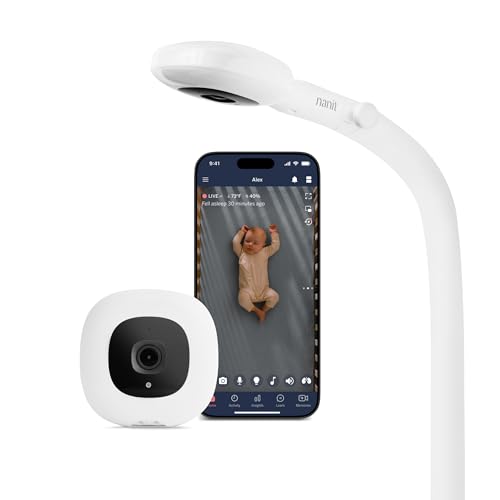
Choose it when Step 1 said online, Step 4 ranked interpretation highly, and Step 3 confirmed strong nursery Wi-Fi. Its overhead crib view and benchmark app make it the connected default. Check price on Amazon.

VTech VM901 — The Hybrid Champion
Choose it when Step 2 listed caregivers who need a screen, or Step 1 ended in a household compromise. The parent unit covers home; the app covers away. Check price on Amazon.

Infant Optics DXR-8 Pro — The Closed Champion
Choose it when Step 1 said offline and meant it. No account, no subscription, no remote view — and, for its households, no regrets. Check price on Amazon.
TP-Link Tapo C210 — The Value Champion
Choose it when Step 5’s ledger ruled, or for the second room any architecture leaves over. The essentials, honestly delivered, at an entry-level tier. Check price on Amazon. Households already in Owlet’s ecosystem should substitute the Owlet Cam as their app-based champion; the reasoning is laid out in baby security camera reviews.
Choosing for Special Situations
Twins and Two Under Two
Multiples compress every timeline: the two-camera question arrives on day one. Work the steps with the multiplier applied. Step 1’s architecture matters doubly, because a per-camera subscription is now a per-twins subscription. Step 2’s caregiver list usually grows — help is coming, and it needs access that is easy to grant. Step 3’s audit covers two sleep spaces, which may be one room with two cribs (one wide or overhead camera can serve both) or two rooms (a genuine two-camera system, where the parent-unit models’ multi-camera pairing and the apps’ multi-camera views become deciding features). The households that cope best chose for two at the start; the ones that bought a single-camera dead end and rebought at month two are this guide’s cautionary tale.
Renting and Moving
If the walls are not yours, mounting becomes a negotiation with a deposit. Favour the designs that need no holes: floor stands that arc over the crib, cameras that sit securely on a high shelf or dresser with the right view, and parent-unit systems that are indifferent to installation altogether. Check the view honestly from the no-drill position before committing — a shelf view at a slight angle serves most nurseries well, and the perfect overhead geometry is not worth a landlord dispute. Renters who expect to move within the camera’s life should also weight portability: the system that re-installs in an afternoon, in a new room’s geometry, without new hardware.
The Household That Travels
Frequent travel splits the purchase in two, and pretending otherwise produces one compromised camera instead of two good ones. At home, choose by the steps as written. For the road, the winners are the zero-setup designs: a closed parent-unit system that works the moment it is plugged in, in any house, on any network or none. App cameras can travel, but hotel sign-in networks defeat them and re-pairing rituals accumulate resentment. Many travelling families also discover the travel unit becomes the grandparents’-house unit, living there permanently — which is Step 2 thinking applied across two postcodes.
Older Siblings in the Frame
Where the nursery camera will also see an older child — shared rooms, a toddler who visits the baby, a playroom second act — add two considerations to the steps. The first is the privacy conversation, held early and openly: the camera is a known household object with a known job, and its role shrinks as children grow. The second is durability of the arrangement: a camera a climbing four-year-old can reach is a camera that will be reached, so mounting height and cord discipline get a second, harder look. Households that treat the camera as family infrastructure, discussed like any other household rule, report none of the unease that surprises families who installed it as a secret.
The Questions Behind the Steps
Three questions generate most of the anxious midnight searching in this category, and each deserves a direct answer inside the choosing process. The first is whether a connected camera can be trusted in a child’s room. The complete answer is layered: the reputable makers secure their services seriously, your own hygiene — unique password, two-factor authentication, current firmware, named-account sharing — controls most of the practical risk, and the residual risk is real but small. Households differ in whether “small” is acceptable for this particular room, and the closed architecture exists so that the difference costs nobody their principles. Choose the layer you can stop thinking about; a camera you distrust will be checked on for the wrong reasons.
The second question is whether the smart features are intelligence or marketing. The honest answer is: unevenly both, and the choosing process should price them as unproven until your own trial proves them. Cry detection that works in your nursery, with your sound machine and your baby’s particular cry, is worth money. The same feature misfiring nightly is worth less than nothing, because it taxes the alert trust the whole system runs on. This is the deepest reason Step 8 exists: the trial is not a formality, it is the only review of the smart features that will ever be conducted in your conditions.
The third question is whether a door or hallway camera could do the nursery’s job — usually asked by households that already own security cameras. It cannot, and the reason is specialisation: a nursery camera is positioned for the crib, tuned for a baby’s sounds, and designed around alerts a parent acts on at night, while the home’s other cameras watch thresholds and driveways. The division of labour between the two is explored in security camera vs video doorbell, and the general indoor cameras that can moonlight in a nursery are surveyed in the best indoor security cameras for phones. Owning door cameras is a reason to understand the nursery camera’s distinct job, not a substitute for it.
A One-Evening Decision Worksheet
If the steps feel abstract, run them as a worksheet tonight. Line one: online, offline, or hybrid — decided, with the reason in five words. Line two: the watchers, named, with the device each will use. Line three: the nursery’s Wi-Fi verdict — strong, weak, or irrelevant because the architecture is closed. Line four: the feature ranking, four items, in order. Line five: the three-year ledger for the champion of your architecture, plan included. Line six: the mount the room requires and the cord route, sketched in words. Line seven: the retailer and the returns window’s last day, circled. A worksheet with seven honest lines has never produced a bad purchase in this category; the bad purchases all share the same biography — a model chosen from a photograph, an architecture discovered afterwards, and a household that never got its seven lines.
Common Mistakes
The category’s mistakes are so consistent they can be listed like symptoms. Buying the model before the architecture, so the household’s real disagreement — online or not — gets fought through a product instead of decided. Optimising for the newborn fortnight, when any feed feels miraculous, instead of the two years that follow. Comparing stickers while subscriptions go uncounted. Falling for resolution numbers while the night picture — the actual product — goes unexamined. Forgetting the caregivers, and building a system only its purchaser can operate. Mounting for the prettiest angle instead of the safest geometry, with a cord run where a standing toddler will eventually reach. And the quietest mistake: expecting the camera to keep the baby safe, when its job is only to keep the parents informed — safe sleep does the keeping, and confusing the two jobs helps neither.
Two further mistakes deserve naming because they arrive dressed as diligence. The first is research without a terminus: weeks of comparison that end, exhausted, in whichever model was open in the last tab. The steps exist to terminate the research — when the worksheet is filled, the choosing is done, and additional input can only blur it. The second is buying for the imagined household instead of the real one: the camera for the parents you intend to be — serene, data-driven, unbothered by feeds — rather than the parents you are at 3 a.m. Choose for the real household. It is the one that will be using the camera.
Pro Tips
Decide the viewing screen as part of the purchase: a retired phone or a counter tablet transforms app-based monitoring from a phone tax into household infrastructure. Name the camera by room or child from day one; at 3 a.m. in a two-camera house, names are a feature. Buy the mount your room needs in the same order as the camera, so installation day is not postponed by a second delivery. Keep the box and receipt until the first-week trial ends. If two finalists remain truly tied, choose the one whose failure mode you prefer — every system fails somehow, and living with a failure you chose beats resenting one you did not. Finally, schedule the six-month revisit when you install: alerts to re-tune, access to review, a child whose reach has changed. Choosing well is an event; keeping the choice good is a habit.
One more tip, from the households who report the highest satisfaction in this category: involve the other parent in the steps, physically, worksheet in hand. A camera chosen by one parent and merely received by the other carries a permanent asterisk — every frustration with it reopens the choosing. A camera chosen by the sequence, together, is household infrastructure from day one, defended by both and blamed by neither. The steps take an evening. The goodwill lasts the camera’s whole service life, which, if you have chosen well, is years.
Worked Examples
The first baby, two phone-native parents, strong Wi-Fi, a grandparent abroad. Step 1: online, gladly — the grandparent’s video check-ins are half the point. Step 2: two app accounts plus a guest account overseas. Step 4 ranks the night picture and the interpreted night at the top. The steps walk straight to the Nanit Pro, with the plan budgeted at Step 5 and a retired phone assigned as the kitchen screen. Verdict: the connected champion, chosen in the right order.
The second baby, a sceptical parent, grandparents on Thursdays. Step 1 splits the household — one parent wants the app, the other distrusts the cloud. Step 2 settles it: the Thursday grandparent needs a screen she can simply pick up. The hybrid is not a compromise here but the correct answer, and the VTech VM901’s parent unit becomes the household screen while the app serves the parent who wanted it. The toddler’s existing camera stays in his room; the new camera joins the nursery. Verdict: architecture chosen by the caregiver list, exactly as Step 2 intends.
The small flat, the tight budget, the playroom problem. Step 3’s audit is decisive: the nursery is twelve steps from the sofa, so remote viewing adds little, and the real need is a camera that can watch a napping baby now and a playroom next year. Step 5’s ledger rules out subscriptions entirely. The Tapo C210 covers the nap checks at an entry-level tier and graduates to the playroom on schedule. Verdict: the value champion, because the home’s geometry shrank the premium features’ worth to nearly nothing — a conclusion only the audit could have reached.
Read the three examples again and notice what they share: in none of them did the winning model win on a feature. The Nanit won on a household’s appetite for information and a grandparent’s timezone. The VTech won on a Thursday. The Tapo won on twelve steps of hallway. That is the whole argument of this guide in miniature — the model is the last thing chosen, and the households that choose it last are the ones still happy with it when the baby it watches is asking for a bedtime story.
How the Right Choice Ages
A well-chosen camera passes through three ages, and the steps above quietly optimise for all of them. In the first age — the newborn months — the system is an alerting machine above all: feeds are frequent, sleep is fragmented, and the winning qualities are trustworthy alerts and audio that reaches a locked phone. Households that chose by Step 4’s honest ranking feel this age go smoothly; households that chose by headline features discover which ones were theatre. In the second age — the long middle of the first two years — the system becomes a checking machine: the silent glance that protects everyone’s sleep, the temperature readout, the sitter handovers. Friction is the enemy now, and the viewing experience chosen at Step 2 pays its dividend nightly. In the third age — the toddler years — the system becomes a room camera: mobility defeats fixed frames, two-way talk becomes conversation, and the privacy conversation comes due as the child becomes a person with a room of their own. The households that thrive in the third age are the ones that revisit the installation — position, cords, access, even the camera’s continued presence — as deliberately as they made it. Choosing, in other words, is not finished at checkout. It is finished, briefly, at each stage, by the same sequence of honest questions this guide opened with.
There is a reassurance buried in that observation, and it is worth surfacing as this guide closes its argument: because the choice is revisited at each age, no single decision carries the whole weight. The architecture decision is the only one that is expensive to reverse, which is why it sits at Step 1 with the most ceremony. Everything downstream — the model within the architecture, the mount, the alert tuning, even the camera’s room — can be adjusted as the household learns itself. Choose the architecture with both eyes open, choose the rest with a light grip, and the sequence will carry you. That is all choosing well has ever meant in this category.
The Fit Check Behind the Choice: Auditing Your Space for a Baby security camera
Guides usually stop at the happy path, the day everything pairs, fits or works first time. This section covers the rest of the ownership curve with a baby security camera: the judgement calls, the awkward cases and the fixes that experienced owners reach for. Keep it bookmarked for the second month rather than the first day; that is when these details start to matter.
Judge a baby camera first by the reliability of its connection in the room where it will live, then by image clarity in low light, since most checking-in happens in a darkened nursery. Sound behaviour matters too: how the monitor handles background noise and how quickly it wakes when the baby stirs. Walk the nursery and pick the mounting point before buying: the camera needs a view of the whole crib, a safe cable route well out of reach, and a signal path to the parent unit or router that does not cross the whole house. Check viewing angle against the crib position you actually use, not the one in the brochure.
For night checks, a monitor that wakes instantly and shows a clear low-light picture saves you opening the nursery door and risking a full wake-up. For a toddler room, a wider view and a talk-back feature earn their keep as the child moves from crib to bed. For travel to family homes, a camera that sets up without tools and joins a guest network easily is worth more than extra features. The common thread is that most problems with a baby security camera are placement, settings or expectation problems wearing a fault’s clothing. Work through the checks in order before concluding that anything is broken or badly made.
Apply all of this to the listings in front of you. When a listing such as the Nanit Pro, VTech VM901 and Infant Optics DXR-8 Pro catches your eye, resist judging it by its headline claim and instead run the checks above against it: does its stated role match the room you measured, does its control path suit your household, and does the maker’s own guidance support the job you have in mind. A model that answers those questions cleanly on paper usually answers them cleanly in the home, and one that dodges them in the listing will dodge them on your wall, shelf or desk as well.
Thick walls, metal doors and a router at the far end of the house are the classic recipe for dropouts, whatever the range claim says. A camera placed for a newborn’s crib may frame a standing toddler badly, so plan a second mounting position from the start. If the picture freezes at night, test the camera closer to the router for one night to separate a signal problem from a faulty unit. Audio lag or echo usually comes from the monitor and camera being in earshot of each other; distance and lower volume fix most cases.
- Start with placement and settings before assuming a fault.
- Change one thing at a time so you know what fixed it.
- Keep a short written note of the working configuration.
- Re-run the basic test after any furniture, network or season change.
- Check the maker’s manual for your exact model before forcing anything.
- Stop and reassess if a fix makes a safety-related behaviour worse.
If the app shows the camera offline while the local monitor works, the home network, not the camera, is the weak link. Wipe the lens with a soft dry cloth, keep firmware updated through the maker’s app, use a strong unique password for any account-based camera, and re-check the mount’s tightness whenever the crib position changes.
Keep a short note of what worked, which setting, which position, which order of steps. The next time the baby security camera misbehaves, and most do eventually, that note turns an afternoon of guessing into ten minutes of fixing.
It also helps to think in seasons rather than in days. A baby security camera that seems ideal in the week it arrives may face different light, different temperatures, different routines and different demands a few months later, and the models that age well are the ones chosen with that longer view in mind.
Keep the household in the loop as you decide. The person who did not choose the baby security camera is usually the person who discovers its most annoying habit first, and a two-minute conversation before buying can surface the objection that saves a return.
Documentation is an underrated feature of ownership. Keep the manual, the receipt and a note of your settings together, because the day something needs adjusting is never the day you want to reconstruct how it was set up.
When two models seem equal, prefer the one whose maker publishes clearer guidance, steadier updates and easier access to spares or support. That difference is invisible in a feature table and decisive in the third year of ownership.
Finally, resist upgrading the whole room around a single purchase. Live with the baby security camera as it is for a few weeks, learn what it actually changed, and only then decide what else, if anything, the room still needs.
Frequently Asked Questions
What is the single most important decision when choosing a baby camera?
The architecture: whether the camera connects to the internet and an app, pairs with a dedicated parent unit, does both, or stays entirely offline. That decision determines your privacy exposure, your ongoing costs, how the system fails, and who can use it — everything else is refinement. Decide it first, with your household’s real values on the table, and the model shortlist shrinks to one or two obvious champions.
How much should I expect to spend?
Think in tiers and ledgers rather than figures, because prices move. An entry-level general camera covers the essentials; mid-tier buys the closed and hybrid systems outright; the premium connected flagships cost the most and add a subscription for their deepest features. The right question is not the sticker but the three-year ledger for your shortlist — camera, mount, plan, second camera — compared honestly. Many households find the mid-tier buy-once systems are the sweet spot of their ledger.
Is a Wi-Fi baby camera safe from hacking?
With proper hygiene, the practical risk is low: a unique strong password, two-factor authentication, current firmware, and access granted only to named accounts. It is not zero, because a connected camera is reachable in ways a closed system is not — the feed exists in an account and a cloud. Parents who find any nonzero exposure unacceptable for a nursery have a coherent position, and the closed Infant Optics DXR-8 Pro exists for them. Choose consciously rather than by default.
Do I need a camera with sleep tracking?
Need is too strong a word for any feature in this category, but sleep tracking is the premium feature with the clearest real use: it turns arguments about bedtime and night wakings into shared information, and it shows whether routine changes are working. Read it as consumer information about patterns, never as health monitoring — it is not a medical feature and the camera is not a medical device. If your household will act on patterns, it earns its plan; if not, it is decoration.
Can I just use a regular security camera?
Yes — the Tapo C210 in this guide is exactly that, and it covers live view, night vision, alerts, and local recording. What you give up is nursery tuning: cry-aware alerts, a prominent temperature readout, crib-designed mounting, and an app organised around a baby. For a primary nursery, many parents prefer the dedicated tool; for second rooms and tight budgets, the general camera is a rational, popular choice. The wider category context is in baby security camera buying guide.
When is the best time to buy and set up?
Before the baby arrives, if life permits — installation involves ladders, drills, and app accounts, none of which pair well with a newborn’s first week. Set it up, run the shakedown tests, tune the alerts, and let the system be boring infrastructure by the time it is needed. If the baby is already here, choose a calm morning, follow the same sequence, and use the first-week trial discipline anyway. The steps in this guide compress well; what they cannot survive is being skipped.
Related Reading
With a model chosen, the natural next step is baby security camera pros and cons for the honest ledger of the whole category, and is a baby security camera worth it if the value question is still open.