Disclosure: As an Amazon Associate, reviewstook.com earns from qualifying purchases. Links on this page are affiliate links; they cost you nothing extra. Prices and availability change often, so check the current Amazon listing before you buy.
Parents searching for baby security camera reviews usually want one thing: the leading models assessed side by side, in the same terms, so a decision falls out of the comparison naturally. That is what these baby security camera reviews deliver. Five cameras that represent every serious approach to watching a nursery — the premium app-based flagship, the ecosystem camera, the hybrid with a parent unit, the closed non-Wi-Fi system, and the budget general camera — each evaluated on the same ground: the crib view, the night picture, the alerts, the app or screen, the ongoing costs, and the households each one truly suits.
Before the assessments begin, the standing caution for this entire category. Every camera reviewed here is a monitoring convenience. None is a safety or medical device; none prevents SIDS or any other harm; none replaces safe sleep — baby on their back, bare crib, firm flat mattress. Where a model offers sleep analytics or pairs with wearable products, those features are consumer information, and this roundup judges them as such.
Key Takeaways
- There is no single best baby camera — there are four architectures, and each model here leads one of them, so the household’s needs, not a league table, should make the final call every time.
- The Nanit Pro is the strongest all-round app experience available today; the Owlet Cam suits households already in Owlet’s app.
- The VTech VM901 is the most forgiving household choice thanks to its parent unit; the Infant Optics DXR-8 Pro is the privacy and simplicity champion, and the gap between those two philosophies is the widest in the roundup.
- The TP-Link Tapo C210 covers the essentials for an entry-level outlay and makes an excellent second-room camera, a travel spare, or a first camera for a household still deciding how much monitoring it actually wants.
- Ongoing cost divides the field: subscription-supported ecosystems versus buy-once systems. Decide which you accept before choosing a model, because switching architectures later means buying twice.
In this guide
How These Reviews Were Assessed
Each model was judged on the work a nursery camera actually does. First, the view: can you see the whole crib, read your baby’s position, and do it in the dark as confidently as in daylight? Second, the alerts: do they arrive promptly, distinguish a cry from the household’s background noise, and stay trustworthy across weeks rather than training you to mute them? Third, the viewing experience: the app or parent unit you will touch dozens of times a day, in the dark, one-handed. Fourth, the ownership ledger: subscriptions, second-camera costs, mounts, and the small frictions that compound over years. Fifth, fit: which households each design serves and which it quietly fails. Star ratings and review counts are excluded by policy — they fluctuate and date instantly — and prices are left to the listings for the same reason; tiers are described in words instead.
One structural note. This roundup is the companion to our single-product deep dive: where that article takes one camera apart bolt by bolt, this one holds all five to the same light. Readers who already know their architecture can jump straight to its champion; readers still deciding should start with the category shape in baby security camera buying guide and return here for the model verdicts.
A second note concerns what a review can and cannot promise. A roundup can rank a camera’s view, weigh its alerts, and price its ownership honestly; it cannot know your nursery’s Wi-Fi dead zones, your baby’s particular response to a voice from the wall, or your household’s true feelings about a cloud account — and those three unknowns decide more purchases than any criterion in print. That is why every verdict in this article is written as a household match rather than a league table, and why the first-week shakedown recommended later matters more than any paragraph here. Read these reviews as a shortlist with reasoning attached, then let your own house cast the deciding vote while the returns window is open.
Baby Security Camera Reviews: The Five Models in Full

Nanit Pro — The App-Based Benchmark
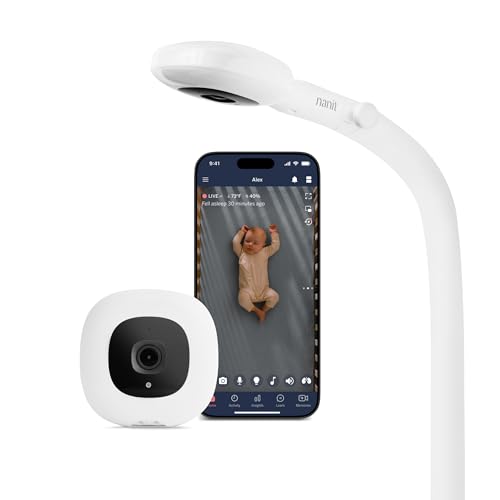
Design and setup. The Nanit Pro is built around an overhead view of the crib, delivered by its floor stand or wall mount, and the advantage is immediate and permanent: the whole mattress, evenly lit at night, with no corner hidden behind a rail. Build quality is the finest in this roundup, setup is guided and calm, and the cable routing is designed to keep everything well away from the crib. There is no screen in the box; your phone is the monitor.
Performance. The night picture leads the field for clarity and evenness, alerts are prompt and intelligently restrained, background audio works exactly as it should with a locked phone, and the app is the benchmark against which the others feel a generation behind. The sleep insights — on the subscription plan after the included period — turn each night into a readable summary that genuinely helps parents shape routines, provided they are read as consumer information rather than health data.
The ownership texture. Living with the Nanit is living with an app, and the app respects you: checks take seconds, the night reads itself back to you in the morning, and the system’s intelligence is spent on keeping notifications rare and meaningful. The tax is vigilance about the unglamorous layer — the nursery’s Wi-Fi strength, the account’s password hygiene, the plan’s renewal — and a low-level awareness that the nursery’s window runs through a company’s servers. Owners who accept that tax describe the product in the language of relief; owners who resent it describe the same product as a subscription with a camera attached. Both are reviewing their own household as much as the hardware, which is the deepest truth in this roundup.
Strengths: best crib view in the roundup; best app; insights that inform real decisions; excellent alert tuning. Trade-offs: premium tier; the plan behind the headline features; total dependence on Wi-Fi and phone; cloud storage of nursery footage. Best for: first-time parents wanting the richest connected nursery. Not suited for: privacy-first or subscription-averse households. Check price on Amazon. Our full-length examination is the companion baby security camera review.
Owlet Cam — The Ecosystem Choice
Design and setup. The Owlet Cam is a compact app-based camera designed to sit or mount near the crib with a clear view in, finished discreetly and set up through Owlet’s app in the familiar modern sequence. Its design story is less about the hardware — competent, neat, unremarkable — than about the dashboard it joins: for households using Owlet’s other nursery products, the camera completes a single-app picture of the nursery.
Performance. Video is clear day and night, two-way talk works well, background audio is properly supported, and temperature sensing is built in and presented sensibly. Alerts are reliable, if less distinctively tuned than the Nanit’s. The app experience is good rather than category-leading, and the camera does not attempt the depth of sleep analysis its chief rival offers; its value concentrates in ecosystem coherence.
The ownership texture. The Owlet Cam asks the least imagination of any model here: it behaves like the camera half of a nursery system, quietly competent, and its app will already be familiar to its target household. Its night picture and alerts handle the core job without drama, and the temperature readout is the kind of small, daily usefulness that outlasts headline features. The honest limitation is distinctiveness — judged purely as a camera against the Nanit, it is second; judged as the completing piece of an Owlet nursery, it has no rival at all. Buyers should therefore decide which judging they are doing before they read another word of any review, including this one.
Strengths: one app for the whole Owlet nursery; solid all-round camera performance; clean design; good audio features. Trade-offs: fewer distinctive features standing alone; same cloud and network dependence as any app camera; ecosystem value only materialises if you own or want the other products. Best for: families already using Owlet products. Not suited for: buyers comparing cameras purely on camera merits, who will find the Nanit deeper. Check price on Amazon.

VTech VM901 — The Hybrid That Hedges Every Bet
Design and setup. The VM901 pairs a Wi-Fi camera with a dedicated parent unit, and the physical design serves both halves: the camera pans, tilts, and zooms under control of the handset or the app, and the parent unit is a chunky, honest screen with real buttons and a battery sized for an evening’s roaming. Setup is the longest in this roundup — two systems to pair — but VTech’s long history in baby monitors shows in instructions that assume a tired beginner.
Performance. In-home viewing on the parent unit is instant, dependable, and immune to internet outages, which is the VM901’s trump card; the app covers the away-from-home case adequately. Picture quality is strong in both modes, night vision is clear across the crib, sound quality is a genuine strength, and the built-in temperature sensor keeps the room’s climate on the screen where it belongs. The app is functional rather than delightful, and there is no sleep-analytics layer.
The ownership texture. The VM901’s daily gift is the absence of a decision: the parent unit is on, it is charged, it shows the crib — no phone to find, unlock, and navigate, no app update pending at the worst moment. Households feel this most at the extremes of the day, the first groggy check and the last. The camera’s pan and tilt earn their keep at the toddler stage, following a small person who no longer respects a fixed frame, and the two-way talk through either the unit or the app covers both the home and away cases. If this roundup has a consensus recommendation for the widest range of households, it is this one — not because it leads any single category, but because it refuses to fail any of them.
Strengths: works when the internet does not; a screen anyone can use; pan and tilt flexibility; strong audio pedigree. Trade-offs: two-part setup and hardware; app polish a step behind the leaders; mid-to-premium tier for the combined system. Best for: households sharing monitoring among parents, grandparents, and sitters. Not suited for: minimalists, or parents who want sleep insights. Check price on Amazon.

Infant Optics DXR-8 Pro — The Private, Simple Classic
Design and setup. The DXR-8 Pro is the roundup’s deliberate anachronism: no Wi-Fi, no app, no account — a camera and a parent unit talking directly. Its signature hardware idea is interchangeable lenses, letting you fit the view to the room instead of leaning on digital zoom. Setup is the fastest here by a wide margin: position, plug in, switch on, done. The parent unit’s screen and battery are built for all-evening carry.
Performance. Within the home, performance is defined by dependability: the feed is simply there, instantly, every time, unaffected by routers, broadband, or anyone’s servers. Picture and sound quality are good rather than spectacular, alerts are the honest basics of sound and movement on the unit, and there are no smart features, no recordings of the night, and no view from outside the house — absences its buyers count as the product working as intended.
The ownership texture. Owning the DXR-8 Pro is the closest this category comes to owning a lamp: it is installed, it works, and it requests nothing — no updates, no passwords, no renewals, no attention. The parent unit’s screen wakes instantly, the link holds through the house, and the interchangeable lenses quietly solve the wide-room and close-crib problems that other systems answer with digital zoom. What owners talk about, years in, is trust: the feed has never depended on anything outside the house, and so it has never been lost to anything outside the house. In a category racing toward the cloud, that stubbornness is not a missing feature list. It is the feature.
Strengths: complete privacy by architecture; zero subscriptions, forever; instant, outage-proof in-home viewing; the easiest handover to any caregiver. Trade-offs: no remote viewing; no smart alerts or sleep features; range limited to the home. Best for: privacy-first parents and anyone who wants the nursery off the internet. Not suited for: parents who need to check in from work or travel. Check price on Amazon. The values behind this choice are weighed in baby security camera pros and cons.
TP-Link Tapo C210 — The Budget All-Rounder
Design and setup. The Tapo C210 is a general indoor pan-and-tilt camera from TP-Link’s smart-home line, adopted by parents in large numbers as a nursery camera. It is compact, mounts or shelves easily, and sets up through the Tapo app in minutes. Nothing about it is nursery-specific, which is both its limitation and the source of its price.
Performance. The essentials are all present and competent: a clear picture with motorised pan and tilt that can sweep a toddler room, effective night vision, motion and sound alerts, two-way talk, and local recording to a memory card that keeps footage in your house and the core features free of any subscription. What is missing is nursery tuning — no cry-specific detection, no temperature readout presented as a nursery feature, an app organised around a smart home rather than a baby.
The ownership texture. The Tapo’s ownership story is flexibility. It sets up in minutes, its app — shared with the household’s other smart devices — is competent and improving, and its local recording means the nursery’s footage never leaves the house unless you send it. Parents who start here often report a characteristic arc: delight at how much the entry tier covers, a growing wish-list of nursery refinements by month three, and a final settlement in which the Tapo either graduates to the playroom when a dedicated monitor takes the nursery, or simply stays, its refinements unmissed. Both endings are successes. The failure mode is only the mismatch — expecting a nursery instrument and receiving a very good general camera.
Strengths: entry-level tier with the full essential feature set; local recording; flexible pan and tilt; a second career anywhere in the home. Trade-offs: generic alerts; no baby-specific features or crib-designed mounting; app experience built for a different job. Best for: tight budgets, second rooms, and playrooms. Not suited for: parents who want the primary nursery to have baby-tuned intelligence. Check price on Amazon. Its sibling, the Tapo C120, is a fixed-view alternative in the same spirit, and the wider family is surveyed among the best indoor security cameras for phones.
Head-to-Head: The Comparisons That Decide Most Purchases
Nanit Pro vs Owlet Cam
This is the connected flagship fight, and it resolves on a single question: are you buying a camera or an ecosystem? As cameras, the Nanit leads — the overhead mounting produces a categorically better crib view, the app is more accomplished, and the sleep insights have no Owlet equivalent. The Owlet Cam’s counter is coherence: in a nursery already running Owlet’s other products, one app and one account govern everything, and the camera itself is thoroughly competent. Verdict: camera-first buyers, Nanit; ecosystem households, Owlet — and neither group should feel it settled for anything.
VTech VM901 vs Infant Optics DXR-8 Pro
The screen-based fight, and the friendliest one, because the products agree about the main thing — a dedicated viewer that works without the internet — and disagree only about the extras. The VTech adds Wi-Fi app access, pan and tilt, and a richer feature set; the Infant Optics subtracts everything digital and gains simplicity, privacy, and the interchangeable-lens flexibility. Verdict: households that also want phone access from outside the home, VTech; households for whom the nursery’s disconnection is the entire point, Infant Optics.
Tapo C210 vs Everyone
The budget camera’s fight is against the whole field at once, and it wins more of it than its tier suggests. On the core job — see the crib, hear the cry, get the alert, record the night — the Tapo delivers perhaps four-fifths of the dedicated monitors’ experience. The missing fifth is refinement: baby-tuned alerts, nursery context, designed mounting, interpreted nights. Verdict: as a household’s only nursery camera on a strict budget, or as any household’s second camera, the Tapo is the rational buy; as the primary tool of an information-hungry parent, the missing fifth is exactly what they were shopping for.
Long-Term Ownership: How the Five Age
A nursery’s camera is a multi-year appliance, and the five age differently. The app-based pair age by software: their apps improve, their features evolve, and their dependence on their makers’ continued support is the long-term risk to weigh — a risk the established brands mitigate but cannot erase. The Nanit’s mounting investment also ages well, since the overhead position suits the toddler bed that follows the crib. The VTech ages by battery: the parent unit’s cell will fade across years of nightly charging, the common and manageable wear item of its class. The Infant Optics ages least of all — with no software to orphan and no account to retire, a DXR-8 Pro handed to a sibling family works exactly as it did new, which is part of its cult following. The Tapo ages by redeployment: when its nursery tour ends, it becomes a playroom, pet, or front-room camera inside the same app, which stretches its value across the house. None of the five is a disposable purchase, and all five outlast the crib — plan the second act at purchase time and the economics of every tier improve.
The Five, Side by Side
| Model | Architecture | Viewing | Standout strength | Watch out for | Tier |
|---|---|---|---|---|---|
| Nanit Pro | App-based Wi-Fi | Phone app | Overhead view + sleep insights | Subscription for insights | Premium |
| Owlet Cam | App-based Wi-Fi | Phone app | Owlet ecosystem in one app | Fewer solo distinctions | Mid to premium |
| VTech VM901 | Hybrid | Parent unit + app | Works without internet | Two-part setup | Mid to premium |
| Infant Optics DXR-8 Pro | Closed, non-Wi-Fi | Parent unit | Privacy and simplicity | No remote viewing | Mid |
| TP-Link Tapo C210 | General smart camera | Phone app | Essentials at entry tier | Generic, not baby-tuned | Entry |
Read the table by columns and the roundup’s logic shows itself. Architecture decides viewing, viewing decides daily life, and the “watch out for” column is never a defect — it is the price of the strength in the column before it. Every model here is the right answer to a different household’s question, which is why the verdict section below is organised by buyer rather than by rank.
Who Should Buy Which
The information-maximising first-timer should buy the Nanit Pro and budget the plan into the purchase, because the insights and the app are the experience and both are fully delivered here. The Owlet household — already using that app for other nursery products — should buy the Owlet Cam and enjoy the single dashboard; buying against your own ecosystem to win a feature comparison is a false economy. The shared-care household, where grandparents and sitters take real shifts, should buy the VTech VM901, because the parent unit is the kindest interface ever given to a caregiver and it keeps working when the internet does not. The privacy-first household should buy the Infant Optics DXR-8 Pro without a backward glance at the features it lacks, since what it lacks is precisely what that household does not want. The budget-led or second-room buyer should buy the Tapo C210 and spend the savings elsewhere in the nursery, accepting generic alerts as the known price of an entry-level tier. And the undecided household should not buy yet — it should decide its architecture first, using how to choose a baby security camera, because every regret in this category is an architecture regret wearing a model’s name.
Two more profiles round out the field. The renting household, which cannot drill into walls and may move within the camera’s service life, should weight the Nanit’s floor stand, the shelf-friendly Tapo, and the parent-unit systems’ total indifference to installation — and should treat any wall-mount-first design as a deposit risk rather than a feature. The frequently travelling household should think in pairs: a rich home system for the ninety percent of life that happens at home, and a simple closed or parent-unit monitor that travels with zero setup, because the camera that needs a network ritual in every new location will eventually be left in the suitcase. Both profiles illustrate the roundup’s method one last time: the household is the specification, and the model is merely its answer.
Setup and Care Notes That Apply to All Five
Whichever model you choose, the same disciplines decide whether it serves you well. Place for the whole crib and test the view before fixing anything permanently. Keep the camera and every cord completely out of the baby’s reach — cords near a crib are a strangulation hazard, and at least three feet from the crib is the standard guidance — with slack secured along the wall; the full method is in how to install baby security camera. On connected models, use a unique password, enable two-factor authentication, keep firmware current, and grant viewing access to named accounts only. Tune alert sensitivity in the evening, in the real room, with the white-noise machine running. Reboot your router once during the first week and watch your chosen system recover — or fail to — while the returns window is still open. Wipe lenses monthly, re-check mounts and cord routes whenever the room changes, and re-run the placement check at the crib-to-bed transition, when reach expands overnight.
One care habit deserves its own sentence because every model in this roundup depends on it: name things clearly. Name the camera by room or by child in the app, name the parent unit’s camera channels the same way, and keep the names consistent across every device a caregiver might pick up. At 3 a.m., in a two-camera house, “Nursery” and “Toddler Room” are safety equipment; “Camera 1” and “Camera 2” are a riddle. The thirty seconds the naming takes is the cheapest reliability upgrade in this entire article, and it is available on all five models equally.
The Criteria in Depth: What Actually Separated These Five
Roundups live or die on whether their criteria match the reader’s life, so here is the fuller account of how the five separated — criterion by criterion, with the reasoning exposed.
The crib view. The single most consequential difference in this roundup is geometric. The Nanit’s overhead position shows the entire sleep surface undistorted, which makes position checks instant and unambiguous; every other model views at an angle or from a shelf, which is good enough for almost every question and noticeably worse for the far-corner ones. Pan-and-tilt, on the VTech and the Tapo, answers a different problem — the mobile toddler — and for the crib months it mostly helps at setup. If your nursery’s question is “show me the whole crib, perfectly,” the Nanit wins this criterion outright, and for some households that settles the purchase.
The night picture. All five see in the dark; they differ in evenness and in how the image serves a decision. The Nanit’s overhead infrared lights the mattress most uniformly. The parent-unit models present a slightly softer picture on smaller screens, which matters less than it sounds — the questions at night are coarse ones, and coarse questions forgive resolution. The Tapo’s night vision is genuinely competent. No model here fails this criterion, which is worth saying plainly: the night picture is no longer a reason, by itself, to pay a premium.
Alerts and audio. Here the field spreads widest. The Nanit’s alerting is the most intelligent and the most restrained; the Owlet’s is capable and conventional; the Tapo’s is generic motion-and-sound that will need sensitivity tuning to stay trustworthy; the parent-unit systems alert by simply being on, a dumb reliability that many parents prefer to any algorithm. Background audio — the feature that makes phone-based monitoring livable — is properly implemented on both app flagships. Two-way talk is universal here and universally baby-dependent in its usefulness.
The daily interface. Dozens of micro-interactions a day compound into love or resentment. The Nanit’s app has the least friction; the parent units have none at all, being single-purpose; the Tapo’s app is a smart-home app doing a nursery job, with the small mismatches that implies; the Owlet’s sits between, polished within its ecosystem’s logic. This criterion is the strongest predictor of month-three satisfaction, and it is the one spec sheets cannot express — which is why this roundup weights it as heavily as the picture.
The ownership ledger. Counted across three years and one child, the closed system is bought once; the hybrid is bought once; the Tapo is bought once plus a memory card; the app flagships are bought and then subscribed, with the Nanit’s insights plan the significant recurring line. Counted across two children and a second room, the gaps widen in the same directions. No ledger here is unreasonable — but they are different shapes of spending, and households feel shapes, not totals: some would rather pay once and own a simpler thing, others would rather rent excellence by the month. Know which household you are.
Sequencing the Purchase: A Practical Order of Operations
These reviews will serve you best in a particular order. First, settle the architecture question — connected, hybrid, closed, or general — using the criteria above and your household’s honest answers about privacy, caregivers, and travel. Second, within the architecture, take its champion from this roundup as your default and try to talk yourself out of it; the champion survives in most households, and where it does not, the reason will name the correct alternative. Third, before checkout, run the unglamorous checks: Wi-Fi strength in the nursery for connected models, the current subscription terms in writing, the mounting plan against your actual crib and walls, and the returns window’s length. Fourth, in the first week, run the shakedown — dark room, sound machine, locked phone, router reboot — and let the results, not the marketing, confirm the purchase. Followed in that order, the decision these reviews support is rarely regretted, because each step removes the specific failure that produces regret in this category.
Second Children, Siblings and Hand-Me-Downs
Most of these cameras will serve more than one child, and the five handle the encore differently. The closed Infant Optics is the natural hand-me-down: no account to transfer, no subscription state, nothing to reset beyond pairing — it moves between children, rooms, and families like furniture. The hybrid VTech supports multi-camera households within its system, so a second room joins the same parent unit rather than starting a parallel setup; confirm the pairing count for your configuration before the second baby arrives, not during. The app flagships handle siblings gracefully in software — multiple cameras in one app, named by child — but the Nanit’s per-camera plan economics deserve a second look at that point, because the insights that were a fair price for one nursery are a decision again for two. The Tapo, characteristically, just multiplies: another inexpensive unit in the same app, its lack of per-camera fees quietly compounding its value case. Twins compress all of this into day one: one wide or overhead camera can cover two cribs in a single room, while twins in separate rooms are simply the two-camera case arriving early, with the same advice — decide the architecture for two before buying for one.
What These Reviews Deliberately Leave Out
Three exclusions deserve explanation, because readers will notice them. Prices are excluded because they move constantly and a printed figure would mislead within weeks; the tier language — entry, mid, premium — is the durable truth about where each model sits. Ratings and review counts are excluded for the same reason, and because a nursery’s safety-adjacent purchases deserve reasoning rather than crowd scores. And precise technical specifications are kept qualitative — described by what they let you do rather than by numbers — because the numbers in this category are measured inconsistently across brands and predict ownership satisfaction far worse than the criteria this roundup actually used. What is not excluded is judgement: every model here has been given a clear household to belong to and a clear household to avoid, which is the only summary a parent actually needs from a review.
Five Scenarios From the Nursery Floor
The 3 a.m. stir. A noise, a half-wake, a decision. The Nanit owner glances at the overhead view, sees a resettling baby, and is asleep again in a minute. The parent-unit owners do the same at their screens, a second slower and no worse for it. The Tapo owner opens a smart-home app and gets the same answer a few taps later. The scenario is a draw — deliberately. It is the category’s core job, and every model here does it; differentiation lives in the scenarios around it.
The evening at the neighbours’. Baby asleep at home with a sitter, parents two doors down. The app-based owners check in from the table, discreetly and completely. The VTech household relies on the sitter’s parent unit and a phone call if needed — adequate, and some parents prefer the enforced letting-go. The Infant Optics household has, by design, no window at all: the sitter is the monitor. Which of these evenings sounds like yours is a purchasing question in disguise.
The storm outage. Power flickers, broadband dies for two hours. The parent-unit systems never notice — the DXR-8 Pro literally cannot. The VTech’s screen carries on while its app waits for the internet. The app flagships go dark until the network returns, then reconnect themselves. Households in outage-prone areas weight this scenario heavily, and they should; households with rock-solid infrastructure may never meet it.
The growth spurt. The crib becomes a bed, the baby becomes a climber, the camera’s job quietly changes. Pan-and-tilt models — VTech, Tapo — track the new mobility best. The Nanit’s overhead view still owns the bed itself. The DXR-8 Pro’s lens swap reframes the room in a minute. Every household re-runs the placement and cord check at this transition, because reach has changed — the scenario’s real lesson is that the second installation matters as much as the first.
The second baby. Covered in its own section above, but worth restating as the scenario that punishes short-term buying: the household that chose an architecture with room to grow adds a camera; the household that did not starts over. All five models can grow in their own way — the differences are in cost shape and app coherence, which is why this roundup keeps returning to the ledger.
Final Verdict
Five models, four architectures, and no honest single winner — but clear champions per household. The Nanit Pro leads the connected field on the strength of its view, its app, and its insights. The Owlet Cam is the coherent choice inside its ecosystem. The VTech VM901 is the household-proof hybrid. The Infant Optics DXR-8 Pro remains the definitive answer for privacy and simplicity. The Tapo C210 proves how much of the core job an entry-level general camera can do. Choose by architecture, then by household, and any of the five will serve you well — as a window onto the crib, in support of the safe-sleep practice that does the real protecting. The value side of the decision, model by model, is examined in is a baby security camera worth it.
A last word on confidence. Parents reading five reviews are usually not really shopping for a camera; they are shopping for the feeling of having chosen well, on behalf of someone who cannot choose at all. That feeling is available from every model in this roundup, because each is a considered answer to a real version of the nursery problem — and it is unavailable from any of them if the choice is made against the household’s own grain. So make the choice the way this article is organised: architecture first, household second, model third, and the unglamorous checks before the money moves. Then install it carefully, tune it once, and let it fade into the background of a home whose real safety work — the bare crib, the back sleeping, the unglamorous nightly routine — was never the camera’s job in the first place.
The Long-Term Checks That Separate a Good Baby security camera From a Tiring One
A review that stops at the first week tells you how a baby security camera arrives, not how it lives. The checks below are the ones that separate a product that stays satisfying from one that slowly becomes a chore, and they are the checks worth repeating with any model you shortlist. Treat this as a verification routine: run it during the return window, while changing your mind is still free.
Judge a baby camera first by the reliability of its connection in the room where it will live, then by image clarity in low light, since most checking-in happens in a darkened nursery. Sound behaviour matters too: how the monitor handles background noise and how quickly it wakes when the baby stirs. Walk the nursery and pick the mounting point before buying: the camera needs a view of the whole crib, a safe cable route well out of reach, and a signal path to the parent unit or router that does not cross the whole house. Check viewing angle against the crib position you actually use, not the one in the brochure.
For night checks, a monitor that wakes instantly and shows a clear low-light picture saves you opening the nursery door and risking a full wake-up. For a toddler room, a wider view and a talk-back feature earn their keep as the child moves from crib to bed. For travel to family homes, a camera that sets up without tools and joins a guest network easily is worth more than extra features. Score each check honestly rather than generously. A baby security camera that passes nine and fails one has told you exactly what living with it will be like, and you can decide with open eyes whether that one failure touches your routine.
Apply all of this to the listings in front of you. When a listing such as the Nanit Pro, Owlet Cam and VTech VM901 catches your eye, resist judging it by its headline claim and instead run the checks above against it: does its stated role match the room you measured, does its control path suit your household, and does the maker’s own guidance support the job you have in mind. A model that answers those questions cleanly on paper usually answers them cleanly in the home, and one that dodges them in the listing will dodge them on your wall, shelf or desk as well.
Thick walls, metal doors and a router at the far end of the house are the classic recipe for dropouts, whatever the range claim says. A camera placed for a newborn’s crib may frame a standing toddler badly, so plan a second mounting position from the start. If the picture freezes at night, test the camera closer to the router for one night to separate a signal problem from a faulty unit. Audio lag or echo usually comes from the monitor and camera being in earshot of each other; distance and lower volume fix most cases.
- Run the placement check in the room where the product will actually live for your baby security camera.
- Test the failure mode: network down, power cut, battery flat for your baby security camera.
- Note the chore the product creates and time how long it really takes for your baby security camera.
- Repeat the key test at the hour of day you will use it most for your baby security camera.
- Write down the one behaviour you would change if you could for your baby security camera.
- Decide before the return window closes, not after it.
If the app shows the camera offline while the local monitor works, the home network, not the camera, is the weak link. Wipe the lens with a soft dry cloth, keep firmware updated through the maker’s app, use a strong unique password for any account-based camera, and re-check the mount’s tightness whenever the crib position changes.
If a model passes these checks in your home, keep the notes you made. They become your baseline for judging its replacement years from now, and they are worth more than any fresh round of research done from memory.
It also helps to think in seasons rather than in days. A baby security camera that seems ideal in the week it arrives may face different light, different temperatures, different routines and different demands a few months later, and the models that age well are the ones chosen with that longer view in mind.
Keep the household in the loop as you decide. The person who did not choose the baby security camera is usually the person who discovers its most annoying habit first, and a two-minute conversation before buying can surface the objection that saves a return.
Documentation is an underrated feature of ownership. Keep the manual, the receipt and a note of your settings together, because the day something needs adjusting is never the day you want to reconstruct how it was set up.
When two models seem equal, prefer the one whose maker publishes clearer guidance, steadier updates and easier access to spares or support. That difference is invisible in a feature table and decisive in the third year of ownership.
Finally, resist upgrading the whole room around a single purchase. Live with the baby security camera as it is for a few weeks, learn what it actually changed, and only then decide what else, if anything, the room still needs.
Frequently Asked Questions
Which baby camera is best overall?
For the connected, app-based experience most buyers are shopping for, the Nanit Pro is the strongest overall package: the best crib view, the best app, and sleep insights no rival here matches. But “overall” hides the real answer, which is architectural. The best camera for a privacy-first household is the Infant Optics DXR-8 Pro, and the best for a shared-care household is the VTech VM901. Match the model to the household and the superlative takes care of itself.
Are expensive baby cameras worth it over a budget smart camera?
They buy refinement, not basics. A Tapo C210 shows the crib, alerts you, and records locally; the premium models add the overhead view, nursery-tuned alerts, temperature in context, polished apps, and sleep interpretation. Whether that refinement is worth several times the outlay depends on how information-hungry the household is and how long the camera will serve. For a primary nursery used for years, many parents judge it worthwhile; for a second room, rarely.
Which camera is best if I do not want Wi-Fi in the nursery?
The Infant Optics DXR-8 Pro, clearly. It is designed from the ground up as a closed system: camera and parent unit communicate directly, nothing connects to the internet, there is no account or subscription, and setup takes minutes. You give up remote viewing and smart features entirely, which for this buyer is the point. The VTech VM901 is the middle path — its parent unit works without the internet even though the system also offers Wi-Fi app access.
Do any of these cameras work without a subscription?
Yes. The Infant Optics DXR-8 Pro has no subscription of any kind. The Tapo C210’s core features, including local recording to a memory card, work without one. The VTech VM901’s parent-unit monitoring is subscription-free. On the app-based flagships, live viewing is free, while the deeper layers — notably the Nanit’s sleep insights and extended history — sit behind a plan after an included period. Always confirm which features are gated before buying.
Can these cameras keep my baby safe?
No camera can, and any review implying otherwise should not be trusted. These are monitoring tools: they inform you, promptly and clearly, and that information helps you respond and rest. Protection comes from safe sleep — back sleeping, a bare crib, a firm flat mattress — and from supervision. Buy any model here for awareness and convenience, keep safe sleep as the foundation, and treat features like sleep analytics as routine information, never as health monitoring.
Which camera should grandparents use?
The one with a screen in the box. The VTech VM901 and Infant Optics DXR-8 Pro hand a grandparent a dedicated parent unit that simply works — no app, account, or password — which is why shared-care households gravitate to them. App-based cameras can grant grandparents their own accounts, and tech-comfortable grandparents manage happily, but the handover test is decisive: if the caregiver cannot be viewing confidently within a minute of picking the device up, choose the parent unit.
Related Reading
Round out the picture with the category’s other lenses: security camera vs video doorbell for how nursery cameras differ from the home’s other cameras.