Disclosure: As an Amazon Associate, reviewstook.com earns from qualifying purchases. Links on this page are affiliate links; they cost you nothing extra. Prices and availability change often, so check the current Amazon listing before you buy.
This baby security camera review takes the deepest available look at the product that defines the modern category: the Nanit Pro, the app-based Wi-Fi nursery camera against which rivals are measured. A baby security camera review has to answer more than whether the picture is sharp. It has to answer what the camera is like at 3 a.m. in month three — how it alerts, how it fails, how it fits a household’s real rhythms — and where its genuine limits lie. That is the review that follows: one product, examined thoroughly, with its competitors present for context rather than as co-stars.
The safety framing comes first, as it should in any nursery review. The Nanit Pro, like every camera in this category, is a monitoring convenience. It is not a safety device and not a medical device; it does not prevent SIDS or any other harm, and its sleep insights are consumer information, not health measurement. Safe sleep — back sleeping, a bare crib, a firm flat mattress — remains the thing that protects your baby. The camera’s job is awareness, and this review judges it on that job alone.
Key Takeaways
- The Nanit Pro is the most complete app-based nursery camera we have assessed: excellent night picture, thoughtful overhead mounting, and the deepest app in the category.
- Its sleep insights are the headline feature and they sit behind the subscription plan after the included period — budget for the plan as part of the product, not as an optional extra you will decide about later.
- It is entirely dependent on your Wi-Fi and your phone; households wanting a screen that works without either should look at hybrid or closed systems instead.
- Setup is genuinely well designed, with mounting that solves the crib-view problem better than shelf placement ever does, and instructions that assume a careful first-timer rather than an installer.
- Best suited to first-time parents who want maximum information from their nursery; not suited to privacy-first buyers, subscription refusers, or households whose nursery Wi-Fi cannot be made reliable.
The short verdict: if you want the richest, most polished nursery-camera experience available and you accept a cloud service as part of the furniture, the Nanit Pro is the one to beat. If any clause of that sentence bothers you, the alternatives in the comparison section are not consolation prizes — they are the right products for you, and this review will treat them with the same seriousness it gives the headline product throughout.

In this guide
What the Nanit Pro Is and Where It Fits
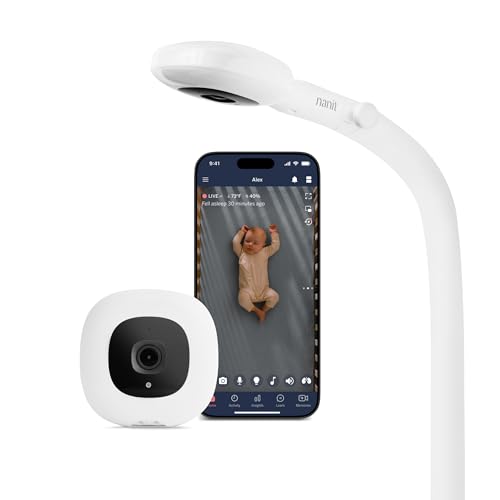
The Nanit Pro is a Wi-Fi nursery camera built around a single idea: the camera should look down into the crib from directly above, and the app should turn what it sees into understanding, not just video. The camera itself is a small, minimal unit designed to mount on Nanit’s floor stand or wall mount, positioning it over the crib with a complete, undistorted view of the sleep surface. There is no parent unit and no screen in the box. Your phone — or a tablet you dedicate to the purpose — is the monitor, and the Nanit app is where the product truly lives.
That positioning tells you exactly where it fits in the market. The nursery camera world divides into app-based systems like this one, hybrids with a parent unit such as the VTech VM901, closed non-Wi-Fi systems such as the Infant Optics DXR-8 Pro, and general smart cameras pressed into nursery service like the TP-Link Tapo C210. The Nanit sits at the premium end of the app-based family, priced and featured accordingly, and its natural buyer is the parent who wants the nursery to be one of the connected, data-rich parts of the home. Its natural non-buyer is equally clear, and this review will keep returning to that fork, because most dissatisfaction with this product is a fork taken wrongly rather than a product failing.
What the system offers, in outline: a clear high-definition picture day and night, two-way talk, background audio that continues while your phone does other things, nursery temperature and humidity sensing, sound and motion alerts, and — on the subscription plan — sleep tracking with nightly summaries and insights, plus extended video history. The camera also offers a night light and nature sounds in its ecosystem of features, and multi-user access so a partner or grandparent can view through their own account. The rest of this review takes those elements one at a time and asks the only question that matters: how well do they work in a real nursery, over real months?
Design, Build and Setup
The hardware design is restrained to the point of invisibility, which is correct for a nursery. The camera head is compact, finished in soft white, with no aggressive styling and nothing about it that invites a toddler’s attention. Build quality feels a clear step above the general smart cameras: seams are tight, the mount connections are positive and wobble-free, and the whole assembly has the finished quality of a product designed for one room and one job rather than adapted from a general platform.
The mounting system is the design decision that defines the product, and it deserves its reputation. Most nursery cameras sit on a shelf or dresser and view the crib at an angle, which distorts the sleep surface, hides the far corner behind the crib rail, and leaves parents perpetually unsure whether what they cannot see is fine. The Nanit’s overhead approach — via the floor stand that arcs over the crib or the wall mount that fixes above it — looks straight down at the whole mattress. Every corner is visible. The baby’s position reads instantly. For the core job of the silent check, this is simply the best view in the category, and once you have used an overhead view, angled views feel like a compromise you can see.
The same mounting discipline serves safety. The stand and wall mount route the cable away from the crib and down the wall, and the setup instructions are explicit about keeping the camera and its cord out of the baby’s reach — the standing rule for any nursery camera, since cords near a crib are a strangulation hazard and must stay well away, at least three feet from the crib. The design makes the safe installation the natural installation, which is how safety features should work.
Setup itself follows the modern connected-device ritual — download the app, create an account, scan, join Wi-Fi, update firmware — and Nanit’s version of the ritual is among the smoother ones, with clear in-app guidance and mounting instructions that assume a first-timer. Budget the better part of an hour including the physical mounting, most of it spent on positioning rather than pairing. The camera connects on the 2.4 GHz band, as nursery cameras generally do for range through walls, so your router needs that band healthy; if your nursery is a Wi-Fi weak spot, solve that first or the finest camera in the world will stutter. The full physical process, for any camera, is laid out in how to install baby security camera.
Performance in Real Use
The Picture, Day and Night
Daytime video is everything the overhead position promises: the whole crib, evenly framed, with detail enough to read a sleeping position, a turned head, a blanket’s location — though safe sleep says the blanket should not be there at all. Colour is natural and the image is stable. The night picture is where the Pro earns its premium. Infrared illumination from directly above lights the mattress evenly, without the bright-centre, dark-edges falloff that plagues shelf cameras, and the detail holds up well enough that the 3 a.m. questions — on her back? face clear? stirring or settled? — answer themselves in a two-second glance. Digital zoom lets you lean in when you want a closer look, with the usual digital-zoom softness, adequate for positions and expressions rather than fine detail. Across months of the kind of use this product is bought for, the picture is the least complained-about element, and that is the highest praise a camera can earn.
Alerts, Audio and the 3 A.M. Test
A nursery camera is an alerting system that happens to have a lens, and the Nanit’s alerting is well judged. Sound and motion alerts arrive promptly on a healthy network, and the app distinguishes event types with enough intelligence that the notification stream stays meaningful — the system is visibly designed to avoid the cry-wolf failure that ruins lesser monitors. Background audio is properly implemented: lock the phone, use other apps, and the nursery’s sound continues, with a cry cutting through as it should. Two-way talk is clear at both ends; whether your particular baby finds a parent’s voice soothing or stimulating is, as ever, a property of the baby rather than the product. The microphone’s sensitivity walks the right line — quiet rustling registers without a constant hiss floor — and the temperature and humidity readouts sit where you will actually look at them, quietly answering the is-the-room-okay question that otherwise opens doors. The composite effect at 3 a.m. is the product’s real achievement: wake, glance, decide, act or roll over — in seconds, with confidence.
The App and the Sleep Insights
The app is the best in this category, and the gap is not small. Navigation is calm, the live view is one tap from anywhere, event history is presented as a comprehensible story of the night rather than a pile of clips, and settings live where a tired person would look for them. The sleep insights — the plan feature — analyse each night and present sleep patterns, timings, and gentle trend reporting. Assessed as what they are, consumer convenience information, they are genuinely useful: they settle arguments about when the baby actually fell asleep, they show whether a routine change worked, and they give exhausted parents a shared factual basis instead of two competing memories. Assessed as anything more — as health data, as a verdict on your parenting — they would be overclaimed, and to its credit the product mostly markets them responsibly. The reviewer’s caution stands anyway: insights inform routines; concerns belong to pediatricians.
Daytime Life: Naps, Play and the Sitter Shift
Reviews fixate on the night, but the Pro works the day shift too, and its character shows there. Nap monitoring is the obvious use — the same silent check, run from the garden or the desk — but the camera also becomes the household’s neutral witness during the sitter shift: a grandparent can show a parent the sleeping baby rather than describe her, and a parent can glance in without the disruptive check-in call that risks waking everyone. The temperature readout earns a second mention here, because daytime is when nursery temperature actually drifts — afternoon sun on the window, heating cycles — and the app surfaces it before it becomes a wake-up. None of this is unique to the Nanit in kind; what is distinctive is how little friction the app puts between the intention and the picture. A check that takes two seconds happens; a check that takes twenty, through a clumsy interface, quietly stops happening, and the monitor becomes furniture. The Pro’s polish is therefore not a luxury layered on the function. It is a large part of the function.
Reliability Over Months
The honest section of any connected-camera review is this one. The Nanit depends on your router, your broadband, and Nanit’s cloud, and over a long enough ownership all three will have a bad night. The camera reconnects automatically after outages in normal circumstances, and day-to-day stability on a healthy network is good — the feed is simply there, which is why owners rate the product highly. But the failure mode exists and is architectural: when the internet dies, so does your view, and no setting changes that. Households for whom that is unacceptable are not being difficult; they are describing the hybrid and closed designs’ reason to exist. Within its architecture, the Pro is as reliable as the category gets; the architecture itself is the caveat.
Strengths and Trade-Offs
Strengths
- The overhead mounting gives the clearest, most complete crib view in the category — the core job done best.
- Night vision is even and detailed across the whole mattress, making the 3 a.m. check fast and certain.
- The app is the benchmark: calm design, proper background audio, and a night history that reads like a story rather than a pile of disconnected clips.
- Alerts are tuned with restraint, so notifications stay meaningful instead of becoming noise to mute.
- Sleep insights, taken as routine information, genuinely help parents see patterns and adjust bedtimes.
- Build quality and setup guidance are a clear step above general-purpose cameras.
Trade-offs
- The headline insights and extended history require the subscription after the included period — the plan is part of the price.
- Total dependence on Wi-Fi, cloud, and phone: no internet or no phone means no monitor.
- No parent unit option, so sharing with a non-technical caregiver means sharing app access.
- Premium tier positioning across camera, mounts, and plan combined.
- The data richness that delights some parents feeds the checking habit in others.
- Your nursery footage lives in a cloud account, which some households will not accept at any security standard.
How It Compares
Against the Owlet Cam, its closest app-based rival, the Nanit is the deeper product: the Owlet Cam is a capable camera whose strongest argument is living in the same app as Owlet’s other nursery products, while the Nanit’s mounting, insights, and app polish lead on the merits of the camera itself. Households already bought into Owlet’s ecosystem have a real reason to choose it; everyone else comparing cameras alone lands here.
Against the VTech VM901, the comparison is architectural rather than incremental. The VM901 gives you a dedicated screen that works without internet and an app for when you are out; the Nanit gives you a better picture, a better app, and insights the VTech does not attempt. If the deciding image in your mind is a grandparent holding a simple screen, buy the VTech. If it is you, at work, reading last night’s sleep story, buy the Nanit.
Against the Infant Optics DXR-8 Pro, there is almost nothing to compare feature-by-feature, because the products are answers to different questions. The DXR-8 Pro is private, simple, subscription-free, and blind from outside the house; the Nanit is connected, rich, subscription-supported, and viewable from anywhere. Both are excellent at being what they are. The comparison that matters is the one in baby security camera pros and cons, weighed against your own household’s values.
Against a general camera like the TP-Link Tapo C210, the Nanit justifies its premium in refinement rather than basics: the Tapo shows you the crib, alerts you, and records locally for an entry-level outlay, while the Nanit adds the overhead view, the nursery-tuned app, temperature in context, and the insights layer. Whether the refinement is worth several times the outlay is a budget question, and is a baby security camera worth it takes it apart honestly.
Baby Security Camera Review: The Nanit Pro After the Newborn Phase
Most reviews are written in the newborn fog, when any working monitor feels like a miracle. The fairer test is the product’s second and third acts. In the sleep-training months, the Nanit’s value concentrates into two features: the trustworthy silent check, which lets parents run a consistent response plan without opening the door to gather information, and the night history, which shows whether the plan is working in hours rather than impressions. Parents attempting to distinguish a genuine need from a protest cry at 2 a.m. consistently describe the overhead view as the difference between guessing and knowing — while repeating the discipline that the camera informs the plan and safe sleep underwrites it.
In the toddler act, the product changes character gracefully. The overhead camera that watched a crib now watches a bed and a good deal of floor; the field of view that framed a mattress frames a small person’s negotiations with sleep — books inspected, blankets arranged, the occasional standing conference with the darkness. Two-way talk becomes a genuine intercom, used with the restraint any intercom to a negotiator requires. The insights matter less in this phase; the live view and alerts matter more. And the household privacy conversation, deferred since installation, comes due: the Pro makes it technically easy to keep the camera running for years, which is precisely why the decision to keep, move, or retire it should be a decision, revisited as the child grows, rather than a default nobody chose.
Sound, Light and the Life of the Room
Two practicalities rarely headline reviews and constantly shape ownership. The first is the camera’s own presence in the room. The Pro is discreet: a small status light, a soft night-light feature in its ecosystem that some parents use for night feeds and others disable, and no mechanical noises in normal operation. Babies habituate to it entirely; it becomes furniture. The second is the nursery’s sound environment as the camera hears it. A white-noise machine — a fixture of most nurseries — sits between the baby and the microphone in acoustic terms, and the Nanit’s alerting handles that constant background well, keying on changes rather than absolute loudness. Parents should still run one deliberate test in the first week: with the sound machine at its normal level and the door closed, make the noises a baby makes — not a shout, a stir and a whimper, simulated by a partner — and confirm the alert that reaches the phone is the one you would want at night. Every camera deserves this test; the Pro passes it more gracefully than most because its tuning assumes exactly this room.
The Second-Camera Question
Success breeds expansion: the nursery camera works, and suddenly the toddler’s room, the playroom, or the grandparents’ house wants one too. The Nanit handles multi-camera life inside one app cleanly, with each camera’s view and history a tap apart, but the economics deserve a look before the affection decides. Each additional camera is another premium-tier purchase, and the insights plan’s terms per camera should be checked rather than assumed. Some households standardise on the Pro everywhere for the single-app simplicity; others run the Pro in the primary nursery and place a parent-unit or general camera — a Tapo C210 is the common choice — in the secondary room, accepting two apps in exchange for a much smaller outlay. Neither is wrong. What is wrong is discovering the per-camera plan cost after the second camera is mounted, so read the terms while the drill is still in its case.
What Owners Commonly Get Wrong
Three owner errors recur. The first is neglecting the network: mounting a premium camera on a weak nursery signal and blaming the camera for the router’s geography. A signal check, and a mesh node if needed, is part of this product’s installation whether the box says so or not. The second is treating the insights as a score. A night summarised is a night described, not graded, and parents who read the app as a judgement tend to enjoy the product less and sleep no better; the households that thrive with it read trends across weeks and ignore single nights entirely. The third is forgetting the account hygiene that any cloud camera deserves — a reused password, sharing left open for a sitter who left months ago, firmware updates postponed indefinitely. The product gives you the tools; the reviewer’s strong advice is to spend the ten minutes using them, once, at setup, when you are still in diligent mode.
Who Should Buy It, Who Should Skip It
Buy the Nanit Pro if you are a first-time parent who wants the most informative nursery setup available; if you will genuinely use sleep pattern information to shape routines; if your home Wi-Fi is strong in the nursery; if both parents want the monitor on their own phones with their own accounts; and if a subscription for the insights tier strikes you as a fair, known cost rather than a surprise.
Skip it if you do not want a camera in the nursery connected to the internet; if a subscription after purchase is a matter of principle; if the monitor will mainly be used by grandparents or sitters who need a simple screen; if your nursery’s Wi-Fi is weak and cannot be improved; or if you know a rich data feed will keep you checking rather than resting — in which case the simpler product is not a compromise but the correct choice, and how to choose a baby security camera will walk you to it.
Pre-purchase checklist: confirm strong Wi-Fi signal in the nursery; decide floor stand or wall mount based on your crib’s position and wall access; confirm the plan’s current terms and which features it gates; check that both caregivers’ phones are compatible with the app; plan the cable route so it stays well clear of the crib; and agree, as a household, what the sleep insights are for — routines, not verdicts.
Setup, Care and Maintenance Essentials
Beyond the initial installation, living with the Nanit is light work. Keep the app and camera firmware updated — updates carry both features and security fixes — and use a unique password with two-factor authentication on the account, since the account is the door to your nursery feed. Review shared access whenever your caregiver arrangements change, removing accounts that no longer need the view. Wipe the lens occasionally with a dry microfibre cloth; overhead cameras gather dust slowly but surely. When you move the crib — and you will, as the room evolves — re-aim and re-check the whole installation, including the cable route, with the same care as day one, because a standing, climbing toddler changes what “out of reach” means. If the feed ever lags, the boring fixes work: reboot the camera, check the nursery’s signal, and confirm the router is not mid-update. Full placement and safety guidance for any model lives in the install companion linked earlier, and the wider category context is in baby security camera buying guide.
The Buying Decision: Stand, Mount and Plan
Buying the Pro is actually three decisions wearing one box. The first is the mount. The floor stand suits renters, rooms where the crib sits away from a wall, and parents who expect to rearrange the nursery; it arcs over the crib from behind and keeps its cable routed down its own body, away from small hands. The wall mount suits a settled room and gives the cleanest, most permanent installation, at the cost of holes in the wall and a fixed crib position. Both deliver the same overhead view; choose by your room’s future, not its present photograph. The second decision is the plan. Read the current terms before checkout — specifically which features the included period covers, what continues free forever, and what the insights tier costs per camera — and decide, calmly, whether you are buying a camera or a camera plus a service. Both are legitimate purchases; only the surprised version is a bad one. The third decision is the viewing screen. The box contains none, so the household needs an answer on day one: both parents’ phones, a retired phone as a permanent nursery display, or a tablet on the kitchen counter. Households that settle this in advance report a smoother first month than those that discover, at midnight, that the only viewer is a phone at four percent battery.
Travel, Visitors and the Camera’s Social Life
The Pro travels adequately rather than brilliantly. It can join another home’s network for a stay at the grandparents’, and the app makes the camera feel at home once connected, but the process is a setup ritual rather than a plug-in moment, and networks with captive sign-in pages — hotels, some rentals — can defeat it entirely. Families who travel often frequently pair the home Nanit with a simple closed-system or parent-unit monitor as the travel unit, a division of labour this review endorses: the rich system where life happens, the simple system where simplicity wins. Visitors raise the gentler social questions. The camera hears the nursery and its doorway; guests putting a baby down, older children playing in the room, and the household’s own conversations all pass its microphone. The mature approach is transparency — the camera is a known household object, mentioned naturally to sitters and family — plus the access hygiene described earlier, so that the circle of viewers is always a chosen circle. Handled that way, the camera’s social life is unremarkable, which is the goal.
Value Across the Ownership Years
The Pro’s economics only make sense across its whole service life, so the review should run them that way. The outlay is premium: camera, mount, and — for most owners — the insights plan across the years of use. The service returned is also long: the newborn months of constant checking, the first year of sleep shaping, the toddler years of bed surveillance, and potentially a second child’s entire cycle on the same hardware. Spread across that span, the nightly cost is small, and the product’s durability and app support make the long span realistic rather than hopeful. The comparison that flatters the Pro least is against the general camera that covers the basics for an entry-level outlay; the comparison that flatters it most is against the cost of the nursery as a whole, where it is a minor line doing nightly work. Our judgement: the value case succeeds for the parent who will use the app and insights weekly, and fails for the parent who wants a feed and nothing more — for whom the honest recommendation is a simpler product at a fraction of the commitment, chosen without a shred of embarrassment.
Inside the Setup: How the First Evening Actually Goes
Because setup quality decides whether a camera is loved or returned, it is worth walking the Pro’s first evening slowly. The box unpacks into the camera, the mount hardware, and paperwork that correctly assumes you have never done this. The app download and account creation take minutes; the pairing — camera to app, app to your 2.4 GHz network — is guided with the clarity of a product whose makers watched real parents do it. The physical mounting is the evening’s real work. With the floor stand, you assemble the arc, position it behind the crib, and adjust until the app shows the whole mattress centred; with the wall mount, you mark, drill, and fix above the crib, then do the same adjustment from the ladder. In both cases the cable route is designed rather than improvised: down the stand or the wall, secured, and away from the crib, honouring the rule that the camera and every cord stay well out of the baby’s reach.
Then comes the part most unboxings skip and this review insists on: the shakedown. Run the feed with the room dark and the sound machine on. Lock your phone and confirm the nursery’s audio continues. Have your partner make baby-scale noises and watch the alert arrive. Reboot the router and watch the camera find its way back. Set the temperature display where you will see it, grant your partner their own account rather than your password, and turn on two-factor authentication while the diligence is fresh. Forty minutes of this converts a gadget into infrastructure, and the Pro’s design — clear app, guided steps, sensible defaults — makes the conversion easier than any rival we have assessed. The households that skip the shakedown are the ones writing frustrated reviews in month two about failures that were discoverable in week one.
How This Review Was Conducted
A note on method, because nursery products deserve it. This assessment weighs the criteria that decide ownership rather than the ones that fill spec sheets: the completeness and evenness of the crib view, the night picture’s usefulness for real questions, alert promptness and restraint, audio behaviour with a locked phone, app friction across the dozens of daily micro-interactions, recovery after network failures, and the clarity of the subscription’s terms. Where the product’s marketing reaches toward health — sleep insights above all — the review deliberately reads it as consumer information and judges it on usefulness for routines, not on any medical standard it does not claim and could not meet. Prices, ratings, and review counts are excluded by policy, because they change constantly and date a review faster than any feature can. What remains is the durable part: what this camera is, how it behaves, and who it suits.
One further methodological choice is worth stating plainly: this review treats the household, not the individual parent, as the unit of analysis. A nursery camera is used by partners in shifts, by grandparents with different technical confidence, and by sitters meeting it for the first time at 7 p.m. A product that delights its purchaser and baffles everyone else has not succeeded, however elegant its app. That is why sharing, account management, and the availability of a simple viewing path recur throughout this assessment, and why the final verdict weighs them alongside the picture quality that dominates most competing coverage of this category.
The Wider Ecosystem and Accessories
No premium camera is bought alone, and the Pro’s surrounding ecosystem deserves a paragraph of honest accounting. The mounts are the essential purchases and are covered above. Beyond them sits a penumbra of optional extras typical of the category: travel cases for the camera, additional mounts for a second location, and the breathing-wear garments the Nanit ecosystem is known for, which work with the camera to report movement patterns. On those garments this review takes the same line it takes on the insights: they are consumer products offering information some parents find reassuring, they are not medical devices, and they carry no power to prevent harm. Buy them, if at all, as conveniences with clear eyes — and never let any accessory’s reassurance soften the safe-sleep practice that actually protects your baby: back sleeping, bare crib, firm flat mattress, room at a comfortable temperature.
The ecosystem’s subtler effect is lock-in, and it cuts both ways. A household with the Pro, its mounts, its plan, and its accessories has a nursery infrastructure that works as one calm whole — and a switching cost that makes rival cameras feel expensive even when they are not. That is not a criticism; it is the standard economics of every platform, and the defence is simply to enter with the information this review exists to provide. If the connected, interpreted, app-centred nursery is your destination, the Nanit’s ecosystem is the most complete route to it currently sold. If it is not your destination, the time to notice is before the first mount goes on the wall, not after the third accessory arrives.
Final Verdict
The Nanit Pro is the benchmark app-based nursery camera because it understands the job completely: the best view of the crib, the calmest app, alerts with restraint, and a night story that turns exhaustion’s arguments into information. Its costs are equally clear — a premium tier, a plan behind its best features, and total reliance on your network and phone. None of those is a flaw; they are the price list of the category it leads. Pay it gladly if the connected, data-rich nursery is what you want. Decline it without regret if it is not, and choose one of the honourable alternatives. Either way, remember what the camera is: a window onto the crib, in service of your rest — while safe sleep, nightly and unglamorous, does the protecting.
Scored against the questions parents actually ask — will I see clearly, will it wake me only when it matters, will it still be earning its place in year two — the Pro answers yes more completely than any rival in this cluster of articles. That is what a benchmark is: not perfection, but the product the others must argue against. The arguments exist, and the companion pieces in this series make them fairly. But the burden of proof sits with the challengers, and after this depth of examination, it still does.
The Long-Term Checks That Separate a Good Baby security camera From a Tiring One
A review that stops at the first week tells you how a baby security camera arrives, not how it lives. The checks below are the ones that separate a product that stays satisfying from one that slowly becomes a chore, and they are the checks worth repeating with any model you shortlist. Treat this as a verification routine: run it during the return window, while changing your mind is still free.
Judge a baby camera first by the reliability of its connection in the room where it will live, then by image clarity in low light, since most checking-in happens in a darkened nursery. Sound behaviour matters too: how the monitor handles background noise and how quickly it wakes when the baby stirs. Walk the nursery and pick the mounting point before buying: the camera needs a view of the whole crib, a safe cable route well out of reach, and a signal path to the parent unit or router that does not cross the whole house. Check viewing angle against the crib position you actually use, not the one in the brochure.
For night checks, a monitor that wakes instantly and shows a clear low-light picture saves you opening the nursery door and risking a full wake-up. For a toddler room, a wider view and a talk-back feature earn their keep as the child moves from crib to bed. For travel to family homes, a camera that sets up without tools and joins a guest network easily is worth more than extra features. Score each check honestly rather than generously. A baby security camera that passes nine and fails one has told you exactly what living with it will be like, and you can decide with open eyes whether that one failure touches your routine.
Apply all of this to the listings in front of you. When a listing such as the Nanit Pro, Owlet Cam and VTech VM901 catches your eye, resist judging it by its headline claim and instead run the checks above against it: does its stated role match the room you measured, does its control path suit your household, and does the maker’s own guidance support the job you have in mind. A model that answers those questions cleanly on paper usually answers them cleanly in the home, and one that dodges them in the listing will dodge them on your wall, shelf or desk as well.
Thick walls, metal doors and a router at the far end of the house are the classic recipe for dropouts, whatever the range claim says. A camera placed for a newborn’s crib may frame a standing toddler badly, so plan a second mounting position from the start. If the picture freezes at night, test the camera closer to the router for one night to separate a signal problem from a faulty unit. Audio lag or echo usually comes from the monitor and camera being in earshot of each other; distance and lower volume fix most cases.
- Run the placement check in the room where the product will actually live for your baby security camera.
- Test the failure mode: network down, power cut, battery flat for your baby security camera.
- Note the chore the product creates and time how long it really takes for your baby security camera.
- Repeat the key test at the hour of day you will use it most for your baby security camera.
- Write down the one behaviour you would change if you could for your baby security camera.
- Decide before the return window closes, not after it.
If the app shows the camera offline while the local monitor works, the home network, not the camera, is the weak link. Wipe the lens with a soft dry cloth, keep firmware updated through the maker’s app, use a strong unique password for any account-based camera, and re-check the mount’s tightness whenever the crib position changes.
If a model passes these checks in your home, keep the notes you made. They become your baseline for judging its replacement years from now, and they are worth more than any fresh round of research done from memory.
It also helps to think in seasons rather than in days. A baby security camera that seems ideal in the week it arrives may face different light, different temperatures, different routines and different demands a few months later, and the models that age well are the ones chosen with that longer view in mind.
Keep the household in the loop as you decide. The person who did not choose the baby security camera is usually the person who discovers its most annoying habit first, and a two-minute conversation before buying can surface the objection that saves a return.
Documentation is an underrated feature of ownership. Keep the manual, the receipt and a note of your settings together, because the day something needs adjusting is never the day you want to reconstruct how it was set up.
When two models seem equal, prefer the one whose maker publishes clearer guidance, steadier updates and easier access to spares or support. That difference is invisible in a feature table and decisive in the third year of ownership.
Finally, resist upgrading the whole room around a single purchase. Live with the baby security camera as it is for a few weeks, learn what it actually changed, and only then decide what else, if anything, the room still needs.
Frequently Asked Questions
Does the Nanit Pro require a subscription?
Not for the live view and core monitoring — the camera streams, alerts, and offers background audio without a plan. The subscription, after an included initial period, gates the deeper layer: sleep insights and analytics, and extended video history. Whether you need the plan depends on whether the insights are central to why you are buying it. Many owners consider them the point of the product; if you do, treat the plan as part of the purchase price from the start.
What happens if the Wi-Fi goes down at night?
The live view and alerts stop until the connection returns, because the Nanit is a fully app-based system with no parent unit fallback. The camera reconnects automatically when the network recovers in normal circumstances. If overnight monitoring must survive internet outages, a hybrid system with a direct parent unit, such as the VTech VM901, or a closed system like the Infant Optics DXR-8 Pro is the more suitable architecture for your household.
Is the Nanit Pro a safety or medical device?
No. It is a monitoring convenience that shows and tells you what is happening in the crib, and its sleep insights are consumer information about patterns, not medical measurement. It does not prevent SIDS or any other harm, and it does not replace safe sleep: baby on their back, in a bare crib, on a firm flat mattress. Any genuine concern about your baby’s breathing, sleep, or health belongs with your pediatrician, not with any camera’s app.
Can grandparents use the Nanit Pro?
Yes, through their own app accounts with access you grant and can revoke — which is clean and secure, but does require the grandparent to be comfortable with a smartphone app, an account, and a password. Households where a grandparent is a primary caregiver often prefer a dedicated parent unit for its simplicity. A common compromise is the Nanit for the parents plus an inexpensive parent-unit or closed system at the grandparents’ house.
How is the Nanit Pro different from a normal security camera?
Three things: position, tuning, and interpretation. Its mounting looks directly down into the crib rather than across the room; its alerts and audio are tuned for a nursery rather than a driveway; and its app interprets the night into sleep information a general camera never attempts. A general camera can show you the crib for far less money, and for some households that is enough — the comparison with door cameras in security camera vs video doorbell shows how differently home cameras are specialised.
Can the Nanit Pro be used for a toddler?
Yes, and many families do. Once the crib becomes a toddler bed, the overhead view still covers the sleep area, and the alerts and two-way talk take on a new role with a verbal, mobile child. Re-check the mounting and cable position at the transition, because a climbing toddler reaches further than a crib-bound baby, and reconsider together, as a family, how long a camera in a growing child’s room remains appropriate.
Related Reading
For the full field assessed side by side, continue to baby security camera reviews, where the Nanit Pro and its four main rivals each get their own evaluation.