Disclosure: As an Amazon Associate, reviewstook.com earns from qualifying purchases. Links on this page are affiliate links; they cost you nothing extra. Prices and availability change often, so check the current Amazon listing before you buy.
The vertical mouse vs trackball question is the friendliest rivalry in ergonomics, because both sides agree on the diagnosis and differ only on the treatment. The diagnosis: a conventional flat mouse asks your forearm to work in a twisted posture and your whole arm to travel for every pixel, and across years of desk work that combination is where much of the strain and fatigue of mousing accumulates. The vertical mouse’s treatment is rotation — turn the hand into a handshake posture and let the arm’s larger muscles drive a familiar sliding motion. The trackball’s treatment is stillness — park the device, move only a ball with your fingers or thumb, and let the arm retire from travelling altogether. This guide compares the two philosophies honestly, reviews two leading examples of each, and gives you a decision method based on your desk, your work, and your hands rather than on either camp’s evangelism.
One framing note before the contest begins, because ergonomic marketing often skips it: both device families are comfort tools, and comfort is a legitimate and sufficient reason to buy them. Neither family is a medical treatment, neither this guide nor any product page can promise health outcomes, and persistent pain, numbness, or tingling deserves a professional’s attention rather than a shopping decision. What follows is about fit, feel, precision, learning curves, and the daily texture of working with each device — the things a buyer can actually evaluate and a review can actually help with.
Key takeaways
- Vertical mice keep the familiar sliding motion and change the hand’s posture; trackballs keep a flatter hand posture and abolish the sliding motion entirely. That single difference drives every other difference in this comparison.
- Choose vertical if your work is varied, your desk has room to move, and you want the shortest learning curve — most people are fluent within days.
- Choose a trackball if your desk space is tight, your arm or shoulder dislikes travelling, or your work rewards planted precision over sweeping movement.
- The Logitech Lift and MX Vertical split the vertical vote by hand size and ambition; the Logitech Ergo M575S and Kensington Expert split the trackball vote between thumb control and finger control.
- Whichever you choose, allow a real adaptation period and judge by the end of week two, not by the first strange afternoon.
In this guide
Vertical Mouse Vs Trackball: the quick verdict
If you want the answer before the evidence: the vertical mouse is the safer first step away from a conventional mouse, because it changes one variable — posture — while preserving the movement your nervous system already knows. The trackball is the more radical and, for the right desk and the right complaints, the more complete answer, because it removes the arm’s travel entirely and shrinks the device’s territory to a fixed footprint. Gamers, heavy spreadsheet travellers, and anyone who shares a desk with conventional-mouse users will usually land vertical. Precision workers, small-desk workers, and anyone whose shoulder has opinions will usually land trackball. The rest of this guide exists to find out which “usually” contains you.
| Criterion | Vertical mouse | Trackball |
|---|---|---|
| What moves | Your whole arm, sliding the device | Only your fingers or thumb, on a stationary ball |
| Hand posture | Upright, handshake-style | Flatter, resting on or over the device |
| Desk space needed | A clear area to travel in | One fixed footprint, no travel area |
| Learning curve | Days | One to two weeks |
| Precision character | Familiar; arm-scale movements | Exceptional for fine work once learned; different at speed |
| Cleaning | Occasional wipe | Regular ball-and-sensor cleaning ritual |
| Gaming fit | Workable for casual and slower titles | Niche; a learned taste |
How were the four review picks chosen?
Each side is represented by its two most instructive citizens rather than by an exhaustive census. On the vertical side, Logitech’s Lift and MX Vertical bracket the category: one compact and approachable, one larger and more fully featured, both from the maker that has done most to normalise the form. On the trackball side, the bracket is drawn by control style rather than size — Logitech’s Ergo M575S puts the ball under the thumb in a mouse-shaped body, while Kensington’s Expert puts a large ball under the fingers in a device that abandons the mouse silhouette entirely. Between the four, every reader of this comparison can find their own variables isolated: size, posture, control digit, and ambition. Readers who want the wider trackball census will find it in our roundup of the best trackball mice, and the Elecom family’s alternative interpretation in our complete guide to Elecom trackballs.

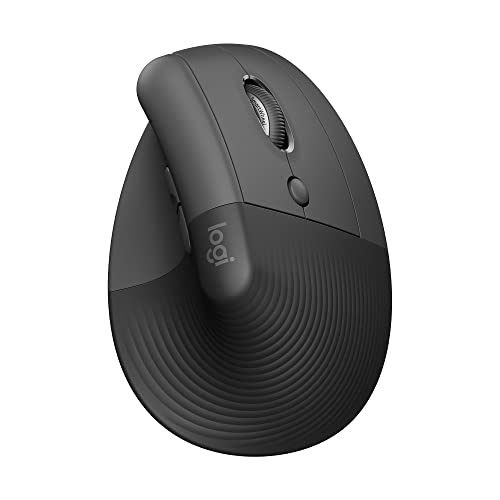
Logitech Lift — the approachable vertical
Badge: Best first vertical mouse for most hands
- Connection: Bluetooth or the included Logi Bolt USB-A receiver
- Clicks: quiet clicks (listing)
- Buttons: 6 total, 4 customisable (listing)
- Colour listed: Graphite
- Platforms: Windows and Mac
The Lift is the vertical mouse as an invitation rather than a prescription. Its upright posture is set at the angle the category has converged on as the natural handshake neighbourhood, but the body around that angle is compact, softly contoured, and clearly designed for small-to-medium hands that the larger ergonomic category historically forgot. The result is a device that changes your posture without changing your life: you slide it like the mouse you already know, your fingers find buttons where instinct puts them, and within a few days the only remaining novelty is how unremarkable the whole arrangement feels — which is precisely the point of a first ergonomic step.
The details support the invitation. Quiet clicks keep shared spaces and late hours civil. The connection choice — Bluetooth for tidiness, the Logi Bolt receiver for reliability — covers both kinds of desk without a dongle sermon. Customisable buttons are enough for the copy-paste-undo economy of office work without pretending to be a macro deck. What the Lift does not attempt is equally clear: it is not a large hand’s mouse, it is not a gaming device beyond the casual, and its battery arrangement favours the replaceable-and-forget school over the rechargeable one, a trade readers should note in the listing’s current description.
Strengths
- Compact, genuinely small-hand-friendly vertical body — the category’s most common exclusion, answered.
- Near-zero learning curve: posture changes, everything else about mousing stays familiar.
- Quiet clicks and dual connection options suit shared, tidy, real-world desks.
Trade-offs
- Large hands will find it small, full stop; its sibling below exists for them.
- A comfort tool, not a performance device — fast gaming is outside its brief.
- Fewer buttons and features than the MX tier above it.
Best for: small-to-medium hands taking their first ergonomic step, in office and mixed work. / Not suited for: large hands, gamers wanting speed, and anyone whose desk problem is space rather than posture.

Logitech MX Vertical — the full-size flagship vertical
Badge: Best vertical for larger hands and heavy workflows
- Design: ergonomic vertical form, Graphite (listing)
- Strain positioning: designed to reduce muscle strain (maker’s framing)
- Multi-computer: move content between up to 3 Windows and Apple computers (listing)
- Battery: rechargeable (listing)
- Connection: wireless
Where the Lift invites, the MX Vertical equips. It is the larger, more deliberate instrument: a fuller body for medium-to-large hands, a more pronounced sculpt, and the workflow features of Logitech’s MX line wrapped around the vertical posture. The multi-computer flow is the headline for the desk it imagines — a laptop and a desktop, or a work machine and a personal one, sharing one mouse and one hand posture, with content carried between them. For the professional whose day genuinely spans machines, that feature is not garnish; it is the reason this mouse exists at its tier.
The rechargeable battery suits the same professional rhythm: a cable at the desk’s back, a top-up during lunch, no drawer of spares. The sculpt itself rewards a palm-led grip and longer sessions, holding the hand in its upright posture with more authority than the Lift’s gentler contours — authority that larger hands need and smaller hands experience as bulk. Judge the sizing honestly and the MX Vertical is the vertical category’s most complete citizen; judge it hopefully, with a small hand, and it becomes an expensive lesson in the same sizing gospel this site preaches for gaming mice.
Strengths
- Full-size sculpt that actually serves medium-to-large hands in the upright posture.
- Multi-computer flow and MX-grade features for serious multi-machine workflows.
- Rechargeable convenience matched to a professional desk’s rhythm.
Trade-offs
- Too much mouse for small hands — try the Lift’s proportions first if in doubt.
- Premium tier pricing for features some single-machine users will never touch.
- Its size and sculpt assume desk room to travel, like every vertical mouse.
Best for: medium-to-large hands, long sessions, multi-computer professional workflows. / Not suited for: small hands, minimalists who want one button fewer rather than one feature more, and tight desks.

Logitech Ergo M575S — the thumb trackball in a mouse’s body
Badge: Easiest trackball transition
- Control: thumb-operated ball, sculpted right-hand shape (listing)
- Tracking character: precise and smooth tracking (listing)
- Connection: Bluetooth, plus the included Logi Bolt USB receiver (listing)
- Colour listed: Graphite with blue ball
- Platforms: PC and Mac
The M575S is the diplomat between the two camps of this comparison: a body shaped like the conventional mouse your hand already trusts, with the travelling abolished and a ball placed under the thumb. The hand rests in a familiar, mildly sculpted posture; the thumb — the digit with the least other employment in mousing — takes over propulsion; and the device itself never moves, which means it works on a tray table, a crowded desk, or the arm of a sofa with equal indifference. For readers whose objection to trackballs is their alien silhouette, this mouse-shaped one removes the objection and keeps the revolution.
Thumb control has a character worth naming. It is quick to learn for gross movement — the thumb is strong and its strokes are long — and slower to master for fine work, because the thumb’s fine motor repertoire is smaller than the fingers’. Most owners find the balance lands happily for office work, browsing, and media timelines, and the precision ceiling rises across the first fortnight as the thumb’s education proceeds. Our dedicated review at the Logitech M575 trackball review follows that education in detail, and the head-to-head at Logitech M570 vs M575 covers the generational differences for owners of the classic predecessor.
Strengths
- Mouse-shaped familiarity: the gentlest possible on-ramp to stationary pointing.
- Zero travel footprint — works anywhere the device itself fits, including laps and trays.
- Dual connectivity and a sculpt that suits long, ordinary working days.
Trade-offs
- Thumb precision has a lower ceiling than finger control for fine detail work.
- Right-handed only, and the thumb does all the travelling — heavy users should vary their habits.
- The ball and its cavity ask for regular cleaning to keep the glide honest.
Best for: trackball-curious mouse users, small or crowded desks, travel and sofa computing. / Not suited for: left-handed users, and detail workers who need the finger-ball ceiling described next.

Kensington Expert Wireless — the finger trackball, uncompromised
Badge: Best for precision work and planted desks
- Control: large finger-operated ball with scroll ring (category-defining design)
- Model: K72359WW, black (listing)
- Connection: wireless
- Form: stationary desktop device, ambidextrous by symmetry
The Expert is the trackball idea with the mouse costume removed entirely: a large ball centred in a broad, low base, ringed by its famous scroll ring, operated by whichever fingers you offer it. The large ball is the argument — more ball means more inertia, finer gradations of movement, and a cursor that can be spun across monitors and then stopped on a single pixel with the same fingers. Audio and video editors, CAD workers, and spreadsheet surgeons have sworn by this device for decades, and the wireless edition simply cuts the last cord of a design that was already about stillness.
Its democracy deserves mention in a comparison full of right-handed sculptures: the symmetrical base serves either hand, and serves the two-handed habits some owners develop — ball with one hand’s fingers, buttons with the other’s — that no shaped mouse can offer. The scroll ring, operated by a fingertip’s rotation around the ball, becomes a timeline instrument in editing work and a long-document joy everywhere else. The costs are presence and patience: the Expert is a desk fixture with a real footprint of its own, its learning curve is the longest in this guide, and its ball-and-bearing hygiene is a genuine weekly ritual, lovingly documented in our Kensington Expert review.
Strengths
- Large-ball precision ceiling is the highest in this comparison, with inertia that flatters fine work.
- Ambidextrous, stationary, and built like a desk fixture rather than a peripheral.
- The scroll ring is a genuine instrument for timelines, documents, and detailed editing.
Trade-offs
- The longest adaptation of the four picks — budget two honest weeks.
- A real footprint and a real cleaning ritual; not a travel device.
- Gaming beyond the slow and deliberate is outside its talents.
Best for: precision professionals, ambidextrous and two-handed users, planted desks with big screens. / Not suited for: travellers, the impatient, and fast gaming.
Which wins on comfort, honestly?
Comfort is where both camps’ marketing gets loudest, so let this section be deliberately quiet. The vertical mouse changes the forearm’s working posture from twisted towards neutral — the handshake position — and many users feel that change as relief in the forearm and wrist across long days, because the muscles holding the hand are no longer maintaining a rotation. The trackball changes something else: it removes the arm’s travel, so the shoulder and upper arm stop making ten thousand small journeys a day, and the hand itself rests flatter and heavier on a device that does not need to be gripped for propulsion. Different complaints, different mechanisms, both legitimate comfort stories — and neither one a medical promise. What your neighbour’s wrist thinks is data about your neighbour’s wrist.
The useful question is therefore diagnostic rather than tribal: where does your own discomfort, if any, live? Forearm and wrist tension after long mousing points at posture, and the vertical family addresses it directly. Shoulder and upper-arm fatigue, or a desk life spent reaching across a wide setup, points at travel, and the trackball abolishes it. No discomfort at all — only curiosity or a cramped desk — points at whichever device solves your actual problem, which may be footprint rather than physiology. And discomfort that includes numbness, tingling, or pain that persists away from the desk points at a professional’s office, after which this comparison will still be here, as a comfort conversation, when you return.
Which wins on precision and speed?
Precision splits by scale. At the small end — nudging a clip by a frame, placing a cursor inside a spreadsheet cell, retouching at pixel level — the finger trackball’s large ball and planted base offer a stillness no sliding device can match, because the hand is not simultaneously holding the instrument and moving it. At the large end — crossing three monitors, sweeping a design canvas, travelling a spreadsheet’s geography — the vertical mouse’s arm-driven movement is faster to learn and, for most users, faster outright, while the trackball answers with ball spins that veterans make look effortless and beginners make look like curling. The thumb trackball sits between: quicker to gross accuracy than the finger ball, less gifted at the pixel end than either rival on its best day.
Speed of adoption is its own precision metric, and here the vertical family wins without contest. A vertical mouse is a mouse; its first afternoon is merely odd, and its first week is fluent. A trackball rewires the pointing loop — propulsion moves to digits that have never held the job — and the honest budget is a fortnight of slightly clumsy days before the fluency arrives, as our guide on how to use a trackball mouse lays out in its learning curriculum. Buyers with a deadline should price that fortnight; buyers without one should not fear it, because it is tuition, not tax — the skill, once bought, is permanent and transfers to every trackball you will ever meet.
How do you transition to either device without hating it?
Transition is a method, and the method is the same for both families with different timelines. Keep your old mouse connected for the first days — not as a refuge to flee to hourly, which teaches nothing, but as a control for the tasks where the new device is still illiterate. Set pointer speed once, sensibly: trackball beginners usually need a touch more speed than instinct suggests, because the digits’ strokes are shorter than the arm’s; vertical beginners usually need a touch less, because the upright grip changes the wrist’s leverage. Then commit to the new device for your ordinary work — email, browsing, documents — where the stakes are low and the repetitions are many, and let the demanding applications join as fluency allows.
Expect the specific humiliations and budget for them emotionally. The vertical convert will click the wrong thing with a rotated hand’s misjudged aim for two days. The trackball convert will overshoot every dialogue box, discover muscles in their thumb they had not been introduced to, and at least once fling the cursor into a corner with a spin meant for a neighbouring monitor. All of this is the tuition being paid in public, and it ends. The players and professionals who failed to convert, in this guide’s observation, are rarely the ones whose hands rejected the device — they are the ones who judged on day two, at maximum clumsiness, and called the judgement a review. Judge at day fourteen, in writing, against the problem you bought the device to solve.
What mistakes do switchers make?
The first is buying for a diagnosis instead of for a fit: choosing the device with the loudest wellness story rather than the one whose mechanism matches your desk and your discomfort’s address. The second is size blindness in the vertical family — the Lift and MX Vertical are not small and large printings of one idea to be chosen by budget, but different hands’ devices, and choosing wrong undoes the posture benefit in a week of perching or cramping. The third is abandoning the trackball during its clumsy fortnight, the ergonomic equivalent of returning a violin because the first lesson sounded bad. The fourth is hygiene neglect: a trackball whose ball and sensors are filmed with dust will glide like a rumour, and its owner will blame the concept for the housekeeping. The fifth is expecting either device to game like the gaming mouse it replaced — these are instruments of the working day that can play, not playing instruments that can work, and the reader whose priority is competitive gaming should start from our gaming coverage and visit ergonomics from there.
A decision method in five questions
If the criterion sections left you balanced on the fence, answer these five questions in order and let the tally decide. One: how much clear desk does your mouse honestly have — a generous field, or a shrinking parish between keyboard, notebook, and mug? A shrinking parish votes trackball, structurally. Two: where does your end-of-day tiredness live — forearm and wrist, or shoulder and upper arm? Posture complaints vote vertical; travel complaints vote trackball. Three: what does your work reward — sweeping travel across large canvases and many windows, or stillness at the detail end of timelines, images, and cells? Travel votes vertical; stillness votes trackball. Four: how much learning patience do you actually own this month — two days, or two weeks? Honest impatience votes vertical, and there is no shame in the answer; a device abandoned in its fortnight helps no one. Five: who else uses this desk? Shared and borrowed desks vote for the device a stranger can drive — the vertical — while sovereign desks may vote as personally as they please.
Three or more votes in one direction is your answer, and the minority votes become your awareness list — the costs you are accepting knowingly, which is the most any buying decision can offer. A split verdict usually means the M575S: the diplomat device, mouse-shaped and stationary, which hedges the fork by taking one step down each road. There are worse hedges in this catalogue of compromises than the mouse that asks your thumb to travel so your arm does not have to.
How do the two families handle multi-monitor geography?
Wide screens stress the two philosophies in opposite directions. The vertical mouse crosses a triple-monitor desk the way it crosses a room — by travelling, with the arm as the engine and pointer speed as the gearing; raise the speed and the crossing shortens, at the usual tax on fine control, which is why multi-monitor vertical users often become connoisseurs of acceleration settings and per-application sensitivity. The trackball crosses the same desk by ballistics: a practised spin throws the cursor across monitors with a flick of the fingers, and the same fingers catch it, millimetre-perfect, at the destination — a skill that looks like sorcery in week six and like a party trick that failed in week one. Neither is objectively better; they are different athletic events, and your preference between throwing and travelling is a real preference worth discovering cheaply if you can — a borrowed device, a colleague’s desk, a shop’s display shelf.
Vertical space deserves a word too, because stacked monitors are now ordinary. Arm travel is naturally wider than it is tall, which taxes the vertical mouse on tall arrangements; finger and thumb balls are indifferent to direction, which flatters them. Readers arranging a desk from scratch should let the pointing device into the monitor conversation earlier than they usually do — the screens and the pointer are one system, and this comparison is, at bottom, about which half of that system you would rather educate: your arm, or your fingers.
What does each device demand of its owner across a year?
Ownership has a texture, and the families differ in theirs. The vertical mouse asks almost nothing: an occasional wipe, a battery rhythm or a drawer of spares, and a pad or desk surface kept reasonably honest. It is the lower-maintenance citizen by a wide margin, and for owners whose appetite for rituals is spent elsewhere, that is a genuine feature. The trackball asks for a liturgy and repays it in kind: the ball pops out, the contact points and sensor get their wipe, the ball returns with its glide restored — a minute’s ceremony, weekly or as the glide dictates, that owners tend to describe with unexpected affection, because a device you maintain becomes a device you know. The Expert’s larger ball makes the ceremony easiest; the thumb ball’s smaller cavity makes it fiddliest; both are cheaper than the alternative, which is a trackball slowly embalmed in dust while its owner reviews the concept instead of the housekeeping.
The year’s other demand is consumable honesty. Trackball balls do not meaningfully wear for most owners, vertical mice’s feet do, and both families’ batteries age on the scale of years. Neither device is a subscription in disguise. Buy either of the four picks here and the year’s true cost is the adaptation fortnight, paid once, up front — after which the devices settle into the long, quiet service that ergonomic equipment, chosen by fit, reliably gives.
How does each family treat creative and technical work?
Creative suites are where the trackball’s planted precision stops being a preference and starts being a workflow. In audio editing, the Expert’s scroll ring walks a timeline the way a jog wheel does on hardware consoles, and the big ball’s inertia lets a playhead be thrown and caught with a confidence a sliding mouse cannot imitate on a crowded desk. In photo and design work, the planted base means the cursor’s home is a place rather than a posture — the hand leaves, returns, and finds the geometry unchanged — which suits the stop-start rhythm of retouching, where the mouse is picked up and put down a hundred times an hour in everything but literal fact. Video colour work, with its small wheels and smaller adjustments, flatters the finger ball for the same reason it flatters a control surface: fine inputs from a still hand.
The vertical mouse’s creative case is different and also real: it is the device for the creative generalist whose day crosses applications, browsers, and documents at speed, where travel dominates detail and the arm’s fluency is the bottleneck. A designer art-directing across three screens, a producer living in a project board, an analyst whose canvas is a workbook the size of a small country — these workers spend their precision budget in bursts and their travel budget constantly, and the vertical posture protects the arm that does the travelling. The honest summary is that the families divide creative work by its dominant verb: if your verb is adjust, lean trackball; if your verb is traverse, lean vertical — and most readers know their verb within a sentence of being asked.
What about standing desks, hot desks, and other modern arrangements?
The standing desk changes the arm’s geometry in ways both families feel. Standing raises the elbow’s working angle and shortens the comfortable travel field, which taxes the vertical mouse’s sweeping style a little and flatters the trackball’s stillness a lot — one reason trackballs have quietly colonised standing-desk setups whose owners never set out to join the camp. Hot-desking pushes the other way: a device that must be packed, carried, and made a stranger’s-desk-friendly in minutes favours the vertical mouse’s instant fluency, or the M575S’s mouse-shaped diplomacy, over the Expert’s fixture-like commitment and fortnight of tuition. Hybrid workers who split the week between a home desk and an office bench often end up, rationally, with one of each — the planted device where the desk is sovereign, the portable posture where it is not.
Shared family desks deserve their sentence too. A vertical mouse can be driven, imperfectly but immediately, by any hand in the house; a finger trackball presents visitors with a small ceremony of confusion that households either find charming or route around by keeping a spare conventional mouse in the drawer. Neither reaction is wrong, but both are predictable, and a purchase made in awareness of them will not be relitigated at the kitchen table in week two.
How do you set pointer speed and buttons on each family?
Settings are where converts most often sabotage themselves, because each family wants its own philosophy. On a vertical mouse, begin at a moderate pointer speed and resist raising it to compensate for the first days’ unfamiliarity — the upright grip’s leverage differs from the flat one’s, and a speed chosen on day one will be wrong by day five in whichever direction you chose it. Give the posture a week at a calm setting, then tune once, in a small step, with your ordinary work as the test rather than a flick exercise. Buttons should be bound to your highest-frequency verbs — back, copy, paste, undo — because the vertical family’s gift is a hand that stays in one posture, and every keyboard journey you eliminate is posture preserved.
On a trackball, the philosophy inverts: speed usually needs to go up from the mouse-era default, because the digits’ stroke is short and the ball’s throw is the compensation — veterans run surprisingly fast settings and let the ball’s inertia and a fingertip’s brake do the precision work. Acceleration, heresy in gaming circles, has legitimate defenders here, since a ball must be both a tortoise at the pixel and a hare across the monitors; test it honestly for a week before joining either church. Buttons on the Expert reward ambition — its programmable set, assigned through its software to your application’s verbs, can turn the stationary hand into a small control surface — while the M575S’s leaner set suits the simpler economy of office work. In both families, the rule that outranks every specific is constancy during learning: a setting changed daily is a language whose grammar moves, and no hand becomes fluent in one of those.
A short history of the fork
The two families diverged from the same ancestor — the ball mouse’s rolling underside — in opposite directions, and the history explains their temperaments. The trackball is the older idea: the ball moved topside in the earliest pointing devices, decades before the mouse became furniture, and it spent its life in specialist territory — drafting rooms, air-traffic consoles, editing suites — where stillness and precision outranked familiarity. The vertical mouse is the younger idea, arriving only when the flat mouse’s ubiquity made its postural costs a mass experience worth engineering against. One family descends from instruments, the other from an apology — which is why trackball owners sound like a guild and vertical owners sound like converts, and why both are right about the flat mouse they left.
The modern chapter is convergence of quality rather than of concept: wireless reliability, good sensors, and thoughtful software have reached both families, so the choice between them is finally the pure philosophical one this guide has treated it as — travel versus stillness, posture versus plantation. A generation ago the fork was muddied by bad examples of each idea; today all four picks here are good examples, and the fork can be chosen on its merits. That is a pleasant place for a comparison to end up: not rescuing you from bad products, but matching you to good ones.
What do the first fourteen days actually feel like, family by family?
The vertical convert’s diary is short. Day one: the hand keeps trying to flatten itself onto the mouse like a returning exile, and clicks land a few millimetres from their intentions because the rotated hand’s internal map is still being redrawn. Day three: the flattening attempts stop, and the first unselfconscious hour of work passes. Day seven: the flat mouse, tried out of curiosity, feels like shaking hands with someone lying down — the conversion’s certificate, issued by the forearm. The remaining week is refinement: button binds migrating to the thumb’s new neighbourhood, pointer speed settling, and the occasional nostalgic reach for a travel distance the upright grip covers differently. Almost nobody writes home about a vertical conversion, which is the family’s deepest compliment.
The trackball convert’s diary is a novella. Days one to three are slapstick: overshot dialogues, a cursor that treats corners as destinations, a thumb or finger discovering both its strength and its illiteracy. Days four to seven bring the first controlled throws — the ball spun, caught, and landed within a button’s width of the target — and with them a dangerous overconfidence that day eight corrects. Days nine to fourteen are where the device stops being an experiment and becomes a posture: the hand rests, the digits work, the arm’s silence becomes noticeable precisely when a visit to a conventional desk elsewhere reminds it of the old travelling life. Converts who survive the fortnight rarely return, and converts who abandon ship almost always do so in the slapstick chapters. Plan your trial to protect the fortnight — light deadlines, low-stakes work in week one — and you protect the verdict from being written by the comedy.
How do you maintain each device so it stays itself?
The vertical mouse’s maintenance is a study in little: wipe the shell where the palm’s oils gather, keep the sensor’s window clean with a soft brush, mind the feet if it slides on a pad, and feed its battery on its own schedule — rechargeable models on a weekly rhythm, cell models with a spare pair in the drawer and a note of the change date. Its failure mode across years is gradual and honest: a coating polished smooth where the hand lives, a wheel whose steps soften. None of it ambushes a working day.
The trackball’s maintenance is a ritual with a plot. The ball lifts out — on the Expert with a push from beneath, on thumb balls with a fingertip’s persuasion — and the three contact points it rides on, plus the sensor window, collect the dust and skin that the ball has been faithfully harvesting from your desk’s air. A dry cloth or a fingertip clears them; the ball itself takes a wipe or, occasionally, a gentle wash and a thorough drying. Done weekly, the ceremony takes a minute and the glide stays factory-honest. Skipped for a month, the device develops a grittiness that owners misdiagnose as sensor failure, mechanical wear, or the concept’s fraudulence — in that order — before a cleaning resurrects it completely. The ritual is the price of the stillness, and this guide’s judgement, after watching many owners pay it happily for years, is that the price is fair and the ceremony is even, in its small way, beloved.
One desk, two devices: the case for the bilingual setup
There is a resolution to this comparison that the versus format hides: own both, on purpose, for different verbs. The bilingual desk is more common among long-tenured ergonomic users than either camp’s literature admits, and its logic is the decision method’s logic applied twice — the vertical mouse owns the traversing hours, the trackball owns the adjusting hours, and the hand changes instruments the way a craftsperson changes tools, without ideology. The costs are real but modest: desk territory for two citizens, a second adaptation to maintain at the level of habit rather than skill, and the small comedy of visitors confronting a desk that appears to be running an election. The benefits compound in a way single-device ownership cannot imitate, because each device’s weakness is covered by the other’s strength on the same desk, in the same hour.
Sequencing matters if you take this road. Learn one device to fluency first — the vertical, if patience is scarce, because its tuition is days — and let it own the desk for a season before the second arrives. Two simultaneous adaptations produce a learner who is clumsy in stereo and blames both teachers. Staggered, the bilingual desk assembles itself calmly, and its owner gains something beyond comfort: a genuine, embodied answer to this comparison’s question, written by their own hands across a year, which no guide — this one included — can give them second-hand. Start with the fork, by all means. Just know that the road, followed honestly, sometimes bends into a circle that contains both destinations.
A last word on evidence and evangelism
Ergonomic devices attract testimonies the way magnets attract filings, and a comparison guide should end by teaching its reader how to weigh them — including the ones quoted in spirit throughout this page. A testimony tells you that a device can be loved, by a hand, at a desk, across time. It cannot tell you the probability that your hand will love it, because testimonies are filed by the sorted: the converted write, the indifferent shrug silently, and the mismatched return their devices and their opinions together. The correct use of the chorus is therefore narrow and valuable — let it establish that all four picks here are genuinely lovable and durably made, then close the tab and interrogate your own desk with the five questions this guide provided. Your forearm’s address, your screens’ geography, your patience’s honest balance: these are the electorate. Everything else, this comparison included, is campaigning.
One campaign promise, though, this guide will make on the evidence’s behalf: whichever family you choose, the change will be larger than you expect and slower than you hope, and then — somewhere in the second month, on an ordinary afternoon — it will stop being a change at all and become simply how your hand works. Former flat-mouse users describe that afternoon with the same mild surprise in both camps, and it is the closest thing to a shared verdict this rivalry produces. The devices disagree about almost everything except this: that the flat mouse’s long reign over your desk was a habit, not a law, and habits can be renegotiated by anyone willing to spend a fortnight on the negotiation.
Bring to that negotiation the same honesty this guide has tried to practise: about your desk’s real dimensions rather than its aspirational ones, about your discomfort’s real address rather than the loudest advertisement’s, and about your patience’s real balance in a month that may already be full. A device chosen on those three honesties has the best chance any product can have — not to be praised in a review, but to disappear, fourteen days later, into the unnoticed machinery of a working day that ends with a hand that feels like your own. Disappearance, for a pointing device, is the highest available honour: it means the tool has stopped being a topic and become a transparency, through which the work itself is all you see. Both families can earn it. Only your desk can award it — and your desk, unlike any reviewer, will be present for every hour of the evidence, which makes it the one critic whose verdict you should arrange your trial to hear. Arrange it generously: full days, real work, no verdicts before their time, and a notebook open beside the keyboard for the observations that memory would otherwise quietly revise in the winner’s favour. Fourteen days from now, that notebook will contain the only review of these devices written by the world’s leading authority on your hand. Trust it over this page wherever the two disagree — that deference is the final thing this comparison has to teach, and the first thing your new device, whichever it is, will confirm.
Frequently asked questions
Is a vertical mouse or a trackball better for wrist pain?
Neither can be promised as a treatment, and this guide will not pretend otherwise. A vertical mouse changes forearm posture, which many users find more comfortable across long days; a trackball removes arm travel, which others find more comfortable. Which mechanism matches your discomfort is a fit question — and persistent pain, numbness, or tingling should be assessed by a professional, who can also advise on whether a device change belongs in your plan at all.
Can I game on either device?
Casually, yes — slower titles, strategy, and single-player games are perfectly playable on both families once learned. Competitively, neither is the right instrument: fast shooters reward the conventional or gaming mouse’s direct arm-and-finger control, and both ergonomic families trade that away for their comfort and stillness benefits. Keep a gaming mouse for gaming if the games are serious; let these devices own the working day.
How long does a trackball take to learn?
Budget a fortnight of daily use to reach fluency, with the first three days being the clumsiest and most misleading. Thumb balls are generally quicker to gross competence; large finger balls take longer and repay it with a higher precision ceiling. Judge at day fourteen, in writing, against the problem you bought it to solve.
Which is better for a small desk?
The trackball, and it is not close: a trackball needs only its own footprint, forever, while a vertical mouse needs a clear field to travel in. On a tray, a narrow desk, or a multi-monitor command centre where the mouse’s parish keeps shrinking, stationary pointing is a structural advantage rather than a preference.
Left-handed users — which family serves you?
The trackball family, via ambidextrous designs like the Kensington Expert in this guide, whose symmetrical base serves either hand fully. The vertical market is overwhelmingly right-handed, and the M575S is right-handed too. Left-handed readers should start with the finger-ball side of this comparison and the wider ambidextrous options in our trackball coverage.
Can I use both — one at work, one at home?
Yes, and many converts do exactly that while deciding, or permanently: a vertical mouse where the desk has room and the work is varied, a trackball where space is tight or the screens are many. The skills do not interfere once each is learned — the hand keeps them in separate drawers — though your wallet will notice the experiment, which is why this guide’s decision method tries to spare it.
What is the final verdict in Vertical Mouse Vs Trackball?
There is no champion here, only a well-lit fork. Take the vertical road if your mousing life is varied, your desk can host movement, and you want the change that asks least of your habits: the Lift for small-to-medium hands and first steps, the MX Vertical for larger hands and multi-machine ambition. Take the trackball road if your desk is tight, your arm is tired of travelling, or your work lives at the pixel end of precision: the M575S for the gentlest conversion ever offered, the Kensington Expert for the full, planted, ambidextrous commitment. Both roads leave the flat conventional mouse behind, which was the only verdict the two camps ever agreed on — and the fortnight of patience either road asks is the real price of admission, refunded nightly for years.