Disclosure: As an Amazon Associate, reviewstook.com earns from qualifying purchases. Links on this page are affiliate links; they cost you nothing extra. Prices and availability change often, so check the current Amazon listing before you buy.
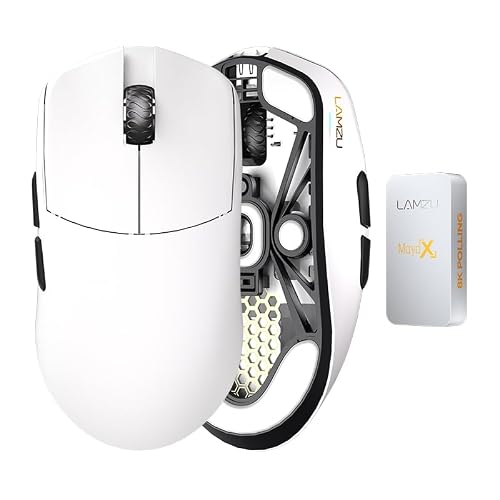
The maya x is what happens when an esports mouse stops decorating itself and starts subtracting. Lamzu’s larger Maya arrives at 47 grams with a symmetrical shell, a PAW3950 sensor rated to 30,000 DPI, optical switches, a Nordic 52840 controller and a dust-proof encoder — a specification list that reads less like marketing and more like a weight audit, every component interrogated for whether it earns its gram. This article approaches the mouse from the buyer’s side of the desk: what that lightness does to an aim style over a season, how the shape sorts hands and grips, where the honest compromises of a 47-gram wireless mouse live, and how it stands against the three rivals players cross-shop most — Razer’s Viper V3 Pro, Logitech’s G Pro X Superlight 2 and GravaStar’s magnesium Mercury X Pro.
Context helps, because the Maya name carries a family resemblance. The original Maya won its following as a compact, claw-friendly shape; the X is the larger sibling, stretched for hands that found the original cramped and for palm-leaning grips that need length under them. Everything in this piece follows from that single decision — a bigger stage for the same minimalist philosophy — and from the question it asks the buyer: is your hand the one this enlargement was drawn for?
Key takeaways on the Maya X
- At 47 grams the Maya X sits in the lightest class of full-size wireless esports mice, and the weight — not the sensor — is the experience.
- The symmetrical shell and larger footprint suit medium-to-large hands and claw or relaxed palm grips; fingertip players with small hands should look at the smaller Maya instead.
- Optical switches and a dust-proof encoder are durability choices disguised as specifications, aimed at the two failure modes that kill gaming mice young.
- The verified listing is the white finish; colour availability on marketplaces changes, so confirm the variant before ordering.
- Against its rivals, the Maya X wins on weight and value-minded minimalism, and concedes ground on brand ecosystem, software polish and charging convenience.
In this guide
Quick picks: the Maya X and its cross-shop rivals
| Mouse | Weight as listed | Sensor headline | Character |
|---|---|---|---|
| Lamzu Maya X | 47g | PAW3950, up to 30,000 DPI | The ultralight minimalist |
| Razer Viper V3 Pro | 54g | 35K DPI optical, 8000 Hz polling | The tournament standard |
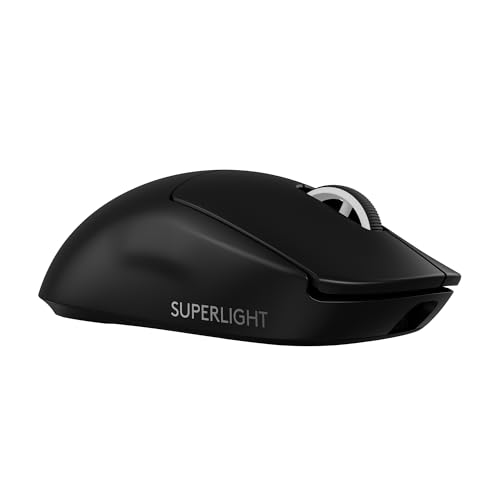
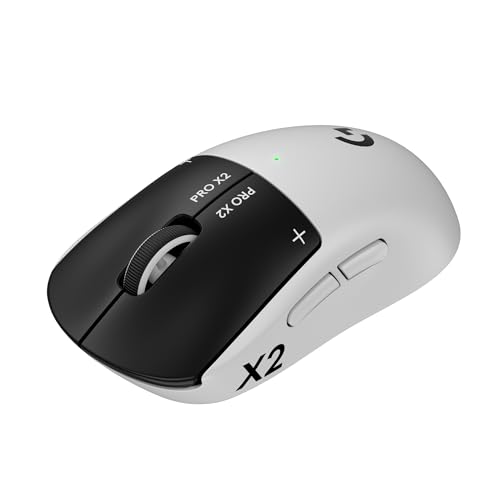
| Logitech G Pro X Superlight 2 | Lightweight class | HERO 2, 32,000 DPI | The ecosystem all-rounder |
| GravaStar Mercury X Pro | 49g magnesium alloy | PAW3950, 32K DPI, 8K dongle included | The exotic material play |

Lamzu Maya X — 47 grams of intent
Badge: Best for weight-first players with medium-to-large hands
- Weight: 47g, ultra lightweight
- Sensor: PAW3950, maximum 30,000 DPI
- Switches: optical
- Controller: Nordic 52840 MCU
- Encoder: dust-proof design
- Shape: symmetrical, larger Maya footprint, white finish as listed
Aim is a conversation between intention and inertia, and 47 grams changes the language of that conversation. Starting a flick costs almost nothing, which players feel as freedom; stopping the flick is where the education happens, because a mouse this light carries so little momentum that the stopping must come from your hand rather than from the mouse’s own mass. Players arriving from 60-to-80-gram mice typically overshoot for a week — the mouse arrives before the intention finishes — and then, as the hand recalibrates, discover a tier of micro-correction that heavier mice had been taxing too heavily to use. Tracking aim smooths out, counter-strafing corrections tighten, and long sessions stop accumulating the forearm fatigue that players had been attributing to their chairs.
The shape is the weight’s necessary partner. A larger symmetrical shell spreads the hand’s contact across more surface, which keeps a featherweight mouse controllable — small ultralights can feel twitchy because the fingers crowd into a grip of pure fingertips, while the X’s length lets the palm’s rear register against the hump and stabilise the whole instrument. Claw grips sit naturally on it, with the arch of the shell meeting the curled fingers where they expect support; relaxed palm grips fill it without the fingers overhanging the front, the specific failure the smaller Maya visited on larger hands. The coating and the white finish are practical matters disguised as aesthetics: light shells show desk grime honestly, and a matte texture that survives sweaty summer sessions matters more than the colour’s showroom charm.
The internals tell a durability story that ultralight mice do not always bother with. Optical switches register clicks with light rather than metal contact, removing the wear mechanism behind the double-click failures that retire beloved mice; the dust-proof encoder guards the scroll wheel’s sensor against the desk’s slow accumulation of debris, the other classic Maya-class ailment. The Nordic controller is the quiet professional’s choice for wireless efficiency, sipping power while keeping the connection honest. None of these components photographs well. All of them decide whether the mouse you love in month one is the mouse you still love in year three.
Strengths
- Class-leading lightness in a full-size shell, which expands rather than restricts the grips it suits.
- Optical switches and a protected encoder aim directly at the two commonest causes of early mouse death.
- A flagship sensor and controller pairing with no decorative tax added to the weight or the concept.
Trade-offs
- Minimalist software and ecosystem compared with the Razer and Logitech platforms.
- The lightness demands an adaptation week from players raised on heavier mice, and a few never convert.
- No charging dock theatre or RGB identity — the mouse’s personality is its restraint, which not every desk wants.
Best for: competitive players whose hands are medium-to-large and whose aim style prizes correction speed. Not suited for: small-handed fingertip players, or buyers who want their mouse to anchor a wider brand ecosystem.

Razer Viper V3 Pro — the tournament benchmark
Badge: Best for players who want the pro-scene default
- Weight: 54g lightweight
- Sensor: 35K DPI optical
- Switches: Gen-3 optical
- Polling: 8000 Hz wireless
- Battery: up to 95 hours as listed
- Controls: 8 programmable
The Viper V3 Pro is the mouse the Maya X gets measured against in every forum thread, and the comparison flatters both. Razer’s flagship is a fraction heavier, carries the scene’s most validated shape lineage, and brings 8000 Hz polling and a mature software suite to the argument. Players who compete, or who simply want the choice the stage makes, will find the Viper’s premium buys certainty: of shape, of support, of an ecosystem that will still be updating when the mouse is old. The Maya X’s counter-argument is narrower and, for the right hand, stronger — seven grams is not a rounding error at this end of the scale, and Lamzu’s price positioning in the market generally leaves the Viper looking like the establishment option it is.
Strengths
- The most tournament-validated package in this comparison, with 8K polling included in the proposition.
- Long listed battery life and a deep, maintained software platform.
- A shape lineage refined across generations of professional feedback.
Trade-offs
- Heavier than the Maya X by a margin its owners can feel in flick stops.
- Premium positioning; the establishment charges for being the establishment.
- Its safe, universal shape excites fewer strong preferences than it avoids weak ones.
Best for: competitors who want the default choice of the professional scene. Not suited for: weight absolutists, for whom the Maya X’s audit went further.

Logitech G Pro X Superlight 2 — the all-rounder with the ecosystem
Badge: Best for mixed gaming-and-working desks
- Sensor: HERO 2, 32,000 DPI
- Switches: LIGHTFORCE hybrid
- Connection: LIGHTSPEED wireless, USB-C charging
- Controls: 5 programmable buttons
- Compatibility: PC and Mac as listed
Logitech’s entry argues that a mouse lives a whole life, not just a ranked life. The Superlight 2’s hybrid switches blend optical speed with mechanical feel, its wireless is the industry’s reference implementation, and its support network is the one most likely to have an answer in your language at midnight. Against the Maya X it concedes the weight headline and the minimalist purity, and counters with refinement everywhere else — the mouse for the player whose desk also hosts a job, a second computer and a preference for tools that never become a hobby in themselves.
Strengths
- Reference-class wireless reliability and the deepest support ecosystem here.
- Hybrid switches that answer the feel objection some players raise against pure optical clicks.
- Equally at home in the office hours and the ranked hours of the same desk.
Trade-offs
- Not the lightest in this company, and its shape is deliberately inoffensive rather than characterful.
- Fewer programmable controls than the Razer for MMO-adjacent binding habits.
- Buyers pay for the ecosystem whether or not they intend to live in it.
Best for: players wanting one mouse for everything, backed by the biggest platform. Not suited for: specialists who measure a mouse in grams and intentions only.

GravaStar Mercury X Pro — magnesium, 8K and theatre
Badge: Best for players who want ultralight with presence
- Weight: 49g magnesium alloy shell
- Sensor: PAW3950, 32K DPI
- Polling: 8000 Hz dongle included
- Connection: wireless with Bluetooth 5.1 among its modes
- Battery: up to 110 hours as listed
- Extras: RGB lighting, 5 programmable buttons
GravaStar looked at the ultralight brief and declined to be quiet about it. A magnesium alloy shell with an exoskeletal design, RGB, an included 8K dongle and a listed battery figure that embarrasses the class — the Mercury X Pro is the Maya X’s philosophy performed by a maximalist, at nearly the same weight. The material matters beyond looks: metal feels cool and rigid in the hand in a way polymers imitate imperfectly, and players who want their 49 grams to feel like an instrument rather than a shell tend to convert on first touch. Against it stand the price of exotic materials and a design language that will dominate any desk it joins — virtues or offences depending entirely on the desk’s owner.
Strengths
- Magnesium construction delivers ultralight weight with a premium, rigid hand-feel.
- The 8K dongle is in the box rather than in a later shopping cart.
- Listed battery endurance leads this comparison comfortably.
Trade-offs
- The skeleton styling collects dust and divides opinion in equal measure.
- Exotic materials command exotic money within the ultralight class.
- RGB and theatre add nothing to aim, and purists will read them as the tax they are.
Best for: players who want flagship lightness with an object worth looking at. Not suited for: minimalists, for whom the Maya X’s restraint is the entire point.
Buying guide: hands, grips and the physics of light mice
Measure your hand before reading another review
Mouse advice collapses without two numbers: your hand’s length from wrist crease to middle fingertip, and its width across the knuckles. The Maya X’s larger shell serves the middle and upper ranges of those numbers; below them, the hand cannot spread across the shell, the grip collapses into fingertips whether the player wants it or not, and the smaller original Maya becomes the correct Lamzu. Above them, even the X can feel like a toy, and the honest advice points toward the largest shells in the class regardless of brand. Every reviewer who has ever called a mouse comfortable or cramped was reporting their own two numbers — learn yours, and the entire internet’s mouse coverage becomes legible at last.
Grip is a diagnosis, not a preference
Watch your own hand during a real match rather than posing it on the desk. Palm players rest the whole hand and move from the arm; claw players arch the fingers and steer with a braced, tense precision; fingertip players float the mouse on digits alone. The Maya X flatters claw first — its hump meets the claw’s arch — serves relaxed palm honestly in larger hands, and asks fingertip players the hard question of whether a big shell suits a grip that uses only its front half. Switching mice is also the legitimate moment to switch grips, but do it deliberately, with a week of practice budgeted, rather than discovering mid-season that your new mouse has been coaching you into a grip your hand hates.
Polling rate, DPI and the numbers that actually bind
DPI figures in the tens of thousands are headroom, not settings: most competitive players live in the hundreds-to-low-thousands and should set sensitivity by the distance method — a comfortable full-pad sweep equalling a predictable in-game turn — rather than by headline. Polling rate is the subtler dial. Higher polling smooths the cursor’s path and shaves latency, at costs in CPU load and battery; on the Maya X and its rivals, the sensible path is to run the highest rate your system holds without strain in your actual games, verified in play rather than assumed from the box. Players pairing the mouse with a high-refresh panel — the MAG 274QPF X30MV review covers that class — gain the most from the upper polling tiers, because the display can finally show the smoothness the mouse is sending.
Skates, pads and the surface half of the mouse
A 47-gram mouse on a worn mousepad is a sports car on bald tyres. The glide is half the instrument: pair ultralight hardware with a pad whose speed matches your stopping style — control surfaces forgive the light mouse’s eagerness, speed surfaces unleash it — and replace skates when the edges have rounded into drag. This is the cheapest performance available in the entire setup, and the most commonly skipped, because pads and skates lack the glamour of a new sensor. Do not skip it in the budget: the Maya X’s whole philosophy is friction reduction, and the pad is where friction lives.
How to adapt to an ultralight mouse in two weeks
Step 1: Expect the overshoot and schedule it
For the first three days, play aim trainers and unranked matches only. Your flicks will arrive early; that is the mass you are no longer carrying announcing its absence. Lowering in-game sensitivity slightly during this window is legitimate scaffolding, provided you rebuild toward your measured distance as control returns.
Step 2: Rebuild stopping as a skill
Drill the stop explicitly: flick to a target and freeze, checking where the crosshair settled, because ultralight aim is a stopping discipline more than a starting one. Ten honest minutes a day for a week rewires the habit faster than a month of matches played on autopilot.
Step 3: Re-audit your grip at day seven
Film your hand or simply attend to it mid-match: has the grip drifted from what you intended? Light mice invite grip drift because nothing anchors the hand. Correct the drift deliberately, consider grip tape if your hands run dry or slick, and let the second week consolidate the arrangement that survives contact with real games.
Step 4: Judge at day fourteen, in ranked conditions
Only now does the mouse get its verdict, in the environment it was bought for. Most converts report the same signature: not miraculous aim, but cheaper aim — the same results bought with less effort and less fatigue, leaving more of both for the decisions that actually win rounds.
Mistakes ultralight buyers make
Chasing the lowest number regardless of hand size leads the list; a mouse too small for the hand is not agile, it is unstable. Second comes judging within the adaptation window and returning a mouse on day three that would have converted by day ten. Third is neglecting the surface — pad and skates — while upgrading the mouse twice. Fourth is importing sensitivity settings wholesale from a heavier mouse’s setup, when the entire point of the change is that the physics under the hand have changed. And fifth, for this specific model, is ordering without confirming the finish and variant on the listing, because Lamzu’s family names are close enough to punish a careless click.
Frequently asked questions
Is the Maya X too light for controlled aim?
For the first week, possibly; permanently, only if your grip depends on the mouse’s mass to stabilise it. Most players find control returns with interest once stopping becomes a hand skill rather than a momentum event, and the players who do not convert are usually those whose hands are too small for the shell rather than too unskilled for the weight.
How does the Maya X differ from the original Maya?
Size, principally: the X is the larger shell, drawn for bigger hands and fuller grips, carrying the same minimalist philosophy. If the original felt like shaking hands with a child’s toy, the X is the one Lamzu made for you; if the original felt perfect, the X will feel like its bigger sibling at a family dinner — related, and slightly too much.
Are optical switches noticeably different in play?
The click feels crisp and the registration is effectively immediate, but the honest headline is longevity: removing the metal-contact wear mechanism removes the classic double-click failure. In play, most users notice the sound and the consistency across months more than any single click’s speed.
What polling rate should I run?
The highest your system sustains smoothly in your actual titles, verified with a session of real play rather than a desktop wiggle. Players on high-refresh monitors benefit most from the upper tiers; everyone should treat battery life as part of the bargain, since higher polling drinks faster.
Is the Maya X good for work as well as gaming?
Its sensor precision and comfort over long sessions transfer well, and its restraint suits a desk. What it lacks for office life is the ecosystem polish and button count of the Logitech rival in this guide — for pure productivity across many devices, that rival argues well; for a playing-first desk, the Lamzu’s lightness wins the evening and survives the day.
Which rival should I choose if not the Maya X?
The Viper V3 Pro for tournament-validated completeness, the Superlight 2 for ecosystem and all-round refinement, and the Mercury X Pro if you want the same weight class wearing magnesium and theatre. The comparison sections above give each its honest due; the hand measurements in the buying guide should make the final call.
The final recommendation
The Maya X is a specialist instrument that happens to be priced and sized for general sale: a 47-gram, larger-shell esports mouse whose every specification serves either speed or survival. Buy it if your hand fits its enlargement, your grip is claw or relaxed palm, and you are willing to spend a fortnight teaching your hand the new physics — the reward is aim that costs less effort every single day afterward. Look to its rivals if you need an ecosystem, a smaller shell, or a mouse that makes an entrance. And whichever you choose, measure your hand first and give the adaptation its two weeks; in this class, the buyer’s patience is the final specification. The surrounding desk is covered in our macropads and numpads guide and the settings that will steer this mouse in the Marvel Rivals options guide.
Long sessions, fatigue and the ergonomics of almost-nothing
The case for ultralight is usually made in milliseconds, but its second act is measured in hours. A mouse that asks less of the forearm across a six-hour session leaves the player with a steadier hand in hour six — the hour when tournament days and ranked climbs are actually decided — and players who track their own performance often find their late-session consistency, rather than their peak aim, is what improved after switching. This is not a medical claim and wrists with real complaints deserve real advice, but the physics are plain: moving less mass, thousands of times, costs less. Players whose hands ache should also examine the whole chain — chair height, desk height, grip tension habits — because a light mouse forgives tension it cannot cure, and the claw grip in particular rewards a conscious relaxation drill between matches.
Battery behaviour and the wireless routine
Wireless freedom is rented, and the rent is a charging habit. Efficient controllers like the Nordic in this mouse stretch the interval between charges, and higher polling rates shorten it, so your settings and your cable should meet in a routine: a regular charging moment — a specific evening, a dockside cable, a magnetic lead kept at the desk — chosen before the first mid-match low-battery warning chooses one for you. Players who compete should also keep the wired mode rehearsed rather than theoretical, because the match where the battery dies is not the match in which to learn where the cable lives. Treat the receiver’s placement with the same care: close, line-of-sight, away from the metal case and the USB hub’s noise, on the short extension most quality mice provide for exactly this purpose.
The Maya X in the wider Lamzu story
Lamzu built its name by listening to the enthusiast community’s specific complaints — weight, coatings, switch feel, encoder reliability — and answering them without the theatre the big brands attach. The Maya X is that philosophy at its most distilled: a community-shaped shell, a flagship sensor, switches chosen for survival, and nothing else. Buying it is partly a vote for that way of making mice, and buyers should know the trade it implies — smaller company, leaner software, support that runs through channels rather than call centres — against the polish of the Razer and Logitech machines it shares this page with. For a growing number of players the trade is not a compromise at all. It is the point.
Care, skates and keeping a light mouse honest
Ultralight shells ask for ordinary care performed slightly more often. Skates wear faster relative to the mouse’s value because glide is the product; inspect them monthly and replace when the edges feather. Keep the sensor lens clean with a dry swab, store the mouse off the pad’s grittiest corner, and let grip tape — if you adopt it — be replaced when it smooths out rather than becoming a permanent archaeological layer. The white finish rewards a weekly wipe and punishes neglect visibly, which owners tend to report as a feature once the habit forms: the mouse tells you when it needs attention, and attention, in this class, is performance.
Genres and titles: where the X earns its keep
Tactical shooters reward the Maya X’s correction speed in the currency of duels reset mid-fight; arena and movement shooters reward its low inertia every time a target changes direction without asking permission. Battle royale play at long sightlines values the sensor’s composure and the shell’s stability for a braced claw. MOBA and strategy players get a quieter dividend — a mouse that disappears during long, click-dense sessions — while MMO players should count buttons before grams and will find the rivals in this guide, with their deeper programmability, better matched to a hotbar’s demands. Simulation and flight players, whose hands live on other controllers entirely, can safely ignore this entire weight class. The pattern is the one this article opened with: the Maya X is a duelling instrument, and genres built on duels are where its subtraction of everything else reads as genius rather than absence.
Buying the Maya X through a marketplace, carefully
Lamzu’s distribution runs substantially through marketplaces and specialist retailers, which places the familiar duties on the buyer: confirm the exact model — Maya X, not Maya, not a near-named sibling — in the listing title and the variant selector; confirm the finish you are ordering, since the verified listing here is the white model; and confirm what the box should contain so the delivery can be audited on arrival. Keep the packaging through the adaptation fortnight, because the return decision for an ultralight mouse is legitimately made at day fourteen rather than day one, and the channel’s window should be planned around that honest schedule rather than spent in the first weekend’s overshoot.
The one-week diary of a converting player
Day one: everything is too fast and the mouse feels like a rumour of a mouse. Day three: the flicks begin landing where they were sent, and the hand notices it is less tired at the session’s end than it has any right to be. Day five: the old mouse, picked up out of curiosity, feels like it is moving through water. Day seven: the grip has settled — claw a touch lower, fingers a touch calmer — and the crosshair’s small corrections have become a language the player did not know they were missing. Day fourteen: the verdict writes itself, and it is rarely about the sensor at all. It is about effort — the discovery that aim had a price in fatigue the player had been paying unconsciously for years, and that a 47-gram mouse simply stopped charging it. That diary is the most honest review format this product category has, and every serious buyer should plan to live it before judging the mouse at its centre.
What the Maya X asks of the rest of the setup
A mouse this light exposes every weakness around it. A pad too small truncates the low-sensitivity sweeps its players favour; a desk at the wrong height turns its weightlessness into wrist angles that no gram-count can rescue; a monitor with ordinary refresh hides the smoothness the whole chain was built to deliver — the reason this guide keeps company with the high-refresh MAG 274QPF X30MV panel review and the settings discipline of our League of Legends options guide. None of this obliges a spending spree. It obliges an audit, in the order the hand experiences the chain: pad, mouse, settings, screen. The Maya X sits at the chain’s centre and rewards every link that is honest — and exposes, politely and immediately, every link that is not.
Closing judgement
Strip the Maya X to its argument and it is a single sentence: remove everything that is not aim or survival, enlarge what remains until a real hand can hold it, and stop. The market’s louder mice will keep adding — materials, lights, docks, ecosystems — and for many players those additions are worth their grams and their money. But there is a clarity to Lamzu’s subtraction that the spec sheet only hints at and the second week of ownership proves. If your hand fits the shell and your games are duels, this is one of the purest instruments the category currently sells, and the fortnight it asks of you is the smallest tuition competitive gaming charges for anything.
Switch feel, clicks and the sound of the thing
Optical switches have a character of their own that deserves description rather than slogans. The click on a well-tuned optical mouse is immediate and uniform — the same resistance, the same report, on the thousandth click as on the first — because there is no metal leaf fatiguing underneath the plunger. Players sensitive to click weight should know that optical implementations tend toward the crisper, slightly lighter end of the spectrum, and that the Maya-class tuning aims for a click that registers decisively without demanding the fingertip force heavier mechanical switches use as their idea of quality. The scroll wheel, guarded by that dust-proof encoder, should step with defined, quiet detents; on any individual unit that arrives with a gritty or wandering wheel, treat it as the defect it is and use the return window, because the encoder is precisely the component this design claims to have solved.
For players who also create: the mouse off the battlefield
Editors, designers and 3D artists who game after hours often keep one mouse for both lives, and the Maya X’s case for that double duty rests on precision and stamina rather than buttons. Pixel-level selections benefit from the same low inertia that serves micro-corrections in a duel; long retouching sessions benefit from the same absence of forearm tax. What the mouse will not give the creative hours is a free-spinning wheel, a tilt wheel or a thicket of programmable buttons — the tools some workflows genuinely run on — and professionals whose software days depend on those should let the workday, not the ranked evening, choose the mouse, or keep two mice the way photographers keep two lenses. Honest tools admit their specialism, and this one’s specialism is the duel; everything else it does well is a dividend, not a promise.
The second mouse question: what the Maya X replaces, and what it should not
Most buyers of this mouse are replacing something, and the wisdom of the purchase depends on what the something was. Replacing a heavy, general-purpose mouse whose weight has become the ceiling on your correction speed: the textbook case, and the conversion diary in this article will likely be yours. Replacing a smaller ultralight that your growing hand or changing grip has outgrown: the X exists for exactly this graduation, and the family resemblance will shorten the adaptation. Replacing a feature-rich MMO or productivity mouse because the weight number seduced you: stop, because the buttons you use hourly are worth more than grams you will notice weekly. And replacing a Maya X with another Maya X in three years, when the skates are memories and the coating has polished to a shine where your fingers live — that replacement, the quietest in this whole guide, is the one the design was built to earn, and the surest sign that the subtraction philosophy found the hand it was drawn for.
A short, complete verdict for the searcher in a hurry
If the thousands of words above must compress into a paragraph for the reader who arrived with one question — should the Maya X be my next mouse? — the answer runs like this. Yes, if your hand is medium-to-large, your grip is claw or relaxed palm, your games are duels, and you will grant it a fortnight: you will get one of the lightest full-size wireless mice made, a flagship sensor, switches built to outlive their warranty’s imagination, and an aim that costs less effort every day you own it. No, if your hand is small, your games need buttons more than grams, or your desk wants an ecosystem with a flag on it — in which case this page’s rivals were reviewed with the same care, and one of them is yours. Either way, measure your hand before you spend anything. In the ultralight era, that measurement is the review; everything else, this article included, is commentary.
One more consideration belongs to the players who compete where it counts — in qualifiers, in leagues, in rooms where the result follows them home. Tournament life punishes exotic setups and rewards the boring virtues: a mouse whose behaviour is identical on the venue’s machine and your own, a shape your hand can find in the dark, a battery routine that has never once been the story of a match. The Maya X’s minimalism serves that life better than its specification suggests, because there is so little in it to configure wrongly, update unexpectedly or fail theatrically. Keep its settings documented the way this cluster’s guides keep recommending — a written record beside your Marvel Rivals settings document — travel with the receiver and the cable both, and the mouse will do the thing professional equipment is actually for: it will be the one part of the day that never needs discussing.
And for the player still weighing grams against features at the end of this long page, a final experiment that costs nothing: play one session with something small and heavy taped — safely, temporarily — to your current mouse, and one session with nothing changed at all, and notice which session your forearm talks about afterward. Bodies are honest reviewers. If yours asks for less mass, the Maya X is waiting at 47 grams with its hand out; if it does not, this guide’s rivals include three excellent heavier answers, and you will have saved yourself a fortnight of adaptation to a philosophy your own arm voted against. Either result is a successful review. Only the unexamined purchase fails.
Grip tape, skates and the aftermarket around a light mouse
A small, healthy aftermarket orbits mice like this one, and two of its offerings deserve the buyer’s attention while the rest can wait. Grip tape is the first: thin, textured panels for the sides and buttons that rescue players whose hands run dry in winter or slick in summer, effectively letting you tune the shell’s friction the way the pad tunes the desk’s. Applied carefully it adds a gram or so and a great deal of security; applied carelessly it adds edges that peel by Friday, so follow the template, warm the panels, and give them a day to bond before a serious session. Replacement skates are the second: keep a set in the drawer from the day the mouse arrives, because the session where a worn skate starts scratching is always the session before a match that matters. Beyond those two, the aftermarket’s coloured shells, paracord fantasies for a wireless mouse and decorative charms can be safely left to the hobbyists — the Maya X’s owner bought subtraction, and the aftermarket is at its best when it protects the subtraction rather than redecorating it.
The last word belongs to the hand itself, because every argument in this article is finally settled there. Specifications can be compared in an evening and prices in a minute, but the Maya X’s proposition — that less mouse can be more aim — is a claim only fourteen days of play can verify, on your pad, in your games, under your fingers. Give it the fortnight if the measurements say your hand belongs on this shell. The mouse has already done its part of the experiment, removing everything it honestly could. The rest of the data is yours to collect, and it will be the most trustworthy review of this product anyone ever writes for you.
A note on handedness, symmetry and the left hand
Symmetrical shells carry a quiet promise to left-handed players, and honesty requires examining how far the promise extends. The Maya X’s body is ambidextrous in shape, which means a left hand can hold it with the same geometry the right enjoys — a rarer gift in gaming mice than it should be, since most high-end shells are sculpted for the right alone. Side buttons, however, live where the right hand’s thumb expects them, and left-handed players should weigh how much their games depend on those buttons before counting the symmetry as complete. For the left-handed duellist whose binds live on the keyboard, this mouse is one of the few flagship-class instruments that does not ask them to play right-handed or settle for less. That inclusiveness, unadvertised and unpriced, may be the most Lamzu sentence in this entire article: the feature is there because the community asked, not because a marketing plan did.
So the recommendation stands, refined by everything since: measure, match the grip, budget the fortnight, mind the surface, and let the mouse’s silence — no lights arguing, no software nagging, no mass negotiating — become the background against which your own game gets louder. That is what 47 grams buys when it is spent by people who knew exactly what they were subtracting, and it is why the Maya X, among all the louder instruments in this guide, may be the one its owners describe with the least hesitation and the fewest qualifications.
Bring the ruler, then, and begin. Every great mouse story in this category starts with two numbers and a hand honest enough to report them — and if yours point at this shell, the lightest chapter of your setup’s history is fourteen days of play away.
Epilogue: the mouse as a measuring instrument for its owner
There is a reason ultralight mice generate unusually personal reviews, and it is that they measure their owners as much as their owners measure them. A heavy mouse forgives a loose grip, a wandering hand position, a sensitivity chosen by folklore; a 47-gram mouse reports all three back to you within a session, which is why its adaptation fortnight doubles as an audit of habits the player did not know they had. Players who complete that audit usually keep the mouse, not because it flattered them, but because it told them the truth cheaply and early — about their stopping, their tension, their pad, their settings — and truth, in a competitive hobby, is the scarcest performance enhancer sold anywhere. The Maya X happens to be an exceptionally honest instrument of that kind, in a size that finally lets larger hands sit for the examination. If you sit for it, bring a notebook. You will learn things about your aim that no sensor specification could have told you, and most of them will still be true when this mouse’s grandchildren are on sale.
And when the notebook is full and the fortnight is done, the mouse disappears — which was always the design. What remains is the aim, cheaper and calmer than it was, and a hand that knows its own numbers. Keep both. They will outlast every mouse in this article, including, in the far future, this one.
The examination, like all good examinations, ends with the examinee knowing more than the examiner expected to teach. That is the Maya X’s final specification, and no listing will ever print it.
One more practical chapter: travelling with an ultralight
Players who take their game on the road — to a friend’s setup, a LAN, a tournament hall — should treat the Maya X’s lightness as a packing virtue with one caveat: light mice in loose bags get their buttons pressed and their skates scuffed by neighbouring hardware, so a small hard case is the one accessory this guide actively prescribes for travellers. Carry the receiver in its own slot, the cable coiled separately, and a spare set of skates in the case’s pocket; the whole kit weighs less than the mice this one replaced. At the venue, give the borrowed desk the same thirty-second audit as your own — pad flat, receiver close, chair height sane — because an ultralight mouse amplifies a bad surface exactly as faithfully as it amplifies a good one. Arrive early, run the drills from the adaptation section as a warm-up rather than a test, and the mouse will be the least foreign thing in a foreign room.
The road, in the end, is where minimalism proves itself: nothing to forget but the essentials, nothing to configure but the game, nothing to blame but the play. A mouse that travels that lightly has earned its name — X for the larger hand, yes, but also for the variable it removes from every equation it enters.
Measure the hand, trust the fortnight, and play the season. The rest — every gram of it — is commentary.
And if the fortnight surprises you — if the lightest mouse you have ever held turns out to be the first one that felt like it was always yours — you will understand why its owners talk about it the way they do: quietly, briefly, and then not at all, because they have gone back to playing.
That silence, from players who review everything, is the loudest verdict in this article.
Forty-seven grams, two honest weeks, one measured hand. Begin there, and the Maya X will handle everything after.
The scale has spoken; the hand confirms; the season decides.
Play well, and may your corrections always cost less than they did yesterday.
A closing experiment for the truly undecided
If, after the measurements, the grip diagnosis and the diary, one doubt remains, settle it with the only court this category recognises: a borrowed fortnight. Many retailers’ return windows, used honestly and carefully, exist precisely for instruments that must be played to be judged — keep the packaging pristine, keep the mouse cleaner than your own desk usually is, and run the full adaptation protocol as if the decision depended on it, because it does. Players who complete that fortnight almost never argue about grams afterward; the hand has filed its report, and reports from hands outrank every review ever written, including the thousands of words above this paragraph. Should the report favour the Maya X, you will own not just a mouse but a measurement — of your grip, your stopping, your fatigue curve — that will inform every peripheral you buy afterward. Should it favour a rival, you will own the same measurement and a mouse that fits it. The only losing outcome is the unexamined one: a mouse bought from a chart, judged in an afternoon, and blamed for a season. Measure, borrow, play, decide — the ultralight era rewards exactly that order, and punishes every other one with unusual consistency.
Keep the return packaging until the fortnight’s verdict is in, keep the spare skates in the drawer after it, and keep the hand measurements somewhere you will find them when the next mouse tempts you — because the next temptation will come, and the player armed with two numbers and a diary will judge it in an evening instead of a season.
The numbers are small; the difference they make, across a season of evenings, is anything but.
Start with the ruler tonight, and let the season that follows be the lightest your aim has ever had the chance to be.