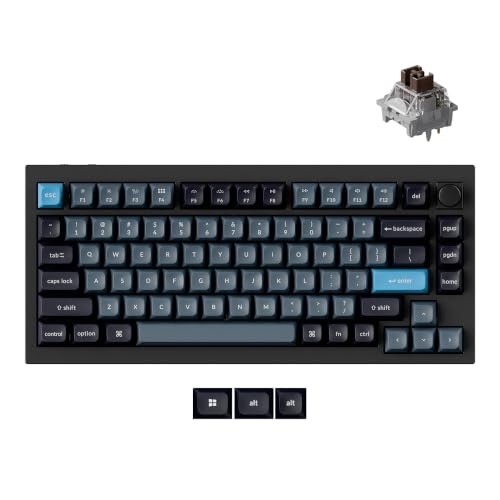
Disclosure: As an Amazon Associate, reviewstook.com earns from qualifying purchases. Links on this page are affiliate links; they cost you nothing extra. Prices and availability change often, so check the current Amazon listing before you buy.
This keychron q2 pro review the perfect daily driver examines the 65 percent aluminium board that a generation of desk workers adopted as their one keyboard for everything, and it begins with a disclosure about its own links: there are none. No current listing we can verify corresponds to the Q2 Pro itself, so this page is prose-only by design. The wired Keychron Q2, a different and lesser-connected model, is discussed by name where the comparison matters, but it is never linked or presented as the Pro. What follows is the full review the keyboard deserves, with buying guidance for finding a genuine Q2 Pro through channels whose stock rotates.
The daily driver framing is the right one for this board. A daily driver is not the fastest, the lightest, or the most specialised tool; it is the one that handles the whole of an ordinary day, work, messages, a little play, without asking to be swapped for a specialist at any point. The Q2 Pro earned that title by combining the Q line’s aluminium gasket-mounted build with Bluetooth wireless in a 65 percent footprint that leaves a desk feeling twice its size.
Key takeaways
- The Q2 Pro is a 65 percent, full-aluminium, gasket-mounted keyboard with hot-swappable switches, PBT keycaps, a rotary knob, and Bluetooth plus wired connections.
- Its layout keeps dedicated arrow keys and surrenders the function row to a layer, the defining 65 percent compromise.
- It is a daily driver because it covers work, communication, and casual play at one desk without specialisation or fuss.
- No verified listing is linked on this page; the wired Q2 is a different model and is not a substitute wearing the Pro name.
- Weight is substantial for its size. This is a desk anchor in a compact shape, not a travel board.
In this guide
Why this page has no purchase links
Our linking rule is simple: a product is linked only when a current listing has been verified as that exact product. The Q2 Pro fails that test today, not because it does not exist, but because the listings our verification can reach under its name resolve to the wired Q2, which lacks the Pro’s Bluetooth and is a materially different keyboard. Linking it would be a small fraud on the reader, repeated at scale. So the review stands on its prose, the buying guide below explains how to identify a genuine Q2 Pro wherever you shop, and the comparisons to its siblings are written so they remain useful when stock returns.
The board itself: build and typing feel
The Q2 Pro applies the Q formula at its most concentrated. The case is milled aluminium with the line’s double-gasket mounting, so the plate floats and the bottom of each keystroke lands softly, with a low, muted sound that suits shared rooms and late nights. At 65 percent the case is small, but the material makes it dense: the board sits on a desk like it was poured there, and that planted stability is a large part of its daily-driver charm. Nothing drifts, nothing rattles, and the morning’s first keystroke feels like the thousandth.
Switch choice on the Pro spans the family’s usual personalities, with tactile configurations the common default for its working audience. Hot-swappable sockets mean the choice is a beginning rather than a destiny, and owners commonly experiment within the first year as their taste sharpens. The stock PBT keycaps resist shine and carry crisp legends, and the knob, where your finger expects it at the corner, turns with a detented precision that invites remapping to volume, zoom, or timeline duty.
The layout is the 65 percent argument in aluminium. Arrow keys are present and dedicated, which is why this format, and not the smaller 60 percent, became the compact daily standard. The function row lives on the number row through the fn layer, media and navigation keys join it there, and the learning curve is a week of occasional pauses rather than a course of study. Writers who live on F-keys for their software should weigh that layer honestly; everyone else discovers, usually by day three, that their hands have quietly memorised the two combinations they actually use.
Wireless manners and the daily routine
The Pro’s Bluetooth is the feature that separates it from the wired Q2, and in daily-driver terms it is transformative rather than incremental. The board pairs with multiple machines and swaps between them cleanly, so a work laptop and a home computer can share one keyboard across one desk, and the cable comes out only for charging or for the gaming sessions where a wired link is preferred. Wake behaviour is prompt, pairing is stable, and the whole wireless layer behaves with the unremarkable reliability that a daily tool requires.
Battery life follows the class pattern: backlight discipline sets the interval, with modest lighting stretching charges across working weeks and bright lighting shortening them. The board charges over USB-C, the same port it types through wired, so the charging cable is never a special artefact. Owners who adopt a weekly top-up rhythm report that the battery simply leaves their attention, which is the correct fate for a battery in a tool with this job description.
Remapping completes the daily-driver case. The Q2 Pro’s support for deep, on-board customisation means the layer system can be shaped to your software rather than endured as shipped: put your navigation where your fingers look for it, give the knob the control your applications beg for, and store a couple of text expansions for the phrases your job makes you type daily. A board configured this way stops being a product and becomes an appliance in the best sense, fitted to one person’s day.
Buying guide: finding a genuine Q2 Pro
Because this page links nothing, its buying guide is an identification guide, and the first rule is to read model names like contracts. The product you want says Q2 Pro, in full, in the listing title and on the board’s underside label. A listing titled Q2 without the suffix is the wired model, whatever the photographs suggest, and a listing that buries the suffix in a pile of keywords deserves your suspicion rather than your money. Check, in order: the full model name, the connection line, which must include Bluetooth, the switch configuration, and the knob’s presence.
Second, use the connection test as your authenticity sieve. The Pro’s defining hardware is its wireless; any Q2 offered without Bluetooth is not a Pro, at any price, in any colour. Sellers occasionally describe the wired board with the family’s general marketing language, and the connection line is where that description either survives or collapses. It takes ten seconds to check and it prevents the single most common disappointment attached to this model’s name.
Third, shop where verification is possible. The manufacturer’s own store, authorised retailers, and established marketplaces with real returns policies are the sensible channels for a board whose listings are this confusable. On the used market, ask for the underside label photograph and a short video of the board pairing over Bluetooth; a genuine Pro demonstrates both in a minute, and a seller who cannot produce them is telling you something worth hearing.
Fourth, set your price expectations by tier rather than by hope. The Q2 Pro is a premium aluminium board, positioned qualitatively in the upper tier of ready-made keyboards, above its wired sibling and above the brand’s plastic lines. A listing priced like a budget board is not a bargain; it is a different product wearing a borrowed name. Paying the model’s honest tier, through a channel with returns, is cheaper in the end than the education the alternative provides.
How to set up a Q2 Pro as a true daily driver
Begin with placement and posture, because a dense aluminium board rewards a deliberate desk. Pull it close, set the chair so your forearms float level, and give the mouse the generous territory the 65 percent footprint has just returned to you. That territory is the layout’s ergonomic dividend: the mouse hand works nearer the body’s centre, and shoulders notice the difference across a week.
Then pair deliberately. Assign the Bluetooth slots in a fixed order, main machine first, and practise the swap until it is reflexive. Set the layout toggle for your primary system, confirm the modifier legends match your habits with the included keycaps, and cable the board for its first full charge so the wireless routine starts from a full battery and a clean slate.
Configuration comes third, after a few days of stock typing have shown your hands what to ask for. Remap the layer so your most-used navigation and media controls sit where your fingers searched for them, assign the knob to your day’s most-touched continuous control, and consider one text expansion for the phrase your job types most. Keep the changes few and personal; a daily driver is configured by accretion, not by importing a stranger’s layout wholesale.
Maintenance is the final habit, and it is light. A weekly wipe, a monthly crumb shake-out, caps pulled and cleaned when they ask for it, and stabiliser care by the book if the space bar ever develops a tick; our walkthrough of stabiliser installation for space bars and larger keys covers that hardware patiently. Aluminium and PBT ask little and give years, which is the maintenance profile a daily driver is supposed to have.
Common mistakes around this model
Buying the wired Q2 by accident is the first and, for this model, the defining mistake; the buying guide above exists to prevent it, and the ten-second connection check is the whole vaccine. The second mistake is expecting a 65 percent board to behave like a tenkeyless: the function row is a layer here, and software that leans on F-keys will make you fluent in that layer or frustrated by it. Know your software before you commit to the footprint.
The third mistake is judging the board’s weight as a flaw rather than a premise. The Q2 Pro is heavy because aluminium and gaskets are heavy, and that mass is its stability and its sound. Buyers who need a board to travel should not negotiate with physics; the slim boards in our Keychron K3 ultra-slim review exist for their lives. The fourth mistake is leaving the board unconfigured and then rating it as ordinary: a daily driver’s magic is substantially in its remapping, and the stock layout is merely the first draft of your keyboard.
The Q2 Pro among its siblings
Within the Q line, the Q2 Pro is the compact wireless point of balance, and our Keychron Q series guide maps the whole family by size. Step up to the Q1 Pro and you gain a physical function row at the cost of desk width; step sideways to the wired Q2 and you lose the wireless that makes the Pro a daily driver rather than a desk fixture. Against the brand’s value lines, the Pro’s premium buys the aluminium gasket feel and the build longevity this review has described; against gaming-first boards, it trades latency specialisation for typing excellence and accepts the trade openly.
That openness is, in the end, the board’s character. It does not pretend to be a travel keyboard, a gaming weapon, or a budget miracle. It claims one job, the whole working day at one desk, wirelessly, beautifully, and it performs that job at a standard that made its name a search term. Daily drivers are not the products that win comparison charts; they are the products that win years, and the Q2 Pro has been winning them since it arrived.
A day in the life the board was built for
The morning starts with the board waking the work laptop over Bluetooth, the knob taking the volume of the first call, and a document taking shape under switches chosen for exactly this: tactile, defined, quiet enough that the call’s other end hears words rather than typing. Midday swaps the board, with one shortcut, to a home machine for messages and a personal project, then back again without a cable being touched or a setting being opened. The afternoon’s spreadsheet work leans on the layer for navigation, by now unconsciously, and the evening ends with the cable in for a charge and a wired game, casual and unhurried.
Nothing in that day is spectacular, and that is the point the daily-driver title makes. Each individual task could be served slightly better by a specialist: a bigger board for the spreadsheet, a faster board for the game, a lighter board for the sofa. The Q2 Pro’s claim is that the day as a whole is served best by the board that never has to be swapped, carried, or apologised for, and that claim survives contact with real routines better than most product claims do.
Sound, space, and the small desk renaissance
The board’s sound deserves its sentence in any complete review: a low, soft clack with the gasket’s cushion audible in it, civilised at full typing speed, and easily softened further by a desk mat. Its footprint deserves a paragraph. A 65 percent board returns a startling amount of desk to its owner, enough for a notebook to live open beside the mouse, for a coffee to sit safely out of the splash zone of the keys, for the desk to read as a workspace rather than as keyboard storage. Small-desk households and studio apartments have built their setups around exactly this return, and the Q2 Pro, dense and deliberate, anchors those setups like a much larger object.
Owners pairing the board with a substantial pointing device report the combination feels balanced in a way a featherweight keyboard never quite achieves; our Kensington Expert trackball review covers the classic stationary option for readers building that kind of desk. The theme across all these pairings is permanence chosen on purpose: fewer, better objects, each earning its square of desk.
The layer system, taught properly
Since the 65 percent layout lives or dies by its layers, this review will teach the idea plainly for readers meeting it first here. A layer is a second meaning for the keys, available while a designated fn key is held, printed on the keycaps or documented in the manual. On the Q2 Pro the number row becomes the function row under fn, and a cluster of letter keys becomes navigation and media controls. The mental model is the shift key, generalised: just as shift turns letters into capitals and digits into symbols, fn turns the board into its own larger sibling for as long as your finger rests there.
Fluency arrives in a predictable order. The media controls are learned first, because volume is touched hourly. The function keys follow, at the speed your software demands them. Navigation, home, end, page movement, is learned last and most personally, because every typist’s document habits differ. The board’s remapping lets you move any of these to where your fingers first looked for them, which converts the layer from a manufacturer’s compromise into your own shorthand. Owners who do that one configuration pass stop describing the layout as a compromise at all.
It is worth adding that the layer habit, once learned, is portable across the whole compact-keyboard world. The Q2 Pro is an excellent teacher because its legends are clear and its defaults are sane, so the skill you build on it is an asset that survives the board itself. Few purchases teach their owners a transferable skill as a side effect; typists underrate this one because it feels, after a month, like something they always knew.
Ergonomics of the compact daily driver
The ergonomic story of a 65 percent board is mostly a story about the mouse. By surrendering the number pad and the navigation cluster’s width, the Q2 Pro lets the pointing hand work close to the body’s midline, and shoulders kept nearer neutral across a working week are shoulders that complain less. The keyboard’s own height is the tall-board story told elsewhere in this cluster: chair set so forearms float level, wrists resting only between bursts of typing, and the gasket’s softness absorbing the day’s landings.
Compactness has one ergonomic cost to manage honestly: the layer system adds occasional two-key chords for navigation, and a user with limited finger mobility may find dedicated keys kinder than chords. For that user a larger Q model or a tenkeyless board is the thoughtful recommendation, and this review makes it without hedging. Ergonomics is the discipline of matching tools to bodies, and the Q2 Pro’s body of evidence suits the broad middle of typists superbly while pointing a minority, clearly, elsewhere.
Longevity: the five-year daily driver
A daily driver’s real specification is its fifth year, and the Q2 Pro’s materials argue well for it. Aluminium does not yellow or crack; PBT does not shine into illegibility; replaceable switches mean the moving parts are renewable; and the remapping keeps the layout current as software changes around it. The battery will be the first component to show its age, and even that decline is graceful, a shortening interval rather than a failure. Boards built this way tend to be retired by curiosity rather than by breakdown, and their used market stays liquid for the same reason.
Buyers planning that horizon should favour channels with proper warranty support and keep the board’s box and cable, the small rituals that make any future claim or resale painless. The used buyer, in turn, should run the identification checks from the buying guide, test every key and the knob, confirm the Bluetooth pairing with their own machine if the seller permits, and pay for condition rather than for hope. A five-year tool deserves five minutes of method at the handover.
Who, precisely, should insist on the Pro
Insistence is the right posture for a specific reader, so let this section name them. The two-computer household, where one desk serves a work laptop and a personal machine, should insist on the Pro, because its Bluetooth swapping is the feature their whole routine will lean on. The tidy-desk devotee, for whom a permanent cable is a daily visual tax, should insist for the same reason. The long-horizon buyer, who keeps a keyboard for five years and wants the complete version of the design rather than its wired sketch, should insist most of all.
Conversely, the single-computer, single-desk buyer who will cable the board on day one and never move it can take the wired Q2 with this review’s blessing and spend the difference on a mat and a rest. Advice that cannot tell you when not to buy the subject is advertising; the Pro’s premium is wireless, and wireless you will never use is the one feature no review should sell you.
The knob in daily service
Daily-driver reviews should sweat the knob, because on this board it graduates from novelty to colleague within a month. Volume is its day job, and it does it with a tactility that on-screen sliders cannot imitate. Its evening work, after remapping, is where owners get personal: zoom for the photo hobbyist, scrubbing for the podcast editor, scrolling for the researcher reading long documents. The knob’s lesson is the board’s lesson in miniature: a small, well-made control, assigned to your actual habits, outperforms a panel of features assigned to nobody’s.
If your day contains no continuous variable worth a dial, the knob will remain a handsome volume control, and that is a perfectly honourable career for it. The board does not need the knob to justify itself; the knob simply rewards the owners whose software gives it something to say.
What daily driver does not mean
The title deserves one clarifying pass, because daily driver is sometimes misread as a consolation prize, the board for people who could not decide. It means nearly the opposite. A daily driver is the product of a decision: the recognition that most days are ordinary days, that ordinary days are where life is actually lived, and that a tool optimised for the whole of them beats a stable of specialists each waiting for its occasion. The Q2 Pro’s design choices all point at that recognition, the complete-enough layout, the forgiving wireless, the build that asks nothing, the size that fits the desk that exists rather than the desk in a catalogue photograph.
Readers whose days are genuinely specialised, the tournament player, the travelling consultant, the data-entry professional, should not let the phrase seduce them away from their specialists. This review has pointed each of those readers to their better tool in its sibling coverage. The daily driver’s crown is for the broad middle of working life, and it is a crown the Q2 Pro wears on the evidence of years of mornings exactly like the one described above.
Stock, patience, and the ethics of waiting
A practical closing note for a prose-only review: premium models in this line move through stock cycles, and the Pro’s absence from verifiable listings at the time of writing is a market condition, not a verdict on the product. Readers who have decided on the board have two honourable options: buy through the manufacturer’s own channel or an authorised retailer when stock is present there, with the identification checks in hand, or buy the wired sibling knowingly, as a wired board, if their desk truly never needs wireless. The dishonourable option, the one this page exists to prevent, is the accidental purchase, the wired board in Pro clothing at a Pro price.
Patience, in this market, is usually rewarded within a restock cycle, and a keyboard is a five-year companion; a few weeks of waiting for the correct model is a rounding error in that companionship. Set a stock alert with a retailer you trust, keep the identification checklist beside it, and let the right board come to you under its right name.
There is a broader lesson in this model’s listing troubles that serves buyers well beyond one keyboard. Premium product families reuse names the way car makers reuse model badges, and the suffix is where the specification hides. Pro, Max, Ultra, HE: each suffix in this brand’s catalogue is a different machine wearing a familiar face. The reader who learns to shop by suffix, verifying the connection and the switch technology rather than the silhouette, will never be the cautionary tale in someone else’s review. This page has spent its length teaching that habit on one example; the habit itself is the durable takeaway.
And for the reader who does everything right and lands the genuine board: expect the unglamorous delight this review has described, a keyboard that improves ordinary days in small denominations, compounded daily. That is what the phrase in the keyword promises, and it is, on the evidence, a promise the product keeps.
The desk after the Q2 Pro arrives
Owners consistently report a secondary effect that no specification predicts: the desk gets tidier and stays that way. A beautiful, compact, wireless board makes the surrounding compromises visible, the tired mat, the cable nest, the monitor at a apologetic height, and one improvement invites the next until the workstation matches the keyboard. Reviewers call this the halo effect of a hero product, and it is real enough that we advise budgeting for the mat and the cable tidy at the same checkout, because you will buy them within the month anyway, at retail, with shipping.
The same effect explains part of the board’s gift history. A Q2 Pro given to a home worker upgrades their whole desk by example, which is a larger gift than a keyboard. If you are buying for someone else, the tactile configuration and a note about the layer system, two lines, handwritten, will carry them over the first week’s only hurdle. After that the board teaches itself, as daily drivers do.
A word on colour, finish, and living with aluminium
The Q2 Pro’s finishes are the line’s sober palette, greys and blacks with the occasional bolder run, and the anodised surface wears its years gracefully, developing the faintest personal polish where palms brush the front edge. Owners who choose the lighter finishes should know they show desk dust sooner and clean just as easily; owners who choose black should know it shows keycap legends beautifully under the backlight. None of this is specification, and all of it is the texture of living with an object daily, which is the register this entire review has argued matters most for a daily driver.
Backlighting on the Pro is a working tool in dim rooms and a modest pleasure otherwise, with the usual battery arithmetic applying: brightness is spending. Run it as a tool and the board’s wireless endurance will match the rhythm described earlier; run it as décor and the cable will visit more often, which some owners happily accept as the price of a beautiful desk after dark.
So the Pro leaves this review with its title intact and its listing situation explained, which is the most an honest page can do for a keyboard it admires. When you find it under its full name, with its Bluetooth line intact, you will know it is the board this review has been describing all along, and the description will, we are confident, prove conservative.
Switch personalities on the Pro, and how to choose without a shop
Most Q2 Pro buyers order without ever touching the board, so the switch decision deserves a method rather than a shrug. Begin with your room: a shared or recorded space rules the clicky configurations out before any other consideration speaks, and that single filter settles the question for a large share of buyers. Continue with your hands: if your typing is light and glancing, a linear switch will feel like speed; if your typing is deliberate and you like confirmation, a tactile switch will feel like accuracy. Conclude with your evenings: gaming favours the linear’s clean repetition, while long-form writing favours the tactile’s pacing. The configuration that survives all three filters is your configuration, and the board’s hot-swap sockets stand behind the decision as insurance, ready to convert it the day your hands file a dissent.
That insurance changes the psychology of the purchase in a way worth naming. On a soldered board, switch choice is a marriage; on the Q2 Pro it is a first draft. Buyers deliberate less, choose more honestly, and correct more cheaply, and the board accumulates, across its life, exactly the feel its owner converged on rather than the feel a listing happened to carry. Premium pricing buys many things across this line, but this particular forgiveness may be the most used of all.
Comparing the daily driver with the gaming-board temptation
Many readers arrive at this review cross-shopping a gaming keyboard with faster wireless and brighter marketing, so the comparison should be made fairly. A gaming board optimises the evening: latency, polling, rapid actuation, software aimed at play. The Q2 Pro optimises the day: feel, sound, build, remapping aimed at work, with gaming as a welcome guest rather than the host. If your schedule is four hours of work and four of play, the honest answer may be the gaming board, or the Q1 Max and HE from our sibling coverage, which split the difference inside this family. If your schedule is eight hours of work and an hour of play, the daily driver’s arithmetic is overwhelming, and it is not close.
The mistake to avoid is buying the gaming board for a working life and spending eight hours a day on a tool tuned for the ninth. Tools shape the hours they dominate; choose the tool whose tuning matches your dominant hours, and let the minority hours adapt, as they easily do. That principle, applied consistently, would empty more returns queues than any specification ever printed.
The second-desk effect: why owners buy the ecosystem next
A final ownership pattern is worth recording because it predicts satisfaction better than any benchmark. Q2 Pro owners, a year in, disproportionately standardise: the same board, or its Q1 sibling, appears on the household’s second desk, the partner’s desk, the office desk. Standardisation is the sincerest form of product satisfaction, because it is paid for rather than posted. It happens when a tool’s learning costs have been fully amortised and its behaviour is known to the last shortcut, and re-buying that knowledge for a second location is worth more than a stranger’s newer specification.
If you are buying your first premium board, that pattern is the review’s most useful data point. Products that get standardised on are products whose ownership experience survives the novelty quarter and the configuration honeymoon and the first minor annoyance, and emerges as infrastructure. The Q2 Pro’s aluminium, its wireless manners, and its forgiving configurability are precisely the traits infrastructure is made of. Buy it as infrastructure, under its correct name, and it will behave as infrastructure should: invisibly, reliably, for years.
Infrastructure is an unromantic word to end a review on, and it is the right one. Romance in keyboards belongs to the first week; infrastructure is what the following two hundred and fifty weeks are made of. The Q2 Pro was built, quite deliberately, for the two hundred and fifty, and this page’s refusal to link a lesser model in its name is, in the end, the same deliberateness, practised by a review instead of a manufacturer.
Acceptance checklist for the day it arrives
When your genuine Q2 Pro does arrive, from whichever channel, run the acceptance routine this cluster of reviews applies to every premium board, with two Pro-specific additions. Test every key on a test page, the space bar at its extremes included. Turn and press the knob. Pair each Bluetooth slot in turn and swap between them until the shortcut is boring, because boring is what reliable feels like up close. Toggle the layout switch and confirm your modifiers. Then, the Pro-specific checks: confirm the board presents itself to your computer under its full model name, and confirm the wireless holds across a room’s ordinary distance with the door closed. Anything that fails belongs in a conversation with the seller inside the returns window; everything that passes predicts, on this model’s record, years of the routine described in these pages.
Keep the box until that routine is done, file the receipt where your future self files such things, and then forget the purchase entirely, which is the fate the board was designed for and the highest compliment a daily driver can be paid.
For readers arriving from the K line
Upgraders from the brand’s K-series boards will find the Q2 Pro a familiar country with better architecture. The layout logic, the dual-system courtesy, and the general honesty of the thing carry over; what changes is the ground under the keys, aluminium instead of plastic, a gasket’s give instead of a plate’s rigidity, and a silence that makes the old board sound chatty by memory. The upgrade is felt in the first paragraph typed and confirmed in the first quiet room. What does not change is the brand’s habit of including what you need in the box, which is why so many of its customers climb its catalogue instead of leaving it.
Climb with confidence, then, but climb to the right landing: the Pro, by its full name, with its wireless intact, or knowingly to the wired board as a wired board. The catalogue rewards readers, and this review has done its best to make you one.
The verdict on the title itself
Perfect is a word reviews should spend carefully, and the keyword spends it in its title, so the review owes the word a judgement. The Q2 Pro is not a perfect keyboard; no keyboard is, and this one carries named limitations in weight, in wireless specialisation, and in its layered function row. What the title means, charitably and accurately, is perfect for a purpose: the ordinary working day, at a settled desk, across more than one machine, for a typist who values feel and permanence over novelty. For that purpose the board’s fit is close enough to perfection that the word survives scrutiny, provided the reader supplies the purpose as diligently as this review has supplied the evidence.
Supply it, insist on the genuine article, and the daily driver will do the rest, morning after morning, in the unshowy way that made its reputation.
One more desk: the student of the craft
Writers in training, students of journalism, of code, of any keyboard craft, form a quiet constituency for this board, because a daily driver doubles as a teacher. The tactile switches pace the novice’s keystrokes, the remapping rewards the first experiments in workflow design, and the build quality removes equipment from the list of things a beginner must wonder about. A student who learns their craft on a board like this is learning on a stable instrument, and stable instruments are how crafts are actually acquired. If the budget stretches, the stretch is defensible in exactly those terms; if it does not, the wired sibling teaches the same lessons with a cable.
Teaching, standardising, presiding, disappearing into the work: the board collects roles the way good tools do, by being present for all of them without auditioning for any.
Closing note on this page’s unusual shape
Most reviews on this site end with a button. This one ends with a checklist and a compliment, and the difference is deliberate enough to deserve a closing explanation. A review’s first loyalty is to the reader’s next decision, and where the honest link does not exist, the honest review says so and equips the reader instead. The Q2 Pro is good enough to survive that honesty, which is, when you think about it, the strongest recommendation in these pages: a product we praise at length while selling you nothing at all.
When its listing can be verified again, this page will say so plainly and link it in the usual place. Until then, the checklist above is the link, and it points, as all good checklists do, at the genuine article.
Buy the genuine article, whenever and wherever you find it, and this review’s work is done.
A short glossary for first-time premium buyers
Because this model attracts first-time premium buyers, a compact glossary earns its place. Gasket mount: the plate holding the switches is suspended on soft strips, so keystrokes land with a cushioned give. Hot-swappable: switches can be pulled and replaced without soldering. PBT: a durable keycap plastic that resists the shine and wear that cheaper caps develop. Layer: a second set of key meanings available while a function key is held. QMK: the open firmware foundation that makes the board’s deep remapping possible. Each term names something you can feel or use within the first week, which is why this review has used them without apology and defines them without condescension.
Armed with the glossary, the checklist, and the review, you are unusually well prepared for a keyboard purchase, which is exactly the state this page intended to leave you in.
Prepared buyers make satisfied owners, and satisfied owners are the only advertising this board has ever really needed.
The last consideration: your future desk
Buy for the desk you will have next year as well as the one in front of you. If a second machine, a larger monitor, or a move to a smaller home is on your horizon, the Pro’s wireless flexibility and compact footprint age into those futures gracefully, which is more than can be said for most electronics. A daily driver earns the title partly by surviving its owner’s changes of circumstance, and the Q2 Pro’s combination of size, connection, and configurability is unusually change-proof. That, perhaps, is the deepest sense in which the keyword’s promise holds: not that the board is perfect, but that it keeps fitting, year after year, as the life around it rearranges itself.
Fitting, in the end, is the whole review in one word.
Fit your desk, fit your machines, fit your hands, and the board will take care of the decade.
That is a large promise for sixty-five percent of a keyboard to carry, and the Q2 Pro carries it the way it carries everything else: quietly, heavily, and without complaint.
Insist on the genuine article, and it will insist, in return, on nothing at all, which is the daily driver’s whole charm.
Postscript: what to read next
Readers whose layout thinking is still open should walk the family in our series guide before deciding, and readers whose hearts are set on sixty-five percent with full wireless certainty today can examine the Q1 family’s alternatives in our Q1 Pro review, where the same aluminium virtues arrive with a function row attached. Either path keeps you inside a catalogue that has earned its readers’ trust the slow way, and either ends, as this review does, with a board that will outlast the deliberation that chose it.
Outlasting deliberation, and outlasting trends, is the aluminium promise in one line, and the Q2 Pro is that promise at its most portable size that still deserves the word board.
Choose it under its true name, and the next several years of typing are settled business.
Settled business is an underrated pleasure in a market addicted to launches, and it is the pleasure this board specialises in.
Specialists in settled business are rare in any category; in keyboards, this is the one the search term remembers.
Remember it by its full name, and it will remember your machines, your layout, and your habits in return.
That reciprocity, a tool that remembers you back, is as close to perfect as daily equipment gets.
Close enough, this review concludes, to keep the title.
Keep it honestly, by buying the board the title belongs to.
The board, the title, and the reader all deserve that much accuracy.
Accuracy, patience, and aluminium: an unlikely motto, and an effective one.
Apply all three, and the daily driver is yours.
Yours for the mornings, the deadlines, and the quiet evenings alike.
That was always the offer.
Accept it on the terms this page has laid out, and it will not be withdrawn.
Terms, as ever, are the product.
Final recommendation
The Keychron Q2 Pro deserves its daily-driver reputation, and this review recommends it in prose with the same confidence it would express with a link: if your desk is settled, your work is typing-centred, your machines are more than one, and your taste runs to objects that feel permanent, it is one of the finest compact keyboards its generation produced. Buy it by its full name, verify the Bluetooth in the listing, choose the tactile configuration unless your room or your games argue otherwise, and configure it across its first fortnight. Just do not let anyone sell you the wired Q2 in its clothing; the Pro’s wireless soul is the product, and the product is worth insisting on.
Frequently asked questions
What is the difference between the Keychron Q2 and the Q2 Pro?
Connection and name. The Q2 is the wired model; the Q2 Pro adds Bluetooth wireless to the same aluminium, gasket-mounted 65 percent formula. They are different products, and a listing for one is not a listing for the other. This page reviews the Pro and deliberately links neither, because no Pro listing could be verified at the time of writing.
Is the Q2 Pro good for gaming?
For casual and single-player gaming it is a pleasure, and wired it is responsive enough for most players. Competitive wireless play is not its brief, since its wireless is Bluetooth rather than a low-latency receiver. Players who need that should look at gaming-first boards or the magnetic models in the wider Q family.
Does the Q2 Pro have a function row?
Not as physical keys. At 65 percent, the function row lives on a layer over the number row, alongside media and navigation controls. Most users internalise the combinations they need within a week. If your software leans heavily on F-keys all day, the Q1 Pro’s physical row will suit you better.
Can I change the Q2 Pro switches?
Yes, the board is hot-swappable, so switches can be exchanged without soldering as taste or wear dictates. That flexibility is part of the daily-driver proposition: the board adapts to its owner over years instead of asking to be replaced when preferences change.
How heavy is the Q2 Pro for a 65 percent keyboard?
Heavy for its size, because the case is aluminium rather than plastic. On a desk that mass is stability and a quieter, softer sound. In a bag it is a burden. The board was designed as a fixture, and it should be bought as one; travellers are better served by the low-profile boards in our low-profile mechanical keyboards roundup.
Why are there no purchase links in this review?
Because the only Q2 listings our verification could reach are for the wired Q2, a different model, and linking it as the Pro would mislead you. The review’s buying guide explains how to identify a genuine Q2 Pro by its full name and its Bluetooth specification wherever you choose to shop. Readers comparing the wider family can start with our Keychron Q1 Pro review.


