Disclosure: As an Amazon Associate, reviewstook.com earns from qualifying purchases. Links on this page are affiliate links; they cost you nothing extra. Prices and availability change often, so check the current Amazon listing before you buy.
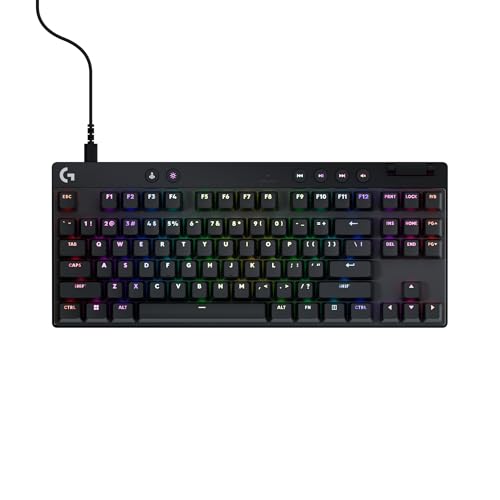
The Logitech g pro x tkl rapid is the keyboard that tells you exactly who Logitech built it for, starting with what it leaves out. There is no wireless radio, no battery, no Bluetooth multipoint and no media dial competing for space on the frame. Instead, every design decision points at one job: registering keystrokes as early and as repeatably as physics and firmware allow, for players whose games are decided by counter-strafes, jiggle peeks and ability cancels measured in single frames. Its magnetic analog switches read how far each key has travelled rather than simply whether it crossed a fixed contact, and that single sensing change unlocks the two features that define this board — adjustable actuation points and rapid trigger, where a key resets the instant it starts rising instead of waiting to pass a fixed reset point on the way back up.
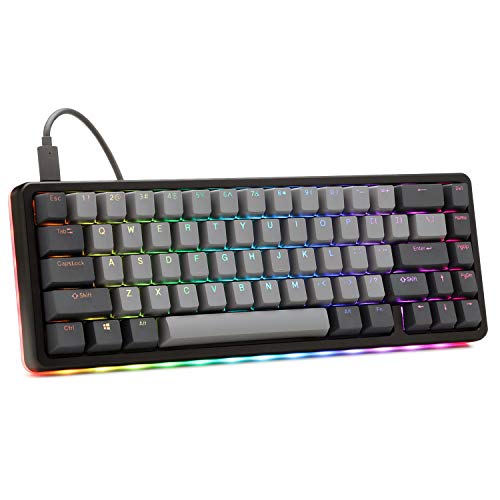
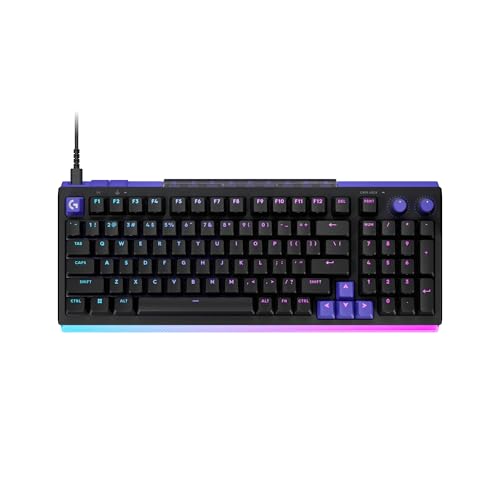
That makes this a narrower recommendation than Logitech’s mainstream boards, and this review treats it that way. If you play tactical shooters or fast movement titles competitively, the Rapid is arguably the most focused tool Logitech has ever sold, and the analysis below explains precisely which of its features will change your game and which are spec-sheet decoration. If you mostly type, browse and play slower games, the honest answer may be one of the alternatives reviewed alongside it: Glorious’s GMMK 3 Pro HE, which wraps similar Hall effect technology in a customisable aluminium hobbyist chassis, or Logitech’s own G512 X, a 98-layout board that keeps rapid trigger but adds hot-swappable mechanical switches and a number row arrangement many desk workers prefer. All three were verified against Amazon’s catalogue data for this review, and each earns its place for a different kind of buyer.
Key takeaways
- Rapid trigger is the real product here: keys reset on the upstroke the moment travel reverses, which makes repeated strafing inputs feel immediate in a way fixed-reset mechanical switches cannot match.
- Actuation is adjustable per key in Logitech G Hub, so movement keys can sit hair-trigger shallow while rarely used ability keys sit deep enough to avoid accidents.
- The board is wired only, by design. Tournament rules, desk permanence and zero battery anxiety are the upside; couch play and cable-free desks are off the table.
- Players who want the same sensing technology with a metal case, gasket mount and hobbyist tuning should look hard at the GMMK 3 Pro HE before spending.
- Typing feel is competent rather than luxurious — the Rapid’s switches are tuned for speed, and long-form writers may prefer a softer, deeper board.
In this guide
Brief verdict on the G Pro X TKL Rapid
For a competitive FPS player who already sits at a wired desk, this is an easy recommendation: the combination of magnetic analog sensing, rapid trigger and per-key actuation inside a compact tenkeyless frame is exactly the toolkit that high-level movement play rewards, and Logitech’s G Hub software remains the most polished place to configure it. The keyboard’s compromises are equally clear. It costs flagship money for a wired-only product, its keycaps and case do not feel as premium as aluminium rivals at similar prices, and nothing about it courts the custom-keyboard hobbyist — the switches are not hot-swappable in the conventional sense because the analog sensing is the switch. Buy it as an instrument, not as a hobby project, and it will not disappoint. Readers still deciding between sensing technologies will find the comparison sections below more useful than any single score, because the right answer depends on how much of your week is spent in ranked lobbies versus documents.
How the comparison set was chosen
Three keyboards appear in the detailed reviews, and each represents a distinct philosophy. The G Pro X TKL Rapid is the subject: Logitech’s pro-circuit answer to the Hall effect wave that independent brands started. The GMMK 3 Pro HE is the hobbyist counter-argument — a CNC aluminium, gasket-mounted 75% board with rapid trigger and 8K polling that treats the case, the sound and the modding path as part of the product. The G512 X is the pragmatist’s option from inside Logitech’s own catalogue: a 98% layout with rapid trigger on a bank of TMR switches plus conventional hot-swappable mechanical switches elsewhere, for buyers who want speed features without surrendering the numpad-adjacent cluster or the ability to swap switches. Every product named as a pick below links to a listing whose identity was confirmed through the Creators API data for this site on 2026-11-24, and the exact catalogue titles are recorded in the sources file that accompanies this article. Products that could not be confirmed that way are discussed in words only, without links.
Detailed reviews

Logitech G Pro X TKL Rapid — the competitive instrument
Badge: Best for ranked FPS play
- Layout: tenkeyless, wired USB-C
- Switches: magnetic analog (Hall effect), factory fitted
- Features: rapid trigger, per-key adjustable actuation, LIGHTSYNC RGB
- Software: Logitech G Hub
- Keycaps: double-shot PBT
Start with the sensation that sells this keyboard: a counter-strafe in Counter-Strike 2 or Valorant where the A key releases and the D key fires in such quick succession that your character stops dead instead of sliding. On a conventional mechanical board, each key must travel back up past its reset point before it can register again, and that dead travel is small but real. Rapid trigger removes it. The switch watches travel direction continuously, so the instant your finger begins to lift, the key deactivates, and the instant you press again it reactivates from whatever depth it currently occupies. After an hour of deathmatch the difference stops feeling like a feature and starts feeling like the absence of a delay you had trained yourself to ignore. Logitech’s implementation lets you set the reset sensitivity in G Hub, and the sane starting point is a moderately aggressive setting on the four movement keys only, leaving the rest of the board behaving conventionally so your typing does not turn into a stutter of accidental repeats.
Adjustable actuation is the second half of the trick. Movement keys can be set to fire after a whisper of travel, which pairs naturally with rapid trigger for strafing, while keys like your ultimate ability or your push-to-talk can be sunk deep so a resting finger never triggers them mid-round. G Hub exposes this per key, stores profiles on the board, and handles the SOCD-style key priority behaviour that movement players use to make opposing directional inputs resolve predictably. The tenkeyless shell is compact without feeling cramped, the PBT caps resist shine, and the detachable cable and carrying case acknowledge that this board is expected to travel to LANs. Where it falls short is tactility and theatre: the linear magnetic switches feel smooth but plain, the case is plastic where rivals at this price machine aluminium, and there is no wireless fallback for the days you would rather work from the sofa. None of that matters in a ranked match, and all of it matters the other six days of the week — which is precisely the judgement this purchase asks you to make.
Strengths
- Rapid trigger and per-key actuation genuinely change high-speed movement play
- G Hub configuration is deep, stable and stored on-board for tournament PCs
- Compact TKL footprint leaves generous mousing room for low-sensitivity aim
Trade-offs
- Wired only, with no wireless or Bluetooth fallback at any price
- Plastic case and plain linear feel trail aluminium rivals for desk appeal
- Analog switches are not hot-swappable; the sensing system is the switch
Best for: competitive FPS and movement-game players with a permanent wired desk. Not suited for: wireless minimalists, custom-keyboard hobbyists, or anyone who wants one board for desk and couch.

Glorious GMMK 3 Pro HE — rapid trigger in a machined aluminium case
Badge: Best for hobbyists who also compete
- Layout: 75%, wired (a wireless variant exists in the same line)
- Switches: Hall effect magnetic, hot-swappable sockets
- Features: rapid trigger, 8K polling, modular gasket system
- Case: CNC machined aluminium
- Software: Glorious CORE
Glorious looked at the same Hall effect opportunity as Logitech and reached the opposite conclusion about what surrounds the switches. Where the Rapid is a sealed instrument, the GMMK 3 Pro HE is a platform: a heavy CNC aluminium case, a modular gasket mounting system you can firm up or soften, hot-swap sockets that accept other magnetic switches, and a knob and 75% layout that acknowledge the board will spend its evenings in documents as happily as in deathmatches. Its rapid trigger implementation and 8K polling put its raw input performance in the same conversation as the Logitech, and in blind strafing drills most players would struggle to declare a winner. The differences live in the hours around the match. The Glorious sounds deeper and feels denser under the fingers, its case shrugs off desk bumps that would slide a lighter board, and when a switch eventually tires you can pull and replace it instead of retiring the keyboard.
The costs of that philosophy are weight, price and software polish. This is a board you place once and leave; it is not coming to a LAN in a backpack without a fight. Glorious CORE has improved steadily but still lacks the profile depth and per-key finesse that G Hub offers Logitech owners, particularly around key-priority behaviour. And the 75% layout, while compact, squeezes the function row and navigation cluster into a density that some touch-typists find slower than a true tenkeyless spread. Choose the GMMK 3 Pro HE when the keyboard is furniture as much as weaponry — when you want rapid trigger for ranked nights and a machined, moddable object for everything else, and you are willing to pay the aluminium premium to get both in one purchase.
Strengths
- Aluminium case and gasket tuning deliver a richer typing feel than the Rapid
- Hot-swappable magnetic switches extend the board’s working life
- Rapid trigger and 8K polling match the Logitech on input performance
Trade-offs
- Heavy chassis is desk furniture, not travel gear
- Configuration software trails G Hub for per-key and priority settings
- 75% density crowds the function row compared with a tenkeyless layout
Best for: enthusiasts who compete seriously but also build their desk around feel and sound. Not suited for: LAN travellers, or buyers who want the simplest possible software experience.

Logitech G512 X — rapid trigger with a full set of keys
Badge: Best for players who still need the number cluster
- Layout: 98% with numpad-adjacent cluster
- Switches: nine TMR rapid trigger switches plus hot-swappable mechanical switches
- Features: gasket structure, PBT keycaps, LIGHTSYNC RGB
- Polling: up to 8K reported by the listing
- Software: Logitech G Hub
The G512 X is Logitech hedging its bets, and the hedge is clever. Instead of making every key magnetic, it fits TMR rapid trigger switches to the nine keys competitive players actually bind their movement and core actions to, then fills the rest of the 98% frame with conventional hot-swappable mechanical switches. You get the strafing benefit where it matters, a number cluster for spreadsheets, flight-sim bindings and MMO keybinds, and the freedom to change the feel of the typing keys by swapping switches — three things the Rapid refuses to offer. The gasket structure softens the bottom-out compared with Logitech’s older tray-mount boards, and the whole package reads as the grown-up sibling: less of a scalpel, more of a workstation that happens to be very fast where it counts.
Understand the compromise before buying. Rapid trigger on nine keys is a targeted tool, not a whole-board system; players who bind movement-adjacent actions widely, or who play genres where many keys benefit from instant reset, will feel the boundary. The 98% layout also eats back some of the mouse room the tenkeyless Rapid frees up, which matters to low-sensitivity players on small mats. But for the large group of gamers whose desk is also their office, and whose competitive title is one game among several, the G512 X may be the most rational fast keyboard Logitech sells — the Rapid’s headline trick, without the Rapid’s single-minded sacrifices.
Strengths
- Rapid trigger where movement happens, mechanical freedom everywhere else
- 98% layout keeps the number cluster for work and simulation titles
- Hot-swappable typing switches let you tune feel without a new board
Trade-offs
- Only nine keys carry the rapid trigger hardware
- Wider frame returns some desk space to the keyboard
- Two switch technologies mean two different feels across one board
Best for: hybrid worker-players who want speed features inside a complete layout. Not suited for: purists who want rapid trigger on every key they might ever bind.
What actually matters when buying a rapid trigger keyboard
How magnetic sensing changes a keystroke
A mechanical switch is a binary device with fixed geography: the contact closes at one depth and opens at another, and the gap between those points is dead travel your finger pays for on every repeat. A magnetic analog switch replaces the contact with a sensor that reports position continuously, which is why the features in this category exist at all. Actuation becomes a software threshold you can move; reset becomes an event triggered by direction change rather than by reaching a fixed height; and the keyboard can even report analog values, so a key can behave like a trigger or a pedal in games that support it. The practical consequences rank in a clear order. Rapid trigger matters most, because it changes every repeated input. Adjustable actuation matters next, because it lets one board serve fast games and careful typing. Analog output matters least today, because few PC titles exploit it — treat it as a bonus, never as the reason for the purchase.
Polling rate, latency and the numbers that stop mattering
Manufacturers love polling figures because they are easy to print. An 8K polling rate sounds eight times faster than 1K, but the real-world difference is a fraction of a millisecond at the end of a chain that includes switch sensing, firmware scanning, USB transfer, the game’s input handling and your display. Once a board offers rapid trigger and at least standard high-speed polling over a wired connection, the remaining latency differences between the boards in this review are smaller than the variance in human reaction time from one hour to the next. Spend your decision energy on switch behaviour, layout and software instead. The one number that does deserve attention is consistency: a board whose firmware handles rapid trigger cleanly, without missed resets at aggressive settings, beats a board with a bigger polling figure and sloppier thresholds every time you hold a doorway angle.
Layout, mouse room and your sensitivity
Tenkeyless exists because mice need territory. If you aim with your whole forearm at low sensitivity, the roughly ten centimetres a TKL returns to your mat is not a luxury; it is the difference between lifting mid-flick and finishing the motion. Players at high sensitivity, or desk-bound typists who live in spreadsheets, feel that trade in reverse — the numpad’s absence costs them daily while the mouse room buys them nothing. The 75% format splits the difference and then charges you a learning period for its compressed navigation cluster. Decide by measuring your current setup: mouse travel per 360, mat size, and how often your right hand leaves for number entry. The correct layout is the one your hands already vote for.
Software is half the product
Every feature that justifies these keyboards lives in software: actuation depths, rapid trigger sensitivity, key priority, per-game profiles, lighting. That makes the configuration application a genuine buying criterion rather than an afterthought. G Hub is the benchmark for depth and stability in this trio, and its on-board profile storage means your settings survive a move to a tournament PC without the software installed. Glorious CORE covers the essentials and is improving, but check that the specific per-key behaviours you want exist before assuming parity. Whichever board you choose, budget an evening for configuration; a rapid trigger keyboard left at factory settings is a standard keyboard with an expensive sensor.
Setting up rapid trigger without ruining your typing
Step one: start from a single game profile
Create a dedicated profile for your main competitive title rather than editing the global one. Everything that follows — shallow actuation, aggressive resets — is tuned for that game’s movement model, and you want a clean default profile waiting when you return to email and documents. Name the profile after the game, duplicate it once as a backup, and only then begin changing values. This habit takes two minutes and prevents the classic first-week disaster where a player’s desktop typing fires double letters because a global profile inherited deathmatch settings.
Step two: set movement keys shallow, everything else standard
Select the four directional keys and set their actuation near the shallow end of the range your board offers. Leave letter keys, modifiers and ability keys at or beyond the default depth. The reasoning is asymmetric: movement keys are struck deliberately and benefit from immediacy, while the rest of your hand rests, brushes and half-presses keys constantly, and shallow settings there convert every brush into an input. Play one unranked match, and only if movement still feels late should you go shallower. Most players find their floor quickly, and it is rarely the minimum the slider allows.
Step three: tune rapid trigger reset on the strafe keys only
Enable rapid trigger on the directional keys and begin with a moderate reset sensitivity. Load a practice range or an aim trainer and perform slow, deliberate counter-strafes: press left, release while pressing right, and watch whether your character stops crisply. If releases feel sticky, increase sensitivity slightly; if keys flicker off while you are still holding them during a tense peek, decrease it. Repeat in small steps across a few sessions rather than chasing perfection in one sitting, because your fingers adapt as the setting changes and early impressions mislead. Ability keys and crouch can join the rapid trigger group later, once the core four feel invisible.
Step four: configure key priority for opposing directions
If your software offers priority handling for simultaneous opposing inputs, set it so the most recent directional press wins. This makes a sloppy overlap — right still physically down as left lands — resolve into the direction you intended last, which is how the brain experiences the manoeuvre anyway. Test it in the same practice environment by deliberately overlapping inputs at speed. Players coming from boards without this feature often describe the result as the keyboard finally keeping up with their intentions; players in titles where the game itself neutralises opposing inputs can leave the setting off, since double handling helps nothing.
Step five: live with it for a week before judging
Rapid trigger changes the timing your muscle memory was built on, and the first sessions frequently feel worse as old habits fire early. Give the configuration a full week of normal play before concluding anything, adjusting only one variable at a time if something specific bothers you. At the end of the week, run the counter-strafe drill again and compare honestly with your memory of the mechanical board. Players who stick through the adjustment almost never return; the ones who bounce off usually changed five settings daily and never learned any of them.
Side-by-side comparison
| Keyboard | Layout | Sensing | Rapid trigger scope | Connection | Case |
|---|---|---|---|---|---|
| Logitech G Pro X TKL Rapid | Tenkeyless | Magnetic analog, all keys | Whole board, per-key tuning | Wired only | Polymer, travel case included |
| Glorious GMMK 3 Pro HE | 75% | Hall effect, hot-swappable | Whole board | Wired (wireless variant in line) | CNC aluminium, gasket mount |
| Logitech G512 X | 98% | TMR on nine keys, mechanical elsewhere | Nine core keys | Wired | Gasket structure, PBT caps |
Read the table as three answers to one question: how much of your life should rapid trigger reorganise? The Rapid says all of it, the G512 X says only the part spent gaming, and the GMMK 3 Pro HE says all of it but inside a case you will enjoy touching for years. Price follows ambition in each case, and none of the three is a mistake in absolute terms — the mistake is buying one philosophy while living another.
Mistakes buyers of rapid trigger boards keep making
Setting every key to the shallowest actuation
The slider invites extremism, and extremism produces a keyboard that fires when a finger rests on it. Shallow settings belong on a handful of deliberate keys. The rest of the board should stay deep enough that your hands can relax on the home row between rounds without typing a paragraph of gibberish into team chat.
Judging the board in the first hour
Muscle memory is a contract written over thousands of hours, and rapid trigger renegotiates it. Players who unbox, play two matches and return the board have measured their own adjustment curve, not the hardware. The week-long trial in the setup section exists because the honest verdict only emerges after the renegotiation finishes.
Paying for analog features their games ignore
Analog key output is genuinely exciting in racing and flight titles that read it, and entirely inert in the shooters most buyers play. Check your actual library before letting analog support sway a decision; for the majority of competitive players it should rank below layout, software and price.
Ignoring the cable because wireless is fashionable
A wired board at a permanent desk is not a compromise — it is the elimination of batteries, pairing, interference and wake-from-sleep lag in one decision. The buyers who regret wired purchases are the ones whose desk was never permanent to begin with. Be honest about whether your setup moves before letting the absence of wireless veto an otherwise ideal board.
Final recommendation
If competitive FPS is the centre of your gaming life and your desk does not move, buy the G Pro X TKL Rapid and spend the first week tuning it properly; it is the most focused expression of what magnetic switches are for. If the same speed appeals but your desk is also a hobby bench and a workplace, the GMMK 3 Pro HE delivers equivalent input performance inside a case that rewards the other sixteen hours of the day. And if you want the strafing trick without surrendering your number cluster or switch-swapping freedom, the G512 X is the pragmatic Logitech. What none of these boards will do is make a casual player competitive by osmosis — they remove milliseconds and friction, and the rest remains, as always, practice. Treat the purchase as removing a ceiling rather than raising a floor: the players who benefit most are the ones whose technique was already pressing against the limits of a conventional switch, and who will feel those limits lift within the first week of honest adjustment.
Finding your actuation depths: a practical experiment
Settings advice for analog boards tends to be handed down as folklore numbers, which is a shame, because the right depths depend on your fingers, your games and even your posture. A better approach is a twenty-minute experiment that produces your numbers. Begin in a practice environment with a visible movement readout or a target you can counter-strafe against. Set the directional keys to the middle of the actuation range and perform fifty strafes at a comfortable rhythm, noting how many feel late, early or accidental. Move the setting one step shallower and repeat. Continue until accidental activations begin — keys firing from a resting brush, direction changes triggering before you intended — then back off one step. That point, where intent and accident trade places, is your personal floor, and it will typically sit noticeably above the minimum the software permits. Record the value, because it becomes the anchor for every future profile you build on any analog board, not just this one.
Repeat the experiment in a typing test rather than a game, and expect a different answer. Most people discover their typing floor sits several steps deeper than their gaming floor, which is the entire argument for per-profile settings rather than one global compromise. The players who report that rapid trigger boards feel twitchy in documents have usually skipped this second measurement and forced one number to serve two different hands — the ranked hand, which hovers and strikes, and the typing hand, which rests and rolls. Give each hand its own configuration and the twitchiness disappears, leaving a board that feels telepathic in matches and unremarkable at the inbox, which is exactly the split personality a gaming keyboard should have.
The wider rapid trigger landscape, in prose
Logitech did not invent this category, and an honest review should place the Rapid among the rivals it does not review in detail. The independent brand most associated with popularising Hall effect gaming boards built its reputation on precisely the features Logitech now ships, and its flagship 60% and 80% models remain the reference points for actuation granularity and community-driven software development; players who live inside configuration tools may still prefer that ecosystem. At the other end, a crowd of smaller manufacturers now sell rapid trigger boards at aggressive prices, trading case quality, quality control consistency and software maturity for the headline sensing features. The Rapid’s position in this landscape is the conservative flagship: not the first, not the cheapest, not the most customisable, but the one backed by a major brand’s support network, tournament presence and retail availability. For some buyers that conservatism is worth a premium. For others it is precisely what they are paying to avoid thinking about. Either way, the sensing technology itself has won — the argument in 2026 is no longer whether magnetic switches belong in competitive keyboards, but whose implementation of them deserves your money.
What the spec sheet does not tell you
The sound of a board built for sensors, not acoustics
Custom-keyboard culture has trained buyers to judge a board by its recording, and by that standard the Rapid is unremarkable: a clean, medium-pitched linear sound with no particular effort spent on foam tuning or case resonance. Context matters, though. In a headset, mid-match, the keyboard’s own voice is inaudible beneath game audio, and the players this board targets wear headsets the way pilots wear oxygen masks. The acoustic question only becomes real for the streaming minority whose microphone sits near the desk, and for them the honest advice is that any of the gasket-mounted alternatives will treat their audience kinder. Everyone else can file sound under qualities the Rapid neither promises nor needs.
Weight, grip and the physics of a keyboard that stays put
A strafing keyboard lives a violent life at the wrists: palms brace against it, fingers hammer it at angles, and during intense rounds the whole board can creep across a desk pad if its feet and mass allow. The Rapid’s rubber footing and moderate weight keep it planted through normal abuse, and its tenkeyless width means the creep that does occur rarely costs mouse room. Players with glass desks or hard surfaces should still consider a desk mat as part of the purchase, not for the keyboard’s sake but because the mat also disciplines mouse glide. It is a small, unglamorous detail that spec sheets never mention and long sessions always reveal.
Lighting, honestly assessed
LIGHTSYNC RGB is present, per-key and bright, and its most useful function has nothing to do with spectacle: colour-coding key groups by game, so movement, abilities and communication keys read at a glance in a dark room. Used that way, lighting is a labelling system. Used as a light show it is a battery-free indulgence that costs nothing here because the board is wired — one of the few places the wired-only design quietly wins, since brightness never has to be rationed against a battery gauge. Players who hate configuration software can also accept the default wave and never think about it again; the board does not punish indifference.
A season of ownership: how the decision ages
The first month with a rapid trigger board is dominated by novelty and configuration. The third month is the honest one, and it is worth imagining before you buy. By then the settings have stopped changing, because the experiment described earlier converged; the board has disappeared into the setup, which is the highest compliment a tool can earn. What remains noticeable is subtler: the absence of the old dead travel in your fingers’ model of the game, and a mild impatience when you are forced to play on a conventional board elsewhere — a friend’s setup, a PC café, a work machine — and feel the reset lag you once considered normal. That impatience is the real signature of the technology. It does not make you dramatically better in a way a statistics page will crown, but it recalibrates what responsive means, permanently, and most owners consider that recalibration the purchase.
The aging story has a financial side too. A flagship wired board with no battery to degrade and no contacts to oxidise is one of the few gaming peripherals that can plausibly serve five years without its performance changing at all, which reframes its price across a much longer denominator than the annual upgrade cycle mice and headsets often follow. The costs that do recur are trivial: a replacement cable someday, perhaps a novelty keycap set, cleaning supplies already in the house. Compare that with the wireless flagship whose battery at year four holds an evening instead of a week, and the wired board’s stubborn simplicity starts to look less like a missing feature and more like a longevity strategy. Buyers who keep hardware for a long time should weigh that trajectory heavily; buyers who chase each year’s model can safely ignore it, because they will have moved on before any of these curves bend.
There is also a community dimension worth one paragraph. Analog boards have gathered an unusually technical owner culture — shared actuation profiles, per-game configuration threads, firmware changelogs read like patch notes. Owning the Logitech entry to that culture buys the mainstream version of it: less exotic, better documented, and supported by a company that will still answer the phone in three years. The hobbyist rivals offer the deeper end of the pool. Neither is the correct depth; they are different sports sharing one pool, and the Rapid is content to be the well-lit shallow end where most competitive players actually swim.
Pairing the Rapid with the rest of your setup
A keyboard this specialised exposes the rest of a setup’s priorities, and a few pairings deserve mention. The mouse matters more than the monitor here: rapid trigger’s benefit is realised in movement-and-aim coordination, so a mouse whose sensor or shape bottlenecks your aim will mask what the keyboard returns. Players upgrading from a budget peripheral set should sequence their purchases honestly — mouse first for most, keyboard second, unless counter-strafing specifically is the known weakness. The desk surface matters in a smaller way already noted: a mat wide enough for the TKL and a full mouse sweep converts the layout’s space dividend into actual aim room instead of a decorative gap. And the PC itself needs nothing special; analog keyboard features are computed on the board and in its software, so no particular processor, port or operating system setting gates them, beyond a free USB port and, for configuration, the G Hub application on Windows or macOS.
Finally, consider the second profile nobody configures: the one for everyone else who touches your PC. A partner, sibling or friend sitting down to type an email on your deathmatch settings will produce a string of accidental keystrokes and a fair question about your sanity. A clearly named standard profile, one click away in G Hub or stored as the board’s default slot, is a small courtesy that keeps a specialised tool from becoming a household prank. The best setups are the ones whose specialisation can be switched off as easily as it was switched on.
Frequently asked questions
Does rapid trigger actually improve counter-strafing?
Yes, in a specific and measurable way: it removes the fixed reset travel a mechanical key needs before it can register again, so direction changes begin the moment your finger reverses. The benefit is largest in games that reward dead-stop accuracy, and smallest in titles with heavy movement acceleration where characters slide regardless of input precision.
Is the G Pro X TKL Rapid good for typing?
It is serviceable rather than delightful. The linear magnetic switches are smooth and consistent, and a deeper actuation profile makes long documents perfectly comfortable, but there is none of the cushioned, tuned feel of a gasket-mounted hobby board. Writers who type for a living should weigh the GMMK 3 Pro HE seriously.
Can the switches be replaced when they wear out?
Not in the hot-swap sense. The analog sensing is integrated into the switch design, so the Rapid is not a board you maintain by swapping switches at the desk. Magnetic switches have no metal contact to oxidise, which is part of their longevity argument, but a failed unit is a service question rather than a two-minute swap.
Why is there no wireless version?
Because the product brief was tournament performance without variables. A cable removes battery weight, radio interference and sleep behaviour from the equation, and the target player sits at the same desk every session. Buyers who need wireless should look at Logitech’s Lightspeed tenkeyless boards instead, accepting conventional switches as the trade.
What actuation setting should a beginner start with?
Start movement keys a little shallower than the factory default and everything else at default, then adjust in small steps over several days. Beginners who jump straight to the minimum spend their first week fighting accidental inputs and often blame the board for a configuration they chose.
Does 8K polling on a rival board make the Rapid feel slow?
No. Beyond the standard high polling rates, the remaining differences are smaller than the variation in your own reactions across a session. Sensing behaviour — rapid trigger quality and threshold consistency — is what you will actually feel, and on that measure these boards are peers.
Should I use different actuation settings for different games?
For most players, one well-chosen setting serves every title better than a shelf of per-game experiments. The reason is muscle memory: your fingers learn a single depth at which a strafe key releases, and that learned depth quietly transfers between a tactical shooter on Monday and a movement game on Friday. Splitting the setting by title asks your hands to relearn the release point each time you swap, and the mistakes that follow tend to get blamed on the board rather than on the change. A more useful split is by role rather than by game. Keep your movement cluster at the shallow, fast setting you practised with, and leave rarely used keys such as inventory or push-to-talk at a deeper, more deliberate travel, where an accidental brush costs you nothing. Change one variable at a time, give it several full sessions rather than several minutes, and judge it by whether your counter-strafes feel boringly consistent, not by whether a single highlight moment felt spectacular.
What should the first evening with this board actually look like?
Resist the urge to open a ranked queue within the hour. Spend the first session in a practice range or a deathmatch, deliberately strafing against a wall while watching how early your character stops after you lift each finger, because that visual feedback teaches the release behaviour faster than any settings screen. Note the actuation depth you settled on somewhere you can find it again in three months, since a firmware reset or a borrowed profile can silently return the board to defaults and leave you diagnosing a change you never chose to make. Finish the evening with twenty minutes of ordinary typing, messages and browsing included. A board that only proves itself under match pressure has answered half the buying question, and the quieter half, the half you will live with every day, deserves its evidence while the return window is still wide open.
Related guides
best tenkeyless gaming keyboards compared
mechanical keyboard switches explained in plain terms
the complete Glorious GMMK lineup guide
best wireless gaming keyboards for FPS play
The Rapid in real gaming situations
Tactical shooters, where the board earns its price
Valorant and Counter-Strike 2 share a demand that few other genres make so brutally: your first bullet’s accuracy depends on your velocity being zero at the moment you fire, and your velocity depends on how cleanly opposing movement keys hand over to each other. This is the exact seam rapid trigger stitches shut. Jiggle peeking a corner becomes a metronome exercise — out, stop, shot, back — and the keyboard stops contributing error to the pattern. Players migrating from mechanical boards typically report that the improvement shows up first not in highlights but in consistency: the peek that used to occasionally slide into a running inaccuracy now stops where it was aimed, round after round. That reliability compounds over a match in a way a single spectacular flick never does, and it is the honest core of the Rapid’s value proposition.
Movement shooters and the bunny-hop test
Apex Legends, Titanfall-derived movement tech and the various movement shooters built on strafe-jumping ask something different: not dead stops but relentless, rhythmic input changes at speed. Here the adjustable actuation earns equal billing with rapid trigger, because a shallow, instantly resetting jump or crouch key lets tap-strafes and slide-jumps chain without the finger ever fully leaving the key. The Rapid handles this workload gracefully, and the per-key profiles matter — a configuration built for tactical stops is not the one you want for a movement playground, and G Hub’s per-game profiles mean you do not have to choose between them at the desk.
The workday hiding inside a gaming board
Most owners will type thousands of words on this keyboard between matches, and the experience deserves a plain description. The switches are linear and even, the PBT caps have a dry, slightly textured feel that resists the greasiness of ABS, and the board’s deck flex is minimal. What is missing is indulgence: no gasket give at the bottom of the stroke, no tuned stabiliser rattle-free silence of the kind hobby boards chase, and a sound profile best described as businesslike. None of this makes the Rapid a bad typing board. It makes it an honest one, whose budget was spent on sensing rather than acoustics — a priority order its target buyer would vote for, and its work-from-home buyer should at least consciously accept.
Tournament legality and the key-priority question
Any discussion of rapid trigger hardware eventually reaches the rules, and buyers deserve the current shape of the answer rather than forum folklore. Rapid trigger itself — hardware that resets a key on release — is broadly accepted in competitive play, including at professional level, because it changes the switch’s physical behaviour rather than automating decisions. The contested feature is different: software key-priority systems that resolve simultaneous opposing inputs, sometimes called SOCD handling in its aggressive last-input-wins form, have been restricted by some tournament organisers and game publishers who view automated input resolution as crossing from hardware into assistance. The practical guidance is simple. Rapid trigger can be bought with confidence. Key-priority features should be treated as a bonus that may need disabling for specific events or titles, and players with professional ambitions should check their league’s current rulebook rather than assuming any feature sold on a retail box is automatically legal everywhere it might be used.
How long the hardware lasts, and what maintenance looks like
Magnetic switches sidestep the classic mechanical failure modes. There is no metal leaf to oxidise into double-registering chatter, no contact bounce for firmware to debounce, and the moving parts are a stem, a spring and a magnet passing a sensor. The realistic wear items are the ordinary ones: springs can soften over years, stabilisers on the large keys can develop rattle, keycap legends on double-shot PBT effectively do not wear at all, and the cable — mercifully detachable — is the component most likely to be replaced in the board’s life. Maintenance is equally undramatic. A brush and compressed air handle crumbs and dust; a keycap puller and warm soapy water handle an annual deep clean; and because there are no switch contacts to protect, the board tolerates a desk life that would slowly murder a traditional mechanical deck. Owners should still keep liquids at the usual respectful distance, since the sensing electronics under the switches have no special love for coffee.
Who should skip this keyboard entirely
Three buyers will be happier elsewhere, and naming them saves everyone a return shipment. The first is the wireless devotee whose setup moves between desk, sofa and television; a wired-only board will irritate them daily regardless of its speed. The second is the hobbyist who experiences a keyboard as a project — swapping switches on a Sunday, tuning stabilisers, chasing a particular sound — because the Rapid is deliberately a finished, sealed answer that offers none of that participation. The third is the value hunter: rapid trigger technology has begun appearing in far cheaper boards from smaller brands, and while those boards concede software polish, support and build consistency, a buyer whose only requirement is the strafing trick itself does not need to pay Logitech’s flagship price to obtain it. The Rapid justifies its cost when the whole package — sensing, software, support, tournament credibility — is what is being bought.