Disclosure: As an Amazon Associate, reviewstook.com earns from qualifying purchases. Links on this page are affiliate links; they cost you nothing extra. Prices and availability change often, so check the current Amazon listing before you buy.
Some mice are designed by committee and some are designed by obsession, and the Maya shape belongs firmly in the second camp. The fnatic lamzu maya 8k is the collaboration edition of Lamzu’s small symmetrical gaming mouse: Fnatic’s esports name joined to a shape that claw and fingertip players had already adopted as a reference point, with 8K polling as the headline capability. This article explains what that combination actually offers, who the shape suits, what 8000 Hz polling does and does not do, and how the Maya family compares with a wired 8K rival built on entirely different priorities.
One point of honesty needs to come first, because it shapes the whole shortlist. When this article was prepared, the site’s product data returned no Amazon listing for the Fnatic-edition Maya 8K itself, so the Fnatic edition is covered here in prose only — discussed, explained and assessed, but not linked. The mice that are linked below are the standard Lamzu Maya editions sold under Lamzu’s own name: the Maya Champion Edition and the larger Maya X. They share the Maya design language and the same sensor generation, and they are labelled as standard editions wherever they appear, so you always know exactly what a click would buy. The third pick, Endgame Gear’s OP1 8K V2, is a wired alternative for players who want genuine 8000 Hz polling without a battery or a receiver.
Why does this small mouse generate such loyalty? Because shape is the one specification that cannot be patched, overclocked or fixed in software. A sensor can be updated and a switch can be swapped by the manufacturer in a revision, but the shell your fingers close around either matches your grip or it does not, every single minute you play. The Maya’s bet is that a short, low, symmetrical shell with a centred hump gives claw and fingertip players a contact pattern they can lock onto — and the Fnatic edition exists because a professional organisation was willing to put its name on that bet.
It also helps to place the collaboration itself correctly. Esports organisations lend their names to many products, and the honest ones are selective, because a professional team’s players will be photographed using the gear and will quietly abandon anything that costs them performance. A mouse shape that survives that selection process has passed a test no laboratory can run: daily use by people whose income depends on their aim, with every rival manufacturer willing to offer them an alternative. That does not make the Maya right for your hand — professionals’ hands are not yours — but it does mean the shape’s design intent has been validated under the least forgiving conditions in gaming.
Key takeaways
- The Maya is a small-hand, claw-and-fingertip shape first and a spec sheet second; hand size and grip decide whether it suits you before any number does.
- The Fnatic x Lamzu Maya 8K edition is covered in prose only here because no listing for that edition was returned; the linked mice are the standard Lamzu Maya Champion Edition and Maya X, labelled as such.
- The Champion Edition is listed at 45 grams with a PixArt PAW 3950 sensor, optical main switches, a golden TTC dust-proof encoder and 8K compatibility, aimed at small hands.
- The Maya X is the larger sibling at 47 grams, with the same PAW 3950 generation and a Nordic 52840 wireless MCU, for players who want the Maya idea in a bigger shell.
- 8000 Hz polling cuts the interval between mouse reports to an eighth of the 1000 Hz standard, but it costs CPU, drains battery faster, and only shows its worth on high-refresh setups.
- The wired Endgame Gear OP1 8K V2 removes the wireless variables entirely and is the pick for players who distrust dongles more than they dislike cables.
In this guide
Quick picks for Fnatic Lamzu Maya 8k
| Model | Best for | Page |
|---|---|---|
| Lamzu Maya Champion Edition | Top pick | Check price on Amazon |
| Lamzu Maya X | Best for specialists | Check price on Amazon |
| Endgame Gear OP1 8K V2 | Best for lengthy sessions | Check price on Amazon |
Read the table with the framing from the introduction in mind: the first two rows are the standard Lamzu editions of the Maya family, offered because they are the closest purchasable expression of the mouse this article is about, and the third row is the wired control in the experiment. If you came here determined to buy the Fnatic edition specifically, treat the Champion Edition as the reference specification for the family and check availability of the collaboration version through Fnatic’s own channels rather than assuming any similarly named listing is the same product.
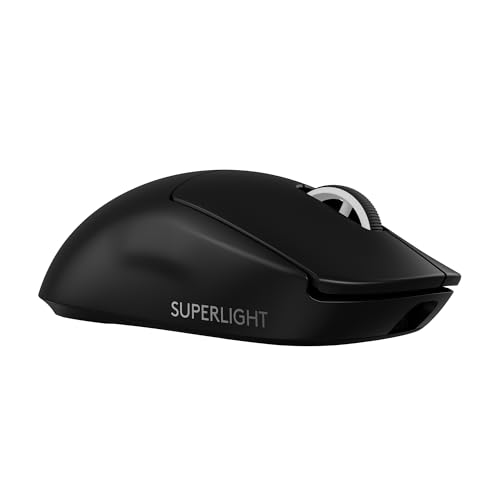
If, on the other hand, you came for the shape and the sensor rather than the logo, the choice between the three is refreshingly concrete. Small hands and a claw or fingertip grip point at the Champion Edition. The same grips in a larger hand point at the Maya X. A desk-bound player who plays wired anyway, or whose PC struggles with high polling rates over wireless, should look hard at the OP1 8K V2 before paying for radios they will not benefit from.
How the selection was chosen
The shortlist rules were strict. The subject product had to be handled honestly: where a listing for the exact Fnatic edition could not be verified, the article would say so and link only what could be verified. Every linked mouse had to come back from the site’s own product data with a full title, so the weights, sensors and switch types quoted below are the manufacturers’ listing claims, reproduced as claims rather than dressed up as measurements taken on a test bench.
Within the Maya family, the two editions chosen bracket the size question, which is the question that decides real-world satisfaction with this shape. The Champion Edition represents the small original intent; the Maya X exists because players with bigger hands asked Lamzu for the same idea scaled up. Including both turns the review into a fitting guide rather than a single verdict, which is what a shape-led product deserves.
The OP1 8K V2 was included as the philosophical opposite: wired rather than wireless, right-handed rather than symmetrical, and built by a company whose reputation rests on click feel and latency engineering. If the Maya family’s charms do not survive contact with your preferences, the Endgame Gear mouse shows what the same money buys when every design decision points the other way.
Detailed reviews

Lamzu Maya Champion Edition
Top pick
| Model | Lamzu Maya Champion Edition |
|---|---|
| Class | Gaming Mice |
| Weight | 45g (listing) |
| Sensor | PixArt PAW 3950 |
| Switches | Optical main switches; golden TTC dust-proof encoder |
| Polling | 8K compatible |
| Fit note | Aimed at small hand users; Purple Shadow finish |
| Listing | Check price on Amazon |
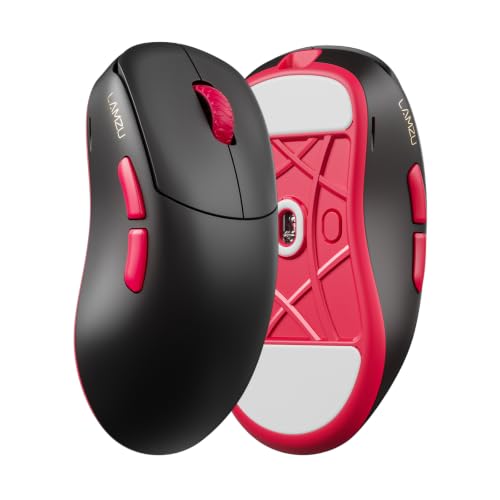
The Champion Edition is the Maya in its purest current form, and its listing reads like a checklist of what the ultralight scene currently values. Forty-five grams is light enough that the mouse stops feeling like an object you push and starts feeling like an extension of the fingers — for fingertip players especially, micro-corrections become a matter of finger pressure rather than arm movement. The PAW 3950 is the current flagship-class PixArt optical sensor, the same generation found across the top of the market, so tracking quality is not the variable that will separate this mouse from its rivals; shape and switches are.
Optical main switches matter for a reason players rarely articulate: they actuate with light rather than a metal contact, which removes the debounce compromises that mechanical switches need to avoid double-click faults. The practical result is a click that can be both very fast and consistent over the mouse’s life. The golden TTC encoder earns its mention for the scroll wheel — encoders are the component that most often degrades into sloppy, jumping steps, and a dust-proof design is a direct defence against the grit that works its way into every desk mouse eventually.
The listing’s own fit note — for small hand users — should be taken literally rather than as marketing modesty. The Maya shell is compact, and a large hand attempting a relaxed palm grip will find its fingers spilling past the front and its palm hovering with nowhere to rest. That is not a flaw in the mouse; it is the mouse declining a job it was not shaped for. In the hands it was shaped for, the short shell lets claw players arch naturally with the hump supporting the finger base, and lets fingertip players steer entirely from the digits with the shell barely touching the palm at all.
Its 8K compatibility deserves the same precision. The mouse supports polling rates up to 8000 Hz when paired and configured appropriately, which divides the report interval to 0.125 milliseconds from the 1 millisecond of a standard gaming mouse. Whether your system turns that capability into a felt difference is a separate question, answered in the buying guide below — but the capability being native, rather than an overclocking hack, means the mouse’s firmware and receiver were engineered around the rate from the start.
Two smaller details complete the Champion Edition’s picture. Its skates are full-coverage PTFE in the modern style, and on a control cloth pad the pairing is deliberate: the pad supplies the braking, the skates supply the smoothness, and the mouse tracks without the scratchy texture that small, hard feet can produce on cloth. And its Purple Shadow finish is not decoration for its own sake — coloured shells make wear visible earlier, which sounds like a drawback until you realise it also makes skate wear and coating shine easy to inspect at a glance, turning maintenance into something you notice rather than something you schedule.
Strengths
- Featherweight 45-gram build that makes fingertip micro-adjustments nearly effortless.
- Flagship-generation PAW 3950 sensor shared with the best mice in its class.
- Optical switches and a dust-proof encoder targeting the two components that age worst in gaming mice.
- Native 8K compatibility for players whose systems and monitors can use it.
Trade-offs
- The small shell genuinely excludes large hands and palm grips, however good the internals are.
- It is a standard Lamzu edition, not the Fnatic collaboration version discussed in this article.
- Running at 8K polling will shorten wireless battery intervals compared with 1000 Hz use.
Best for: small-to-medium handed claw and fingertip players who want the Maya shape with current flagship internals. / Not suited for: palm grippers, large hands, or buyers set specifically on the Fnatic edition’s branding and bundle.

Lamzu Maya X
Best for specialists
| Name | Lamzu Maya X |
|---|---|
| Family | Gaming Mice |
| Weight | 47g (listing) |
| Sensor | PAW3950, maximum 30000 DPI |
| Wireless | MCU Nordic 52840 |
| Switches | Optical switch; dust-proof encoder |
| Shape note | Symmetrical, the larger Maya; White finish |
| Listing | Check price on Amazon |
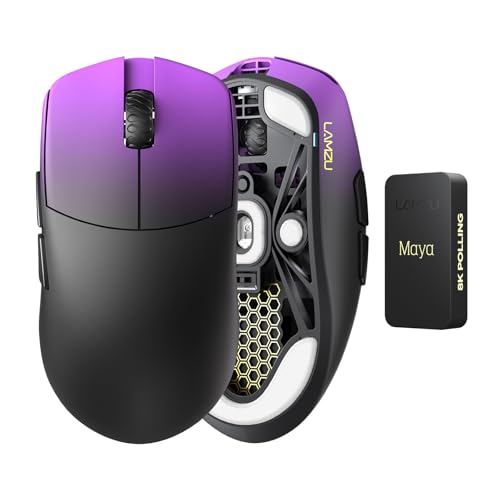
The Maya X answers the most common complaint about the original Maya — not its weight, its sensor or its clicks, but its size. Lamzu describes it plainly as the larger Maya, and the two extra grams over the Champion Edition buy a shell with more length and presence for medium-to-large hands. The symmetrical shape is retained, which keeps the mouse ambidextrous in outline and keeps its grip options open between claw and fingertip for a bigger hand.
Internally the X is no consolation prize. It carries the same PAW3950 sensor family with a listed maximum of 30000 DPI — a ceiling no player needs, but a sign that the sensor is running in its flagship configuration — optical switching, a dust-proof encoder, and a Nordic 52840 MCU handling the wireless link. That Nordic chip is worth naming because it is the radio brain found in many respected wireless gaming mice; its presence signals that the wireless implementation comes from the industry’s mainstream rather than a corner-cutting alternative.
Where the Champion Edition is the scalpel, the X is the same blade with a longer handle. Players who tried the small Maya and found their ring finger and pinky cramped — the classic symptom of a shell too short for the hand — should start here rather than abandoning the shape family entirely. The extra shell also gives relaxed claw players a little more rear contact, which steadies the mouse during lift-off and repositioning.
Lift-off behaviour deserves its own sentence, because larger hands lift differently. A bigger hand wraps more of the shell, so its lifts tend to tilt the mouse slightly toward the thumb side; a shell with enough rear presence, like the X, stays level through that motion and lands flat, which keeps the sensor’s first reading after landing honest. Small-shell mice in big hands often land on an edge and produce one wild report before settling — a tiny fault that players feel as occasional inexplicable cursor jumps, and that the X’s proportions quietly prevent.
Strengths
- The Maya concept scaled for medium-to-large hands without changing its grip character.
- Same flagship sensor generation and optical switching as the smaller edition.
- Nordic 52840 wireless MCU, a proven platform for low-latency links.
- Still only 47 grams, so the larger shell does not cost the ultralight feel.
Trade-offs
- Small-handed players who were the original Maya’s audience may find the X’s extra size dilutes the shape’s point.
- White finish shows desk grime and cable-free desk dust more honestly than dark shells do.
- Like the Champion Edition, it is a standard Lamzu product rather than the Fnatic collaboration.
Best for: medium-to-large handed players who want the Maya’s grip geometry with room to actually hold it. / Not suited for: the small hands the original was drawn for, or fingertip players who prize the shortest possible shell.

Endgame Gear OP1 8K V2
Best for lengthy sessions
| Unit | Endgame Gear OP1 8K V2 |
|---|---|
| Element | Gaming Mice |
| Connection | Wired |
| Weight | 1.75 oz (listing) |
| Sensor | Optical PixArt PAW3395U, 30,000 DPI |
| Switches | Kailh GX main button switches |
| Polling | 8000 Hz polling rate |
| Shape note | For right-handed users; Black finish |
| Listing | Check price on Amazon |
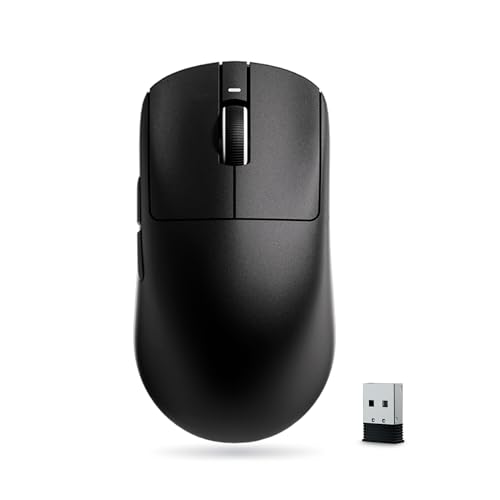
The OP1 8K V2 is what happens when a maker decides that the shortest path between hand and computer is a wire and engineers everything else around that decision. There is no battery to charge, no receiver to place, no radio link to be interfered with — and its 8000 Hz polling is delivered over the cable with a consistency wireless links work hard to match. For lengthy sessions its case is simple: the mouse weighs the same in hour six as in minute one, because there is no battery state quietly changing either the mass or your anxiety about it.
Its component choices are connoisseur-grade. Kailh GX switches are mechanical switches built for speed and a crisp, defined actuation — a different philosophy from the optical switches in the Lamzu mice, trading the optical’s immunity to contact wear for a tactile character many players actively prefer. The PAW3395U sensor is the previous flagship PixArt generation in a U-variant, still comfortably beyond the tracking needs of any human hand. The shell is shaped for right-handed users, which frees its designer from symmetrical compromises: the sides can be sculpted for one hand’s fingers rather than both hands’ tolerance.
The cable is the obvious cost, and modern lightweight cables plus a simple bungee reduce it to a minor tax rather than a deal-breaker for desk-bound players. What the OP1 cannot do is travel easily between rooms or serve a couch-and-TV setup. It is a workstation instrument, and judged as one it is superb.
Its right-handed shell also makes a point the symmetrical mice cannot: commitment is a feature. By shaping for one hand only, Endgame Gear could carve the thumb side for a secure ledge and let the ring-finger side fall away where a right hand wants clearance. Players coming from symmetrical mice often describe the first hour on a good ergonomic shell as the mouse feeling larger than its measurements, because every surface is where a finger expected it to be. That sensation is the ergonomic dividend, and it is why the OP1 belongs in a Maya article — it shows exactly what the Maya’s ambidextrous discipline gives up, and lets you decide whether the trade suits your hand.
Strengths
- True 8000 Hz polling over a wire, with no receiver placement or interference concerns.
- Kailh GX switches with a crisp mechanical click character many players prefer to optical.
- No battery to charge, degrade or add weight anxiety during long sessions.
- Right-handed shaping that commits fully to one hand’s ergonomics.
Trade-offs
- The cable, however light, still exists — and still snags on a badly arranged desk.
- Left-handed players are excluded by the shell design entirely.
- Previous-generation sensor, excellent but a step behind the PAW 3950 on paper.
Best for: desk-bound competitive players who want 8K polling with zero wireless variables and best-in-class click feel. / Not suited for: wireless devotees, left-handed players, or anyone whose setup moves between rooms.
Buying guide: what really decides Fnatic Lamzu Maya 8k
8000 hertz polling and its real CPU cost
Polling rate is how often the mouse reports its position to the PC. At 1000 Hz the gap between reports is one millisecond; at 8000 Hz it is 0.125 milliseconds. The benefit is smoothness and currency: the cursor’s position data is fresher, and on a high-refresh monitor the path of a fast swipe renders with finer steps. The honest caveat is that the improvement lives at the edge of perception — it is most noticeable in slow, precise tracking on a 240 Hz-or-faster display, and essentially invisible on a 60 Hz office monitor, where the screen itself is the bottleneck.
The cost is paid by the CPU. Eight thousand interrupts a second is real work, and on older processors or in games already running the CPU near its limit, 8K polling can cost frame rate — the exact opposite of the smoothness it was bought for. It also multiplies wireless transmission, shortening the interval between charges. The sensible approach is empirical: enable 8K, play your main game while watching frame rate in its busiest scene, and compare against 1000 Hz and an intermediate step if the mouse offers one. Keep the highest rate that costs you nothing measurable, and do not treat a lower stable rate as a defeat — a steady 1000 Hz beats a stuttering 8000 Hz in every duel that matters.
There is a second, quieter interaction worth understanding: polling rate and frame rate multiply each other’s weaknesses. A game rendering at a fluctuating frame rate presents the mouse’s reports unevenly no matter how frequent they are, because each rendered frame can only use the freshest report available at its start. This is why the polling upgrade feels dramatic to the player with a powerful, stable system and invisible to the player whose frame rate swings wildly — the second player’s bottleneck was never the mouse. Fix frame pacing first, with settings and drivers, and the mouse’s contribution becomes visible afterwards.
Shape safety for claw and fingertip grips
The phrase shape safety, borrowed from mouse-review vocabulary, asks whether a shell lets your grip repeat itself without strain. For claw players, safety means the hump meets the finger base at a point that supports the arch without forcing it higher over a long session; a hump too far back pushes the wrist into extension, and a hump too far forward collapses the arch into the mouse. The Maya’s centred, modest hump is the compromise most claw hands accept, which is why the shape gathered its following.
For fingertip players, safety is about the sides: the shell must offer enough flat, slightly textured contact for the thumb and ring finger to steer without squeezing. Squeezing is the hidden fatigue source in ultralight mice — the lighter the mouse, the more grip force replaces weight as the thing keeping it located, and an hour of unnecessary squeeze shows up as a tired forearm that players misattribute to sensitivity. Measure your hand honestly — length from middle fingertip to wrist crease — and respect the listing’s small-hand guidance for the Champion Edition rather than hoping to adapt.
Wireless stability in crowded venues
A modern 2.4 GHz gaming link is robust, but it shares spectrum with every other wireless device in the room, and a tournament hall or a student house can hold hundreds. Stability is mostly a placement discipline: the receiver should sit close to the mouse, ideally on an extension cable or dock that puts it within a metre or so, with an unobstructed path. A receiver plugged into the back of a PC under a desk is asking its signal to pass through a metal case, a wooden desk and your own body before reaching the mouse — and then players blame the mouse for the resulting dropouts.
Interference also has a daily face: USB 3 ports and hubs are known radio-noise sources in the 2.4 GHz band, so a receiver sharing a hub with external drives is a self-inflicted wound. Give the receiver its own clean port and a short extension, keep it away from Wi-Fi routers where practical, and a quality link like the Nordic-based one in the Maya X will hold through environments far denser than a home desk.
Diagnose before you despair: if a wireless mouse stutters, test it wired or with the receiver temporarily taped to the edge of the pad. If the stutter vanishes at close range, your link environment was the fault and placement will cure it permanently. If it persists at point-blank range, the problem lives in software, polling load or the mouse itself, and you have saved yourself an afternoon of moving furniture by learning that in two minutes.
Switch feel and coating durability
Click feel is a preference disguised as a specification. Optical switches, as fitted to both Lamzu editions here, tend toward a lighter, sharper actuation with no contact wear to change the feel over time; the Kailh GX mechanicals in the Endgame Gear mouse answer with a more deliberate, tactile break that many players find easier to spam rhythmically. Neither is objectively better — but a player who plays click-timing games should try to form an opinion, because the click is the input you repeat most.
Coating is the shell’s handshake with your skin. A good matte coating gives the fingers purchase without rubberised stickiness, and its durability decides whether the mouse feels the same in year two. Coatings suffer most from hand creams, sanitiser residue and aggressive cleaning; wipe the shell with a barely damp cloth, keep solvents away from it, and an ultralight’s finish will stay grippy long after its battery has aged. On white shells like the Maya X, add a cosmetic expectation: the coating will record your desk life visibly, which some owners wear as patina and others read as neglect.
Fnatic Lamzu Maya 8k in real routines
Scene: a competitive player upgrading from a 1000 hertz mouse
Consider a ranked player moving from a capable 1000 Hz mouse to the Maya platform, expecting the polling rate to transform their game. The first honest surprise is that the shape changes more than the number does: the smaller shell shortens the distance their fingers travel to the buttons and invites a fingertip style they did not know they had. The second surprise is that 8K polling’s clearest early benefit is not aim at all — it is the smoothness of slow camera pans in menus and spectator views, where the finer report steps are easy to see.
By week two the upgrade has sorted itself into truth. Their flick accuracy is unchanged in kind — shape fit did that — but their tracking in long strafing duels feels marginally more connected on their high-refresh monitor, and the mouse’s lightness has quietly raised their comfortable session length. The lesson generalises: buy an 8K mouse for the whole package, and let the polling rate be the smallest reason on the list.
Situation: a LAN attendee surrounded by wireless interference
A local LAN is the wireless mouse’s public examination: dozens of headsets, phones, and other mice all shouting in the same spectrum, in a hall full of metal. The Maya-class link survives this environment when its owner does the placement work — receiver on its extension, close to the pad, away from the tangle of USB hubs powering everything else on the desk. Players who skip that work experience the classic LAN story of a mouse that was flawless at home and haunted in the hall, and the mouse is innocent in almost every retelling.
The wired OP1 8K V2 exists in this article partly for this scene. A player who attends events regularly and has been burned once may rationally choose the cable and delete the entire category of worry. There is no competitive law that says a modern mouse must be wireless; there is only the scoreboard, and it does not award style points for a missing cable.
Scene: a fingertip player who found other ultralights too long
Fingertip grip is a steering method: the palm never lands, and the mouse is nudged, braked and flicked entirely by five contact points. Shell length is its enemy, because every extra millimetre of rear shell eventually meets the palm during a downward pull and turns a fingertip mouse into an accidental claw mouse. This is the exact player the small Maya was drawn for — the one who tried the famous ultralights, admired their weight, and kept catching the shell’s tail on hard pulls.
For that player the Champion Edition’s compact outline is not a compromise to tolerate but the feature itself, and the Fnatic edition’s existence tells them the shape survived scrutiny from professionals whose fingertip players had every alternative available. Their remaining decision is only about size discipline: resist the Maya X’s extra room, because room is precisely what their grip is trying to avoid.
Their pad pairing deserves one note as well. Fingertip steering makes many small movements rather than few large ones, so this player lives in the centre of the pad and wears its middle smooth long before its edges age. A slightly faster cloth than a tactical player’s control pad suits the style, keeping the constant micro-motion from feeling like stirring porridge — and rotating the pad a quarter turn every few weeks spreads that concentrated wear across fresh cloth.
Setup and first-week how-to
Step 1 for Fnatic Lamzu Maya 8k: place the receiver before you change any setting
Whatever Maya-family mouse you unbox, give its receiver the best seat in the house first: on its extension, close to the pad, clear of metal and hubs. Play a full session at default settings in that configuration. This order matters because it establishes a clean wireless baseline — any oddity you meet later can then be blamed on a setting you changed rather than on a link that was compromised from the first minute.
Step 2 for Fnatic Lamzu Maya 8k: raise polling one step at a time
Do not jump straight to 8000 Hz. Play a day at 1000 Hz, then try an intermediate rate if offered, then 8K, spending real matches at each step in your main game rather than waving the mouse on the desktop. Watch two things: your frame rate in busy scenes, and your own sense of the cursor’s path during slow tracking. Promote the rate only when both are at least as good as the step below; the goal is the highest rate your whole system — not just the mouse — can honour.
Step 3 for Fnatic Lamzu Maya 8k: migrate your sensitivity by distance, not by numbers
A new shell changes how a sensitivity feels even at identical DPI, because your fingers sit differently and the mouse’s weight has changed. Set your DPI, then measure your in-game turn distance with a ruler on the pad — the centimetres per 360 degrees — and tune until that distance matches what your old mouse gave you. Only then judge the new mouse’s aim character; judging it while your turn distance is accidentally 15 percent faster is how good mice get returned.
Step 4 for Fnatic Lamzu Maya 8k: give the grip two weeks before modifying it
New shapes invite instant accessorising — grip tape, aftermarket skates, button spacers. Resist for a fortnight. Your hand needs time to find its natural contact points on the shell, and tape applied on day one freezes a grip you were still experimenting with. After two weeks you will know exactly which finger slips and which surface chafes, and any modification you make will be a targeted fix instead of decoration.
Step 5 for Fnatic Lamzu Maya 8k: schedule a two-session review before the return window closes
Put two specific sessions in the diary: one aim-training session where you deliberately test flicks, tracking and click timing, and one ordinary long session where you forget the mouse entirely and notice afterwards whether your hand is fresh or tired. A mouse that aces the test session but tires the hand in the ordinary one is the wrong mouse, and the return window is the only time that knowledge is free.
Common mistakes with Fnatic Lamzu Maya 8k
Enabling 8K polling on a system that stutters under it
The signature symptom is a game that felt smooth at 1000 Hz developing a fine judder after the upgrade, worst in busy scenes. The cause is CPU load from the report stream, and the fix is humility: step the polling rate down until the judder vanishes. Players resist this because 8K was the headline they bought, but a polling rate is a means to smoothness, not a trophy — the rate that makes your game smoothest on your hardware is, by definition, your correct rate.
Buying the shape for a palm grip it does not feed
The Maya’s reputation tempts players of every grip, and palm players are its most disappointed adopters. A palm grip needs length to support the hand and a rear hump to fill it; the Maya offers neither by design. If your whole palm rests on the mouse and your fingers lie flat, this shape family will feel like holding a pebble regardless of its internals — the Maya X softens the problem, and the Thorn, covered elsewhere in this cluster of guides, is the Lamzu shape actually drawn for a fuller hand.
Skipping receiver placement behind a metal case
The most common wireless troubleshooting thread in gaming follows a script: new mouse, receiver in the rear IO, PC case between receiver and pad, intermittent dropouts, conclusion that wireless is unreliable. Move the receiver to the front of the desk on its extension before concluding anything. It is a five-minute experiment that resolves the majority of cases, and it should be step one of every wireless mouse setup, this family included.
Head-to-head: separating the shortlist
The two Lamzu editions split on a single axis, and it is worth stating without decoration: hand size. The Lamzu Maya Champion Edition is the small, 45-gram original intent with the PAW 3950 and optical switches; the Lamzu Maya X is the same design language grown for larger hands at 47 grams, with the same sensor generation and a Nordic wireless platform. If both fit your hand — genuinely medium hands can sit on the fence — choose by grip: fingertip purists take the smaller shell’s manoeuvrability, relaxed claw players take the X’s extra rear support.
The Endgame Gear OP1 8K V2 separates itself on philosophy rather than size. It concedes the entire wireless convenience argument in exchange for the most direct connection a mouse can have, mechanical Kailh GX clicks instead of optical ones, and a right-handed shell. Against either Lamzu it wins on session-length indifference — no charge state, ever — and loses on freedom of movement and desk tidiness. Players who have never once wished their mouse were wireless should take that hint seriously; players who move between desk and couch should not romanticise a cable.
And the Fnatic edition itself? Its value over the standard Champion Edition is the collaboration layer — the branding, the Fnatic identity, and the assurance of a shape an esports organisation attached its name to. That value is real to fans and collectors and irrelevant to players who buy purely on fit and internals, and since no listing for it was verified for this article, it stands as the reference point of the family rather than a purchasable row in the table. Buy the standard editions for the hardware; seek the Fnatic edition through its own channels if the badge itself is part of what you want.
Living with the choice: upkeep and longevity
Ultralight mice ask for gentler housekeeping than their heavier ancestors. The skates are the consumable: thin PTFE feet wear fastest on hard or coarse pads, and a mouse that begins to feel scratchy is usually asking for new feet, not retirement. Inspect them monthly under a bright light; a shiny, uneven wear pattern tells you your pad and pressure are honest, while a gouged skate tells you a grit particle spent a week embedded in it — which is also your cue to brush the pad more often.
Battery care shapes a wireless mouse’s lifespan. Avoid the two extremes: do not leave the mouse plugged in permanently as a way of life, and do not run it flat and leave it flat. Ordinary play-and-charge rhythms keep a modern cell healthy for years. At high polling rates the charge interval shrinks, so build the habit of topping up during a natural break — a meal, a work call — rather than discovering an empty battery at match point.
The encoder and switches chosen in these mice are longevity plays in themselves: dust-proofing delays the scroll wheel’s decline into random steps, and optical switches remove the contact oxidation behind the classic double-click failure. What still ages is the coating under your fingers and the cable on the wired alternative — inspect the OP1’s cable where it exits the shell, because that flex point is where wired mice eventually confess their mileage.
Keep the original box and the spare skates that mice in this class typically include, and store the mouse out of direct sunlight if it ever spends a season unused; ultraviolet light and heat are unkind to coatings and to battery cells alike. A mouse this light is also easy to damage in a bag — carry it in a hard case rather than loose among chargers and bottles, because a shell built to weigh 45 grams was not built to be sat on by a laptop.
Final recommendation
Start from the shape, because the Maya family insists on it. If your hand is small to medium and your grip is claw or fingertip, the Champion Edition is the most faithful purchasable version of the mouse this article set out to assess, and its internals are beyond reproach. If your hand is larger but the geometry still appeals, the Maya X is the honest answer rather than a compromise. If your desk is permanent, your events are wired-friendly, or your PC dislikes high-rate wireless, the OP1 8K V2 will make you forget the Maya debate entirely.
And keep the Fnatic edition in proportion. It is the collaboration that gives this family its name and its story, and if it becomes available through a listing you trust, the assessment above of the Maya shape and the 8K platform is the assessment that applies to it. Until then, the standard editions carry the hardware argument completely — buy them for your hand, configure the polling rate your system can honour, and place the receiver like you mean it.
One last word for the undecided: mice are the most personal purchase in gaming, and the most returnable. Order from a seller whose returns policy lets your hand vote, use the full window rather than the first evening, and trust the tired-hand test over the spec sheet every single time you are torn between two shells that both look right on paper.
Frequently asked questions
What matters most when choosing for fnatic lamzu maya 8k?
Fit between the shell and your hand, ahead of every specification. The Maya is a small shape with strong opinions; in the right hand it disappears, and in the wrong hand no sensor can rescue it. Measure your hand, name your grip honestly, and only then compare the Champion Edition, the Maya X and the wired alternative on internals.
How much should a beginner budget for fnatic lamzu maya 8k?
Budget at the level of a flagship gaming mouse rather than an entry one, and verify the figure on the current listing before deciding, since prices shift. A beginner whose grip is still forming may honestly be better served learning on a cheaper, more forgiving shape first — the Maya rewards a grip you already know, and its small shell is an unforgiving teacher for a player still discovering theirs.
Which error do shoppers of fnatic lamzu maya 8k regret most?
Buying the small Champion Edition with a large hand because the reviews were glowing. The regret is predictable and entirely avoidable: the listing itself flags the mouse as aimed at small hand users. The second-place regret is subtler — turning on 8K polling, watching a CPU-limited game judder, and blaming the mouse for a setting.
How long does it take to get used to a new fnatic lamzu maya 8k setup?
Allow roughly two weeks of regular play. The lightness adjusts fastest — most players stop noticing 45 grams within days — while the grip geometry takes longer, because your fingers must rebuild their map of where the buttons and hump live. Click timing usually settles last of all, particularly when switching between mechanical and optical switch designs.
When is the premium option in fnatic lamzu maya 8k actually worth it?
The premium tier pays when you will use what it buys: a high-refresh monitor that can show 8K polling’s smoothness, a competitive schedule long enough for grams and switch consistency to matter, and a settled grip the shape was drawn for. Without those three, the same money buys more happiness in a monitor upgrade or a second mouse for a different grip.
What should I confirm first if my fnatic lamzu maya 8k purchase disappoints?
Confirm the unglamorous things in sequence: receiver placement close to the pad, polling rate set to something your CPU sustains without judder, and your turn distance re-measured for the new shell. Then confirm the fit question — if your fingers spill past the front of the mouse in your natural grip, no setting will fix what is fundamentally a size mismatch, and the Maya X or a different shape family is the answer.
Related guides
The Maya does not live alone on a desk. Its natural companions in this guide family are the pad beneath it, Fnatic Focus3 Max, the ergonomic alternative within the same collaboration line, Fnatic Lamzu Thorn, and the keyboard that completes the Fnatic desk, Fnatic Streak80 Lp. Readers curious about how the number eight thousand is marketed elsewhere can compare 4k vs 8k Tv Walkthrough, Best 8k Camera and Best 8k Drones — a useful reminder that a bigger number is a beginning of a conversation, never its conclusion.
One more angle: 8000 hertz polling and its real CPU cost, revisited
Return to polling with a system-level view: the mouse does not poll in a vacuum. Your keyboard, your audio interface and your capture software all ask the CPU for attention, and a machine that tolerates 8K polling in one game may resent it in another with a heavier simulation thread. Treat the rate as a per-game setting rather than a badge of honour, and keep a note of which titles earned which rate — future you, troubleshooting a judder at midnight, will be grateful for the record.
One more angle: shape safety for claw and fingertip grips, revisited
A final fit test that costs nothing: play one full session, then look at your hand. Fingertip and claw players should finish with relaxed fingers and no deep pressure marks on the fingertips. Marks mean you were squeezing to keep the mouse located — a sign the shell is slightly wrong for you, whatever the scoreboard said — and grip tape or the larger X shell are the two honest remedies, in that order.
One more angle: wireless stability in crowded venues, revisited
Stability also depends on what your own desk adds to the spectrum. A Wi-Fi router on the same desk, a wireless headset dongle and a phone hotspot can crowd a link in an ordinary flat as surely as a tournament hall does. Spread your receivers apart, keep the mouse’s receiver the closest object to the mouse, and most home interference mysteries resolve themselves without a single setting being touched.
One more angle: switch feel and coating durability, revisited
Switch feel interacts with polling in a way few players consider: a crisper switch encourages a lighter touch, and a lighter touch keeps the mouse planted during rapid clicking, which is when high-rate tracking data is most valuable. The components of a mouse are not independent line items — they compound — and the Maya family’s pairing of light shell, fast switches and high polling is best understood as one argument made three ways.