Disclosure: As an Amazon Associate, reviewstook.com earns from qualifying purchases. Links on this page are affiliate links; they cost you nothing extra. Prices and availability change often, so check the current Amazon listing before you buy.
A dota 2 mouse lives a strange double life. For most of a match it makes tiny, patient movements — nudging the camera, adjusting a last-hit by a few pixels, checking the minimap — and then, twice a game, it has to be perfect at full speed: the blink-poof, the hex-before-BKB, the camera snap to a fight three screens away. A mouse that suits Dota has to be boring in the small moments and flawless in the fast ones, which is a different brief from the flick-shot heroics that gaming mouse marketing usually sells.
The three mice below are the current reference points for that brief, and they disagree about how to meet it. One is the safe professional standard, a symmetrical wireless mouse that has become the default recommendation for a reason. One is an ergonomic shape refined over two decades, built for players whose hands want support rather than neutrality. The third is an extreme lightweight experiment — barely heavier than the cable mice used to drag behind them — for fingertip players who move the mouse with their fingers alone. The reviews explain what each feels like across a long evening; the guide after them explains how to judge shape, sensor and weight against your own hand and habits.
Everything named here was checked against its live Amazon listing, and the links lead to those listings so the variant in front of you — colour, edition, bundled dongle — is the one this page describes. With gaming mice, the variant question matters more than usual: the same shell name can hide a standard and a mini size, and the wrong one changes the entire fit. Check the listing’s size line twice before ordering.
Key takeaways
Four properties decide whether a mouse disappears into your hand or argues with it for forty minutes. They frame the reviews that follow, and the scenarios later stress-test each one.
- Sensor accuracy at the low-to-mid DPI most Dota players utilise
- Shape that suits relaxed claw and fingertip grips
- Side buttons placed for control groups and rapid-buy
- Weight that holds wrist flicks repeatable in minute forty
In this guide
Swift picks for Dota 2 Mouse
The short version first. If one line in this table matches your hand and your grip, the detailed review underneath it is the one to read closely.
| Model | Best for | Page |
|---|---|---|
| Logitech G Pro X Superlight 2 | Best for specialists | Check price on Amazon |
| Razer DeathAdder V3 Pro | Best for extended bouts | Check price on Amazon |
| Pulsar X2 CrazyLight | Best for shared chambers | Check price on Amazon |
How the lineup was chosen
The selection began with sensor behaviour at the speeds Dota actually uses. Most Dota players run moderate sensitivity and make small corrections, so the filter favoured sensors with a reputation for clean tracking at low-to-mid DPI and no smoothing surprises, over headline maximum DPI figures that nobody plays at. Wireless was treated as the default rather than the upgrade: modern 2.4 GHz connections from the major makers are effectively indistinguishable from a cable in play, and the freedom from cable drag genuinely helps the small camera nudges that fill a match. Every pick here is wireless for that reason, though all can run wired while charging.
Shape coverage was the second filter. Hands and grips differ enough that a single “best” shell is a fiction, so the lineup deliberately spans the three families a Dota player is realistically choosing between: a neutral symmetrical all-rounder, a sculpted ergonomic shell, and an ultralight mini for fingertip control. The third filter was buttons — at least two thumb buttons, placed where a relaxed grip can reach them without shifting, because control groups and quick-buy live there for most players. The final filter was verifiability: an exact listing, an official image, and a specification that could be quoted from the maker’s own page rather than from rumour. A mouse that could not be verified in that way did not appear here, however strong its reputation in forums.
Detailed reviews

Logitech G Pro X Superlight 2
Best for players who want the proven all-rounder and no surprises
| Model | Logitech G Pro X Superlight 2 |
|---|---|
| Part | Gaming Mice |
| What its entry leads with | wireless operation, USB-C connection |
| Price | Confirm cost on Amazon |
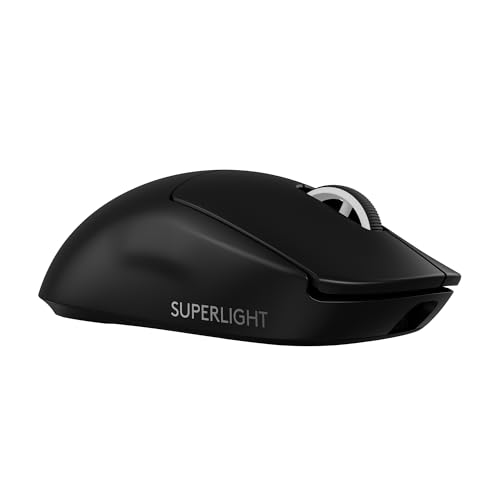
The Superlight 2 is what a recommendation looks like when an entire industry converges. Its shape is a safe, medium symmetrical shell that suits palm, claw and fingertip grips without excelling at any one of them in a way that alienates the others, and its HERO 2 sensor tracks cleanly across the full range from the slow creep of a camera pan to the full-arm snap across the pad. The LIGHTFORCE hybrid switches are the interesting engineering here: they pair the speed of optical actuation with a mechanical click feel, which answers the oldest complaint about optical switches — that they felt hollow — while keeping the double-click failures of ageing mechanical switches at bay.
For Dota, the virtues are quiet ones. Five programmable buttons cover the two thumb keys most players bind, plus the wheel click and DPI controls, and Logitech’s software, whatever its reputation for enthusiasm, does store profiles on the mouse itself so your settings survive a PC change. USB-C charging ends the micro-USB archaeology that older wireless mice imposed, and the battery stretches across many evenings of play between charges. The mouse simply refuses to be the reason anything went wrong, which over a season of ranked games is worth more than any single spectacular feature.
There is a discipline to its neutrality worth understanding before you buy. A safe shape is a compromise shape: palm grippers with large hands may find it slightly small, and dedicated fingertip players may find it slightly large, and both are right. The Superlight 2 is the mouse you buy when you do not yet know your own preferences well enough to specialise, or when you do know them and they happen to be “medium everything”. It is also the easiest of the three to resell or hand down, because its audience is everyone.
Strengths
- HERO 2 sensor with clean tracking at the low-to-mid DPI where Dota is actually played
- Hybrid optical-mechanical switches that click like a mechanical switch and age like an optical one
- A genuinely neutral shell that works across grip styles, hand sizes and games beyond Dota
Trade-offs
- The safe shape is nobody’s perfect shape; specialists will find a better fit elsewhere in this lineup
- Only two thumb buttons, so players who bind heavily to the mouse will run out of room
- Premium pricing for a design whose appeal is the absence of drama
Best for: the player who wants one excellent mouse for Dota and everything else, and who values a decision they will never have to second-guess. Not suited for: a fingertip purist chasing the lightest possible shell, or a player whose binds need more than two side buttons. Confirm cost on Amazon
One setup habit matters with this mouse: set your DPI in the software once, store it to the onboard profile, and then leave the DPI button out of your binds. Accidental DPI shifts mid-game are a classic source of “the mouse felt wrong all match” reports, and the Superlight 2’s consistency is only an asset if the settings stay where you put them. Give it a week at one sensitivity before judging — mouse aim in Dota is mostly camera control, and camera control is mostly habit.
It is also worth saying plainly what this mouse is not trying to be. There is no ergonomic sculpting to argue about, no extreme gram count to adapt to, no exotic feature demanding a learning curve. In a hobby that increasingly sells specialisation, the Superlight 2 sells the opposite: the confidence that the equipment layer of your game is finished, solved, and will stay solved while you spend your attention on drafting, positioning and the hundred decisions that actually move your rank. For many players that closure is the real product.

Razer DeathAdder V3 Pro
Best for palm and relaxed-claw players who want a shaped shell and a huge battery
| Item | Razer DeathAdder V3 Pro |
|---|---|
| Class | Gaming Mice |
| Listing highlights | wireless operation, optical switches |
| Page cost | Check price on Amazon |
The DeathAdder name has been on desks for roughly two decades, and the V3 Pro is what happens when a famous ergonomic shape gets the full modern treatment: 63 grams, a Focus Pro 30K optical sensor, third-generation optical switches, HyperSpeed wireless and a quoted ninety hours of battery. The shape is the story. Where the Superlight 2 is neutral, the DeathAdder is opinionated — a right-handed shell with a high, supportive hump and flared sides that fills a palm and gives a relaxed claw grip a ledge to rest against. Hands that love it describe it as the mouse disappearing; hands that do not, describe it as being told how to hold a mouse.
That support pays its rent late in sessions. In minute forty of a tense game, a palm that is resting rather than gripping makes steadier small movements, and Dota’s late game is a long sequence of small movements under stress: positioning at Roshan, edging around a high-ground ward, holding a buyback decision with the cursor hovering. The ninety-hour battery reinforces the same theme of low maintenance — charge it during a weekly desk tidy and the question simply never arises mid-match. Razer’s optical switches also suit the game’s click pattern: thousands of right-clicks per match, each needing to register identically, with no appetite for the inconsistency that worn mechanical switches develop.
Know its boundaries, though. The DeathAdder is a medium-large shell, and small hands or committed fingertip grips will fight its length and its hump. It is right-handed only, so left-handed players and anyone who swaps hands are excluded by design. And its two thumb buttons, while large and well placed, are the whole of its extra offering — this is a mouse for players whose keyboard hand does the heavy binding work and whose mouse hand is reserved for aiming and two trusted commands.
Strengths
- A refined ergonomic shell that supports the hand through long late-game sessions
- Ninety hours of quoted battery life, the most in this lineup
- Optical switches that keep right-click feel consistent across thousands of clicks per match
Trade-offs
- Right-handed, medium-large shell — small hands, fingertip grips and left-handers should look elsewhere
- The sculpted shape is a commitment; if your hand dislikes it, no setting fixes that
- Two side buttons only, placed for a relaxed grip rather than for heavy binding
Best for: the medium-to-large-handed palm or relaxed-claw player who plays long sessions and wants support rather than neutrality. Not suited for: fingertip players, small hands, or anyone who needs a symmetrical or left-handed shell. Check price on Amazon
If you are coming from an older DeathAdder, the V3 Pro will feel familiar in silhouette and startling in weight — the shape your hand remembers, at a third less mass than the wired ancestors carried. Give the transition a few days before judging the lightness as twitchiness. Most players find the reduced effort changes their late-session play for the better once the first week’s muscle memory updates, particularly on camera pans, where the lighter shell starts and stops with less overshoot.
The DeathAdder also rewards a word about desk posture, because an ergonomic shell amplifies whatever your setup gives it. With your chair height set so your forearm rests roughly level, the shaped hump fills the palm exactly as designed and the support effect is real. With the desk too high, the same shell digs its rear edge into the heel of your hand and feels worse than a neutral mouse would. If you trial one and it disappoints in the first hour, adjust the chair before you judge the mouse — ergonomic shapes are honest about bad setups in a way flat shells politely conceal.

Pulsar X2 CrazyLight
Best for fingertip and claw players chasing the lightest possible mouse
| Label | Pulsar X2 CrazyLight |
|---|---|
| Range | Gaming Mice |
| Headline functions from its page | wireless operation, optical switches |
| Price | Check price on Amazon |
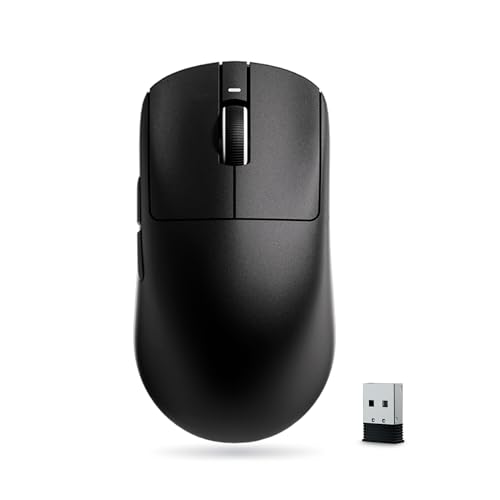
Thirty-six grams. The X2 CrazyLight’s listing leads with that number — with dot skates fitted — and everything else about the mouse is in service of it: a mini symmetrical shell, an XS-1 sensor rated to 32K DPI, optical switches rated for a hundred million clicks, and an 8K polling dongle in the box. This is a specialist instrument. In a fingertip grip, where the mouse is steered by the fingers alone and the palm never touches it, every gram is inertia your fingertips must start and stop hundreds of times a minute. At 36 grams the mouse starts feeling less like an object you move and more like a cursor your fingers happen to be resting on.
Dota rewards that more than outsiders expect. Fingertip control is the grip of micro-intensive play: a courier shepherded through trees while the hero last-hits under tower, an illusion scouted down a lane, a Meepo player’s divided attention made physical. The mini shell puts the sensor close to the fingers’ natural pivot, so tiny corrections cost tiny movements. The included 8K dongle is, for Dota’s purposes, headroom rather than necessity — the game’s decisions do not turn on polling rates — but it costs nothing to have and removes one variable from the “was that me or the mouse” post-mortem after a missed combo.
The compromises are structural. A mini shell offers nothing to a palm; players who rest their hand will find their fingers cramping into a grip the mouse was not shaped for. Extreme lightness also removes the sense of planted stability some players use to keep small movements smooth — if your aim style leans on the mouse’s own inertia to damp tremor, 36 grams will feel nervous for the first week and possibly forever. Battery life on ultralight mice is the other quiet cost of the gram count, and the CrazyLight expects more frequent charging than the DeathAdder’s ninety-hour standard. This is a mouse you choose because your grip demands it, not because the number is fashionable.
Strengths
- Thirty-six grams with dot skates — the lightest option here by an enormous margin
- Mini shell shaped for claw and fingertip grips, with the sensor close to the fingers’ pivot
- 8K polling dongle included rather than sold as an accessory
Trade-offs
- The mini shell is unusable for palm grip and tiring for anyone who rests their hand
- Feather weight removes the inertia some players rely on to keep movements smooth
- Ultralight design means more frequent charging than the big-battery rivals
Best for: the committed fingertip or claw player, especially on micro-heavy heroes, who knows exactly why they want the grams gone. Not suited for: palm grippers, new players still discovering their grip, or anyone whose desk time is mostly desktop work. Check price on Amazon
A warning about the first week: ultralight mice expose your sensitivity settings. Players often discover their DPI was effectively being damped by the old mouse’s weight, and the same setting on a 36-gram shell feels frantic. Drop your sensitivity a step for the first few days, play bot matches until the small movements calm down, then creep back up only if you miss the speed. Judging a CrazyLight at your old settings on day one is the most common way this mouse gets unfairly returned.
Consider also what the CrazyLight does to your pad choice. On a fast, hard pad, 36 grams can feel like ice on ice — exhilarating for flicks, tiring for the constant small stops Dota demands. Most fingertip players pair ultralight mice with a control-leaning cloth pad whose friction supplies the braking the mouse’s weight no longer provides. If you trial this mouse and it feels ungovernable, change the surface before you change your verdict: the combination, not the mouse alone, is the instrument you are actually evaluating.
Buying handbook: what truly settles Dota 2 Mouse
Sensor accuracy at the low-to-mid DPI most Dota players use
Ignore the maximum DPI on the box; nobody plays Dota at thirty thousand DPI, and the number exists for marketing. What matters is behaviour between roughly 400 and 1600 DPI, where the overwhelming majority of players live: the sensor should track slow, small movements without smoothing them into mush, and fast snaps without spinning out or losing the surface. All three sensors here — Logitech’s HERO 2, Razer’s Focus Pro 30K and Pulsar’s XS-1 — are past the point where sensor quality decides games. The honest conclusion is that sensor choice is the least interesting decision in this guide, which is good news: it frees you to decide on shape and weight, where the real differences live. One practical check remains — play on the pad you actually own, because a sensor tuned on a vendor’s demo surface can behave differently on a worn cloth pad.
Lift-off distance is the one sensor setting genuinely worth opening the software for. It decides how high the mouse can rise before tracking stops, and players who reposition with a lift — common after big camera sweeps — want it low and consistent so the cursor does not wander during the lift. Most players can leave it at the default forever, but if your cursor drifts when you re-centre the mouse, this setting, not a new sensor, is the fix. It takes ninety seconds to test both extremes in demo mode and settle it permanently.
Shape that suits relaxed claw and fingertip grips
Shape is the decision you cannot patch with software, so make it with your hand, not your eyes. Measure nothing; instead, notice how your hand rests on your current mouse when you are not thinking about it. Palm fully down with fingers flat points to the DeathAdder’s support. Palm hovering, fingers arched, control coming from the fingertips points to the CrazyLight. Something between — the relaxed claw most Dota players actually use — is served by all three, with the Superlight 2 as the safe middle. Hand size arbitrates ties: the same grip on a small hand wants a smaller shell. If you can, judge a shape across a full match rather than a shop-floor minute, because a shell that feels precise for sixty seconds can feel cramped at minute forty when your hand warms and settles.
Side buttons placed for control groups and swift-buy
Two thumb buttons is the working standard for Dota, and placement matters more than count. The classic assignment — one for a control group or a selected unit, one for quick-buy or a courier command — only works if both buttons are reachable from your resting grip without rolling the mouse or shifting your aim. Test this in a demo match: if reaching the forward button moves your cursor, that button will betray you in a fight. All three picks keep their thumb buttons high and forward enough for a relaxed grip, with the DeathAdder’s being the largest targets and the CrazyLight’s the lightest presses. Resist the temptation to bind more than two critical actions here; the section on mistakes below explains why an overloaded mouse hand loses fights.
Weight that retains wrist flicks repeatable in minute forty
Weight is a fatigue decision disguised as a speed decision. A lighter mouse is faster to start and stop, which helps micro corrections, but it is also less forgiving of a tired hand’s tremor late in a session. The three picks span the realistic spectrum — the CrazyLight at 36 grams, the DeathAdder at 63, the Superlight 2 in the lightweight mainstream — and the right point on it depends on how you move: fingertip players gain the most from the extreme end, wrist-and-arm players often prefer a little mass as a stabiliser. Judge weight in the last game of your session, not the first. A mouse that feels thrillingly light at 7 p.m. and skittish at 11 p.m. has told you something true about your own play.
Dota 2 Mouse in actual habits
Scenario: microing a courier as last-hitting under tower
Two units, two attentions, one mouse. While your hero creeps under tower, your courier threads through trees toward the secret shop, and every second your cursor spends travelling between tasks is a second one of them is unsupervised. This is fingertip country: small, fast, precise cursor work with instant stops. The CrazyLight was built for it, and the Superlight 2 handles it nearly as well with a friendlier shape for the other ninety percent of the game. The DeathAdder’s size works against it slightly here — not because it is slow, but because its shell encourages a settled palm, and this scenario is all unsettled movement.
The scenario also exposes a settings truth: players who micro well almost always keep their camera on edge pan or a drag key rather than reserving the mouse purely for unit control, because splitting the work lets the cursor stay near the action. Whichever mouse you choose, rehearse the courier routine in a bot match — hero to the tower, courier to the shop, back for the last-hit — until the alternation stops costing thought. The mouse makes the routine physically easy; only repetition makes it mentally cheap, and mental cheapness is what wins the laning stage.
Situation: blink-poof combos that punish any sensor spin-out
The blink-poof is Dota’s sensor exam: a maximum-speed camera move, a precise landing point, an ability sequence, all inside a second. A sensor that spins out or a shell that slips in the hand turns it into a hero standing in the wrong place, embarrassed, on cooldown. All three sensors here pass the exam — spin-out is a solved problem at this level — so the differentiator becomes grip security: the mouse must not rotate in your hand during the snap. Claw and fingertip players get that security from the CrazyLight’s small shell; palm players get it from the DeathAdder’s sculpted sides; the Superlight 2’s neutrality asks slightly more of your grip and repays it with versatility everywhere else.
Situation: lengthy tournament viewing parties turned ranked marathons
The major final ends, everyone is inspired, and the viewing party becomes a five-stack until 2 a.m. These marathons are where mice are really judged: four, five, six games with barely a break, hands getting tired, attention fraying. Battery anxiety disqualifies nothing here — all three picks last far beyond one marathon — so the night turns on comfort under fatigue. The DeathAdder’s supported palm ages best across six games for most hands; the Superlight 2 is the neutral runner-up; the CrazyLight asks the most of your fingers and rewards the players whose grip stays disciplined when they are tired. Whoever you are, the marathon will find your mouse’s weakness by game four, which is exactly why it is the honest test.
Marathons have a social wrinkle too: at a viewing party your mouse may be borrowed, admired and briefly played on by friends between matches. The Superlight 2 survives this best, since its neutrality suits every hand that grabs it; the DeathAdder draws the strongest opinions, loved and rejected within the same evening; the CrazyLight mostly draws disbelief at its weight, followed by a convert or two among the fingertip players. None of this should drive a purchase — but if your desk is a social one, it is a real secondary consideration.
Arrangement and at the outset-week how-to
A new mouse deserves a structured first week, because aim habits are stubborn and first impressions are noisy. Work through these steps in order.
Step 1 for Dota 2 Mouse: change one variable at a time
New mouse, old settings — that is the rule for day one. Keep your DPI, sensitivity, binds and pad exactly as they were, so the only new thing your hand has to learn is the shell. Change the sensitivity on day three if you must, the binds on day five, never two things on the same day. Players who change everything at once cannot tell which change helped, and they spend a fortnight chasing a feeling that was actually three separate adjustments arguing with each other.
Step 2 for Dota 2 Mouse: run one typical sitting at default options and frankly write down what bothers you
Before you open the software, play one ordinary session exactly as the mouse arrives and keep a notebook — a real one, or a notes file — beside you. Write down the irritations in the moment: the button your thumb cannot find, the spot where your ring finger drags, the click that feels hollow. These notes are your setup agenda for the week. Without them, you will fix whatever annoyed you most recently and forget the rest; with them, a week later you can check whether each original complaint was solved or merely adapted to.
Step 3 for Dota 2 Mouse: compare next to the old gear one final time largely prior to selling it
Keep the old mouse plugged in, or at least within reach, for the full first week. On the last day, play one game on each, back to back. The comparison will be unflattering to one of them in ways that a week of solo use never revealed — a button placement, a glide, a weight your hand had quietly missed. Only after that final comparison should the old mouse be sold, gifted or boxed as a spare. Selling on day two is how players end up buying their old mouse back.
Step 4 for Dota 2 Mouse: write the return deadline on almost the box the day it arrives
Do this literally, with a pen, on the box, the hour the parcel lands. Return windows feel generous until they are not, and a mouse is the peripheral most likely to reveal its incompatibility slowly — a shape niggle at day ten, a click feel at day twenty. The written date turns a vague intention into a decision appointment: before that day, you will consciously decide the mouse is a keeper, rather than drifting past the deadline with a doubt still unresolved.
Step 5 for Dota 2 Mouse: connect or fitting the variant precisely as its guidebook describes clearly ahead of changing any setting
Pair the dongle where the manual says — ideally on the included extension, close to the pad, away from USB 3 interference and metal desk legs — update the firmware if one is offered, and only then start tuning. A surprising share of “wireless feels laggy” reports are a dongle buried behind a PC case acting as a shield. The manual’s boring placement advice exists because the physics is boring. Follow it first; customise second.
Common mistakes with Dota 2 Mouse
Copying a pro’s DPI lacking matching up with your screen resolution
A professional’s 800 DPI is meaningless without their resolution, their in-game sensitivity and their mousepad the size of a bath towel. Copy the number alone and you have copied nothing except a number. The transferable part of a pro setup is the effective sensitivity — how far the cursor travels per centimetre of hand movement at your resolution — and even that should be treated as a starting neighbourhood, not a destination. Set your sensitivity by task instead: you should be able to cross your screen in one comfortable wrist sweep and still park the cursor on a single creep without hunting. When both are true, the number is right, whatever it says.
Choosing an oversized shell that slows fingertip corrections
Big shells photograph well and promise control, but a fingertip player on an oversized mouse is steering with their whole arm what their fingers should be nudging. The symptom is a particular kind of lateness: last-hits adjusted a fraction after the creep’s health crosses the threshold, courier turns that arc wide, a general feeling that the cursor arrives eventually rather than immediately. If your corrections feel like that, the shell is too much mouse for your grip — the fix is a smaller, lighter shape, not more practice fighting the wrong tool. The CrazyLight exists precisely for this player, and the Superlight 2’s medium shell is the compromise for those unsure.
Binding too many actions to the mouse and overloading your aim hand
Every action bound to the mouse is an action that disturbs the aim while it happens. Two thumb buttons carrying control-group and quick-buy is a sane load; adding item slots, courier delivery and attack-move turns your aiming hand into a second keyboard, and the cost appears exactly when it hurts — mid-fight, when a thumb press nudges the cursor off the target you were hexing. Keep the mouse hand’s job description short: move, click, two trusted commands. The keyboard hand has dozens of keys and nothing else to do with them.
There is a subtler cost as well: attention. Each mouse-bound action must be remembered by the same hand that is simultaneously solving a positioning problem, and under fight pressure the two tasks collide — the press happens late, or the aim happens badly, in roughly equal measure. Watch a replay of your own worst fight and count how many inputs your mouse hand attempted in the decisive three seconds. If the count surprises you, the rebinding session that follows will do more for your play than any hardware change in this guide.
Head-to-head: separating the lineup
Superlight 2 against DeathAdder V3 Pro is the mainstream argument, and it is really about shape philosophy. The Logitech bets that a neutral shell serves the widest range of hands adequately; the Razer bets that a sculpted shell serves one kind of hand superbly. Play them side by side in your mind by remembering your current mouse: if you have never once thought about its shape, buy the neutral one. If you have a specific ache, a specific grip, a specific hand that wants filling, the DeathAdder is the answer to a question the Logitech does not ask. Neither is more accurate; their sensors are peers. The choice is comfort ideology, and it is perfectly reasonable to decide it in an afternoon of honest reflection about your own hand.
The CrazyLight stands apart from both, not as a better or worse mouse but as a different tool class. Against either rival it wins on weight by a margin that changes how fingertip control feels, and loses on versatility, forgiveness and battery by margins just as real. It is the pick for a player who has already diagnosed themselves — grip known, sensitivity known, micro-heavy hero pool — and wants equipment that specialises with them. For a player still exploring, it is a fascinating second mouse and a risky first one.
Price does not arbitrate any of this, incidentally, and it is worth understanding why. These three sit in overlapping premium territory, separated by less than the cost of a single skin bundle, because the market has decided that a flagship sensor, optical switches and a good wireless link are a package. What the money buys differently is philosophy: neutrality, support, or extremity. That is a healthier market than one where accuracy itself is rationed by price, and it means a player who chooses purely on fit is not secretly sacrificing performance to do so.
Living with the decision: care and longevity
Mouse feet are consumables and nobody treats them that way. The skates under all three picks will polish, thin and eventually drag, and the glide you loved degrades so gradually that you blame your aim for a month before blaming the plastic. Inspect them seasonally: if the edges are shiny-thin or the mouse has developed a scratchy patch on your favourite part of the pad, replacement feet are cheap and restore the original glide in minutes. Wash the pad at the same time — a pad full of dust and skin is a sensor’s worst surface and a skate’s worst enemy, and warm water with a drop of soap returns most cloth pads to their first month.
The other slow failure is grime in the seams: the wheel well, the split between the buttons, the sensor lens recess. A soft brush and a blast of air every few weeks keeps clicks crisp and tracking clean. For the battery, the same lithium courtesy applies as with any wireless gear — avoid leaving it flat for weeks, top it up during downtime rather than in a panic before a session. Optical switches in all three picks remove the classic double-click death, so a well-kept mouse here should be retired by your changing preferences, not by its failures.
Keep the charging cable and the wireless extender in the same drawer as the spare feet, and label the dongle if you own more than one wireless device — unmarked dongles are indistinguishable and pairing the wrong one has wasted more evenings than any hardware fault in this category. A mouse kit kept together like this also preserves resale and hand-me-down value: the friend who inherits your old mouse with its feet, cable and dongle intact inherits the mouse you loved, not the degraded version of it.
Final recommendation
Decide by hand first and by specification second. If you cannot describe your grip, or you play several games and want one mouse for all of them, the Logitech G Pro X Superlight 2 is the recommendation — it is the centre of the market for good reason and the least likely purchase in this guide to be regretted. If your hand is medium-large, your grip is palm or relaxed claw, and your sessions run long, the Razer DeathAdder V3 Pro’s shaped support and ninety-hour battery make it the connoisseur’s choice. If you are a fingertip or claw player whose game is micro and whose current mouse feels like a paperweight, the Pulsar X2 CrazyLight is the specialist leap.
Then give whichever you choose the full first-week protocol before you judge it. A mouse is learned by the hand over days, not assessed by the eye over minutes, and every pick here has earned its place by surviving that week in thousands of players’ hands before yours.
One last reassurance for the undecided: the difference between these three mice, in the hands of the same player, is smaller than the difference made by a month of settled habits on any one of them. Players torture themselves over the final five percent of mouse choice while playing on sensitivity settings they have never tested. Pick the shell that fits your hand, run the first-week protocol, set your sensitivity by the screen-cross test in this guide, and then close the question. Your rank will respond to the closed question more than to the mouse.
Frequently asked queries
What counts most when choosing for dota 2 mouse?
Shape fit for your grip, ahead of everything. Sensors at this level are all excellent, batteries all last for days, and switches all register faithfully — the variable that still separates a good Dota mouse from a wrong one is whether the shell matches the way your hand actually holds it across a forty-minute game. After shape, consider weight for your movement style, then button placement for your two most-used commands. Decide in that order and the specification sheet becomes a confirmation exercise rather than a source of anxiety.
How much should a beginner funds for dota 2 mouse?
A beginner is best served by the mainstream tier rather than either extreme. The reasoning is diagnostic: you do not yet know your grip, your sensitivity or your hand’s preferences, so a versatile, neutral mouse teaches you those things while playing perfectly well in the meantime. Ultralight specialists and sculpted ergonomic shells are second purchases, bought with knowledge the first mouse gave you. Spending more at the start buys features aimed at preferences you have not formed yet.
Which slip do customers of dota 2 mouse regret most?
Buying the shape that looked right instead of the shape that fits. It presents as a mouse that reviews brilliantly, photographs beautifully, and aches quietly by the third game of every session until it is replaced. The close runner-up is copying a professional’s settings wholesale and spending a month fighting an effective sensitivity built for a different resolution and a different hand. Both regrets share a root: choosing by someone else’s evidence instead of your own hand’s.
How long does it take to get used to a new dota 2 mouse configuration?
Five to ten days of regular play for the shell, longer if you also changed sensitivity. The first two days feel clumsy in a specific way — your camera control, which is mostly subconscious, keeps predicting the old mouse’s weight and glide. Bot matches and demo-mode practice compress the adjustment; ranked matches stretch it, because stress makes the hand revert to old habits. If the mouse still feels foreign after two full weeks of daily play, the shape is probably wrong for you, and that is a finding worth acting on inside the return window.
When is the premium alternative in dota 2 mouse genuinely worth it?
When the premium buys the specific thing your play lacks: extreme lightness for a diagnosed fingertip grip, ergonomic support for long sessions, or a sensor and switch package that removes a failure mode you have actually suffered, like double-clicking. It is not worth it for polling-rate numbers beyond your monitor’s ability to matter, for maximum DPI figures, or for the reassurance of owning the flagship. In this lineup each premium is defensible for its intended player — the waste happens when the intended player is someone else.
What should I confirm at carefully the outset if my dota 2 mouse purchase disappoints?
First, the dongle’s position and the firmware, because wireless disappointment is usually placement, not product. Second, your sensitivity: confirm the new mouse is actually running the DPI you think it is, since a mismatched default has sabotaged many first impressions. Third, give the shape the full week before concluding anything, and use your written notes from the first session to check whether the complaints are shrinking. If they are not shrinking by day seven, believe them — fit problems do not heal.
Associated guides
- Dota 2 Mousepad
- Dota 2 Headset
- Dota 2 Options
- Ducky One 2 Mini Review
- 2 4ghz vs Bluetooth Headset
- Anne Pro 2 vs Rk61 vs Gk61 Spend 60 Percent Compared
Those guides cover the rest of the Dota control scheme — the pad under this mouse, the headset above it, and the settings that bind them together.
One more angle: shape that suits relaxed claw and fingertip grips, revisited
A useful shape test that takes one bot match: play ten minutes paying attention only to your ring and little fingers. On a well-fitting mouse they rest with a job — lightly stabilising, ready to brake a fast movement. On a poor fit they either hover tensely or drag on the pad, and both habits quietly tax your control for the whole game. Players often discover their true grip this way, because the outer fingers confess what the palm conceals. If your outer fingers are working as brakes and rests without soreness after a full match, the shell and your grip agree, whatever the marketing called either of them.
One more angle: sensor accuracy at the low-to-mid DPI most Dota players use, revisited
There is a small experiment that settles sensor anxiety permanently. In demo mode, place your cursor on a creep, then move the mouse in the smallest circle you can manage for ten seconds, watching whether the cursor traces your intention or a smoothed approximation of it. Then flick to the opposite corner and back, twenty times, and see whether the cursor lands where it started. Modern flagship sensors — all three in this guide — pass both tests boringly. Run the experiment once on your new mouse, enjoy the boredom, and never think about sensor marketing again. Your attention is worth more than the worry.
One more angle: weight that retains wrist flicks repeatable in minute forty, revisited
Test weight the way games test it: at the end, not the beginning. After your longest session this week, play one more game and notice whether your small movements have become either of the two failure shapes — overshooting, which suggests the mouse is too light for your tired hand, or dragging short, which suggests it is too heavy for it. Neither shows up in a fresh-hand trial. This is also why borrowing a friend’s mouse for one game misleads: you sample its weight with rested muscles and draw conclusions for the hour when muscles are anything but. Judge in minute forty, because that is where your ranked games are decided.
One more angle: side buttons placed for control groups and rapid-buy, revisited
Decide your two thumb-button assignments by frequency, not by importance. The button your thumb finds perfectly should carry the command you issue most — for many players that is selecting the courier or a control group — while the slightly less natural button carries the rarer, more deliberate command like quick-buy. Players often reverse this, putting the dramatic rare action on the good button and fumbling the everyday one fifty times a match. Audit your own last replay: count the presses. The tally, not the theory, should assign the buttons.