Disclosure: As an Amazon Associate, reviewstook.com earns from qualifying purchases. Links on this page are affiliate links; they cost you nothing extra. Prices and availability change often, so check the current Amazon listing before you buy.
Mesh Wi-Fi stopped being a luxury when homes filled with laptops, consoles, and televisions all demanding the same air, and deco 7 pro be67 is TP-Link’s Wi-Fi 7 statement for the large, busy household: a tri-band BE14000-class system whose verified listing promises an 8-stream design, a 10-gigabit port, coverage rated to 8,100 square feet, and support for some 200 devices. Those are flagship mesh numbers, and deco 7 pro be67 should be judged as one — against the wired reality of real homes, not against the router it replaces.
This review reads the BE67’s specification the way a network actually experiences it: what Wi-Fi 7’s Multi-Link Operation does for a house full of devices, where the 10-gigabit port matters and where it is decoration, and how many nodes a given home truly needs. The verified one-pack listing is linked below, because mesh systems are bought by the node and expanded by the node — the correct way to purchase coverage is to start with the house you have and add reach only where the walls demand it.
Key takeaways
- Wi-Fi 7 tri-band mesh with MLO, rated BE14000-class, with a 10 Gb port — verified in the one-pack listing
- Buy nodes by the house, not the box’s maximum: most homes need two, large or masonry homes three
- Wired backhaul, where you can run it, is worth more than any radio feature on the box
- The 10 Gb port serves future internet plans and fast local transfers; gigabit households will not tax it
In this guide
Deco 7 Pro Be67: what Wi-Fi 7 actually adds
Wi-Fi 7’s headline features translate into household terms unevenly, and the BE67 carries the full set. Multi-Link Operation lets a compatible device hold links on multiple bands at once, sending traffic down whichever path is clearest — in a busy home this feels like the network developing judgement, steering a video call away from the band your console just flooded. Wider 320 MHz channels on the 6 GHz band double the widest road Wi-Fi 6E built, and the denser modulation squeezes more from clean air. Each feature needs a Wi-Fi 7 client to shine, and most homes have few today, which frames the purchase honestly: this is infrastructure bought for the devices of the next five years as much as for tonight’s.
What works immediately, with any client, is the mesh itself: three radios per node, a dedicated conversation between nodes, and a system that manages roaming as one network rather than as a row of repeaters arguing. The BE14000 class figure is the sum of all radios’ theoretical rates — a number no single device will ever see, and one this review mentions only to dismiss. The figures that matter are per-client speeds at real distances and the system’s behaviour under a houseful of simultaneous demand, and on those the tri-band Wi-Fi 7 architecture’s advantages are structural rather than numerical.
Coverage, nodes, and the honest arithmetic of houses
The listing’s 8,100-square-foot figure describes a multi-node pack in favourable construction; the one-pack linked here covers a fraction of that, and the gap between those numbers is where mesh buyers should live. Drywall homes pass signals kindly and often need fewer nodes than feared; brick, concrete, foil-backed insulation, and underfloor heating eat 6 GHz signals especially, and in such houses node placement — high, central, line-of-sight-ish between nodes — matters more than node count. Buy the pack that matches your construction, not your square footage alone, and remember the system’s virtue: a node can be added later, alone, when a dead corner identifies itself.
Placement discipline repays reading twice. Nodes should talk to each other through the fewest walls possible, ideally with the backhaul path kept short and high; a node placed inside the dead zone it is meant to cure can only repeat the weak signal it receives. The app’s placement guidance helps, and walking the house with a phone’s Wi-Fi analyser teaches more. Mesh marketing sells the fantasy that hardware abolishes physics; the BE67’s hardware is strong enough that respecting physics with it produces a network most households will simply stop thinking about, which is the highest praise networking gear can earn.
The 10-gigabit port and wired backhaul
One port on the BE67 speaks 10-gigabit, and its honest uses are two: an internet connection faster than gigabit, which a minority of households have and a growing minority will; and a wired link to a switch, a NAS, or a backhaul run, where local traffic — backups, media servers, a workstation’s file habit — can genuinely exceed gigabit. For everyone else the port is future-proofing, harmless and occasionally decisive. The remaining ports run at gigabit-class speeds suited to the devices that plug into them, which in practice means the television, the console, and the printer will never know the difference.
Wired backhaul deserves its own insistence: if your home lets you run a cable between nodes — through walls, along skirting, via existing structured wiring — do it, and the mesh’s radios are freed to serve clients entirely. It is the single largest performance upgrade available to any mesh system at any price, larger than the jump between Wi-Fi generations, and it costs a cable. The BE67 supports it, as a flagship should. Buyers who cannot wire should place nodes for the radio backhaul’s sake, closer together than client coverage alone would suggest, and accept the trade with open eyes.
Setup, management, and who should buy it
TP-Link’s Deco app continues the line’s tradition of setup measured in minutes: place, plug, follow, done, with the network’s ongoing management — device lists, parental controls, security subscriptions offered by the platform — living in the same app. Advanced users will find the usual mesh trade: less granular control than a traditional router’s web interface, in exchange for a system that manages its own complexity. Know which kind of owner you are; the BE67 is unapologetically for the household that wants the network to be an appliance, albeit a very fast one.
Buy it if your home is large, busy, or built of signal-eating materials; if your internet plan is at or heading beyond gigabit; or if your current mesh is a Wi-Fi 5 or early Wi-Fi 6 system whose seams show under the household’s load. Skip it if a single good router already covers your flat without complaint — mesh solves distribution problems, and a home without one is buying nodes to stand in rooms that never asked. The verified one-pack below is the sensible entry: cover the house, live with it a month, and let the walls themselves tell you whether a second node is a need or a notion.
The products worth a closer look
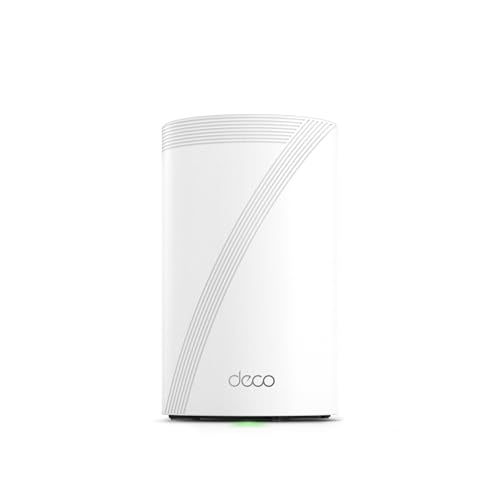
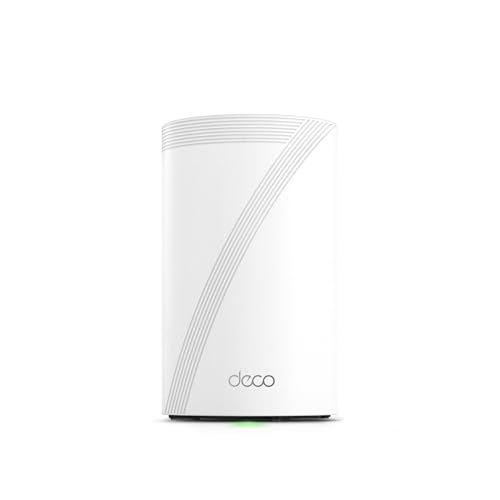
TP-Link Deco 7 Pro BE67 (1-Pack)
Verified pick — start with one node
The verified listing is the BE67 one-pack: the BE14000 tri-band Wi-Fi 7 system with its 8-stream design, 10-gigabit WAN/LAN port, 320 MHz channels, and TP-Link’s HomeShield and AI-Roaming features named in the maker’s own title. Buying the one-pack first is this review’s deliberate advice — it is the same node the multi-packs contain, and a month of living with it tells you your house’s true node count better than any coverage chart.
Confirm on the listing whether a multi-pack suits your construction better before ordering, since the per-node economics favour packs for homes already certain they need three. Either way, plan the placement before the box arrives: high, central, with the backhaul path — wired if you can, short and open if you cannot — treated as the system’s spine.
- Tri-band Wi-Fi 7, BE14000 class, 8 streams
- 10-gigabit WAN/LAN port
- 320 MHz channels on 6 GHz
- Mesh expansion by adding Deco nodes
Strengths
- Wi-Fi 7 with Multi-Link Operation
- Dedicated tri-band mesh backhaul
- Expandable one node at a time
Trade-offs
- Flagship mesh pricing
- Wi-Fi 7 client features await Wi-Fi 7 devices
- App-led management limits granular control
Best for: large, busy, or solidly built homes upgrading their whole network / Not suited for: small flats a single router already covers well
Security, updates, and the mesh as a household appliance
A mesh system is the network’s front door, and its security posture deserves the attention its speed gets. TP-Link’s HomeShield layer, named in the verified listing, bundles the protections households actually use — malicious-site filtering, device isolation options, and reporting — with the usual division between the free tier and the subscription’s fuller features; read that division before assuming the box’s promises are all included forever. What matters more is the update rhythm: a mesh that updates its firmware automatically and promptly is a safer appliance than a faster one abandoned by its maker, and Deco’s app-led model pushes updates the way phones do, which is the correct direction for a device non-specialists own.
Set the habits at installation: a strong, unique admin password, the guest network used for visitors and for the smart-home gadgets whose manufacturers you would not invite to dinner, and automatic updates left on. A mesh system bought for a decade of service will be attacked by a decade of evolving mischief; its defence is a vendor still paying attention, and the subscription question is really a question about funding that attention. Judge it as such, rather than as a toll.
When mesh is not the answer: powerline, MoCA, and the single-router cases
Honesty about alternatives strengthens a mesh recommendation. Homes with coaxial wiring can run MoCA adapters that turn it into excellent Ethernet, feeding a single strong router or wired access points with a reliability radios envy; powerline adapters offer a lesser version of the same trick where the wiring allows. A compact flat with a central router position may gain nothing from mesh at all, and a gamer whose only problem is one desk’s connection may be served best by a single cable run — the unglamorous king of networking solutions, against which every product in this category is an elaborate apology for a wall.
The BE67’s case rests on the homes where those answers do not reach: large, multi-storey, solidly built, device-dense, and unwilling to be wired. In those homes the question is not mesh or not, but which mesh and how many nodes, and this review’s framework — tri-band Wi-Fi 7, wired backhaul where possible, nodes bought by evidence — is the answer’s shape regardless of brand. Buy the shape first; the badge on the node is the last decision, and on current evidence it is a defensible one.
Placing nodes like you mean it: a floor-plan method
Mesh performance is decided less by the hardware’s ceiling than by the geography it is given, and most disappointing installations share the same three placement sins. Nodes hidden inside cabinets, behind televisions, or on the floor lose a large share of their reach before the first device connects, because the materials that hide electronics are the materials that absorb radio. Nodes placed at the extremes of the home, each clinging to a whisper of the other’s signal, create a chain whose weakest link governs everyone’s evening. And nodes stacked vertically in a stairwell without thought for the floors’ construction waste their signal heating the structure between storeys.
The method that works is cartographic and slightly tedious. Sketch the floor plan, mark where bandwidth is actually consumed — desks, sofas, the television, the bedroom where calls happen from bed — and place the main node near the home’s centre of gravity for both the incoming line and the demand. Place each satellite roughly halfway between the main node and the demand it serves, in open air at about waist to chest height, within clear sight of a doorway if not of the next node itself. Then walk the home with a phone, reading signal in the rooms that matter, and adjust by metres rather than by hopes: a node moved two metres out of an alcove routinely gains more than a node upgraded a whole product tier. Finish by re-checking at the worst hour, when neighbours’ networks wake and the microwave runs, because a mesh tuned at a quiet noon has been tuned for a home nobody lives in.
The 10-gigabit port and the household’s wired skeleton
The headline port on this system invites a question few households can answer today — what would you plug into it — and the honest answer divides buyers usefully. A household with a multi-gigabit internet service, a network storage box serving a video editor, or a wired workstation habit has a skeleton that can use the port immediately, and for them it is a genuine feature rather than a badge. Everyone else is buying an option on a future upgrade, which is a legitimate purchase at the start of a system’s long life and a poor reason to stretch a budget at the end of one. The more universally valuable wiring decision is backhaul: where a cable can be run between nodes — through a loft, along a skirting board, via an existing data point — the mesh stops sharing its airtime between serving devices and talking to itself, and the improvement reaches every room rather than only the one beside the fast port.
MoCA and powerline adapters, discussed in the main article as alternatives to mesh, return here as its allies: an adapter pair that carries backhaul traffic over the home’s existing coaxial or mains wiring can wire two nodes together in a house where running new cable is forbidden by a landlord or by architecture. The mesh does not care how its nodes are linked, only that they are, and a hybrid system — radio where radio works, wire where wire exists — is the configuration experienced installers actually leave behind in difficult houses. Judge the Deco’s ports and radios as a toolkit for building that hybrid, and its specification stops reading like a race and starts reading like a workshop.
Security and updates: the router as a household appliance
A mesh system is the home’s front door, and its security posture deserves the same matter-of-fact attention as a lock. The practices that matter are boring and decisive: let the system update its firmware automatically, because router vulnerabilities are patched on the maker’s schedule rather than yours; retire the default network name’s factory password habits in favour of a long unique passphrase the household actually keeps written down somewhere findable; put visitors on the guest network the system provides, and put the growing menagerie of smart-home gadgets on the isolated network segment if the system offers one, so that a compromised light bulb does not share a corridor with the household’s documents. None of this requires expertise — it requires an hour on the day of installation, while the app is open and the motivation is fresh, and it converts the mesh from a convenience into what it should be: the quietest, least-thought-about appliance in the home, noticed only on the rare day it is not there.
Wi-Fi 7’s features, translated from acronyms into evenings
The newest standard’s headline capabilities read like alphabet soup, so here is the translation a household can use. Wider channels mean a single device can be handed a broader slice of air at once, which matters when one machine — a workstation pulling a project from network storage, a console downloading a game — is the evening’s main event. Multi-link operation lets a capable device converse over more than one band simultaneously, which in practice buys resilience: a band momentarily crowded by a neighbour or a microwave stops being a dropped call and becomes a shrug. The denser modulation schemes squeeze more data into the same air when conditions are clean, which rewards the homes that place their nodes well and does little for the homes that hide them in cabinets — the standard, like every standard before it, pays its dividends to good geography first.
The honest buyer’s summary is that Wi-Fi 7 is a capacity and resilience upgrade more than a speed-at-any-cost upgrade. A single phone on a quiet network will not feel reborn; a household of simultaneous streams, calls, downloads, and smart devices, on a network whose nodes can finally cooperate at this level, will feel the ceiling lift in the hours when the old ceiling used to announce itself. That is the correct expectation to buy against, and it is why this system’s recommendation in the main article is addressed to busy, growing households and to buyers who keep infrastructure for a long time, rather than to anyone chasing a number on a box.
The ISP router question and the modem-mode manoeuvre
Most households meet this system while an internet provider’s router still sits at the centre of their network, and the meeting needs managing. Running two full routers in sequence — the provider’s and the mesh — creates the double-translation tangle that breaks game hosting, some video calls, and smart devices’ sense of direction, while producing no error message that names the culprit. The clean arrangements are the two the install guides describe and owners routinely skip: put the provider’s box into its bridge or modem mode and let the mesh be the only router, or, where the provider forbids that, demote the mesh to access-point duty and accept the provider router’s management. Either is respectable; the unexamined middle, both routing and neither told, is where haunted networks come from.
Cable and fibre gateways add their own wrinkle, since the incoming service sometimes shares a box with television or telephone features the household still uses, and bridge mode can disable more than routing. Read the provider’s documentation for your exact gateway before the mesh arrives, while the old network still works and the afternoon is calm, and write down the current settings as you would photograph a BIOS before clearing it. The households whose mesh installations go smoothly are, with eerie consistency, the ones who did that paperwork first; the technology in the box is rarely the variable.
Troubleshooting the mesh that disappoints
When a system like this underperforms its promise, the causes form a short, learnable list, and working it in order saves the weekend. First, geography: nodes too far apart, too hidden, or serving rooms through materials — foil-backed insulation, masonry, aquarium walls of water — that radio treats as scenery’s revenge. Second, backhaul: satellites clinging to a weak wireless link while a wired path exists unused, or powerline adapters on circuits whose noise defeats them. Third, the double-router tangle above, quietly taxing everything. Fourth, one abusive device — a camera uploading to a distant cloud around the clock, a torrent client with no manners — drinking a band dry while the household blames the mesh. Fifth, and only fifth, the hardware itself.
The diagnostic instrument for the first four is patience plus the system’s own app, which reports each node’s link quality in language owners should learn to read before they need it. Move one node, wait a day, and judge by the household’s actual complaints rather than by a speed test at noon beside the router, because a mesh exists to serve the far bedroom at nine in the evening and should be graded there. If the list is exhausted and a specific node still misbehaves in different locations while its siblings behave, then the hardware conversation with the maker begins — with placement notes, link readings, and dates in hand, which is to say, with the evidence that gets a replacement approved rather than a script read aloud.
When to add, when to wait: the system’s life across years
A mesh is one of the few technology purchases designed to be extended, and the discipline is to extend it on evidence. Add a node when a specific room’s measured signal and lived experience agree that it is underserved — a new home office, a teenager’s streaming era, a garden room that became a workplace — and not when a sale suggests the house might enjoy one. Each addition re-shapes the network’s geography, so re-run the placement walk after any change and let nodes settle for a day before judging them; meshes, like the households they serve, need a night to find their arrangement. Across years, the system’s value compounds in the devices that join it: the first Wi-Fi 7 phone, the laptop that can finally use the wide channels, the console that moves to the wired port. Infrastructure bought slightly ahead of its household, placed well, secured properly, and extended on evidence is the closest thing consumer networking offers to a permanent decision, and it is the spirit in which this one should be bought.
Household case studies: three homes, three verdicts
The long Victorian terrace, with its masonry walls and its office in the converted loft, is the mesh’s hardest common exam, and it teaches the system’s real curriculum. The incoming line arrives at the front of the house, the work happens at the back and the top, and two floors of brick stand between. A single router there is a rumour by the second floor. This system, placed by the floor-plan method — main node raised and central, one satellite mid-house at the stairwell’s turn, one toward the loft — covers it, with the stairwell node doing the quiet hero work of turning a corner that radio hates. The household’s verdict after a season is the mesh verdict at its most typical: the network stopped being a subject of conversation, which in infrastructure is the highest available praise.
The open-plan modern flat is the opposite exam and nearly as instructive, because its problem is not walls but neighbours — forty networks contesting the same air in a building of glass and studwork. Here the system’s newest-standard features earn their keep in the evenings, when the building’s aggregate demand peaks, and the placement method inverts: nodes closer together, radios cooperating, the wide channels finding their moments in the crowd. The third home, a rural property with thick stone and outbuildings, exceeds any mesh’s honest reach in places, and its owner’s correct architecture is the hybrid this article keeps recommending — the mesh governing the house, a wired or point-to-point link carrying the network to the barn office, each technology doing the work physics assigned it. A system that knows where its competence ends, and whose owner knows too, is worth more than a stronger system deployed on a fantasy.
Parental controls, guest networks, and the social layer
Modern mesh software carries a social layer that reviews underuse: profiles for children with schedules and filters, a guest network that keeps visitors’ devices off the household’s inner circle, and per-device visibility that turns the mystery of the slow evening into a named culprit. These features deserve an hour of the installation day, while motivation is high, because they are never configured later — the history of home networking is unambiguous on this point. Set the children’s profiles with the children present and the rules explained, since a network that enforces a family’s agreements transparently causes less friction than one discovered to be spying. Put the guests on their network without apology and the smart devices on theirs, and the home’s digital geography starts to resemble its physical one: public rooms, private rooms, and doors that mean something.
Working from home on the mesh: calls, cameras, and the upload direction
Home networks are usually graded on download, but the working household lives and dies by the other direction and by consistency under conversation. Video calls ask little bandwidth and demand everything of stability: a mesh whose nodes hand a laptop between them as its owner moves rooms must do so without the call ever learning about it, and a system whose backhaul is congested at the school-run hour will show it in frozen faces long before a speed test confesses. The practical configuration for a working home follows from that: the primary worker’s desk deserves either a node in the room or a wire to one, the mesh’s quality-of-service features, where offered, should be told honestly which devices are the livelihood, and the household’s heavy background citizens — cloud backups, camera uploads, game downloads — should be scheduled into the night’s empty hours as a matter of policy rather than left to compete with the nine o’clock call.
Upload deserves its own sentence in the buying decision, because households increasingly produce as well as consume: the creator uploading footage, the photographer delivering galleries, the worker whose cloud drive syncs both ways all day. A mesh cannot widen the provider’s upload pipe, but it can stop taxing it with internal inefficiency, and the wired backhaul and placement disciplines in this article routinely recover more working speed than a tier upgrade would have bought. Grade a candidate system, as this article keeps advising, at the worst hour in the worst room on the metric your work actually spends — and for a growing share of households that metric is a call that never freezes, which is a standard this system, properly placed, meets without drama.
The rental, the landlord, and the house you cannot rewire
A large share of this system’s buyers live in homes they may not modify, and the mesh’s virtues compound there in a way worth stating plainly. No drilling, no cable runs, no electrician: the network improves by placement and by radio alone, and when the tenancy ends the whole infrastructure leaves in one box, ready to be re-placed in the next home by the same floor-plan method. Renters should nonetheless negotiate the two free wins that need no permission — the provider gateway’s bridge mode, which is a setting rather than a modification, and the furniture geography that lets nodes sit in open air at proper heights, which is interior design rather than construction. Students in shared houses add one more consideration, which is that a mesh’s per-device visibility ends the traditional mystery of whose console is consuming the evening, and households that can see their network tend, mercifully, to govern it by conversation instead of by sabotage.
The smart home on the mesh: dozens of small citizens
The modern household network carries a population its owner rarely counts: bulbs, plugs, cameras, speakers, thermostats, and appliances, each a small citizen with a radio and an opinion. A mesh system meets this population differently from a single router, because the citizens distribute themselves among the nodes and the network’s management finally has geography to work with — the camera by the door speaks to the node by the door, and its constant small conversation stops crossing the whole house. The practices that keep the peace are the ones the security section prescribes, applied with the census in mind: an isolated segment for the gadgets, so their compromises stay theirs; a guest network for the humans who visit; and a periodic glance at the device list, because a household that cannot name its network’s citizens cannot notice a stranger among them. The Deco’s app makes that census a two-minute ritual rather than a technical exercise, and households that adopt the ritual — quarterly, with the same calm as checking a smoke alarm — own a network that stays understood as it grows, which is the only kind that stays safe.
The mesh and the neighbourhood: being a good radio citizen
A home network’s performance is partly a commons problem, and a system this capable has a citizen’s duties worth a short section. Channel selection left to the system’s automation is usually wiser than a manual choice made once and forgotten, because the neighbourhood’s air changes as neighbours replace their own equipment, and the mesh that re-surveys its environment nightly adapts to a street the manual setting cannot see. Transmit power, where the software exposes it, is not a virtue to maximise: a node shouting to reach a far room also shouts into three neighbouring homes, and the placement disciplines in this article — nodes closer, geography kinder — achieve the same coverage at civil volumes. Households in dense buildings that adopt both habits, automation and placement over power, find their evenings improve twice: once in their own rooms, and once in the aggregate, as the street’s equipment collectively stops escalating. None of this will appear in a speed test, and all of it appears in the lived experience of a network across a year, which is the tribunal this review has appealed to from its first page.
Installation day, narrated as it should go
Let the review close with the day itself, done properly, as a story a buyer can rehearse. The gateway’s settings are photographed before anything is unplugged, and its bridge mode is set while the old network still lives to be consulted. The main node takes the photographed settings’ place, raised and central, and the household’s phones join it one by one like guests being introduced. The satellites go to their floor-plan positions, not their convenient ones, and the signal walk follows with a phone and a notebook, adjusting by metres. The old network’s name is retired only when the new one has carried an evening — a call, a stream, a game, the dishwasher’s small report — without a single complaint from the rooms that matter. Then the paperwork: the passphrase written where the household keeps such things, the guest network named for guests, the children’s profiles set with their owners present, and the provider’s box labelled with its mode and its date, for the technician or the future self who will otherwise spend a bewildered hour rediscovering both. An installation done this way is remembered as a calm afternoon; done the other way, it is remembered as the weekend the internet broke. The hardware is identical in both stories. The difference, as in every article in this cluster, is the method.
The shelf card for a whole-home system
Compressed for the shop, the review reads: a Wi-Fi 7 mesh whose radios are strong, whose fast port serves the wired few, and whose real performance will be decided by your floor plan rather than by its box. Buy it for a busy, growing household that keeps its infrastructure for years; place it by the map method, wire what can be wired, put the provider’s box in its proper mode, and grade it at the worst hour in the worst room. Households that do those things will forget the network exists, which is the entire ambition. Households that will not do them should buy the simplest system that covers their rooms, because an unplaced flagship mesh and a placed modest one are not a close contest — and the modest one wins it every evening, in every far bedroom, until the flagship’s owner finally moves a node out of the cabinet.
The mesh’s contract with the household
Terms, in the open, as this cluster’s reviews now print them. The system asks for an afternoon of honest installation — the gateway tamed, the nodes placed by map rather than by convenience, the walk performed with a phone and a notebook — and for a household’s small ongoing courtesies: updates allowed, the device census glanced at quarterly, a node added only on evidence. It offers, in exchange, the disappearance of the network as a subject: coverage that reaches the rooms where life happens, capacity that holds at the worst hour, and an infrastructure that will still be serving, extended node by node, when the phones in the house have been replaced twice over. Households that sign knowingly stop reviewing their router, which is the highest state home infrastructure can achieve. The review’s thousands of words exist to print those terms in full; the signature, as ever, belongs to the household.
The signature in the network’s record
File the installation, finally, in the household’s record — the gateway’s mode and its date, the nodes’ positions described in words a future mover can follow, the passphrase’s location, and the worst-hour readings that certified the work. That record is the mesh’s second installation, the one that happens on paper, and it pays out at every future event the household cannot yet foresee: the technician’s visit that starts from knowledge instead of from questions, the house move that rebuilds the network in an afternoon because the method and the map survived, the new node added in the right room the first time. Networks are the household infrastructure most often rebuilt from amnesia, and the record is the cure, costing twenty minutes on the calm day of installation. Sign it, file it with the house’s other papers, and let the mesh join the plumbing and the wiring in the category of things the household understands once, properly, and then simply lives with.
The last line of the network’s record
Mark, finally, the date the network left the household’s conversation — the week the last placement adjustment was made, the month the app went unopened except by curiosity, the season a visitor asked for the guest password and the household realised, answering, that the mesh had become what the plumbing is: assumed. That date is the system’s true review score, and no benchmark in this long article outranks it, because home infrastructure is a negative art whose masterpieces are measured in complaints that never occur. Guard the date with the record that produced it — the map, the modes, the worst-hour readings — and let the nodes go on with their quiet negotiations in the walls’ blind spots. The household has better things to discuss, which was, from the first node on the first afternoon, the entire point of buying the thing.
Envoi: the house, at the worst hour, connected
The system’s final examination is the hour this review kept invoking as its tribunal: nine in the evening, the whole household awake and hungry — a call in the study, a film in the living room, a game downloading in a bedroom, a camera watching the door — and the network, placed by map and wired where wiring was possible, carrying all of it without once becoming the subject of a sentence spoken aloud in the house. That silence is the mesh’s completed work, and it is the same silence this cluster keeps awarding to its best subjects: the keyboard forgotten, the memory unmentioned, the screen that simply wakes. Infrastructure succeeds by vanishing, and a whole-home system that has vanished into a house’s ordinary life has achieved the only specification that ever mattered. The review closes its file. The house, connected entire, gets on with its evening.
Coda: the network, one year on
A year after installation day, the mesh can be audited in the household’s own terms, and the audit is mostly a list of things that did not happen. No room was ever declared dead. No call froze at the school-run hour after the backhaul was wired. The one node added — for a garden room that became an office in spring — was placed by the same map method, settled within a day, and has not been thought about since, which the household now recognises as the system’s native state. The device census, glanced at quarterly as prescribed, caught exactly one stranger: a forgotten smart plug of the household’s own, retired with mild embarrassment and no harm done.
That is the complete report, and its brevity is the product working. Home infrastructure is the only technology category whose perfect year reads like an empty page, and a system that delivers an empty page — while the house’s devices multiplied, its work deepened, and its evenings filled with streams — has earned the strongest verdict a review can file a year late: nothing to report. The nodes go on negotiating in the walls. The household goes on with its life, which was the entire transaction, completed.
Postscript: the house, extended once more
One last visit, to the house whose network left the conversation — where it has since been extended exactly once, for a newborn’s room and the small parliament of devices a newborn convenes: a monitor, a camera, a white-noise machine with opinions. The extension took an afternoon, by the map method, with the record open, and the new node settled into the geography as though the house had been waiting for it. Nothing else about the network has changed, which is the visit’s whole report: the gateway still in its mode, the census still glanced at, the worst hour still carried without a sentence spoken about it. A system that can absorb a household’s largest life event as an afternoon’s placement exercise has made its case more completely than any benchmark in this long review. The house grows. The network, quietly and on the record, grows with it.
Questions readers ask about this topic
How many BE67 nodes does my home need?
Start from construction, not just area. A one-pack suits a compact flat or a small house with light internal walls; two nodes cover most family houses; three serve large, multi-storey, or masonry homes. The listing’s maximum coverage figure assumes multiple nodes in favourable construction. The system’s strength is that you can begin with the pack your house seems to need and add a single node later for a corner that proves stubborn — buy the minimum plausible, then let evidence spend the rest.
Will Wi-Fi 7 help my current phones and laptops?
Partly now, more later. Your existing devices gain the mesh benefits immediately — better roaming, a dedicated backhaul, modern management — because those live in the system. Wi-Fi 7’s signature features, like Multi-Link Operation and the widest channels, need Wi-Fi 7 clients, which will arrive with your next phone and laptop generations. A mesh system is infrastructure with a five-to-seven-year horizon; buying the current standard for it is the opposite of wasteful.
What is Multi-Link Operation in plain terms?
It lets a compatible device use more than one band at the same time, sending each packet down the path that is clearest at that moment, instead of being married to a single band until it fails. In a busy home that means calls and games stay smooth while other devices flood a band. It is Wi-Fi 7’s most practical feature for households — less about peak speed, which is already abundant, and more about the network behaving intelligently under load.
Should I wire the nodes together if I can?
Yes, whenever the option exists. Wired backhaul frees every radio to serve your devices, removes the distance-and-walls tax on node-to-node traffic, and is worth more than any feature difference between mesh generations. If you have structured wiring, a media panel, or a feasible cable run, use it. If not, place the nodes closer together and higher than client coverage alone suggests, so the radio backhaul they rely on stays strong.
Is the 10-gigabit port useful with a gigabit internet plan?
Not for the internet itself — your plan is the ceiling there. Its uses are local and future: a fast NAS or workstation link, a switch uplink, wired backhaul headroom, and readiness for the multi-gigabit plans spreading through fibre areas. Treat it as insurance and local-network capacity rather than as a reason to buy; the reasons to buy are the mesh, the tri-band Wi-Fi 7 radios, and the coverage. The port is the specification you will be glad of in year four.
Can I mix the BE67 with my older Deco nodes?
Deco systems are designed to interoperate across generations within the same network, with the caveat that the whole network’s behaviour is shaped by its weakest members — older nodes cannot offer Wi-Fi 7 features to the clients attached to them. A common pattern is to make the BE67 units the core of the home and retire older nodes to light-duty corners, or remove them entirely. Check the app during setup; it will show you exactly what each node is contributing.
How many nodes does my home actually need?
Fewer than marketing suggests and more than hope does. Construction decides: open-plan modern homes often saturate with two nodes, while masonry, foil-backed insulation, and long floor plans can demand three or four placed by the floor-plan method rather than by square-footage tables. Buy for the option to add a node later, place the first ones properly, and let measured signal — not anxiety — order the next one.
Will Wi-Fi 7 help my older phones and laptops?
They will connect and work exactly as well as their own radios allow, gaining the network’s better management and backhaul without gaining the new standard’s top speeds. The system’s newest capabilities belong to your newest devices and to the ones you buy during the system’s long life, which is the correct way to value a router purchase: as infrastructure for devices you do not own yet.
Should I wire my nodes together if I can?
Yes, wherever a cable path exists, because wired backhaul returns the radios’ whole capacity to your devices and removes the placement compromises that radio backhaul imposes. In homes where new cable is impossible, the existing coaxial or mains wiring, through the adapters the main article discusses, often provides the same benefit through walls that were never meant to carry data.
Related guides
Bluetooth audio latency explained
how multipoint connections work
the gaming PC build buying guide