Disclosure: As an Amazon Associate, reviewstook.com earns from qualifying purchases. Links on this page are affiliate links; they cost you nothing extra. Prices and availability change often, so check the current Amazon listing before you buy.
Some comparisons arrive with a missing half, and ddr5 5600 vs ddr5 is one of them: the keyword pits the 5600 MT/s tier against DDR5 in general, which in practice means against the speeds buyers actually cross-shop it with — the 4800 baseline below and the 6000 sweet spot above. Read that way, ddr5 5600 vs ddr5 becomes the middle child’s question: is the tier between the floor and the favourite a sensible saving, a pointless compromise, or the quiet right answer for particular platforms?
This comparison gives 5600 its fair hearing. It is the speed many laptops, prebuilts, and early DDR5 boards standardised on, it asks less of memory controllers than 6000 does, and its kits are priced accordingly. Against the sweet spot it surrenders a little of both bandwidth and latency; against the baseline it buys real headroom. Whether that middle position is wisdom or purgatory depends, as this series keeps finding, on the platform it serves and the price on the day.
Key takeaways
- 5600 is the middle tier: clearly above the 4800 baseline, a step below the 6000 sweet spot in both bandwidth and typical latency
- Its natural homes are laptops, prebuilts, and platforms whose controllers prefer a gentler speed
- For a new desktop gaming build, 6000’s small premium usually retires the argument
- Compare whole kits by the latency fraction and the price, never by the speed badge alone
In this guide
Ddr5 5600 Vs Ddr5: placing the middle tier
DDR5’s desktop story has three acts: 4800, the JEDEC baseline every platform guarantees; 6000, the enthusiast sweet spot where current controllers and prices converged; and 5600, the tier the industry used while getting there — standard in early DDR5 boards, in most DDR5 laptops, and in the prebuilts that filled the generation’s first years. Millions of machines run it happily, which is itself evidence: 5600 is not a defective speed awaiting correction, it is a mature tier whose only crime is having a more famous neighbour.
In performance terms the placing is exact. Against 4800, 5600 brings roughly seventeen percent more bandwidth and, at comparable timings, lower latency — a genuine step, visible in the same CPU-bound scenarios where memory speed shows at all. Against 6000, it gives back about seven percent of bandwidth and a nanosecond or so of latency at typical timings. These are small numbers with specific addresses: they live in competitive gaming at high refresh and in simulation, and they are absent from GPU-bound play, which is most play.
Where 5600 is the right specification
Laptops are 5600’s homeland: their DDR5 implementations standardised around it, their memory is often soldered or specified by the maker, and the tier suits mobile controllers and power budgets. A laptop buyer comparing machines should treat 5600 as the expected specification and spend their scrutiny on capacity and whether the memory is upgradeable at all. Prebuilts form the second homeland, for the same reason — the tier is what the platform generation shipped — and a prebuilt on 5600 has far less to apologise for than one on 4800.
Desktop cases exist too. A board-and-CPU combination whose controller is happier at 5600 — some early DDR5 platforms, some four-stick configurations that will not train at 6000 — is better served by a stable 5600 kit than by a 6000 kit running compromised timings or failing to boot its profile. Stability is a performance feature: the fastest memory in the world is the kit that runs at its rated settings every cold morning, and 5600’s gentler demands make that promise easier for marginal platforms to keep.
The new-build argument, and why 6000 usually wins it
For a new desktop gaming build on a current platform, the honest advice remains the sweet spot, because the price distance between a good 5600 kit and a good 6000 kit has compressed to the point where the saving rarely buys anything meaningful elsewhere in the build. Seven percent of bandwidth and a nanosecond, across five years of CPU-bound moments, for the price of a modest lunch — the arithmetic that made 6000 the consensus applies against 5600 almost as strongly as against 4800. Middle tiers die of exactly this: not inadequacy, but a neighbour priced too close.
The exceptions are priced in the same currency. When a 5600 kit is discounted deeply — a sale, a bundle, a platform package — the saving can grow teeth and fund a real upgrade elsewhere, and the performance surrendered stays in its small, scenario-bound box. Shopping by the day’s prices rather than by the tier’s reputation is the skill this whole memory series is trying to teach; 5600 is where that skill earns its keep most often, because its value is the most price-sensitive of the three tiers.
Owners of 5600 systems: the upgrade question
If your machine already runs 5600, the comparison inverts: the question is not which tier is better but whether the step to 6000 repays a purchase, and outside a platform change it generally does not. The gains live in scenarios, the costs are certain, and the same money saved toward a graphics card returns more in every scenario at once. The exception is the owner who is replacing memory anyway — a failed kit, a capacity jump from 16 to 32 gigabytes — for whom choosing 6000 at the moment of forced purchase is simply correct shopping.
Capacity, once again, outranks speed in the owner’s ledger. A 5600 system with 32 gigabytes is a better gaming machine than a 6000 system with 16, because the capacity wall, when a game hits it, costs seconds while the speed gap costs nanoseconds. Upgrade in the order the bottlenecks bind: capacity, then the graphics card, then — at the platform’s natural renewal — the memory tier, which will have moved by then anyway. DDR5’s story is still being written, and patience is a position in it.
Four sticks, small cases, and 5600’s quiet advantages
Two configurations quietly prefer 5600. The first is the four-stick build: filling all four slots loads the memory controller in a way that makes high speeds harder to train, and many platforms that run two sticks happily at 6000 ask for 5600 or below with four — so a builder who needs 64 gigabytes across four slots may find 5600 is not a compromise but the speed the configuration honestly supports, with capacity’s benefits dwarfing the tier’s small surrender. The second is the tightly cooled small-form-factor machine, where memory voltage and heat are unwelcome guests; 5600 kits typically ask a little less of both.
Neither case appears in the headline comparisons, which are written for the standard two-stick tower, and both illustrate this series’ method: the specification is right relative to a configuration, not in the abstract. A buyer who knows their build is a four-stick or small-case build should read the sweet-spot consensus as addressed to someone else — politely, correctly, and not to them.
Resale and hand-me-down logic for the middle tier
Memory kits get handed down — to a sibling’s build, a home server, a second machine — and the middle tier’s afterlife is worth a thought at purchase. A 5600 kit will serve any DDR5 machine it lands in without complaint, because it asks nothing exotic of any controller; a very fast kit’s second life can be a troubleshooting session in a board that cannot train it. There is a modest virtue in buying the specification that is welcome everywhere, and owners who rotate hardware through a household feel it regularly.
Resale prices tell the same story from the other side: the sweet spot holds value best because demand concentrates there, while 5600 kits sell at the discount that made them attractive new. None of this should steer a primary purchase — memory is bought to be used, not to be sold — but in a household ecosystem where parts circulate, the middle tier’s universal manners are a real, if quiet, line in its favour.
The comparison in one table, then in one kit
The middle tier’s case rests on small numbers honestly added up, so here is the whole DDR5 ladder as latency arithmetic before the shopping begins. At baseline 4800 with a typical CL40 label, first-word latency sits near 16.7 nanoseconds. At 5600 with CL36, it falls to about 12.9. At the 6000 sweet spot with CL30, it reaches 10.0, matching good DDR4. Bandwidth climbs alongside: each step up the ladder widens the pipe by roughly a sixth over the one below. Read the ladder as two different purchases wearing one name — the step from 4800 to 5600 mostly buys bandwidth and respectability, while the step from 5600 to 6000 mostly buys latency and the last measure of frame-time polish — and the question of which step your money should take answers itself according to which currency your workloads spend.
| DDR5 tier | Typical headline timing | First-word latency | Character |
|---|---|---|---|
| 4800 | CL40 | About 16.7 ns | The baseline every board guarantees; prebuilt territory |
| 5200 | CL36–40 | About 13.8–15.4 ns | An early step-up tier, now mostly absorbed into value kits |
| 5600 | CL36 | About 12.9 ns | The middle tier this article examines |
| 6000 | CL30 | 10.0 ns | The sweet spot current platforms are tuned around |
| 6400 and beyond | CL32 | 10.0 ns | Bandwidth for bandwidth’s sake; platform tolerance varies |

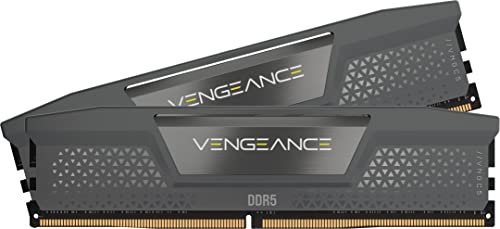
Corsair Vengeance DDR5 32GB 6000 CL30
The verified kit that represents the top of the ladder for most buyers: a matched 32GB pair at up to 6000 MT/s with a CL30 headline and both profile systems supported as listed. It appears in this middle-tier article as the measuring stick — the kit a 5600 purchase must justify itself against on price, because on specification the argument is already over. When the price gap between a 5600 kit and this is small, this is the purchase; the article’s remaining sympathy for 5600 belongs to the situations, enumerated in the main text, where the gap is not small or where stability and capacity argue sideways.
- Capacity: 32GB as two matched 16GB sticks
- Speed and timing: up to 6000 MT/s, CL30
- Profile support: AMD EXPO and Intel XMP 3.0 as listed
- Presentation: plain heatspreader, no lighting
Strengths
- The ladder’s sweet spot in a single matched purchase
- Latency parity with the best DDR4, at DDR5 bandwidth
- Trains reliably on the platforms this comparison concerns
Trade-offs
- Priced above the 5600 tier it is measured against here
- Still only 32GB; capacity-hungry workloads may prefer slower abundance
- Benefits assume a platform and firmware happy at the profile
Best for: buyers whose price comparison lands within reach of the top tier / Not suited for: strict budgets where the 5600 tier funds a larger capacity instead
When 5600 is the thinking person’s choice
Three situations rehabilitate the middle tier completely. The first is the capacity trade: at a fixed budget, a 64GB kit at 5600 serves a creator who edits, renders, and keeps forty browser tabs of reference material open far better than a 32GB kit at 6000 serves the same desk, because the moment a workload spills out of memory, every latency figure in this article becomes a rounding error next to storage speeds. The second is the stability trade on early or modest boards, whose memory training at the top tier can be a negotiation rather than a toggle; a 5600 kit that simply works, every cold morning, beats a faster kit that works except when it does not. The third is the hand-me-down trade inside a household, where the middle tier bought today becomes, in three years, the unremarkable and perfectly adequate memory in a second machine — a fate that asks nothing of latency heroics.
Notice that none of these defences claims 5600 is faster. They claim, correctly, that speed is one variable in a system of constraints, and that a buyer who can name the constraint actually binding them — capacity, stability, budget, longevity — will sometimes choose the middle of the ladder with open eyes and no regrets. That is a different creature from the buyer who chooses it because the number looked close enough on a shelf, and this article exists to convert the second buyer into the first, whichever rung they land on.
Benchmark literacy: reading 5600-versus-6000 charts without being misled
Charts comparing these tiers circulate endlessly, and most mislead politely rather than dishonestly. The first trap is the average frame rate, which compresses the whole story into the number least connected to how a game feels; the low-percentile frame times, where memory latency actually lives, can differ meaningfully while the averages shake hands. The second trap is the test scene: a benchmark run through an empty vista measures the graphics card, while the crowded market square or the forty-player fight measures the processor and its memory, and a kit comparison conducted in the wrong scene is a graphics review wearing memory’s clothing. The third trap is configuration asymmetry — comparing a tuned 6000 kit against a 5600 kit left at its loosest defaults, or vice versa — which measures the tuner rather than the tiers.
Read any comparison, therefore, with three questions ready. Were the timings at each tier the timings a buyer would actually receive from the common kits, or the best a reviewer could extract? Was the test scene processor-bound, and would the author say so? And do the low percentiles move with the averages, or does the chart’s headline conceal the very quantity the upgrade claims to improve? A comparison that answers all three cleanly is worth its conclusion at whatever tier it lands; one that answers none is entertainment with axes. Your own machine, tested in your own games with the method the platform articles describe, outranks every chart ever published — the tiers differ by small enough margins that individual silicon, firmware, and workload routinely overturn the published order.
The prebuilt and laptop dimensions of the middle tier
Much of the world’s 5600 memory was not chosen at all; it arrived inside prebuilt desktops and laptops whose buyers never saw a configurator. For those owners the question inverts: not whether to buy the middle tier, but whether to escape it. In desktops the escape is a kit swap, governed by the same matched-pair discipline as any memory purchase, plus one prebuilt-specific caution — some large vendors ship firmware that restricts memory profiles, and an owner should confirm the board will actually run a faster kit’s profile before buying one, because a 6000 kit confined to baseline behaviour is a 5600 kit with a surcharge. In laptops the memory is increasingly soldered, and the 5600 the machine arrived with is the 5600 it retires with; owners of such machines should spend their upgrade money on storage and on the machine’s next incarnation instead, and can take comfort that the tier’s adequacy, argued throughout this article, applies to them with full force.
There is a quieter prebuilt lesson too. Vendors choose the middle tier for the same reasons this article defends it — stability across thousands of shipped units, forgiving training behaviour, and a price that leaves room in the bill for the parts customers actually compare. A specification that survives a vendor’s support-cost arithmetic has passed a test no review lab runs. When a boutique builder offers the 6000 tier as a modest-cost option, take it; when a mainstream machine arrives at 5600, recognise the decision as professional rather than cheap, and direct your scrutiny at the places vendors genuinely do cut — storage speed, cooling, and power supply quality — where the consequences dwarf anything the memory tier could have given or withheld.
Ownership across a platform’s life: firmware, ageing, and the second kit problem
A memory tier chosen today will be lived with through firmware updates, a possible processor upgrade, and the slow growth of the software it feeds, and the middle tier’s character across that lifespan deserves examination. Motherboard firmware matures around the speeds the market actually buys, which means the sweet spot receives the most training attention from board makers, the middle tier a close second, and the exotic tiers a distant third. An owner at 5600 can expect their kit’s behaviour to be boring in the best sense across every update: recognised, trained, and forgotten. That boringness is a feature with compound interest, because every hour not spent coaxing memory is an hour the machine spends being a tool rather than a project.
The second-kit problem arrives when a two-stick owner wants more capacity years later and discovers that adding two more sticks is the configuration platforms like least, especially at speed. The middle tier forgives this sin more readily than the top tier does — four sticks at 5600 is a far more achievable negotiation than four at 6000 on many boards — which quietly reframes the original purchase: a buyer who suspects they will grow into four sticks may rationally choose the middle tier today precisely because it leaves the growth path open. The alternative strategy, buying the full foreseeable capacity in two sticks immediately, remains the cleaner engineering answer, but budgets are real, and the tier that tolerates the untidy path has genuine value for the owners who will walk it.
Ageing itself is kind to memory. Unlike fans or batteries, a memory kit has no moving parts and no chemistry of consequence; a kit that trains today will train in six years, barring abuse, and its resale or hand-me-down value decays with the platform’s popularity rather than with its own condition. The middle tier’s enormous installed base — every prebuilt, every laptop generation, every cautious builder — guarantees it destinations: there will be DDR5 machines wanting exactly this speed long after the enthusiast conversation has moved to the next standard. A purchase that remains useful somewhere in the household ecosystem for a decade is a different economic object from a purchase that is merely fast this year, and the middle tier, unglamorous as ever, is quietly excellent at being that object.
Workload portraits: five machines that run the middle tier
Portraits ground the abstractions. The first machine is a family gaming PC built around a midrange graphics card and a 1440p screen, where the card is the constraint in nearly every title and the memory tier is invisible in the best sense; its owner spent the tier difference on a larger solid-state drive and experiences that decision daily, while experiencing the memory decision never. The second machine is a flight-simulation enthusiast’s rig, and here honesty requires the opposite note: simulation titles with vast scenery streaming are among the few workloads that reliably reward the top tier’s latency, and this owner, having tested both, keeps the faster kit and considers the matter closed by evidence rather than by argument.
The third machine belongs to a video editor whose timelines stack high-resolution footage, effects, and a browser’s worth of reference material; her binding constraint is capacity on deadline days, and her 64GB middle-tier kit serves her better than any 32GB flagship-tier kit could, because a render that fits in memory finishes while a render that pages is still introducing itself to the disk. The fourth is a small server in a cupboard — a media library and file host built from a retired desktop — where the middle tier’s stability across months of uptime is the entire requirement and speed is a rumour from another department. The fifth is a student’s laptop, soldered at the factory, whose owner will never make a memory decision about it at all and whose experience of the tier is simply that the machine feels fine, which is the tier’s most common review worldwide, written by people who will never write one.
Laid side by side, the portraits expose the pattern this article keeps circling: the tier is wrong exactly when a specific, nameable workload presses on latency, and right in the wide remainder of computing life. The discipline the comparison ultimately teaches is not about memory at all. It is about refusing to buy for the workload you find interesting to discuss when a different workload is the one you actually run — a discipline that transfers intact to processors, graphics cards, and every other component whose forums are louder than its physics.
Troubleshooting a 5600 kit that will not behave
Even the forgiving tier occasionally misbehaves, and its faults follow the platform’s usual grammar. A kit that trains at baseline but not at its profile is reciting the oldest poem in this book: update the board’s firmware before doubting the silicon, seat the sticks in the slots the manual prefers for two-stick operation — a detail owners get wrong with impressive consistency — and test each stick alone at the profile to learn whether the fault belongs to one stick, one slot, or the negotiation between the pair. A kit that passes a short test and fails in long sessions is usually describing heat, and the cure is airflow across the slots rather than another exchange. A kit that was stable for a year and is not stable now has changed its story, and the suspects change with it: a firmware update that altered training, a new processor, or a power supply ageing out of its prime, each more likely than memory that spontaneously forgot its rating.
The middle tier’s troubleshooting mercy is that its margins are wide, so the distance between working and not working is usually crossed by one identifiable change rather than by marginal physics. Keep the platform’s documentary habit — note firmware versions and configuration changes with dates — and a 5600 fault becomes a short story with a culprit, instead of the long superstition that memory problems become in households where nothing is written down. That habit, more than any tier decision, is what separates owners who fear memory from owners who merely own it.
The middle tier and the upgrade itch: a note on satisfaction
There remains one audience this comparison serves quietly: the owner who already has the middle tier, whose machine works, and who reads articles like this one with a rising suspicion that they bought wrong. To that reader the article’s evidence offers a specific reassurance, which is that the distance between their machine and the top tier’s is measured in single-digit percentages inside specific workloads — a distance that no honest person can feel across an ordinary week of computing. The upgrade itch is a real force in this hobby, and it is fed by comparisons framed as verdicts rather than as measurements. Measured properly, the middle tier is not a compromise that its owners must defend; it is a specification that its owners can forget, and forgetting your memory is the highest state a memory purchase can achieve. Spend the itch’s budget on the component your machine actually waits on, or on the games themselves, and let the 5600 kit do the job it has been doing all along — invisibly, which is to say, perfectly.
The middle tier’s verdict, delivered to four readers
Comparisons end, as this cluster’s habit is, with sentences addressed to the readers who actually arrived. To the new builder with a fixed budget: price the ladder honestly, buy the top tier if the gap is small on the day, and buy the middle without a backward glance if the gap funds capacity — then close the subject and enjoy the machine, because both purchases are defensible and only the unexamined one is not. To the prebuilt owner: your tier was chosen by professionals solving for stability across a fleet, and your upgrade money almost certainly has a better home elsewhere in the machine. To the laptop owner: your tier is your machine’s character, soldered and settled, and it serves you better than the forums’ anxiety suggests. To the tuner: the middle tier is your laboratory’s calm baseline, the configuration you return to when an experiment needs a known-good home, and owning it as a reference is a mark of method rather than of compromise. Four readers, four different relationships with the same two sticks of memory — and a comparison that can hold all four honestly has done the only work a comparison can do.
The middle tier’s contract
Terms, in the spirit this cluster now insists on. The middle tier promises adequacy without apology: bandwidth that serves the great majority of machines honestly, stability that borders on the boring, and a price that leaves the budget alive for the components a given workload actually waits on. It asks, in exchange, that its buyer surrender the last few percent in the specific arenas where latency is cashed — and that they surrender them knowingly, by the ladder’s arithmetic, rather than by a shelf’s accident. Buyers who sign with that knowledge describe the tier the way its millions of silent owners would, if owners of working memory ever described anything: not at all. The kit is in the machine, the machine is in the work, and the comparison — having finally taught its reader to read a ladder — can let the subject rest at the rung where most of the world’s computing quietly lives.
The signature in the middle tier’s record
File the choice, as this cluster files all its choices, with its reason attached. If the record says the top tier was bought, let it name the workload that cashed the latency, so a future owner understands the machine’s design rather than merely inheriting it. If it says the middle tier was bought, let it name the constraint the money relieved instead — the capacity, the storage, the calm — so the decision reads, years later, as the arithmetic it was rather than as an economy to apologise for. Records like that are how households accumulate wisdom about their own machines, one signed decision at a time, and the middle tier — the specification that asks to be forgotten — benefits from the record most of all, because forgetting is only safe when the reasons are written somewhere the forgetting cannot reach. Sign it, and let the ladder rest.
The last line of the ladder’s record
Mark, finally, the date the ladder stopped mattering — the week the chosen kit, at whichever rung, was last consciously considered, the month the machine’s owner returned to thinking about their work and their games instead of their memory’s tempo. That date is the middle tier’s natural habitat and the top tier’s eventual one, because all honest memory purchases end in the same obscurity, and the rungs differ only in what they cost to reach it and what they pay out on the way. Owners who arrive there by arithmetic recognise the state and keep it; owners who arrive by accident sometimes leave it again, seduced by a rung they did not need, and pay the comparison’s tuition twice. The ladder will be here, with its nanoseconds computed and its portraits hung, whenever the next machine asks the question. Until then, let the record’s last line stand as the comparison’s shortest honest form: chosen, verified, forgotten — at whichever speed the evidence required.
Envoi: the machine that never mentioned its memory
The middle tier’s final image is a machine at work in its third year — a game running, a render queued, a dozen of the owner’s ordinary applications open — whose memory has not been mentioned, by anyone, since the week it was installed. No forum thread bears its name, no upgrade itch attaches to it, no benchmark in the household’s history records its tempo, because its tempo was never the story of any evening it served. That obscurity is the tier’s completed promise, and it is shared, in fairness, by every honest kit in this long comparison that was bought by arithmetic and verified by ritual. The ladder’s rungs matter intensely for one weekend — the weekend of choosing — and then, if the choosing was done well, they matter not at all for years. This article has spent its length on that one weekend, in the belief that a weekend of arithmetic buys years of silence. The machine in its third year, unbothered and unmentioning, is the belief’s evidence. Let it work.
Coda: the ladder, one year on
A year after the choice, the ladder can be revisited in the only place it ever really existed — the machines. The middle-tier machine has taken a graphics upgrade, a second drive, and a doubling of its owner’s game library without its memory being raised in a single conversation, and its owner, asked directly, has to check the record to confirm which rung they bought. The top-tier machine in the neighbouring household tells the same story with one addition: its owner can name two specific titles, from the processor-bound shelf, where the faster kit’s presence was felt and verified in the frame times — the exact, narrow vindication this comparison promised that tier, delivered precisely where the ladder said it would live and nowhere else.
Two machines, two rungs, zero regrets, and a year’s silence from both: that is the audit the whole comparison was underwriting. The ladder’s arithmetic was never in dispute, and it never decided anything by itself. What decided was the matching — of rung to workload, of premium to bottleneck, of purchase to the household’s actual life — and the matching, performed once with the evidence in hand, has now held for a year in both directions. Future builders will face taller ladders with larger numbers. The matching will be the same, and so, if this article did its work, will the silence that follows it.
Postscript: the rung, revisited at the next build
One last visit, at the next build, to the owner who chose by the ladder the first time. They face a taller ladder now, with new numbers and the same shape, and the interesting thing is how little of this article they need to re-read: the method transferred whole. Capacity first, in two sticks. The platform’s favoured rung, priced against its neighbours on the day. The constraint named before the premium is paid, and the choice signed into the new machine’s record with its reason attached. Asked whether they regret the middle tier of the old machine, they answer with the old machine itself, still running in the household’s second room, its memory never once the subject of a sentence in three years of service. The ladder was climbed, the rung was chosen, the silence followed — and the new build, decided in an afternoon, is already settling into the same merciful obscurity.
The ladder, at the next question
The ladder’s method was tested once more, away from memory entirely, when the same household specced a processor the following spring — and found the questions already written, in the memory record’s margins, waiting to be re-asked of a different component. Constraint first. Premium second. Reason signed. A household that learns to buy one component this way has, without noticing, learned to buy all of them this way, which is the comparison’s last and largest claim for its ladder: it was never only about the rungs.
Questions readers ask about this topic
Is DDR5 5600 good enough for gaming?
Yes — it is a mature tier that powers most DDR5 laptops and a generation of desktops without complaint. Its deficit against the 6000 sweet spot is a few percent of bandwidth and about a nanosecond of latency at typical timings, visible only in CPU-bound scenarios. A machine on 5600 is not a machine with a problem; it is a machine one small step from the consensus specification, which is a very different thing.
Should I buy 5600 or 6000 for a new build?
6000, in most markets on most days, because the price gap has narrowed until the saving buys little elsewhere. The exceptions are a deeply discounted 5600 kit, a platform whose controller prefers the gentler speed, or a four-stick configuration that trains reliably only at 5600. Decide by the day’s actual prices and your platform’s behaviour, not by tier loyalty — this is the most price-sensitive comparison in the DDR5 range.
Why do so many laptops use DDR5 5600?
Because the mobile DDR5 ecosystem standardised around it: it suits laptop memory controllers and power budgets, and it was the mature, available tier when the current laptop generations were designed. For a laptop buyer, 5600 is the expected specification — spend your attention on capacity and on whether the memory can be upgraded later, both of which will matter more across the machine’s life than the speed tier does.
Can I mix a 5600 kit with a 6000 kit?
The system will run all of it at the slower kit’s speed and loosest timings, surrendering the 6000 kit’s point and inviting the instability mixed kits are known for. If you are adding capacity, match the existing kit exactly or replace the whole set with one matched kit. Memory is the component least forgiving of improvisation, and its prices rarely justify the gamble that mixing represents.
Is it worth upgrading from 5600 to 6000?
As a standalone purchase, generally no: the gains are confined to CPU-bound scenarios and are small there, while the cost is certain. If you are replacing memory anyway — more capacity, a failed kit — choose 6000 then, since the price difference at the moment of forced purchase is the cheapest the upgrade will ever be. Otherwise, let the tier change ride along with your next platform renewal, and spend today’s money where bottlenecks bind harder.
What timings should a 5600 kit have?
Apply the fraction: latency in nanoseconds is CL divided by frequency, so a CL36 5600 kit posts about 12.9 nanoseconds and a CL30 kit about 10.7 — a spread larger than the one between some speed tiers. A tight 5600 kit is a genuinely good product; a loose one is a badge. Whatever the tier, buy the kit whose full specification — speed and timings together, from a listing that states both — wins the arithmetic at its price.
My laptop has 5600 memory soldered in. Am I missing out?
Less than the enthusiast conversation suggests. Your machine’s tier serves its processor and its portability exactly as designed, and the workloads that would expose the gap are mostly workloads a laptop’s cooling would ration anyway. Spend your attention on storage and on the machine’s next generation, where your money can still make decisions.
Should a new builder ever choose 5600 today?
When the price gap funds something with a larger daily effect — capacity above all, then storage — or when a specific board’s behaviour at the top tier is documented to be troublesome and the build’s owner values calm over percentages. The choice should be made by arithmetic and by naming the constraint it relieves, never by the assumption that the tiers are equivalent; they are not, and the article’s ladder shows the honest distance.
What happens if I enable a 6000 kit’s profile on a board that prefers 5600?
Usually one of two things: the board trains it and runs, possibly with margins thinner than the testing you did not do, or it refuses and falls back to baseline behaviour until you intervene. The middle path — set the faster kit to run at 5600 manually with tightened timings — is a legitimate owner’s trick, buying the better-binned silicon’s stability at the calmer frequency.
Related guides
DDR5 4800 versus 6000 for gaming
CL16 versus CL18 versus CL20 RAM