Disclosure: As an Amazon Associate, reviewstook.com earns from qualifying purchases. Links on this page are affiliate links at no extra cost to you; prices and availability change frequently, so check Amazon for the latest.
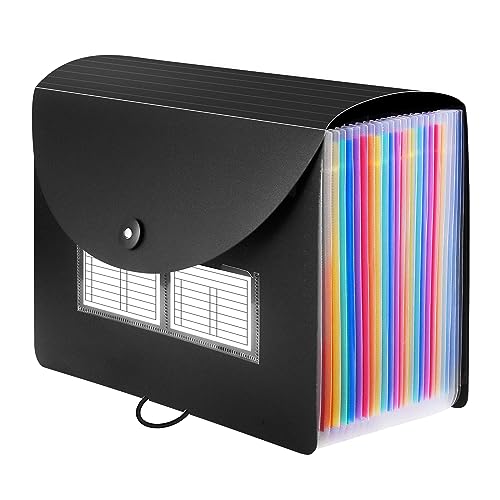
Where to Buy the Best Document Organizer for Small Business Under $20
Every name link and check link below points to the same Creators API-verified Amazon listing for that pick, so you can confirm pocket counts and paper sizes against your own filing habits before ordering for the business. Purchases made through links on reviewstook.com support our testing and writing at no extra cost to you.
- Best Overall for Business Records: Sooez 24 Pockets Expanding File Folder — Check on Amazon
- Best for Monthly Bookkeeping: Amazon Basics Expanding Accordion File Organizer — Check on Amazon
- Best for Receipts and Bills: Sooez Accordion File Organizer, 13-Pocket — Check on Amazon
- Best for Client Visits: SKYDUE Expanding File Organizer with 8 Pockets — Check on Amazon
- Best Counter Sorter: Marbrasse 6 Tier Paper Organizer Letter Tray — Check on Amazon
- Best for a Shared Till Desk: SUPEASY 5 Trays Paper Organizer Letter Tray — Check on Amazon
Running a Small Business on the Best Document Organizer for Small Business Under $20
A small business generates a particular kind of paper chaos: supplier invoices that must survive until tax season, customer receipts that must survive until the return window closes, delivery notes, licence renewals, lease paperwork and the printed bank statements your bookkeeper asks for every quarter. Shopping for the best document organizer for small business under $20 is not about building a corporate archive. It is about giving each of those streams a labelled home cheap enough that you can buy one organizer per stream, per location or per staff role, and still spend less than a single hour of accounting help would cost you when the records cannot be found.
The honest shape of this tier is two formats working as a pair. Expanding accordion folders are the record keepers: they close, they stand on a shelf behind the counter or in the stockroom, and they hold a year of one stream each — one for sales receipts, one for purchase invoices, one for the standing paperwork of licences and contracts. Mesh letter trays are the traffic controllers: they sit where paper enters the business, at the till, the packing bench or the front desk, and they hold today’s paper in visible, sorted motion until it graduates into a folder at the end of the week. A business that buys only folders ends up with unsorted piles on top of them; a business that buys only trays ends up with nowhere permanent for anything. The six picks below cover both halves of that system.
Be equally clear about the ceiling of a twenty-dollar business organizer. None of these products locks, and none is a fire product; the verified listing titles describe expanding pockets, mesh and a waterproof cover, and that is exactly what you are buying. Cash-handling records, signed original contracts, employee identity documents and anything your insurer or accountant would call irreplaceable belong in lockable storage from a higher tier, the step we map in Best Document Organizer For Small Business Under $200. Treat this tier as the working records layer — the paper you touch weekly — and it will repay its tiny cost the first time a supplier disputes an invoice and you produce it in under a minute.
In this guide
Quick Picks
- Best Overall for Business Records: Sooez 24 Pockets Expanding File Folder — Twenty-four pockets run a month-plus-category hybrid for invoices, receipts and standing paperwork in one shelf folder.
- Best for Monthly Bookkeeping: Amazon Basics Expanding Accordion File Organizer — Thirteen waterproof-covered compartments map onto twelve months plus a year-end pocket for the bookkeeper.
- Best for Receipts and Bills: Sooez Accordion File Organizer, 13-Pocket — Deeper pockets keep monthly divider tabs readable, so a bill is filed by month and found by month.
- Best for Client Visits: SKYDUE Expanding File Organizer with 8 Pockets — A compact eight-pocket carry file for quotes, contracts and receipts when the office is wherever the client is.
- Best Counter Sorter: Marbrasse 6 Tier Paper Organizer Letter Tray — Six open mesh tiers sort incoming invoices, orders and post at the counter where they arrive.
- Best for a Shared Till Desk: SUPEASY 5 Trays Paper Organizer Letter Tray — Five handled trays give a small team a visible in, pending, done and file flow beside the till.
How These Picks Were Chosen
Every product linked in this guide was matched against the Creators API verification sheet for this cluster before it could appear here: brand, exact listing title and ASIN all had to agree. That check matters for business buyers because the budget filing market is crowded with lookalike listings, and a folder that arrives with fewer pockets than its photographs suggested is a small but real operational annoyance. Colour variants of one model were counted as a single product, never as separate recommendations, and products whose titles described a different class — a locking box, a fire-oriented case, a piece of filing furniture — were excluded from this tier regardless of any temporary discount, because a business guide that breaks its own budget promise teaches readers to distrust every other number in it.
The class filter for small business use added two business-specific tests on top of the tier filter. First, could a second person run the system? A folder whose logic lives only in the owner’s memory fails a business the moment that owner is on holiday, so we favoured obvious labelling schemes — months, or a short list of named categories — over clever ones. Second, could the business buy the same organizer again next year and get the same system? All six picks are staple designs from established office-supply lines rather than novelty products, which matters when you standardize: the second folder you buy for a second location should match the first, pocket for pocket.
Within those filters we ranked on usable capacity and retrieval speed. For a business, retrieval is the whole game: an invoice you cannot find in a minute is, commercially, an invoice you do not have. Label visibility therefore scored as heavily as pocket count, and open-tray visibility scored for the incoming-paper job where folders cannot compete. Prices are never printed in this guide because they move; the tier names the class of product to shop, and the links let you check today’s figure before the business commits.
Detailed Reviews: Six Working Organizers for a Small Business Budget

Best Overall for Business Records — Sooez 24 Pockets Expanding File Folder, Letter/A4
Strengths
- Twenty-four pockets hold twelve months of one stream plus twelve standing categories, the exact shape of a small business year
- Expandable cover keeps the folder shelf-standing even when some pockets are fat and others are nearly empty
- Letter and A4 sizing covers supplier paperwork from both US and overseas vendors without folded corners
Trade-offs
- Fully loaded, it is a heavy shelf folder rather than something you carry to the accountant under one arm
- Twenty-four pockets demand a labelling session up front; unlabelled, the advantage over a smaller folder disappears
- No lock and no closure beyond the folder itself, so sensitive records need a lockable home elsewhere
| Format | Expanding accordion file folder |
|---|---|
| Pockets | 24 |
| Paper size | Letter / A4 |
| Cover | Expandable cover, per listing title |
| Colour in title | Black |
A growing business outgrows a thirteen-pocket folder in a specific way: the months still fit, but the standing paperwork — the lease, the insurance summary, the equipment warranties, the licence copies, the bank correspondence — has nowhere honest to live, so it colonizes the month pockets and corrupts both systems. This twenty-four-pocket Sooez solves that collision directly. Run the first twelve pockets as the calendar for one stream, typically purchase invoices, and the second twelve as named standing categories. One folder then answers both kinds of question a business actually gets asked: “show me March’s invoices” and “show me the insurance certificate”, each in a single reach to the same shelf.
The desktop accordion format suits the back-office reality of most small firms, which is a shelf or a counter end rather than a filing cabinet. The folder lives open or standing where the week’s paper gets processed, and its width is an asset there: pockets fan visibly, so filing is a drop rather than a hunt. For multi-stream businesses, buy one folder per stream and label the spines by year — sales in one colour of tape, purchases in another — and the shelf itself becomes the index. That standardization is cheap at this tier and is what separates a records system from a collection of folders.
The limitation to plan around is discipline at setup. Label all twenty-four pockets before the first invoice goes in, using the words your bookkeeper uses, not the words that look tidy. If your accountant asks for “supplier invoices”, the pocket says supplier invoices, even if you personally call them bills. Businesses also need a retirement rule: when the year closes, this folder becomes the archive for that year, sealed with a dated label, and a fresh folder starts the new year. A folder that tries to hold two years holds neither properly, and year-end is exactly when you can least afford ambiguity.
Best for: sole traders and small firms running one folder per record stream per year / Not suited for: records that must be locked or carried daily

Best for Monthly Bookkeeping — Amazon Basics Expanding Accordion File Organizer, Letter Size, 13 Compartments
Strengths
- Thirteen compartments are twelve months plus the year-end pocket every bookkeeper asks for, with no setup imagination required
- Waterproof cover protects records in the real environments of small business: cafés, workshops, market stalls and site cabins
- Large-capacity expansion still closes over a fat month of statements and invoices
Trade-offs
- No handle is named in the listing title, so transporting a full folder is a two-handed job
- Plain black styling will not distinguish this folder from an identical one used for a second stream without added spine labels
- Thirteen sections suit one stream well; multi-stream businesses will need several folders or the twenty-four-pocket pick
| Format | Expanding accordion file organizer |
|---|---|
| Compartments | 13 |
| Paper size | Letter size |
| Cover | Waterproof, per listing title |
| Colour in title | Black, 1-pack |
If your bookkeeping rhythm is monthly — and for most small businesses it is, because sales tax, payroll summaries and bank statements all breathe monthly — this is the folder shaped like your obligations. Twelve compartments take the months in order, and the thirteenth becomes the year-end pocket: the annual summaries, the accountant’s checklist and the documents that belong to the year rather than to any month. When your bookkeeper or tax preparer asks for the year, you hand over one folder with everything in the order they think in. Anyone who has watched a professional sort a shoebox of mixed receipts at an hourly rate understands that this folder pays for itself in a single meeting.
The waterproof cover earns its place in working environments rather than offices. Small business paper lives where the work is: a café counter near the espresso machine, a workshop bench, a market stall in changeable weather, a site cabin with a kettle. A cover that shrugs off splashes and wipes clean protects records from the everyday accidents that actually destroy small-business paperwork, which are spills and damp far more often than fire or theft. The folder stands on a shelf when moderately filled, which keeps it visible, and visible is what gets filed into; a folder stored flat in a drawer becomes a drawer problem within a quarter.
Its honest boundary is scope. One folder, one stream, one year is the rule that keeps it useful. Businesses that try to run sales, purchases and payroll through a single thirteen-compartment folder discover that three streams times twelve months is thirty-six categories wearing thirteen labels, and retrieval dies. The fix at this tier is pleasantly cheap: a folder per stream, spine-labelled, replaced yearly. That is still a trivially small records budget for a business, and it scales from a market trader to a ten-person firm without changing the system, only the shelf length.
Best for: monthly bookkeeping streams and the annual bookkeeper handover / Not suited for: running several record streams through one folder

Best for Receipts and Bills — Sooez Accordion File Organizer, 13-Pocket Expanding File Folders, Letter A4
Strengths
- Deeper pockets keep the monthly divider tabs visible above the paper, so retrieval by month stays a glance rather than a fan-through
- Monthly divider tabs are part of the design, matching how bills and receipts are actually queried
- Thickened cover holds its shape on a counter or shelf through daily business use
Trade-offs
- The monthly framing needs relabelling if your business files a stream by supplier or client instead of by date
- It overlaps the Amazon Basics pick closely; most businesses should choose one monthly folder design and standardize on it
- Deeper pockets add slight bulk beside the slimmest carry folders in this tier
| Format | Accordion file organizer, expanding |
|---|---|
| Pockets | 13 |
| Paper size | Letter / A4 |
| Dividers | Monthly divider tabs, per listing title |
| Cover | Thickened cover, per listing title |
Receipts and bills are retrieved by date. A supplier queries an invoice by month, a card statement is reconciled by month, an expense claim is challenged by month. This Sooez folder is built around that single fact: its deeper pockets keep the monthly divider tabs visible above the paper line, which sounds like a small thing until you have fanned through a competitor folder for the fourth time looking for a tab buried behind its own contents. In a business, that fan-through happens weekly, in front of a ringing phone, and it is the moment staff start leaving paper on the counter instead of filing it. Visible tabs are not a convenience feature here; they are what keeps the system in use by people other than its creator.
Run it as the bills-and-receipts folder and its logic completes itself. Incoming supplier invoices drop into the current month; card receipts join them; paid items can be marked on the tab side or moved to the back of the same pocket, depending on your bookkeeper’s preference — ask once, then never improvise. At month end the pocket is the reconciliation, complete and in order. The thickened cover matters in this role because the folder is handled daily and opened flat on counters; flimsy covers curl and crack under that rhythm, while this one keeps enough structure to stand behind the till or on the office shelf between uses.
Choose between this and the Amazon Basics folder on retrieval style. If your monthly stream is mostly full-size invoices and statements, either works and the Basics folder’s waterproof cover may suit a messier workplace. If your stream is heavy on small receipts that hide tabs and slide around, the deeper pockets here are the better tool. What a business should not do is buy one of each for the same stream and split the year across two designs; consistency is what lets any staff member file and find without asking.
Best for: receipt-heavy and bill-heavy monthly streams handled by more than one person / Not suited for: category filing by client or supplier without relabelling
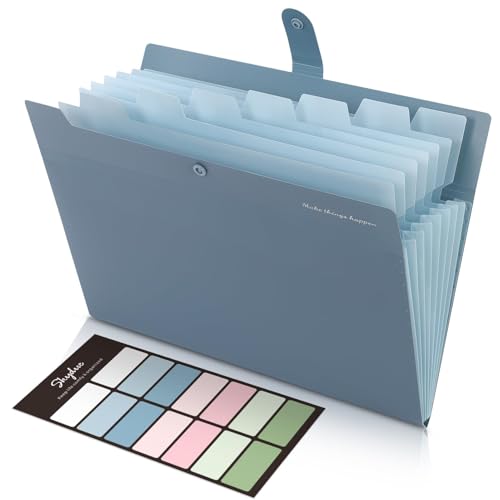
Best for Client Visits — SKYDUE Expanding File Organizer with 8 Pockets, Letter Size
Strengths
- Eight pockets suit a per-client or per-job file: quote, contract, invoices, receipts, sign-off and correspondence
- Labels are included, so a new client file can be created in the field in under a minute
- Compact size travels in a work bag between office, site and client premises without becoming luggage
Trade-offs
- Eight pockets will not run a twelve-month scheme; this is a project file, not the business archive
- Capacity fills fast on jobs that generate bulky paperwork such as permits and printed plans
- One verified colourway in our sheet, so colour-coding clients means adding your own tape or labels
| Format | Expanding accordion file organizer |
|---|---|
| Pockets | 8 |
| Paper size | Letter size |
| Included | Labels, per listing title |
| Colour in title | Blue |
Tradespeople, consultants, agents and mobile service businesses share a filing problem the desk-bound never meet: the file has to travel to the work. The SKYDUE eight-pocket folder is the job file for that pattern. One folder per client or per job, with pockets for the quote, the signed agreement, the running invoices, the receipts for materials, the correspondence and the final sign-off, gives you a complete, presentable record in your hand at the kitchen table where the client actually asks questions. It looks deliberate, it opens flat, and it means the answer to “what did we agree?” is produced, not promised.
The listing title names bills and receipts among its intended contents, and the smaller pocket format genuinely suits the paper of field work: fuel receipts, materials slips, delivery dockets and printed emails stay put in narrow expansion instead of sliding into a communal wad. At the end of a job, the whole folder is the job record — file it on the shelf as the archive for that client, and its cost disappears into the job’s expenses. Few filing habits are as satisfying, or as useful when a client queries an invoice eleven months later, as pulling one labelled folder that contains the entire story.
Know its ceiling. A long project with permits, drawings and staged contracts will burst eight pockets, and the answer is a second folder for the same job, split by phase, not a bigger handful crammed into one. And because it travels, treat it as a working copy carrier: signed originals should be scanned — the workflow in How To Scan A Document With A Printer covers the mechanics — and the originals themselves should sleep in the business’s lockable storage, not in a folder that rides in a van.
Best for: per-client and per-job files for mobile and field-based businesses / Not suited for: twelve-month archives or bulky permit-heavy projects in a single folder

Best Counter Sorter — Marbrasse 6 Tier Paper Organizer Letter Tray, Mesh Desk File Organizer with Handle
Strengths
- Six open tiers give a counter a complete visible flow: in, to pay, to file, orders, post out and one spare
- Mesh construction wipes clean and survives counter life — coffee, dust and daily knocks — without warping
- The handle lets staff lift the whole sorting station aside for cleaning or closing time in one move
Trade-offs
- Open tiers show their contents to anyone at the counter, so customer and employee documents must never rest here
- It sorts paper in motion only; nothing in a tray is filed, archived or protected
- Six unlabelled tiers become six mystery piles within a week in a shared workspace
| Format | Mesh desk letter tray / paper sorter |
|---|---|
| Tiers | 6 |
| Paper size | Letter / A4 |
| Carrying | Handle, per listing title |
| Colour in title | Black |
The two tray picks in this guide are framed exactly as the audit requires: they are the incoming-paper layer of the business, the place documents land before they become records. The Marbrasse is the stronger counter station of the two. Six tiers let a small business run its whole daily paper flow in the open: supplier invoices awaiting payment in one tier, customer orders in progress in another, post and deliveries to check in a third, paper ready to file in a fourth, outgoing items in a fifth, and the sixth for the day’s surprises. Because everything is visible, the owner can read the state of the business’s paperwork from the doorway — a full “to pay” tier is a cash-flow fact, not a filing detail.
Counter placement is the discipline that makes it work. Put the tray where paper physically enters the business — beside the till, at the packing bench, next to the front-desk printer — and nowhere else. Paper that has to be carried to its sorter gets stacked beside the carrier’s elbow instead, and the stack, not the tray, becomes the system. Label the front edge of every tier in words the newest staff member understands, and set one rule that never bends: nothing leaves a tier except into a folder, the post or the shredder. Trays fail in businesses when they become parking; they succeed when they are treated as a conveyor with six clearly named stops.
The privacy boundary is absolute and worth stating in a business context. Customer details, employee paperwork and anything with account numbers must skip the tray entirely and go straight to a closed folder or lockable storage, because an open counter sorter is visible to every customer who leans on it. Used for the non-sensitive flow it is designed for — invoices, orders, delivery notes, internal lists — the Marbrasse is the cheapest operations upgrade in this guide, and the one staff will thank you for first.
Best for: shops, cafés and front desks sorting non-sensitive incoming paper in the open / Not suited for: customer, employee or account documents, or any long-term storage

Best for a Shared Till Desk — SUPEASY 5 Trays Paper Organizer Letter Tray with Handle
Strengths
- Five trays fit the cramped reality of a till point, packing bench or reception ledge where a six-tier unit crowds the work
- Handled mesh design suits shared, wiped-down, frequently moved workstations in retail and hospitality
- Open tiers let a whole shift team see what is waiting without asking the person who was on earlier
Trade-offs
- One fewer tray than the Marbrasse means one fewer live category in the daily flow
- Open design offers no privacy, so it must be paired with closed storage for anything sensitive
- Letter-size trays hold the flow well but mixed-size delivery paperwork looks untidy quickly if tiers are not cleared daily
| Format | Mesh desk letter tray with handle |
|---|---|
| Trays | 5 |
| Paper size | Letter |
| Settings named in title | Office, home, classroom, school |
The SUPEASY tray is the Marbrasse idea compressed for the workstations where small business paper actually collects: the till point with eighteen centimetres of spare ledge, the packing bench shared with tape and labels, the reception desk that is also the returns desk. Five trays still run a complete flow — in, action, waiting, file, out — and the smaller footprint leaves room to work beside the flow instead of behind it. In a shared business the handle matters more than it looks: the whole station can be lifted to a shelf at close of business and returned in the morning, which keeps the counter clear for cleaning and removes the overnight temptation for paper to wander.
Shift work is where this pick quietly shines. A tray system is a handover document: the incoming shift reads the tiers the way they read a till count, seeing at a glance what the previous shift left in action and waiting. That only works if the tiers are emptied on a rhythm, so pair the tray with a closing routine — the “file” tray empties into the month’s folder, the “out” tray goes to the post bag, and anything still in “action” at close gets a note on top explaining where it stands. Five minutes, and the business’s paper survives staff changes, sick days and holidays without a single “where did that go?”
Compared with the six-tier pick, the choice is footprint against one extra category. A single-operator business with a real desk should take the Marbrasse and its spare tier. A team working a tight counter should take the SUPEASY and its manners. Both are incoming-layer tools; the records themselves belong in the folders reviewed above and, for the sensitive minority, in the lockable tier covered by Best Document Organizer For Small Business Under $150.
Best for: till points, packing benches and shared desks running a visible shift handover / Not suited for: private documents or as the business’s only storage
Comparison Table
| Pick | Format | Capacity | Paper | Link |
|---|---|---|---|---|
| Sooez 24-Pocket | Shelf folder | 24 pockets | Letter / A4 | Check on Amazon |
| Amazon Basics Accordion | Portable folder | 13 compartments | Letter | Check on Amazon |
| Sooez 13-Pocket | Portable folder | 13 pockets, monthly tabs | Letter / A4 | Check on Amazon |
| SKYDUE 8-Pocket | Carry folder | 8 pockets | Letter | |
| Marbrasse Letter Tray | Counter sorter | 6 tiers | Letter / A4 | |
| SUPEASY Letter Tray | Till-desk sorter | 5 trays | Letter |
How to Choose the Best Document Organizer for Small Business Under $20 by Record Stream
Choose by stream, not by product. List the streams your business actually produces — for most small firms that is sales receipts, purchase invoices, bank and card statements, standing compliance paperwork, and client or job files — and assign one organizer to each stream that generates paper weekly. Streams decide formats: anything retrieved by month wants a thirteen-pocket monthly folder, anything retrieved by client or job wants the eight-pocket carry file multiplied per client, and the standing paperwork wants the second half of the twenty-four-pocket folder where it stops corrupting the monthly system. Paper that is not yet a record — today’s arrivals — belongs to a tray, and only to a tray, until the weekly filing pass promotes it.
Then apply the second-person test to every choice. Could a staff member who did not set the system up file a new invoice correctly in thirty seconds, and find a four-month-old one in a minute? If the answer needs you in the room, the system is a hobby, not a business process, and the fix is almost always labelling: fewer, plainer category names, written in the vocabulary of the person who will ask for the document later — usually your bookkeeper. The guides for the other seats in the business work the same logic from different chairs: the owner-operator version is at Best Document Organizer Under $20, and the desk-based version at Best Document Organizer For Home Office Under $20.
Finally, draw the security line before you buy, not after an incident. This tier sorts and stores working records; it does not lock and it does not protect originals. Decide which documents in your business are irreplaceable — signed contracts, licences, identity and banking originals — and route those to lockable storage from the start, keeping copies in the working folders for daily use. That one decision converts a cheap filing setup into a defensible records practice, and it costs nothing but the honesty to make it on day one.
What Does a $20 Records Budget Actually Buy a Business?
It buys standardization, which is worth more to a business than capacity. At this level you can afford the same folder for every stream, every location and every year, and sameness is what makes records retrievable by anyone, auditable by your accountant and survivable when staff change. What it does not buy is protection: no locks, no fire-oriented construction, no hardware that survives a determined toddler, let alone a determined adult. Set expectations accordingly and the tier performs beautifully; ask it to be a safe and it will disappoint you at the worst possible moment.
It also buys a natural archiving rhythm. Because a folder per stream per year is cheap, the business can close a year by closing folders: label the spines, shelve them in order, start fresh. Compare that with the filing-cabinet drawer that mixes three years and two businesses because emptying it felt like a project. Cheap, identical, annually replaced folders are not a compromise version of a records system. For a small firm, they are the records system that actually gets maintained, which is the only kind that exists when the auditor, the landlord or the tax office comes asking.
How Do You Set Up a Small Business Filing Rhythm That Staff Actually Follow?
Set the system up on a quiet day, before the next delivery arrives. Label every pocket and tier, write a one-page index — stream, folder, location, retention — and tape it inside the stockroom door or the office cupboard where anyone can find it. Then hold one complete sorting session for the existing backlog, filing or shredding every loose sheet, because a system launched beside an unsorted pile will lose to the pile. Brief the team in five minutes: where paper lands, where it graduates to, and the one rule that nothing sensitive ever rests in an open tray.
Run the rhythm weekly. Ten minutes, same time each week, ideally tied to an existing closing or banking routine: tray paper moves into folders, the current month’s folder gets a quick completeness glance, and obvious junk is shredded while it is still obviously junk. Problem: a pocket is bursting while others stay empty — fix by splitting that stream by quarter or by major supplier, not by forcing the gussets. Problem: paper is landing on the counter beside the tray again — fix by moving the tray to the landing spot, because the landing spot is data about your workflow, not a discipline failure. Problem: only one person understands the labels — fix by renaming pockets in the asker’s words, starting with your bookkeeper’s.
How Should a Small Business Handle Receipts, Invoices and Tax Records Through the Year?
Receipts are a volume problem with a simple shape: many small pieces of paper, each worthless alone and expensive in aggregate at tax time. Capture them into the current month’s pocket of the receipts folder the day they arrive — the folder must live where receipts land, which is beside the till or in the vehicle, not in the office nobody visits. Businesses that also scan should scan in the same motion; the paper pocket then becomes the backup rather than the only copy, and the year-end sort becomes a reconciliation instead of an excavation.
Invoices split into two directions and should never share a pocket. Purchase invoices flow toward payment: tray tier to pay, then the month’s pocket once paid, with the payment date noted if that is your bookkeeper’s habit. Sales invoices flow toward collection: a copy in the client’s job file while the job is live, then into the monthly sales folder once settled. Keeping the two directions in separate folders is what lets you answer the two classic questions — “have we paid this?” and “have they paid us?” — without opening the same folder twice and guessing.
Tax records are the annual folder wearing a monthly disguise. Keep the year-end pocket of the bookkeeping folder reserved from January for the documents the return will need, and feed it as items arrive rather than hunting for them next spring: annual summaries, asset purchase invoices, loan statements, the paperwork of anything you bought, sold or claimed. When the year closes, that pocket plus twelve monthly pockets is the complete handover. Retention beyond the year belongs to your accountant’s advice for your jurisdiction, but the physical rule is simple: closed years live in labelled folders on a high shelf, in order, and the working shelf only ever holds the current year and the one before it.
Paper folders should not be the only copy of anything the business cannot afford to lose. A light scanning habit turns this cheap physical system into a resilient one: scan the month’s folder contents in the same weekly session that files them, keep the scans in a dated folder structure that mirrors the physical pockets exactly, and back that structure up following the routine in How To Back Up Scanned Documents. Mirroring matters more than resolution. When the scan tree and the shelf tell the same story — same streams, same months, same names — any record can be produced from whichever copy is closer, and a lost folder becomes an inconvenience instead of a crisis. Businesses that print and scan heavily from the same desk may also find the equipment guidance in our small business printing coverage useful, but the records logic stays the same regardless of hardware: one stream, one folder, one mirrored scan folder, one weekly rhythm.
Common Mistakes
The first mistake is one folder for the whole business
, which guarantees that three streams share thirteen labels and none of them can be retrieved. The second is letting sensitive documents rest in open counter trays where customers can read them; the tray layer is for non-sensitive flow only, always. The third is a labelling scheme only the owner understands, which converts every absence into a records outage. The fourth is mixing years — a folder that spans two tax years serves neither and terrifies bookkeepers. The fifth is buying filing furniture before the stream system works; a business that cannot run six folders will not be saved by a cabinet, it will just store its chaos behind a door. The sixth, and most expensive, is treating this tier as security: working folders hold copies and current records, while originals belong in lockable storage.
Final Recommendation
For most small businesses, start with two folders and a tray. The Amazon Basics thirteen-compartment folder runs the monthly bookkeeping stream and the bookkeeper handover; the Sooez twenty-four-pocket folder takes the stream with the heaviest standing paperwork; and the Marbrasse tray — or the SUPEASY where counter space is tight — runs the incoming layer where paper actually arrives. Add a SKYDUE folder per active client if your work travels. That combination, labelled in your bookkeeper’s vocabulary and emptied on a weekly rhythm, is a complete working records system for less than the cost of one hour of professional rescue sorting. When the business is ready to protect its originals properly, step up through Best Document Organizer For Small Business Under $50 toward the lockable tiers, and keep this cheap, honest layer doing the daily work it is genuinely good at.
Frequently Asked Questions
How many organizers does a small business actually need?
One per active record stream, plus one tray at the point where paper enters. Most small firms land on three or four folders — sales, purchases, bookkeeping and standing paperwork — plus client job files if the work is client-based. More streams than that usually means a stream should be split by year rather than given a second design.
Should receipts be filed by month or by supplier?
By month for most small businesses, because reconciliation, sales tax and expense queries are all date-shaped. File by supplier only for the two or three major suppliers whose paperwork you retrieve constantly; a hybrid — monthly folders plus one standing folder per major supplier inside the twenty-four-pocket pick — covers both habits.
Can staff share one filing system, or does each person need their own?
Share the system, never split it. One set of folders with plain labels and a written index survives holidays and staff changes; personal parallel systems guarantee the document is in someone else’s folder. Personal trays for in-progress work are fine, provided paper graduates into the shared folders weekly.
Are these organizers enough for tax and audit purposes?
They are enough as the physical layer: complete, ordered, retrievable records are what an audit actually consumes. They are not secure storage, so originals and sensitive records need a lockable home, and you should follow your accountant’s retention advice for your jurisdiction. Ask your bookkeeper to approve the category names before you label — that five-minute check prevents most year-end pain.
How do I keep customer and employee documents private on a budget?
Keep them out of open trays entirely, hold working copies in a closed folder stored away from customer areas, and keep originals in lockable storage from a higher tier. Privacy in a small business is mostly routing: the right document taking the right path from the moment it arrives.
When should a growing business step up from this tier?
When retrieval slows because volume per stream exceeds a folder a year, when you employ enough staff that access control matters, or when the value of the originals you hold — contracts, licences, property paperwork — makes lockable and fire-oriented storage an insurance question rather than a filing one. The next tiers keep the same stream logic and add the protection.
What should I do with last year’s folders?
Close them, label the spines with stream and year, and shelve them in order out of the working area. Keep the retention period your accountant advises, then shred in year order. A closed-year shelf that anyone can read at a glance is the sign the system is working.

