Disclosure: As an Amazon Associate, reviewstook.com earns from qualifying purchases. Links on this page are affiliate links at no extra cost to you; prices and availability change frequently, so check Amazon for the latest.
Is a Workstation PC Worth It? An Honest Cost-Benefit Answer
Is a workstation PC worth it? The honest answer is that the question has no general form — it has a personal one, and this article’s job is to help you ask it correctly. A workstation costs more than a regular desktop, sometimes much more, and what the premium buys is specific: certified professional graphics, error-correcting memory options, sustained performance engineering, deep memory capacities and business support. For the professional whose work touches those things weekly, the premium is among the best money in their practice. For the buyer whose work never touches them, the same premium buys a very expensive badge. Everything below is an attempt to sort you, accurately, into one of those two groups.
We will do it without printing prices, because workstation prices move too fast for print and because the argument does not need them: it runs on tiers, on time and on the cost of failure, all of which you can price against live listings as you read. The framework here pairs with the category weighing in Workstation PC Pros And Cons and the specification work in Workstation PC Buying Guide; readers who already know their budget can see the worth-it question answered at fixed tiers in Best Workstation PC Under $700 and its neighbours. This page is the decision itself.
In this guide
What the Workstation Premium Actually Buys
Before judging worth, itemise the purchase. The workstation premium — the difference between a workstation and a consumer desktop of similar headline speed — buys five things. Certified graphics drivers, tested by your software’s publisher against your exact applications. ECC memory availability, which corrects the random bit errors that large memory arrays accumulate during long computations. Sustained-load engineering: cooling, power delivery and component selection aimed at hour four of a render rather than second ninety of a benchmark. Memory and expansion headroom: capacities and slots that let the machine grow with your projects instead of expiring with them. And business support: channels, documentation and warranties built for people whose computer is a revenue tool.
Notice what the premium does not buy: it does not buy the fastest possible benchmark numbers, which consumer hardware often wins, and it does not buy gaming performance, style or novelty. A buyer who values the five things above is buying substance. A buyer who values the things in this paragraph should not pay the premium at all, and a large part of this article’s honesty consists of telling that buyer so, with examples of the machines they should buy instead — including, later, a mainstream Dell tower with a proper gaming-capable GPU that makes no workstation claims whatsoever.
The Arithmetic That Decides It: Time, Failure and Lifespan
Worth-it questions about tools are answered in hours, not in specifications. Run three numbers for your own work. First, waiting time: how many hours a week do you spend watching the machine — rendering, compiling, loading, swapping? A workstation that halves a daily hour of waiting returns roughly a working week every quarter; price that week against the premium and the question usually answers itself. Second, failure cost: what does one corrupted render, one unsupported-driver crash in deadline week, one out-of-memory failure on the big project actually cost you — in rework, in penalties, in reputation? The workstation premium is, in large part, an insurance premium against those events, and like all insurance it is cheap or expensive depending on the value of what it protects.
Third, lifespan: a workstation bought with headroom typically serves four to six years; a consumer machine bought tight against today’s needs often serves two to three before its ceiling becomes your problem. Cost per year of service — not purchase price — is the honest unit, and it routinely reverses the apparent ranking between a ‘cheap’ machine replaced early and an ‘expensive’ one still working. None of this arithmetic requires printed prices: take the live listing figures for the two or three machines you are actually choosing between, divide by realistic years of service, add your waiting hours at your own rate, and the worth-it question stops being a matter of opinion.
There is a fourth number, quieter than the others: the cost of the second purchase. The most expensive workstation is the one bought twice — the consumer machine bought first because the workstation seemed extravagant, replaced eighteen months later by the workstation that should have been bought initially. Buyers who have lived that sequence describe it without nostalgia. If your workload’s trajectory points at workstation territory within the machine’s first two years, the worth-it answer is probably yes now, at the first purchase, rather than yes eventually at twice the total cost.
Who It Is Worth It For — and Who It Is Not
Worth it: the certified-software professional
If your income runs through CAD, engineering or architecture software whose publisher certifies professional graphics, the question is close to rhetorical. The certified configuration is the supported configuration, and the premium is the price of having a vendor answer when something breaks. For this buyer, ‘worth it’ understates it: the workstation is the cost of practising the profession with proper tools.
Worth it: the long-load and large-memory worker
Renderers, simulators, compilers of large codebases, analysts with datasets that live in memory, local-AI developers: your work is exactly the sustained, capacity-hungry pattern workstations are engineered for. Waiting time and memory ceilings tax you weekly, in measurable hours, and the premium buys those hours back. Run the arithmetic in the previous section with your real numbers; it is rarely close.
Worth it: the practice and the fleet buyer
Studios and businesses buying several seats gain the consistency dividend: identical machines, one support relationship, predictable behaviour across desks. The premium multiplies by seats, but so does the cost of inconsistency, and fleet buyers who have managed a miscellany of consumer machines rarely volunteer to do it twice.
Not worth it: the office-plus professional
Documents, email, browser research, spreadsheets, video calls, light design: this workload is real professional work, and it does not need a workstation. A modern mainstream desktop with a fast processor, 32GB of memory and NVMe storage will serve it identically, and the savings buy the monitor, backup and peripherals that this buyer will actually feel. Buying a workstation for office-plus work is the category’s most common waste of money.
Not worth it: the certification-free GPU buyer on a budget
Editors, Blender artists and AI experimenters whose software ignores certification and whose budget is fixed face a real trade: the professional GPU premium, or more raw GPU, storage and display for the same money. On a fixed budget, the second basket usually wins. The exception is when the same buyer also needs the memory capacity and support story — which is why this article keeps insisting on the workload, not the label, as the judge.
The honest middle: the growing professional
If your work is light today and visibly growing — bigger projects arriving, heavier software being adopted — you are the genuinely hard case. The guidance from the second-purchase argument applies: buy the platform with headroom (a tower, generous memory) at the tier you can afford, even renewed, rather than the sealed or tight machine that fits today perfectly and next year not at all. For this buyer the workstation question is really a headroom question, and headroom is nearly always worth it.
The Machines That Frame the Answer
Six verified machines, chosen because each one is the worth-it answer for a different buyer — or the deliberate alternative for one. All were checked against Amazon’s product data on 2026-11-20.
Worth It for the Professional Mainstream — Lenovo ThinkStation P2 Gen 2
Strengths
- 128GB of memory and a balanced flagship-class processor make its cost-per-year arithmetic easy over a long service life
- The specification has no weak line, which is what ‘worth it’ looks like in hardware form
- Vendor support and a fleet-proven line minimise the failure-cost side of the ledger
Trade-offs
- No professional GPU in this configuration, so the certification buyer must step up within the line
- Buyers with office-plus workloads will never recover its premium in waiting time saved
- A full tower’s running presence is part of its ownership cost
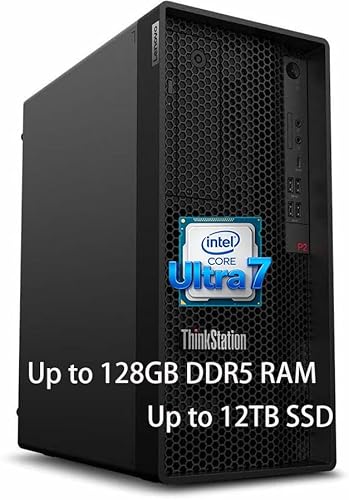
| Processor | Intel Core Ultra 7 265K |
|---|---|
| Memory | 128GB DDR5 RAM |
| Storage | 2TB SSD + 1TB HDD |
| Networking | Ethernet, Wi-Fi 7, Bluetooth |
| Operating system | Windows 11 Pro |
The ThinkStation P2 Gen 2 is the reference case for this article: a workstation whose premium is plainly itemised — memory headroom, platform quality, support — and plainly recoverable by the professional mainstream buyer whose waiting hours and project sizes are real. Over a five-year seat, its cost per year against a cheaper machine’s three-year replacement cycle is the arithmetic that converts sceptics.
It is equally the reference case for restraint: hand it to an office-plus buyer and the same machine becomes the premium that never pays out. Worth-it is a property of the pairing between machine and workload, and the P2 demonstrates both halves of that sentence better than any other machine in this article.
Best for: mixed professional workloads with real waiting time and growing projects / Not suited for: office-plus work or certified-graphics requirements

Worth It at Renewed Prices — HP Z4 G4 Workstation (Renewed)
Strengths
- A Xeon platform with 64GB of memory at renewed positioning collapses the premium almost to zero
- Professional build quality and graphics lineage survive into its second life intact
- Dual-tier storage and Windows 11 Pro arrive fitted
Trade-offs
- The platform’s age caps its per-core speed and its remaining service horizon
- The Quadro P400 is a display and light-3D card, not a compute engine
- The buyer’s verification effort is part of the price — budget it honestly
| Processor | Intel Xeon W-2133, 6-core, up to 3.9GHz |
|---|---|
| Memory | 64GB DDR4 |
| Storage | 512GB NVMe SSD + 2TB HDD |
| Graphics | NVIDIA Quadro P400 2GB |
| Operating system | Windows 11 Pro |
| Condition | Renewed |
The renewed Z4 G4 reframes the worth-it question entirely: when the premium shrinks to the difference between a renewed workstation and a new consumer desktop, the workstation’s assurances come nearly free, and the answer flips to yes for a wide range of buyers who could not justify a new flagship. Its costs are diligence and age, both knowable in advance.
For first workstations, second seats, home labs and small studios, this class of machine is where the worth-it argument is strongest in the entire category — professional capability whose price has already been paid by its first owner’s depreciation. Verify the listing, verify the delivery, and the arithmetic is very hard to beat.
Best for: first-time buyers, studios and labs willing to verify what they buy / Not suited for: current-generation speed or a long first-owner warranty

Worth It as the Sensible Seat — Dell OptiPlex 7070 SFF (Renewed)
Strengths
- Eight cores, 32GB of memory and a 1TB NVMe drive pass every floor light professional work sets
- Small, quiet and Windows 11 Pro-equipped: deployable anywhere, immediately
- Renewed pricing makes its cost-per-year case without any heroics
Trade-offs
- Integrated graphics end its ambitions at light visual work
- An older platform’s ceiling will show in heavy or parallel tasks
- Renewed checks apply in full
| Processor | Intel Core i7-9700, 8 cores, up to 4.70GHz |
|---|---|
| Memory | 32GB DDR4 |
| Storage | 1TB NVMe M.2 SSD |
| Networking | Wi-Fi 6E (AX210) |
| Operating system | Windows 11 Pro |
| Included | Wireless keyboard and mouse |
| Condition | Renewed |
The OptiPlex 7070 class answers a narrower worth-it question — not ‘is a flagship worth it’ but ‘is a properly specified professional machine worth it for ordinary professional work’ — and answers it yes. Its memory and storage floors are the ones that matter daily, its form factor fits real desks, and its price makes the alternative (a new budget machine with less memory and a slower drive) look like the false economy it is.
Buyers should be clear about what it is not: it is not a 3D, rendering or AI machine, and no worth-it argument survives pretending otherwise. As the second seat, the office-plus professional’s machine or the starter seat, its value case is complete on its own terms.
Best for: second seats, office-plus professionals and starter workstations / Not suited for: any primary heavy workload

The Alternative That Is Worth It Instead — Dell Tower Desktop (RTX 5060)
Strengths
- A 20-core Core Ultra 7 with an RTX 5060 discrete GPU covers creative and GPU-led work the integrated machines cannot
- 32GB of memory and a 1TB SSD meet the professional floors without workstation pricing logic
- Windows 11 Pro, HDMI 2.1 and an SD card reader show a machine aimed at real desks
Trade-offs
- No workstation certification story: CAD practices needing certified drivers should not buy it for that work
- No ECC platform and a consumer support model — the assurance items are simply not in the basket
- A mainstream tower’s expansion and power headroom are good, not professional-grade
| Processor | Intel Core Ultra 7 265F, 20-core |
|---|---|
| Graphics | NVIDIA GeForce RTX 5060 8GB GDDR7 |
| Memory | 32GB RAM |
| Storage | 1TB SSD |
| Ports | HDMI 2.1, SD card reader |
| Operating system | Windows 11 Pro |
| Included | Wired keyboard and mouse |
This Dell tower is in the article as the control group: the machine that is worth it instead, for the certification-free creative buyer. Its discrete RTX GPU delivers the raw graphics throughput that editors, 3D hobbyists-turned-professionals and AI experimenters actually use, at a tier where a professional GPU would have consumed the budget and returned certification they never invoke.
Its presence disciplines every other verdict here. If a workstation cannot explain what it offers beyond this machine for your workload, it is not worth it for you — and if it can, in certification, memory or support terms that your week actually presents, then the premium has been justified in the only court that matters.
Best for: certification-free creative and GPU-led buyers / Not suited for: certified CAD work or ECC-critical computation

Worth It for Local AI in a Small Space — MINISFORUM MS-S1 MAX (64GB)
Strengths
- The AI Max+ platform’s unified memory gives local AI workloads a capability no similarly sized machine previously offered
- A PCIe x16 slot and dual 10GbE networking keep expansion and fast storage genuinely open
- 64GB of memory and 2TB of storage arrive in the configuration AI work wants
Trade-offs
- Soldered memory makes the 64GB a lifetime decision — model-led buyers should price the 128GB variant before ordering
- Integrated graphics are not a certified professional path
- Compact cooling under sustained load is present in a quiet room
| Processor | AMD Ryzen AI Max+ 395, 16 cores / 32 threads |
|---|---|
| Graphics | RDNA 3.5 integrated GPU |
| Memory | 64GB LPDDR5 |
| Storage | 2TB SSD, dual M.2 PCIe 4.0 |
| Expansion | PCIe x16 slot |
| Networking | Dual 10GbE, Wi-Fi 7 |
| Ports | USB4 v2 80Gbps |
| Power supply | 320W |
The MS-S1 MAX poses the worth-it question in its newest form: not workstation versus desktop, but capability-per-desk. For the local-AI developer, its unified memory architecture is worth a premium over conventional machines of any size, because the alternative — a tower with a large-memory discrete GPU — costs more space, more money or both to reach the same working capability. For that buyer, it is not merely worth it; it is the efficient purchase.
For buyers outside AI and heavy development, the same machine’s premium buys a architecture they will not use, and the honest verdict flips. It is the cleanest illustration in this article that worth-it follows the workload’s frontier: buy the machine that is special in the way your work is demanding, and ordinary in every way your work is not.
Best for: local AI developers and heavy multitaskers in small spaces / Not suited for: certified graphics needs or buyers unsure their memory needs fit 64GB


Worth It Only With Eyes Open — HP Z240 Tower Workstation (Renewed)
Strengths
- A genuine HP workstation tower with 32GB of memory at the renewed market’s entry edge
- A tower chassis leaves a graphics and storage upgrade path that sealed machines do not
- Windows 11 Pro included keeps it deployable as a professional seat
Trade-offs
- Storage is a 1TB hard drive with no SSD in this configuration — the first upgrade is effectively mandatory
- An older i7 platform bounds its performance to light professional work
- Renewed verification, as ever, is part of the true price
| Processor | Intel Core i7-7700 |
|---|---|
| Memory | 32GB DDR4 |
| Storage | 1TB HDD |
| Operating system | Windows 11 Pro |
| Condition | Renewed |
The Z240 is this article’s honesty test. At the renewed market’s entry edge, a real workstation tower with 32GB of memory sounds like the worth-it argument won by default — until the configuration is read closely and the hard-drive-only storage announces the catch: the machine needs an SSD before it feels like a workstation at all, and the honest price is the machine plus that upgrade plus the buyer’s time.
Priced that way — truthfully — it can still be worth it as a project platform, a Linux seat, a light-duty tower with an upgrade path. Priced naively, it is the article’s standing warning that worth-it is computed on the whole cost of reaching a working machine, never on the headline of the cheapest listing.
Best for: project builders and light-duty buyers who will fit an SSD themselves / Not suited for: anyone expecting a finished workstation out of the box
Where to Buy
The machines above are sold through Amazon; the reviewstook.com listings linked here are the exact configurations verified for this article. Worth-it arithmetic should always be run against the live listing — configuration and terms included — rather than against any figure printed elsewhere, this page included.
Lenovo ThinkStation P2 Gen 2 — Check on Amazon
HP Z4 G4 Workstation (Renewed) — Check on Amazon
Dell OptiPlex 7070 SFF (Renewed) — Check on Amazon
Dell Tower Desktop (RTX 5060) — Check on Amazon
HP Z240 Tower Workstation (Renewed) — Check on Amazon
Cost of Ownership: The Whole Bill, Not the Sticker
The purchase price is the first line of a workstation’s cost, not the total. Ownership adds electricity — meaningful for heavy machines under daily load, and worth an honest estimate for Threadripper-class and multi-GPU systems in particular. It adds the peripherals the machine deserves: a display that does its output justice, backup storage that protects its contents, a UPS if its unfinished work is valuable. It adds, on renewed machines, the buyer’s verification time and occasionally a first upgrade, as the Z240 above demonstrates. And it subtracts, on the other side of the ledger, the residual value of a professional machine at retirement — workstations hold second-life value as secondary seats, home servers and resales in a way consumer desktops generally do not.
Software belongs in the ownership bill too, and it cuts in the workstation’s favour more often than buyers expect: the professional applications these machines run are frequently the most expensive items on the desk, licensed per seat, and a machine that runs them badly taxes a very expensive asset. When the software costs more than the hardware — true for many CAD and creative professionals — optimising the hardware purchase price at the software’s expense is arithmetic done upside down. The workstation premium, seen from the software seat, is often the cheapest line in the whole setup.
Finally, count downtime at its real rate. A professional machine that fails costs the repair, plus the idle professional, plus the deadline consequences. Business support, conservative engineering and platform maturity are all, economically, downtime insurance — and buyers who have invoiced a week lost to a dead consumer machine tend to stop asking whether the workstation premium is worth it, because they have already paid the alternative’s price once.
The Worth-It Question, Workload by Workload
CAD and engineering design: worth it, and the least arguable case in this article. Certification, viewport stability on large assemblies and vendor support map directly onto billable reliability. The professional who bills design hours and runs a consumer card to save the premium is self-insuring against driver incidents with their own deadline as the deductible. Video editing and motion design: genuinely contested, and decided by volume. The occasional exporter gains little from the workstation premium; the daily exporter with large timelines gains sustained performance, memory headroom and storage throughput that price out quickly in waiting hours. Price both baskets at system level before deciding, and let your export queue cast the vote.
Software development: worth it in proportion to build and environment weight. A developer whose day is an editor and a browser needs no workstation. A developer running container stacks, local clusters, multiple virtual machines and monorepo builds is running a small data centre at their desk, and the memory capacity and sustained multi-core performance of a workstation are bought back in compile-waiting hours within the first quarter. Data analysis and science: worth it when datasets live in memory or computations run long — which is to say, worth it in exactly the cases where ECC also stops being a luxury. The correctness argument and the capacity argument arrive together in this workload, and together they are decisive.
Local AI experimentation and development: worth it in the new way. The buyer here is not purchasing certification but memory architecture — the unified-memory compacts or the large-memory towers — and the comparison is against cloud GPU rental, priced in the next section. Streaming and content production on a schedule: worth it when the schedule is commercial. A streamer whose machine is their studio cannot amortise a failure across a hobbyist’s patience; the sustained-performance and support arguments apply with the force of any other deadline business, as the streaming shortlists in this cluster reflect. General professional and office work: not worth it, finally and firmly — the workload that gains nothing from a single item in the premium’s basket should not pay for the basket.
The Alternative Nobody Prices: Renting Compute Instead of Buying It
A complete worth-it analysis must face the substitute that did not exist a generation ago: rented compute. Cloud workstations and GPU instances convert the premium into an hourly rate, and for genuinely occasional heavy work — the monthly render, the quarterly simulation, the one-off AI training run — renting can beat owning a flagship that idles the rest of the month. The honest thresholds are utilisation and data gravity. If the heavy workload runs most weeks, ownership wins on arithmetic alone. If your data is large, local and sensitive, ownership wins on practicality whatever the arithmetic says, because moving terabytes to rented machines is its own tax in time and risk.
Latency and habit matter too, in ways spreadsheets miss. A workstation on your desk is present for the small jobs — the quick test render, the five-minute experiment — that never justify spinning up a rental, and those small jobs are where much professional intuition is built. The hybrid answer many professionals land on is the one this article endorses: own the machine your daily work needs, at balanced or renewed tier, and rent the peaks. That posture makes the worth-it question smaller and easier — you are no longer asking a purchase to cover your worst hour of the year, only your worst normal week, and workstations are very good value indeed when specified for exactly that.
Second Life and Exit Value: The Premium’s Partial Refund
Ownership arithmetic usually stops at the machine’s retirement from its first seat, and that is where it starts lying in the workstation’s favour. Professional machines retire upwards: the flagship becomes the second seat, the render node, the home server, the machine a junior colleague or a family member uses for years more — or it is sold into a renewed market that exists precisely because these machines remain useful. Consumer desktops retire downwards, mostly to cupboards. A workstation’s true service life is the sum of its assignments, and reckoned that way the premium’s cost-per-year falls again, sometimes below the consumer machine it was compared against at purchase.
There is a planning consequence: buy the workstation you would be glad to inherit. Memory capacity, chassis quality and platform documentation decide a machine’s second-life usefulness far more than its original benchmark position, which is one more reason this article’s recommended machines are specified the way they are. The buyer who internalises the exit value stops seeing the premium as spent and starts seeing it as deposited — recoverable in years of secondary service that a lesser machine simply does not have in it.
Objections, Answered at Full Strength
‘My gaming PC is faster for less money.’ True, on the benchmarks that measure what gaming PCs are built for — and beside the point where certification, ECC, sustained engineering and support are concerned. If none of those four touches your work, the objection is not an objection at all; it is this article’s own advice, and you should buy the gaming-class machine, as the Dell alternative in our shortlist demonstrates. If one of them does touch your work, the objection compares a price against a specification it does not meet. ‘Workstations are just marketing.’ The label is abused — this series has repeatedly flagged workstation badges on machines that earn none of it — but the underlying goods are real and itemised: certified drivers exist, ECC corrects real errors, sustained cooling holds real clocks. Judge the itemised goods, never the badge, and the marketing objection dissolves into the verification habit.
‘I will upgrade a cheap machine later.’ Sometimes true, often the second-purchase trap wearing a plan’s clothing. Upgrades rescue towers with headroom; they do not rescue sealed machines, undersized power supplies or platforms at their memory ceiling. If the upgrade path is real — named parts, open slots, a power supply that supports them — the plan is respectable. If it is a hope, it is the expensive route to the workstation, paid in instalments. ‘The renewed market makes new workstations pointless.’ It makes some new workstations pointless for some buyers, which is a different and more useful claim. Current certified graphics, the compact AI class, full manufacturer warranties and the latest platforms exist only new; everything else should indeed be priced against renewed before it is bought, and this article has said so in every section.
The Premium in Tiers: A Rough Map of the Territory
Without printing prices, the territory can still be mapped. At the entry tier, renewed professional machines compress the premium to nearly nothing — the worth-it question there is mostly about diligence. At the mainstream tier, the premium over a comparable consumer desktop is real but bounded, and it buys the full itemised basket on a current platform; this is where most professionals’ arithmetic lands. At the flagship and specialist tiers, the premium grows faster than the capability for all but the workloads that specifically need it, and the worth-it question becomes a specialist’s calculation rather than a general one. The compact AI tier scrambles the map entirely, pricing an architecture rather than a tier. A buyer who knows which territory they are standing in — and the workload always knows — will find the local version of the worth-it question much smaller than the global one this article opened with.
A Note on Timing: When the Answer Changes With the Calendar
Worth-it answers have a shelf life, and three calendar events move them. The first is your own workload’s growth: the answer computed for this year’s projects expires when next year’s arrive, which is why this article keeps prescribing headroom — headroom is how a yes stays yes. The second is platform transition: buying at the end of a platform’s life, when its successor’s memory generation and connectivity are imminent, taxes the long-service assumption the arithmetic rests on; buying just after a transition, by contrast, is how four-to-six-year horizons are actually achieved. The third is the renewed market’s tide: corporate refresh cycles periodically flood it with a particular class of machine, and a buyer whose timing is flexible can occasionally catch professional capability at prices that make the worth-it question embarrassing in the other direction.
None of this justifies waiting indefinitely — the waiting hours are being spent on the current machine every week of the delay, and they belong in the arithmetic too. The practical rule is to decide on the workload’s evidence, buy at the configuration the procedure selects, and let the calendar be a tiebreaker rather than a strategy. Professionals who bought the right machine a platform early have consistently out-earned professionals who bought the perfect machine a year late.
How to Decide in One Sitting
Compress the article into a procedure. Write down your three heaviest applications and whether any of them certifies professional graphics. Estimate your weekly waiting hours honestly. Name your largest project’s memory appetite. State your realistic service horizon — how many years this seat must serve. Then look at the two or three candidate machines, new or renewed, that fit those four answers, and run cost-per-year plus waiting-hours against each. The procedure takes an hour and it converts ‘is it worth it’ from a vibe into a number with your name on it.
If the procedure’s answer is a workstation, the specification guidance in Workstation PC Buying Guide and the step sequence in How To Choose A Workstation PC will finish the job, and the hands-on verdicts in Workstation PC Reviews will sanity-check the class you land in — including the beginners’ tier in Best Workstation PC For Beginners Under $1200, where the worth-it question is asked by buyers making exactly this decision for the first time. If the procedure’s answer is a mainstream desktop like the Dell above, buy it without a backward glance and spend the difference on the desk around it. Both outcomes are victories for the procedure, which is the actual product this article is selling.
Common Mistakes in Judging Whether a Workstation Is Worth It
- Comparing purchase prices instead of cost per year of service, and crowning the machine that gets replaced first.
- Ignoring waiting time — the one cost every professional pays weekly and almost nobody prices.
- Pricing the machine but not the system: displays, backup, power protection and the software seat it serves.
- Assuming the premium buys benchmark speed, then feeling cheated when a gaming PC posts bigger numbers.
- Buying the workstation for the workload you hope to have next year, or the desktop for the workload you outgrew last year.
- Forgetting the second-purchase cost: the cheap machine replaced early is the most expensive machine of all.
Final Recommendation
Is a workstation PC worth it? For certified-software professionals, long-load workers, large-memory workloads and practices buying consistency across seats: yes — demonstrably, in hours and in avoided failures, and often by margins that make the question feel naive in retrospect. For office-plus professionals and certification-free buyers on fixed budgets: no — a good mainstream desktop serves the same week for less, and the difference belongs in displays, storage and backup. For the growing professional in the middle: buy headroom, new or renewed, because the second purchase is the one that is never worth it.
The six machines above were chosen to make those three answers concrete, from the balanced ThinkStation to the renewed towers to the mainstream alternative that keeps the workstations honest. Run your own arithmetic with the procedure in this article, verify the listing you land on, and whichever side of the line you fall, buy the machine your workload chose — that purchase, and only that one, is always worth it.
Frequently Asked Questions
Is a workstation PC worth it for a home office?
It depends on the work done in that home office, not on the office. Certified CAD, rendering, large-memory or long-load work justifies a workstation anywhere it is performed. Office-plus work does not, wherever it is performed. Home buyers should add one home-specific line to the arithmetic: noise and heat matter more in a spare bedroom than in a studio, which occasionally tips a close decision towards the compact class.
Is a workstation PC worth it over a gaming PC?
When your software certifies professional drivers, when you need ECC memory or business support, or when your projects need workstation-class memory capacities — yes. When your work is GPU-led and certification-free, a gaming PC frequently delivers more usable performance for the same spend, and this article’s Dell RTX alternative exists to make that comparison concrete.
Are renewed workstations worth it?
They are often the strongest worth-it case in the category: professional platforms and generous memory at entry prices, with the premium largely prepaid by depreciation. The costs are verification effort and a shorter remaining horizon. Buyers who run the checks — exact configuration, seller standards, return terms, day-one verification — routinely get the best cost-per-year figures available anywhere in this market.
How long does a workstation need to last to be worth it?
The arithmetic usually turns between years three and four: a workstation that serves four to six years against a cheaper machine’s two to three commonly wins on cost per year before waiting-time savings are counted at all. Buyers confident of a short horizon — a temporary project, a planned relocation — should weight the renewed market more heavily, where the long-life premium has already been discounted.
Is the extra memory in workstations worth paying for?
Memory is the premium’s best-value component for most professionals, because its absence taxes every working day and its presence is felt in every large project. The exception is the genuinely light workload, where capacity beyond 32GB sits idle. Set the floor from your largest project, as this article’s procedure describes, and buy to it without apology.
Is a workstation worth it for a beginner?
A beginner whose work is already professional — the junior engineer on certified software, the new editor with client deadlines — should buy for the work, and a workstation may be worth it immediately. A beginner still learning their tools is usually better served by a balanced or renewed machine, growing into the flagship when their projects write the specification. The beginner lists in this cluster, such as Best Workstation PC For Beginners Under $500, apply exactly that logic at entry budgets.
Should I buy a workstation now or wait for prices to move?
Buy when the workload’s evidence says buy. Workstation prices and configurations drift constantly, and the waiting hours you spend on an inadequate current machine are a real, compounding cost that usually exceeds any saving from timing the market. The exceptions are genuine platform transitions — a new memory generation or professional GPU line arriving imminently — where a short, deliberate wait buys years of additional service life. ‘Short and deliberate’ is the operative phrase: a decision with a date, not a postponement with a hope.
Is a workstation worth it for video editing specifically?
At production volume, usually yes — not for the certification, which editing software largely ignores, but for the memory capacity, sustained performance and storage throughput that daily 4K timelines consume, and for the support story when the machine is the studio. At occasional volume, the mainstream alternative with a strong consumer GPU is the better basket for the same money. The deciding measurement is your export and render queue: if it runs daily and bills hourly, the workstation’s arithmetic is friendly; if it runs monthly, rent the peaks and buy the balanced machine.
What is the single best test of whether a workstation is worth it for me?
Price your waiting. Add up the hours your current machine makes you wait in a normal week — renders, builds, loads, swaps — and multiply by what your time is worth. If that weekly figure, projected across a year, approaches the premium of the workstation you are considering, the question has answered itself. If it does not come close, buy the mainstream machine and enjoy the savings with a clear conscience.


