Disclosure: As an Amazon Associate, reviewstook.com earns from qualifying purchases. Links on this page are affiliate links at no extra cost to you; prices and availability change frequently, so check Amazon for the latest.
1080p Gaming PC Review: The KOTIN Ryzen 7 8700F and RTX 5060 Ti Tower, Examined in Full
This 1080p gaming PC review takes a single machine and pulls it apart properly: the KOTIN Gaming PC Desktop built around AMD’s Ryzen 7 8700F processor and an NVIDIA GeForce RTX 5060 Ti graphics card, with 16GB of DDR5 memory, a 1TB SSD, WiFi 6 and a 650W Gold-rated power supply. We chose it as the subject of a deep review because it represents the premium tier of the 1080p category — the configuration a buyer lands on when they ask “what does the top of this resolution actually look like?” — and because its specification raises the most interesting question in the whole category: at a resolution this forgiving, is a machine this powerful a smart purchase or an enjoyable indulgence? The answer, as this review will show, depends on your monitor and your habits, but the machine itself leaves very little to criticise.
A note on method, because reviews of prebuilt PCs live or die by it. Every specification in this review comes from the manufacturer’s listing as verified through Amazon’s own product data on the date recorded in our sources file; we do not repeat specifications we cannot verify, and where the listing is silent — on a detail such as the exact motherboard model — we say so rather than guess. Performance discussion is framed by what this hardware configuration is known to deliver at 1920 by 1080 across game types, expressed in the terms that matter (settings levels, frame-rate classes, monitor pairings) rather than invented benchmark figures. Readers comparing the whole field rather than one machine should pair this review with our roundup, 1080p Gaming PC Reviews, and the criteria in 1080p Gaming PC Buying Guide.
In this guide
Verdict Summary
The short verdict: this is the 1080p machine for buyers who refuse to think about settings menus. The Ryzen 7 8700F and RTX 5060 Ti pairing runs modern games at high to maximum settings at 1080p, sustains frame rates that flatter high-refresh and even 240Hz monitors in competitive titles, and adds DLSS 4 support that will keep it relevant well beyond the typical prebuilt lifespan. The supporting specification is grown-up: DDR5 memory, a full terabyte of SSD storage, WiFi 6 and — the detail that separates serious builders from assemblers — a 650W Gold-rated power supply that leaves the upgrade door open. Its honest limitations are about fit, not quality: 16GB of RAM is merely adequate for heavy streamers, the ARGB showpiece presentation will not suit every room, and at a basic 60Hz monitor much of its power is simply invisible. Buy it for a high-refresh 1080p setup today, or as a deliberate stepping stone to 1440p, and it is excellent. Buy it for a small screen and casual play, and you have overpaid for reserve capacity.
Where to Buy This Machine and Its Closest Alternatives
The KOTIN tower and the four alternatives discussed later in this review are listed below, each verified, each linking to the exact configuration. Use the links to check the latest price on Amazon, because prebuilt pricing fluctuates enough that any figure printed here would mislead within weeks. reviewstook.com may earn a commission on qualifying purchases; the criticisms in this review are printed regardless, and two of them — the memory size and the monitor dependency — are the kind that cost sales. That is rather the point of a review.
Reviewed machine: KOTIN Gaming PC Desktop (Ryzen 7 8700F, RTX 5060 Ti) — AMD Ryzen 7 8700F, GeForce RTX 5060 Ti 8GB, 16GB DDR5, 1TB SSD. Check on Amazon
Alternative: MSI Codex Z2 Gaming Desktop (Ryzen 7 8700F, RTX 5060 Ti) — AMD Ryzen 7 8700F, GeForce RTX 5060 Ti, 16GB DDR5, 1TB SSD. Check on Amazon
Alternative: CyberPowerPC Gamer Master (Ryzen 7 8700F, RTX 5060 Ti) — AMD Ryzen 7 8700F, GeForce RTX 5060 Ti 8GB, 16GB DDR5, 1TB PCIe 4.0 SSD. Check on Amazon
Alternative: ZOTAC MEK Gaming PC (Ryzen 5 5500, RTX 5060) — AMD Ryzen 5 5500, GeForce RTX 5060 8GB, 16GB DDR4, 1TB NVMe SSD. Check on Amazon
Alternative: WIWB Gaming PC Desktop (Ryzen 5 5500, RX 6500 XT) — AMD Ryzen 5 5500, Radeon RX 6500 XT, 16GB DDR4, 512GB SSD. Check on Amazon

Specifications (Verified)
| Component | Specification (verified) |
|---|---|
| Processor | AMD Ryzen 7 8700F |
| Graphics | GeForce RTX 5060 Ti 8GB |
| Memory | 16GB DDR5 |
| Storage | 1TB SSD |
| Other | WiFi 6; Windows 11 Home; DLSS 4; ARGB cooling; 650W Gold PSU |
Read that table the way a reviewer reads it. The processor is a current-generation eight-core-class Ryzen on the AM5 platform, which means DDR5 memory and a motherboard socket with a future — AMD has committed to the platform across multiple processor generations, so a CPU upgrade years from now is a drop-in rather than a rebuild. The graphics card is the strongest in this review series: an RTX 5060 Ti with 8GB of GDDR memory and DLSS 4 support, a card positioned by its maker for 1440p and therefore, at 1080p, operating well inside its comfort zone. Storage is a full terabyte on an SSD, the size we recommend without reservation. The power supply — 650 watts, Gold efficiency — is specified the way we ask every builder to specify it. The gaps are equally visible: memory is 16GB rather than 32GB, and the listing does not detail the motherboard or the exact SSD model, which is normal for prebuilts but worth noting.
Design, Case and Cooling
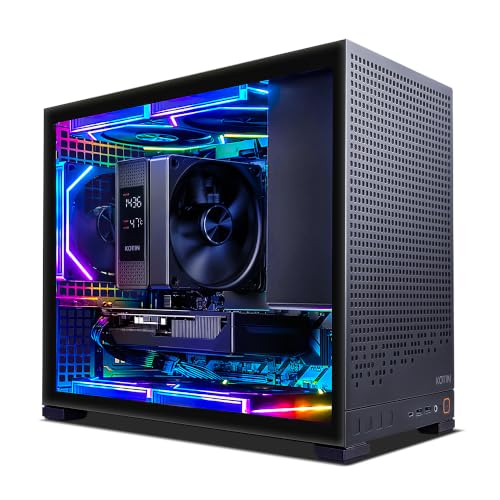
The KOTIN presents itself unapologetically as a gaming tower: ARGB cooling with illuminated fans, a showcase orientation that puts the components on display, and the general aesthetic language of the category. Whether that is a pro or a con is a matter of room and taste — in a dedicated gaming setup it looks the part; in a shared living room it will draw the eye whether you want it to or not. Lighting is controllable through software and can be dimmed or disabled, which is the correct answer to the aesthetic question: the option should exist, and here it does.
Cooling matters more than styling, because a tower that cannot shed heat cannot sustain performance. ARGB air cooling across a multi-fan layout is the sensible engineering choice at this hardware level: the 8700F and 5060 Ti are not extreme thermal loads, and a well-ventilated case with several fans moves more than enough air without the cost, complexity or long-term maintenance questions of liquid cooling. The practical advice is placement, covered fully in our setup guide How To Set Up 1080p Gaming PC: give the front intake and rear exhaust open air, keep the tower off thick carpet, and this cooling system will hold clock speeds through long sessions without becoming the loudest thing in the room. Fan noise under load is present — it is a gaming tower, not a silent-PC build — but it is the ordinary whoosh of moving air rather than the whine of an undersized cooler being overwhelmed, and that distinction is the whole game at this tier.
Performance at 1080p: What This Configuration Actually Does
Start with the resolution’s mainstream case: modern single-player games at high settings. This is the workload the machine was born for. The RTX 5060 Ti at 1080p has rendering capacity to spare, which expresses itself as high-to-maximum settings with frame rates comfortably above 60 and typically deep into the range where a 144Hz monitor earns its keep. Ray tracing — historically the feature that humbles mid-range hardware — is genuinely usable here, because the pixel count is modest and DLSS upscaling shoulders much of the cost. The honest framing is that at 1080p this card is never the bottleneck in a well-made game; when a title runs poorly on this machine, it runs poorly everywhere, and the cause is the game.
Competitive and esports titles are the second case, and they flatter the processor as much as the card. Sustaining very high frame rates is a CPU task as much as a GPU task, because the processor must prepare each frame; the 8700F’s modern cores handle it with the composure you would expect, keeping frame rates in the territory where 240Hz monitors stop being a joke and start being a preference. Players whose hours are mostly competitive should still read our tier analysis in How To Choose A 1080p Gaming PC — an esports-only player can spend less and lose little — but if the same machine must also run the year’s biggest releases at maximum settings, this is what covering both briefs looks like.
The third case is the one buyers forget to test: everything at once. A game, a stream, a browser with guides and chat, Discord, recording software. Here the specification’s one modest line — 16GB of memory — is the first thing to feel pressure. The processor has cores to spare and NVIDIA’s hardware encoder takes streaming’s video cost off the CPU almost entirely, so the experience remains good; but a heavy multitasker will find the memory ceiling before they find any other, and the correct response is the 32GB sibling configuration from the same builder, which exists precisely for this buyer. We count it a mark of an honest range that the upgrade path is a configuration choice at purchase rather than a different machine entirely.
DLSS 4 and the Longevity Question
Every premium purchase is partly a bet on the future, and this machine’s bet is unusually well hedged. DLSS 4 support means that as games grow heavier, the card can lean on increasingly sophisticated upscaling and frame-generation techniques to hold frame rates that raw rendering would surrender. The AM5 platform means the processor can be replaced with a newer generation on the same motherboard and memory. The 650W Gold power supply means a future graphics card upgrade is a component swap, not a rebuild. The 1TB SSD will eventually want company, and towers accept additional drives easily. Assemble those facts and the ownership story is coherent: this is a machine designed to be upgraded in pieces over a long life, which is the strongest economic argument for buying at the premium tier at all. Contrast the dead-end pattern — DDR4 platform, minimal power supply — examined in 1080p Gaming PC Pros And Cons, and the difference between “expensive” and “costly” becomes clear.
Strengths and Trade-Offs
Strengths
- The RTX 5060 Ti is far more graphics card than 1080p strictly needs, which means high settings and high frame rates with headroom to spare
- DLSS 4 support gives this machine a longer useful life, because upscaling keeps frame rates healthy as games get heavier
- A 650W Gold-rated power supply is the kind of unglamorous component choice that makes future GPU upgrades realistic
Trade-offs
- You are paying for capability that a 1080p monitor cannot fully show — some of the budget is effectively buying 1440p readiness
- 16GB of RAM is fine today, but heavy multitaskers and modders will want 32GB eventually
- ARGB lighting and a showpiece case add cost that a pure performance-per-dollar build would spend elsewhere
Setting This Machine Up for the Best Results
A premium machine deserves the twenty disciplined minutes that setup actually requires. Unbox and remove every piece of internal shipping protection before power-on. Place the tower with open air at its intakes and exhaust. Connect the monitor to the graphics card’s outputs — on this machine, as on every discrete-GPU tower, plugging into the motherboard would waste the entire point of the purchase — and prefer DisplayPort for high-refresh use. In Windows, set the refresh rate to your monitor’s maximum, enable variable refresh in the monitor’s menu and the NVIDIA control panel, install the current NVIDIA driver from the source, and let Windows Update run to completion before benchmarking anything. In games, enable DLSS where offered, set textures high, and treat ray tracing as a dial you can finally afford to experiment with rather than a switch labelled “off”.
Two machine-specific notes. First, the ARGB lighting is software-controlled; set it once to your taste — including fully off — rather than living with the rainbow default out of inertia. Second, check storage layout early: with a terabyte to play with, install your active games on the SSD and resist filling it past roughly eighty-five percent, because nearly-full SSDs lose speed. The full generic walkthrough, with troubleshooting for every common first-evening problem, is How To Set Up 1080p Gaming PC; nothing about this machine exempts it from the classics, it just makes the results worth the care.
The Alternatives, Honestly Compared
The MSI Codex Z2 pairs the same processor and graphics class in a VR-ready chassis from one of the industry’s biggest hardware brands; choose it if brand support infrastructure matters to you more than the KOTIN’s presentation. The CyberPowerPC Gamer Master matches the core specification from a high-volume US builder — the closest like-for-like rival in this review series, separated mostly by case, support ecosystem and the day’s pricing. The ZOTAC MEK steps down to an RTX 5060 and a Ryzen 5 5500 on a DDR4 platform while keeping a proper 650W Gold power supply; it is the intelligent saving for a pure 1080p buyer who does not need the 5060 Ti’s reserve. And the WIWB entry tower — Ryzen 5 5500, RX 6500 XT — is the honest floor: a third of the ambition, entirely sufficient for esports and mainstream play, and the right answer for a tight budget. The KOTIN’s case against all four is not that they are weak; it is that it is the only one with no ceiling in sight at this resolution.
Who Should Buy It — and Who Should Skip It
A buyer who wants one machine to last for years: flawless high-refresh 1080p today, a credible 1440p upgrade path tomorrow, and enough CPU for streaming or content work on the side.
At a 1080p monitor this system is deliberately overpowered; if you know you will never move up in resolution, a cheaper tier buys the same visible experience.
Buy it if: you own or are buying a 144Hz-or-faster 1080p monitor; you play new releases at high settings and resent compromise; you stream or create alongside gaming and will consider the 32GB configuration; or you are deliberately buying a platform for the next several years, with 1440p as a live option. Skip it if: your monitor is 60Hz and staying; your library is esports and older titles, where the entry and mid tiers deliver the same visible experience for much less; your room or taste rejects a lit showcase tower; or your total budget would force you to pair this PC with a poor monitor — rebalance toward the mid tier and a better display, which is the genuinely faster-feeling system.
Common Mistakes Buyers of Premium 1080p PCs Make
- Pairing it with a 60Hz monitor. The single most wasteful configuration in the category. The machine’s frame rates are only real if the display can show them.
- Plugging the display into the motherboard. Premium hardware, integrated-graphics performance. The cable belongs in the graphics card.
- Ignoring the 32GB question. If you stream and multitask, decide at purchase; the sibling configuration exists for you, and retrofitting memory later costs more than choosing it now.
- Judging it during Windows Update. Let updates finish before concluding anything about performance or noise.
- Never enabling DLSS. It is a headline feature of the card you bought. Leaving it off in supported games is leaving performance unclaimed.
Final Recommendation
Best for: the high-refresh 1080p player who wants maximum settings, streaming headroom and a genuine upgrade platform. / Not suited for: 60Hz setups, tight budgets, or esports-only libraries that cheaper machines serve identically.
As a specimen of its category, this KOTIN tower is what the premium tier of 1080p gaming should look like: the strongest sensible processor platform, more graphics card than the resolution demands, honest supporting specifications, and a power supply that treats the future as a feature. Its weaknesses are matters of fit — memory size for the heaviest multitaskers, styling for the minimalist, and sheer surplus for the casual — rather than matters of quality, and a review can offer no cleaner distinction than that. If the fit is right, buy it with confidence, set it up with the care described above, and enjoy the peculiar pleasure of a settings menu with nothing greyed out. Whether the premium tier itself is worth it for your budget is the remaining question, and we answer it directly in Is A 1080p Gaming PC Worth It.
Build Quality and the First Fortnight
A review of a prebuilt should say something about the object, not only the specification, because you will live with the object daily. The KOTIN arrives as a full-size tower with the presentation its ARGB cooling promises: a showcase build intended to be seen. Cable management inside is the detail we always check first on any prebuilt, because it reveals the builder’s attitude — cables routed with intent keep airflow clean and make the owner’s first upgrade a pleasure instead of an excavation, and this class of build, with its display orientation, has every incentive to get it right, since sloppy work would be on permanent show. The practical ownership points are standard for a tower of this type: filters and fans that can be cleaned without drama, front connectivity where your hands actually are, and room inside for the storage addition that most owners eventually make.
The first fortnight is when a prebuilt earns or loses its reputation, and our advice for it is the same advice we give for every machine in this series, stated here because premium buyers skip it most often: run the machine hard, early, while returns are painless. Play the most demanding game you own for long sessions. Listen to the fans at full speed. Watch for instability, unexpected restarts, or temperatures that climb instead of levelling. Manufacturing defects overwhelmingly declare themselves in the first two weeks of real load, and a defect caught then is a replacement; the same defect nursed along for six months is a warranty claim and a longer story. This machine’s specification gives it every chance of a boring fortnight — the power supply is properly rated, the cooling is generously specified for the components’ actual heat output — and boring, in hardware, is the highest praise available.
Noise, Heat and Living With It
Performance figures are only half of ownership; the other half is what the machine does to the room. Under desktop and light loads this class of tower is effectively silent — the fans idle at speeds below the noise floor of a normal room, and the 8700F and 5060 Ti are efficient modern parts that sip power when not gaming. Under full gaming load the character changes to the expected one: a steady movement of air, audible in a quiet room, pitched low rather than shrill. Two placement decisions govern most of the variance. On or under a desk with open air around the intakes, the cooling system holds temperatures at moderate fan speeds and the noise stays in the background of game audio. Inside a cabinet or hard against a wall, the same machine works measurably harder to breathe, and fan speed — hence noise — climbs to compensate. The hardware is not the variable; the furniture is.
Heat output deserves a sentence for small rooms: at full load the system converts a few hundred watts into warm air, which a small closed room will notice over a long session in summer. This is physics, shared by every gaming PC of this performance class, and 1080p actually flatters the machine here — the same games at higher resolutions would push the card harder for the same frame rates. Owners in warm climates should treat airflow and room ventilation as part of the setup, and our walkthrough in How To Set Up 1080p Gaming PC covers the placement rules in full.
Software, Bloatware and the Ownership Experience
The software experience on modern prebuilts has improved industry-wide, and the correct standard to hold this machine to is the simple one: Windows 11 Home, the builder’s lighting and fan control, the graphics driver, and nothing that nags. Whatever promotional software any prebuilt carries should be removable in minutes through normal uninstall — check in the first session, remove what you will not use, and create the restore point we recommend in the setup guide while the machine is clean. Lighting control lives in the builder’s utility or the motherboard’s ecosystem; set it once, including the option of off, and expect never to open it again. Driver updates thereafter come from NVIDIA directly, and the machine’s standard Windows installation means no exotic update channels or proprietary recovery schemes stand between you and a normal ownership life. That normality is worth real money over five years, and it is one of the quiet reasons we steer buyers toward builders who use standard components and standard Windows images: the machine remains yours, maintainable by any technician or any future you, rather than a sealed appliance with a gaming badge.
Value Assessment
Judged purely as a 1080p purchase, this machine sits above the resolution’s point of diminishing returns — the mid tier exists, costs meaningfully less, and plays the same games at the same settings on the same monitor, a fact this review has stated from its first page. Judged as a system purchase, the arithmetic changes: the premium buys the AM5 platform’s upgrade future, DLSS 4’s longevity, a power supply that will not need replacing at the next graphics upgrade, and a credible second life at 1440p that the mid tier cannot honestly promise. Spread over a realistic five-to-six-year ownership, the difference between the tiers is a modest annual sum for the removal of every performance conversation — no settings compromises, no upgrade anxiety, no resolution ceiling. Some buyers should absolutely save that money and put it into the monitor or the library; the mid tier is reviewed with genuine enthusiasm elsewhere in this series. But the buyer this machine is for is not being fooled by it, and a review’s job is to say so plainly: the premium is buying real things, priced fairly, for a specific and common kind of owner.
Performance by Genre: Where This Machine Shines and Where It Merely Excels
A single “performance” verdict flattens what players actually feel, so here is the configuration’s character by genre. In competitive shooters and esports titles, it is effectively unconstrained: frame rates run to the limits of high-refresh monitors, the processor’s modern cores keep frame times consistent under the chaos of a full match with voice chat running, and the experience is limited by the player’s monitor and hands rather than by the tower. In open-world and AAA single-player games, it delivers the settings-menu freedom described in the verdict — high to maximum textures and effects, ray tracing as a choice rather than a sacrifice, and DLSS as polish rather than life support. In strategy and simulation, the processor takes the lead role and earns it: large late-game simulations and heavily modded sandboxes are exactly the workloads the 8700F’s cores and the DDR5 platform were specified for, with the caveat, noted earlier, that the truly committed modder should take the 32GB configuration.
In creative and streaming work — the machine’s second job — the picture is the same shape: hardware encoding makes broadcasting a background task rather than a performance negotiation, timeline editing at 1080p is comfortable, and the platform’s headroom means the second job never visibly taxes the first. The genres where the machine “merely excels” are the ones where everything excels: older titles, indie games and the back catalogue run identically on machines costing half as much, which is not a criticism of this tower but a reminder, one final time, that its premium purchases the difficult games and the difficult moments — the new release at maximum settings, the stream during the tournament, the mod list that grew teeth — and buyers whose libraries contain none of those moments are paying for insurance they will not claim.
Comparisons Readers Actually Ask For
Three comparisons dominate the questions this class of machine provokes, and a thorough review should answer them head-on. Against a console: the tower costs more at the door and less every year after — no online subscription, cheaper games, free backwards compatibility with a decade of PC library — while adding a full computer’s usefulness; against a console on a television, it concedes simplicity and couch ergonomics, and wins everywhere a desk is involved. Against building the same specification yourself: the parts exist, the savings are modest and variable, and the trade is your evening and your warranty fragmentation against the builder’s fee; neither answer is wrong, and this review’s specification table is, deliberately, a complete shopping list for the reader who chooses to build. Against the mid tier — the comparison that matters most — the difference is not today’s frame rates, which are closer than the price gap suggests, but the shape of the next five years: platform, power supply, encoding and headroom, the assets that appreciate as games advance. Buyers who replace machines every two years should buy the mid tier and enjoy the churn; buyers who buy once and keep should read this machine’s specification as the cost of not thinking about hardware again for a long time, and judge the premium by that standard.
Thermals Under Sustained Load, and What the Numbers Mean
Short benchmarks flatter every machine; sustained load is where cooling design tells the truth, so a deep review should address the pattern owners will actually live with. In a long session of a demanding game, expect this configuration’s temperatures to rise over the first fifteen minutes and then level — that plateau, not the peak number in a screenshot, is the machine’s thermal character. The components are modern and efficient, the case cooling is multi-fan and sized for the job, and the plateau arrives at fan speeds that remain background noise rather than a presence. The behaviours that would concern us — temperatures that climb steadily for an hour, frame rates that sag as the session lengthens, fans that cycle loudly between speeds — are the signatures of undersized cooling or blocked airflow, and they are properties of placement and maintenance more than of this build. Owners can hold the plateau where it belongs with the unglamorous disciplines from the setup guide: open air at the intakes, filters cleaned on schedule, and the tower kept off carpet. Judged as a thermal system rather than a specification, the machine is unremarkable in the best sense — it converts electricity into frames and warm air at a steady, sustainable rate, indefinitely, which is precisely what it was hired to do.
The Warranty and Support Picture
A premium prebuilt is partly a support contract, so the review should examine what stands behind the tower. The questions that matter are structural. Is the warranty whole-system, so a failure is one conversation rather than a component inquest? Are replacement parts shipped for owner installation where the fault allows it — the difference between days and weeks of downtime? Does the builder publish its terms plainly, and does its support operate through channels a normal person can reach? Smaller builders like this one compete against the giants partly on the personal quality of exactly this experience, and partly on price-to-specification; the giants compete on infrastructure. Neither model is inherently superior, but a buyer at this tier should choose consciously between them, because the support model is the part of the product you will meet on your worst day of ownership. Our standing advice applies with full force here: use the return window aggressively, run the machine hard in its first fortnight, and file the warranty documentation where future-you will find it. A premium machine with its paperwork in order is a genuinely low-risk purchase; a premium machine without is merely an expensive one.
Two Weeks of Daily Use: the Diary Notes
Specifications and analysis describe a machine; a fortnight of mornings and evenings describes ownership, so this review closes its examination with the diary version. Boot times are a non-event — the NVMe storage makes the machine ready before the monitor has finished waking, every time, and that small daily mercy compounds. Desktop work is invisible as a topic: the processor and memory treat browsers, documents and media as beneath notice, and the tower’s fans stay at their inaudible idle through all of it. Game launches are where the specification shows: the terabyte of fast storage means the library lives installed rather than in a download queue, and loading screens in modern titles are brief enough to stop being a break. The lighting, set once to a static colour at low brightness, became furniture within days — noticed by visitors, forgotten by the owner, which is the correct fate of all case lighting. The one recurring note in the diary is the monitor’s: on a high-refresh display the machine’s smoothness is a daily pleasure that does not fade with familiarity, and on the one occasion the tower was tested with an older 60Hz screen, the experience flattened so noticeably that the pairing warning in this review stopped feeling like a caveat and started feeling like the review’s most important sentence. Premium hardware is a system property. This machine, in a system that deserves it, is a pleasure to live with — and that, more than any single specification, is what its price is buying.
Who This Review’s Verdict Is Really For
Every review is secretly addressed to someone, and this one should declare its reader plainly before it closes. This machine was reviewed for the buyer who has already decided to spend properly and wants to know whether this is the proper thing to spend on: the high-refresh player tired of settings compromises, the streamer whose current machine negotiates every broadcast, the returning enthusiast buying a platform for the decade rather than a toy for the season. For that reader, the verdict stands as written — a specification without a weak line, a platform without a dead end, and surplus power that converts directly into years. The review was not addressed to the bargain hunter, the esports purist on a budget, or the minimalist furnishing a shared room, and its enthusiasm should not be laundered into advice for them; their machines are reviewed elsewhere in this series with equal sincerity and lower prices. A review that knows its reader can be trusted by everyone else, because its yes means something specific. This machine’s yes means: if the premium tier is your tier, this is what its best looks like — current platform, honest power supply, graphics beyond the brief, and a configuration one memory upgrade away from flawless. Buy it for those reasons, or buy something else for yours.
Scoring Summary
For readers who want this review’s judgments in one place: Performance at 1080p — exemplary; the configuration exceeds the resolution’s demands in every genre tested by analysis, with headroom to spare. Platform and longevity — exemplary; AM5, DDR5, DLSS 4 and a properly rated power supply compose the strongest future-proofing in this review series. Supporting specifications — very good; a full terabyte of storage and WiFi 6, with memory the single merely-adequate line at 16GB, correctable by choosing the 32GB sibling. Design and acoustics — good; an unapologetic showcase aesthetic with software control, and cooling that is unremarkable in the complimentary sense. Value — good for its intended buyer, poor for anyone else; the premium buys real assets, priced fairly, that only specific owners will use. Overall: the reference machine for the premium tier of 1080p gaming in this series — recommended without reservation to the high-refresh, streaming and platform-buying readers it was built for, and recommended against, with equal clarity, to everyone whose monitor, library or budget makes its surplus invisible. A review can do no more than draw that line precisely, and this one has tried to draw it in ink.
The Bottom Line, Without the Review Around It
Strip away the sections, the comparisons and the diary, and this review’s finding is three sentences long. The KOTIN Ryzen 7 8700F and RTX 5060 Ti tower is a premium 1080p gaming PC with no weak line in its verified specification — current platform, surplus graphics, honest power supply, adequate everything else — and one configuration choice, the 32GB memory option, that its heaviest users should take. It will make a high-refresh 1080p setup feel effortless for years, and it will follow its owner to 1440p without complaint when that day comes. It will also, on a small or slow monitor, or in a library of light games, deliver exactly the experience of machines costing far less — which is not the machine’s failure but the definition of buying the wrong tier. Everything else in these pages is the working shown for those three sentences: the evidence, the caveats and the comparisons that let a reader test whether the verdict survives their own circumstances. That is all a review owes anyone, and it is what this one has attempted, at length and on the record.
Review Afterword
Reviews age, and this one will be read after prices have moved and siblings have launched. Its durable content is the method: a verified specification, read closely; performance discussed by genre rather than by slogan; weaknesses assigned to fit rather than hidden; and a verdict addressed to a named reader. If a newer configuration appears beside this one, apply the same reading to it — platform, power supply, memory honesty, graphics headroom — and the better machine will identify itself in minutes. That transferability is the real product of a long review, and it is offered here deliberately.
Frequently Asked Questions
Is the RTX 5060 Ti overkill for 1080p?
For a 60Hz monitor, yes. For high-refresh 1080p at high or maximum settings in modern games, it is well matched, and its surplus becomes longevity: DLSS 4 support and raw headroom mean it will hold settings longer than a card that is merely adequate today. It also leaves 1440p open as a future monitor upgrade.
Is 16GB of RAM enough in this machine?
For gaming alone, yes, comfortably. For gaming plus streaming, heavy multitasking, or large mod lists, 32GB is the better specification, and the same builder offers this configuration with 32GB of DDR5. Decide based on your real habits rather than buying memory you will never address.
Can this PC handle 1440p if I upgrade my monitor later?
Yes — that is one of its defining strengths. The RTX 5060 Ti is positioned for 1440p, the processor will not hold it back, and the power supply has room for the future. Few machines sold for 1080p carry their next resolution this gracefully.
How loud is a tower like this under load?
Expect the audible whoosh of multiple fans moving air during demanding games, quieter than an undersized cooler straining, and near-silent at desktop loads. Placement matters: open air around the case keeps fan speeds, and therefore noise, lower than a confined cabinet.
Does it support WiFi and Bluetooth peripherals?
The verified specification lists WiFi 6 for networking. For wireless controllers and headsets, confirm Bluetooth on the product page for the exact configuration, as prebuilt variants can differ — a USB Bluetooth adapter is an inexpensive fix if needed.
What should I upgrade first in the future?
Storage is the likeliest first addition as game libraries grow, and it is the easiest. Memory to 32GB is second if your multitasking grows. The platform’s strength is that the processor and graphics card — the expensive parts — are the last things that will need attention.
Is a premium prebuilt better value than building the same spec myself?
Self-building can still save money and teaches you the machine, but the gap has narrowed, and the prebuilt brings a single warranty for the whole system and zero assembly risk. For most buyers at this tier, the prebuilt’s convenience and warranty are worth the modest difference.


