Disclosure: As an Amazon Associate, reviewstook.com earns from qualifying purchases. Links on this page are affiliate links; they cost you nothing extra. Prices and availability change often, so check the current Amazon listing before you buy.
The zenwifi bq16 pro is what a mesh system looks like when a maker stops compromising in public: a quad-band Wi-Fi 7 design, twin 10-gigabit ports on each unit, coverage claims aimed at genuinely large homes, and subscription-free security and parental controls bundled rather than rented back to you monthly. It is also, usefully, a product whose name can be verified — a point the sibling explainer on this site makes at length about a ghost model in the same family. This guide reviews the two confirmed ways to buy the system, the one-pack and the two-pack, and helps you decide how many nodes a home like yours actually needs before the flagship temptation decides for you.
The honest framing first. Most homes do not need this system, and this page will say plainly where its strengths stop mattering. But for a large house, a masonry house, a house with a wired backhaul plan, or a household whose network carries work, school, streams, and games simultaneously, the BQ16 Pro’s combination of a dedicated-feeling quad-band design and serious wired ports is a coherent answer rather than an extravagance. The decision that matters is pack size, and it is a decision about your building, not about your enthusiasm.
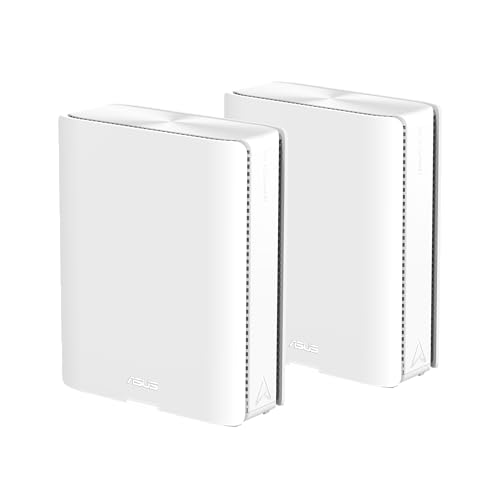
Key Takeaways
- Quad-band Wi-Fi 7 with a headline combined rate in the flagship class, designed so mesh relay traffic and device traffic interfere with each other as little as the design allows.
- Each unit carries two 10-gigabit ports, which makes wired backhaul and fast local devices first-class citizens rather than afterthoughts.
- The two-pack is the default recommendation for large homes; the one-pack suits a smaller footprint, a wired plan, or starting the system and expanding later.
- Security and parental controls are included without a subscription, which changes the long-term cost comparison against rivals that charge annually.
- Coverage figures on the box assume friendly construction; thick walls are explicitly part of this system’s pitch, with Ethernet backhaul as the reliable answer where wireless relay struggles.
- Placement and backhaul decisions will influence your experience more than any remaining specification difference at this tier.
In this guide
Quick Picks: one pack or two?
| Pick | Coverage pitch | Best suited to | Link |
|---|---|---|---|
| ASUS ZenWiFi BQ16 Pro, two-pack | Large-home coverage up to the flagship claim, quad-band Wi-Fi 7, twin 10G ports per unit | Large, multi-floor, or thick-walled homes | Check price on Amazon |
| ASUS ZenWiFi BQ16 Pro, one-pack | Single-unit coverage for smaller footprints, same quad-band design and ports | Flats, smaller homes, wired setups, expand-later buyers | Check price on Amazon |
Both rows are the same system at different node counts, which makes this the cleanest quick-picks table in home networking: no hidden model differences, no regional variants, just a quantity decision. The reviews below therefore concentrate on what one node does brilliantly, where a second node changes life, and the homes in which a third conversation — cabling — matters more than either box.
How were these picks chosen?
Each listing was confirmed through marketplace data with an exact title naming the ZenWiFi BQ16 Pro, its quad-band Wi-Fi 7 design, and its pack size, and each carries an official product image shown before its review. Nothing else is linked on this page. That discipline matters in this family more than most, because neighbouring ZenWiFi series carry similar names and genuinely different hardware; the sibling explainer about the unverifiable BE5000 Pro name shows where loose naming leads, and this guide refuses to repeat the sin in the opposite direction by padding its table with lesser series dressed as alternatives.

ASUS ZenWiFi BQ16 Pro two-pack — the large-home default
Badge: Best for large, multi-floor, and thick-walled homes. The two-pack is the form in which this system’s design makes full sense: one node anchoring the internet entry point, the second extending a quad-band umbrella across the floors and walls that defeat lesser systems, with the family’s AiMesh approach letting the pair present a single, calm network to every device you own.
- Design: quad-band Wi-Fi 7 mesh system, two units
- Coverage pitch: up to the flagship large-home figure in the listing
- Ports: two 10-gigabit ports per unit
- Extras: subscription-free network security and parental controls, custom SSIDs
- Backhaul: wireless relay or Ethernet for thick walls
Strengths
- Two nodes placed well will end the dead-zone conversation in homes where a single router, however mighty, physically cannot.
- The port provision lets you wire the backhaul where cables exist and still feed a fast switch, a NAS, or a gaming PC at full tilt.
- Included security and controls remove the annual toll that quietly inflates rival systems across a five-year ownership.
Trade-offs
- It is a flagship-tier purchase; a small flat will never use the second node’s talents and should not fund them.
- Two premium nodes demand thoughtful placement to shine, and lazy placement wastes exactly what you paid for.
- Households with modest internet plans will not see the system’s ceiling, since no mesh outruns the connection entering the home.
Think of the two-pack as infrastructure rather than gadgetry. Installed well, it disappears for years, carrying the household’s work calls, the evening’s streams, and the weekend’s downloads without becoming a topic of conversation. That invisibility is the true flagship feature, and it is why the pack earns its recommendation for homes whose size or construction has defeated cheaper attempts — attempts whose combined cost often approaches this system’s anyway, paid in frustration instalments.
Best for: large, multi-floor, or masonry homes, and busy households that have already outgrown one mesh tier. / Not suited for: small flats, light users, or anyone whose real bottleneck is a slow internet plan.

ASUS ZenWiFi BQ16 Pro one-pack — the considered start
Badge: Best for smaller homes and expand-later plans. A single BQ16 Pro unit is already a formidable router: the same quad-band radios, the same twin 10-gigabit ports, the same Smart Home Master toolkit of multiple SSIDs, VPN support, and parental controls described in its confirmed listing. For a flat, a compact house, or a home office wired for Ethernet, one node may be the whole answer.
- Design: quad-band Wi-Fi 7 mesh-ready unit, single pack
- Coverage pitch: up to the single-unit figure in the listing
- Ports: two 10-gigabit ports
- Extras: Smart Home Master with multi-SSID, VPN, parental controls, AiMesh expansion
- Backhaul: ready for a wired or wireless partner node later
Strengths
- You buy the flagship platform without funding a second node your floor plan may never need.
- AiMesh expansion means a later second unit integrates into the same system rather than starting a new one.
- The port pair suits a wired desk setup beautifully, feeding a workstation and a fast local device without a switch.
Trade-offs
- One node cannot repeal physics in a large or thick-walled home; reach promises should be read against your floor plan, not the box.
- Buying singly usually costs more per node than the two-pack if you do expand soon after.
- Its talents are wasted if it ends up hidden in a cupboard at the home’s far corner where the line enters awkwardly.
The one-pack is the right purchase for the disciplined buyer who has measured their home honestly — or who plans to wire backhaul between floors and knows a single well-placed node per zone will do. It is also the connoisseur’s entry for a home office where the network is a work tool: multi-SSID separation for guests and gadgets, VPN options, and ports that treat a workstation as a first-class citizen. Buy it as a complete answer for a modest footprint, or as chapter one of a system you intend to grow deliberately.
Best for: flats, compact homes, wired home offices, and expand-later planners. / Not suited for: large multi-floor homes expecting one node to perform miracles through masonry.
Zenwifi Bq16 Pro: what quad-band Wi-Fi 7 actually buys you
Band count is the least glamorous and most consequential line in a mesh specification. Every band is a set of lanes. Devices drive on some lanes while, in a wireless mesh, the nodes’ conversation with each other needs lanes of its own. A dual-band system forces those two traffics to share, which is why distant nodes in cheap systems serve disappointing speeds even when their signal bars look cheerful. A quad-band flagship separates the flows far more generously, and adds the newest Wi-Fi 7 behaviours — wider channels and more efficient handling of crowded air — on top. The lived result is not a bigger number on a speed test beside the router; it is a video call that stays clean in the far bedroom while someone else streams in the lounge.
The twin 10-gigabit ports deserve equal billing, because they future-proof the wired half of the home that Wi-Fi headlines ignore. A fast NAS, a workstation moving large files, a gaming PC that deserves a cable — these benefit today, and a wired backhaul between nodes benefits most of all, converting the mesh’s weakest link into its strongest. When you read that the listing explicitly mentions Ethernet backhaul for thick walls, understand it as the maker telling you the honest hierarchy: wireless relay for convenience, wire for certainty. Homes with cabling, or the willingness to run one strategic cable, extract the most from this system.
How many nodes does your home really need?
Count barriers, not just area. Open-plan square footage is easy to cover; the same area divided by brick internal walls, foil-backed insulation, or a concrete floor slab is a different country. Start from the two-pack for a typical large family home, the one-pack for a flat or a compact single-storey, and treat a third node as a targeted medicine for a specific dead zone rather than as a default. Place the main node centrally where the line enters if you can, elevate nodes into the open, and keep them out of cabinets and away from large metal objects and mirrors.
Then verify with your life rather than with an app. Make the call from the worst chair. Stream on the far television while a game downloads. If a corner still sulks, move the nearest node a few metres before concluding anything about the hardware, because placement adjustments routinely outperform purchases. Broader tier context lives in best mesh WiFi system under 50 for smaller budgets, and the ghost-name cautionary tale lives in ZenWiFi BE5000 Pro for anyone still tempted by unverifiable flagship labels.
How to install and configure the system in an afternoon
Begin before the boxes open: decide node positions and, if wiring backhaul, confirm the cable runs and switch ports you will use. Set up the main node first, update its firmware, and let it settle as a single router while you test the rooms near it. Add the second node in its planned position — not beside the first — and give the system time to optimise its links before judging. Create your main network name, a guest network, and, if the household is gadget-rich, a dedicated SSID for smart devices through the Smart Home Master tools, which keeps the doorbell and bulbs in their own tidy lane.
Retire the old network properly: switch off the previous router’s wireless or bridge it as your provider directs, so devices stop clinging to a ghost of the old setup. Then run the household test — simultaneous call, stream, and download in the rooms that matter — and adjust placement by metres where anything falters. Finish by saving the configuration details somewhere durable and labelling the nodes discreetly; future-you, troubleshooting at midnight in two years, will be grateful for both.
Common mistakes with flagship mesh systems
The first is buying flagship coverage for a bottleneck that lives elsewhere: a slow plan, an ancient modem, or a single elderly laptop whose own radios cap every test. Diagnose the chain before upgrading its most expensive link. The second is symmetrical placement by eye — spacing nodes evenly across a floor plan while ignoring that one direction crosses three masonry walls and the other crosses open air. The third is hiding the beautiful hardware, because premium nodes are designed to be seen and their radios genuinely suffer inside furniture.
Fourth, many households enable every advanced feature on day one and then cannot tell which change caused a quirk; adopt features one at a time, with a day of normal life between them. Fifth, some buyers skip the wired backhaul their home already supports, leaving the system’s best trick unused behind a wall plate. If Ethernet exists between your node positions, plug it in — the difference in far-room consistency is the closest thing networking offers to a free upgrade, and gaming households comparing options may also enjoy best mesh WiFi system for gaming under 30 for the latency-first perspective at lower tiers.
How does it compare with stepping down a tier?
| Consideration | BQ16 Pro flagship route | Mid-tier mesh route | Single strong router route |
|---|---|---|---|
| Band design | Quad-band Wi-Fi 7, generous relay room | Usually tri-band, competent relay | No relay; one location must serve all |
| Wired ports | Twin 10-gigabit per unit | Typically gigabit class | Varies; sometimes strong |
| Best home | Large, multi-floor, thick-walled, busy | Medium homes, moderate loads | Flats and compact open plans — see best WiFi 7 router under 30 |
| Ongoing costs | Security and controls included without subscription | Often subscription extras | Varies by maker |
| Main risk | Paying for unused headroom | Outgrowing it in a busy house | Dead zones physics will not forgive |
The comparison resolves into a sentence: buy the tier your building and your household load describe, and let the flagship be the answer to a described problem rather than a mood. Where the description genuinely matches — size, walls, simultaneity, wired ambitions — this system stops looking expensive and starts looking proportionate.
Final recommendation
For the large or difficult home, take the two-pack, place it with care, wire the backhaul if your walls allow a cable, and enjoy several years of not thinking about your network. For the compact home or the wired office, the one-pack delivers the same platform honestly sized. Either way, you are buying a verified flagship under its real name, with controls and security included rather than rented — a grown-up infrastructure purchase, made with the verification habit this site’s sibling explainer recommends for the whole category.
What is life with a flagship mesh actually like, month after month?
The first week is measurement theatre: speed tests in doorways, node positions adjusted by metres, a household mildly amused by your new hobby. The first month is quieter. The far office stops being the room where calls go to die. The television’s evening stream loses its opening wobble. A visiting relative asks for the password once and their phone simply works in the garden. By the third month the system has achieved the highest state available to infrastructure: nobody in the house can remember what the old network was called, or why the bedroom used to be a dead zone, because the problem the BQ16 Pro was bought to solve has stopped existing as a topic.
That invisibility is worth describing because it is what the flagship premium actually purchases. Cheaper systems can match a speed test in the hallway; what they struggle to match is the absence of incidents across a year of simultaneous life — two careers on calls, a school-age streamer, a console downloading a season’s worth of game overnight, a doorbell, a dozen sleepy smart devices murmuring to each other. Headroom is not a number; it is the margin that keeps ordinary Tuesdays ordinary. If your household’s Tuesdays are already ordinary on lesser hardware, keep your money. If they are not, this is the tier where they become so.
How do the Smart Home Master tools earn their keep?
The listing’s mention of multi-SSID capability sounds like alphabet soup until a household accumulates devices with different trust levels. A main network for the family’s computers and phones, a guest network for visitors, and a dedicated lane for smart-home gadgets — bulbs, plugs, cameras, the doorbell — gives you tidiness with a security flavour: the gadgets chatter among themselves, guests never touch the lane your laptop lives on, and when a cheap smart plug eventually misbehaves, it misbehaves in its own compartment. Parental controls in the same toolkit let a household shape children’s access by schedule and category without a subscription toll, which parents consistently rank among the least glamorous and most valued features they own.
VPN support completes the picture for households that work across borders or simply prefer their traffic wrapped when travelling members connect home. None of these tools requires expertise to begin; the sane path is to enable one at a time, live with it for a week, and keep only what your household actually uses. A flagship system tempts owners to switch on everything at once and then troubleshoot a fog of their own making. Resist. The system’s power is that the tools exist when a real need names them, not that they all glow simultaneously on day one.
What should wired households know about the 10-gigabit ports?
Each unit’s pair of 10-gigabit ports is an invitation to treat the wired half of your home as a first-class network rather than a legacy afterthought. The obvious uses arrive first: wire the backhaul between nodes where a cable exists and watch the far node’s served speeds stop depending on the weather of the airwaves. Then wire the devices that move real data — a workstation, a network storage box, a gaming PC — and local transfers stop being an event you schedule and become a thing that simply happens. A small switch extends the invitation to a whole desk or media shelf without consuming the second port’s dignity.
The subtler benefit is longevity. Wi-Fi generations will keep arriving, but a home wired at multi-gigabit speeds has a skeleton that outlasts several of them, and each future mesh upgrade inherits the skeleton gratefully. If your home lacks cabling, one strategic run — between the two node positions, along a skirting board or through a loft — often captures most of the benefit for a fraction of a full rewire’s drama. The BQ16 Pro is unusually ready to honour that investment, which is a meaningful part of its flagship claim and a reason cabling households should weight it heavily against rivals whose ports stop at gigabit class.
Frequently asked questions
Is one node enough for a three-bedroom house?
It depends on construction more than on bedroom count. A compact, open, timber-framed three-bedroom home may be served beautifully by one well-placed unit, while a smaller masonry house can defeat it. If your rooms are spread across floors or separated by brick and concrete, begin with the two-pack expectation and let a site survey of your own evenings confirm or relax it.
What does quad-band mean in plain language?
The system can talk on four separate radio bands. Practically, that gives the mesh more room to separate the conversation between nodes from the conversation with your phones, laptops, and televisions, so far rooms keep more of the speed the main node enjoys. It is the single design feature most responsible for the flagship feel in daily use.
Are the security and parental controls really included?
Both confirmed listings describe subscription-free network security and included parental controls, which is a meaningful ownership advantage over systems that charge an annual fee for equivalent features. Over a five-year life, that difference can rival a pack-size decision in total cost, so include it when comparing rival flagships fairly.
Should I wire the backhaul or stay wireless?
Wire it if you reasonably can. A cable between nodes removes the relay from the air entirely, giving the far node the full strength of the system to serve its room, and the listing’s own mention of Ethernet backhaul for thick walls reflects that hierarchy. Wireless relay remains a good convenience where cables are impossible, especially with this many bands to share the work.
Can I start with one pack and add a node later?
Yes — the system is built on the maker’s AiMesh approach, so an additional compatible unit can join the same network rather than forcing a restart. That is the strategic charm of the one-pack for smaller homes: a complete answer today that does not paint you into a corner if a house move or an extension changes the question next year.
How does this relate to the BE5000 Pro I saw mentioned?
That name could not be verified as a real, buyable product, and this site’s explainer on it walks through the ghost-name problem in detail. The BQ16 Pro is the family’s verifiable flagship: real listings, real pack options, and specifications you can check against the box when it arrives. Buy names you can verify.
How should you plan placement in difficult homes?
Walk the home as a signal would. Start where the connection enters and move room by room, noting every material change — the brick chimney breast, the foil-backed insulation in the extension, the concrete slab between floors, the bathroom’s tile and pipework, the aquarium, the mirror wall. Each is a toll booth. Node positions should be chosen so the path between nodes crosses as few tolls as possible, even when that means a node lives in a hallway rather than in the room it serves, because a node at a doorway often serves the room beyond it better than a node imprisoned inside with no clean link home.
Height is the cheapest adjustment in the whole discipline: nodes radiate better from a shelf than from the floor, and a metre of elevation routinely outperforms a menu of advanced settings. Keep nodes out of direct sun and away from radiators, both for the electronics’ sake and because heat sources correlate with the furniture that blocks signals. Then iterate with the household test — call, stream, download, in the rooms that matter, at the hours that matter — and move the far node a few metres at a time, testing after each move, the way you would focus a lens. Placement is a craft with feedback, and this system gives you enough headroom that the craft, once done, stays done for years.
When should you not buy this system?
Honesty requires a section like this in every flagship review. Do not buy it if your internet plan is slow and cannot be upgraded, because the bottleneck will sit upstream of the mesh and mock the investment. Do not buy it for a studio flat whose current router already covers every corner; spend the money on literally anything else. Do not buy it as a gift for a household that dreads configuration, unless you are also gifting the afternoon of installation. And do not buy it to win a specification argument with a neighbour — buy it because your building, your household load, and your wired ambitions describe it. Flagships purchased for described problems become infrastructure; flagships purchased for moods become expensive shelf ornaments with excellent radios.
How does the system handle a house full of simultaneous demands?
Picture the stress test no lab can stage: a weekday evening in term time. Two adults are on video calls in different rooms, one of them presenting. A teenager is in a ranked match where latency is a moral issue. A younger child is streaming a film in the lounge. The television in the kitchen is following a recipe video. Somewhere, a cloud backup has woken up and begun moving the day’s photographs, and the doorbell is ready to announce a parcel. On a strained network, this scene produces the familiar choreography of frozen faces and buffering wheels, each blamed on the internet itself. On a system with this one’s headroom — bands to separate the flows, ports to wire the heaviest citizens, processing room to spare — the scene produces nothing at all, which is the entire point. Capacity you never notice is capacity correctly bought.
The honest corollary is that simultaneity, not raw speed, is the correct test to run during your first week. A lone speed test flatters every system ever made. Instead, recreate your household’s worst ordinary hour deliberately, in the rooms where it actually happens, and listen for complaints. Silence is the flagship’s native language. If a corner still struggles under that honest load, you have learned something placement can probably fix, and you have learned it while returns and adjustments are still easy — which is why this guide keeps prescribing the household test with the persistence of a family doctor prescribing a walk.
What does ownership cost beyond the box?
Very little, by flagship standards, and the shape of the answer is one of this system’s quiet advantages. The security and parental-control layers are included without a subscription, so the annual toll that rival ecosystems collect never arrives. The nodes sip power rather than drinking it, though two premium units will sip more than one tired old router did. The real costs are the one-time companions: perhaps a small switch to extend the wired invitation, perhaps a cable run between floors, perhaps a surge protector for the main node’s corner. Budget those honestly at purchase time and the system’s five-year cost becomes refreshingly predictable — a single considered outlay followed by years of the network simply being handled, which is the financial personality infrastructure should have.
How does the BQ16 Pro age across a five-year horizon?
Infrastructure should be judged on the timescale it will actually serve, and five years is the honest unit for a flagship mesh. In year one, the system is extravagance you can measure: dead zones gone, simultaneity invisible, the household converted. In year two, devices multiply — a second work-from-home desk, a teenager’s first PC, a doorbell, a car that updates itself in the drive — and the headroom that looked luxurious becomes simply adequate, which is the moment flagship buyers feel their decision quietly vindicated. In year three, a faster internet plan may arrive on your street, and the 10-gigabit ports and Wi-Fi 7 radios mean the mesh greets it without becoming the bottleneck. In years four and five, the questions become about firmware support and your own changing floor plan, and a system built on a maker’s mesh platform with expansion options answers both more gracefully than a sealed bargain can.
That horizon also reframes the subscription point from a feature into a philosophy. A system whose security and controls are included is a system whose maker was paid once, in full, at the till — its incentives end where your ownership begins. A system that rents its own features back to you annually is a relationship that must be re-justified every year, usually at the exact moment a renewal email arrives during a busy week. Over five years, the included model is not merely cheaper in arithmetic; it is calmer in character, and calm is the quality this entire category exists to deliver. When you compare flagships, run the five-year column, not the first-year one.
What does the two-pack mean for guests, gadgets, and the garden?
The second node buys more than bedrooms. Placed toward the garden side of a house, it turns the patio into a covered room — calls taken outside in summer, a speaker by the barbecue, a laptop on the garden table during the good weeks. Placed toward a garage or workshop, it civilises the spaces where tutorials are watched with greasy hands and where a smart opener or camera would otherwise cling to a dying signal. Guests feel the difference without knowing why: their phones simply work in the spare room, which is the definition of hospitality in a connected house. Even the gadgets vote — updates that used to fail silently at the network’s edge begin completing, and the household’s background hum of small digital chores stops generating mysteries.
None of that requires the flagship tier in a small property, and this page has said so plainly. But in the large or difficult home the two-pack is aimed at, these fringe territories are not fringes at all; they are where modern life increasingly happens, and a system that covers the map of your actual days — desk, sofa, garden, garage, spare bed — earns its keep in a currency speed tests cannot count. Buy for the map, place for the map, test against the map. The BQ16 Pro two-pack was drawn for exactly that map at its largest, and in that role it has very little company.
How should you troubleshoot the rare bad day?
Even flagship systems have weather. A far room slows after a furniture rearrangement, because the new bookcase is a wall the signal did not used to cross. A firmware update coincides with a quirk that a restart quietly retires. A neighbour’s new network crowds a channel until the system’s own optimisation migrates away. The troubleshooting order that respects your time is the order of likelihood: restart the affected node, check its link quality in the app, walk the new obstacle course your furniture has built, and only then touch settings. Change one thing, test with the household load, and write down what worked in the same durable place you saved the configuration — because the second occurrence of any fault is where notes convert an evening of folklore into a five-minute fix.
Notice what is absent from that order: panic-buying a third node. Additional hardware is the last resort of placement problems, not the first, and a system with this one’s headroom will solve most bad days with geometry and patience. If a genuine, persistent, documented failure survives the order, then the maker’s support — reached with your notes in hand and your model name verified, as this site’s sibling explainer would insist — becomes a short conversation instead of an archaeological dig. Good ownership is mostly this: calm sequence, written records, and hardware chosen well enough that the sequence is rarely needed.
Why does this guide keep returning to verification?
Because the BQ16 Pro and its ghost sibling are the same lesson photographed from two sides. One name resolves instantly into listings, documentation, pack variants, and images; the other dissolves into echoes. A buyer trained by the contrast will never again shop networking gear — or cameras, or mice, or any category where naming churns — in quite the old way. That training is worth more than the difference between any two routers, and it is why a flagship review on this site spends paragraphs on a product it cannot sell you. Buy the verified flagship if your home describes it. Buy a lesser verified system if it does not. But buy verified, and let the ghosts keep their perfect, imaginary specifications to themselves.
How does the system serve work-from-home professionals specifically?
The home worker’s network carries a reputation: a frozen frame in a client call is remembered long after a buffering film is forgiven. This system’s gifts map onto that reality precisely. The band design keeps a call’s modest but sacred traffic from queueing behind a household’s entertainment. The wired ports let a desk be cabled like an office even when the office is a spare bedroom. The multi-SSID tools let work devices live on their own lane, tidy for security policies and for the psychology of a working day that ends. And the two-pack’s coverage means the call can move — to the garden on a summer afternoon, to the quietest room during a household emergency — without the network voting on the decision. Professionals who bill for their presence should evaluate mesh the way they evaluate a chair or a microphone: as equipment whose failure is public.
There is also a resilience argument that rarely makes feature lists. A mesh with a strong second node degrades gracefully where a single router fails absolutely; rooms near the surviving node keep working while you troubleshoot, and a household that works from home notices the difference between degraded and dark the way a shop notices the difference between a slow till and a closed sign. Flagship money, spent by a working household on a verified system, is partly insurance — and unlike most insurance, it pays its dividend daily in the form of nothing going wrong.
What should you expect from setup day, hour by hour?
Hour one is unboxing, placement, and the main node’s birth as a single router, with firmware updated before any judgement is passed. Hour two is the second node’s introduction, placed at its planned post and left alone to negotiate its links while you make tea and resist the urge to hover in the app. Hour three is the household test — call, stream, download, garden, garage — with a notebook for the rooms that complain. Hour four is adjustment: metres moved, a shelf gained, an obstacle acknowledged, and the test repeated only where it failed. By the evening the system should have achieved its intended invisibility, and the correct celebration is to use it for something enjoyable rather than to run one more speed test. Networks, like soufflés and negotiations, suffer from being checked too often; set it, test it honestly once, and then let it work.
A worked example: sizing the system to three real homes
Home one is a two-storey, four-bedroom house in timber and plasterboard, with a working parent on each floor and a teenager gaming in the loft conversion. The two-pack, placed at the entry hall and the first-floor landing, covers the map with the loft inside the second node’s generous umbrella, and the teenager’s PC gets the cable the port provision invites. Home two is a stone-built cottage whose walls have defeated two previous systems; here the two-pack succeeds only when paired with the Ethernet backhaul run the owner finally installs along the skirting, after which the far wing stops being a rumour — a parable in the guide’s central doctrine that wiring beats wishing. Home three is a spacious one-bedroom flat whose owner arrived ready to buy the two-pack and leaves, if this guide has done its work, with the one-pack and a clear conscience, its single node covering an open plan completely while the saved difference funds the internet plan upgrade that was the actual bottleneck. Three homes, three configurations, one system — sized by maps, not by marketing.
Closing note: the flagship, filed properly
Filed under its true name, with its packs distinguished, its ports understood, its placement doctrine learned, and its limits stated as plainly as its powers, the BQ16 Pro is the rare flagship that survives its own review. Buy the two-pack for the large or difficult home, the one-pack for the compact or wired one, wire what can be wired, place what must be placed, and then — the highest praise available to infrastructure — forget it for years at a time.
One more consideration: the network as household diplomacy
Every household contains an unofficial minister of technology, and a mesh system is either their finest hour or their recurring tribunal. A system that simply works redistributes peace: nobody’s meeting is the one that froze, nobody’s film buffers while another’s game downloads, and the minister is demoted to the honorary role of person who once set it up. The BQ16 Pro’s headroom is, in this light, a diplomatic instrument — capacity as conflict prevention — and households that have lived through the tribunal phase will recognise the value instantly, even if it never appears in a specification table. If that recognition is yours, you already know which tier your next system belongs to; this guide’s remaining job is merely to help you place it, wire it, and verify its name like a professional.
Frequently revisited: pack size, one last time
Because it is the only decision this page truly asks of you, let it be stated as a rule of thumb with its exceptions attached. Count your home’s barriers before its rooms: if the path from the entry point to your furthest important chair crosses more than two serious walls or one floor slab, begin with the two-pack and let a site survey argue you down. If the path is short, open, and single-level, begin with the one-pack and let the same survey argue you up. Either way the survey — an evening of calls, streams, and downloads in the rooms that matter — is the authority, and it outranks this rule, the box’s coverage figure, and any reviewer’s floor plan, including the ones in this guide. Flagships reward owners who measure; this one, with its ports and bands and included tools, simply gives your measurements more to work with than most.
The glossary this system deserves
Quad-band: four radio bands, letting a mesh separate relay traffic from device traffic with unusual generosity. Wi-Fi 7: the current generation, bringing wider channels and more efficient handling of crowded air. Backhaul: the conversation between nodes, best conducted by cable where a cable can go. AiMesh: the maker’s platform for nodes cooperating as one network, including later additions. Smart Home Master: the toolkit language in the listing for multiple SSIDs, VPN, and parental controls. 10G port: a wired socket ten times the gigabit class, ready for fast storage, workstations, and future internet plans. Node: one unit; pack: how many units the box contains — the distinction this entire guide reduces to, in the end, plus placement. Read any rival’s listing with this glossary open and the flagship comparisons will conduct themselves.
What a flagship should leave behind
Judge this system, a year from now, by what is absent. Absent: the family phrase for the bad room, because there is no bad room. Absent: the weekly restart ritual, the router-side negotiations, the suspicion that the internet itself is moody. Absent: the renewal email for security features, the compatibility spreadsheet, the note on the fridge with the old network’s password in three handwritings. In their place, a single network name that every device in the house knows, a configuration page saved somewhere sensible, and a minister of technology with nothing left to minister. That is the flagship’s real specification sheet, and it cannot be printed on a box because it is written by a year of ordinary days. The BQ16 Pro — verified, quad-band, wired-ready, subscription-free — is built to write it. If your home is the size and shape it was built for, let it.
A parting checklist for the day you order
Measure the path from your entry point to your furthest important room, counting walls and floors rather than paces. Decide the backhaul answer — cable if the house allows it, wireless with placement discipline if it does not. Choose the pack by the barrier count, not by ambition. Plan the node positions on paper, with heights, before the boxes arrive. Set an afternoon aside for the installation liturgy this guide described — main node, firmware, second node, household test, adjustments by metres — and protect that afternoon from interruption the way you would protect any home improvement that only has to be done once. Finally, save the configuration and the node positions in the household’s durable place. A flagship installed with that much intention tends to stay installed, quietly, for the whole of its long service — which is, in the end, the only review that matters and the one your family will write without ever knowing they were reviewing anything.
How the system rewards the household that keeps records
One page, kept with the meter readings and the boiler’s history, completes the installation: node positions, network names and which devices live on which lane, the backhaul arrangement, and the date of the last accepted firmware. That page is the difference between a five-minute answer and an evening of archaeology when anything changes in year three — a new device class, a moved node, a provider engineer asking sensible questions. Flagship hardware deserves flagship housekeeping, and the housekeeping, as ever, is cheaper than the hardware by several orders of magnitude.