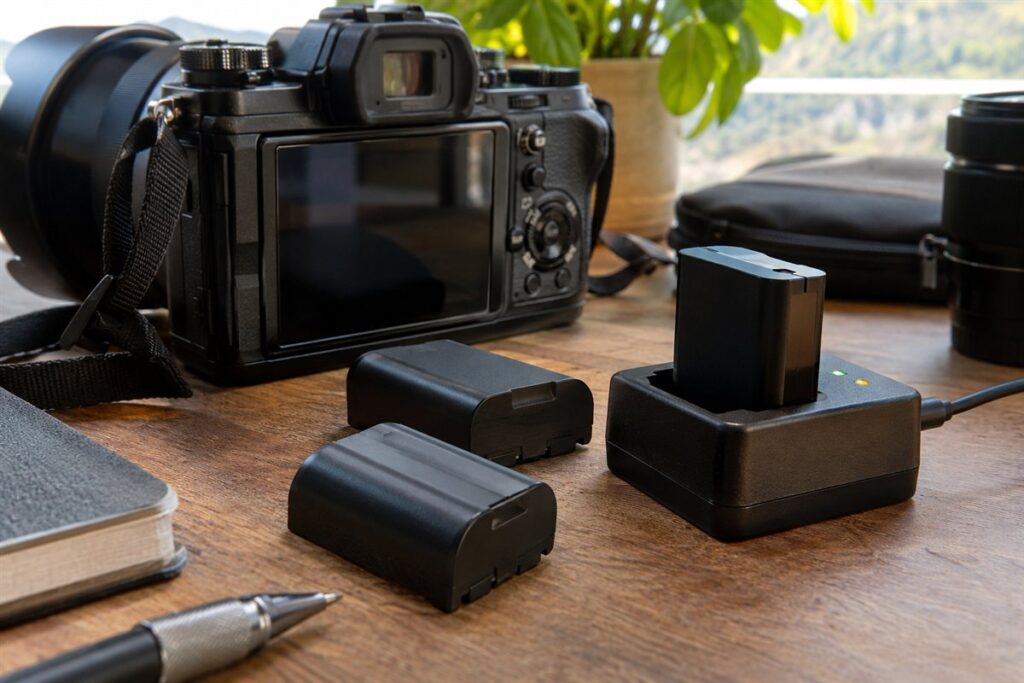
A camera battery drains fast mostly because of the screen, electronic viewfinder, video recording, wireless features, cold weather or an aging battery. You can usually get more shots by turning off power-hungry features and carrying a spare.
Common Causes
- Screen and viewfinder: Bright displays and constant image playback use a lot of power, particularly on mirrorless cameras.
- Video: High resolution and high frame rate recording draws more than stills.
- Wireless features: Bluetooth, Wi-Fi and location tracking stay active in the background.
- Autofocus and stabilization: Continuous focus, eye tracking and in-body stabilization keep motors busy.
- Cold weather: Low temperatures reduce the available charge for a time.
- Battery age: Rechargeable cells lose capacity after many charge cycles.
- Lens and flash: Some lenses and built-in flashes use extra power.
In this guide
How to Extend Battery Life
- Lower screen brightness and shorten the auto-off and sleep timers.
- Use the optical viewfinder if you have one, or set the electronic viewfinder to eye-sensor mode.
- Turn off Bluetooth, Wi-Fi and location logging when you do not need them.
- Switch off image playback after each shot.
- Use single autofocus when your subject is still, instead of continuous tracking.
- Turn off the stabilization when the camera is on a tripod.
- Power the camera down between shooting sessions, not just put it to sleep.
Cold, Heat and Storage
| Condition | What to do |
|---|---|
| Cold | Keep spare batteries in an inner pocket and swap them in as needed |
| Heat | Keep the camera and spares out of direct sun and hot cars |
| Storage | Store partly charged in a cool, dry place for long periods |
Follow the maker’s battery guidance for storage and charging.
Check the Battery Itself
Many cameras show battery health or charge cycle information in the menu. If a battery drops quickly from a full charge, even with features off, it may be near the end of its life. Use batteries and chargers recommended by the camera maker, because low quality alternatives can behave unpredictably and may not report charge correctly.
Habits That Help Every Day
Charge your batteries the night before a shoot, label them so you know which are fresh, and rotate them so they wear evenly. Keep a small case for spares, and check the level before you leave home. These small habits prevent most mid-shoot surprises and cost nothing.
Understanding Rated Shot Counts and Estimating Your Needs
Camera makers often publish a rated number of shots per charge. Treat that figure as a comparison tool rather than a promise. Ratings come from standardized test routines that follow a set pattern of shooting, review and power cycling, which may not resemble how you use the camera. If you shoot in bursts, review images constantly, record video, use wireless features or work in the cold, you will likely get fewer shots than the rating suggests. If you shoot sparingly with the screen mostly off, you may get more.
To estimate your own needs, run a simple test. Start with a fully charged battery, use the camera as you normally would on a typical outing, and note how many shots or minutes of video you record before the indicator drops to a low level. Repeat the test with different settings, such as with Wi-Fi on and off, to see the effect. Write down the results. After a few outings you will have a realistic idea of what one battery gives you and how many you need for a day.
- Video drains faster than stills, so count recording time separately.
- Display and viewfinder use make a large difference, especially on mirrorless cameras.
- Do not trust the battery percentage blindly at the low end, since indicators can drop quickly near empty.
- Check your manual to see how the camera reports battery state and what the warning icons mean.
When planning a trip or event, add a safety margin beyond your estimate, as unexpected opportunities and longer days are common.
Lenses, Flash and Accessories That Add to the Drain
The camera body is not the only thing drawing power. Lenses with autofocus motors and image stabilization draw current from the body, and large telephoto lenses with fast tracking can use more than a small prime. Stabilization that stays active constantly, particularly when you half-press the shutter button for long periods, adds to the load. If you notice that one lens drains the battery faster than others, check whether its stabilization or focus settings can be adjusted according to the lens manual.
Flash is another source. On-camera flash and external flashes require power, and the camera may need extra energy to communicate with the flash and its wireless features. External flashes have their own batteries, so keep spare sets for both the camera and the flash, and label them separately to avoid mixing them up.
Other accessories deserve attention. Battery grips hold extra batteries and can double running time, though they add bulk and weight. Wireless remotes, microphones and external monitors can draw power from the camera or from their own batteries. A GPS accessory or a connected phone app can keep the camera awake and searching. If you use a gimbal or rig, check whether accessories power the camera or run from separate sources.
- Remove accessories you do not need for a given outing.
- Turn off stabilization on lenses when the camera is on a tripod, if the manual advises it.
- Carry spare batteries for flash units and other accessories, not only for the camera.
- Check connections periodically, since dirty contacts can create odd behavior.
Charging Habits and Long-Term Battery Care
Rechargeable lithium-ion batteries wear gradually, and habits influence how fast. Heat is a major enemy, so avoid charging a battery that is hot from heavy use or from sitting in the sun, and let it cool for a while first. Do not leave batteries in hot places such as parked cars. Cold temporarily reduces available capacity, but the effect usually recovers once the battery warms up, while heat can cause lasting damage.
Deep discharge and keeping batteries at full charge for long periods can both shorten lifespan, which is why makers usually suggest storing batteries partly charged when you will not use them for weeks. Follow the maker’s advice for the exact level and conditions. Check stored batteries every few months and top them up if needed, because a battery that drops too low may not recharge properly.
Use the charger recommended for your battery and avoid damaged cables or chargers. Do not charge unattended on flammable surfaces, and stop using any battery that looks swollen, leaks or becomes unusually hot. Dispose of old batteries at a recycling point rather than in household rubbish, and follow local rules.
- Rotate batteries so that each gets used and recharged in turn.
- Label batteries with a purchase date or number to track their age.
- Keep contacts clean and dry, wiping them gently with a dry cloth if they look dirty.
- Replace batteries that no longer hold a charge well, instead of working around them.
USB Power, Dummy Batteries and Other External Options
Many modern cameras can be powered or charged over USB, and this can transform a long shoot. Check your manual for the supported methods, since some cameras can charge a battery inside the camera, some can run from USB power while recording, and some can do both or neither. The power source also matters. A power bank, a wall adapter and a computer port can all supply different amounts of power, and the camera may need a certain standard to work properly. Use a quality cable that supports the required power.
Plan for the practical side. Charging in the camera can be slow, and the camera may heat up if it is also recording. For long events such as time lapses or livestreams, running from external power avoids interruptions. Some makers offer a dummy battery, or a power adapter that fits in the battery compartment and connects to mains or an external supply. Check the camera maker’s listed accessories to see what is supported, and always follow the instructions.
A separate charger that charges batteries outside the camera is also useful, because you can charge several batteries while the camera is in use. Consider a travel charger that works in different countries, with the right plug adapters. For outdoor work, a small power bank can top up batteries during breaks, though cold affects the power bank as well. Keep cables organized in a small pouch, and test your whole power setup at home before you rely on it in the field. Having more than one way to power your camera is the best protection against a dead battery at the wrong moment.
Troubleshooting a Sudden or Unexplained Drain
If a battery that used to last a day now fades in a couple of hours, work through the possibilities in order. First, check the settings. Wireless features, location logging, a bright screen or a long timeout may have been switched on during an update or by accident. Resetting the camera to default settings, then changing only what you need, can reveal the cause. Check whether a connected phone app is keeping the camera active.
Next, look at the battery. Compare with a second battery. If the new one lasts much longer, the old one is probably worn out. Inspect it for damage, clean the contacts and check the date of purchase. If you use a non-original battery, try a battery from the camera maker to see whether behavior changes, because quality varies among third-party products, and some may not report charge accurately.
Also consider storage and firmware. A very large or slow memory card can occasionally cause longer write times and more power use. Check the maker’s support site for firmware updates, which sometimes address power issues. Make sure the camera really powers off when turned off, and test whether it loses charge overnight when not in use. A camera that drains in storage may have a fault or an accessory attached.
If none of these steps help, contact the maker’s support or a qualified repair service, rather than opening the camera yourself. Keep notes of what you tried, as they help technicians diagnose the problem.
A Battery Habits Checklist for Every Shoot
Battery life is partly about the camera and partly about habits. Small choices add up over a day of shooting, and a simple routine keeps you from being caught with an empty pack. Use the list below before you leave the house and during the day.
- Charge the night before. Top up your batteries the day before a shoot, and put the charged packs in your bag as spares.
- Carry at least one spare. For long days, events or travel, bring more than one. Keep them in a pouch, not loose with keys or coins.
- Check the settings you use most. Screen brightness, image stabilization and wireless features all draw power.
- Turn the camera off between shots when you will not shoot for several minutes, or set a short sleep timer.
- Use the viewfinder when you can. A bright rear screen uses power, especially on mirrorless cameras.
- Avoid unnecessary playback. Checking every frame on the back screen costs more energy than you might think.
- Keep batteries warm in cold weather. Carry a spare in an inside pocket and swap them when the camera shows a low level.
None of these steps is difficult, and together they can noticeably extend the length of a session. Keep a routine that you actually follow, rather than a long list you will forget.
Camera Features That Quietly Use Power
Modern cameras are full of conveniences, and many of them run in the background. Knowing which ones matter helps you decide what to switch off. The table below summarizes common power-hungry features and what you can do about them.
| Feature | Why it draws power | What you can do |
|---|---|---|
| Rear screen and electronic viewfinder | They keep a live image running | Lower brightness, shorten the screen timeout, use the eye sensor wisely |
| Image stabilization | Motors or sensor movement run continuously | Turn it off on a tripod, if the maker advises it |
| Continuous autofocus and tracking | The lens motor and processor work constantly | Use single focus when subjects are still |
| Wireless and Bluetooth | Radios keep searching or connected | Switch off when you do not need to transfer files or use a remote |
| GPS or location logging | Needs regular updates | Disable it unless you need the data |
| Video recording | High data rates and processing | Expect shorter battery life and carry extras |
| Burst shooting | Rapid processing and card writing | Use it only when you need it |
| Flash | Charging the flash uses a lot of energy | Use an external flash with its own batteries |
Check your camera’s manual for the specific menu items, since names vary between brands and models.
Is It the Battery or the Camera? A Simple Diagnosis
If your camera seems to drain faster than it should, the cause may be the battery itself, the way you use the camera or something else. A bit of detective work can sort out which.
- The battery is old. Rechargeable cells lose capacity over time. If a pack that once lasted all day now fades in an hour, it may be near the end of its life.
- The battery is not a good match. Unbranded packs of doubtful origin may not deliver the stated capacity or report charge accurately. Use packs recommended by the camera maker where you can.
- The camera is waking up unexpectedly. A half-pressed shutter button, a loose strap or a camera bag pressing a button can keep it active.
- Cold weather. Low temperatures reduce the available power, and the battery may recover when it warms up.
- Dirty contacts. Wipe the metal contacts on the battery and in the compartment with a clean dry cloth.
- Leaving it on in a bag. Some cameras do not shut down fully, and may keep running or searching for a connection.
Try one change at a time, so you can see what makes a difference. If a battery still performs badly after you have fixed the habits, replace it with a genuine one from the camera maker or a trusted source.
Storing and Caring for Batteries Over the Long Term
Lithium-ion batteries last longer when treated gently. Avoid leaving them fully charged or fully empty for long periods, and follow the maker’s recommendations for storage. In general, a cool, dry place away from direct sunlight and heat is best, and a hot car is a poor place to leave a battery.
Use only the charger that came with the camera or one approved by the maker, and do not leave batteries charging unattended for long periods. Stop using any battery that is swollen, hot, leaking or damaged, and dispose of it according to local rules for battery recycling. Never try to open or repair a battery pack.
Label your spare batteries and rotate them, so they all get used evenly. A small mark with a pen or a numbered sticker is enough. Keep a note of when you bought each one, and replace them when capacity falls noticeably. Following the maker’s guidance helps your batteries stay reliable, and keeps you shooting for as long as the light lasts.
Planning Power for Travel, Events and Video
Some situations demand more energy than a normal day out. Long video clips, event coverage and travel days where charging is hard to find all call for a plan. Estimate how many spare packs you need by thinking about your busiest day, and add one more for safety. Video recording and heavy use of the rear screen can shorten life considerably, so expect to change batteries more often.
For travel, check airline and local rules for carrying lithium batteries, which usually require them to be in carry-on baggage and protected from short circuits. Keep the terminals covered with the plastic caps or in a pouch. A USB charger that can top up a battery in the camera or in a standalone charger is a useful backup when an outlet is available, but follow the maker’s guidance on which chargers and power banks are suitable.
At events, plan swap times. Change the battery during a natural break rather than waiting for the warning, and put the used one in a different pocket so you do not mix them up.
Products Worth a Look
As an Amazon Associate, Reviews Took earns from qualifying purchases. These picks come from our guide: 4 Best Camera Chargers and Dummy Batteries (2026).
-
LP NP-FW50 Dual Battery Charger
-
K&F Concept NP-FZ100 3-Slot Charger
-
King Ma Dummy Battery (Type-C Power)
Measuring Your Real Battery Life: A Simple Test
Published shot counts are laboratory numbers — measured with a fresh battery, moderate temperatures and a standardised pattern of use that resembles nobody’s actual day. Your real figure depends on your screen habits, your lenses, your climate and your battery’s age, and it is worth measuring once. Start a typical shoot with a full charge, note the count at the start, and shoot as you normally shoot until the battery is spent. The number you get is your planning number: the one that should decide how many spares a wedding, a trip or a long event actually requires.
Repeat the test when anything significant changes — a new lens with hungrier stabilisation, a firmware update, a season’s colder weather — and write the results where you keep your kit notes. Photographers who know their real numbers stop experiencing battery anxiety, because anxiety is mostly uncertainty wearing a costume. They also catch decline early: a battery whose test figure falls steadily across a year is announcing its retirement in time for you to replace it calmly, rather than during the shoot of the season.
- Measure on a real shoot, from full charge to spent, in your normal style.
- Plan spares from your measured figure, not the brochure’s.
- Re-test after new lenses, updates or season changes.
- Track each battery’s figure over time to spot decline early.
Label your batteries so the test results attach to individuals. A dab of paint or a numbered sticker turns a drawer of identical cells into a managed fleet: the strong ones for critical work, the tired ones for casual days and as emergency reserves. Fleet thinking is the difference between a battery problem and a battery system, and it costs one sticker per battery.
Power Management by Shooting Situation
Different work spends power differently, and the settings that save a landscape day can sabotage a sports day. For still subjects and tripod work, be ruthless: short screen timeouts, playback off, wireless off, stabilisation off where the maker advises it on a tripod, and long sleep timers replaced by simply switching off between compositions. For events and action, reverse the priorities — the camera must wake instantly and track continuously, so spend power on readiness: keep autofocus and stabilisation working, accept the drain, and manage the day with spare batteries and rotation rather than with settings that cost you moments.
Video deserves its own regime, because it is the heaviest sustained load most cameras ever carry. Plan video days around power from the start: external power where the situation allows, batteries rotated at natural breaks rather than at exhaustion, and a shaded camera where possible since heat and power problems arrive together. Travel work adds a final pattern — opportunistic charging. Top up at every café, vehicle and airport pause, because a battery at eighty percent at the start of an unexpected evening is worth more than a perfect charging routine at a hotel you reach too late.
- Tripod and still work: minimise everything, switch off between frames.
- Events and action: spend power on readiness, manage with spares.
- Video: plan external power and rotation from the start.
- Travel: charge opportunistically at every pause.
The meta-skill is matching the regime to the day before the day begins. A minute at the bag, setting the camera for the work ahead, prevents both failures: the landscape photographer whose camera sleeps through a changing sky, and the event photographer whose battery dies at the speeches because the camera spent the afternoon in tripod mode.
Battery Health: Charging, Storage and Retirement
Lithium cells age by cycles, by heat and by time spent at extremes of charge. You cannot stop the ageing, but you can stop accelerating it. Avoid leaving batteries in hot cars and on sunny dashboards. For storage longer than a few weeks, the common maker guidance is a partial charge rather than full or empty, in a cool dry place. Charge with the maker’s charger or a reputable one that speaks to the battery properly; mystery chargers are a false economy measured in swollen cells and shortened lives. And rotate your fleet, so one battery does not accumulate all the cycles while its siblings age unused on the shelf.
Retirement should be a decision, not an event. A battery that swells, runs hot, drops charge on the shelf, or delivers a fraction of its tested figure has finished its service, however attached you are to it. Retire it through proper recycling channels, replace it in a calm week, and note the date on its successor. Photographers who manage batteries this way describe battery failure the way careful drivers describe running out of fuel: as something that happens to other people, for reasons that are not mysterious.
- Keep batteries out of heat; store longer-term at partial charge, cool and dry.
- Use the maker’s charger or a reputable equivalent.
- Rotate the fleet so cycles and ageing spread evenly.
- Retire swollen, hot or fading cells through proper recycling, promptly.
Third-party batteries deserve a balanced word. Reputable ones serve many photographers well; unbranded ones vary wildly in capacity and safety, and a camera’s warranty conversation can complicate around them. If you buy third-party, buy from makers with reputations to lose, test the cells as rigorously as your originals, and keep them in the fleet system — labelled, measured and retired by the same rules.
Troubleshooting a Sudden Change in Battery Life
When a camera that lasted all day suddenly lasts half of one, something changed, and the change is findable. Work the list in order of likelihood: a setting altered — wireless left on, a sleep timer lengthened, screen brightness raised, a new lens’s stabilisation working harder; a battery ageing past its useful life; contacts dirty on battery or camera; firmware updated with new background behaviours; or the work itself changed, with more video, more chimping or colder weather than the comparison day. Change one variable back at a time and test, as with any diagnosis, or you will fix it without learning it.
Isolate the battery from the camera early in the process. If the suspect cell performs badly in another body, or a known-good cell performs well in yours, the culprit is named. This swap test is why even photographers who shoot one body benefit from owning two batteries: the second cell is not only a reserve, it is the diagnostic instrument that divides every power problem in half.
- List what changed: settings, battery age, contacts, firmware, workload, weather.
- Swap batteries between bodies, or against a known-good cell, to isolate the fault.
- Clean contacts gently and check for a battery that sits loosely.
- Change one variable at a time so the fix teaches you the cause.
If a healthy battery in a clean camera with sane settings still drains abnormally, suspect the camera itself — a component drawing power when it should sleep — and involve the maker’s service with your test figures in hand. Measured evidence, as in every troubleshooting story in this series, converts a vague complaint into a findable fault.
Building a Power Kit for Travel and Long Days
Assemble your power kit as deliberately as your lens kit. Its core: enough tested batteries for your longest day, counted from your measured figures; the charger, plus the means to use it where you will actually sleep — vehicle adapter, power bank compatibility, plug adapters for other countries; a small cable kit; and a rotation system, even as simple as charged batteries facing one way in the pouch and spent ones the other. Test the whole chain at home before any trip that matters, because charging failures, like battery failures, prefer to debut far from home.
Weigh redundancy against weight honestly. For most travel, one spare beyond the day’s calculated need is the sweet spot; for paid or remote work, two. Solar and exotic charging solutions suit expeditions, not city trips, and their weight usually buys more ordinary batteries instead. The goal is a kit you stop thinking about — power as a solved background condition — because the foreground of any shooting day should belong to the photographs.
- Count batteries from your measured daily figure, plus a margin.
- Carry charging means for where you will actually sleep.
- Use a simple charged-versus-spent system in the pouch.
- Test the full charging chain at home before important trips.
Review the kit after each trip with the same ten-minute honesty recommended throughout this guide: what ran short, what never got used, what failed. Power kits, like gift frameworks and culling systems, improve by annotation — and the photographers whose batteries never die are simply the ones whose last trip taught their next one.
Power for Hybrid Shooters: Stills and Video in One Day
Hybrid work breaks naive battery planning because the two modes spend power in different shapes: stills in sips, video in a steady pour. A day that is eighty percent stills can be ended by twenty minutes of video at the wrong moment. Plan hybrid days by budgeting the video first — its minutes are the expensive line item — and keep a dedicated battery whose charge is reserved for footage, so stills enthusiasm cannot spend the video reserve. Label the reserve physically; intentions dissolve under field pressure, but a marked battery in a separate pocket survives it.
Settings help at the margins: shoot video in the configuration you rehearsed, with displays and wireless set deliberately rather than inherited from the stills setup, and return to the frugal stills configuration when filming ends. The configuration-switching habit recommended elsewhere in this series earns its keep most on hybrid days, because the wrong inherited setting — screens bright, wireless live, sleep disabled from the morning’s filming — is how hybrid batteries die in the afternoon.
- Budget video minutes first; they dominate hybrid consumption.
- Reserve a marked battery for footage and defend the reserve.
- Switch configurations deliberately between modes.
- Rehearse the hybrid day at home if the work is paid.
When to Choose External Power
External power — mains adapters, high-capacity power banks, dummy batteries — suits work where the camera stays in one place or moves little: studio sessions, interviews, time-lapses, long ceremonies from a fixed position, desk-based product work. Its virtue is the end of arithmetic; its costs are cables, trip hazards and a tethered camera’s reduced freedom. Choose it when the position is fixed and the duration is long; decline it when the work moves, because a cable across a dance floor or a hillside creates problems larger than the one it solved.
Whatever the source, verify its rating against the camera’s requirements and test the complete chain under load before real work — an external supply that sags during a burst or a recording start reproduces every symptom of a dying battery, with better camouflage. Keep one internal battery in the rotation even on externally powered days, charged and ready, because the day an external cable is kicked out mid-ceremony is the day the spare stops looking like pessimism.
- Use external power for fixed positions and long durations.
- Verify ratings and test the whole chain under load beforehand.
- Mind cables as hazards in any space with moving people.
- Keep a charged internal battery as the permanent understudy.
Reading the Battery Gauge Like an Instrument
Treat the indicator as an instrument with known habits rather than as a promise. Learn its personality on your own body: how long the first segment lasts in your typical work, where the steep fall begins, how cold shifts the whole curve. Run one deliberate discharge with a notebook, noting percentages against shot counts and conditions, and you will own a calibration that no manual provides because it belongs to your batteries, your lenses and your hands. Afterwards, a glance at the gauge gives you a time estimate instead of a mood, and planning — spares, swaps, charging pauses — becomes arithmetic again.
Share the calibration habit with anyone who shoots with you. A second photographer who knows the fleet’s real behaviour swaps at the right moments without being managed, and a team whose power knowledge is shared stops producing the twin failures of event work: the dead battery at the speeches and the three untouched spares in the car. Instruments reward those who read them; gauges, like shutters and sleep timers, are only mysterious to people who have not yet measured them.
FAQ
How many spare batteries should I carry?
For a full day of shooting, one or two spares is common, more if you record a lot of video.
Can I charge the camera from a power bank?
Many modern cameras support USB charging or power. Check your manual for supported methods.
Does turning the camera off save more power than leaving it in sleep mode?
Generally yes, because sleep mode keeps some circuits active. Switching off between sessions avoids the small continuous drain, though it takes a moment to wake up the camera.
Is it safe to use third-party batteries?
Quality varies. Some work well, while others may report charge inaccurately or fit poorly. Check reviews and the maker's guidance, and consider the camera maker's own batteries for important work.
Why does my battery die faster in winter?
Low temperatures reduce the charge a battery can deliver for a time. Keep spares warm in an inner pocket and swap them in when the cold one weakens. It often recovers when warmed.
How long do camera batteries last overall?
Lifespan depends on use, charge cycles, heat and storage. There is no fixed figure, so watch for shorter running time and replace the battery when it no longer meets your needs.
Should I fully drain the battery before charging?
Modern lithium-ion batteries do not need this, and deep discharges can shorten their life. Charge whenever convenient and follow the maker's guidance.
Can I travel with spare camera batteries on a plane?
Rules for lithium batteries differ between airlines and countries. Check current regulations, and carry spares in your hand luggage, protecting the contacts from short circuits.
Does shooting raw use more battery than JPEG?
The difference is usually small compared with screen, video and wireless use. Larger files may take slightly longer to write, but settings like display brightness matter more.
Why does my battery drain overnight in the bag?
Something is awake that should be asleep: wireless features polling, a sleep timer set to never, a camera switched on by a tight bag pressing its controls, or a battery ageing into self-discharge. Check the power state when you pack, turn wireless fully off, and store the camera where buttons cannot be pressed. Test by charging fully, leaving the camera out of the bag overnight, and comparing. If a healthy camera holds its charge on the table but not in the bag, the bag was the culprit all along.
Is it bad to charge the battery before it is empty?
No. Modern lithium cells have no memory effect, and partial charging is harmless — for storage, a partial charge is actually preferred. Charge whenever convenient, top up before important work without guilt, and avoid only the extremes of abuse: chronic heat, deep discharge left for months, and chargers of unknown quality. The habit that serves photographers best is boring: batteries charged after each significant shoot, rotated evenly, and never left cooking in a car.
How many spare batteries do I really need?
Base it on your measured daily consumption rather than on anxiety. Most stills photographers find one spare covers a normal day and two cover anything; video shooters and cold-weather photographers should measure their heavier draw and plan accordingly. Spares beyond your real worst day add weight without adding safety, and batteries age on the shelf whether used or not. Buy to your measured need, keep the fleet tested, and let evidence — not the memory of one bad day — set the number.
Why does the battery indicator drop suddenly near the end?
Battery gauges estimate charge from voltage, and lithium voltage holds a long plateau before falling steeply at the end — so the last portion of the gauge genuinely covers less working time than the first. Cold exaggerates the effect, as does an ageing cell. Plan around it: treat the final segment as a warning zone, swap at natural breaks once it appears, and never schedule critical work on a battery’s last visible fraction. The gauge is not lying; it is reporting a curve that is not a straight line.
Can a lens really drain the battery faster?
Yes. Stabilisation motors, autofocus motors working in continuous modes, and electronically controlled apertures all draw from the camera’s battery, and large lenses with ambitious stabilisation draw noticeably. A new lens that coincides with shorter battery life is a common and genuine pattern, not an illusion. Counter it in the settings where the work allows — stabilisation modes matched to the situation, single autofocus for still subjects — and re-run your battery test with the new lens so your planning figures stay honest.
Should I turn the camera off between shots or let it sleep?
For gaps of minutes, sleep is efficient and keeps the camera ready; for gaps beyond that, off is surer, since sleep still sips power and a sleeping camera can be woken by bag pressure into real drain. The deciding factor is your wake-up cost: cameras that start instantly forgive being switched off constantly, while slower starters push you toward sleep with a short timer. Set the sleep timer short, use off for transport and long waits, and the two habits together cover nearly every situation.
Do battery grips help?
They hold more power in the hand, which suits long event days and video work, and they add handling benefits for vertical shooting. They also add weight and bulk that travel and street photographers may resent, and they complicate the fleet with more cells to rotate and test. Decide by your longest real day: if measured consumption regularly exceeds two batteries, a grip earns its place; if not, loose spares in a pouch solve the same problem more flexibly and more cheaply.
Why does cold weather kill my battery so fast, and is the damage permanent?
Cold slows the chemistry that delivers power, so available capacity falls — temporarily. Warm the same battery and most of the charge returns, which is why rotating warm spares from an inside pocket works. The effect is not, by itself, permanent damage, though chronic storage at extremes ages cells faster. Treat cold as a logistics problem — more batteries, kept warm, swapped often — rather than as a defect, and winter stops being the season your camera betrays you.
Why does my battery drain faster in winter even indoors?
Indoor winter air is dry and heated, but the drain usually traces to the journey rather than the room: batteries chilled in transit start the day with reduced available capacity, and a camera carried between cold streets and warm interiors spends power through more wake cycles, more screen use in dull light, and longer sessions. Keep the battery warm from the start of the day, not just during shooting, and judge winter consumption by your measured test in winter conditions rather than by summer’s figures.
Is fast charging bad for camera batteries?
Maker-approved fast charging is engineered for the cells it ships with, and using it as directed is fine. The cautions belong to heat and to mystery chargers: charging in a hot environment, or with adapters that ignore the battery’s communication, stresses cells in ways that shorten life. Charge at room temperature, on the maker’s charger where you can, and treat any battery that becomes notably warm while charging as a battery to watch — and, if it repeats, to retire.
How do I store batteries for a season of not shooting?
Charge them partially rather than fully, following your maker’s storage guidance, and keep them cool, dry and out of the camera. Check them every couple of months and top up if they have sagged significantly, since lithium cells left flat for long periods can fall below the point where chargers will revive them. Note the storage date on your kit list. A season of correct storage costs a battery almost nothing; a season forgotten flat in a drawer can cost the battery entirely.
What should I do with a swollen battery?
Stop using it immediately. Do not charge it, do not force it into the camera, and do not puncture or squeeze it. Store it somewhere cool and non-flammable, away from other batteries, and take it to a proper battery recycling or hazardous-waste point as your local rules direct. Swelling is the cell announcing internal failure, and it is the one battery symptom that outranks frugality completely. Replace the battery in the same week so the fleet is whole before the next important day.
Why does a battery show full again after resting?
Voltage recovers slightly when a load is removed, so a rested battery can display more charge than it showed under work — while holding no more real capacity than before. The gauge is reporting chemistry relaxing, not charge returning. Do not let a rested battery’s optimism reschedule your plans; treat any cell that hit empty under load as empty for planning purposes until it has been genuinely charged. This small scepticism prevents the classic failure of the battery that promised a second life and delivered ten frames.
The Short Version
Screens, video, wireless features and cold are the main drains. Turn off what you do not need, keep spares warm and replace tired batteries.
Related Guides
- Smartwatch Battery Life: What to Expect and How to Extend It
- How to Update Camera Firmware and Why It Matters for Performance
- Why Your Camera Photos Look Grainy and How to Reduce Noise
- Why Your Camera Will Not Focus and How to Fix Autofocus
- 6 Best Camera Battery Cases: Slots, Shells and Pouches (2026)
