Disclosure: As an Amazon Associate, reviewstook.com earns from qualifying purchases. Links on this page are affiliate links; they cost you nothing extra. Prices and availability change often, so check the current Amazon listing before you buy.
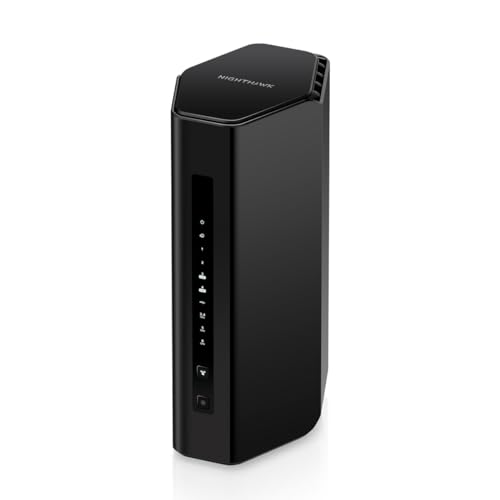
The nighthawk rs300 is NETGEAR’s pitch to households whose internet has quietly become infrastructure: the router as a serious, tri-band WiFi 7 appliance rather than the blinking box the internet provider left behind. Its verified listing describes coverage up to 2,500 square feet, combined speeds in the 9.3 Gbps class under its BE9300 designation, support for around 100 devices, and a port selection with two 2.5-gigabit and two gigabit connections. This review explains what those figures mean for a real home, where the RS300 sits between its larger siblings — the RS500 and the RS700S — and how to decide whether your household needs this rung of the ladder, the one above it, or a mesh system instead. It also covers placement and setup in the detail that router reviews owe their readers, because a router’s real-world performance is half product and half geography.
Begin with the honest premise of all router buying: your internet speed is capped by your provider’s plan, and no router outruns it. What a router like this actually improves is everything inside the home — the capacity to serve many devices at once, the consistency of wireless performance in far rooms, the speed of traffic between your own devices, and the grace with which the network handles the evening pile-up when the whole household arrives online simultaneously. Readers shopping for those improvements are this review’s audience; readers hoping to turn a slow plan into a fast one should spend their money on the plan instead, and we will say so again in the guide.
Key takeaways
- The listing confirms the shape: WiFi 7 tri-band under the BE9300 class, up to 2,500 sq ft coverage positioning, around 100 devices, and 2× 2.5G plus 2× gigabit ports.
- WiFi 7’s practical gifts are capacity and consistency under load — many devices, busy evenings — more than any single device’s top speed.
- The RS500 steps up to 3,000 sq ft, a 12 Gbps class, and around 120 devices; the RS700S reaches 3,500 sq ft, a 19 Gbps class, around 200 devices, and a 10-gigabit port.
- Most single-router households of ordinary size are the RS300’s natural parish; larger homes, heavy wired setups, and multi-gigabit internet plans argue upward.
- Placement is a performance feature: a central, elevated, unhidden router outperforms a stronger router in a cupboard every day of the week.
In this guide
Quick verdict and the picks
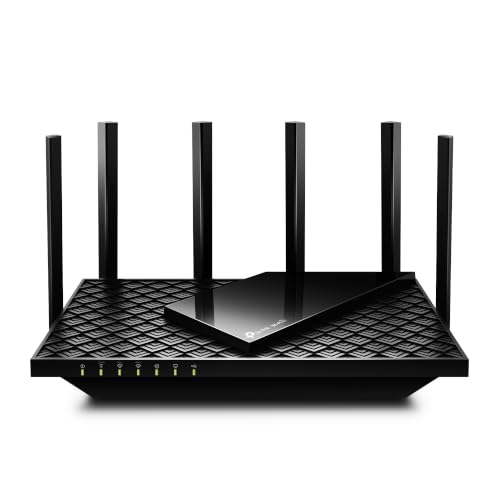
- The subject: NETGEAR Nighthawk RS300 — tri-band WiFi 7 for the mainstream serious home. Check price on Amazon
- The step up: NETGEAR Nighthawk RS500 — more coverage, more capacity, an extra gigabit port. Check price on Amazon
- The flagship: NETGEAR Nighthawk RS700S — the range’s ceiling, with a 10-gigabit port for multi-gigabit lives. Check price on Amazon
How these were chosen: all three are verified NETGEAR Nighthawk listings from this site’s Creators API, and they form the actual ladder a Nighthawk shopper climbs. The review’s job is to place your household on the right rung — including the possibility that the right rung is the first one.
Nighthawk Rs300 in context: what WiFi 7 changes at home
Each WiFi generation advertises speed, and each generation’s real gift is something else. WiFi 7’s gifts, in the home, are about abundance management: wider channels and more efficient use of the spectrum mean the network degrades gracefully when the evening load arrives — the video call in the study, the game download in the bedroom, the film in the living room, the dozen quiet devices murmuring in the background. Tri-band design is the architectural half of that grace: three radios divide the traffic so that devices are not all queuing on the same air. The RS300’s BE9300 figure is the combined theoretical capacity across those bands — a ceiling the household shares, not a speed any single device will see — and its honest meaning is headroom. Headroom is what a family actually buys in a router: not a faster Tuesday for one laptop, but a Friday night where nobody’s stream negotiates with anybody else’s game.
The port selection tells the wired half of the story. Two 2.5-gigabit ports matter to households with faster-than-gigabit internet plans, a network storage box, or a wired backhaul to another access point — the connections where a gigabit ceiling would genuinely bind. Two further gigabit ports cover the ordinary wired citizens: a desktop, a television, a console, a printer. It is a selection aimed at the modern mainstream rather than the homelab, and it helps define the RS300’s rung precisely: serious, current, and not pretending to be a small business’s core switch.

NETGEAR Nighthawk RS300
Badge: The mainstream flagship of the home network
- Standard: WiFi 7, tri-band, BE9300 class in the listing
- Coverage positioning in the listing: up to 2,500 sq ft
- Speed positioning in the listing: 9.3 Gbps combined class
- Device positioning in the listing: around 100 devices
- Ports in the listing: 2× 2.5G and 2× gigabit
- Setup positioning in the listing: easy setup
Day to day, the RS300’s character is absence: the absence of the evening buffering negotiation, of the far-bedroom dropout, of the sense that the network is a resource the household must schedule around. Its coverage positioning suits the ordinary family home or large apartment in a single unit, provided placement is sensible — routers radiate in the round, and the listing’s square footage assumes the router lives somewhere central rather than in the corner where the internet line happened to enter. For households on gigabit-class internet plans with a normal census of devices, this is the rung where the Nighthawk line’s virtues arrive complete, without paying for ceilings the home will never touch.
Strengths
- Current WiFi 7 tri-band capacity sized honestly for mainstream homes.
- Two 2.5G ports give faster-than-gigabit plans and storage a real home.
- Single-unit simplicity — no mesh nodes to place, power, and manage.
Trade-offs
- One unit cannot defeat architecture: very large, multi-storey, or masonry-heavy homes need mesh or multiple access points.
- Households with multi-gigabit plans and heavy wired traffic will want the RS700S’s port story.
- WiFi 7’s fullest benefits arrive as client devices adopt it; older devices gain capacity, not new physics.
Best for: family homes and large apartments on fast plans, with a busy device census and a central place to put it. / Not suited for: sprawling multi-storey houses, or homes whose internet plan is modest and whose real problem is one dead room — a mesh or an extender may answer better.

NETGEAR Nighthawk RS500
Badge: The step up for bigger homes and fuller houses
- Standard: WiFi 7, tri-band, BE12000 class in the listing
- Coverage positioning in the listing: up to 3,000 sq ft
- Speed positioning in the listing: 12 Gbps combined class
- Device positioning in the listing: around 120 devices
- Ports in the listing: 1× 2.5G and 3× gigabit
The RS500 is the same argument with the volume raised: more coverage, more shared capacity, more devices, and a port mix that trades one of the RS300’s 2.5G connections for an extra everyday gigabit port — a trade that reveals its intended household, one with more wired citizens than high-speed special cases. Larger homes with a fuller census — older children with their own ecosystems, a home office with real demands, guests and their devices — are its natural readers. The step is evolutionary rather than transformative, which is a compliment: the ladder’s rungs should feel like this.
Strengths
- Coverage and capacity headroom for larger, busier homes.
- Three gigabit ports suit households with several wired staples.
- Same single-unit simplicity and setup story as the RS300.
Trade-offs
- A single 2.5G port narrows the faster-than-gigabit wired options versus its sibling.
- Smaller homes will never spend the extra headroom they bought.
- Architecture still trumps output in difficult buildings.
Best for: larger single-router homes with heavy device counts and several wired staples. / Not suited for: compact homes, or wired enthusiasts who need multiple high-speed ports.

NETGEAR Nighthawk RS700S
Badge: The flagship — for multi-gigabit lives
- Standard: WiFi 7, tri-band, BE19000 class in the listing
- Coverage positioning in the listing: up to 3,500 sq ft
- Speed positioning in the listing: 19 Gbps combined class
- Device positioning in the listing: around 200 devices
- Ports in the listing: 1× 10G and 3× gigabit
The RS700S is the rung for households whose internet and internal traffic have outgrown the mainstream entirely: multi-gigabit fibre plans, a network storage habit with real throughput, a device census that reads like a small office’s. Its 10-gigabit port is the signature — the connection that lets a multi-gigabit plan, or a fast wired backbone, exist without a ceiling in the router. For everyone else it is magnificent overcapacity, and this review’s honesty requires saying that most readers should admire it from the rung below.
Strengths
- The range’s highest capacity, coverage, and device positioning.
- A 10G port future-proofs multi-gigabit plans and fast local backbones.
- Flagship headroom for homes that genuinely run like small offices.
Trade-offs
- Its premium buys ceilings most homes will never approach.
- Still one unit against difficult architecture; size of home and shape of home are different problems.
- Fullest value requires a plan and devices that can use it.
Best for: multi-gigabit households, homelab-leaning users, and the largest single-router homes. / Not suited for: ordinary plans and censuses, where the RS300 or RS500 deliver the lived experience for less.
The Nighthawk ladder compared
| Model | Class (listing) | Coverage / devices (listing) | Port signature | Pick it when… |
|---|---|---|---|---|
| RS300 | BE9300, 9.3 Gbps | 2,500 sq ft / ~100 | 2× 2.5G + 2× 1G | Mainstream serious home, fast plan |
| RS500 | BE12000, 12 Gbps | 3,000 sq ft / ~120 | 1× 2.5G + 3× 1G | Larger home, fuller census, more wired staples |
| RS700S | BE19000, 19 Gbps | 3,500 sq ft / ~200 | 1× 10G + 3× 1G | Multi-gigabit plan, homelab habits, biggest homes |
Read the ladder by your constraints, not your ambitions. The binding constraint is usually one of three: the plan’s speed (which decides whether high-speed ports matter), the home’s size and construction (which decides coverage philosophy), or the census (which decides capacity). Identify yours and the rung chooses itself — the pleasant secret of a well-built ladder.
Buying guide: router, mesh, or nothing — the honest decision tree
Start by separating your problems, because routers are bought to solve four different complaints that marketing blends into one. Complaint one: the internet itself is slow everywhere, including beside the router on a wired connection. That is a plan or provider problem; no router in this article fixes it, and the correct purchase is a conversation with your provider. Complaint two: the internet is fast near the router and frail in far rooms. That is coverage and placement — the RS300’s parish if the home is one unit’s worth of geography, or mesh territory if the home is large, split-level, or built like a bunker. Complaint three: everything is fine until the evening, when the household’s simultaneous life makes the network stutter. That is capacity — precisely what WiFi 7 tri-band headroom addresses, and the strongest argument in this review. Complaint four: local traffic is slow — backups to a home server, transfers between machines. That is ports and internal capacity, the RS700S’s accent. Name your complaint before shopping and the market’s noise falls away.
Then audit the census honestly. Count not just phones and laptops but the quiet population: televisions, speakers, consoles, watches, bulbs, cameras, appliances that phoned home one day and never stopped. Modern homes routinely host several dozen devices, and the household that believes it has twelve usually has forty. The RS300’s positioning around a hundred is therefore not extravagance; it is the first rung that takes the modern census seriously, with the RS500 and RS700S extending the same courtesy to fuller houses. Finally, look at your internet plan’s actual tier. A router cannot outrun it, but it should not strangle it either: plans above gigabit speed are wasted through a gigabit-only WAN port, which is the single most concrete reason the 2.5G and 10G ports in this ladder exist.
Mesh deserves its fair sentence in this guide. For homes whose shape defeats any single radio — long, multi-storey, thick-walled — a mesh system with several nodes will beat a flagship router placed bravely in the middle, and choosing mesh there is wisdom, not surrender. The single router wins where one central radio can genuinely see the home: most apartments and ordinary houses, with simpler management, no node placement puzzles, and wired ports where the living actually happens. The RS300’s buyer is the household in the second picture that has outgrown the provider’s box. There are millions of them, and this router was built by people who counted.
How to set up the RS300 for the home you actually have
Step 1: Place before you plug
Choose the most central, elevated, open position the home allows — a shelf in the middle of the plan, not the floor of the far corner where the line enters. Every metre toward the centre is coverage bought for free, and every cupboard door is range spent for nothing.
Step 2: Connect and update
Wire the modem or fibre terminal to the router’s internet port, power up, and follow NETGEAR’s setup flow, then install any firmware update it offers before configuring anything else. A router’s first day should begin on its newest software.
Step 3: Name the network and set a real password
Keep your existing network name and password if the household has many devices — they will rejoin without a weekend of re-pairing — or take the opportunity to set a fresh, strong passphrase and rejoin devices deliberately, evicting the forgotten ones. Either way, change the router’s own admin credentials from their defaults.
Step 4: Walk the home with a phone
Visit every room that matters — the study desk, the far bedroom, the garden chair — and check the signal and a real speed test in each. Note the weakest room now, while repositioning the router by a metre is still easy, rather than after the furniture has settled around it.
Step 5: Wire the stationary, free the mobile
Connect the devices that never move — television, console, desktop, storage — by cable where practical. Every wired device is one fewer negotiator on the wireless air, and the mobile devices that remain will feel the difference every evening.
Common mistakes in router buying and setup
The first is buying a router to fix a plan, discovered only when the new hardware performs exactly like the old. The second is hiding the router — in a cupboard, behind the television, under the stairs — and then reviewing its coverage as if the furniture were innocent. The third is judging a router by the speed test performed beside it, which measures your plan and your phone rather than your network; the far bedroom is the honest laboratory. The fourth is leaving default admin credentials and an ancient firmware in place on the device that guards the whole home. The fifth is buying the flagship rung for a home whose binding constraint was architecture, when mesh — or one wired access point — was the shape of the answer all along.
Final recommendation
The RS300 is the right router for the household this review keeps describing: a fast plan, a full census, an ordinary home’s geography, and evenings that used to negotiate. Buy it with confidence if that is your house. Step up to the RS500 when the house and census grow, and to the RS700S when the plan goes multi-gigabit or the wired life gets serious. And if your audit named a different problem — a slow plan, a bunkered floorplan — spend the money there instead, with this review’s blessing. A router is infrastructure, and infrastructure bought honestly disappears; the RS300, well placed, is built to disappear for years.
Frequently asked questions
Will the RS300 make my internet faster?
It will not exceed your plan’s speed — nothing can. What it improves is the home side: more devices served gracefully at once, stronger performance in far rooms, faster traffic between your own devices, and evenings without the pile-up stutter. If a wired test beside your current router already shows your plan’s full speed, the RS300’s gifts are the ones listed here.
Do I need WiFi 7 devices to benefit?
No. Older devices benefit from the router’s capacity, radios, and processing — the air is managed better even for yesterday’s clients. WiFi 7 clients add their own efficiencies on top, so the router improves as the household’s devices gradually renew, which is the right direction for infrastructure to age.
Router or mesh for a three-storey house?
Usually mesh, or a router plus wired access points — vertical, multi-storey coverage is the single radio’s hardest geography. The RS300 suits homes one strong central radio can see; be honest about your floorplan and the answer follows.
What are the 2.5G ports for?
Connections that can exceed gigabit speed: a faster-than-gigabit internet plan on the WAN side, network storage, a fast desktop, or a wired link to another access point. If none of those exists in your home today, they are headroom rather than waste — plans and storage habits tend to grow into them.
How many devices can a home really have?
More than its owners guess. Beyond the obvious screens, count speakers, watches, consoles, cameras, bulbs, plugs, appliances, and every guest phone that ever joined. Households regularly pass fifty without noticing, which is why this ladder’s device positioning starts around a hundred.
Where should the router live?
Centrally, elevated, and in the open — the middle of the home’s map and the middle of its height, away from thick masonry, large metal objects, and the aquarium. Placement is the cheapest performance upgrade in networking, and it is available on setup day for free.
Related guides
the best WiFi 7 routers at the accessible end
mesh systems for homes one router cannot cover
WiFi extenders and when they suffice
a WiFi 6 router for simpler needs
the Nothing Ear (a) your network will serve
Security and the router as the home’s front door
A router is the only device in the home that every other device trusts completely, which makes its hygiene a household matter rather than a hobbyist one. The essentials are unglamorous and quick: current firmware, a unique admin password, a strong wireless passphrase, and remote management left off unless you deliberately need it. Guest networking deserves special praise in a house with visitors and smart gadgets — a separate network for guests and for the quiet population of bulbs and plugs limits what any single compromised gadget can see of the family’s real devices. NETGEAR’s ecosystem offers subscription-flavoured security services on top of these basics; households should evaluate them as they would any subscription, by the value of the monitoring and controls to their own situation, rather than as a toll the hardware demands. The deeper point is cultural: the router stopped being a peripheral when the home moved inside it, and a five-minute security pass on setup day is the cheapest insurance the modern household buys.
The home office test: where capacity stops being abstract
Remote work is the load that exposes a weak router most cruelly, because its failures arrive in meetings. The pattern is familiar: your call is flawless at ten in the morning and fragments at four, when the household returns and the network fills. That is not a bandwidth problem in the plan sense — a video call is a modest stream — it is a contention and consistency problem, exactly the class of problem tri-band WiFi 7 headroom exists to absorb. Households with two working adults and school-age children are, in network terms, small offices with leisure facilities attached, and they should buy like it. The RS300’s rung is where that seriousness begins in this line; the working household that also games, streams, and stores at scale is the RS500’s portrait; and the house that has quietly become a studio — uploads, NAS archives, a census in three figures — has already read its own description in the RS700S section above.
What happens to the old router
A practical footnote with real value: the provider router or ageing unit the Nighthawk replaces need not go straight to the recycling. Many can serve as a wired access point in the one stubborn room, extending the new network’s reach with hardware already paid for — a configuration that takes some care with settings but rewards it. Others make a dignified donation to a relative whose needs are smaller, or a spare whose existence turns a future failure from an emergency into an inconvenience. What the old unit should not do is remain in the chain by accident — a forgotten double-router arrangement, with two devices both trying to run the network, is a classic source of the mysterious problems owners then blame on the new purchase. One router, one authority, everything else in a supporting role: that is the tidy principle, and setup day is when to enforce it.
Reading coverage figures like an adult
Square-footage claims in router marketing describe a laboratory’s open space, not your home’s masonry, mirrors, and metal. Treat the ladder’s figures — 2,500, 3,000, 3,500 — as relative positions within the line rather than promises about your floorplan, and discount all of them by your building’s hostility: timber and plasterboard are kind, brick is middling, reinforced concrete and stone are the enemy, and foil-backed insulation is a special villain. The practical method remains the walk-test from the setup section: the new router, placed centrally, auditioned in every room that matters during the return window. A router that covers your actual home from one honest position has told you more than any figure on any box, including the boxes in this review — which is why we keep returning to placement as the variable owners control completely and manufacturers cannot print.
When the household outgrows the rung: upgrade paths that respect the purchase
Infrastructure should age gracefully, and the Nighthawk ladder offers two humane paths when life outgrows the RS300. If the census and plan grow but the geography stays kind, the step up the ladder is straightforward, and the retired RS300 becomes the relative’s upgrade or the spare. If the geography turns against you — a move to a larger or stranger house — the RS300 can remain the network’s brain with wired access points or a mesh companion extending its reach, preserving the settings, the security pass, and the household’s familiarity. Either path treats the original purchase as a foundation rather than a mistake, which is the mark of buying infrastructure at the right rung in the first place: not the highest, not the cheapest, but the one your audited life actually described.
Energy, heat, and the always-on citizen
The router is the one computer in the home that never sleeps, which makes its manners as a permanent resident worth a paragraph. It will live somewhere visible if it is placed properly, so its design and its indicator lights become part of the room; most owners dim or schedule the lights and forget them. It produces modest heat continuously, which argues for the open shelf the setup section already recommended over any enclosed cabinet — a router suffocating in a media unit is a router ageing before its time and performing below its promise. And its power draw, while small, is constant, which is one more reason to buy the right rung rather than the largest: the flagship’s extra capacity is not free to run for the decade it will sit there, blinking at the hallway. None of these considerations should veto a needed purchase. All of them belong to the complete picture of a device whose defining trait is that it is always there — the home’s quietest employee, deserving a decent workplace.
The garden, the garage, and the edges of the map
Every home has its frontier rooms — the garden office, the garage workshop, the summerhouse, the driveway where the car updates itself overnight — and a router review should acknowledge that modern life increasingly happens at the signal’s edge. A centrally placed RS300 reaches further into that frontier than the provider box it replaces, and for many homes the frontier is exactly where the upgrade announces itself: the video call that survives the garden room, the workshop stream that stops negotiating. Where the frontier still fails, the remedies are the honest ones from the guide — a wired run to an access point for the outbuilding that matters, a mesh node for the one that matters less — rather than a bigger central shout. Radio respects geography more than it respects wattage, and the household that maps its frontier before buying will spend once, correctly, instead of twice, hopefully.
Troubleshooting the three complaints new owners actually have
First, the speed test that disappoints beside the router: check the cable between modem and router and the plan itself, because the router cannot display a speed the line never delivered, and a wired test with a capable computer is the only honest witness. Second, the one room that still struggles: before blaming the radio, move the router a metre in any permitted direction and retest — walls and metal make metre-scale differences that no setting can — and then consider whether that room deserves a wired point as a permanent citizen rather than a wireless apology. Third, the device that will not join or keeps dropping: older smart gadgets are notoriously particular about modern network settings, and the guest network — or a compatibility option in the router’s wireless settings — usually resolves what looks like a feud into a handshake. None of these complaints indicts the hardware. All three are the ordinary diplomacy of introducing a new authority to an established household of devices, and each has a settings-level ending.
A word for gamers on a family router
Gamers sharing a household network ask a fair question of a tri-band mainstream router: is it a gaming router in disguise? The honest answer is that for most homes it is better than that — it is a capacity router, and capacity is what family gaming actually suffers from. The ranked match does not fail because the router lacks a gaming badge; it fails because a sibling’s download, a parent’s call, and a television’s stream all arrived in the same second. Headroom is the cure, and this ladder sells headroom by the rung. The remaining gaming virtues are the old ones: wire the gaming machine if the room allows, since no radio outruns a cable; let the router’s quality-of-service features, where you enable them, favour the interactive over the bulk; and place the router with the gaming room in mind when the map is drawn. Players who do those three things on an RS300 will rarely envy the dedicated gaming hardware — and players in esports-serious households know where their separate, wired shrine stands anyway.
The five-year view: why routers reward buying once, correctly
Few purchases in the home are asked to serve as long, as invisibly, as a router. It will outlast phones, laptops, televisions’ software, and possibly the internet plan’s branding, carrying every one of them. That longevity cuts two ways in the buying decision. It argues for current technology — WiFi 7 today is the standard your devices will grow into across the router’s whole life, which is why this ladder’s timing is sound. And it argues against both false economies: the under-bought router becomes a five-year negotiation, while the over-bought flagship’s unused ceilings charge rent in money and electricity for the same five years. The right rung, audited honestly against plan, census, and floorplan, is the only version of the purchase that feels correct in year four as well as week one. That is the standard this review has applied to the RS300 throughout, and it is why the mainstream rung — neither apologetic nor extravagant — so often turns out to be the flagship of the household that bought it.
Guests, gatherings, and the network as host
A modern home network has a social life, and the router is its host. Guest access, set up once with its own name and password, turns the awkward doorstep exchange — the spelling of the family passphrase, the tour of the router’s sticker — into a printed card or a code the household can share without exposing its own keys. Gatherings stress the census in ways ordinary evenings do not: a dozen visitors’ phones arrive like a small festival, and the headroom this ladder advertises is precisely the difference between a network that hosts gracefully and one that becomes the evening’s anecdote. There is even a security kindness in the arrangement, since guests and their devices live on their own side of the guest boundary, away from the family’s storage and machines. None of this requires the flagship rung; it requires only that the household set the feature up before it is needed, which is the recurring moral of router ownership in every section of this review — five minutes of intention on a quiet day, repaid on every busy one.
For apartment dwellers: the neighbour factor
Apartments add a variable houses mostly escape: other people’s networks, dozens of them, sharing the same air. In that density, a router’s sophistication shows differently — modern standards manage crowded spectrum with better manners, tri-band designs give the household more places to stand, and the router’s automatic channel judgement earns its keep nightly. The apartment reader should also know their advantages: distances are short, one strong unit genuinely can see the whole home, and the RS300’s rung is often the complete answer rather than the beginning of one. The placement advice compresses accordingly — central and high still wins, with the added note that the shelf away from the shared wall’s thicket of neighbouring signals is worth a small experiment. Run the walk-test at the evening peak, when the building is home and the air is honest, and the apartment will tell you within ten minutes whether you have bought enough router. In our experience of this category, at this rung, the answer is almost always yes.
The verdict one more time, in the language of the four complaints
Return, finally, to the four complaints from the buying guide, because they are the cleanest verdict this review can offer. If your complaint was a slow plan, close this page and call the provider — kindly, and with a wired speed test in hand. If it was frail far rooms in a home one radio can see, the RS300, placed like you mean it, is the answer. If it was the evening pile-up — the complaint of the decade, in the decade of the full house — the RS300 is not merely an answer but the rung where the answer starts, with the RS500 waiting if your census writes cheques the first rung cannot cash. If it was local traffic and multi-gigabit ambition, the RS700S has been patiently holding your coat since its section. Four complaints, four honest destinations, and a ladder that respects the reader enough to send three of them elsewhere. The fourth — the pile-up, the far room, the full house at full stretch — is the RS300’s home ground. If that is your house, you have read the right review.
A glossary for the router aisle
Five definitions demystify the whole shelf. A band is a range of radio spectrum; tri-band routers run three networks’ worth of air at once, dividing the household’s traffic. The class figure — BE9300 and its siblings — sums the theoretical ceilings of all bands, a measure of shared capacity rather than any device’s speed. A gigabit port moves data at up to a gigabit per second; the 2.5G and 10G ports in this ladder raise that ceiling for plans, storage, and backbones that can use it. Coverage figures describe open-space reach and should be read as the line’s internal ranking, discounted by your walls. And firmware is the router’s own software, whose updates are the owner’s one recurring duty — the tap that keeps the front door’s lock modern. Hold those five and no router box, in any shop, can talk past you again.
The night the network disappeared: a closing thought on invisible infrastructure
There is a particular compliment that only infrastructure earns, and it arrives as an absence: the month in which nobody in the house mentioned the internet at all. No buffering anecdotes, no router pilgrimages, no family summit about whose stream ruined whose call. The network simply receded into the category of things that work, alongside the plumbing and the wiring in the walls, noticed only in the breach. That disappearance is the true product specification of a router like the RS300 — more meaningful than its class figure, more durable than its coverage claim — and it is achieved jointly, by a manufacturer who built enough headroom and an owner who placed it well and kept its firmware young. Buy the rung your audit named, do the five setup steps like you mean them, and then enjoy the highest praise home technology can receive: a household that has forgotten you bought anything at all.
Forgotten, in this one category, is the sincerest form of five stars — though as a matter of house policy we do not print star counts here, for the same reason we do not print prices: the household’s own evenings are the only review that will still be accurate next year. Give the RS300 the chance to earn yours.
Moving house with a Nighthawk: the network as the first box unpacked
Households that move with a router they trust develop a ritual worth recommending: the network is the first system restored, before the kitchen is organised or the pictures are hung, because every other modern comfort — the music, the television, the work call on Monday — queues behind it. The RS300’s single-unit nature flatters the ritual; there is one box to find, one central shelf to choose in the new geography, and one walk-test to learn the new home’s radio personality, which will differ from the old one’s in ways no floorplan predicts. Run the audit fresh rather than assuming the old placement logic transfers, update the guest details for the new address’s visitors, and the house becomes a home on the network’s schedule — which is to say, by the first evening. It is a small ceremony, but households remember it, and it belongs in any complete account of what a good router actually provides across its years: not speed, in the end, but continuity.
What to tell the provider when the problem really is theirs
Since this review has twice sent readers back to their provider, it owes them the script. Arrive with evidence: a wired speed test, run with a capable computer connected directly, at two different times of day, with the figures written down. State the plan you pay for and the figures you measured, and ask the only question that matters — whether the line, the street cabinet, or the account is the constraint. Providers’ front lines respond to measurements the way routers respond to placement: specifically. If the line is at fault, the fix is theirs and usually free; if the plan is simply small, the conversation becomes the upgrade decision this review cannot make for you. Either way, you will have separated the home’s network from the world’s with a cable and ten minutes, which is the founding diagnostic of this entire article — and, not coincidentally, the reason its router recommendations can be made with a clear conscience.
And once the line is proven and the router is placed, stop optimising. Networks, like gardens, reward an initial act of design and then a long act of leaving alone. The households happiest with their routers are not the ones still adjusting them in month six; they are the ones who cannot remember where the admin password is written down, because nothing has asked them for it since the spring.
A last audit you can do tonight, before any purchase
Close the laptop on this review and do the ten-minute version of everything it has taught. Count your devices — all of them, including the ones you forgot you owned. Stand where your router lives and ask whether you would put a lamp there if you wanted the whole home lit; if not, you have found your first upgrade, and it is free. Run one wired test and one far-bedroom test and write both numbers down; the gap between them is your network’s autobiography in two figures. Then check your plan’s tier against your router’s internet port, and your census against its comfortable capacity. Four small acts of measurement, and tomorrow’s purchase — whichever rung, whichever brand — will be the rare technology decision made from evidence rather than from advertising. That is all this review ever wanted for you; the Nighthawk ladder simply happens to reward the measured household particularly well.
Bring those four numbers back to this page and the ladder reads itself: plan against ports, census against capacity, floorplan against coverage, evenings against headroom. The rung that matches all four is yours, and the household will feel the match within a day — not as a faster internet, exactly, but as an internet that has stopped being a topic.
The RS300 as a gift, a landlord special, and other unconventional cases
Two unconventional buyers deserve a closing mention. The adult child equipping a parent’s home is buying, whether they know it or not, a reduction in future support calls — a current router with automatic updates and a sane app is a gift that keeps not ringing — and the mainstream rung is exactly right for that mercy. The landlord furnishing a rental, or the family equipping a second home, faces the same logic with the volume turned down: reliability and remote manageability outrank ceilings, and a single strong unit beats a mesh’s moving parts in a property you visit rarely. Both buyers should still do the audits in this review, on the property in question rather than their own, because infrastructure serves the building it inhabits and no other. Do that, and the most unglamorous purchase in technology becomes, quietly, one of the most considerate.
Considerate, invisible, and equal to the evening pile-up: it is not the language of router boxes, but it is the language of the households that chose well. May yours be fluent by the weekend.
One more number worth understanding: what “up to” means in this aisle
Every figure in this review has arrived wearing the words “up to,” and a final act of literacy is to understand that phrase as engineering honesty rather than evasion. Radio performance depends on the client, the distance, the walls, and the neighbours; a standard that promised a single fixed number would be lying in a way “up to” does not. The mature reading is comparative: within one maker’s ladder, measured one way, the figures rank the rungs truthfully, and across makers they rank approximately, with the room as the final arbiter. That is why this article has consistently translated figures into households — censuses, floorplans, evenings — because a household is the unit in which routers are actually experienced. Bring that translation habit to every specification you meet from now on, and the aisle loses its power to dazzle, which is the precondition for it to serve you.
Households that should wait, and what they should do instead
Completeness demands a section for the reader who should not buy anything in this article today. If your provider has announced a faster tier arriving in your street this year, wait for it: the plan’s arrival will clarify which port story you need, and routers bought in anticipation have a way of anticipating wrongly. If your home is about to be renovated, wait for the walls to settle — the new floorplan deserves its own audit, and builders have a gift for moving the one socket your placement plan depended on. If your current router is current, healthy, and merely unfashionable, let it serve; the pile-up has not complained, and infrastructure replaced on a whim teaches households to distrust their own contentment. In each case, do the audits anyway. A measured household that decides to wait has not wasted the evening — it has banked the knowledge, and when the street, the walls, or the router finally change, the purchase will take ten confident minutes.
And when the waiting ends — as waiting, in a house full of devices, always does — the ladder will be here, the rungs in their order, the audits in this page. Infrastructure rewards the patient and the measured in equal measure, which is to say it rewards exactly the reader who made it to the end of a seven-thousand-word router review.
That reader’s household is about to get quieter — in the one way a full house should.
The good kind of quiet: every screen lit, every call clear, nobody thinking about the box on the shelf at all.