Disclosure: As an Amazon Associate, reviewstook.com earns from qualifying purchases. Links on this page are affiliate links at no extra cost to you; prices and availability change frequently, so check Amazon for the latest.
Where to Buy
Every model below was verified against the Amazon listing data for this guide, and the configuration named here is the configuration that listing describes. Prebuilt PCs are revised more often than almost any other category — a memory size changes, a drive changes — so treat the listing, not any summary including this one, as the contract for what arrives.
Best Overall Balance: LXZ Prebuilt Gaming PC — Check on Amazon
Best for 1440p Ambitions: CyberPowerPC Gamer Master GMA2900A3 — Check on Amazon
Best Liquid-Cooled Option: Witrigs Gaming PC Desktop Computer — Check on Amazon
Best Intel Option: CyberPowerPC Gamer Xtreme GXiVR8060A47 — Check on Amazon
Best Entry-Level with a Real GPU: ZYNEEX Prebuilt Gaming Desktop PC — Check on Amazon
Best Premium Pick: iBUYPOWER Element EWA9N5702 — Check on Amazon
All of these models are sold through Amazon for reviewstook.com readers, and checking the live listing before you buy is also how you confirm which exact configuration, case and lighting package is currently shipping under that model name.
Knowing how to set up rgb gaming pc hardware properly is the difference between a first evening spent playing and a first weekend spent troubleshooting. A prebuilt tower removes the build, but it does not remove the setup: monitors get plugged into the wrong ports, high-refresh screens sit at basic rates for months, two lighting programs fight over the same fans, and updates queue behind the first game install. This guide walks the whole sequence in order — unboxing and placement, connections, first boot, drivers, display settings, lighting control, cooling checks and the small security basics — using the verified towers in this cluster as the worked examples throughout.
Nothing here needs tools beyond patience, and the order matters more than any single step. Placement decides cooling for the machine’s whole life; the display cable’s port decides whether your graphics card is even being used; the refresh-rate setting decides whether the monitor you paid for is the monitor you get. Do these once, in order, and an rgb gaming pc should disappear into daily use exactly as a good appliance does — glowing quietly, running cool, and asking nothing of you but dusting and the occasional driver update. How To Choose A RGB Gaming PC RGB Gaming PC Review
Key Takeaways
- Decide from your monitor and your games outward — resolution and refresh rate set the graphics tier before any case catches your eye.
- A discrete graphics card is the line between a gaming PC and a glowing everyday PC; read that line of the listing first.
- 16GB of memory and a 1TB solid-state drive are the working standard; 32GB is the streamer’s and creator’s comfort zone.
- RGB and ARGB lighting change enjoyment, not frame rates — fund performance first, then buy the glow knowingly.
- A sensibly sized power supply and standard parts are what keep a prebuilt upgradeable for years.
In this guide
Before you plug anything in: placement and inspection
Put the tower where air can move: clearance at the intakes and exhaust, off thick carpet where possible, and never sealed inside a closed cabinet during play. Open the side panel only if the builder’s instructions ask you to remove internal packing — many prebuilts ship with protective material inside the case that must come out before first boot, and the quick-start sheet is the authority here, not habit. Check that cables inside are seated, that the graphics card has not sagged loose in transit, and keep every accessory, remote and spare cable in one labelled bag; the lighting remote you cannot find in month three is the one that controlled the fans.
The connections that people get wrong
Plug the monitor into the graphics card’s ports, not the motherboard’s — the single most common prebuilt mistake, and the cause of many a ‘slow gaming PC’ that was actually running on the wrong output. Use the cable type your refresh rate needs, seat USB peripherals in the ports you planned — fast front ports for drives, rear ports for the permanent keyboard and mouse — and connect ethernet if the run is possible, falling back to WiFi where it is not. Power goes through a surge protector, not straight into the wall, because the tower you just bought deserves the cheapest insurance in the whole setup.
First boot: updates, drivers and the refresh-rate fix
Let Windows finish its updates before installing anything large, then install the current graphics driver for your card, then your launchers and games. Now the step owners miss: open Windows display settings, confirm the resolution is native, and set the refresh rate to the monitor’s full rate — and repeat it after any driver reinstall. Install exactly one lighting control program — the one your case or motherboard specifies — set a sane default that you can live with daily, and learn where its off switch is. Finally set a fan or temperature check while a game runs for ten minutes: a new tower should stay composed, and catching a blocked intake or a packing remnant now beats catching it by the smell later.
RGB, explained without the mystique
RGB lighting comes in two flavours that matter. Plain RGB fans glow in a colour you choose, usually controlled as a group. Addressable RGB — ARGB — controls each light individually, which is what enables waves, gradients and per-fan effects, and it needs the right motherboard headers and software to behave. Neither flavour changes a single frame rate. What lighting does change is how the machine feels on your desk every day, how your setup photographs, and how much you enjoy the object you spent real money on — which are legitimate reasons to buy, as long as they are bought knowingly, after the performance brief is met, and not instead of it. Check how the lighting is controlled before you buy: a remote, a case button and motherboard software are very different daily experiences.
Cooling is the quiet half of performance
Fans and coolers rarely headline a listing, but they decide noise, and noise decides whether a PC is pleasant to live with. More fans moving slowly are generally quieter than fewer fans spinning hard, which is one honest advantage of the multi-fan RGB towers: the lighting hardware doubles as airflow hardware. Liquid cooling can keep a processor cooler and quieter under sustained load, at the cost of a pump and tubing that air cooling simply does not have. Whichever route a tower takes, leave space around it, keep the intakes clear, and treat dust as a scheduled chore rather than a surprise — a clogged filter raises temperatures and fan noise together, slowly enough that owners often blame the hardware instead.
Power supply and the upgrade path
The power supply is the least glamorous line in any spec list and the one that decides what you can add later. A sensibly sized unit from the start means a future graphics-card upgrade is a card swap; an undersized one turns the same upgrade into a power-supply replacement as well, with all the recabling that involves. The same logic applies to memory slots, spare drive bays and motherboard headers for lighting. A prebuilt PC is not a sealed appliance unless you choose one that is — standard cases, standard power supplies and standard motherboards are what keep a tower upgradeable for years, and they are worth more over the machine’s life than any single lighting effect.
Connectivity you will actually use
WiFi on the motherboard saves a cable run and matters in rooms where ethernet is impractical, though a wired connection still wins for stability in competitive play. Bluetooth covers controllers, headsets and keyboards without dongles. Front-panel USB is a daily convenience that spec sheets bury: fast ports on the front make external drives, capture devices and VR accessories painless, while a panel full of slow ports quietly taxes every transfer. Count the ports you will genuinely plug in weekly — headset, controller, drive, phone — and check the tower against that list rather than against a marketing total.
The verified picks, reviewed in full

Best Overall Balance — LXZ Prebuilt Gaming PC, AMD Ryzen 7 8700F and NVIDIA GeForce RTX 5060
Strengths
- A modern Ryzen 7 processor paired with an RTX 5060 gives this tower genuine headroom for high-refresh 1080p play and credible 1440p play with sensible settings
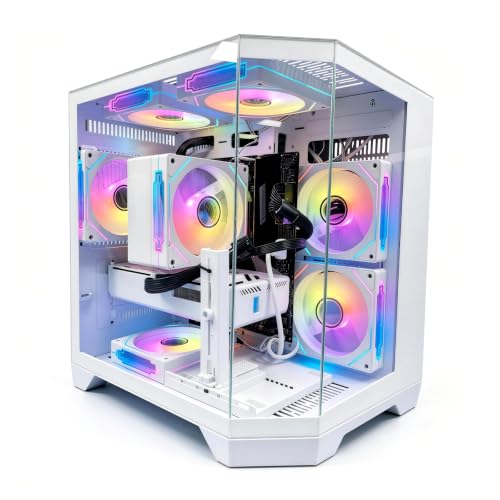
- Six RGB fans mean the lighting show is the full case, not a single glowing strip, and the airflow path is populated from day one
- A 650W power supply and 1TB of storage leave sensible room for a second drive and modest upgrades
Trade-offs
- 16GB of DDR5 is the current sweet spot rather than generous headroom, so heavy multitasking while gaming will push you toward a memory upgrade sooner
- The front panel leans on slower USB 2.0 ports, so fast external drives belong on the USB 3.0 ports only
- As a smaller prebuilt brand, long-term support depends more on standard parts than on a large service network
| Processor | AMD Ryzen 7 8700F |
|---|---|
| Graphics | NVIDIA GeForce RTX 5060 |
| Memory | 16GB DDR5 |
| Storage | 1TB SSD |
| Power supply | 650W PSU |
| Notable extra | six RGB fans and a front panel mixing seven USB 2.0 ports with three USB 3.0 ports |
On paper the LXZ Prebuilt Gaming PC is a mid-range machine, built around a AMD Ryzen 7 8700F processor and NVIDIA GeForce RTX 5060 graphics, with 16GB DDR5 of memory and 1TB SSD of storage. For this article’s angle, judge it first on whether its tier matches the brief in front of you, and only then on its individual merits. That combination tells you most of what matters before a single game is installed: this is the tier where settings, resolution and expectations need to be agreed with the hardware rather than wished past it, and within that agreement this machine is honestly specified — nothing in the verified configuration is pretending to be something it is not.
In everyday use, what owners notice first is rarely the headline part. It is the load times from the solid-state storage, the way the case lighting changes the feel of the desk after dark, and whether the fans stay civilised during a long session. The LXZ configuration gets the everyday basics in the right order: enough storage to install a real library without immediate triage, enough memory for a game plus the usual background crowd of chat and browser, and connectivity — six RGB fans and a front panel mixing seven USB 2.0 ports with three USB 3.0 ports — that removes the small daily frictions cheaper towers leave in. None of that photographs as dramatically as the lighting, and all of it matters more by the second month.
The honest limitation is the one built into its tier. 16GB of DDR5 is the current sweet spot rather than generous headroom, so heavy multitasking while gaming will push you toward a memory upgrade sooner That is not a defect; it is the price of the tier, and every tower in this cluster pays a version of it somewhere — in memory, in graphics memory, in storage or in the upgrade path. The right question is whether this particular compromise lands on something you will actually hit. A player whose library is esports and older favourites may never meet it. A player installing every new large release on day one will meet it sooner, and should be looking one tier up rather than blaming the machine for a brief it was never sold against.
Upgrade thinking is straightforward here. Storage is the easiest addition and the one most owners make first; memory is next where the platform allows it; and the graphics card is the big lever, subject to the power supply — 650W PSU — and to physical clearance in the case. Buy this tower for what it is on arrival, treat upgrades as a bonus the standard layout makes possible, and it will serve the way a good prebuilt should: immediately, quietly, and without a build weekend standing between you and your library.
Best for: buyers who want a mid-range machine with the NVIDIA GeForce RTX 5060 doing the heavy lifting and the lighting to match. / Not suited for: buyers whose real brief belongs a full tier away from this configuration.
Check on Amazon to confirm the current configuration of the LXZ Prebuilt Gaming PC before you decide, because prebuilt configurations are revised and the listing is the final word on what ships.

Best for 1440p Ambitions — CyberPowerPC Gamer Master GMA2900A3, AMD Ryzen 7 8700F and NVIDIA GeForce RTX 5060 Ti 8GB
Strengths
- The RTX 5060 Ti is the meaningful step up in this group for players eyeing a 1440p monitor without jumping to the premium tier
- CyberPowerPC is an established system builder, so assembly, cable routing and warranty handling follow a mature process
- PCIe 4.0 storage keeps load times and texture streaming in line with the faster graphics card
Trade-offs
- You pay for the stronger GPU while memory stays at 16GB, so streamers running many background apps should budget for more RAM later
- The 8GB of graphics memory asks for texture discipline in the most demanding newer titles at higher resolutions
- Case lighting is tasteful rather than maximal, so buyers chasing the brightest RGB showcase may want extra fans later
| Processor | AMD Ryzen 7 8700F |
|---|---|
| Graphics | NVIDIA GeForce RTX 5060 Ti 8GB |
| Memory | 16GB DDR5 |
| Storage | 1TB PCIe 4.0 SSD |
| Power supply | not stated in the verified listing title |
| Notable extra | WiFi ready out of the box with Windows 11 Home installed, in the Gamer Master line |
On paper the CyberPowerPC Gamer Master GMA2900A3 is a step-up mid-range machine, built around a AMD Ryzen 7 8700F processor and NVIDIA GeForce RTX 5060 Ti 8GB graphics, with 16GB DDR5 of memory and 1TB PCIe 4.0 SSD of storage. Read its trade-offs as a description of its intended owner, and check whether that description sounds like you. That combination tells you most of what matters before a single game is installed: this is the tier where settings, resolution and expectations need to be agreed with the hardware rather than wished past it, and within that agreement this machine is honestly specified — nothing in the verified configuration is pretending to be something it is not.
In everyday use, what owners notice first is rarely the headline part. It is the load times from the solid-state storage, the way the case lighting changes the feel of the desk after dark, and whether the fans stay civilised during a long session. The CyberPowerPC configuration gets the everyday basics in the right order: enough storage to install a real library without immediate triage, enough memory for a game plus the usual background crowd of chat and browser, and connectivity — WiFi ready out of the box with Windows 11 Home installed, in the Gamer Master line — that removes the small daily frictions cheaper towers leave in. None of that photographs as dramatically as the lighting, and all of it matters more by the second month.
The honest limitation is the one built into its tier. You pay for the stronger GPU while memory stays at 16GB, so streamers running many background apps should budget for more RAM later That is not a defect; it is the price of the tier, and every tower in this cluster pays a version of it somewhere — in memory, in graphics memory, in storage or in the upgrade path. The right question is whether this particular compromise lands on something you will actually hit. A player whose library is esports and older favourites may never meet it. A player installing every new large release on day one will meet it sooner, and should be looking one tier up rather than blaming the machine for a brief it was never sold against.
Upgrade thinking is straightforward here. Storage is the easiest addition and the one most owners make first; memory is next where the platform allows it; and the graphics card is the big lever, subject to the power supply — not stated in the verified listing title — and to physical clearance in the case. Buy this tower for what it is on arrival, treat upgrades as a bonus the standard layout makes possible, and it will serve the way a good prebuilt should: immediately, quietly, and without a build weekend standing between you and your library.
Best for: buyers who want a step-up mid-range machine with the NVIDIA GeForce RTX 5060 Ti 8GB doing the heavy lifting and the lighting to match. / Not suited for: buyers whose real brief belongs a full tier away from this configuration.
Check on Amazon to confirm the current configuration of the CyberPowerPC Gamer Master GMA2900A3 before you decide, because prebuilt configurations are revised and the listing is the final word on what ships.

Best Liquid-Cooled Option — Witrigs Gaming PC Desktop Computer, AMD Ryzen 7 4700LE (as listed) and NVIDIA GeForce RTX 5060 8GB GDDR7
Strengths
- Liquid cooling at this tier is a genuine differentiator, keeping processor temperatures and noise in check under long sessions
- An RTX 5060 with GDDR7 memory delivers the modern graphics performance most players in this group are shopping for
- A 650W power supply is properly matched to the graphics card with room for storage additions
Trade-offs
- The processor generation is older than the Ryzen 7 8700F machines, so check the exact configuration carefully against your workload
- Liquid cooling adds a pump and tubing to the long-term maintenance picture that air cooling avoids
- A lesser-known brand name means you should lean on standard, replaceable parts rather than proprietary support
| Processor | AMD Ryzen 7 4700LE (as listed) |
|---|---|
| Graphics | NVIDIA GeForce RTX 5060 8GB GDDR7 |
| Memory | 16GB RAM |
| Storage | 1TB NVMe SSD |
| Power supply | 650W PSU |
| Notable extra | liquid cooling, which is unusual at this tier and changes both the look and the maintenance picture |
On paper the Witrigs Gaming PC Desktop Computer is a liquid-cooled mid-range machine, built around a AMD Ryzen 7 4700LE (as listed) processor and NVIDIA GeForce RTX 5060 8GB GDDR7 graphics, with 16GB RAM of memory and 1TB NVMe SSD of storage. In this line-up it earns its place by being honest about what it is, which is rarer in this category than it should be. That combination tells you most of what matters before a single game is installed: this is the tier where settings, resolution and expectations need to be agreed with the hardware rather than wished past it, and within that agreement this machine is honestly specified — nothing in the verified configuration is pretending to be something it is not.
In everyday use, what owners notice first is rarely the headline part. It is the load times from the solid-state storage, the way the case lighting changes the feel of the desk after dark, and whether the fans stay civilised during a long session. The Witrigs configuration gets the everyday basics in the right order: enough storage to install a real library without immediate triage, enough memory for a game plus the usual background crowd of chat and browser, and connectivity — liquid cooling, which is unusual at this tier and changes both the look and the maintenance picture — that removes the small daily frictions cheaper towers leave in. None of that photographs as dramatically as the lighting, and all of it matters more by the second month.
The honest limitation is the one built into its tier. The processor generation is older than the Ryzen 7 8700F machines, so check the exact configuration carefully against your workload That is not a defect; it is the price of the tier, and every tower in this cluster pays a version of it somewhere — in memory, in graphics memory, in storage or in the upgrade path. The right question is whether this particular compromise lands on something you will actually hit. A player whose library is esports and older favourites may never meet it. A player installing every new large release on day one will meet it sooner, and should be looking one tier up rather than blaming the machine for a brief it was never sold against.
Upgrade thinking is straightforward here. Storage is the easiest addition and the one most owners make first; memory is next where the platform allows it; and the graphics card is the big lever, subject to the power supply — 650W PSU — and to physical clearance in the case. Buy this tower for what it is on arrival, treat upgrades as a bonus the standard layout makes possible, and it will serve the way a good prebuilt should: immediately, quietly, and without a build weekend standing between you and your library.
Best for: buyers who want a liquid-cooled mid-range machine with the NVIDIA GeForce RTX 5060 8GB GDDR7 doing the heavy lifting and the lighting to match. / Not suited for: buyers whose real brief belongs a full tier away from this configuration.
Check on Amazon to confirm the current configuration of the Witrigs Gaming PC Desktop Computer before you decide, because prebuilt configurations are revised and the listing is the final word on what ships.

Best Intel Option — CyberPowerPC Gamer Xtreme GXiVR8060A47, Intel Core i5-14400F and NVIDIA GeForce RTX 5060 8GB
Strengths
- The Core i5-14400F and RTX 5060 pairing is well matched — neither part waits on the other in mainstream titles
- An established builder’s warranty and support process lowers the risk for first-time prebuilt buyers
- 1TB of PCIe 4.0 storage is the right starting size for a mixed library of large and small games
Trade-offs
- The F-suffix processor has no integrated graphics, so troubleshooting a display issue means relying on the graphics card alone
- 16GB of memory is adequate rather than future-proof for gaming plus streaming plus a browser full of tabs
- Lighting is present but not the six-fan showcase of the brightest towers here
| Processor | Intel Core i5-14400F |
|---|---|
| Graphics | NVIDIA GeForce RTX 5060 8GB |
| Memory | 16GB DDR5 |
| Storage | 1TB PCIe 4.0 SSD |
| Power supply | not stated in the verified listing title |
| Notable extra | WiFi ready with Windows 11 Home, in the Gamer Xtreme line |
On paper the CyberPowerPC Gamer Xtreme GXiVR8060A47 is a sensible Intel-based mid-range machine, built around a Intel Core i5-14400F processor and NVIDIA GeForce RTX 5060 8GB graphics, with 16GB DDR5 of memory and 1TB PCIe 4.0 SSD of storage. Consider it as the answer to a specific question posed by a specific desk, screen and library — not as a rung everyone must climb. That combination tells you most of what matters before a single game is installed: this is the tier where settings, resolution and expectations need to be agreed with the hardware rather than wished past it, and within that agreement this machine is honestly specified — nothing in the verified configuration is pretending to be something it is not.
In everyday use, what owners notice first is rarely the headline part. It is the load times from the solid-state storage, the way the case lighting changes the feel of the desk after dark, and whether the fans stay civilised during a long session. The CyberPowerPC configuration gets the everyday basics in the right order: enough storage to install a real library without immediate triage, enough memory for a game plus the usual background crowd of chat and browser, and connectivity — WiFi ready with Windows 11 Home, in the Gamer Xtreme line — that removes the small daily frictions cheaper towers leave in. None of that photographs as dramatically as the lighting, and all of it matters more by the second month.
The honest limitation is the one built into its tier. The F-suffix processor has no integrated graphics, so troubleshooting a display issue means relying on the graphics card alone That is not a defect; it is the price of the tier, and every tower in this cluster pays a version of it somewhere — in memory, in graphics memory, in storage or in the upgrade path. The right question is whether this particular compromise lands on something you will actually hit. A player whose library is esports and older favourites may never meet it. A player installing every new large release on day one will meet it sooner, and should be looking one tier up rather than blaming the machine for a brief it was never sold against.
Upgrade thinking is straightforward here. Storage is the easiest addition and the one most owners make first; memory is next where the platform allows it; and the graphics card is the big lever, subject to the power supply — not stated in the verified listing title — and to physical clearance in the case. Buy this tower for what it is on arrival, treat upgrades as a bonus the standard layout makes possible, and it will serve the way a good prebuilt should: immediately, quietly, and without a build weekend standing between you and your library.
Best for: buyers who want a sensible Intel-based mid-range machine with the NVIDIA GeForce RTX 5060 8GB doing the heavy lifting and the lighting to match. / Not suited for: buyers whose real brief belongs a full tier away from this configuration.
Check on Amazon to confirm the current configuration of the CyberPowerPC Gamer Xtreme GXiVR8060A47 before you decide, because prebuilt configurations are revised and the listing is the final word on what ships.

Best Entry-Level with a Real GPU — ZYNEEX Prebuilt Gaming Desktop PC, AMD Ryzen 5 5500 and NVIDIA GeForce RTX 3050 6GB
Strengths
- A discrete RTX 3050 puts this in a different league from integrated-graphics budget boxes for actual game performance
- 16GB of memory and a full 1TB NVMe drive are generous at this tier, where smaller drives are common
- ARGB cooling gives the lighting a modern, controllable look rather than fixed single-colour fans
Trade-offs
- DDR4 memory and an older processor platform mean the upgrade path is shorter than on the DDR5 machines
- The RTX 3050 is a 1080p card — plan settings accordingly and do not buy it for high-refresh 1440p
- 6GB of graphics memory is the first limit you will meet in texture-heavy newer games
| Processor | AMD Ryzen 5 5500 |
|---|---|
| Graphics | NVIDIA GeForce RTX 3050 6GB |
| Memory | 16GB DDR4 3200MHz |
| Storage | 1TB NVMe SSD |
| Power supply | not stated in the verified listing title |
| Notable extra | addressable RGB air cooling and built-in Wi-Fi in a tower pitched at gaming, streaming and editing |
On paper the ZYNEEX Prebuilt Gaming Desktop PC is an entry-level discrete-graphics machine, built around a AMD Ryzen 5 5500 processor and NVIDIA GeForce RTX 3050 6GB graphics, with 16GB DDR4 3200MHz of memory and 1TB NVMe SSD of storage. Its value is clearest in contrast with its neighbours here, which is exactly why the roundup format suits this category. That combination tells you most of what matters before a single game is installed: this is the tier where settings, resolution and expectations need to be agreed with the hardware rather than wished past it, and within that agreement this machine is honestly specified — nothing in the verified configuration is pretending to be something it is not.
In everyday use, what owners notice first is rarely the headline part. It is the load times from the solid-state storage, the way the case lighting changes the feel of the desk after dark, and whether the fans stay civilised during a long session. The ZYNEEX configuration gets the everyday basics in the right order: enough storage to install a real library without immediate triage, enough memory for a game plus the usual background crowd of chat and browser, and connectivity — addressable RGB air cooling and built-in Wi-Fi in a tower pitched at gaming, streaming and editing — that removes the small daily frictions cheaper towers leave in. None of that photographs as dramatically as the lighting, and all of it matters more by the second month.
The honest limitation is the one built into its tier. DDR4 memory and an older processor platform mean the upgrade path is shorter than on the DDR5 machines That is not a defect; it is the price of the tier, and every tower in this cluster pays a version of it somewhere — in memory, in graphics memory, in storage or in the upgrade path. The right question is whether this particular compromise lands on something you will actually hit. A player whose library is esports and older favourites may never meet it. A player installing every new large release on day one will meet it sooner, and should be looking one tier up rather than blaming the machine for a brief it was never sold against.
Upgrade thinking is straightforward here. Storage is the easiest addition and the one most owners make first; memory is next where the platform allows it; and the graphics card is the big lever, subject to the power supply — not stated in the verified listing title — and to physical clearance in the case. Buy this tower for what it is on arrival, treat upgrades as a bonus the standard layout makes possible, and it will serve the way a good prebuilt should: immediately, quietly, and without a build weekend standing between you and your library.
Best for: buyers who want an entry-level discrete-graphics machine with the NVIDIA GeForce RTX 3050 6GB doing the heavy lifting and the lighting to match. / Not suited for: buyers whose real brief belongs a full tier away from this configuration.
Check on Amazon to confirm the current configuration of the ZYNEEX Prebuilt Gaming Desktop PC before you decide, because prebuilt configurations are revised and the listing is the final word on what ships.

Best Premium Pick — iBUYPOWER Element EWA9N5702, AMD Ryzen 9 7900X and NVIDIA GeForce RTX 5070 12GB
Strengths
- The Ryzen 9 and RTX 5070 pairing is in another performance class from the rest of this list, aimed squarely at high-refresh 1440p and beyond
- 32GB of DDR5 removes the memory ceiling that the 16GB machines will meet first
- The included keyboard and mouse mean the box contains a genuinely complete starting setup
Trade-offs
- This is the premium tier, and the premium is real — buyers who only play esports titles will never use the surplus
- A 1TB drive fills quickly when the library includes several large modern installs, so a second SSD is a likely early addition
- The bundled peripherals are starters; competitive players will still upgrade to their preferred mouse and keyboard
| Processor | AMD Ryzen 9 7900X |
|---|---|
| Graphics | NVIDIA GeForce RTX 5070 12GB |
| Memory | 32GB DDR5 |
| Storage | 1TB NVMe SSD |
| Power supply | not stated in the verified listing title |
| Notable extra | a bundled gamer keyboard and mouse in the box, with Windows 11 Home installed |
On paper the iBUYPOWER Element EWA9N5702 is the premium machine in this group, built around a AMD Ryzen 9 7900X processor and NVIDIA GeForce RTX 5070 12GB graphics, with 32GB DDR5 of memory and 1TB NVMe SSD of storage. Treat the verified specification as the whole argument; in a category sold on photographs, that restraint is the point. That combination tells you most of what matters before a single game is installed: this is the tier where settings, resolution and expectations need to be agreed with the hardware rather than wished past it, and within that agreement this machine is honestly specified — nothing in the verified configuration is pretending to be something it is not.
In everyday use, what owners notice first is rarely the headline part. It is the load times from the solid-state storage, the way the case lighting changes the feel of the desk after dark, and whether the fans stay civilised during a long session. The iBUYPOWER configuration gets the everyday basics in the right order: enough storage to install a real library without immediate triage, enough memory for a game plus the usual background crowd of chat and browser, and connectivity — a bundled gamer keyboard and mouse in the box, with Windows 11 Home installed — that removes the small daily frictions cheaper towers leave in. None of that photographs as dramatically as the lighting, and all of it matters more by the second month.
The honest limitation is the one built into its tier. This is the premium tier, and the premium is real — buyers who only play esports titles will never use the surplus That is not a defect; it is the price of the tier, and every tower in this cluster pays a version of it somewhere — in memory, in graphics memory, in storage or in the upgrade path. The right question is whether this particular compromise lands on something you will actually hit. A player whose library is esports and older favourites may never meet it. A player installing every new large release on day one will meet it sooner, and should be looking one tier up rather than blaming the machine for a brief it was never sold against.
Upgrade thinking is straightforward here. Storage is the easiest addition and the one most owners make first; memory is next where the platform allows it; and the graphics card is the big lever, subject to the power supply — not stated in the verified listing title — and to physical clearance in the case. Buy this tower for what it is on arrival, treat upgrades as a bonus the standard layout makes possible, and it will serve the way a good prebuilt should: immediately, quietly, and without a build weekend standing between you and your library.
Best for: buyers who want the premium machine in this group with the NVIDIA GeForce RTX 5070 12GB doing the heavy lifting and the lighting to match. / Not suited for: buyers whose real brief belongs a full tier away from this configuration.
Check on Amazon to confirm the current configuration of the iBUYPOWER Element EWA9N5702 before you decide, because prebuilt configurations are revised and the listing is the final word on what ships.
Comparison Table
| Model | Processor | Graphics | Memory | Storage |
|---|---|---|---|---|
| LXZ Prebuilt Gaming PC | AMD Ryzen 7 8700F | NVIDIA GeForce RTX 5060 | 16GB DDR5 | 1TB SSD |
| CyberPowerPC Gamer Master GMA2900A3 | AMD Ryzen 7 8700F | NVIDIA GeForce RTX 5060 Ti 8GB | 16GB DDR5 | 1TB PCIe 4.0 SSD |
| Witrigs Gaming PC Desktop Computer | AMD Ryzen 7 4700LE (as listed) | NVIDIA GeForce RTX 5060 8GB GDDR7 | 16GB RAM | 1TB NVMe SSD |
| CyberPowerPC Gamer Xtreme GXiVR8060A47 | Intel Core i5-14400F | NVIDIA GeForce RTX 5060 8GB | 16GB DDR5 | 1TB PCIe 4.0 SSD |
| ZYNEEX Prebuilt Gaming Desktop PC | AMD Ryzen 5 5500 | NVIDIA GeForce RTX 3050 6GB | 16GB DDR4 3200MHz | 1TB NVMe SSD |
| iBUYPOWER Element EWA9N5702 | AMD Ryzen 9 7900X | NVIDIA GeForce RTX 5070 12GB | 32GB DDR5 | 1TB NVMe SSD |
Read the table as a map of trades rather than a league table. The premium row is not the winner of the budget rows’ contest, and the budget rows are not failed versions of the premium one — each configuration is a coherent answer to a different brief, and the columns that matter most are the ones your own monitor and library point at. Where a detail is not stated in a verified listing, it is not guessed at here, and the live listing remains the place to confirm it before money moves.
Common Mistakes
- Shopping by case photograph and discovering the graphics line afterwards — the most expensive habit in this category.
- Plugging the monitor into the motherboard instead of the graphics card, then judging the machine’s performance on integrated output.
- Leaving a high-refresh monitor at its default rate in Windows for the entire life of the PC.
- Installing two lighting control programs and blaming the fans when they fight.
- Buying 8GB of memory or a 256GB drive for a modern library and calling the inevitable upgrade a surprise.
- Sealing a multi-fan tower in a closed cabinet and wondering why it is loud and hot.
Every mistake on that list is cheap to avoid and annoying to live with, which is the defining trait of this category’s pitfalls: the hardware is generally fine, and the regrets are generally administrative. Read the graphics line, plug the cable into the card, set the refresh rate, keep one lighting program, leave the tower room to breathe — five minutes of method that separates the owners who recommend their purchase from the owners who warn you about theirs.
Final Recommendation
Choosing well is a method, not a talent: the steps above, in order, with the graphics line read first and the case admired last. Run any listing — including next year’s — through the same sequence and it will sort itself. Continue exploring this cluster here: RGB Gaming PC Buying Guide Best Gaming Mouse For Fps — and pair any tower with peripherals chosen with the same method, since a great PC behind a poor mouse is a compromise you feel in every match.
Frequently Asked Questions
Does RGB lighting improve gaming performance?
No — lighting changes how a PC looks and feels on your desk, not how it renders. Its honest value is enjoyment, setup identity and, in multi-fan towers, the side benefit that the fans providing the light also provide the airflow. Buy performance first and lighting second, and you will be happy with both.
How much memory does an RGB gaming PC need?
16GB is the working standard for gaming today and handles a game plus ordinary background apps. 32GB is the comfortable choice if you stream, record, edit video or keep many applications open while you play. Below 16GB, expect to manage what runs alongside your games.
Can I turn the lighting off or change how it behaves?
In almost every case, yes — through the case control, a remote, or the lighting software, depending on the model. Check how a specific tower is controlled before buying if you share the room or play after others are asleep, because a simple off switch matters more in real life than a long effects list.
Is a prebuilt RGB gaming PC upgradeable?
Towers built in standard cases with standard power supplies and motherboards generally accept more memory, extra storage and eventually a new graphics card. Compact or heavily customised systems can be tighter. The power supply size and spare slots in the verified specification are the clues to check before you buy with upgrades in mind.
Should I choose air cooling or liquid cooling?
Air cooling is simple, reliable and needs nothing beyond dusting. Liquid cooling can run a hard-working processor cooler and quieter under sustained load, at the cost of a pump and tubing in the long-term picture. For most mainstream gaming towers, both are legitimate — choose based on noise preference and how much maintenance you are happy to own.
What should I do first when the PC arrives?
Run Windows updates, update the graphics driver, install your launchers, and set your monitor’s refresh rate in Windows display settings. Then remove any preinstalled software you do not want, set up a backup habit while the drive is nearly empty, and only then install the full library — the machine will never be quicker to organise than it is on day one.
Is integrated graphics enough for gaming?
It is enough for light, older and browser-based games and for everyday computing, and it is not enough for demanding modern titles at satisfying settings. Listings are explicit when a tower has integrated graphics only — read that line carefully, because it changes the machine’s entire purpose.
Why do my fans ignore the lighting software?
Usually because two controllers are running at once — case software plus motherboard software, or a leftover utility. Keep one, remove or disable the other, confirm the fans are connected to the header or hub that the surviving program controls, and the behaviour normally settles immediately.


