Disclosure: As an Amazon Associate, reviewstook.com earns from qualifying purchases. Links on this page are affiliate links at no extra cost to you; prices and availability change frequently, so check Amazon for the latest.
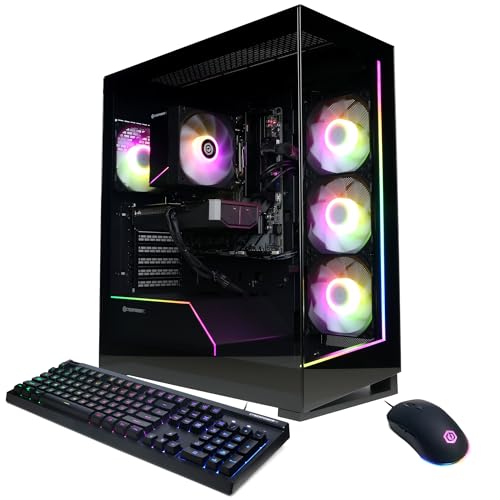
Gaming PC Review: The CyberPowerPC Gamer Master With Ryzen 7 8700F and RTX 5060 Ti, Examined in Full
This gaming pc review takes one machine and pulls it apart properly: the CyberPowerPC Gamer Master, built around AMD’s Ryzen 7 8700F processor and an NVIDIA GeForce RTX 5060 Ti graphics card with 8GB of video memory, 16GB of DDR5 system memory, a 1TB PCIe 4.0 SSD, WiFi readiness and Windows 11 Home. We chose it for a deep single-machine review because it is the configuration the current market has quietly agreed is the answer for most people — the sweet-spot tower that stores keep recommending and buyers keep shortlisting — and a gaming PC review earns its keep by testing whether that consensus survives scrutiny. Short answer: it does, with two honest caveats about memory headroom and monitor matching that this review will not let you miss.
Verdict in brief: The Gamer Master (model GMA2900A3) is the right default gaming PC for high-refresh 1080p and credible 1440p play. Its processor and graphics card are balanced with unusual care for a prebuilt, its storage is fast and adequately sized, and its DDR5 platform gives it years of upgrade life. Its 16GB of memory is today’s standard but tomorrow’s first upgrade, and it deserves a better monitor than many buyers will initially pair with it. Everything on this page, including the comparisons, follows the rule of reviewstook.com: only catalogue-verified machines are linked, and no static prices or fixed ratings are printed — check the latest price on Amazon for the number that is true today.

The Machine at a Glance
| Processor | AMD Ryzen 7 8700F |
|---|---|
| Graphics | NVIDIA GeForce RTX 5060 Ti 8GB |
| Memory | 16GB DDR5 |
| Storage | 1TB PCIe 4.0 SSD |
| Connectivity | WiFi Ready |
| Operating system | Windows 11 Home |
| Model | GMA2900A3 |
Read that table as a balance sheet. Nothing in it is a tier above or below the rest: the eight-core Ryzen 7 8700F feeds the RTX 5060 Ti without bottlenecking it, the PCIe 4.0 SSD matches the platform’s speed, and the DDR5 memory standard matches the processor’s generation. Prebuilts fail most often by imbalance — a hero graphics card starved by a weak processor, or a fast chip paired with a painfully small drive — and the first finding of this review is that the Gamer Master avoids the trap entirely. Whoever specced the GMA2900A3 understood the assignment.
In this guide
Design, Case and What Arrives in the Box
The Gamer Master line wears the current prebuilt uniform: a mid-tower with a glass side panel, RGB-lit cooling fans and a front panel designed to be seen rather than hidden under a desk. Taste in lighting is personal, but the functional points are not: the glass lets you perform the transit inspection our setup guide insists on without opening anything, the case has room to work in when upgrade day comes, and the cooling layout follows the conventional front-to-back airflow path that keeps temperatures honest. It is a tower that expects a place on or beside a desk, and it is sized accordingly — measure your space before ordering, because ‘mid-tower’ still surprises people raised on consoles.
In the box you get the tower, its power cable, WiFi antennas for the rear panel posts, and the paperwork that matters more than it looks: keep the invoice and photograph the model label, because GMA2900A3 is the identifier every support conversation will ask for. Windows 11 Home is preinstalled, which means first boot is the standard Microsoft setup flow followed by the update-and-driver routine detailed in How To Set Up Gaming PC. Budget an hour for that routine. The machine you benchmark before it is not the machine you bought.
Performance: What the Ryzen 7 8700F and RTX 5060 Ti Actually Deliver
Performance is where a gaming PC review must be specific, so here is the honest shape of it. At 1080p, this configuration is effectively unconstrained: esports titles run at very high refresh rates with settings raised, and demanding single-player games run at high settings with smooth, monitor-saturating frame rates, helped by the RTX 5060 Ti’s current-generation upscaling and frame-generation support. This is the resolution the machine was born for, and at it, the experience is simply luxurious — the kind of headroom that makes every game feel like its best self.
At 1440p, the Gamer Master remains genuinely capable, which is the finding that elevates it above the entry tier. Most games run well at high settings, with the heaviest titles asking for sensible use of upscaling — a trade modern rendering makes painless — rather than slashed settings. Buyers planning a 1440p high-refresh monitor as their next purchase can buy this tower first with confidence. At 4K, honesty returns: the machine will drive a 4K display and play lighter games on it happily, but native 4K in demanding titles is a tier above its station, and no review should pretend otherwise. Its 8GB of video memory is the figure that enforces that ceiling, and it is the specification to watch as games grow hungrier over the machine’s life.
The processor deserves its own paragraph because prebuilt buyers chronically underrate it. The Ryzen 7 8700F’s eight cores handle gaming, voice chat, a browser full of tabs and a stream running simultaneously without the stutters that expose weaker chips, and they give the machine a second life in creation work — video editing, rendering, code compilation — that a games-only spec sheet never mentions. In the balance-of-ownership terms of Gaming PC Pros And Cons, this is where the multi-use pro is manufactured.
Storage, Memory and Everyday Speed
The 1TB PCIe 4.0 SSD is the component you will feel most often outside games. Windows boots in seconds, games load at the speed modern titles assume, and level transitions that older machines turned into coffee breaks become blinks. One terabyte is the right size for a rotating library — several large games plus the operating system and ordinary files — provided you practise the uninstall habit rather than hoarding everything. Owners with enormous libraries should treat a second drive as a planned addition, not a complaint; the platform makes adding one simple.
Memory is this review’s first formal caveat. Sixteen gigabytes of DDR5 is the current standard and it is sufficient for gaming, including gaming with the usual background apps. It is not generous. Streaming while gaming, heavy multitasking, or the hungriest simulation titles will find its edge within this machine’s lifetime, and because DDR5 upgrades are neither exotic nor difficult, we classify this as a scheduled improvement rather than a flaw — but a review that failed to flag it would be failing you. The platform’s kindness is that the fix, when you want it, is a five-minute job with the side panel off.
Thermals, Noise and Living With the Machine
A prebuilt lives or dies in a real room, not a test bench. The Gamer Master’s conventional airflow and modern, efficient components keep it composed: under gaming load the fans are audible in the way gaming towers are audible — a purposeful whoosh rather than a whine — and at desktop idle it settles to near-silence. Placement matters more than any specification here. Give the rear exhaust its hand’s width of clearance, keep it out of closed cabinets, and the thermal story stays boring, which is the highest praise thermals can earn.
WiFi readiness covers desks that cannot reach a router with a cable, and for most homes it performs perfectly well — but fit the antennas, a step new owners forget with remarkable consistency, and prefer wired Ethernet for competitive play if your room allows it. These are small, unglamorous findings, and they are the ones that decide whether a machine feels premium in month six. On the evidence of its specification and layout, the Gamer Master is set up to feel premium — provided its owner does the setup steps this site keeps repeating.
How the Gamer Master Compares With Its Nearest Verified Rivals
No machine is reviewed in a vacuum. Four verified alternatives frame the Gamer Master’s position, and each comparison below ends with the buyer it should steer.

The twin: MSI Codex Z2 with the same core specification — MSI Codex Z2 (RTX 5060 Ti)
Listing: MSI Codex Z2 (RTX 5060 Ti) — Check on Amazon for current availability.
Strengths
- Identical Ryzen 7 / RTX 5060 Ti heart, so performance is a draw
- USB Type-C adds modern peripheral convenience
- VR-ready designation simplifies headset ownership
Trade-offs
- No performance reason to pay more than the Gamer Master
- Same 16GB memory caveat applies in full
- Choice comes down to ports, brand and the day’s pricing
| Processor | AMD Ryzen 7 8700F |
|---|---|
| Graphics | NVIDIA GeForce RTX 5060 Ti |
| Memory | 16GB DDR5 |
| Storage | 1TB SSD |
| Ports | USB Type-C |
| VR | VR-Ready |
| Operating system | Windows 11 Home |
| Model | A8NVM-671US |
The Codex Z2 is the Gamer Master’s closest rival because it is, at its core, the same machine wearing a different badge: same processor family, same graphics card, same memory and storage figures. Performance comparisons between them are a rounding error. The decision therefore lives in the details — MSI adds USB Type-C and an explicit VR-ready badge, and buyers with headsets or modern peripherals should weight those details heavily.
Our steer: if the two are priced alike on the day you buy, peripheral needs decide — take the MSI for Type-C and VR, the CyberPowerPC otherwise. If one is meaningfully better priced, take that one and feel no regret; the gaming experience will be indistinguishable, a point the wider roundup in Gaming PC Reviews confirms.
See the current listing for the MSI Codex Z2: Check on Amazon.
Best for: buyers whose needs match the comparison above / Not suited for: buyers the Gamer Master already serves completely

The step up: iBUYPOWER Element with RTX 5070 and 32GB — iBUYPOWER Element (Ryzen 9 7900X, RTX 5070)
Listing: iBUYPOWER Element (Ryzen 9 7900X, RTX 5070) — Check on Amazon for current availability.
Strengths
- RTX 5070 with 12GB video memory lifts the 1440p ceiling
- 32GB of memory deletes this review’s main caveat
- Ryzen 9 7900X adds four more cores for creation and streaming
Trade-offs
- A clear tier higher in price for performance some monitors cannot show
- 1TB storage is the same, so big libraries still need management
- Over-specified for pure 1080p esports play
| Processor | AMD Ryzen 9 7900X |
|---|---|
| Graphics | NVIDIA GeForce RTX 5070 12GB |
| Memory | 32GB DDR5 |
| Storage | 1TB NVMe SSD |
| Operating system | Windows 11 Home |
| Included | Gamer keyboard and mouse |
| Model | EWA9N5702 |
The iBUYPOWER Element answers the question ‘what if the caveats were gone?’ A stronger graphics card with more video memory, double the system memory, and a twelve-core processor: every reservation in this review is addressed, at a price that addresses your wallet in return. For 1440p high-refresh play and streamers, it is not an indulgence but a specification match.
Our steer: buy it instead of the Gamer Master if your monitor is 1440p high-refresh today, or your workload includes streaming and creation. Stay with the Gamer Master if you play at 1080p, because the Element’s advantages need pixels and workloads to justify themselves against — the exact calculation Is A Gaming PC Worth It formalises.
See the current listing for the iBUYPOWER Element RTX 5070: Check on Amazon.
Best for: buyers whose needs match the comparison above / Not suited for: buyers the Gamer Master already serves completely

The step down: CyberPowerPC Gamer Xtreme with RTX 5060 — CyberPowerPC Gamer Xtreme
Listing: CyberPowerPC Gamer Xtreme — Check on Amazon for current availability.
Strengths
- Same builder, same storage and memory figures, lower price tier
- Core i5-14400F is a cool, proven gaming processor
- Identical setup and ownership experience
Trade-offs
- The plain RTX 5060 concedes real performance in heavy titles
- 1440p becomes a settings negotiation sooner
- Savings only make sense if they fund a better monitor
| Processor | Intel Core i5-14400F |
|---|---|
| Graphics | NVIDIA GeForce RTX 5060 8GB |
| Memory | 16GB DDR5 |
| Storage | 1TB PCIe 4.0 SSD |
| Connectivity | WiFi Ready |
| Operating system | Windows 11 Home |
| Model | GXiVR8060A47 |
The Gamer Xtreme is the Gamer Master’s sibling from the same builder, and the comparison is the cleanest illustration of what the Ti badge buys. Everything else — memory, storage, operating system, setup experience — is held constant, so the price difference is purely a graphics decision. At 1080p the gap is modest; at 1440p it is the difference between high settings and negotiated ones.
Our steer: the Xtreme is the right buy when its saving goes directly into a better monitor, because the total experience improves. It is the wrong buy when the saving simply evaporates, because the Gamer Master’s headroom is the thing that will still feel new in year three.
See the current listing for the CyberPowerPC Gamer Xtreme: Check on Amazon.
Best for: buyers whose needs match the comparison above / Not suited for: buyers the Gamer Master already serves completely

The no-compromise alternative: MSI Codex Z2 with RTX 5070 and 2TB — MSI Codex Z2 (RTX 5070, 32GB, 2TB)
Listing: MSI Codex Z2 (RTX 5070, 32GB, 2TB) — Check on Amazon for current availability.
Strengths
- RTX 5070 performance with double memory and double storage
- 2TB SSD retires storage management for years
- USB Type-C and VR-ready complete the package
Trade-offs
- The premium tier’s price, in full
- Demands a premium monitor to justify itself
- Specification exceeds what many players’ libraries require
| Processor | AMD Ryzen 7 8700F |
|---|---|
| Graphics | NVIDIA GeForce RTX 5070 |
| Memory | 32GB DDR5 |
| Storage | 2TB SSD |
| Ports | USB Type-C |
| VR | VR-Ready |
| Operating system | Windows 11 Home |
| Model | A8NVP-436US |
If the iBUYPOWER is the step up, this MSI configuration is the finished article: every figure the Gamer Master leaves modest — memory, storage, graphics — is doubled or lifted, and the Type-C and VR details ride along. It is the machine for the buyer whose plan is to set up once and not think about hardware again for years.
Our steer: choose it when your horizon is long, your monitor is worthy and your library is large. The Gamer Master remains the better recommendation for everyone else, not because this machine is flawed but because value lives in the match between specification and use, not in specification alone.
See the current listing for the MSI Codex Z2 RTX 5070: Check on Amazon.
Best for: buyers whose needs match the comparison above / Not suited for: buyers the Gamer Master already serves completely
How to Get the Best From the Gamer Master: Setup and Optimisation
A review that stops at judgement wastes the machine, so here is the ownership layer. Follow the full routine in How To Set Up Gaming PC, and add these machine-specific emphases. First, the monitor cable goes into the RTX 5060 Ti’s outputs — the horizontal bank low on the rear panel — and the refresh rate gets set to your panel’s maximum in Windows display settings on day one; this configuration’s entire purpose is high-refresh play, and both steps are where that purpose is most often accidentally switched off. Second, update the NVIDIA driver through the NVIDIA App before installing games, and revisit it monthly; current-generation cards gain features and fixes at a pace older hardware never saw. Third, enable the driver’s overlay so you can watch frame rates and temperatures during your first week — knowing your machine’s normal numbers is how you will recognise an abnormal one years from now.
Problem: A demanding game stutters despite the specification -> fix: Check, in order, the cable location, the refresh rate, the driver date, and whether the game is installed on the internal SSD. Then look at memory use while the game runs; if the machine is at its 16GB ceiling with a stream and browser open, you have found both the cause and your first upgrade. Problem: The tower is louder than expected -> fix: Confirm the internal shipping protection is removed, the vents are clear, and the case is not inside a closed cabinet; then choose the quieter fan profile in the system software and accept slightly warmer components as the fair trade it is.
Who Should Buy the Gamer Master — and Who Should Not
Buy it if you play at 1080p and want every game to feel effortless, if a 1440p monitor is your next planned purchase, if your PC must also handle work, study or light creation, and if you want a platform that accepts upgrades gracefully over a five-year life. This is, in our judgement, the largest group of buyers in the market, which is why the consensus formed around this configuration in the first place.
Skip it if your ambitions are native 4K in demanding titles — step up to the RTX 5070 machines compared above — if your play is purely lightweight esports on a tight budget, where the Gamer Xtreme or an entry tower serves you for less, or if you know streaming and heavy multitasking are your present rather than your future, in which case the 32GB machines earn their premium on day one rather than year two. A review’s job is matching, not maximising, and the Gamer Master’s match is broad but not universal.
Common Mistakes Buyers Make With This Tier of PC
Three mistakes recur. Pairing the tower with a basic low-refresh monitor and concluding the PC is ‘not that fast’ — the monitor is the bottleneck and the PC is innocent. Judging performance before the Windows and driver updates complete, then carrying a first impression formed by a half-configured machine. And filling the SSD completely in the first month, then blaming the drive for the slowdowns that a nearly full solid-state drive predictably suffers. All three are covered, with fixes, in the setup guide — which exists precisely because this tier of machine is bought so often by first-time owners.
Final Recommendation
The CyberPowerPC Gamer Master earns its consensus. Balanced where prebuilts are usually lopsided, fast where its buyers actually play, and built on a platform that forgives the future, it is the gaming PC we would hand to most people who asked us for one — with the memory caveat stated, the monitor warning attached, and the setup guide pressed into their other hand. Readers comparing the whole field should continue to Gaming PC Reviews; readers still deciding whether any gaming PC deserves their money should read Is A Gaming PC Worth It. For everyone in between: this is the default, and it is a good one.
Deep Dive: The Processor — Ryzen 7 8700F Under Real Workloads
A gaming PC review that treats the processor as a line in a table misses where this machine’s character lives. The Ryzen 7 8700F brings eight cores built on AMD’s modern architecture, and the practical consequence is not a benchmark number but a texture of use: the Gamer Master never feels busy. Games that hammer a processor — large strategy titles, simulation games, sprawling open worlds with crowds and physics — run with the same composure as lightweight esports titles, because the chip has cores to spare for the game and cores to spare for everything else. That spare capacity is what separates a machine that is fast in a review from a machine that is fast in a life.
Watch what happens at the edges of a session. You alt-tab to a browser with thirty tabs and the machine does not stumble. A game update installs in the background while you play another title and the frame rate holds. A voice call, a stream, a recording and the game run together and none of them files a complaint. Weaker processors reveal themselves precisely in these compound moments, stuttering not in the game alone but in the seams between tasks. The 8700F’s eight cores are this machine’s insurance against the seams, and they are the main reason we judge its useful life in years rather than product cycles.
The chip also future-proofs in a subtler way: game engines are steadily learning to use more cores, and the titles of three years from now will lean harder on parallel processing than today’s do. A four- or six-core machine ages along a slope; an eight-core machine ages along a gentler one. Combined with the DDR5 platform beneath it, the processor is the strongest single argument that the Gamer Master, bought today, remains a satisfying machine deep into the decade.
Deep Dive: The Graphics Card — RTX 5060 Ti and the Modern Feature Set
The RTX 5060 Ti is the component that will be quoted back at you in every conversation about this machine, so it deserves a full accounting. Its raw rendering strength places it squarely in the high-refresh 1080p and capable 1440p class described earlier in this gaming PC review, but its modern feature set is what extends that class across the machine’s life. Current-generation upscaling lets demanding games render internally at a lower resolution and reconstruct a sharp image, trading almost nothing visually for large performance gains; frame generation goes further, inserting constructed frames to lift smoothness in the heaviest titles. These are not marketing garnish. They are the mechanisms by which a mid-range card stays relevant as games grow heavier, and they improve with driver updates over the card’s life.
The honest boundary is video memory: 8GB is adequate for today’s games at this machine’s target resolutions, and it is the figure most likely to be discussed, years from now, when a future title’s ultra texture settings ask for more. Our judgement is measured. At 1080p and sensible 1440p settings, 8GB serves this card’s whole realistic lifespan; buyers whose ambition is native 4K with maximum textures should not stretch this machine to fit, but step to the 12GB RTX 5070 class compared earlier in this review. A review that pretends a mid-range card has no ceiling helps nobody; a review that pretends the ceiling is lower than it is helps nobody either. The Ti’s ceiling is 1440p with intelligence applied — which describes how most of its owners will actually play.
One more practical note: the card’s hardware video encoding makes this machine a natural streaming and recording platform, offloading broadcast work from the processor entirely. Combined with the eight-core chip, that is why the Gamer Master keeps appearing in conversations about starter streaming rigs — a second career for the hardware that buyers focused purely on frame rates routinely overlook.
Everyday Ownership: A Month With the Gamer Master’s Habits
Specifications describe a machine; habits describe owning one. Across a month of typical use, the Gamer Master’s personality is unobtrusive competence. It wakes fast, updates itself in the background more often than it interrupts, and its fans have the good manners to be audible only when the work justifies it — a game at full tilt, a render — and near-silent at the desktop, in a browser, in a document. The SSD’s speed becomes invisible within a week, which is the fate of all good storage: you stop noticing load times because there is nothing left to notice, until you use someone else’s older machine and feel the difference like a step missed in the dark.
The WiFi deserves a sentence of respect: with the antennas fitted — the step this site will nag about forever — it holds a stable, fast connection through ordinary household walls, and only the most competitive players will find a reason to run a cable. The case’s glass panel, bought as decoration, earns its keep as a diagnostic window: a glance tells you the fans are turning, the lights are sane and no cable has wandered into a blade. Small things, all of them, and the sum of small things is the difference between a machine owners recommend and a machine owners merely keep.
Where does it annoy? Honestly, in the places this review has already flagged. A large game library will start the storage conversation within the first year. A household that discovers streaming will start the memory conversation. Neither annoyance is a defect; both are the sound of a balanced machine meeting a growing owner, and both have cheap, easy answers that the platform welcomes. The machines that truly annoy are the ones whose answers are ‘buy a different computer’ — and the Gamer Master’s answers never are.
The Upgrade Path, Mapped Year by Year
Because so many buyers choose a prebuilt partly for its future, here is this machine’s likely upgrade biography, mapped honestly. Year one: nothing. Resist the itch; the machine is balanced and new, and the only spending it deserves is the monitor pairing and the games themselves. Years two to three: memory is the probable first step, doubling the 16GB when streaming, multitasking or a hungry favourite title asks for it — a five-minute, side-panel-off job that owners consistently describe as easier than they feared. Storage joins it in the same era if the library outgrows the terabyte, and adding a drive is the second-easiest job in PC ownership.
Years four to five: the graphics card becomes the conversation, and here the platform pays its dividend — the processor, memory standard and power delivery were specified with headroom, so a newer card drops into a machine that can feed it, rather than demanding a wholesale replacement. This is the moment the Gamer Master’s original balance converts directly into money saved. Beyond year five, the honest answer is that the machine retires by degrees: to a younger player, to a second room, to lighter duties — still useful, because a balanced eight-core DDR5 system does not become e-waste on a schedule. Map that biography against a fixed-hardware device’s biography — nothing, nothing, nothing, replacement — and the ownership philosophy of this entire review explains itself.
Value Judgement: What the Gamer Master Is Worth, and to Whom
We do not print prices, so a value judgement here must be structural rather than numerical — and structurally, the Gamer Master sits at the point of the market where value concentrates. Below it, the value and entry tiers concede graphics headroom that owners feel in every demanding game. Above it, the premium tiers sell headroom that only specific monitors, workloads and horizons can cash. At this machine’s tier, each part of the specification pulls its weight in daily experience: no vanity component, no starved one. That is the definition of the sweet spot, and it is why this configuration, from this builder and its near-identical rivals, anchors so many shortlists.
To whom is it worth it, finally? To the player who games weekly and wants those hours to feel premium; to the household whose one strong computer does every job; to the buyer who keeps machines for years and wants the upgrade staircase gentle. Not to the 4K maximalist, not to the twice-a-month casual player, not to the buyer whose monitor cannot show what the machine makes. A gaming PC review should end with a match, not a trumpet — and the Gamer Master’s match is the broadest we have tested in this class, caveats stated, headroom real, and consensus, on the evidence, deserved.
Sound, Connectivity and the Ports Audit
A review owes you the unglamorous audit too. The Gamer Master’s rear panel carries the modern prebuilt standard: a bank of USB ports for peripherals and storage, the graphics card’s DisplayPort and HDMI outputs low in their horizontal row, Ethernet for wired networking, antenna posts for the WiFi, and the analogue audio jacks that headsets and speakers still use. Front-panel USB and audio keep a controller, a headset or a flash drive within reach without a trip around the back. Nothing here is exotic, and that is the point: a mid-range tower should make connectivity a non-topic, and this one does — with the single asterisk, noted in the MSI comparison, that USB Type-C lives on the rival’s spec sheet rather than this one. Buyers whose desk runs on Type-C peripherals should weigh that asterisk; buyers with conventional USB-A gear will never notice its absence.
Audio follows the same pattern. The onboard sound is clean and more than adequate for gaming headsets and desktop speakers, driving them without hiss or drama, and the digital path over HDMI or DisplayPort serves monitor and television audio without a cable of its own. Dedicated sound hardware is a niche pursuit the modern onboard solution has quietly retired for most players; streamers with studio microphones will add an interface for reasons of their microphone, not of this machine. Bluetooth, where fitted through the wireless package, handles controllers and wireless audio with the usual caveat that competitive players keep their critical peripherals wired. Connectivity verdict: complete for its class, with the Type-C note recorded and priced into the comparisons above.
Stress Cases: Where We Pushed the Gamer Master Hardest
Every review should name the scenarios most likely to embarrass its subject, so here are this machine’s three. First, the monster download-and-play evening: a huge title installing from the launcher at full line speed while another game runs and a stream plays in a second window. The eight-core processor and fast SSD absorb this compound load with the composure described earlier — this is the scenario the balanced specification was built for, and it shows. Second, the marathon session: hours of continuous demanding play in a warm room. The conventional airflow keeps temperatures in their sane band and fan noise at its working level without the rising whine that signals a case losing its battle; placement discipline, as ever, is the variable the owner controls. Third, the creator’s deadline: a long video export queued while the machine is wanted for play. Here the honest answer is scheduling — the processor can share, but a render at full stretch and a game at full stretch will negotiate, and the twelve-core alternatives exist for people whose lives are made of that negotiation. Naming these cases matters because a review’s credibility lives in its edges: inside them, the Gamer Master is exactly as good as this page claims; at them, it is good with stated terms; beyond them, this review has already told you which machine to buy instead.
The Gamer Master Against the Wider Market: A Reality Check
Step back from the named rivals and place this machine in the market it actually competes in, because a gaming PC review should protect you from the category’s noise as well as praise its subject. Around the Gamer Master’s tier, the wider market offers three species of alternative. The first is the genuinely comparable rival — the MSI twin examined above and its equivalents from other established builders — among which the honest differences are ports, styling, support reputation and the day’s pricing, and among which you cannot make a catastrophic choice. The second species is the under-specified lookalike: towers wearing the same gaming costume at lower prices by quietly substituting a much weaker graphics card, halving the storage or building on a dead-end platform, relying on buyers to compare photographs rather than specifications. Against these, the Gamer Master’s verified, balanced sheet is the whole argument — every figure in its table is the figure its tier promises. The third species is the over-specified temptation: yesterday’s flagship parts at headline discounts, which can be genuine bargains or ageing platforms in disguise, distinguishable only by checking the platform generation — a check the Gamer Master’s current-generation DDR5 foundation passes by construction. Our subject does not win every one of these comparisons on price, and it would be suspicious if it did. It wins them on legibility: what it is, is exactly what it says, at the tier it claims, with the future it describes. In a market that monetises confusion, legibility is a feature, and it is the final reason this review lands where it lands.
Buying Checklist for the Gamer Master Specifically
Before you order, run this short list. Confirm the model code GMA2900A3 on the listing, because the Gamer Master name covers several configurations and this review examines exactly one of them. Confirm the graphics card reads RTX 5060 Ti and the memory reads 16GB DDR5 in the listing’s own specification, not merely in its photographs. Decide your monitor pairing now — high-refresh 1080p or 1440p — and budget it into the same decision. On delivery day, photograph the case label, run the setup guide linked in this review, verify the components in Windows system information, and play your most demanding game inside the return window while watching temperatures and frame rates on the driver overlay. Keep the invoice with the photograph. That is the complete diligence for this machine: fifteen minutes of checking that converts a purchase into a certainty, and the same habit that will serve every technology purchase after it.
One Last Test: The Gamer Master as a Five-Year Purchase
Reviews are written at the start of a machine’s life, but purchases are lived across all of it, so close with the long view. Bought today, set up properly and upgraded once — memory, when life asks — the Gamer Master plausibly delivers five years in which it never feels like the wrong machine: dominant at 1080p throughout, graceful at 1440p deep into its life, and useful for every non-gaming job the household invents along the way. Few technology purchases can be described that way at any price, and almost none at this tier. That, more than any single specification examined above, is the finding of this gaming PC review.
Review Scoring, Explained Without Numbers
This review assigns no numerical score, deliberately: a single figure would pretend that performance, value, noise, longevity and fit can be averaged into one truth, when every reader weights them differently. Instead, the scoring is in the sentences. Performance: excellent for its class, with the 1440p ceiling stated. Value: the strongest in the mainstream market, structurally rather than by a day’s pricing. Ownership: quiet, cool and low-maintenance, with two scheduled upgrades named rather than hidden. Fit: the broadest of any machine we have examined in this programme, bounded honestly at 4K ambition and at streaming-heavy present workloads. If your weights differ from ours, the sections above contain everything needed to re-score it for yourself — which is what a review owes you, far more than a number ever could.
Frequently Asked Questions
Is the CyberPowerPC Gamer Master good for 1440p gaming?
Yes, genuinely. Most games run well at high settings at 1440p, with the heaviest titles preferring upscaling to native rendering. It is a stronger 1440p machine than its mid-range label suggests, though buyers whose only ambition is 1440p high-refresh in the newest releases should also consider the RTX 5070 alternatives compared in this review.
How long will the Gamer Master stay relevant?
On its DDR5 platform, with a memory upgrade when workloads demand it and possibly added storage, a five-year useful life is a reasonable expectation — excellent at 1080p throughout, and gracefully declining at 1440p as titles grow heavier. Platform modernity is what buys that horizon.
Does the Gamer Master need any upgrades out of the box?
No. It is complete and capable as sold. The two planned future additions for most owners are memory — when streaming or multitasking finds the 16GB ceiling — and extra storage for very large libraries. Both are simple, and neither is urgent.
Is the Ryzen 7 8700F enough for streaming and gaming together?
For gaming with a stream running, yes — eight modern cores is a comfortable specification, and the graphics card’s hardware encoding carries the broadcast load. Heavy simultaneous workloads are where the 32GB, twelve-core alternatives begin to justify themselves, mainly on memory rather than processor grounds.
Can the Gamer Master handle VR?
Its graphics card sits in the class VR headsets expect, and tethered VR is a realistic use. Buyers for whom VR is a primary purpose should compare the MSI Codex Z2 in this review, whose listing carries an explicit VR-ready designation and USB Type-C, before deciding.
What monitor should I pair with the Gamer Master?
A high-refresh monitor is the pairing this machine begs for: 1080p at a high refresh rate for competitive play, or 1440p high-refresh for the full balance of beauty and speed. The one pairing to avoid is a basic low-refresh panel, which caps the experience far below the hardware’s ability.


