The DJI Mini 4K is the entry-level model in DJI’s compact drone line, while the Mini 4 Pro is the more capable sibling with a stronger feature set. If you mainly want simple, enjoyable aerial video and photos, the Mini 4K covers the basics; if you want more assistance in the air and more flexibility, the Mini 4 Pro is the step up. Confirm exact specifications on DJI’s product pages.

What Each Drone Is For
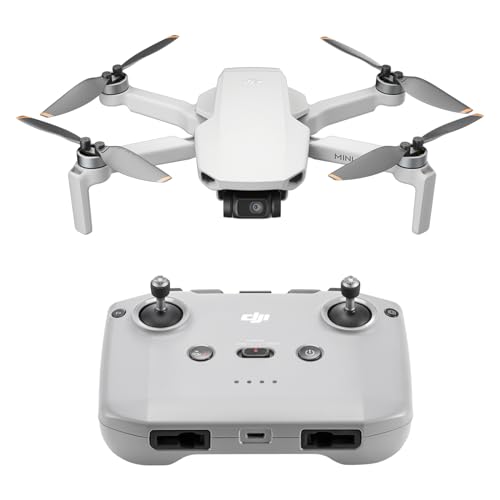
The Mini 4K is designed as an easy way into flying a camera drone. It folds small, uses a three-axis gimbal to keep footage smooth, and records in 4K, which suits holiday clips, family outings and learning the fundamentals of aerial framing.
The Mini 4 Pro targets people who expect to fly in more varied conditions or want more automated help. It sits higher in the lineup, and DJI positions it with a more advanced sensing and tracking toolkit.
In this guide
Where They Differ
These are the areas where the two models are typically set apart. Check each on DJI’s page rather than relying on memory:
- Obstacle awareness: the Pro model is the one built around broader sensing. The entry model leans more on the pilot’s own attention.
- Subject tracking: automated follow modes are a headline feature of the more advanced model.
- Camera flexibility: look at video modes, color options and how each handles vertical shooting for social platforms.
- Transmission and controller: compare the controller options and the range claims in each bundle.
- Battery bundles: extra batteries and charging hubs change the real-world flying time of a day trip.
Side by Side
| Factor | Mini 4K | Mini 4 Pro |
|---|---|---|
| Position in range | Entry level | Higher-tier |
| Typical user | New pilots, casual shooters | Travelers and frequent flyers wanting more assistance |
| Automated flight aids | More basic | More extensive |
| Size class | Compact folding | Compact folding |
How to Decide
- Write down where you will fly. Open fields need less assistance than wooded trails or tight spaces.
- Decide whether you want automatic follow shots, or whether you are happy framing everything yourself.
- Think about growth. If you expect to want more features within a year, the higher model may save you from buying twice.
- Compare the full bundle, including controller and batteries, not just the drone.
Choose the Mini 4K if simplicity and a gentle learning curve matter most. Choose the Mini 4 Pro if you want broader assistance and more room to grow.
Planning battery use for a full day of flying
Flight time figures printed by makers come from controlled conditions, usually calm air and steady flying. Real outings are shorter, because wind, cold weather, quick maneuvers, climbing and hovering with a camera running all use more power. When you compare the Mini 4K and the Mini 4 Pro, read the battery information on DJI’s pages, then plan on getting less than the headline number.
The practical question is how many flights you want in a day. A short trip to a local viewpoint may need one or two batteries, while a day of travel photography might need several. Bundles often differ in how many batteries they include and whether they add a charging hub, which charges batteries one after another or in a managed order. A hub is useful at home, but on the road you may rely on a power bank or a car adapter, so check what charging methods the drone supports.
Habits make a bigger difference than most people expect. Do not wait until the battery warning appears before turning back, and set a return-home battery level you are comfortable with. Land with some charge remaining rather than draining fully. Keep batteries out of hot cars and out of freezing conditions before flights, because temperature affects both capacity and safety. Store batteries according to the manual, usually partly charged if they will sit unused for a long time.
- Count how many flights you want, then add a spare.
- Check whether the bundle includes a hub or only a single charger.
- Label batteries and rotate them so wear is even.
Learning to fly and good first-flight habits
Whichever model you buy, the first weeks are about building control and confidence. A smaller drone is easier to carry but it is also more affected by wind, so choose calm days and open space away from people, roads and trees. A wide field gives you room for mistakes while you learn how the sticks behave.
Begin with the basics. Lift off, hover at a low height, turn slowly and land at a marked spot. Practice flying forward, sideways and backward while keeping the nose pointed in a known direction. Then add climbs and descents together with gentle turns. Many pilots find that flying with the drone facing toward them feels reversed at first, so go slowly and keep the movement small.
Learn the return-to-home function before you need it. Check the height it uses, which should be above nearby trees and buildings, and confirm that the home point has been recorded before takeoff. Test the behavior in an open space. Know what happens if the signal is lost or the battery runs low, and read the manual’s section on warnings.
Sensing features and assisted modes, where the model has them, are aids rather than guarantees. They have limits in low light, over water, near thin branches or in front of plain surfaces. Keep the drone in sight when the rules require it, and do not rely on automation to avoid every obstacle. A short checklist for each flight helps: batteries charged, propellers undamaged, memory card inserted, firmware current, and a clear view of the sky.
Accessories worth adding and ones to skip
It is easy to spend more on accessories than on the drone itself. Think about what you will really use and add items in stages. The basics for most pilots are spare propellers, a memory card of a type and speed that the maker recommends, and a carry case or bag with room for the controller, batteries and cables.
Neutral density filters are worth considering if you plan to shoot video. They reduce the amount of light entering the lens, which lets you keep a natural shutter speed in bright conditions. Confirm that a filter is made for your exact drone model, since size, weight and fit matter on a small gimbal. A heavy or poorly fitted filter can disturb the gimbal balance, so read the notes on compatibility.
Propeller guards can help when learning or flying near objects, though they add weight and may affect flight time and handling. Check whether guards are available for your model and how the maker describes their use. Landing pads keep dust and grass out of the motors and camera, and are inexpensive. A lens cloth and a small blower are useful for cleaning.
Skip accessories you cannot explain a use for. Extra stickers, decorative covers and add-on lights may cause legal or practical problems, such as added weight or rule changes for lighting. If you consider anything that changes the aircraft’s weight, check your local regulator’s rules, since weight class can affect requirements in some places.
Photo and video quality beyond the spec sheet
Camera quality is more than a resolution number. Sensor size, lens, processing and the way footage is compressed all shape what you see on screen. Because we cannot assume details, treat DJI’s product page as the source for sensor and video specifications, and focus here on how to judge whether those specifications meet your needs.
Start with where the pictures will end up. If they will mostly be watched on phones and shared online, a modest camera can look excellent. If you plan to crop heavily, print large or deliver to clients, extra detail and flexibility become more valuable. Think about low light as well. Small sensors in compact drones tend to be stronger at golden hour and on bright days than at night, so plan flights for good light whichever model you pick.
Look at color options and file types. Some models offer flatter color profiles or higher bit depths that give more editing room, while simpler modes produce ready-to-share clips. Check how each model handles vertical video for social media, as some use a crop and others rotate the camera or gimbal. Review the available frame rates for slow motion.
Finally, think about storage and editing. High-quality video files are large, so budget for cards and for a computer or phone that can edit them smoothly. Watch real sample footage from independent creators, noting the conditions, before making a final decision.
Weather, wind and safe flying conditions
Small, light drones are pleasant to carry, but they have less mass to resist wind. A breeze that feels mild at ground level can be stronger at height, so a drone that looks stable near you may struggle when it climbs. Check the maker’s stated wind resistance in the manual and treat it as a limit to stay well below, not a target.
Before each flight, check the forecast for wind, gusts, rain and temperature. Avoid flying in rain, fog, snow or heavy mist, since moisture can damage electronics and the camera lens. Cold weather shortens battery life, so warm batteries before use if the manual suggests it, and keep an eye on the charge. Hot weather can cause overheating and reduce performance, so avoid leaving the drone in direct sun on a dashboard.
Watch for terrain and structures that create turbulence, such as cliffs, tall buildings and tree lines. Flying over water carries extra risk because a forced landing is unrecoverable, and downward sensors may behave unpredictably over reflective surfaces. Keep a safe distance from people, vehicles and animals, and choose takeoff and landing spots away from them.
Check local airspace and rules before flying, using your aviation authority’s official resources. Know which areas are restricted, and keep to height and distance limits that apply to you. Carry a simple routine for each flight: scan the sky, confirm your home point, test the controls, and make a decision to stop if conditions look worse than expected.
A Short Questionnaire to Find Your Match
Before you weigh specifications, answer a handful of plain questions. Your answers usually point to one drone or the other more clearly than any chart.
- Will you mostly share clips on a phone, or edit them on a computer?
- Do you expect to fly near trees, buildings or other obstacles?
- Is this your first drone, or have you flown before?
- Do you plan to travel with it, and how much bag space can you spare?
- Would you rather keep the budget simple, or spend a bit more for extra capability you may grow into?
If your answers are all about easy sharing, simple flying and a modest outlay, a simpler folding drone is likely to feel right. If you picture more demanding shots, tricky surroundings or serious editing, a more capable model tends to earn its place. Neither answer is wrong; the point is to know which one is yours.
How to Read a Drone Listing Carefully
Product pages for folding drones often list several versions of what looks like the same model: the bare drone, a bundle with extra batteries, and a bundle with a different controller. Compare the contents line by line. Note how many batteries are included, whether a charging hub is part of the package, and which controller comes in the box. Check whether a carry bag, spare propellers or a filter set are listed, and which of those you would otherwise have to buy.
Also look for notes about region, since some listings cover a specific market with its own regulations and power plugs. If a seller does not state the exact model code or what ships in the box, ask before you order. A short message now can save a return later.
Where Each Drone Fits in a Kit Over Time
Think of a drone as the first piece of a small kit rather than a single purchase. Over time most pilots add batteries, a charging hub, a bag, filters and cards. The drone you choose affects how those pieces fit, because accessories are often designed for one family or one model.
| Stage | Typical additions | What to check |
|---|---|---|
| First week | Memory card, spare propellers | Card speed that the maker recommends |
| First month | Extra batteries, hub | Compatibility with your specific model |
| Later | Filters, travel case, landing pad | Whether items suit both models or only one |
If you may upgrade within a year or two, favor accessories that work across models so that nothing becomes redundant.
Errors First-Time Drone Owners Make
New pilots often rush the first flight. They skip firmware updates, forget to calibrate when the app asks, and launch from a cramped spot with no clear landing area. Others fly too far too soon, losing sight of the drone, or ignore the local rules on altitude and no-fly zones. A few forget to set return height, which matters near trees and buildings.
- Read the manual and setup guide fully before flying.
- Practice in an open area with the lowest speed mode.
- Keep the drone in view and stay clear of people and property.
- Learn what each warning in the app means before it appears.
- Land with a comfortable battery margin, not at the last moment.
Warranty, Support and Spare Parts
When you choose between two drones, also look at what happens if something goes wrong. Check how the maker handles repairs, what the warranty covers according to its own terms, and whether replacement parts such as propellers and gimbal covers are easy to buy. Registering the drone with the maker and keeping your proof of purchase simplifies any future claim. If a seller offers an extended plan, read its terms carefully to see what is included and what is excluded, and compare that with the maker’s own service options. Good support can matter more than a small difference in specifications.
Storage, Transport and Care Between Flights
How you treat the drone between flights affects how long it stays reliable. Fold it carefully following the maker instructions, fit the gimbal cover where one is provided, and keep the aircraft in a padded case or bag with room for batteries and the controller. Avoid leaving it in a hot car or in direct sun, and keep it dry. Wipe the camera lens with a soft microfiber cloth made for optics and clear dust from vents and moving parts with gentle air or a soft brush.
Batteries deserve special care. Store them as the maker recommends, away from heat and metal objects, and follow official guidance for travel, since airlines and authorities set rules for lithium batteries. Check propellers for chips before each outing and replace damaged ones. A small checklist in the bag helps you remember each step.
Which Questions to Ask Before You Pay
If you are buying from a store, a marketplace seller or a second-hand listing, a few direct questions can prevent disappointment. Ask what exactly is in the box, whether the drone has been activated before, and how many battery cycles any included packs have seen. Confirm that the controller is the one you expect and that the region matches your own. Look at return terms in writing, and check how the seller handles damaged or faulty items.
- Is the model code printed on the box the one you meant to buy?
- Are all accessories listed genuinely included?
- Does the seller offer a way to contact them after the sale?
- Can you register the drone under your own name with the maker?
Clear answers are a good sign. Vague ones are a reason to look elsewhere.
Ready to Buy? Start Here
If this guide helped you decide what to look for, these products are a place to start.

As an Amazon Associate we earn from qualifying purchases. Prices and availability are shown on Amazon.
How the Mini 4K and the Mini 4 Pro Feel Different After the First Month
The first week with any new drone is a poor guide to owning it. Everything feels impressive while the novelty lasts, and small annoyances barely register. By the end of the first month the pattern settles: you learn how long setup really takes when you are tired, how the drone behaves when the light is ordinary rather than golden, and which settings you keep returning to instead of the ones you admired in the launch material. This is where the Mini 4K and the Mini 4 Pro start to separate in ways a specification table cannot show, because the difference is mostly about friction. The model you reach for without thinking is usually the right one, even if the other looks stronger on paper.
A useful exercise is to keep a short note after each outing for a month: what you shot, what slowed you down, and what you wished had been different. Patterns appear quickly. Some owners discover that portability decides everything, because the best footage they captured came from unplanned moments when the drone happened to be with them. Others discover that they plan every session anyway, so a larger or more capable body costs them nothing and the extra flexibility shows up in every edit. Neither answer is wrong, but they point to different purchases, and they explain why two thoughtful buyers can read the same comparison and choose opposite models with complete confidence.
Handling details matter more over time than headline features. Think about how the Mini 4K and the Mini 4 Pro feel with cold fingers, with gloves, in bright sun when screens wash out, and when you are packing up quickly because the weather is turning. Think about the sounds, the menus you must dig through, and whether the controls you use most are reachable without looking. These are unglamorous considerations, yet they decide whether a drone becomes a trusted tool or an occasional gadget, and they are worth weighing as heavily as any sensor or lens claim.
A Fair Test You Can Run Before You Commit
If you can borrow, rent or handle both models, run the same small test with each instead of relying on showroom impressions. Choose one familiar scene, shoot it at the same time of day with the Mini 4K and then with the Mini 4 Pro, and keep the settings as close as the two systems allow. Work through the whole chain: setup, capture, transfer, a quick edit and export. Most comparisons stop at capture, yet the hours after shooting are where workflow differences quietly accumulate, and a model that saves you ten minutes on every session repays its price in patience many times over.
Review the results on a big screen, not the rear display
Rear screens flatter everything. Open the files on the largest screen you own, view them at full size, and look at the areas comparisons usually ignore: shadow detail in the corners, skin tones under mixed light, fine texture in grass or masonry, and the way highlights roll off rather than clip. Then shrink the same files to the size your audience will actually see, because a difference that vanishes at delivery size should not drive a decision. Write down which files you preferred before checking which drone made them; blind preference is more honest than brand loyalty, and it often surprises people who arrived certain of the answer.
Test the bad day, not just the good one
Every drone looks good in kind conditions. Deliberately include an unkind one: a dull overcast spell, a breezy afternoon, a dim interior, or a scene with movement you cannot direct. Notice how much work each model demands to rescue the result, and whether the rescue happens in the field or later at the computer. A drone that needs constant correction teaches you discipline but drains enthusiasm, while one that forgives small mistakes keeps you shooting. Your tolerance for that trade-off is personal, and discovering it before you buy is far cheaper than discovering it after.
Choosing by Project, Not by Specification Sheet
Specifications describe what a drone can do once; projects describe what you will ask of it every week. Work through the situations below, find the one closest to your real life, and let it carry more weight than any single feature. If none of them matches, describe your own typical outing in a sentence or two and judge both models against that sentence instead.
The cautious first-time buyer
If this is your first drone and you are unsure the hobby will stick, the Mini 4K’s simpler proposition is a genuine virtue: less money at risk, fewer features to learn at once, and a clear picture of what basic aerial footage looks like. Many pilots discover that the flying itself is the joy and that modest footage of their own places delights them for years. If the hobby fades, you have learned that cheaply; if it grows, you will know exactly which limitations you want your second drone to remove.
The keen photographer stepping up
If you already photograph seriously on the ground, you will meet the simpler drone’s limits sooner, particularly in how much control you have and how the files behave in editing. The Mini 4 Pro is built for that user: more sensing, more control and a more flexible image pipeline, as the comparison above sets out. For this buyer the cheaper model can be a false economy, because the upgrade arrives within the year and the first purchase becomes a down payment on the second.
Travel and family use
For holidays and family days, both drones pack small and fly easily, so the choice turns on how the footage will be used. Clips destined for phones and family sharing ask little of either model, and the Mini 4K handles that brief comfortably. If you plan to print stills, crop into frames or edit video with real grading, the Mini 4 Pro’s extra flexibility earns its keep. Consider also the pilot: a nervous beginner may relax sooner with the model carrying more obstacle sensing, and relaxed pilots take better pictures.
Ownership Habits That Matter More Than Accessories
Owners who stay happy with either the Mini 4K or the Mini 4 Pro tend to share a few dull habits. They keep firmware and apps updated on a quiet evening at home rather than in the field, they format cards in the drone after a confirmed backup, and they store batteries and bodies the way the manual recommends instead of wherever they land. They also keep a simple log of settings that worked, so a good result can be repeated instead of rediscovered. None of this is exciting, and all of it prevents the small failures that sour people on equipment that was never actually at fault.
Resist the accessory spiral in the first month. Shoot with the basic kit until a specific, repeated frustration names the accessory that would solve it. A case that fits your actual bag, spare media you trust, and a cleaning routine you will genuinely follow beat a drawer of clever extras bought on launch-day enthusiasm. When you do add pieces, check compatibility carefully: mounts, batteries, chargers and cases are rarely shared between the Mini 4K and the Mini 4 Pro, and assuming they are is one of the most common and most avoidable disappointments in this category.
Troubleshooting the Frustrations Owners Actually Hit
Most problems owners blame on the drone turn out to be process problems. Files that look soft often trace back to a protective film left on a lens, a smudged element, or a shutter and movement combination that no stabilisation can fully forgive. Connection dropouts usually improve when apps and firmware are brought to matching versions and the phone is freed of competing wireless demands. Overheating complaints frequently involve direct sun, maximum settings held for long stretches, and blocked airflow, all of which the manual quietly warns about. Working through those basics first, calmly and in order, resolves the majority of bad days without a repair ticket.
When something genuinely misbehaves, gather evidence before seeking help: note the settings, the conditions, and whether the fault repeats in a controlled test at home. Support teams and community forums solve problems far faster when the description is precise, and a repeatable fault is taken more seriously than a vague feeling that results seem off. Keep receipts, registration details and firmware notes together; if you later sell the drone, that tidy history also reassures the next owner and protects the value of your purchase.
Buying the Mini 4K or the Mini 4 Pro Second-Hand: What to Check
Both models appear on the used market, and a careful used purchase can move the decision more than any specification difference. Inspect the drone in person where possible: check lenses and sensors for marks, run every control, and review a test shot or short clip at full size rather than trusting the rear screen. Ask why the owner is selling, how the batteries have been stored, and whether the original receipt exists. A seller who used the equipment gently and can describe its history plainly is worth a small premium over a mystery bargain.
Batteries deserve special suspicion in any used kit, because they age whether or not they are used and their condition decides real session length. Ask how many are included, whether they hold a sensible charge, and price replacements into the deal before agreeing. Also confirm that chargers, cables and any mounts in the listing are the maker’s own or reputable equivalents, and that accounts or registrations can be transferred or released by the seller. Fifteen minutes of checking protects the whole purchase, and a seller who resists basic checks has answered your most important question.
A Short Decision Worksheet
If the comparison still feels balanced, decide it on paper. Score each model from one to five on the criteria below, honestly and quickly, then weight the scores by how often each criterion touches your actual routine. The exercise works because it forces vague feelings into comparable claims, and because most people discover, halfway through, that they have been hoping one model would win, which is itself the answer they needed.
How often will it actually be used?
Estimate your real sessions per month, not your aspirational ones, and favour the model whose size, setup and routine fit that rhythm. A slightly lesser tool used weekly produces a body of work; a superior tool used twice a year produces a guilty shelf. If your estimate is honestly low, also price the option of renting for the big occasions and owning the simpler model for the rest.
What will the complete kit cost over two years?
Add the aircraft or body, the batteries and media your routine consumes, the case and mounts you will genuinely buy, likely repairs or protection, and the storage your files will occupy. Two-year cost routinely reverses headline comparisons, in both directions: sometimes the dearer model is the cheaper ownership because its kit is already complete in the box, and sometimes the saving on the simpler model funds everything around it. Decide on the two-year figure, because that is the money you will actually spend.
Which limitation would annoy you monthly?
Every model has a limitation its owners mention in forums. Identify the leading complaint about the Mini 4K and about the Mini 4 Pro, then ask which one intersects your routine every month and which one you would meet once a year. Buy the model whose recurring annoyance you can shrug at. This sounds negative and is in practice the most positive test available, because satisfaction is mostly the absence of the irritation you personally cannot stand.
Battery Life in Real Hands, Not in Brochures
Published endurance figures are measured under conditions chosen by the maker, and your conditions will differ: colder air, brighter screens, more hovering or more clips reviewed in the field all spend energy faster. Build your own honest figure during the first weeks by noting what a battery actually delivered across several typical outings, then plan sessions around the pessimistic end of that range. Owners who plan around real numbers stop having sessions end mid-subject, and they also stop carrying more spares than the day requires. The discipline is the same for both models in this comparison, which is why it rarely decides between them, but it decides whether ownership feels calm or anxious.
Learning Curves and the First Ten Sessions
Plan your first ten sessions as tuition, whatever you buy. Fly or shoot in easy conditions, repeat the basic manoeuvres and shots until they are dull, and review every session the same evening. The temptation to attempt the ambitious shot in week one produces the crashes, the ruined cards and the discouragement that end hobbies. Ten calm sessions build the instincts that make ambitious shots safe later: judging distance, reading light, knowing the menus by touch. Pilots and shooters who invest those sessions early almost never regret them, and the equipment they bought reveals its real character only after them, which is another reason not to judge a purchase by its first weekend.
Resale, Hand-Me-Downs and the Second Owner
Equipment in this category commonly serves two or three owners, and thinking like the second owner improves how you treat the first ownership. Keep the box, the cables and the paperwork; record battery cycles if the system reports them; and be honest in any listing about drops and repairs. A tidy, documented example sells quickly and funds the next step, while a neglected one funds nothing. If you are buying used yourself, the same list becomes your inspection checklist, and a seller who can answer those questions calmly is usually a safer bet than a lower price from one who cannot.
Weather Windows and Knowing When Not to Go
Experienced owners share a trait that looks like caution and is actually craft: they check conditions the night before, decide a threshold in advance, and honour it in the morning when enthusiasm argues otherwise. Wind, rain, heat and poor light each tax the equipment and the operator, and the footage from a forced session in bad conditions rarely repays the risk. Keep a list of indoor or sheltered alternatives for spoiled days, such as maintenance, editing or practising controls at home, so that standing down feels like a plan rather than a loss. Over a year, this habit saves more equipment and produces more good footage than any single feature on either model.
Building a Small, Complete Kit
A complete kit is not a large kit. For most owners it is the body, enough batteries for a typical session, two trusted cards, a case that fits the bag they actually carry, cleaning basics and the one or two mounts or grips their subjects demand. Write the list for your own routine, buy to the list, and stop. Kits assembled by list survive contact with real life; kits assembled by browsing accumulate duplicates of the glamorous items and lack the dull ones, which is why so many owners own three mounts and no spare card. Revisit the list each season, because your subjects change and the kit should follow them, not the catalogue.
Sound, Signals and Being a Good Neighbour
How a piece of equipment behaves in shared spaces decides how welcome it is there. Learn the sounds yours makes, the lights it shows and the impression it gives at a distance, and operate it so that other people can relax around it: announce yourself where courtesy suggests it, keep clear of anyone who has not agreed to be involved, and land or stop the moment someone is uncomfortable. Owners who behave this way protect access for everyone, including themselves, because most restrictions on hobbies like this one are born from a minority of careless sessions. Being visibly considerate is not etiquette decoration; it is how the places you love remain open to the equipment you love using in them.
When to Stop Researching and Start Using
Comparison has a natural end point, and it arrives sooner than the internet suggests. Once you can state, in one sentence, the job you are buying the equipment to do, and you have checked the handful of facts in this guide that bear on that job, further research mostly manufactures doubt. The remaining uncertainty, how the thing feels in your own hands across your own month of use, cannot be resolved by reading; it can only be resolved by owning, borrowing or renting. Set yourself a decision date, honour it, and redirect the research hours into the first ten practice sessions. A month later you will know more than another month of reading could have taught you, and you will own the footage to prove it.
Care Routines for Humid, Dusty and Coastal Homes
Where you live quietly shapes how equipment ages. Coastal air leaves salt on everything, humid homes invite moisture into cases and bags, and dusty environments work grit into every control and seal. Counter each with a matching habit: wipe down after sessions near the sea, store gear with airflow rather than sealed in damp bags, and keep a soft brush for the grit that collects around buttons and dials. Check stored equipment monthly even in quiet seasons, because mould and corrosion do their work unobserved. These routines take minutes and are the difference between equipment that ages gracefully for years and equipment that fails mysteriously in its second season.
FAQ
Is the Mini 4K good enough for real estate or roof inspections?
For informal looks at your own property, a basic camera drone can show you a roof, gutters or a chimney clearly enough to decide whether to call a professional. For paid work, check the rules that apply to commercial flying where you live, and consider whether clients will expect the steadier footage, sensing and file quality of the more advanced model. The honest answer is that the Mini 4K can look, while the Mini 4 Pro is easier to work with. Match the tool to whether money and liability are involved.
Will I notice the difference on a phone screen?
For bright, straightforward scenes viewed on a phone, the gap between the two is smaller than the price gap suggests, because the screen hides fine detail and both drones produce pleasing footage in good light. The differences grow as conditions worsen and as screens grow: dusk scenes, high-contrast views and footage shown on a television reveal the more advanced model’s advantages in control and file flexibility. Decide by where your footage will mostly be watched, not by the best screen you own.
Does the Mini 4 Pro’s obstacle sensing make it crash-proof?
No sensing system makes any drone crash-proof. Sensing helps most against the solid, well-lit obstacles the system can see, and it struggles with thin branches, wires, glass and fast sideward movement, as the main guide notes. It is best understood as a safety net that catches some beginner mistakes, not as permission to stop watching the aircraft. The Mini 4K simply asks more of your own attention. In both cases, open spaces, slow inputs and a pre-flight look around remain the real protection.
Which model holds its value better?
Popular, well-kept drones of both types find second-hand buyers readily, because new pilots are always entering the hobby. The more advanced model typically returns a larger share of its higher price when sold with its batteries healthy and its accessories complete, while the simpler model loses less money in absolute terms simply because it cost less. Either way, condition and battery health matter more to buyers than the badge. Fly the drone you buy, keep it tidy, and treat resale as a small rebate rather than an investment strategy.
Can I learn video editing with the cheaper drone?
Absolutely, and there is an argument that you should. Editing skill, including pacing, colour decisions and choosing which clips to discard, is independent of the camera that recorded the footage. Learning on simpler files keeps projects light and computers happy, and the lessons transfer completely when you upgrade. Many strong editors started with modest cameras. What the cheaper drone cannot teach is how to expose and set up the advanced features it does not have, which is a short lesson waiting for you if and when you step up.
Can a beginner learn on the Mini 4 Pro?
Yes. Many newcomers begin on higher models. The extra features are optional, so you can fly manually while you build confidence.
Do both folding drones need registration?
Rules depend on your country and on how you fly. Check your local aviation authority, as weight class alone does not settle every requirement.
How many batteries should I buy?
It depends on how many flights you want in a day and how long each lasts in real conditions. Many pilots find that two or three batteries cover a typical outing. Check what is in the bundle and consider a multi-battery option if you travel.
Do I need an ND filter?
Not for casual photos, but they are useful for video in bright light because they let you keep a natural shutter speed. Make sure any filter is designed for your exact model.
What memory card should I use?
Use a card of the type and speed class that DJI lists on its product page or in the manual. A reputable card from a known maker reduces the chance of recording errors. Format it in the drone before use.
Can I fly in light rain?
It is not recommended. Moisture can damage electronics, motors and the camera, and wet conditions affect control. Wait for dry weather and check the forecast.
How should I carry a drone when I travel?
Use a padded case, carry batteries in your hand luggage as airlines usually require, and check the airline's current battery rules. Also check the drone rules at your destination before you leave.
How do I know when to replace the propellers?
Replace them if you see cracks, chips, bends or rough edges, or if the drone vibrates more than usual. They are inexpensive compared with the cost of a crash, so keep a spare set.
Is firmware worth updating?
Generally yes, as updates can fix bugs and improve safety features. Read the release notes first and update with a charged battery and when you are not about to fly.
The Short Version
The Mini 4K is the simple, approachable option and the Mini 4 Pro is the feature-rich step up. Choose by how much automation and flexibility you want, and verify details on DJI’s own pages.
