The DJI Neo is a very small drone designed around easy, selfie-style flying, while the DJI Mini 4K is a more conventional entry-level folding camera drone. Choose the Neo for quick, casual, close-range clips of yourself and friends, and the Mini 4K if you want a traditional drone workflow with a controller and more range for scenery. Confirm specifications on DJI’s pages.

What Each Drone Is For
The Neo is built to be as approachable as possible. It is tiny, lifts off from the palm in common setups, and leans on automated modes to follow the subject, so it appeals to people who want social clips without learning to pilot.
The Mini 4K is a classic small camera drone. It folds, uses a stabilizing gimbal and is designed for flying with a controller or phone, which makes it better suited to landscapes, travel footage and learning proper aerial technique.
In this guide
Key Differences
- Flying style: the Neo emphasizes simple, automated shots near the user. The Mini 4K emphasizes manual flight with framing decisions by the pilot.
- Control options: compare which controllers and phone connections each supports, since the Neo can be used with fewer accessories.
- Range and distance: a traditional drone is better suited to going out and exploring a scene, while the Neo is intended for close-in use.
- Camera behavior: compare gimbal type, video resolution and stabilization on DJI’s pages.
- Handling around people: small guarded designs can be reassuring to some users, but follow all local rules wherever you fly.
Side by Side
| Factor | DJI Neo | DJI Mini 4K |
|---|---|---|
| Design idea | Tiny, selfie-style flyer | Folding entry-level camera drone |
| Skill needed | Very little | Some practice |
| Best for | Vlogs, friends, quick clips | Scenery, travel, learning to fly |
| Control approach | Automated, flexible | Controller or phone workflow |
Who Should Choose Which
- Choose the Neo if you mainly film yourself or a small group and want almost no learning curve.
- Choose the Mini 4K if you want to explore landscapes, frame shots deliberately and build real flying skills.
- Think about the footage you want. A close follow shot and a sweeping reveal need different tools.
One more practical point: think about where the footage ends up. Short vertical clips for social feeds suit a quick, automated flyer, while a travel film with wide establishing shots benefits from a drone you can steer deliberately.
Your First Flights, Step by Step
Whichever small drone you choose, the first few flights set habits that last. A calm, structured start is safer and more enjoyable than launching straight into complex shots.
- Read the manual and update the firmware and app before you leave the house. Charge the drone, controller if there is one, and your phone.
- Choose an open area with no people nearby, no overhead wires and no trees close to the takeoff point. A large grassy field is better than a car park.
- Check the weather. Light wind and good visibility make learning far easier, and a drone that feels easy in calm air can be a handful in gusts.
- Check the surroundings for restrictions, including airports, parks and private land, and follow local rules.
- Do a short hover at low height, then move gently in each direction, observing how the drone responds. Keep the drone within view the whole time.
- Practice returning and landing several times before attempting anything creative.
- Learn how the drone signals a low battery, a lost signal or a failed sensor, and what it does in each case.
The Neo’s automated modes and the Mini 4K’s manual flight call for different practice. With the Neo, learn how its follow modes behave and how to cancel them. With the Mini 4K, spend time on gentle stick movements and smooth turns, which are the foundation of good aerial video.
Flying Around People, Pets and Property
Small drones feel harmless, but they still have spinning propellers and can cause injury or damage. Because the Neo is designed for use close to the user, it is worth thinking carefully about safe distances and how you will handle mistakes.
- Tell people nearby what you are about to do, and ask them to stay clear of the takeoff and landing area. Keep children and pets away until you are comfortable.
- Do not fly directly over crowds or people who have not agreed to it. Local rules often restrict this, and size alone does not make it safe.
- Keep a plan for loss of signal, a sudden gust or low battery. Know how the drone will react, and where it is likely to land.
- Be careful near windows, balconies and glass, which sensors may not detect well.
- Respect privacy. Avoid filming people in private spaces such as gardens and windows, and ask before you film others.
- Avoid indoor flights in small rooms until you know the drone’s behavior.
- Do not catch or touch the drone while the propellers are spinning unless the manual explicitly describes a safe method.
Check whether propeller guards are available for your model and whether they change flight time or handling. Guards help reduce risk but do not remove it, so keep the same habits.
Shot Ideas That Suit Each Drone
The two drones encourage different kinds of footage, and planning shots to match their strengths gives better results.
With a small selfie-style flyer, think of the drone as a moving tripod near you. Good shots include a follow shot while you walk or cycle, a gradual pull back that reveals the surroundings, and a circling move that keeps you in the middle. Short clips of a few seconds each cut together easily. Choose backgrounds with clear, uncluttered space, because busy backgrounds make tracking harder, and keep an eye on the light so you are not backlit in every shot.
With a conventional folding drone, think about scenery and scale. Try a slow forward move over a coastline or a field, a rising shot that reveals a valley, or a sideways glide along a ridge or a row of buildings. Use the horizon and leading lines such as roads and rivers to guide the eye. Keep movements slow and smooth, and plan the start and end of each shot before you press record.
For either one, shoot more clips than you think you need, hold each shot for several seconds, and vary the heights. Check the footage in the field on your phone to confirm focus and exposure, then adjust and try again. Learn the quick shot modes in the app and test which feel useful and which feel gimmicky.
Battery Planning and Accessories
Small drones fly for a short time on each battery, and that is a fact of life for the class. Check the flight time stated by DJI for each model, remember it is a best-case figure from set conditions, and expect real flights to be shorter, especially in wind or cold. Plan your shots so you use time wisely instead of aimless hovering.
- Extra batteries are the most useful accessory. Having two or three means a session can include several flights and a break.
- A charging hub, if one is available for your model, lets you charge several batteries at once. Check compatibility.
- A memory card of the recommended type and speed matters, and a spare is cheap insurance.
- Spare propellers belong in your bag, since a minor bump can chip one.
- A padded case or pouch protects the drone, and a landing pad keeps dust and grass out of the motors.
- Consider lens cleaning cloths and a small blower for the camera.
Storing batteries correctly extends their life. Follow the manual on storage charge level, avoid heat, and do not charge a battery that is damaged or swollen. Replace batteries that no longer hold charge well. Charge them somewhere safe, on a non-flammable surface, and never leave them charging unattended overnight.
Sharing and Editing Your Clips
A drone is more fun when you do something with the footage. Both models work with DJI’s apps, and the best workflow depends on where you want clips to end up.
For quick social clips, you can use the app’s editing or quick-share tools if your model offers them, then export a short, vertical or square clip. For longer projects, copy the files to a computer, make backup copies and edit in software that you are comfortable with. Start with a simple structure: a wide opening shot, a few varied middle shots and a memorable closing shot. Keep each clip short, usually a few seconds, and cut on movement to keep the pace lively.
Add stability and consistency in editing. Trim the beginning and end of each clip where the movement starts or stops. Match brightness and color between clips so the sequence feels connected. Use music that is licensed for your intended use and check the platform’s rules. If you plan to share publicly, avoid showing private properties or identifiable people without permission.
Review your footage after each outing and write down what you would change. After a few sessions you will know whether you enjoy the automatic, close-in style or want more control of scenery, which is the best guide to whether the drone you chose fits you.
Before You Fly: Rules and Responsibility
Owning a drone brings responsibilities. Rules about registration, where you may fly, how high, and how close to people and buildings vary from country to country and sometimes by city. Some places require you to register the drone, pass a test or carry insurance, while others have simple guidelines. Before your first flight, find your national aviation authority or the equivalent body and read their official guidance. Check for restricted zones near airports, parks, stadiums and sensitive sites, and respect them. Never rely on a forum post or video for legal information; official sources are the only safe basis.
Think too about privacy. Flying over private property or near people with a camera can cause distress. Ask permission, keep a respectful distance, and avoid recording individuals without consent.
Learning to Fly Safely, Step by Step
- Read the manual and watch the maker’s official tutorials.
- Update the firmware and the app, following the maker’s instructions.
- Choose an open area with few people, away from trees, wires and water.
- Practice hovering at a low height until you feel comfortable.
- Learn the return-to-home feature and test it at a safe altitude.
- Check the weather, especially wind, before each flight.
- Fly within sight at all times and keep an eye on battery level.
A small drone is more affected by wind than a larger one, so be conservative. If the drone struggles to hold position, land it and try again on a calmer day.
Which Style of Flying Suits You
| Flying style | Suits | Considerations |
|---|---|---|
| Quick selfie-style clips | Casual users and social media creators | Short range, simple controls |
| Landscape and travel shots | Travelers and hobbyists | Need range, steady video and a foldable body |
| Following a subject | Sports and outdoor activities | Check tracking features and speed limits |
| Learning and play | First-time pilots | Choose forgiving controls and low risk |
Camera Basics for Aerial Clips
Aerial video has its own rules. Slow, smooth movements look better than fast, jerky ones. Open your shot with a clear subject, then move the drone gently to reveal the scene. Use gentle gimbal movements and avoid sudden changes of direction. Choose a resolution and frame rate that suit your needs, and keep exposure steady by avoiding flights directly toward the sun. If the drone offers automatic shot modes, try them for practice, but also learn to fly manually, since manual control gives you creative freedom.
- Fly slowly and plan each shot in advance.
- Use a clean background and good light.
- Record extra seconds at the beginning and end for editing.
- Watch clips on the ground before flying again.
Looking After the Drone and Batteries
Treat the drone and its batteries with care. Charge batteries in a safe place, away from flammable materials, using the supplied charger. Do not leave charging batteries unattended, and let them cool before charging after a flight. Store them at the level recommended by the maker if you will not use them for a while. Check propellers for chips or cracks and replace damaged ones. Clean the camera lens gently. Carry the drone in a case that prevents movement and protects against dust. Follow the maker’s guidance for travel, since airlines have rules for lithium batteries.
Editing and Sharing Aerial Clips
Once you have footage, choose the best moments and trim away dull parts. Keep clips short and varied, mixing wide aerial views with ground-level shots. Add music that you have permission to use, and avoid cluttering the clip with effects. Export in a format suited to the place where you will share it. Keep originals safe in case you want to re-edit later. Share your work with friends and learn from their feedback.
Weather, Wind and Battery Planning
Small drones are light, so wind is a major factor. Check the forecast and local wind readings before every flight, and remember that wind is usually stronger higher up than at ground level. If the drone struggles to hold position or drifts, bring it back and land. Cold weather reduces battery capacity, so keep batteries warm before use and expect shorter flights. Hot weather can cause overheating, so avoid leaving the drone in direct sun. Carry several charged batteries for a day out, and plan to land with a comfortable reserve.
Learn how your drone warns you about low battery and what it does automatically. Practice the response so that you act calmly if an alert appears. Never push a battery to its limit.
Accessories Worth Considering
- A protective case that fits the drone and batteries.
- Spare propellers for quick replacement.
- Extra memory cards of suitable speed.
- A landing pad to keep dust and grass away from the camera.
- Lens cloths and a blower for cleaning.
Buy accessories from reputable sellers and check that they are designed for your model. Poorly made batteries or chargers can be a safety risk.
Creative Ideas for Beginners
Once you can fly with confidence, try simple creative shots. Begin low and rise slowly to reveal a landscape. Fly sideways past a subject, keeping the camera pointed at it. Orbit a building or tree at a steady pace. Shoot at golden hour for warm light. Look for patterns such as fields, roads and shorelines that look striking from above. Tell a story with a sequence of shots that move from wide to close. With practice you will develop your own style and enjoy the new point of view.
A Checklist Before You Choose a Small Drone
A drone is more than a camera, so think through these items before you decide.
- Check the drone rules in your country or region, including registration and where flying is allowed.
- Decide what you want to film: yourself and friends at close range, or wide scenery.
- Look at the maker’s page for controller options, battery information and what comes in each package.
- Think about where you will fly and whether open space is easy to reach.
- Plan for storage, such as memory cards and a way to back up footage.
- Read the manual and any safety notes from the maker before your first flight.
A calm, informed beginning makes the first flights safer and more enjoyable.
Mistakes New Drone Pilots Make
The most common mistake is flying before learning the controls. Take time to read the instructions, practice in a wide, quiet area and keep the drone close until you are comfortable. Another is ignoring the weather. Wind that feels mild on the ground can be stronger higher up, and small drones are easily affected.
New pilots also forget about batteries and updates. Charge everything the day before, and check whether the maker has released software updates through its app. Always keep the drone in sight, stay away from crowds, roads and airports, and respect the privacy of others. Finally, avoid taking risks for the sake of a shot. No clip is worth a crash or an incident, so land early if something seems wrong.
Choosing by Situation
| Situation | Leaning |
|---|---|
| Quick clips of yourself and friends | The Neo, which is designed around simple, close-range flying |
| Scenery with a traditional controller | The Mini 4K |
| Absolute beginner who wants a gentle learning curve | Compare how each one is controlled on the maker’s page |
| Travel with minimal gear | Compare the size and weight of the full kit |
Handy Terms for First-Time Drone Buyers
- Gimbal: a small stabilizing mount that keeps the camera steady as the drone moves.
- Return to home: a function that brings the drone back toward its takeoff point, with settings explained in the manual.
- Line of sight: keeping the drone visible to you throughout the flight.
- Propeller guard: an optional cover around the blades that some pilots use near people or objects.
- Flight mode: a preset that changes how the drone moves or films, such as a follow or orbit style.
Check the exact names and features for each model on the maker’s page, since they can differ and change with updates.
Spend a few minutes with the official setup guide for your model. It shows the correct way to prepare, launch and land, and it will help you build safe habits from your very first flight.
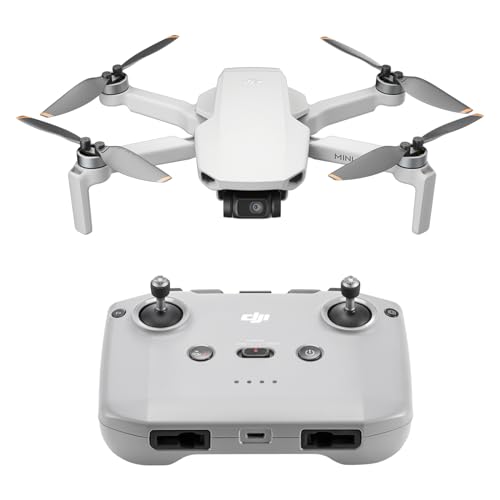

Ready to Buy? Start Here
If this guide helped you decide what to look for, these products are a place to start.


As an Amazon Associate we earn from qualifying purchases. Prices and availability are shown on Amazon.
How the DJI Neo and the Mini 4K Feel Different After the First Month
The first week with any new drone is a poor guide to owning it. Everything feels impressive while the novelty lasts, and small annoyances barely register. By the end of the first month the pattern settles: you learn how long setup really takes when you are tired, how the drone behaves when the light is ordinary rather than golden, and which settings you keep returning to instead of the ones you admired in the launch material. This is where the DJI Neo and the Mini 4K start to separate in ways a specification table cannot show, because the difference is mostly about friction. The model you reach for without thinking is usually the right one, even if the other looks stronger on paper.
A useful exercise is to keep a short note after each outing for a month: what you shot, what slowed you down, and what you wished had been different. Patterns appear quickly. Some owners discover that portability decides everything, because the best footage they captured came from unplanned moments when the drone happened to be with them. Others discover that they plan every session anyway, so a larger or more capable body costs them nothing and the extra flexibility shows up in every edit. Neither answer is wrong, but they point to different purchases, and they explain why two thoughtful buyers can read the same comparison and choose opposite models with complete confidence.
Handling details matter more over time than headline features. Think about how the DJI Neo and the Mini 4K feel with cold fingers, with gloves, in bright sun when screens wash out, and when you are packing up quickly because the weather is turning. Think about the sounds, the menus you must dig through, and whether the controls you use most are reachable without looking. These are unglamorous considerations, yet they decide whether a drone becomes a trusted tool or an occasional gadget, and they are worth weighing as heavily as any sensor or lens claim.
A Fair Test You Can Run Before You Commit
If you can borrow, rent or handle both models, run the same small test with each instead of relying on showroom impressions. Choose one familiar scene, shoot it at the same time of day with the DJI Neo and then with the Mini 4K, and keep the settings as close as the two systems allow. Work through the whole chain: setup, capture, transfer, a quick edit and export. Most comparisons stop at capture, yet the hours after shooting are where workflow differences quietly accumulate, and a model that saves you ten minutes on every session repays its price in patience many times over.
Review the results on a big screen, not the rear display
Rear screens flatter everything. Open the files on the largest screen you own, view them at full size, and look at the areas comparisons usually ignore: shadow detail in the corners, skin tones under mixed light, fine texture in grass or masonry, and the way highlights roll off rather than clip. Then shrink the same files to the size your audience will actually see, because a difference that vanishes at delivery size should not drive a decision. Write down which files you preferred before checking which drone made them; blind preference is more honest than brand loyalty, and it often surprises people who arrived certain of the answer.
Test the bad day, not just the good one
Every drone looks good in kind conditions. Deliberately include an unkind one: a dull overcast spell, a breezy afternoon, a dim interior, or a scene with movement you cannot direct. Notice how much work each model demands to rescue the result, and whether the rescue happens in the field or later at the computer. A drone that needs constant correction teaches you discipline but drains enthusiasm, while one that forgives small mistakes keeps you shooting. Your tolerance for that trade-off is personal, and discovering it before you buy is far cheaper than discovering it after.
Choosing by Project, Not by Specification Sheet
Specifications describe what a drone can do once; projects describe what you will ask of it every week. Work through the situations below, find the one closest to your real life, and let it carry more weight than any single feature. If none of them matches, describe your own typical outing in a sentence or two and judge both models against that sentence instead.
Filming yourself and your activities
The Neo is built around the idea of the drone as a personal camera that follows its owner, as the comparison explains, and for solo walks, rides and runs that changes everything: there is no controller routine between you and the shot. The Mini 4K asks you to pilot, which gives you framing control but occupies your hands and attention. If your content is you, moving, choose the aircraft designed to watch you; if your content is places, choose the aircraft designed to be flown over them.
Learning to fly properly
A beginner who wants to become a pilot, with manual control, planned routes and composed aerial shots, is better served by the Mini 4K’s conventional control scheme, because the skills it teaches transfer to every larger drone. The Neo teaches a different, lighter skill set: directing an automatic camera. Neither is superior in the abstract. The honest question is which pilot you want to be in a year, and the comparison’s sections on control and flying style are the ones to reread with that question in mind.
Family fun and casual sharing
For family days, the Neo’s simplicity and protective design lower the stakes of handing it around and capturing quick clips of the group, while the Mini 4K suits the family member who wants to make a small production of the day. Both produce shareable results. Consider who will operate it most: a household of casual users will fly the simpler aircraft far more often, and frequency of use is the most reliable predictor of value in this class of drone.
Ownership Habits That Matter More Than Accessories
Owners who stay happy with either the DJI Neo or the Mini 4K tend to share a few dull habits. They keep firmware and apps updated on a quiet evening at home rather than in the field, they format cards in the drone after a confirmed backup, and they store batteries and bodies the way the manual recommends instead of wherever they land. They also keep a simple log of settings that worked, so a good result can be repeated instead of rediscovered. None of this is exciting, and all of it prevents the small failures that sour people on equipment that was never actually at fault.
Resist the accessory spiral in the first month. Shoot with the basic kit until a specific, repeated frustration names the accessory that would solve it. A case that fits your actual bag, spare media you trust, and a cleaning routine you will genuinely follow beat a drawer of clever extras bought on launch-day enthusiasm. When you do add pieces, check compatibility carefully: mounts, batteries, chargers and cases are rarely shared between the DJI Neo and the Mini 4K, and assuming they are is one of the most common and most avoidable disappointments in this category.
Troubleshooting the Frustrations Owners Actually Hit
Most problems owners blame on the drone turn out to be process problems. Files that look soft often trace back to a protective film left on a lens, a smudged element, or a shutter and movement combination that no stabilisation can fully forgive. Connection dropouts usually improve when apps and firmware are brought to matching versions and the phone is freed of competing wireless demands. Overheating complaints frequently involve direct sun, maximum settings held for long stretches, and blocked airflow, all of which the manual quietly warns about. Working through those basics first, calmly and in order, resolves the majority of bad days without a repair ticket.
When something genuinely misbehaves, gather evidence before seeking help: note the settings, the conditions, and whether the fault repeats in a controlled test at home. Support teams and community forums solve problems far faster when the description is precise, and a repeatable fault is taken more seriously than a vague feeling that results seem off. Keep receipts, registration details and firmware notes together; if you later sell the drone, that tidy history also reassures the next owner and protects the value of your purchase.
Buying the DJI Neo or the Mini 4K Second-Hand: What to Check
Both models appear on the used market, and a careful used purchase can move the decision more than any specification difference. Inspect the drone in person where possible: check lenses and sensors for marks, run every control, and review a test shot or short clip at full size rather than trusting the rear screen. Ask why the owner is selling, how the batteries have been stored, and whether the original receipt exists. A seller who used the equipment gently and can describe its history plainly is worth a small premium over a mystery bargain.
Batteries deserve special suspicion in any used kit, because they age whether or not they are used and their condition decides real session length. Ask how many are included, whether they hold a sensible charge, and price replacements into the deal before agreeing. Also confirm that chargers, cables and any mounts in the listing are the maker’s own or reputable equivalents, and that accounts or registrations can be transferred or released by the seller. Fifteen minutes of checking protects the whole purchase, and a seller who resists basic checks has answered your most important question.
A Short Decision Worksheet
If the comparison still feels balanced, decide it on paper. Score each model from one to five on the criteria below, honestly and quickly, then weight the scores by how often each criterion touches your actual routine. The exercise works because it forces vague feelings into comparable claims, and because most people discover, halfway through, that they have been hoping one model would win, which is itself the answer they needed.
How often will it actually be used?
Estimate your real sessions per month, not your aspirational ones, and favour the model whose size, setup and routine fit that rhythm. A slightly lesser tool used weekly produces a body of work; a superior tool used twice a year produces a guilty shelf. If your estimate is honestly low, also price the option of renting for the big occasions and owning the simpler model for the rest.
What will the complete kit cost over two years?
Add the aircraft or body, the batteries and media your routine consumes, the case and mounts you will genuinely buy, likely repairs or protection, and the storage your files will occupy. Two-year cost routinely reverses headline comparisons, in both directions: sometimes the dearer model is the cheaper ownership because its kit is already complete in the box, and sometimes the saving on the simpler model funds everything around it. Decide on the two-year figure, because that is the money you will actually spend.
Which limitation would annoy you monthly?
Every model has a limitation its owners mention in forums. Identify the leading complaint about the DJI Neo and about the Mini 4K, then ask which one intersects your routine every month and which one you would meet once a year. Buy the model whose recurring annoyance you can shrug at. This sounds negative and is in practice the most positive test available, because satisfaction is mostly the absence of the irritation you personally cannot stand.
Battery Life in Real Hands, Not in Brochures
Published endurance figures are measured under conditions chosen by the maker, and your conditions will differ: colder air, brighter screens, more hovering or more clips reviewed in the field all spend energy faster. Build your own honest figure during the first weeks by noting what a battery actually delivered across several typical outings, then plan sessions around the pessimistic end of that range. Owners who plan around real numbers stop having sessions end mid-subject, and they also stop carrying more spares than the day requires. The discipline is the same for both models in this comparison, which is why it rarely decides between them, but it decides whether ownership feels calm or anxious.
Learning Curves and the First Ten Sessions
Plan your first ten sessions as tuition, whatever you buy. Fly or shoot in easy conditions, repeat the basic manoeuvres and shots until they are dull, and review every session the same evening. The temptation to attempt the ambitious shot in week one produces the crashes, the ruined cards and the discouragement that end hobbies. Ten calm sessions build the instincts that make ambitious shots safe later: judging distance, reading light, knowing the menus by touch. Pilots and shooters who invest those sessions early almost never regret them, and the equipment they bought reveals its real character only after them, which is another reason not to judge a purchase by its first weekend.
Resale, Hand-Me-Downs and the Second Owner
Equipment in this category commonly serves two or three owners, and thinking like the second owner improves how you treat the first ownership. Keep the box, the cables and the paperwork; record battery cycles if the system reports them; and be honest in any listing about drops and repairs. A tidy, documented example sells quickly and funds the next step, while a neglected one funds nothing. If you are buying used yourself, the same list becomes your inspection checklist, and a seller who can answer those questions calmly is usually a safer bet than a lower price from one who cannot.
Weather Windows and Knowing When Not to Go
Experienced owners share a trait that looks like caution and is actually craft: they check conditions the night before, decide a threshold in advance, and honour it in the morning when enthusiasm argues otherwise. Wind, rain, heat and poor light each tax the equipment and the operator, and the footage from a forced session in bad conditions rarely repays the risk. Keep a list of indoor or sheltered alternatives for spoiled days, such as maintenance, editing or practising controls at home, so that standing down feels like a plan rather than a loss. Over a year, this habit saves more equipment and produces more good footage than any single feature on either model.
Building a Small, Complete Kit
A complete kit is not a large kit. For most owners it is the body, enough batteries for a typical session, two trusted cards, a case that fits the bag they actually carry, cleaning basics and the one or two mounts or grips their subjects demand. Write the list for your own routine, buy to the list, and stop. Kits assembled by list survive contact with real life; kits assembled by browsing accumulate duplicates of the glamorous items and lack the dull ones, which is why so many owners own three mounts and no spare card. Revisit the list each season, because your subjects change and the kit should follow them, not the catalogue.
Sound, Signals and Being a Good Neighbour
How a piece of equipment behaves in shared spaces decides how welcome it is there. Learn the sounds yours makes, the lights it shows and the impression it gives at a distance, and operate it so that other people can relax around it: announce yourself where courtesy suggests it, keep clear of anyone who has not agreed to be involved, and land or stop the moment someone is uncomfortable. Owners who behave this way protect access for everyone, including themselves, because most restrictions on hobbies like this one are born from a minority of careless sessions. Being visibly considerate is not etiquette decoration; it is how the places you love remain open to the equipment you love using in them.
FAQ
Can the Neo really fly without any controller at all?
Yes, within the limits the comparison describes: it can take off from a palm, follow its subject and return using its automated modes, with a phone app adding more control when you want it. That independence is its defining convenience. Understand its boundaries before relying on it: automated following works within the ranges and conditions the maker specifies, and obstacles, wind and losing sight of the subject can all end a follow session. Practise in an open space until the behaviour is familiar, and keep the phone handy as the backup control it is designed to be.
Which drone is safer around children and pets?
Neither drone should be flown carelessly around children or animals, but their designs differ. The Neo’s enclosed, guarded design and light weight make incidental contact less worrying, which is one reason it suits family use. The Mini 4K’s exposed propellers demand more distance and supervision. In both cases the rules are the same: an adult in charge, no flying directly over anyone, and a landing the moment a child or animal moves toward the aircraft. Design reduces risk; behaviour removes it.
If I buy the Neo, will I still want a Mini 4K later?
Many owners find the two drones complementary rather than substitutes, because one follows you and the other explores for you. Whether you will want both depends on how your flying develops. If the Neo reveals that you love aerial footage and want composed, piloted shots of landscapes, the Mini 4K is a natural next step. If the Neo covers everything you ever ask of a drone, it has saved you the price of a more conventional aircraft. Start with the use you are sure about, and let experience argue for the second purchase.
Which is better for indoor clips?
Indoor flying rewards small size, guarded propellers and modest ambitions, which favours the Neo’s design, and even then it should be done in spacious interiors with everyone briefed. The Mini 4K can be flown indoors by a careful pilot but its exposed propellers and satellite-positioning expectations make it less at home. Indoors, position signals can be weak or absent for either drone, so keep flights slow, low and short, and never fly over people. For most homes, a phone on a small gimbal remains the wiser indoor camera.
Do I need to register either of these drones?
Registration depends on where you live, how you fly and the weight class of the aircraft, and both of these drones sit in the lightest classes, as the main guide discusses. Rules differ between countries and change over time, so check your own aviation authority’s current requirements before your first flight rather than relying on any article, including this one. The check takes minutes, and flying legally from day one is a habit worth forming before the first battery is ever charged.
Can the Neo replace a regular drone?
For close-range personal clips, it can be enough. For distant scenery or deliberate manual framing, a conventional folding drone is a better match.
Do I need a license or registration?
Rules vary by country and by how you fly. Check your local aviation authority, because size alone does not settle the question.
Which is better for a complete beginner?
Either can work. The Neo needs less piloting skill for close-range clips, while the Mini 4K teaches manual flying. Choose by the footage you want.
How many batteries do I need?
At least one spare is recommended, and two or three make a session more productive. Check compatible batteries in the product listing.
Can I fly indoors?
Possibly, but small spaces and glass surfaces are risky. Read the manual, clear the area and keep people and pets away.
Is it safe to fly near family members?
Keep a safe distance, as propellers can cause injury even on small drones. Brief everyone on the plan and follow local rules about flying near people.
Do I need a phone for control?
It depends on the model and the accessories you choose. Check DJI's page for the control options and what is included in each package.
How do I protect footage from loss?
Copy files to two locations after each session, label them by date and place, and avoid clearing the card until backups are confirmed.
What if the drone loses signal?
Know its documented behavior before you fly, set safe return settings where available, and fly in open areas until you are familiar with them.
The Short Version
The Neo is the simplest, most casual option and the Mini 4K is the more traditional drone. Choose by whether you want effortless selfie clips or full control for scenic shots, and check DJI’s pages for details.
